

Breaking Down the Acer Iconia Tab A500: Review, Features and Full Specs
The Acer Iconia Tab A500 review below looks back at a tablet that helped define the early Android tablet era. Announced in February 2011 and released in April 2011, this Acer Iconia Tab A500 tablet arrived when 10 inch tablets were still new, and it offered a full size USB port, an HDMI output and a 10.1 inch screen at a price that undercut many rivals. This Acer Iconia Tab A500 full specifications and review covers the design, display, performance, cameras, battery and software, so you can judge the device on its own 2011 terms rather than against modern tablets.
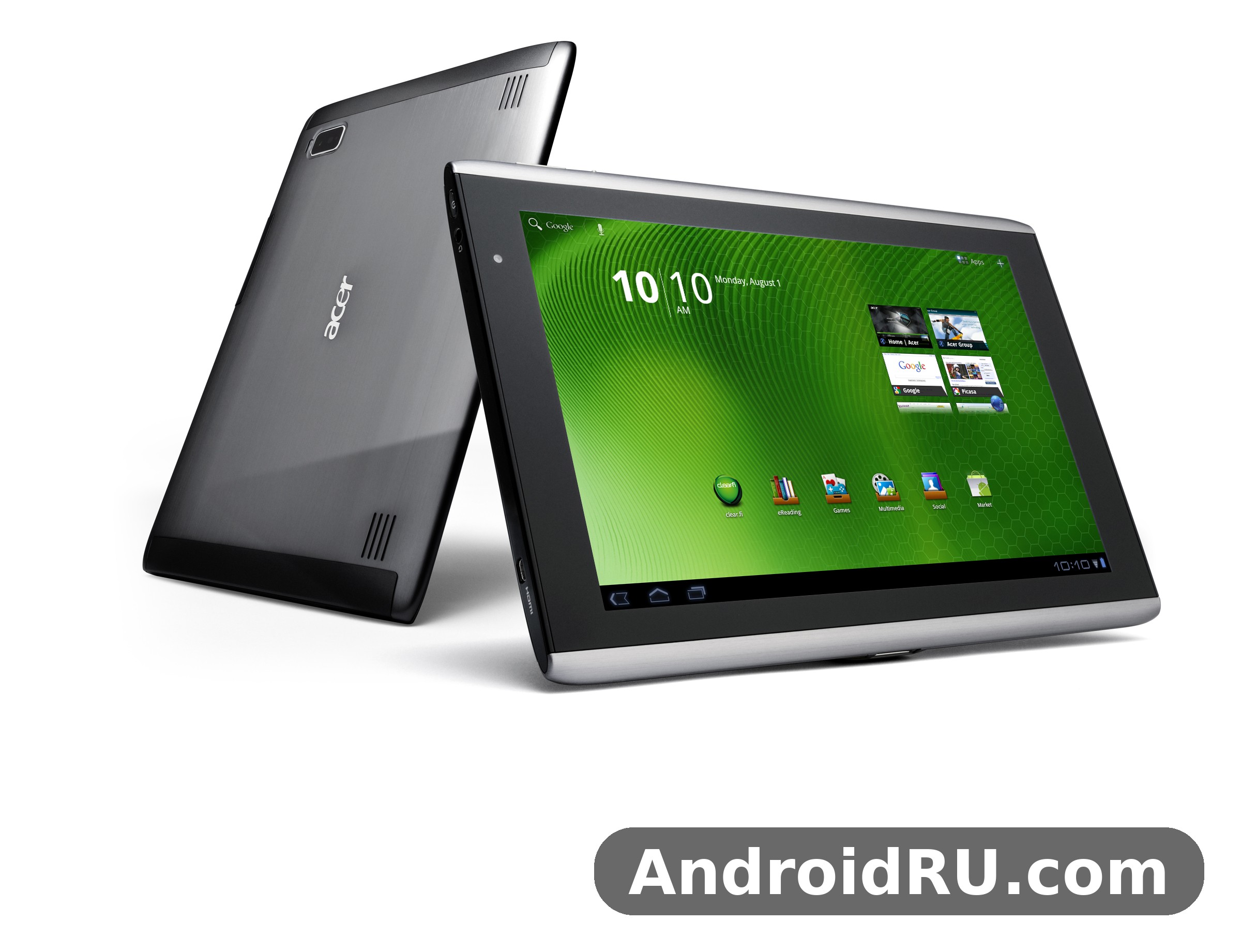
If you are comparing old tablets, checking a second hand unit, or building a small collection of early Android hardware, this guide is for you. It answers the practical questions first: what the Acer Iconia Tab A500 specs really were, how the Acer Iconia Tab A500 price compared with rivals at launch, and what still works today. Nothing here pretends the tablet is a modern device, and nothing here claims hands on testing of a brand new unit in 2026. The aim is a clear, honest record of a discontinued classic, written for readers, collectors and anyone curious about where Android tablets began.
Acer released several Android devices in the same period, and the range is worth understanding before you judge this tablet in isolation. A general Acer tablet review of the period often praised the company for packing generous ports and a large screen into a keenly priced device, and the Iconia Tab A500 was the clearest example of that approach. Readers who want a sense of the wider family can start with Getting to Know the Acer Iconia Smart: Review and Detailed Specs, which shows how Acer applied similar ideas to a phone sized device in the same era.
Design and Build Quality
The Acer Iconia Tab A500 design was bold for 2011. The front was a large sheet of glass with a fairly wide bezel, while the back used a brushed metal panel with a raised central ridge that gave the tablet a distinctive look and a place to grip. The Acer Iconia Tab A500 design build quality and weight review in this section weighs those choices against the practical cost: at 730 grams the tablet was heavy by later standards, and at 13.3 mm thick it was chunky, yet the metal body felt solid and far less fragile than the plastic shells used on some cheaper rivals.
A Large Tablet With a Distinctive Back Panel
The Acer Iconia Tab A500 dimensions were 260 x 177 x 13.3 mm, which made it a true two handed device for most people. The Acer Iconia Tab A500 weight of 730 grams meant it was best used resting on a table, on a lap, or propped on a stand rather than held in one hand for a long reading session. The Acer Iconia Tab A500 weight dimensions and portability for travel therefore mattered: it travelled well in a bag, where the metal back resisted scuffs, but it was not a tablet you would carry lightly on a long walk. The black finish kept fingerprints fairly discreet, and the curved ridge on the rear helped fingers find purchase when the tablet was held in landscape.
Build quality was one of the stronger points in the original Acer Iconia Tab A500 review coverage. The metal rear, the firm buttons and the snug port covers gave the impression of a device built to a higher standard than its launch price suggested. That impression still matters for collectors today, because a well kept example can look presentable more than a decade later, while a plastic rival from the same year often shows wear far sooner.
Ports, Buttons and Everyday Handling
Ports were a real selling point. Along one edge sat a full size USB 2.0 port, a micro USB port, a microSD card slot, a 3.5 mm headphone jack and a mini HDMI port, plus a charging socket and a small reset hole. The Acer Iconia Tab A500 hardware in this area was unusually generous, and the full size USB port allowed a keyboard, a mouse or a flash drive to be connected without an adapter, which was rare on tablets of the time. Volume keys, a power button, a rotation lock and a dedicated search button completed a layout that favoured function over minimal looks.
What the Full Size USB Port Adds
The full size USB port turned the tablet into a more flexible work tool. A USB keyboard made long typing sessions far easier, a mouse helped with precise taps in documents and web pages, and a flash drive offered a quick way to move files on and off the device. For a 2011 tablet, that flexibility was a genuine advantage, and it remains one of the features collectors mention first when they describe why the A500 stood out.
The Acer Iconia Tab A500 accessories that owners bought most often were a protective cover, a stand and a screen protector, and the Acer Iconia Tab A500 case market at the time reflected that. The Acer Iconia Tab A500 accessories case cover and screen protector options were plentiful when the tablet was current, though today a buyer will need to search second hand listings for a matching cover. A good Acer Iconia Tab A500 case also helped with the weight problem, because a folio case with a stand turned the tablet into a small media screen on a desk or a train table.
Display and Viewing Experience
The Acer Iconia Tab A500 display was a 10.1 inch LCD panel with a resolution of 800 x 1280 pixels, giving about 149 pixels per inch in a 16:10 ratio. For reading, browsing and video, the wide shape worked well, and the Acer Iconia Tab A500 display size and screen resolution explained here is the key to understanding its strengths: text was large and readable, web pages showed a useful amount of content, and films filled the screen with only modest black bars.
A 10.1 Inch Screen for Reading and Video
The Acer Iconia Tab A500 screen used an LCD panel with 256K colours, and Acer added its own user interface layer over Android. Colours were reasonably vivid for the period, though the panel could not match the contrast of later IPS or OLED screens, and viewing angles narrowed when the tablet was tilted. The Acer Iconia Tab A500 tablet for reading browsing and video playback was still a pleasant combination, because the screen was large enough for a magazine page or a video window, and the stereo speakers sat on the same face as the display. Brightness was adequate indoors, but direct sunlight washed the image out, which was normal for tablets of this generation.
Screen Resolution, Colour and Viewing Angles
At 800 x 1280 pixels, the Acer Iconia Tab A500 screen showed about 149 pixels per inch, so individual pixels were visible if you looked closely, especially in small text. That was standard for a 10.1 inch tablet in 2011, and most owners found it acceptable for books, news, email and video. Colour accuracy was fair rather than precise, and the panel favoured brightness over deep blacks. Viewed head on, the picture was clear and comfortable; viewed from a sharp angle, contrast dropped and colours shifted, so the tablet worked best when it was facing the viewer directly.
For readers comparing it with smaller tablets, the contrast with the 7 inch class was obvious. A smaller screen forced more scrolling and smaller text, while this tablet gave documents room to breathe. That difference is one reason the 10.1 inch form became the default for full size Android tablets in the years that followed, and it is also why the A500 still reads as a proper tablet rather than an oversized phone.
Performance and Software
The Acer Iconia Tab A500 performance story starts with its chip. The Nvidia Tegra 2 T20, a dual core 1.0 GHz Cortex-A9 processor with ULP GeForce graphics, was one of the leading tablet chips of 2011, and it gave the A500 enough power for the Honeycomb interface, HD video and the games of the period. The Acer Iconia Tab A500 Nvidia Tegra 2 processor performance review in this section looks at what that chip could do well, and where its 1GB of RAM set a firm ceiling.
Nvidia Tegra 2 and 1GB of RAM
The Acer Iconia Tab A500 RAM was 1GB, paired with 16GB or 32GB of internal storage, and a dedicated microSDHC card slot for expansion. The Acer Iconia Tab A500 1GB RAM multitasking performance and limits were clear in everyday use: one or two apps ran smoothly, web browsing with a few tabs was workable, and video playback was reliable, but heavy multitasking, large web pages and demanding games could slow the tablet down. The Acer Iconia Tab A500 memory configuration was generous for 2011, when many phones still shipped with 512MB, yet it is modest now, and that gap explains why the tablet feels slow with modern expectations.
The Acer Iconia Tab A500 gaming performance on Tegra 2 graphics was strong for its time. Tegra optimised games showed off the dual core chip and the GeForce graphics, with smooth 3D scenes that earlier single core tablets could not match. Simple games, video and music remain the most realistic uses today, while newer games that expect far more memory and newer graphics support will not run well, or will not install at all.
The Acer Iconia Tab A500 storage choice also deserves a note. The Acer Iconia Tab A500 16GB and 32GB storage versions compared show a simple trade: the 32GB version cost more but left far more room for apps, music and video, while the 16GB version relied more on the microSD card. The Acer Iconia Tab A500 internal storage and microSD card support meant owners could add a card for media, though apps of that era often preferred internal storage, so the larger built in option was the safer buy.
Android Honeycomb and the Move to Ice Cream Sandwich
The Acer Iconia Tab A500 Android story began with Android 3.0 Honeycomb, the first version of Android designed for tablets, and the tablet was upgradable to Android 4.0 Ice Cream Sandwich. The Acer Iconia Tab A500 Android Honeycomb tablet software features included a tablet style interface with a system bar, large widgets, a redesigned browser and apps built for a big screen, which felt like a genuine step beyond the phone interface stretched across a tablet. The Acer Iconia Tab A500 software included Acer UI touches, a document viewer, an organiser, predictive text input and media players for MP3, WAV, WMA, eAAC+, XviD, MP4 and H.264 files.
The Acer Iconia Tab A500 update to Ice Cream Sandwich brought a cleaner interface, better multitasking and improved performance, and the Acer Iconia Tab A500 Ice Cream Sandwich update and software support was an important part of the tablet value at the time. The Acer Iconia Tab A500 video playback and document viewer features also benefited, because the newer software handled media and files more smoothly. Support ended long ago, so the tablet cannot run current apps or receive security updates, and owners should treat it as an offline or local media device rather than a daily driver for banking or sensitive accounts.
Within Acer own range, the A500 sat above smaller tablets and beside phones that shared the same software ideas. A useful comparison for the wider family is Acer Allegro: Is It the Right Phone for You? Review and Specs, which shows how Acer balanced price and features on a phone while the A500 did the same job on a tablet.
Cameras, Audio and Everyday Use
The Acer Iconia Tab A500 camera setup was practical rather than ambitious. A 5 megapixel rear camera with autofocus and an LED flash handled snapshots and document photos, while a 2 megapixel front camera handled video calls. The Acer Iconia Tab A500 rear camera and front camera quality was acceptable for casual use in good light, but neither camera was a reason to choose the tablet, and both show their age badly against any modern phone camera.
Rear and Front Cameras in Practice
The Acer Iconia Tab A500 5MP rear camera with LED flash details are straightforward: 5 megapixels, autofocus, an LED flash and video recording. In daylight, photos were usable for sharing and for keeping a record, while in low light the small sensor produced noise and soft detail. The 2 megapixel front camera was fine for video calls of the period, when call quality was limited by networks as much as by the camera itself. The tablet could record video, and the rear camera suited short clips more than serious filming.
For a tablet, the camera position mattered as much as the sensor. Held in landscape, the rear camera sat where a hand could easily cover it, so owners learned to grip the edges. That small handling detail was common to many early tablets, and it is one of the reasons tablets never replaced phones as everyday cameras.
Stereo Speakers and Media Playback
The Acer Iconia Tab A500 speakers were stereo speakers on the front of the device, which was a sensible choice for video. The Acer Iconia Tab A500 stereo speakers and audio quality review finds a clear, reasonably loud sound for a tablet of this size, with enough volume for a quiet room and a 3.5 mm headphone jack for private listening. Bass was limited, as it was on almost every tablet of the time, but voices and music came through cleanly.
The Acer Iconia Tab A500 features for media were broad: a music player, a video player, a document viewer and an HDMI port for a television. The Acer Iconia Tab A500 HDMI port for external display connection allowed 1080p output to a television, so the tablet could act as a small media player in the living room. The Acer Iconia Tab A500 HDMI connection was a strong point for owners who wanted to watch films on a larger screen without buying a separate player.
The Acer Iconia Tab A500 charger and power setup used a dedicated charging socket rather than charging over USB, which is worth knowing for second hand buyers. A missing charger can be harder to replace than a standard cable, so check that the charger is included before you buy a used unit, and test that the tablet charges reliably.
Battery Life and Connectivity
The Acer Iconia Tab A500 battery was a non removable Li-Po unit rated at 3260 mAh. The Acer Iconia Tab A500 battery life and charging time explained in this section is based on the official figures and the way tablets of this period were used: Acer quoted up to 200 hours of standby and up to 6 hours of talk style use, which in practice meant a few hours of video or browsing between charges. The Acer Iconia Tab A500 3260mAh battery capacity and standby time was modest for a 10.1 inch tablet, and it is the weakest part of the specification sheet.
How Long the 3260 mAh Battery Lasts
With the screen on for video, the tablet typically lasted a few hours, while mixed use with reading and browsing stretched further, and standby with the screen off could last for days. The tablet offered up to 200 hours of standby, which helped owners who used it in bursts rather than all day. Age is the real issue now: a battery from 2011 will have lost capacity, so a second hand unit may last far less than the original figures suggest, and the non removable design means a replacement needs a repair shop rather than a simple swap.
Charging took a few hours from empty, and the dedicated charger delivered power faster than a standard USB port of the time would have. Owners who used the tablet as a bedside reader or a kitchen screen often left it plugged in, which suited the standby behaviour, but the modest capacity meant it was not a tablet for a long flight without a charger nearby.
Wi-Fi, Bluetooth, GPS and USB Options
The Acer Iconia Tab A500 connectivity was Wi-Fi only, with no cellular connection and no SIM slot. The Acer Iconia Tab A500 WiFi Bluetooth GPS and USB connectivity included Wi-Fi 802.11 b/g/n with hotspot support, Bluetooth 2.1 with A2DP and EDR, GPS, micro USB 2.0 and a full size USB 2.0 port. The Acer Iconia Tab A500 connectivity therefore covered home Wi-Fi, a Bluetooth headset or keyboard, location services and wired file transfer, but it could not connect to a mobile network on its own, so owners needed Wi-Fi or a phone hotspot when they were away from home.
Sensors included an accelerometer, a gyroscope and a proximity sensor, and the Acer Iconia Tab A500 sensors accelerometer gyro and proximity explained in plain terms are: the accelerometer and gyroscope handled screen rotation and motion in games, while the proximity sensor helped the tablet respond to its surroundings. The browser supported HTML and Adobe Flash, which mattered in 2011 when many websites still used Flash for video, though Flash has long since disappeared from the modern web.
Full Specifications
The table below gives the Acer Iconia Tab A500 specs in full, using the figures published for the device. It covers launch, body, display, platform, memory, cameras, sound, connectivity, features, battery and price, so you can check any detail in one place.
| Category | Specification |
|---|---|
| Announced | 2011, February |
| Released | 2011, April |
| Status | Discontinued |
| Dimensions | 260 x 177 x 13.3 mm (10.24 x 6.97 x 0.52 in) |
| Weight | 730 g (1.61 lb) |
| SIM | No |
| Network | No cellular connectivity |
| Display type | LCD, 256K colors |
| Display size | 10.1 inches, 295.8 cm2, about 64.3 percent screen to body ratio |
| Resolution | 800 x 1280 pixels, 16:10 ratio, about 149 ppi density |
| User interface | Acer UI |
| Operating system | Android 3.0 Honeycomb, upgradable to 4.0 Ice Cream Sandwich |
| Chipset | Nvidia Tegra 2 T20 |
| CPU | Dual-core 1.0 GHz Cortex-A9 |
| GPU | ULP GeForce |
| RAM | 1GB |
| Internal storage | 16GB or 32GB |
| Card slot | microSDHC, dedicated slot |
| Rear camera | 5 MP, autofocus, LED flash, video recording |
| Front camera | 2 MP |
| Loudspeaker | Yes, with stereo speakers |
| 3.5 mm jack | Yes |
| WLAN | Wi-Fi 802.11 b/g/n, hotspot |
| Bluetooth | 2.1, A2DP, EDR |
| Positioning | GPS |
| Radio | No |
| USB | microUSB 2.0, USB 2.0 |
| Sensors | Accelerometer, gyro, proximity |
| Browser | HTML, Adobe Flash |
| Other features | HDMI port, MP3, WAV, WMA and eAAC+ player, XviD, MP4 and H.264 player, organiser, document viewer, predictive text input |
| Battery | Non-removable Li-Po 3260 mAh |
| Standby | Up to 200 h |
| Talk time | Up to 6 h |
| Colours | Black |
| Price | About 200 EUR |
The Acer Iconia Tab A500 release in April 2011 came at a launch price of about 200 EUR, which positioned it as a value choice against more expensive 10 inch tablets. The Acer Iconia Tab A500 price in 2011 and value today are very different things: at launch the price bought a large screen, a dual core chip and generous ports for less than the leading rival, while today the same tablet is a low cost second hand or collector item, valued for nostalgia and for its place in tablet history rather than for daily performance.
Two close relatives help put the A500 in context. The A501 added mobile data to a similar design, and the differences are small but important for buyers who need connectivity on the move. For the full comparison, see Acer Iconia Tab A501 Specifications and Detailed Overview: Build Quality Explained, which covers the sibling model in detail. The Acer Iconia Tab A500 vs Acer Iconia Tab A501 comparison and differences come down mainly to connectivity and a few hardware details, while the screen, chip and battery remain closely related.
Pros and Cons
The balance below sums up the Acer Iconia Tab A500 review in practical terms. The strengths were real in 2011, and the weaknesses explain why the tablet is now a classic rather than a current choice.
Pros
- Large 10.1 inch 800 x 1280 display that suited reading, browsing and video.
- Full size USB port, micro USB, microSD slot and HDMI output in one device.
- Solid metal build with a distinctive rear panel and firm buttons.
- Nvidia Tegra 2 dual core chip that handled HD video and games of the period well.
- Stereo front speakers and a 3.5 mm headphone jack.
- Keen launch price of about 200 EUR for a full size tablet.
Cons
- Heavy at 730 grams and thick at 13.3 mm, so tiring to hold for long periods.
- Modest 3260 mAh battery with only a few hours of screen on use.
- Only 1GB of RAM, which limits multitasking and modern apps.
- Wi-Fi only, with no cellular connection and no SIM slot.
- Software support ended at Android 4.0, with no current apps or security updates.
- Camera quality is basic, and the LCD panel has narrow viewing angles.
Owners who ran into trouble with an old unit often searched for the same fixes, and the Acer Iconia Tab A500 common problems and how to fix them usually covered a tablet that would not charge, a screen that stayed dark, Wi-Fi that dropped, or apps that closed without warning. The Acer Iconia Tab A500 problems in most cases came back to an ageing battery, a loose charger connection, or software that had not been reset for years. The Acer Iconia Tab A500 factory reset and troubleshooting steps explained in many owner guides start with charging the tablet fully, holding the power button to force a restart, clearing app data, and, as a last step, a factory reset after backing up any files you want to keep.
Repair is another practical question. The Acer Iconia Tab A500 screen replacement and repair options today are limited to specialist repair shops and second hand parts, because Acer no longer supplies parts for a discontinued 2011 tablet. The Acer Iconia Tab A500 discontinued tablet buying guide for collectors therefore stresses condition above all: buy a unit with a working screen, a battery that still holds a charge, a working charger and no cracked glass, and treat any software faults as a bonus problem rather than the main risk.
For everyday context, the smaller sibling in the same family offers a useful contrast in size and price. See Acer Iconia Tab A101 Review: Value for Money and Battery Life Put to the Test for how Acer applied the same ideas to a smaller tablet, and how the trade between screen size and portability played out.
Frequently Asked Questions
These answers cover the questions readers ask most often about the Acer Iconia Tab A500, using the verified specification figures and the tablet history set out above.
When was the Acer Iconia Tab A500 released?
The Acer Iconia Tab A500 was announced in February 2011 and released in April 2011. That April 2011 release date is the verified launch date, and it places the tablet among the first wave of Android Honeycomb tablets. The tablet is now discontinued, and its launch price was about 200 EUR.
Is the Acer Iconia Tab A500 still worth buying in 2026?
For most people, no, not as a daily tablet. The question is the Acer Iconia Tab A500 still worth buying in 2026 comes up often from collectors, and the honest answer depends on the purpose. As a collector item, a media player for local files, or a piece of tablet history, a cheap working unit can be enjoyable. As a main tablet for current apps, browsing, banking or work, it is not suitable, because support ended at Android 4.0 and the 1GB of RAM cannot run modern software well.
How much RAM and storage does the Acer Iconia Tab A500 have?
The tablet has 1GB of RAM and either 16GB or 32GB of internal storage, plus a dedicated microSDHC card slot. The 32GB version leaves more room for apps and media, while the 16GB version depends more on the card. Both versions share the same chip, screen and battery.
Does the Acer Iconia Tab A500 have a front camera?
Yes. The tablet has a 2 megapixel front camera for video calls, alongside a 5 megapixel rear camera with autofocus and an LED flash. Both cameras are basic by modern standards, and the front camera in particular suits video calls rather than photos.
Can the Acer Iconia Tab A500 be updated to Android 4.0?
Yes. The tablet shipped with Android 3.0 Honeycomb and was upgradable to Android 4.0 Ice Cream Sandwich. That was the last major official update, and no later official Android version was released for the device. Owners should not expect current apps or security updates on either version.
Before you decide, it helps to see how Acer handled a different kind of device in the same period. The budget phone in the range shows the same value first approach in a smaller package, and you can read it here: Acer Liquid Express E320 Complete Specifications: Every Detail, From Battery Life to Audio. For a final note on setup, the Acer Iconia Tab A500 user manual and setup instructions for beginners are worth reading before first use: charge the tablet fully, connect to Wi-Fi, sign in only if you need to, and keep the device offline for sensitive tasks. That simple routine is the safest way to enjoy a classic tablet in 2026.

