

Acer Iconia Tab A101 Review: Value for Money and Battery Life Put to the Test
This Acer Iconia Tab A101 review puts a small 7-inch tablet from 2011 through the questions that mattered then and still matter to collectors and curious buyers now: what did you get for the money, how long did the battery last, and where did this model sit beside its closest relative? The Acer Iconia Tab A101 tablet is a compact slate built around the NVIDIA Tegra 2 platform, a 7-inch 1024×600 screen, 1GB of RAM, and Android 3.2 Honeycomb. It arrived at a time when 7-inch tablets were still proving themselves, and Acer priced it to undercut larger 10-inch slates while keeping a full set of ports and a real camera pair. The Acer Iconia Tab A101 price was about 260 EUR at launch, which placed it firmly in affordable territory for a dual-core Honeycomb tablet with mobile data. That price is the starting point for everything that follows, because value for money was the whole point of this machine.
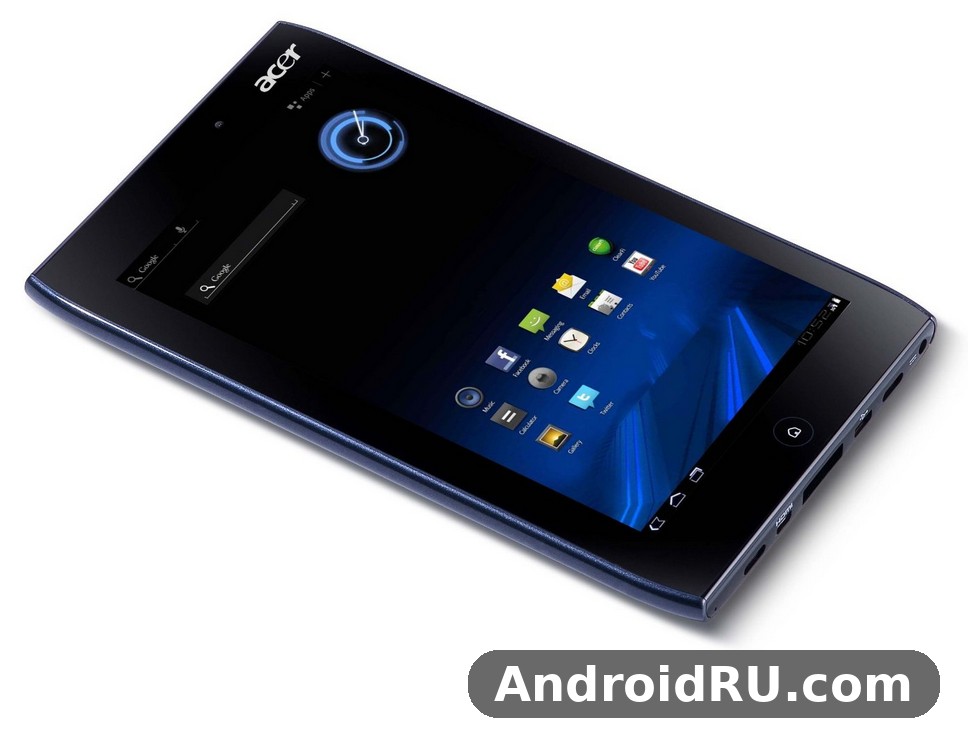
Before going further, one distinction needs to be clear. The A101 is the 3G version of the A100. The two tablets share the same screen, the same chip, the same memory, and the same cameras, but only the A101 takes a SIM card for mobile data on the move. An Acer A101 review that only lists numbers misses the point of this tablet, just as an Iconia Tab A101 review from the period that treats the two as identical misses the single feature that justified the A101 name and, in many markets, its slightly higher price. This article treats the A101 as a classic device from its own era. It does not pretend the tablet can run modern apps or match a modern slate, and it does not claim hands-on testing of a brand-new unit in 2026. Instead it weighs the design, the screen, the performance, the cameras, and the battery against what buyers in 2011 could reasonably expect, and against what a second-hand buyer should check today.
A 7-Inch Tablet From 2011, Judged on Its Own Terms
The Acer A101 tablet arrived in May 2011, announced in February of the same year, at the height of the first Honeycomb wave. Google had built Android 3.2 Honeycomb for tablets, NVIDIA had built Tegra 2 for exactly this kind of device, and Acer had already shown it could make a capable 10-inch slate in the A500. Shrinking that formula to 7 inches meant a tablet that fitted in a jacket pocket or a small bag, weighed 470 grams, and could be held in one hand for reading. The Acer Iconia Tab A101 release in May 2011 came a month after its Wi-Fi-only sibling, and the timing mattered: buyers who wanted a connected tablet for trains, cafes, and holidays did not have to wait long for the 3G model.
Judging a 2011 tablet by 2026 standards would be unfair and unhelpful. The right test is whether it delivered on its own promises: a portable screen for reading and video, enough speed for the web and games of its day, a battery that survived a working day, and a price that made sense. On those terms the A101 is a genuinely interesting machine, with one clear weakness that every owner noticed. The battery, small by later standards and listed differently across databases, is the part of this tablet that most needs honest discussion, and it gets a full section of its own below. The Acer Iconia Tab A101 review value for money question runs through the whole article, because the tablet was never trying to be the best tablet of its year. It was trying to be the sensible one.
Who This Tablet Was Made For
The A101 was made for readers, commuters, students, and families who wanted a second screen without paying for a 10-inch flagship. Its 7-inch size made it a natural e-reader, a video player for journeys, and a casual web browser for the sofa. Acer Iconia Tab A101 for students reading and note taking was a realistic use case in 2011: the screen was large enough for textbooks and web pages, the tablet was light enough to carry all day, and the price left room in a student budget. Business travellers liked the 3G connection and the HDMI output, which turned a hotel television into a presentation screen. Parents liked that it was cheap enough to hand to a child for games and video, and sturdy enough to survive the experience.
What Still Matters About It Today
Today the A101 matters as a collector piece, a museum of early Honeycomb design, and a case study in how quickly tablets changed. From an Acer Iconia Tab A101 discontinued tablet collector guide 2026 point of view, the things to look for are a working battery, an intact screen, the original ports, and a clean, working 3G slot. Collectors value the A101 over the A100 precisely because the 3G hardware marks it out, and because it captures a moment when Acer was experimenting with size, connectivity, and price in the tablet market. It is not a daily driver in 2026, and no honest account should suggest otherwise, but as a piece of tablet history it still has a story worth telling properly.
Design and Build: Compact, Solid, and Made to Travel
The A101 is a plain, practical tablet. Its front is dominated by the 7-inch screen with a black bezel, its back is a dark plastic shell with a subtle texture that helps grip, and its edges carry the ports that made this tablet unusually well connected for its size. Acer Iconia Tab A101 dimensions are 195 x 117 x 13.1 mm, which is chunky beside a modern slate but was normal for a 2011 tablet with a full set of ports. Acer Iconia Tab A101 weight is 470 grams, light enough to hold for a chapter or two, heavy enough to feel solid rather than hollow. Acer Iconia Tab A101 weight 470 grams portability for travel made it easy to carry in a jacket pocket or a small bag without noticing the load on a long day out. The tablet came in Black with Red and Black with Blue finishes, a small splash of colour that kept it from looking like every other black rectangle of its year.
Build quality was one of the quiet strengths of the Iconia Tab range. The A101 does not creak, its buttons sit firmly, and its screen sits flush in the frame. Readers who compare it with the larger model in Breaking Down the Acer Iconia Tab A500: Review, Features and Full Specs will recognise the same design language: a practical shell, generous ports, and no attempt to hide the hardware behind fashion. The A500 was bigger and heavier, while the A101 traded screen size for portability, and for many buyers that trade was exactly right. A tablet that fits in a coat pocket gets used more often than a tablet that needs a bag, and Acer understood that.
Ports, Buttons, and Everyday Handling
For a 7-inch tablet the A101 is remarkably well supplied. It has a micro USB port, a micro HDMI port, a microSD card slot, a 3.5 mm headphone jack, and a SIM slot for its 3G connection. Acer Iconia Tab A101 HDMI output lets the tablet drive a television or monitor for video and slides, which was a genuine selling point in 2011 when many rivals offered no video output at all. Acer Iconia Tab A101 micro USB and micro HDMI ports sit on the edge where they are easy to reach, and the microSD slot means the modest built-in storage was never a hard limit. The volume rocker and power button are easy to find by touch, and the stereo speakers sit where they can actually be heard when the tablet rests on a table.
Handling is comfortable for reading and browsing. The 470-gram weight balances well in two hands, and the textured back stops the tablet sliding on a smooth surface. The screen is glossy, so reflections appear under bright light, and the viewing angle is narrow from one side, which owners noticed when sharing a video with someone sitting beside them. Those are fair criticisms, and they belong in any honest account, but they do not change the basic fact that the A101 was built to be carried, used, and put away again without fuss. It is a working tablet, not a showpiece, and its design is honest about that.
How It Compares With the Larger Iconia Tabs
Next to the 10-inch A500 and A501, the A101 feels like a different kind of device rather than a smaller copy. The larger tablets had bigger screens and bigger batteries, but they needed a bag and two hands. The A101 gave up screen space and battery capacity to gain portability, and Acer priced it to match. Readers weighing the family can also look at Acer Iconia Tab A501 Specifications and Detailed Overview: Build Quality Explained for the 10-inch 3G model, which shows how Acer scaled the same ideas up. The A501 is the big-screen 3G alternative, while the A101 is the pocketable one, and the choice between them was always about how a buyer planned to carry the tablet, not about which one was simply better.
Display: A 7-Inch 1024×600 Screen for Reading and Video
Acer Iconia Tab A101 display measures 7.0 inches with a resolution of 1024 x 600 pixels, a 16:10 aspect ratio, and about 170 pixels per inch. The panel is a TFT LCD with capacitive multi-touch, rated for five-point touch, and it was one of the first 7-inch Honeycomb screens on the market. Acer Iconia Tab A101 1024×600 display quality review notes from the period praised the size and the aspect ratio for video, which fills the screen with only small black bars, and for reading, where a page of text sits comfortably without constant zooming. The resolution is modest beside a modern tablet, and text is not as crisp as on a later high-density screen, but for books, web pages, and video in 2011 it was entirely usable.
Colour and brightness are good indoors and acceptable outdoors. The screen is bright enough for a room with normal lighting, and colours look natural rather than oversaturated. The glossy finish helps contrast indoors but hurts outdoors, where reflections compete with the image. Acer Iconia Tab A101 screen glare outdoors and viewing angles were a known weakness: tilt the tablet and the image washes out from one side, while the other side holds up better. A matte screen protector helped some owners, and turning the brightness up helped more, but the panel was never going to match the best screens of its year. What it offered instead was a sensible balance of size, resolution, and price, and for reading and video that balance worked.
Reading, Browsing, and Video on a 7-Inch Screen
Acer Iconia Tab A101 reading ebooks and watching movies experience was the core of the tablet, and it holds up well as a description of what the device did best. A 7-inch screen is large enough for a novel, a magazine page, or a web article, and small enough to hold like a paperback. Video at 720p plays smoothly, the 16:10 screen suits films and television, and the stereo speakers give dialogue a reasonable presence for a small tablet. Web browsing benefits from Honeycomb tabs and the full desktop-style browser of the period, which rendered pages properly instead of forcing a mobile layout. For buyers who wanted a reading and video tablet first and a work tablet second, the screen was the right size at the right price.
Screen Limits Worth Knowing
The limits are straightforward. The 1024 x 600 resolution shows its age on small text, the TFT panel has a narrow viewing angle, and the glossy surface reflects sunlight. None of these are surprises for a tablet of this price and year, and none of them stopped owners using the tablet daily. The honest summary is that the screen was good enough for its job, better than the cheapest rivals, and clearly behind the best screens of 2011. Buyers who wanted the finest display paid more elsewhere; buyers who wanted a fair screen at a fair price found it here.
Performance: NVIDIA Tegra 2, 1GB of RAM, and Android 3.2 Honeycomb
Acer Iconia Tab A101 performance in daily use came from a proven combination: the NVIDIA Tegra 2 T20 chipset, a dual-core 1.0 GHz Cortex-A9 processor, an ULP GeForce graphics processor, and 1GB of RAM. Acer Iconia Tab A101 Tegra hardware was the standard dual-core platform for Honeycomb tablets in 2011, and it gave the A101 the same core speed as tablets that cost considerably more. Acer Iconia Tab A101 RAM of 1GB was generous for the year, when many rivals still shipped with 512MB, and it made a real difference to multitasking. Switching between the browser, email, and a video player felt smooth, and apps stayed in memory instead of reloading every time. The Acer Iconia Tab A101 7 inch tablet with Tegra 2 was, on paper and in practice, a properly quick tablet for its class.
Acer Iconia Tab A101 Android software shipped as Android 3.2 Honeycomb, the tablet version of Android with a redesigned interface, a system bar, and proper support for larger screens. Acer Iconia Tab A101 Honeycomb software gave owners widgets, a full browser with tabs, and access to the Android Market of the period, with apps designed for tablets as well as phones. Acer Iconia Tab A101 Android 3.2 Honeycomb tablet interface felt modern in 2011, with its dark theme, its app drawer, and its notification area. Later Android versions left Honeycomb behind, and the A101 was promised an update path to Android 4.0 Ice Cream Sandwich in some markets, but buyers should judge the tablet on the Honeycomb experience it actually shipped with, which was polished, fast, and well suited to the hardware.
Tegra 2 in Daily Use
In daily use the Tegra 2 chip handled the web, email, social apps, and media playback without complaint. Pages loaded quickly over Wi-Fi and 3G, scrolling was smooth, and video playback at 720p was a particular strength, thanks to hardware acceleration in the GeForce graphics core. Acer Iconia Tab A101 video playback 720p performance test accounts from the period reported smooth playback of high-definition files, with the tablet coping well with the formats that mattered in 2011. Multitasking with 1GB of RAM meant a browser with several tabs open did not slow the tablet down, and the Honeycomb interface kept its animations smooth. The tablet was not a workstation, and heavy work still belonged on a laptop, but for the tasks a 7-inch tablet was bought for, it was quick.
Gaming and Video Playback
Acer Iconia Tab A101 gaming performance with Tegra 2 was one of the tablet’s genuine selling points. NVIDIA built a catalogue of Tegra-optimised games for exactly this hardware, with better textures and effects than the same games showed on single-core phones. Racing games, platform games, and 3D action titles ran well on the 7-inch screen, and the stereo speakers added to the experience. Video playback was equally strong, with smooth 720p files and good sound for a small device. The tablet will not run modern games, and no honest review should suggest it will, but in its own era it was a capable little games machine as well as a reader and a browser.
Storage and Expansion
Acer Iconia Tab A101 storage came in 8GB and 16GB versions, with a microSD card slot for expansion up to 32GB. Acer Iconia Tab A101 1GB RAM and 16GB storage was the version most buyers wanted, because 8GB filled up quickly once apps, music, and video were added. Acer Iconia Tab A101 8GB versus 16GB storage which to choose was a simple question in 2011: if the tablet was mainly for reading and browsing, 8GB was enough, but if it was for video and games, the 16GB version was worth the extra money. Acer Iconia Tab A101 microSD card expansion up to 32GB meant neither version was a dead end, and owners could carry a library of films and music on a card. The microSD slot was a real advantage over tablets that offered no expansion at all.
The 3G Difference: How the A101 Differs From the A100
This is the section that matters most for anyone choosing between the two near-identical tablets. The A100 is Wi-Fi only, while the A101 adds GSM and HSPA mobile data through a Mini-SIM slot, with download speeds up to 21.1 Mbps and upload up to 5.76 Mbps on HSPA. Acer Iconia Tab A101 vs Acer Iconia Tab A100 differences begin and largely end with that SIM slot, but the difference changed how the tablet could be used. With the A101, maps, email, and the web worked on a train, in a park, or on holiday, without hunting for a hotspot. With the A100, the same tasks waited until Wi-Fi appeared. Acer Iconia Tab A101 WiFi performance is the same as the A100 when both are on a wireless network, but only the A101 keeps working when the network is gone. Acer Iconia Tab A101 WiFi only mode versus 3G data is a simple comparison: Wi-Fi is faster and kinder to the battery at home, while 3G keeps the tablet connected everywhere else. The Acer Iconia Tab A101 3G tablet with Android Honeycomb combined mobile data with a tablet interface, and an Acer Iconia Tab A101 HDMI output and stereo speakers review of the period praised the same practical approach to media that the ports and speakers showed.
There are two limits to understand. First, the A101 does not make voice calls over its 3G connection. Acer Iconia Tab A101 no voice calls only SMS explained in plain terms: the tablet can send and receive text messages, but it was not designed or certified as a telephone, and owners who expected to hold it to their ear were disappointed. Second, the 3G hardware draws more power than Wi-Fi, so battery life drops when mobile data is in use. Both limits were known at launch, and both were accepted by buyers who valued connectivity over call support. The A100, covered in Acer Iconia Tab A100: Full Review and Specifications, is the right choice for a buyer who only ever uses Wi-Fi and wants the lowest price, while the A101 is the right choice for a buyer who needs the internet away from home.
Connectivity Beyond 3G
Beyond mobile data, the A101 is well connected for its year. It has Wi-Fi 802.11 b/g/n, Bluetooth 2.1 with A2DP for wireless headphones and file transfer, GPS with A-GPS for maps and navigation, a micro USB port, and a micro HDMI port. Acer Iconia Tab A101 Bluetooth 2.1 accessories and file transfer worked with the headsets, keyboards, and speakers of the period, and Acer Iconia Tab A101 GPS navigation with A-GPS support made the tablet usable as a large-screen map in a car, with a data connection from its own SIM. Acer Iconia Tab A101 GPS accuracy was good for its year, locking on quickly outdoors, and the combination of GPS plus 3G made the A101 a genuinely useful travel companion. The tablet has no FM radio and no NFC, which were rare in tablets of this size in 2011, and their absence was not a serious drawback.
Cameras: 5MP Rear and 2MP Front in Real Use
Acer Iconia Tab A101 camera setup pairs a 5-megapixel rear camera with autofocus and a 2-megapixel front camera. Acer Iconia Tab A101 5MP camera and 2MP front camera hardware could record 720p video from the rear camera, which was a solid specification for a 7-inch tablet in 2011. In bright daylight the rear camera produced usable photographs with fair colour and enough detail for sharing online or keeping as a record. Indoors and in low light the quality dropped quickly, with noise and soft detail, and owners who expected a camera to match a good phone were disappointed. The front camera was made for video calls, and for that job it was adequate: faces were recognisable, movement was smooth enough, and the 7-inch screen made calls comfortable.
The honest verdict is that the cameras were a useful extra rather than a reason to buy the tablet. A tablet is an awkward camera to hold, and the A101 was no exception, but having a 5MP camera with autofocus meant owners could capture a document, a whiteboard, or a moment without reaching for another device. The 2MP front camera made video calls practical, and the combination was better than the single-camera tablets that some rivals sold. Readers interested in how Acer handled cameras on its smaller devices can also see Acer Liquid mini E310 Detailed Overview: Form Factor, Storage and What to Expect, which shows the same practical approach to cameras in a compact Acer device of the same era. For the A101, the cameras deserve a passing grade: useful, honest, and clearly behind a dedicated camera or a good phone.
Video Calls and Everyday Photos
Video calls were the front camera’s real job, and the A101 handled them well for its year. The large screen made the other person easy to see, the front camera sat in the right place for a call held in two hands, and the 3G connection meant calls could happen away from Wi-Fi. Everyday photos from the rear camera were best in daylight, where the autofocus helped and the 5MP sensor captured enough detail for online sharing. In poor light, owners learned to keep expectations modest. The camera app itself was simple, with the usual Honeycomb controls, and it did not get in the way. That is the fairest summary: the cameras worked, they were convenient, and they were never the star of the tablet.
Battery Life Put to the Test
Battery life is where the A101 deserves its closest examination, and where honest numbers matter more than marketing. The headline figure needs care: several databases quote the A101 battery as 3260 mAh, while the GSMArena specification sheet lists a non-removable Li-Po 1530 mAh cell, and owners reported that the tablet actually contains two 1530 mAh cells working together. Acer Iconia Tab A101 battery life test results from the period are consistent whatever figure a listing uses: about five hours of web browsing over Wi-Fi, about four hours of streamed video, and about four and a half hours of 720p video playback. Iconia Tab A101 battery endurance of four to five hours was normal for a small Honeycomb tablet in 2011, but it was short beside larger tablets with bigger cells, and it is the weakest part of this tablet.
Real owners reported a wide range. Light use with reading and occasional browsing could stretch across a day, with the tablet still holding charge after twelve to fourteen hours of office-style use with the screen off much of the time. Heavy use with 3G data, bright screen, and video drained the cell in four to five hours of continuous use. Acer Iconia Tab A101 battery drain problem and standby time complaints from owners usually traced back to the same causes: 3G left on when Wi-Fi was available, a live wallpaper running, or an app keeping the tablet awake. Switching 3G to 2G when only messages were needed, turning the brightness down, and closing unused apps all helped. The battery is non-removable, so a tired cell in a second-hand unit is a real problem, and any buyer today should check that the tablet still holds a charge before paying.
How Long the Battery Lasts
The fairest way to describe the battery is in hours of real use, not in milliamp-hours alone. Five hours of browsing, four hours of streaming, and four to five hours of video is enough for a journey, a working morning, or an evening of reading, but it is not enough for a full day away from a charger. Acer Iconia Tab A101 battery figures should be read with that in mind: the tablet was built for portability and price, and the battery was the price paid for both. The value for money case rests on the whole package, not on battery life alone, and buyers who understood that trade made their peace with it. Buyers who needed all-day battery life were better served by a larger tablet or by carrying a charger.
Standby Time and Charging Habits
Standby time was better than active use suggested. With Wi-Fi off and the screen dark, the tablet could sit for days without losing much charge, and owners who used it in bursts found it ready when they picked it up. Charging was by the supplied charger through the tablet’s port, and a full charge took a few hours. The practical habits that helped most were simple: charge overnight, keep 3G off when Wi-Fi is available, lower the brightness indoors, and avoid live wallpapers. None of these are glamorous, but they are the habits that turned a four-hour tablet into a tablet that lasted a working day in real use.
Value for Money: The Verdict on Price
Acer Iconia Tab A101 price and release date 2011 context explains the value case. At about 260 EUR in May 2011, the A101 gave buyers a dual-core Tegra 2 tablet, 1GB of RAM, a 7-inch 1024×600 screen, 5MP and 2MP cameras, HDMI output, GPS, and 3G data for less than most 10-inch Honeycomb tablets. Acer Iconia Tab A101 full specifications and features at that price were genuinely competitive, and the tablet undercut larger rivals while keeping the ports and connectivity that made it useful. The battery was the compromise, and the screen was good rather than great, but nothing else at the price offered the same combination. The verdict is that the A101 earned its reputation as a value tablet, and its price is the reason it sold and the reason collectors still remember it.
Full Specifications
Acer Iconia Tab A101 specs at a glance are set out in the table below. Iconia Tab A101 specs shared almost everything with the A100 except for mobile data, and the table marks the 3G difference clearly so the two models are never confused. Acer A101 specs in full cover the display, the platform, the memory, the cameras, the battery, and the connectivity, with the verified release date of May 2011 and the announced date of February 2011.
At a Glance
The table below is the complete specification of the Acer Iconia Tab A101 as listed for its 2011 release. Where listings differ on the battery, the table gives the figure most often quoted alongside the GSMArena cell figure, so readers can see both numbers and understand why they differ. All other figures are consistent across the specification sources for this model.
| Feature | Specification |
|---|---|
| Model | Acer Iconia Tab A101 |
| Announced | February 2011 |
| Released | May 2011 |
| Status | Discontinued |
| Display | 7.0 inches TFT LCD, 1024 x 600 pixels, 16:10, about 170 ppi, capacitive multi-touch |
| Operating system | Android 3.2 Honeycomb |
| Chipset | NVIDIA Tegra 2 T20 |
| Processor | Dual-core 1.0 GHz Cortex-A9 |
| Graphics | ULP GeForce |
| RAM | 1GB |
| Storage | 8GB or 16GB, microSD card slot up to 32GB |
| Rear camera | 5 megapixels, autofocus, 720p video recording |
| Front camera | 2 megapixels, video calls |
| Battery | Non-removable Li-Po, 3260 mAh quoted in several listings; GSMArena lists a 1530 mAh cell, with owners reporting two cells in the tablet |
| Mobile data | GSM and HSPA, up to 21.1 Mbps down, 5.76 Mbps up; SMS, no voice calls |
| Wi-Fi | Wi-Fi 802.11 b/g/n |
| Bluetooth | Bluetooth 2.1 with A2DP |
| Positioning | GPS with A-GPS |
| Ports | Micro USB, micro HDMI, microSD slot, 3.5 mm headphone jack, Mini-SIM slot |
| Speakers | Stereo speakers |
| Dimensions | 195 x 117 x 13.1 mm |
| Weight | 470 grams |
| Colours | Black with Red, Black with Blue |
| Price at launch | About 260 EUR |
Pros and Cons
The A101 is easiest to judge as a list of strengths against its weaknesses, because its appeal was never about one feature. It was about a combination that made sense at its price, with one clear compromise that every buyer should know about before deciding.
What the A101 Does Well
The strengths are real and they explain why the tablet sold. The 7-inch size and 470-gram weight make it genuinely portable, the Tegra 2 chip and 1GB of RAM keep it quick for the tasks of its year, the 3G connection frees it from Wi-Fi, the HDMI output and stereo speakers make it a good video player, and the price undercut larger Honeycomb tablets while keeping a full set of ports. Acer Iconia Tab A101 features include GPS, Bluetooth, a microSD slot, and a 5MP camera with autofocus, which together make a complete tablet rather than a cut-down one. For reading, browsing, video, and light gaming, the A101 delivered more than its price suggested.
Where the A101 Falls Short
Acer Iconia Tab A101 common problems and what to check before buying include a tired battery, a dim or scratched screen, a loose charging port, and a SIM slot that no longer reads a card. The weaknesses are equally real and they centre on the battery. Four to five hours of active use is short, the glossy screen reflects light and has a narrow viewing angle, the cameras are weak in low light, the tablet cannot make voice calls over 3G, and Honeycomb is now a historic operating system with no modern app support. Is the Acer Iconia Tab A101 still worth buying today? Only as a collector piece, a spare reader for old files, or a piece of tablet history, and only if the battery still holds a charge and the price is low. As a daily tablet in 2026 it is not a practical choice, and any buyer should go in with that understanding. Acer Iconia Tab A101 pros and cons after long term use point to the same answer: a good tablet for its year, a limited tablet today, and a fair price then as now.
Frequently Asked Questions
These questions cover the points buyers and collectors ask most often about the A101, from its release date and its 3G support to its battery, its storage, and its place beside the A100.
When was the Acer Iconia Tab A101 released?
The Acer Iconia Tab A101 was announced in February 2011 and released in May 2011, with a launch price of about 260 EUR. It is discontinued, and the A101 is the 3G version of the Wi-Fi-only A100, which was released in April 2011. The May 2011 release date is the verified date for the A101, and it should not be confused with the February announcement or with the A100 release.
Does the Acer Iconia Tab A101 support 3G and can it make phone calls?
Yes, the A101 supports GSM and HSPA mobile data through a Mini-SIM slot, with speeds up to 21.1 Mbps down and 5.76 Mbps up, but it cannot make voice calls. It can send and receive SMS text messages, and it works well for maps, email, and browsing away from Wi-Fi. Buyers who need voice calls should use a phone beside the tablet, while buyers who only need mobile data will find the 3G connection does exactly what it promises.
How long does the Acer Iconia Tab A101 battery last?
Expect about five hours of web browsing over Wi-Fi, about four hours of streamed video, and about four and a half hours of 720p video playback. Light use with the screen off much of the time can stretch across a day, while heavy use with 3G data and a bright screen drains the tablet in four to five hours. The battery is non-removable, so a second-hand buyer should test that the tablet still holds a charge, and should keep 3G off when Wi-Fi is available to save power.
How much storage does the Acer Iconia Tab A101 have and can it be expanded?
The A101 came in 8GB and 16GB versions, with 1GB of RAM, and a microSD card slot for expansion up to 32GB. The 16GB version is the better choice for video and games, while 8GB is enough for reading and browsing. The microSD slot means storage was never a hard limit, and owners could carry films, music, and books on a card.
What is the difference between the Acer Iconia Tab A101 and the Acer Iconia Tab A100?
The two tablets share the same 7-inch 1024×600 screen, the same NVIDIA Tegra 2 chip, the same 1GB of RAM, and the same 5MP and 2MP cameras. The difference is connectivity: the A100 is Wi-Fi only, while the A101 adds GSM and HSPA mobile data through a SIM slot. The A101 was released in May 2011, a month after the A100 in April 2011. For a closer look at the family, see Getting to Know the Acer Iconia Smart: Review and Detailed Specs, which shows how Acer applied the same practical design ideas across its early Android range, and remember that the A101 is the connected member of the pair.

