

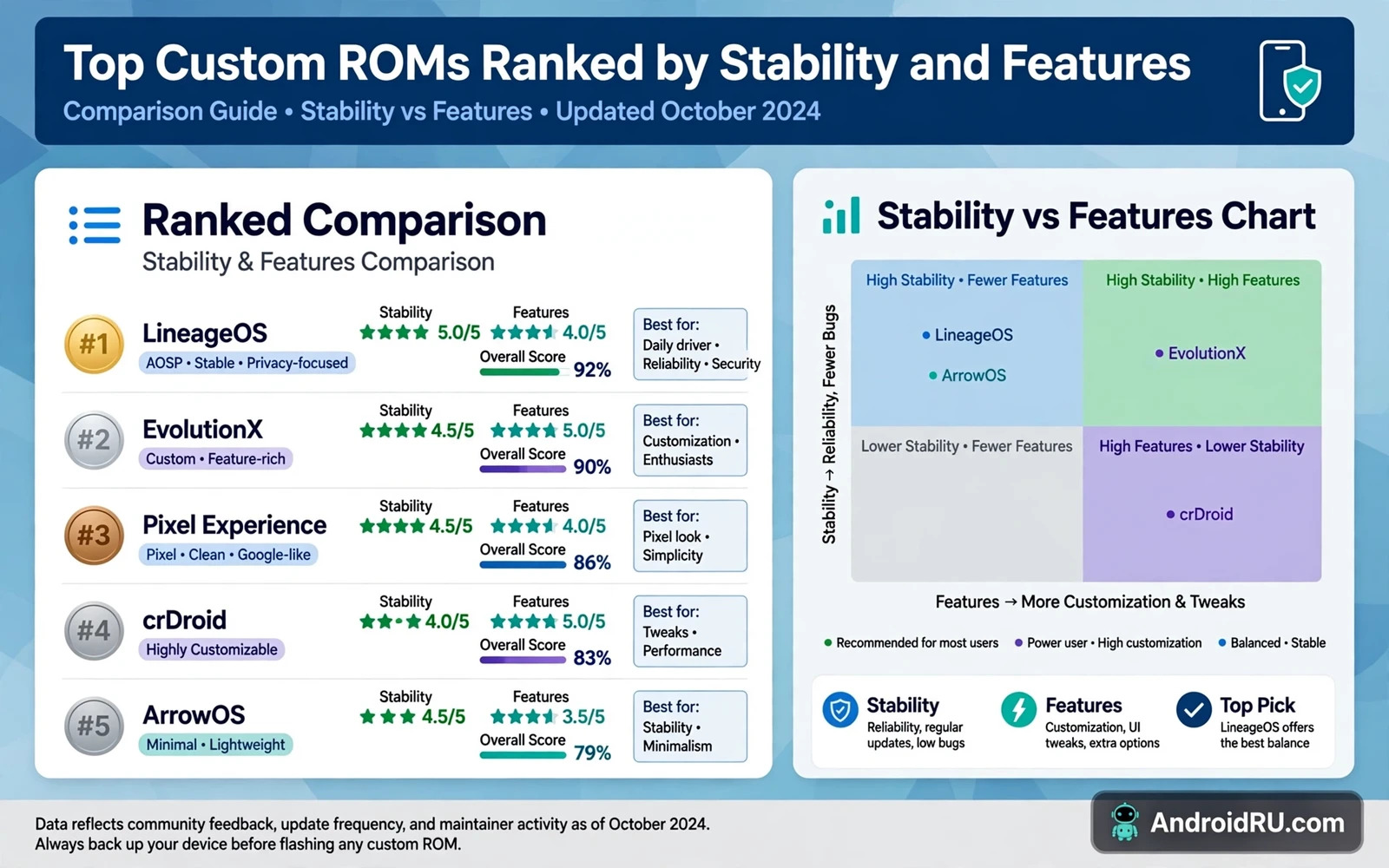
Custom ROMs give Android phones a second life with cleaner software and longer support and extra features. Ranking ROMs by stability and features helps you choose without testing every ROM on your own phone. Stability means daily reliability and battery behavior and call quality and camera quality. Features mean customization and privacy tools and update frequency and device support. This ranking guide explains the main ROM families in plain terms and it shows how to match a ROM to your own priorities.
Read the safety warning before you install any custom ROM. ROM installation can wipe all user data and it can void the device warranty. A wrong ROM file can cause a bootloop or a brick. Back up photos and videos and documents and accounts before you start and keep a full copy of stock firmware on a computer. Never flash a ROM built for another model even when the phone name looks similar.
How To Judge Stability Honestly
Stability is not a single score and it changes with each build and each device. A ROM can be stable on one model and buggy on another model because device drivers differ. Judge stability by daily tasks first such as calls and messages and mobile data and camera use and battery drain overnight. A ROM that passes those daily tasks is stable for most users even when a rare feature has a bug. A ROM that fails calls or data is not stable no matter how many features it lists.
Update history also signals stability. A ROM with regular builds and clear changelogs and quick fixes for serious bugs tends to stay usable over time. A ROM with rare builds and vague notes may leave a serious bug unfixed for months. Check the support thread for your exact model and look for recent reports rather than old praise. Old praise may describe a build that no longer matches the current release.
ROM Families Ranked By Balance
LineageOS style ROMs rank highest for balance because they focus on clean Android and broad device support and steady updates. They add useful customization without heavy changes to the core system. Battery behavior tends to stay close to stock and daily apps tend to work well. Camera quality can vary because maker camera apps may not carry over to an open ROM. Users who want a clean daily phone often start here.
Pixel style ROMs rank high for features that mimic a Pixel phone such as a clean launcher and smart Assistant features and a modern interface. They suit users who want a Pixel feel on non Pixel hardware. They can use more resources than a minimal ROM and they may need extra setup for device specific features. Users who value interface polish over minimal resource use often prefer this family.
Highly customized ROMs rank high for features and lower for stability on some devices. They add deep theme tools and status bar tools and gesture tools and privacy toggles. Those extras delight tweakers but each extra feature adds a chance of conflict. Users who enjoy tuning every detail and who accept occasional bugs often enjoy this family most. Users who need a boring reliable phone should avoid the most experimental builds in this family.
Minimal open ROMs rank high for stability on supported devices and lower for out of the box features. They ship a lean system with few preinstalled apps and they leave choices to the user. That leanness helps battery life and helps performance on older phones. New users may find the lean start unfamiliar because common apps must be installed by hand. Experienced users often prefer that control.
Install steps decide whether a good ROM stays good and the custom ROM installation guide walks through recovery and backup and flashing in the right order. That guide pairs with this ranking because a stable ROM can still fail when flashed in the wrong order. Read it after you choose a family and before you download any file. A careful install protects the stability that the ranking promises.
Features That Matter More Than Feature Count
Feature count alone misleads because many listed features duplicate each other or stay unused. Privacy controls matter more than a long list of theme options for many users. Update support matters more than a rare gesture for users who keep a phone for years. Camera support matters more than a launcher tweak for users who photograph daily. Rank features by your own daily use and ignore features you will never open.
Device support depth also matters more than total device count. A ROM that supports your exact model with an active maintainer will serve you better than a ROM that lists hundreds of models with no maintainer for yours. Check who maintains your model build and how often that maintainer posts fixes. A maintained build with a small user base beats an abandoned build with a large download count.
Recovery knowledge protects every ROM choice and the custom recovery comparison explains which recovery fits your device and your backup habits. That comparison helps you pick a recovery before you flash a ROM. A good recovery with a verified backup turns a failed ROM test into a short restore instead of a long repair.
Matching A ROM To Your Phone And Your Habits
Older phones benefit most from lean ROMs and clean ROMs because those ROMs reduce background load and extend usable life. Newer phones can run feature heavy ROMs without a noticeable slowdown. Daily driver phones need the most stable build available even when a newer experimental build lists more features. Test phones can run experimental builds because a failure costs little. Match the risk level to the role of the phone.
Partition layout affects ROM choice too and the dynamic partitions guide explains why some ROM packages differ on modern devices. That guide helps you understand why a ROM file for a dynamic device may look different from a ROM file for an older device. Read it when your phone uses dynamic partitions so you do not judge a ROM package by an outdated file layout.
Testing A ROM For A Full Week
A full week test reveals problems that a first day test hides. Battery behavior on day one reflects setup activity and app installs rather than normal use. Call quality on day one reflects a fresh system rather than a system under normal load. By day four the phone settles into normal patterns and real strengths and real weaknesses appear. Judge a ROM after that settling period rather than after a few exciting hours.
Keep a simple daily note during the test week with battery level at night and any app crash and any missed call or message. That note turns vague feelings about a ROM into concrete evidence. A ROM that feels fast but crashes a messaging app twice a week is less stable than a ROM that feels plain but never crashes. Concrete notes protect you from choosing a ROM for its theme while ignoring its daily failures.
Test the camera across the week in daylight and in low light and in video mode because camera quality varies more than any other feature across ROMs. A ROM with a weak camera app may still take good photos with a third party camera app on some devices. Test both the built in camera and a trusted third party camera before you judge camera quality. A camera weakness that a third party app fixes is less serious than a camera weakness that no app can fix.
ROM Support And Community Health
Community health predicts long term ROM quality better than a single release note. An active maintainer who answers device specific questions and posts test builds signals a healthy project. A project with many downloads but no maintainer activity for your model signals a risk. Join the device thread before you flash and read the last month of reports rather than the launch excitement from months earlier.
Security update speed also reflects community health because a ROM that lags on security patches leaves known issues open. Check how quickly the ROM merged the latest security fixes for your model. A ROM that merges fixes promptly shows discipline that benefits stability too. A ROM that ignores security fixes may also ignore other maintenance work.
Exit planning matters as much as entry planning because every ROM test needs a way back to stock. Keep stock firmware and recovery backups ready before the first flash. A ROM that cannot be cleanly replaced by stock firmware is a trap rather than a test. Verify the exit path on a spare device when possible before you commit a daily phone to a new ROM family.
ROM Choice Mistakes To Avoid
Choosing a ROM by screenshots alone is a common mistake because screenshots show themes rather than stability. A beautiful screenshot tells you nothing about call quality or battery life or camera reliability. Read daily use reports before you judge a ROM by its appearance. Appearance can be changed later with a launcher while stability cannot be themed into existence.
Chasing the newest build every day is another mistake because daily builds can introduce regressions. A stable weekly build often serves a daily phone better than a fresh nightly build. Update on a schedule that fits your tolerance for bugs rather than on every release notification. Patience with updates protects daily reliability.
Ignoring maintainer notes is a third mistake because notes often list known issues for your exact model. A known issue that affects your daily use should block that build for you even when other users praise it. Read the known issues section before every flash and weigh each issue against your own daily tasks.
Forgetting the exit plan is the most costly mistake because a ROM without a clean return path traps your data. Confirm stock firmware availability and recovery backup steps before the first flash. An exit plan written before flashing feels unnecessary until the day you need it urgently.
ROM And Warranty Realities
Warranty realities vary by maker and by region so a ROM install may affect warranty differently on two phones from different makers. Some makers tolerate bootloader unlocking while others treat any unlock as a warranty end. Research the warranty policy for your exact maker before you unlock anything. A ROM test on a phone still under a valuable warranty deserves extra thought.
Resale value also changes after a ROM install because a buyer may prefer stock software or may distrust a modified phone. Keep stock firmware and a return path ready if you plan to sell the phone later. A phone that can return to stock cleanly keeps more resale options than a phone stuck on an experimental build.
Start with a balanced ROM and test daily tasks for a full week before you judge it. Keep stock firmware ready and keep backups current during the test week. A ROM ranking can point you to a good starting family but only your own daily use can prove stability on your exact phone.

