

A custom recovery replaces the stock recovery on your phone. A custom recovery lets you flash files and back up partitions and restore backups. TWRP and OrangeFox are the two best known custom recoveries today. TWRP is the older and wider known project. OrangeFox builds on TWRP ideas with a different interface and extra features. This guide compares the two recoveries on real criteria. It covers interface and device support and backup and flashing and updates. Choose the recovery with the best support for your exact model.
Recovery mode runs outside normal Android. Recovery mode loads before the main system starts. Recovery mode can work even when Android fails to boot. Recovery mode can flash system files. Recovery mode can wipe partitions. Recovery mode can restore a full backup. That outside position makes recovery the safety net for root and custom ROM work. A phone without a working recovery is harder to rescue after a bad flash.
What TWRP Offers
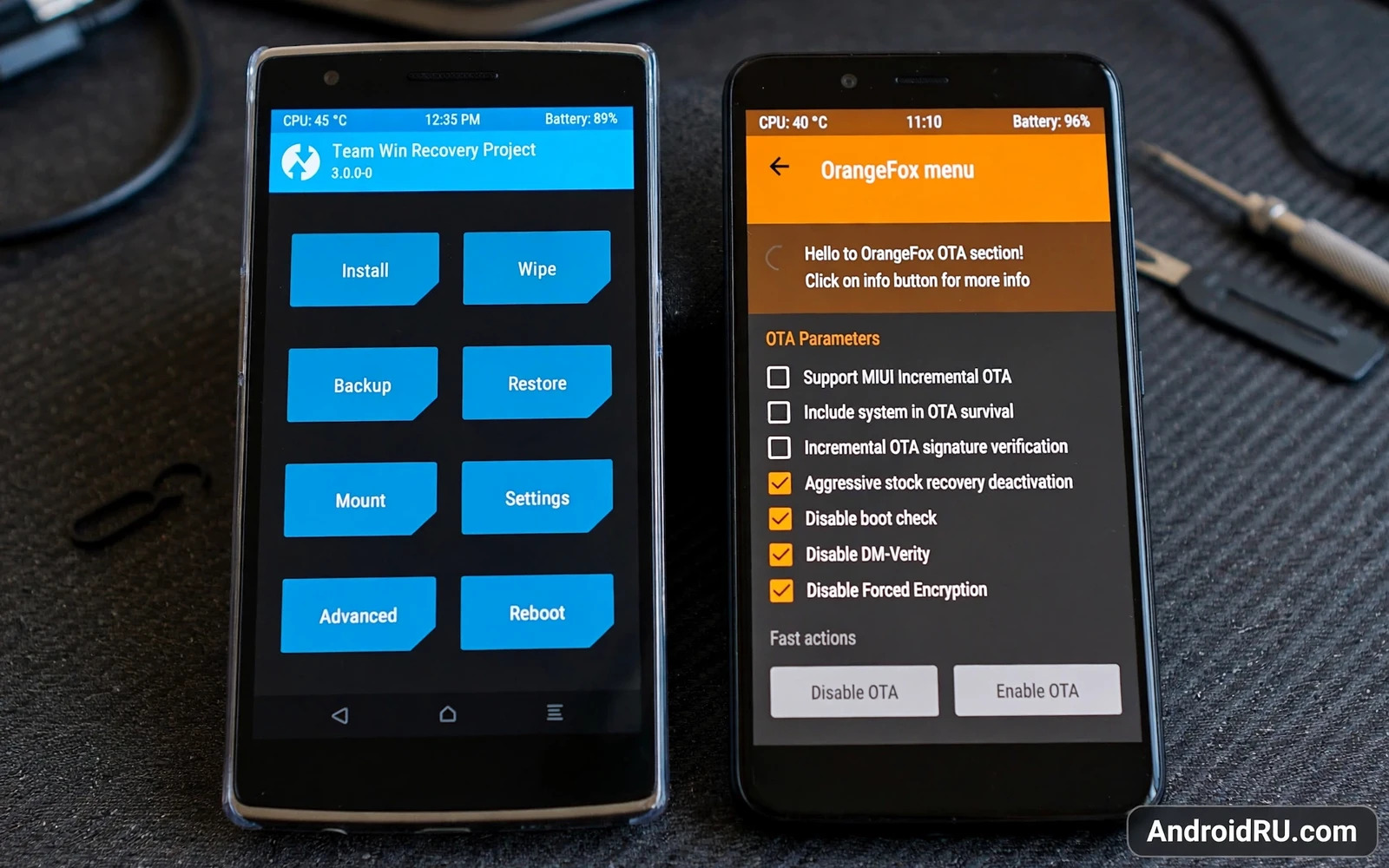
TWRP stands for Team Win Recovery Project. TWRP offers a touch based interface for recovery tasks. TWRP supports install and wipe and backup and restore and mount and file management. TWRP supports flashing zip packages. TWRP supports ADB sideload for flashing from a computer. TWRP supports backup of boot and system and data partitions on supported devices.
TWRP device support is the widest among custom recoveries. TWRP has official builds for many models. TWRP has unofficial builds for many more models. TWRP guides are numerous for common models. TWRP problems are well documented for common models. A new user benefits from that depth of shared knowledge. Check official build availability for your exact model first.
TWRP interface is functional rather than polished. Buttons are large and clear. Menus are direct and simple. Advanced options hide behind extra screens. The design suits users who want a tool that works fast. The design suits users who flash often. The design may feel dated to users who expect a modern look. Function wins over style in recovery work.
TWRP backup handling is strong on supported devices. Backups can include boot and system and vendor and data. Backups can be stored on internal storage or external storage. Backups can be restored partition by partition. Backup compression options affect speed and size. Test a backup restore on a second device when possible. A backup that never restores is not a backup.
What OrangeFox Offers
OrangeFox Recovery builds on TWRP code with its own interface and features. OrangeFox offers a modern touch interface with clear menus. OrangeFox offers built in support for common flashing tasks. OrangeFox offers extra tools for managing backups and files. OrangeFox offers a password and security layer for recovery access in supported builds. OrangeFox aims to feel polished without losing recovery power.
OrangeFox device support is narrower than TWRP device support. OrangeFox has official builds for a smaller set of models. OrangeFox builds often target popular models with active maintainers. OrangeFox guides are fewer than TWRP guides. Check OrangeFox build availability for your exact model before you choose it. A recovery without a build for your model is not an option.
OrangeFox interface appeals to users who value clarity. Menus use modern icons and readable text. Common tasks sit on the main screen. Advanced tasks sit one tap away. The interface reduces mistakes during stressful rescue work. A clear interface matters when the phone already fails to boot normally. Stress plus a confusing menu causes errors.
OrangeFox extra features vary by build. Some builds offer better handling of encrypted data. Some builds offer better handling of dynamic partitions. Some builds offer built in tools for managing Magisk modules. Some builds offer addon support for common tasks. Read the feature list for your exact build. Do not assume a feature from another build exists on your build.
Interface And Ease Of Use
TWRP interface prioritizes speed and familiarity. Users who know TWRP can work fast on any TWRP build. Menus stay consistent across many models. Muscle memory transfers well. New users learn TWRP basics in one session. Flashing and backup and restore follow the same pattern on most builds.
OrangeFox interface prioritizes clarity and polish. New users may find OrangeFox easier at first glance. Menus explain options in plainer language. Common rescue tasks are easier to find. Users who flash rarely may prefer that clarity. Users who flash often may still prefer TWRP speed. Personal taste matters less than device support.
Both recoveries need touch input to work well. Both recoveries support hardware buttons for basic navigation when touch fails. Both recoveries support ADB commands from a computer. ADB support helps when the screen is damaged. ADB support helps when touch calibration fails. Learn the ADB sideload command before you need it in a crisis.
Backup And Restore Compared
Backup is the core job of any recovery. TWRP backup covers the partitions that matter for rescue. OrangeFox backup covers the same core partitions on supported builds. Both recoveries let you choose partitions per backup. Both recoveries let you name backups clearly. Both recoveries let you restore a single partition or a full set. Name backups with date and ROM version and purpose. A clear name saves time during rescue.
Data encryption affects backup on both recoveries. Modern Android encrypts user data by default. A recovery must decrypt data to back it up fully. Decryption support varies by device and by build. Some builds decrypt cleanly. Some builds back up data only in encrypted form. Some builds skip data backup when decryption fails. Test data backup on your build before you rely on it.
Backup storage location matters. Internal storage backups die with a full wipe. External storage backups survive a full wipe. A memory card slot helps when the phone has one. USB storage through recovery helps when the phone lacks a card slot. Copy important backups to a computer as well. A backup in two places survives more failures than a backup in one place.
Partition backup detail is covered step by step in the how to backup system partitions via TWRP recovery walkthrough, which explains which partitions matter and how to verify a backup before you trust it. Follow that routine no matter which recovery you pick.
Flashing And Custom ROM Work
Flashing is the second core job of a recovery. Both recoveries flash zip packages for ROMs and modules and kernels. Both recoveries wipe cache and data when a ROM guide requires it. Both recoveries support ADB sideload for flashing from a computer. Both recoveries show flash logs on screen. Read the log after every flash. A flash that reports errors needs attention before reboot.
Custom ROM flashing needs a recovery that handles your partition layout. Modern devices use dynamic partitions. Modern devices use A B slots. Recovery support for those layouts varies by build. Check slot handling for your exact model. Check dynamic partition handling for your exact model. A recovery that mishandles slots can flash to the wrong slot.
ROM installation steps pair closely with recovery choice. The how to install custom ROMs LineageOS step by step path uses recovery for wiping and flashing and first boot checks. Read that path together with your recovery guide. A ROM guide and a recovery guide that disagree on wipe steps need resolving before you flash.
Updates And Maintenance
Recovery updates arrive separately from system updates. TWRP updates come from the TWRP project and device maintainers. OrangeFox updates come from the OrangeFox project and device maintainers. Update recovery only when the new build supports your device and Android version. A recovery update can fix decryption support. A recovery update can fix partition handling. A recovery update can also introduce a new bug. Read the changelog before updating recovery.
System updates can affect recovery. A system update can replace a custom recovery with stock recovery on some devices. A system update can change encryption in ways that break recovery decryption. A system update can change partition layout. Reflash recovery after a system update when your setup needs it. Test recovery boot after a system update before you need recovery in a crisis.
Keep recovery simple and stable. Do not update recovery on the same day as a ROM update. Do not update recovery right before a risky flash. Change one thing at a time. A stable recovery is worth more than a new recovery feature.
Choosing Between TWRP And OrangeFox
Choose TWRP when device support decides the question. TWRP wins on model coverage. TWRP wins on guide availability. TWRP wins on community troubleshooting depth. TWRP wins for users who already know its menus. TWRP is the safe default when both recoveries offer builds for your model and you value support depth.
Choose OrangeFox when interface and build features decide the question. OrangeFox wins on modern interface clarity. OrangeFox wins when its build offers better decryption for your model. OrangeFox wins when its build offers better dynamic partition handling for your model. OrangeFox wins for users who flash rarely and want clear menus. OrangeFox is the better pick when its build is actively maintained for your model.
Choose neither when support is missing. A recovery build for a similar model can brick your phone. A recovery build for an older Android version can fail on your version. A recovery build from an unknown uploader can hide malware. Wait for a proper build or keep stock recovery. A missing recovery is safer than a wrong recovery.
Recovery choice also connects to root safety. The complete Android rooting guide explains how recovery fits into backup and rescue planning for a rooted phone. A recovery that you can boot reliably is the difference between a quick fix and a full data loss after a bad module. Test recovery boot on a calm day. Test backup restore steps before a crisis. A recovery you have tested beats a recovery you have only read about.

