

Acer Iconia Tab A501 Specifications and Detailed Overview: Build Quality Explained
The Acer Iconia Tab A501 arrived in April 2011 as the 3G sibling of the Wi-Fi only Acer Iconia Tab A500, and it remains one of the clearest examples of how early Android tablets were built. Announced in February 2011 and released in April 2011, this 10.1-inch tablet paired a Nvidia Tegra 2 T20 chipset with Android 3.0 Honeycomb, a combination that defined the first serious wave of large-screen Android devices. For readers looking for Acer Iconia Tab A501 specs in one place, this guide brings together the confirmed hardware, the design choices behind it, and the practical limits that come with a tablet from 2011.
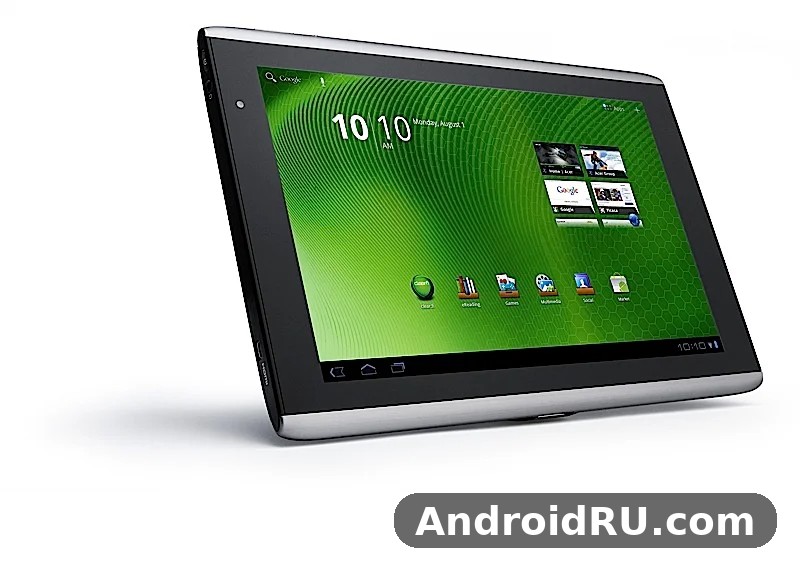
Understanding the A501 starts with its place in the Iconia line. The A500 handled Wi-Fi only, while the A501 added GSM and HSPA data through a Mini-SIM slot, so it could stay connected away from a wireless network. That single difference changed who the tablet suited: commuters, field workers, and travellers who needed maps, email, and browsing without hunting for a hotspot. The Acer Iconia Tab A501 3G connection, rated at HSPA 21.1 Mbps down and 5.76 Mbps up, was fast for its year, even though it offered no GSM voice calling. This article frames the A501 as a classic tablet, not as a rival to later devices, and it explains what was solid, what was heavy, and what has aged.
Anyone searching for an Acer Iconia Tab A501 review today is usually doing one of three things: checking a second-hand unit, comparing it with the A500, or learning how early Honeycomb tablets worked. The Acer Iconia Tab A501 full specifications and review below cover each of those angles. You will find the Acer Iconia Tab A501 release date and price in 2011, the Acer Iconia Tab A501 battery life and charging time in practical terms, the Acer Iconia Tab A501 10.1 inch display resolution and quality, and the Acer Iconia Tab A501 Nvidia Tegra 2 processor performance in everyday tasks. The aim is a calm, factual record that helps a reader judge the tablet on 2011 terms.
Design and Build Quality Explained
Build quality is the heart of this overview, because the A501 was marketed as a premium-feeling tablet at a time when many rivals used light plastic shells. The Acer Iconia Tab A501 dimensions are 260 x 177 x 13.3 mm and it weighs 777 g, which made it well built for its time and noticeably heavier than the slim tablets that followed a few years later. The black finish, the brushed metal back, and the engraved pattern on the rear panel gave it a distinct look, and the Acer Iconia Tab A501 black colour model and back panel design still photograph well today. The frame felt rigid in the hand, with little flex when the tablet was held by one corner, and that stiffness helped protect the large glass screen.
The A501 used a full set of physical controls and ports that later tablets removed. A power button, volume rocker, screen rotation lock, and a reset pinhole sat around the edges, while the front kept a clean bezel around the 10.1-inch screen. The Acer Iconia Tab A501 weight and dimensions for daily use meant it suited a bag, a desk stand, or two-handed reading far better than one-handed use on a train. At 13.3 mm thick, it was chunky by later standards, yet the thickness made room for a full-size USB port, a microUSB port, and an HDMI port, a combination that many owners valued more than thinness.
Materials and Finish
The rear shell used metal with a textured, engraved pattern that resisted fingerprints better than a plain gloss panel, while the front glass sat in a dark bezel. The metal back helped the tablet feel cool and solid, and it spread heat from the processor across a wider area during video playback. Small details, such as the centred rear camera, the LED flash beside it, and the speaker grilles, were placed with care, and the overall finish avoided the creaks that cheaper plastic tablets showed when pressed. For a device from early 2011, the fit of the panels, the tight seams, and the firm buttons were strong points, and they explain why so many used examples still look tidy when the screen is intact.
Size, Weight and Handling
At 777 g, the A501 was heavier than later tablets in the same screen class, and long reading sessions could tire the wrists if the tablet was held unsupported. A case, a stand, or a cushion made a real difference, and many owners used it on a table for films and browsing. The 64.3 percent screen-to-body ratio left wide bezels, which gave thumbs a place to rest without touching the display, and the Acer Iconia Tab A501 screen to body ratio and bezel size explain why accidental touches were less common than on edge-to-edge designs. The balance was even, the corners were softly rounded, and the tablet sat flat without rocking, which helped when it was used as a small media screen.
Grip and Port Placement
Ports were spread across the sides so cables did not crowd one edge. The full-size USB 2.0 port accepted flash drives and some peripherals, the microUSB 2.0 port handled charging and data, and the HDMI port sent video to a television. The Acer Iconia Tab A501 USB port and accessories compatibility was a genuine advantage in 2011, when many tablets offered only a single proprietary connector. A 3.5 mm headphone jack, a microSDHC slot, and the Mini-SIM tray completed a practical layout, and the Acer Iconia Tab A501 microSD card slot expansion guide in the battery and storage section below explains how owners added space.
Buttons, Sensors and Everyday Durability
The accelerometer, gyro, proximity sensor, and compass supported screen rotation, games, and navigation, and the Acer Iconia Tab A501 accelerometer gyro compass sensors explained in plain terms are the parts that let the screen turn, let maps point the right way, and let motion games respond. The buttons had a firm click, the volume rocker was easy to find by touch, and the rotation lock stopped the screen turning at awkward moments. No tablet from this era was rugged, and the A501 was no exception, yet its metal shell and rigid frame gave it better everyday durability than the lightest plastic models of the same year.
Display and Viewing Experience
The Acer Iconia Tab A501 display was a 10.1-inch LCD with 256K colours, a resolution of 800 x 1280 pixels, a 16:10 ratio, and about 149 pixels per inch. Those numbers sound modest now, but in 2011 they gave a wide, clear canvas for web pages, books, and HD video. The Acer Iconia Tab A501 10.1 inch display resolution and quality suited the 16:10 shape, which left room for video without heavy letterboxing and gave web pages a useful width in landscape mode. Acer added its own interface layer over Honeycomb, and the capacitive touch screen responded to light taps and swipes, with multi-touch for pinch zoom.
Viewing angles reached about 80 degrees, according to Acer material from the launch period, and colours looked bright indoors, though the LCD washed out a little in direct sunlight. Text was readable, icons were large, and the Honeycomb interface used the extra width for panels, widgets, and a system bar that kept navigation close at hand. For film watching, the screen was the main strength of the tablet, and for reading, the size reduced scrolling, even if the pixel density could not match later high-density panels.
10.1-Inch Screen in Everyday Use
In daily use, the screen handled email, news, maps, and video with ease. The Acer Iconia Tab A501 screen was large enough for two-pane email and for a full web page without constant zooming, and the touch layer tracked fingers well for typing on the on-screen keyboard in landscape mode. Brightness was adequate for a living room or an office, and the anti-glare qualities were limited, so shade helped outdoors. A screen protector and a simple Acer Iconia Tab A501 case were common add-ons, and the Acer Iconia Tab A501 manual recommended keeping the display clean and dry, as with any early capacitive panel.
Resolution, Colour and Viewing Angles
The 1280 x 800 resolution gave video a sharp look at normal viewing distance, while still images and games looked smooth for the period. Colour reproduction was lively rather than strictly accurate, which suited films and photos, and the 256K colour depth was a known limit of the panel type rather than a fault of one unit. Side viewing kept the image usable, though contrast fell away at steep angles, so sharing a film with a person beside the owner worked better than sharing it from far to the side. Taken as a whole, the display was a fair match for the Tegra 2 graphics, and it did not ask more of the processor than the hardware could deliver.
Performance and Software
Performance came from the Nvidia Tegra 2 T20 chipset, a dual-core 1.0 GHz Cortex-A9 CPU, and a ULP GeForce GPU, with 1 GB of RAM. The Acer Iconia Tab A501 Nvidia Tegra 2 processor performance was strong for early 2011, and it handled Honeycomb, web browsing with Adobe Flash, HD video, and the games of the period without the long pauses seen on single-core tablets. The Acer Iconia Tab A501 dual core Cortex A9 CPU benchmark results from the period placed it near the top of Android tablets at launch, though later quad-core chips soon passed it. For the tasks it was sold for, the balance of CPU, GPU, and RAM was sensible.
The tablet shipped with Android 3.0 Honeycomb, an Android version made for tablets, and it could be updated to Android 3.2 Honeycomb. The Acer Iconia Tab A501 Android Honeycomb update to 3.2 fixed bugs, improved stability, and added small refinements to the interface. The Acer Iconia Tab A501 update path ended there, so later Android versions, later apps, and later security standards are out of reach, and that limit matters more today than any single speed test. The Acer Iconia Tab A501 performance in 2011 terms was good; the Acer Iconia Tab A501 performance today is limited to older apps, local media, and light browsing.
Tegra 2 Platform and Everyday Speed
The Tegra 2 platform combined two Cortex-A9 cores with GeForce graphics, which helped with video decoding, 3D games, and smooth scrolling. The Acer Iconia Tab A501 chipset handled 720p and some 1080p video, and the Acer Iconia Tab A501 features list from launch stressed HD playback, Flash sites, and multitasking. With 1 GB of RAM, several apps could stay open, though heavy web pages with Flash could slow the browser, and the Acer Iconia Tab A501 1GB RAM and internal storage options shaped how many apps and files could sit on the device at once. The tablet was not built for later demanding games, and it should be judged on the software of its own era.
Android Honeycomb and Later Updates
Honeycomb brought a tablet interface with a system bar, recent apps, widgets, and a browser that felt closer to a desktop browser than phone Android did. The Acer Iconia Tab A501 Android experience included an organizer, a document viewer, predictive text input, and media players for MP3, WAV, WMA, eAAC+, XviD, MP4, and H.264 files. The Acer Iconia Tab A501 Adobe Flash browser support in 2011 was a selling point, because many video sites still used Flash, and the Acer Iconia Tab A501 document viewer and organizer apps included with Honeycomb helped with office files and schedules. Readers comparing the A501 with the A500 will find the same software on both, and the Acer Iconia Tab A501 vs Acer Iconia Tab A500 differences are about connectivity, not about the operating system.
Cameras, Audio and Connectivity
The camera system was modest, even for 2011. The rear camera used a single 5 MP sensor with autofocus and an LED flash, and it recorded video, while the front camera used a single 2 MP sensor for video calls and self-portraits. The Acer Iconia Tab A501 5 megapixel rear camera with flash took usable daylight photos, though low-light shots were noisy and the large tablet body made steady framing harder than on a phone. The Acer Iconia Tab A501 front 2 megapixel camera for video calls was adequate for the video chat apps of the period, and the Acer Iconia Tab A501 camera as a whole was a secondary feature, not the reason to buy the tablet.
Audio came from stereo speakers and a 3.5 mm jack, and the Acer Iconia Tab A501 speakers gave a wider sound for films than the single small speaker on many rivals. The Acer Iconia Tab A501 stereo speakers and audio quality were better than the single small speaker on many rivals, with a wider sound for films. Connectivity covered Wi-Fi 802.11 b/g/n with hotspot sharing, Bluetooth 2.1 with A2DP and EDR, GPS with A-GPS, microUSB 2.0, full-size USB 2.0, and HDMI. The Acer Iconia Tab A501 3G HSPA connectivity and SIM card slot set it apart from the A500, and the Acer Iconia Tab A501 WiFi hotspot sharing and internet connection let it share its mobile data with a laptop when needed. There was no FM radio, and the tablet had no GSM voice calling, despite the SIM slot.
Rear and Front Cameras
The rear camera sat on the metal back with the flash beside it, and autofocus helped with documents and outdoor scenes. Video recording was listed as supported, though frame rates and quality depended on light and on the app in use. The front camera, fixed focus and modest in resolution, suited video calls in good light. Neither camera matched a dedicated camera or a later tablet, and owners who wanted sharp photos usually carried a phone as well. For a quick scan, a video call, or a holiday snapshot in daylight, the cameras did the job, and that was the standard for tablets in 2011.
Sound, 3G and Wireless Connections
Stereo sound gave films and games more presence, and headphones through the 3.5 mm jack improved detail further. The Acer Iconia Tab A501 Bluetooth 2.1 pairing with wireless headphones worked with the headsets of the period, and the Acer Iconia Tab A501 GPS navigation and location accuracy, with A-GPS help, suited maps and route planning when a data connection was present. The Acer Iconia Tab A501 HDMI port for TV connection sent video to a larger screen, which made the tablet a handy media player in a hotel room or a living room. The Acer Iconia Tab A501 Bluetooth connection, the Acer Iconia Tab A501 GPS receiver, and the Acer Iconia Tab A501 HDMI output together show how Acer treated the A501 as a connected media device, not only as a reading slate.
Battery Life and Storage
The battery was a non-removable Li-Po 3260 mAh unit rated at 24.1 Wh, with standby of up to 400 hours and talk time listed at up to 8 hours in the specification record. The Acer Iconia Tab A501 battery life and charging time in real use depended on screen brightness, Wi-Fi or 3G use, and video playback, and Acer material from the launch period quoted up to eight hours of video playback and up to ten hours of Wi-Fi browsing. The Acer Iconia Tab A501 3260 mAh battery standby time details matter for collectors, because an old battery may hold far less charge now, and the Acer Iconia Tab A501 replacement battery and repair options today are limited to specialist repairers, since the cell is sealed inside the metal body.
Storage came in 16 GB, 32 GB, and 64 GB versions, each with 1 GB of RAM, and a dedicated microSDHC slot added more space. The Acer Iconia Tab A501 64GB model availability and price history show that the largest version was the rarest and the most expensive at launch, while the 16 GB model was the common entry point. The Acer Iconia Tab A501 battery, the Acer Iconia Tab A501 RAM, and the Acer Iconia Tab A501 tablet storage choices all point to the same idea: Acer offered a flexible range, and buyers picked the size that matched their media library. The Acer Iconia Tab A501 price at launch was about 490 EUR, with United States carrier versions later listed at 499.99 dollars for 16 GB and 549.99 dollars for 32 GB.
Battery Capacity in Real Use
Video playback, bright screens, and 3G data drained the battery faster than reading or music, and the tablet charged through its USB connection, so a full charge took several hours. Owners who dimmed the screen, turned off unused radios, and used Wi-Fi instead of mobile data got the longest sessions. The sealed battery meant there was no quick swap, and the Acer Iconia Tab A501 charger supplied with the tablet was the safe way to charge it, since the port and the power needs matched the original design. A second-hand buyer should test the Acer Iconia Tab A501 battery by playing video for an hour and watching the drop, because a worn cell is the most common fault on a tablet of this age.
Memory Options and Expansion
The three internal sizes shared the same 1 GB of RAM, so speed did not change with storage size, only the room for apps, photos, and films. A microSDHC card added space for media, and files could be moved between the card and internal memory through the file tools in Honeycomb. The Acer Iconia Tab A501 accessories that owners bought most often were a case, a charger, a screen protector, and a microSD card, and the Acer Iconia Tab A501 teardown guides from repair sites show the internal layout, the sealed battery, and the screws that hold the metal back in place. Anyone opening the tablet should follow a proper Acer Iconia Tab A501 teardown guide and accept the risk to a fifteen-year-old device.
Full Specifications
The table below brings together the confirmed Acer Iconia Tab A501 specifications from the GSMArena record, with the launch dates, the Tegra 2 platform, and the full hardware list in one place. Use it to check a second-hand unit, to compare the A501 with the A500, or to confirm a single detail such as the battery size or the camera resolution. The Acer Iconia Tab A501 vs A500 comparison is simple: the two tablets share the screen, the chipset, the RAM, and the cameras, while only the A501 adds 3G HSPA data through a Mini-SIM.
| Item | Specification |
|---|---|
| Model | Acer Iconia Tab A501 |
| Announced | 2011, February |
| Released | 2011, April |
| Status | Discontinued |
| Network | GSM / HSPA; 2G GSM 850 / 900 / 1800 / 1900; 3G HSDPA 900 / 2100; HSPA 21.1 / 5.76 Mbps; no GSM voice communication |
| SIM | Mini-SIM |
| Dimensions | 260 x 177 x 13.3 mm (10.24 x 6.97 x 0.52 in) |
| Weight | 777 g (1.71 lb) |
| Display | 10.1 inches LCD, 256K colours, 800 x 1280 pixels, 16:10 ratio, about 149 ppi, about 64.3 percent screen-to-body ratio, Acer UI |
| Operating system | Android 3.0 (Honeycomb), upgradable to 3.2 (Honeycomb) |
| Chipset | Nvidia Tegra 2 T20 |
| CPU | Dual-core 1.0 GHz Cortex-A9 |
| GPU | ULP GeForce |
| RAM | 1 GB |
| Internal storage | 16 GB, 32 GB, or 64 GB, each with 1 GB RAM |
| Card slot | microSDHC, dedicated slot |
| Rear camera | Single 5 MP, autofocus, LED flash, video recording |
| Front camera | Single 2 MP |
| Sound | Loudspeaker with stereo speakers; 3.5 mm jack |
| Wireless | Wi-Fi 802.11 b/g/n, hotspot; Bluetooth 2.1, A2DP, EDR; GPS, A-GPS; no FM radio |
| Ports | microUSB 2.0, USB 2.0, HDMI port |
| Sensors | Accelerometer, gyro, proximity, compass |
| Browser and media | HTML, Adobe Flash; MP3 / WAV / WMA / eAAC+ player; XviD / MP4 / H.264 player; organizer; document viewer; predictive text input |
| Battery | Non-removable Li-Po 3260 mAh (24.1 Wh); standby up to 400 h; talk time up to 8 h |
| Colours | Black |
| Price at launch | About 490 EUR |
Related reading in this Acer series places the A501 beside its closest relatives. The Breaking Down the Acer Iconia Tab A500: Review, Features and Full Specs explains the Wi-Fi only version in detail, while the Getting to Know the Acer Iconia Smart: Review and Detailed Specs covers a very different Acer device from the same era. For the wider Iconia family, the Acer Iconia Tab A510 Overview: Review, Audio and Complete Specifications shows how the later A510 moved the line forward, and the Acer Liquid Express E320 Complete Specifications: Every Detail, From Battery Life to Audio and the Acer Allegro: Is It the Right Phone for You? Review and Specs give context on Acer phones from the same period.
Pros and Cons
The strengths of the A501 were clear in 2011, and several of them still read well on paper, even though the software limits now outweigh them for most buyers. The tablet offered a large screen, a dual-core chip, stereo sound, a full-size USB port, HDMI output, and 3G data in a rigid metal body. The weaknesses were also clear: it was heavy, thick, and tied to Honeycomb, with a modest camera and a sealed battery that ages with time. The Acer Iconia Tab A501 problems reported by owners over the years centred on slow updates, a worn battery, and apps that stopped supporting Android 3.x, rather than on a single hardware failure.
- Large 10.1-inch display with a useful 16:10 shape for video and web pages.
- Nvidia Tegra 2 dual-core performance that was strong for early 2011.
- 3G HSPA data through a Mini-SIM, unlike the Wi-Fi only A500.
- Full-size USB port, microUSB, HDMI, microSDHC slot, and 3.5 mm jack.
- Stereo speakers and a rigid metal body with a clean black finish.
- GPS, Bluetooth, Wi-Fi hotspot sharing, and a full sensor set for its year.
- Heavy at 777 g and thick at 13.3 mm, so long one-handed use was tiring.
- Android 3.0 to 3.2 only, with no path to later Android versions.
- Only 1 GB of RAM, which limits later apps and heavy web pages.
- 5 MP rear camera and 2 MP front camera were modest even in 2011.
- Non-removable 3260 mAh battery that may hold little charge after many years.
- Discontinued, so parts, repairs, and the Acer Iconia Tab A501 unboxing experience as a new product are no longer available.
Frequently Asked Questions
These answers cover the questions that come up most often about the A501, from the release date to the A500 comparison and the practical question of whether it is worth buying as a used classic today.
When was the Acer Iconia Tab A501 released?
The Acer Iconia Tab A501 was announced in February 2011 and released in April 2011, according to the GSMArena launch record. A later carrier version with AT and T 4G HSPA plus arrived in the United States in September 2011, and the Acer Iconia Tab A501 AT and T 4G HSPA plus version details show the same core hardware with carrier data support. The launch price was about 490 EUR, and the tablet is now discontinued.
What is the difference between the Acer Iconia Tab A501 and the A500?
The main difference is connectivity: the A501 adds GSM and HSPA 3G data through a Mini-SIM, while the A500 is Wi-Fi only. The two tablets share the 10.1-inch 1280 x 800 display, the Nvidia Tegra 2 T20 chipset, the dual-core 1.0 GHz Cortex-A9 CPU, 1 GB of RAM, the 5 MP rear camera, the 2 MP front camera, and the 3260 mAh battery. If you need mobile data away from Wi-Fi, the A501 is the right choice; if you only use Wi-Fi, the A500 gives the same screen and speed.
Is the Acer Iconia Tab A501 still worth buying today?
For most people, the answer is no as a daily tablet, because Android 3.2 cannot run later apps, later browsers, or later security standards, and an old battery may need replacement. The Acer Iconia Tab A501 discontinued tablet worth buying today only makes sense for a collector, a museum piece, or a simple offline media player with local files. Check the screen, the battery, the ports, and the SIM tray before paying, and treat the Acer Iconia Tab A501 price today as a collector price, not as the price of a working daily device.
How long does the Acer Iconia Tab A501 battery last?
The battery is a non-removable Li-Po 3260 mAh unit rated at 24.1 Wh, with standby of up to 400 hours in the specification record. Acer quoted up to eight hours of video playback and up to ten hours of Wi-Fi browsing when the tablet was new, and the Acer Iconia Tab A501 battery life and charging time in practice depended on brightness and on whether 3G or Wi-Fi was in use. A used unit will usually last less, so test it with video playback before you buy.
Who Should Consider This Classic Tablet
The A501 suits a collector who wants a clean example of the first Honeycomb tablet wave, a reader who values its large screen and rigid build, or a hobbyist who enjoys older Android hardware. It does not suit a buyer who needs a daily tablet for later apps, secure browsing, or video calls, because the software stopped at Android 3.2 and the battery is sealed. The Acer Iconia Tab A501 tablet remains a useful reference point for how far tablets have come: it had the screen size, the ports, and the 3G data that later tablets kept, while later models fixed the weight, the thickness, and the software limits. The useful full-size USB port and the HDMI output still stand out as thoughtful choices, and the metal body still feels more solid than many later plastic designs.
Viewed on its own terms, the A501 was a capable and well-built tablet for 2011. Its Tegra 2 chip, its 10.1-inch display, its stereo speakers, and its 3G option gave it a clear role, and its build quality explains why the model is still discussed by collectors. A buyer who checks the battery, tests the touch screen, and accepts the Honeycomb limits will know exactly what they are getting, and a reader who only needs the facts will find them in the table above.

