

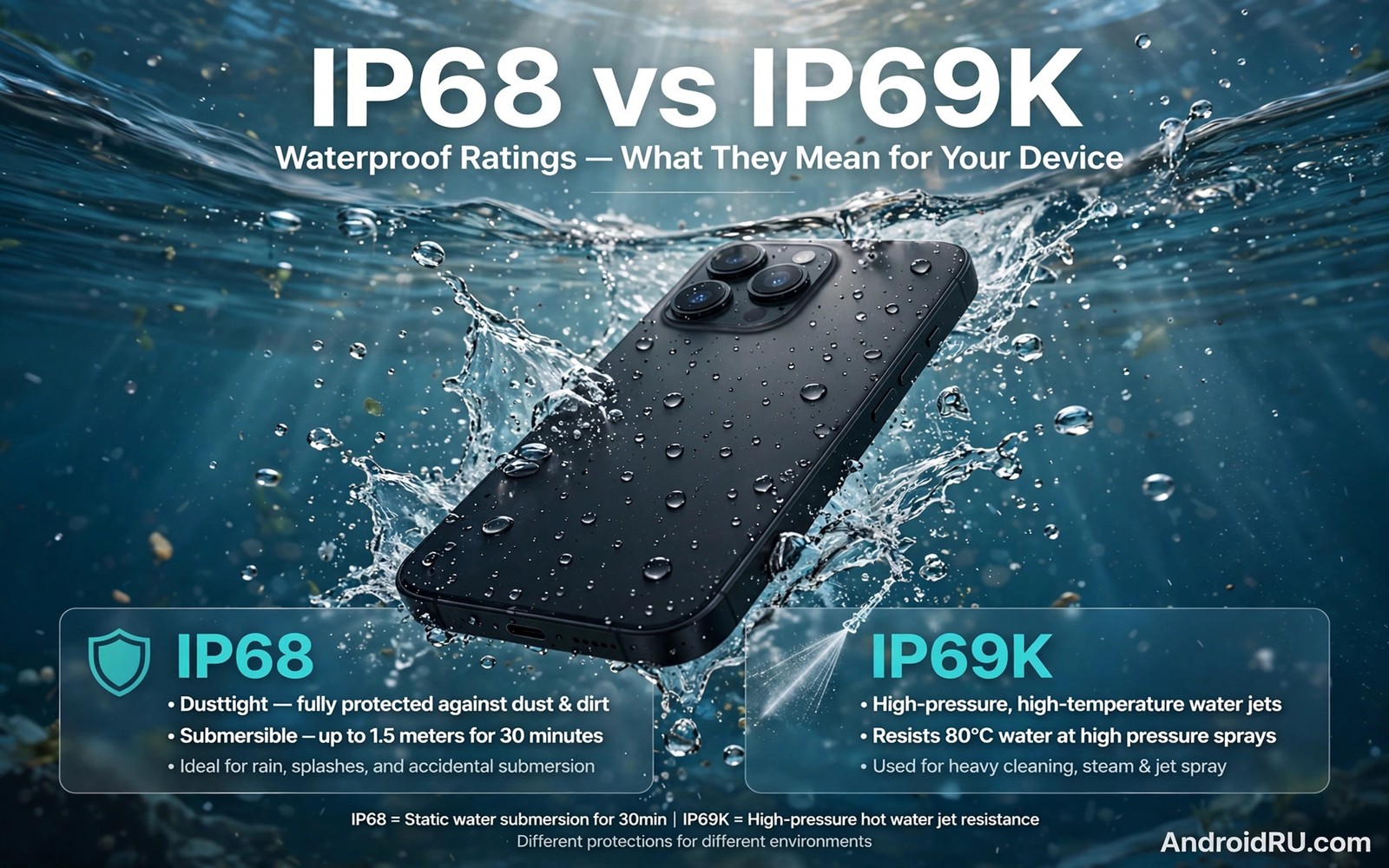
IP68 vs IP69K waterproof ratings confuse many buyers because the codes look similar. Both codes promise strong protection against dust and water. Only one of them covers high pressure hot water jets. The difference matters for food workers and car wash crews and anyone who cleans equipment with pressure washers. This guide explains each digit in plain language so you can read any rating with confidence.
The ingress protection code has two digits after the letters IP. The first digit rates dust protection. The second digit rates water protection. A 6 for dust means the device is sealed against dust entry. An 8 for water means it survives immersion under maker stated conditions. A 9K for water means it survives powerful hot water jets from close range. The military durability standards explained for buyers cover shock and vibration rather than water jets. Read the water code and the durability claim as separate promises.
Water ratings also confuse buyers because makers state immersion limits in different ways. One maker states depth and time clearly on the product page. Another maker hides the limits in a manual footnote. A buyer who misses the footnote may assume deeper and longer protection than the phone offers. Always find the exact depth and time statement before you buy. A rating without stated limits is an incomplete promise. Treat it as a warning sign rather than a selling point.
How to read the IP code digit by digit
The first digit runs from 0 to 6. A rating of 5 means dust protected with limited entry allowed. A rating of 6 means dust tight with no entry under test conditions. Most modern rugged phones aim for 6. That level matters on dusty sites and dry trails. Dust in a charging port can still cause problems even on a dust tight phone. Clean ports after dusty days to keep the seal working.
The second digit runs from 0 to 9K. A rating of 7 means immersion up to one metre for thirty minutes. A rating of 8 means immersion beyond one metre under conditions that the maker must state. The depth and time for an 8 rating vary by model. Always read the maker statement. A phone rated to 1.5 metres for thirty minutes is not the same as a phone rated to 2 metres for sixty minutes.
What IP68 actually guarantees in real life
IP68 guarantees immersion in fresh water under the stated depth and time. It does not guarantee protection in seawater or chlorinated pools or soapy water. Salt and chlorine and soap attack seals faster than fresh water. It also does not guarantee protection against steam or hot water. A phone can pass a cool immersion test and still suffer in a hot shower. Treat IP68 as rain and drop protection rather than swim proofing.
The test uses clean water and a still phone. Real life adds movement and pressure changes. Swimming strokes create pressure spikes. A phone in a pocket during a fall into water faces impact plus immersion. Seals age with heat and sunlight and repeated port use. A two year old phone may no longer match its factory rating. Test your phone carefully after any hard drop or repair.
What IP69K adds beyond IP68
IP69K adds resistance to high pressure and high temperature water jets. The test sprays water at 80 degrees Celsius from several angles at close range. Pressure reaches 80 to 100 bar in the test. That level matches industrial cleaning and food plant washdowns. A phone with IP69K can survive a careful pressure wash that would force water past an IP68 seal.
IP69K does not replace IP68. Some phones carry both ratings. Others carry only IP69K and that alone does not prove long immersion survival. Check for both codes when you need both protections. A food worker needs jet resistance during cleaning. A hiker needs immersion protection after a river crossing. Buy the combination that matches your daily risks.
Salt water pools soap and steam risks
Salt water leaves crystals in seals as it dries. Those crystals lift seals and create slow leaks. Chlorine dries rubber and makes it brittle over time. Soap reduces surface tension and helps water creep past seals. Steam carries heat deep into small gaps. None of these fluids appear in the standard fresh water test. That gap explains many warranty disputes after pool and sea use.
If your phone contacts salt water then rinse it in fresh water as soon as you can. Dry it with a soft cloth and leave ports open in moving air. Do not use a hair dryer on high heat. Do not charge the phone while the port feels damp. Wait until the port is fully dry. These steps reduce corrosion and protect the next water exposure.
How seals wear and how to protect them
Seals are rubber parts that age. Heat and sunlight harden rubber. Repeated opening wears port covers. Pocket grit scratches seal faces. A seal that looks fine can still leak under pressure. Inspect port covers each week when you work in harsh places. Look for cracks and flattening and loose fit. Replace a worn cover through an authorised service point when you can.
Cases help seals by reducing drops and impacts. A case does not restore a worn seal. A screen protector does not add water protection. Wireless charging reduces port wear because you open the cover less often. That single habit can extend seal life by months. Keep a spare cover if your model supports user replacement. Small spares cost little and prevent big failures.
adb shell dumpsys usagestats 2>/dev/null | head -5
adb shell settings get global charging_state 2>/dev/null || echo port-check-done
adb shell dumpsys battery | grep -i health
Attribution: the snippet above is an original example prepared for this article. It follows a standard public pattern for Android device checks and it does not copy code from any vendor site.
Warranty truth about water damage
Many warranties exclude water damage even on IP68 phones. The rating describes a lab test result. It is not an insurance promise. Makers test new phones under controlled conditions. They cannot control how an owner uses the phone after purchase. Water indicators inside the phone show service staff whether water entered. A tripped indicator often ends a free repair claim.
Read the warranty before you rely on the rating. Some rugged brands offer water damage cover for a limited time. Others exclude it completely. Keep purchase proof and test records. If a phone fails during normal rain use then document the event with photos and dates. Clear records help any claim. Never claim a phone is swim proof when the manual warns against swimming.
Everyday water encounters ranked by risk
Rain exposure is the lowest risk water encounter for a rated phone. Rain drops hit the phone at low pressure. Seals handle rain well when covers are closed. Wipe the phone dry after heavy rain. Check that port covers stayed shut during the storm. Rain rarely harms a phone with intact seals and closed covers.
A drop into a shallow puddle adds immersion plus impact. The impact may shift a seal at the exact moment water surrounds the phone. Check the phone after any puddle drop. Dry it and test the speaker and microphone. A muffled speaker after a puddle drop may signal water in the grille. Let the phone dry fully before charging it.
A fall into a sink or a bucket is a deeper immersion test. Depth may reach half a metre and duration may last minutes while you retrieve the phone. Most IP68 phones handle that event when seals are fresh. Older seals may leak under the same event. Age and prior drops change the outcome more than the rating number suggests.
Swimming adds movement and chemicals and pressure changes together. Strokes create pressure spikes at the phone surface. Chlorine and salt attack seals during and after the swim. A phone that survives a calm immersion test may still fail after repeated swims. Avoid swimming with a phone unless the maker explicitly allows it in writing.
Pressure washing is the highest risk encounter for a normal phone. Jets force water past seals at high speed. Only IP69K rated phones are built for that stress. Keep pressure washers away from IP68 phones entirely. Rinse an IP68 phone with a gentle stream instead. A gentle rinse cleans without forcing water into seals.
Common mistakes
The most common mistake is treating IP68 as permission to swim with the phone. Swimming adds pressure and chemicals that the test never covers. Another mistake is charging a wet phone. A damp port can corrode and short during charging. Wait for full drying first. A third mistake is trusting an old rating after a screen repair. Third party repairs often disturb seals. Ask the repair shop whether water resistance was restored and tested.
Another frequent error is blasting an IP68 phone with a pressure washer. IP68 alone does not cover high pressure jets. Only IP69K covers that stress. Use low pressure rinsing for an IP68 phone. Keep the jet at a distance and avoid direct spray into ports and speakers.
A fourth mistake is drying a wet phone with compressed air at high pressure. High pressure air can force water deeper into seals and grilles. Dry with a soft cloth and moving air at room temperature. Patience protects the phone better than force.
Frequently asked questions
Can I take underwater photos with an IP68 phone?
Short fresh water photos are usually possible within the stated depth and time. Touch screens respond poorly under water. Use volume buttons as a shutter when they work. Rinse and dry the phone after. Do not treat it as a dive camera.
Does IP69K mean my phone is better than IP68?
Not in every way. IP69K is stronger against hot high pressure jets. IP68 is stronger as a statement about immersion time and depth. The best choice for harsh work is a phone that carries both ratings. Check both codes rather than assuming one covers the other.
How long does water resistance last?
It lasts as long as the seals stay intact. Heat and drops and repairs shorten that life. No maker gives a lifetime water guarantee. Inspect seals often and treat any hard drop as a reason to recheck water protection.
Conclusion
IP68 vs IP69K waterproof ratings are clear once you read each digit on its own. IP68 covers immersion in fresh water under stated limits. IP69K covers hot high pressure jets. Together they give strong protection for harsh work. Alone each one leaves a gap that you must respect. The thermal cameras that reveal hidden heat adds useful context for this choice. The giant batteries for multi day field work adds useful context for this choice.
Your concrete next step is to open your phone manual today and write down its exact depth and time limits. Then check whether it also carries IP69K. Tape that note inside your work bag if you clean equipment with water. That note will stop a costly mistake on the next washdown.
Write your phone water limits on a card in your work bag when you work with water daily. That card reminds you and your team of safe cleaning methods. A team that knows the limits avoids the pressure washer mistake. Shared knowledge protects every phone on the crew.

