

Acer Iconia A14 Review: The Good, the Bad and the Battery Life
Big tablets at small prices always come with a catch, and the Acer Iconia A14 is no exception. Acer announced this 14-inch tablet at IFA on 3 September 2025, put it on sale in November 2025, and pitched it squarely at people who want a large screen for films, classes and light work without paying flagship money. The headline numbers look generous for the price: a 14-inch IPS display, Android 15, 8GB of RAM, 256GB of storage and an 8000 mAh battery, all wrapped in a slim metal body with a built-in kickstand. This Acer Iconia A14 review 2026 looks at what those numbers mean in daily use, where the tablet shines, and where the compromises show up.
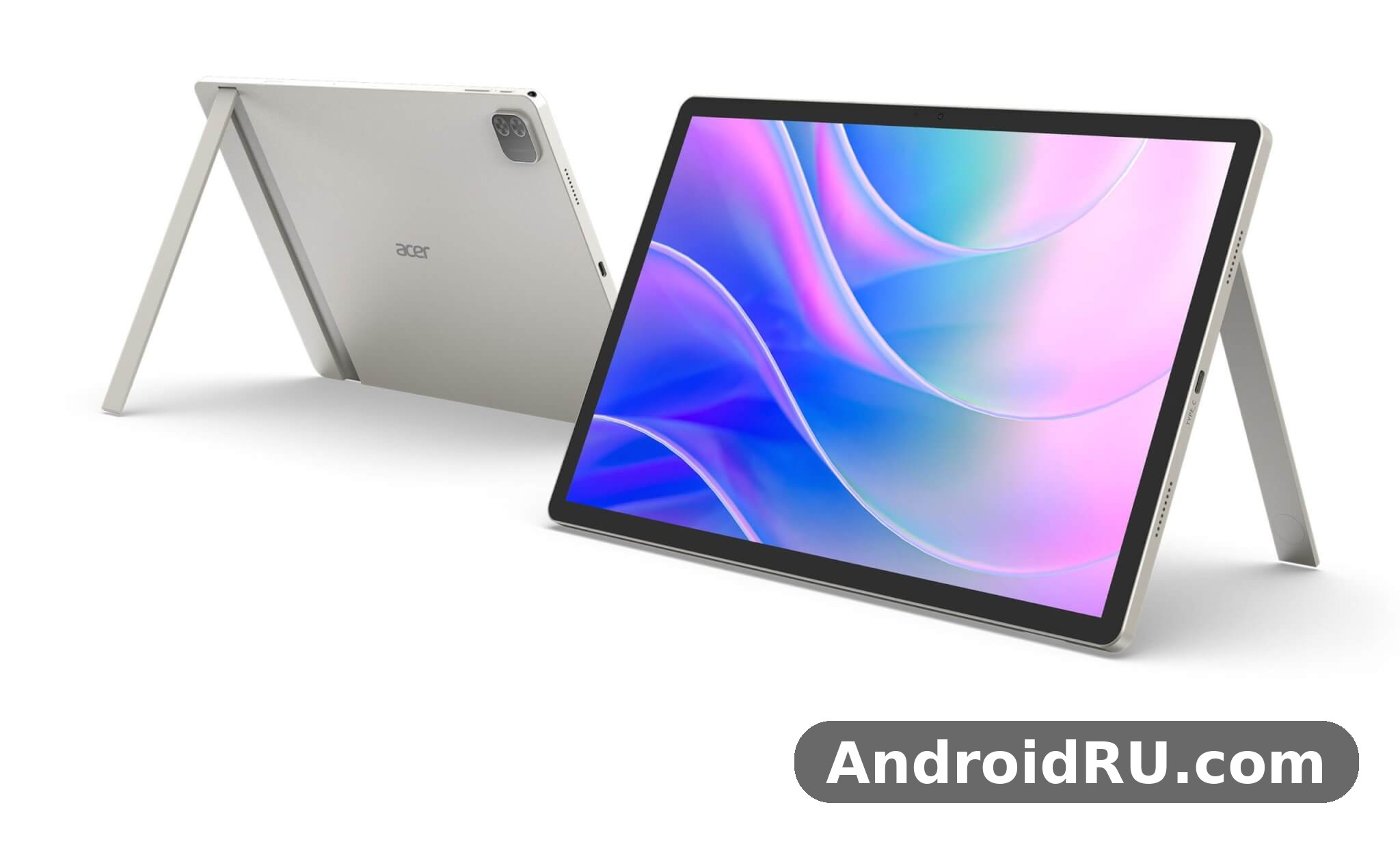
Before going further, it helps to set expectations. This is a budget Android tablet, and Acer priced it that way: about 260 euros, or around 300 dollars at launch. It is not a rival to a Galaxy Tab S or an iPad Air, and judging it against those tablets would miss the point. The real question is whether a large, cheap tablet can handle the jobs most people actually buy one for — streaming, reading, video calls, homework and casual games — without constant frustration. On paper, the Iconia A14 has a fair shot. The screen is big, the battery is big, the storage is generous, and the software is a clean, current Android 15. The weak spot is the processor, an entry-level Allwinner chip that sets the ceiling for everything else. Read on for the full picture, including the Acer Iconia A14 full specifications, a head-to-head comparison, and an honest answer to the question every buyer asks: is this tablet worth it?
Acer Iconia A14 Review 2026: The Good, the Bad and the Battery Life at a Glance
The short version is simple. The good: a huge 14-inch screen, a battery that lasts through a long day, plenty of storage, a handy kickstand, and a price that undercuts most tablets half its size. The bad: a modest processor that stumbles under heavy multitasking, a screen that is sharp enough but not bright enough for sunny rooms, cameras that are fine for calls and little else, and no mobile data option at all. The battery life sits in the middle of that story — it is the single best reason to buy this tablet, and also the reason the rest of the package works at all, because a big screen and a slow chip matter less when you are not hunting for a charger every few hours.
Acer launched the Iconia A14 alongside three siblings at IFA 2025: the X12, the X14 and the A16. The A14 and A16 share the same IPS screens, kickstands and 8000 mAh batteries, differing mainly in size. The X14 steps up to an OLED panel and Wi-Fi 6 with Bluetooth 5.4, while the X12 uses a MediaTek Helio G99 chip. That family context matters, because the A14 is the value pick of the four: the biggest screen per euro in the range, with the fewest frills. If you want the same idea in a larger size, the Acer Iconia A16 at a Glance: Review and Detailed Specifications covers the 16-inch version, and the OLED alternative is the Acer Iconia X14 Review and Full Specifications: Everything You Should Know.
Who this tablet is for
The Iconia A14 fits a particular kind of buyer. It suits students who need a large screen for lecture videos and reading, families who want a shared tablet for the living room, and anyone who watches a lot of video and wants a screen that feels closer to a small laptop than a phone. It also suits buyers on a strict budget who would rather have a big screen and a long-lasting battery than a fast chip. It does not suit mobile gamers who play demanding titles, professionals who edit video on the go, or anyone who needs mobile data away from Wi-Fi. Knowing which group you fall into answers most of the buying question before you read another word.
The verdict in one paragraph
For its price, the Acer Iconia A14 delivers a lot of tablet: a 14-inch display, an 8000 mAh battery, 8GB of RAM and 256GB of storage running Android 15. Its limits are honest ones — a slow chip, an average screen and basic cameras — and none of them is hidden. If your daily tablet life is video, reading, browsing, classes and light apps, this is a sensible buy and a genuinely good budget Android tablet. If you need speed, a bright outdoor screen or serious gaming, spend more or look elsewhere. The rest of this review explains how that verdict was reached, section by section.
Acer Iconia A14 Display Quality: A Big 14-Inch IPS Screen
The screen is the reason this tablet exists. At 14 inches, it is larger than most laptops from a decade ago, and it changes how the tablet feels in use: two apps side by side are actually readable, a film fills your field of view, and a textbook page shows at a comfortable size. The panel is an IPS LCD with a resolution of 1200 by 1920 pixels in a 16:10 ratio, which works out to about 162 pixels per inch. That is not retina-sharp by modern phone standards, but at normal tablet viewing distance text looks clean, and the 16:10 shape is a good compromise — taller than a video screen for reading, wide enough for films without huge black bars.
Acer Iconia A14 display quality is good for the money, with the usual budget caveats. Colours look natural rather than punchy, viewing angles are wide thanks to the IPS panel, and the screen-to-body ratio of around 83 percent keeps the bezels slim without making the tablet hard to hold. The listed Acer Iconia A14 screen brightness 400 nits figure tells the other half of the story: indoors, the screen is plenty bright, but in a sunlit room or near a window it can look washed out, and outdoor use in direct sunlight is a struggle. There is no high refresh rate here — the panel runs at 60 Hz — so scrolling is standard rather than silky, which is normal at this price.
A 14 inch tablet for reading, films and classes
Size is the A14’s superpower. As an Acer Iconia A14 14 inch tablet for reading, it shows a full page of a textbook or comic without constant zooming, and the 16:10 ratio suits documents better than the squarer screens on some rivals. For films, the 14-inch panel makes the tablet a credible portable television, especially propped up on its kickstand. For classes, the screen is large enough to watch a lecture while keeping notes open beside it. The trade-off is portability: at 910 grams and over 32 cm wide, this is a tablet you carry in a bag, not in one hand for long stretches.
Built-in kickstand: the feature that sells the screen
The built-in kickstand deserves its own mention, because it turns the big screen from a spec into a habit. This Acer Iconia A14 kickstand review note is simple: the stand is built into the back of the tablet, flips out when you need it, and holds the screen at a comfortable angle for watching video or joining a call. It removes the need for a separate case or stand, which matters on a budget tablet where every accessory is an extra cost. The Iconia A14 kickstand also helps the speakers, since the tablet sits upright with the sound firing toward you rather than into a tabletop. It is a small piece of engineering that makes the tablet feel thought through rather than thrown together.
Acer Iconia A14 Performance Test: Allwinner A733, 8GB RAM and Everyday Speed
Every budget tablet lives or dies on its chip, and the Iconia A14 uses the Allwinner A733, a 12 nm octa-core processor with two Cortex-A76 cores at 2.0 GHz and six Cortex-A55 cores at 1.8 GHz, paired with an IMG BXM-4-64 graphics unit. That is an entry-level chip by 2025 standards, and it sets honest limits: everyday apps run fine, but heavy work makes the tablet pause and think. An Acer Iconia A14 performance test in daily use looks like this: web browsing, email, YouTube, reading apps and video calls feel smooth; switching between several apps is workable thanks to the generous memory; but demanding games, large photo edits and long export jobs are slow or simply not the right job for this device.
The saving grace is the memory. The Acer Iconia A14 8GB RAM 256GB storage combination is unusually generous for a tablet near 260 euros, and it changes the feel of the device more than the chip spec suggests. With 8GB of RAM, apps stay in memory longer, so returning to a browser tab or a document does not force a reload every time. Storage is 256GB of internal space, which holds a large offline video library, and a dedicated microSDXC slot adds room for more. Acer A14 RAM is therefore a genuine selling point, and Iconia A14 storage is one of the best figures in its price class. Some retailers also list a cheaper 6GB RAM and 128GB storage version, so check the exact configuration before you buy — the headline model is the 8GB and 256GB one.
Acer Iconia A14 gaming performance: casual yes, demanding no
Acer Iconia A14 gaming performance is best described as casual-friendly. Light games, puzzles, card games, 2D platformers and older 3D titles run well on the 14-inch screen, and the big display makes casual gaming genuinely enjoyable. Demanding 3D games at high settings are a different story: frame rates drop, the tablet warms up, and you will need to lower graphics settings to keep things playable. That is the honest limit of the Allwinner A733, and buyers who care most about gaming should look at tablets with a stronger chip. For everyone else, the tablet handles the games most people actually play without complaint.
Acer Iconia A14 Allwinner A733 benchmark expectations
Talking about an Acer Iconia A14 Allwinner A733 benchmark needs a note of caution: benchmark scores for this chip vary with firmware, test version and background apps, and no single number tells the whole story. What the numbers consistently show is an entry-level profile — solid single-task speed for browsing and media, modest multi-core muscle, and graphics performance suited to light 3D rather than console-class games. The Acer A14 chipset is built for efficiency and low cost, not for raw power, and the tablet is tuned that way. If you compare benchmark charts, compare this chip against other budget tablet chips, not against flagship phone silicon, or the gap will look worse than it feels in real use.
What the chip handles well
Streaming video, reading, browsing with a handful of tabs, video calls, note-taking and office-style apps all run comfortably. These are the jobs the tablet was built for, and the combination of 8GB of RAM with a 1080p-class screen keeps them smooth, because the processor never has to push an extreme resolution. The tablet also stays cool during these tasks, which matters on a device you hold for hours.
Where it slows down
Heavy multitasking with many apps open, large spreadsheets, photo editing with big files, and modern 3D games are where the limits appear. Animations can stutter when the tablet is busy, app launches take a beat longer than on a mid-range device, and switching back to a heavy app sometimes means waiting for it to reload. None of this makes the tablet unusable — it makes it a tablet with a clear speed ceiling, and buyers who respect that ceiling will rarely hit it.
Acer Iconia A14 multitasking split screen on Android 15
One place the big screen earns its keep is multitasking. Acer Iconia A14 multitasking split screen mode lets you put two apps side by side — a lecture video next to your notes, a recipe next to a timer, or a browser next to a document — and at 14 inches both halves stay usable. Android 15 handles split-screen well, and the 8GB of RAM keeps both apps alive when you switch away briefly. It is not a laptop replacement, and there is no official keyboard bundle, but for students and casual workers the split-screen setup covers a surprising amount of real work.
Acer Iconia A14 Android 15 features and software
The tablet ships with Android 15, which is a real advantage at this price: a current operating system with modern privacy controls, improved notification handling, better large-screen app behaviour and the current set of accessibility tools. Acer Iconia A14 Android 15 features include the standard Google app suite, a clean home screen without heavy skins, and the usual tablet tricks like split-screen and floating windows where apps support them. The open question is the Acer Iconia A14 software update policy. Acer has not published a long, specific update promise for this model in the way some phone makers now do, so buyers should assume security updates will arrive but not count on several years of major Android version upgrades. Check the current support page for your region before buying if long-term updates matter to you, and keep the tablet updated whenever a patch appears.
Acer Iconia A14 Battery Life Test: How Long the 8000 mAh Cell Really Lasts
Battery life is the headline of this review, and the hardware gives the tablet a strong start: a 8000 mAh battery feeding a power-efficient chip and a 1080p-class screen. That combination is exactly what long battery life needs, because the two biggest drains on a tablet are the display and the processor, and both are modest here. An Acer Iconia A14 battery life test in mixed daily use — a few hours of video, some browsing, reading and a video call — should comfortably last a full day, and lighter users can stretch it across two days without hunting for a charger. Heavy video playback will drain it faster, but even then the large cell keeps the tablet going far longer than the small batteries in budget phones.
To put a range on it: in this class of tablet, with an 8000 mAh cell and a 1200 by 1920 screen, video playback typically lands in the region of eight to twelve hours depending on brightness, volume and whether you are streaming over Wi-Fi or playing a local file. Mixed use with the screen at moderate brightness lands lower, as it does on every tablet, because the screen is on for more kinds of work. These are realistic ranges rather than laboratory promises, and your own result will depend on brightness above all else — the 400-nit panel at full brightness draws noticeably more power than the same panel at half brightness. The Acer tablet battery story is therefore a good one with a simple rule: keep brightness sensible and the tablet will reward you.
Acer Iconia A14 charging time 8000 mAh: what to expect
The one honest gap in the battery story is charging. Acer Iconia A14 charging time 8000 mAh is not published as a single official figure, and the tablet charges over USB Type-C 2.0, so a full charge from empty takes several hours on a standard charger — plan on an overnight charge or a long top-up during the day rather than a quick fifteen-minute rescue. That is normal for a battery this size without fast-charging branding, but it means charging habits matter: top the tablet up when you can, rather than running it flat and expecting a fast refill. Check the charger wattage in the box for your region, because retail bundles vary, and a higher-wattage USB-C charger within the tablet’s supported range will shorten the wait.
Acer Iconia A14 for watching movies and long sessions
The battery and the screen were clearly designed together. Acer Iconia A14 for watching movies is the use case where everything lines up: a 14-inch display, stereo speakers, a kickstand, and a battery that outlasts a long film or a whole season of episodes. On a flight, a train or a sofa, the tablet can play for hours without a power socket nearby, which is the whole point of a big entertainment tablet. The Iconia A14 battery is also a quiet advantage for students and readers, because a tablet that survives a full day of classes without a charger is a tablet you can rely on.
Acer Iconia A14 Camera Quality, Speakers and Everyday Extras
Cameras on a budget tablet are a supporting act, and Acer has kept them simple: an 8MP rear camera with autofocus and an LED flash that records 1080p video at 30 frames per second, and a 5MP front camera for calls. Acer Iconia A14 camera quality is adequate for its real jobs — scanning a document, snapping a whiteboard, joining a video call — and nobody should buy this tablet for photography. The Iconia A14 camera on the back handles daylight snapshots acceptably, but low light brings noise and soft detail, and there is no portrait wizardry or night mode to rescue dim shots. The front camera is the one that matters more, because it is the one you will actually use.
Acer Iconia A14 video call quality 5MP front camera
Video calls are where the front camera earns its place. Acer Iconia A14 video call quality 5MP front camera is good enough for classes, meetings and family calls: faces look clear in decent light, the wide screen shows several participants at once, and the kickstand holds the tablet at a natural angle so you are not staring up your own nose. In dim rooms the image gets grainy, as it does on every budget tablet, so sit facing a window or a lamp for the best result. The 5MP sensor will not flatter you, but it will not embarrass you either, and for a tablet in this price range that is a fair result.
Acer Iconia A14 stereo speakers sound test notes
Sound is a pleasant surprise. The tablet has stereo speakers — four speakers in total — and an Acer Iconia A14 stereo speakers sound test in a quiet room shows clear dialogue, decent volume and a wider soundstage than the single-speaker tablets this price usually brings. Iconia A14 speakers handle films and lectures well, where voices matter most, though bass is thin and music at full volume can sound harsh, which is normal for tablet speakers. A 3.5mm headphone jack is also included, which is increasingly rare and genuinely useful: wired headphones, a cheap headset for calls, or a speaker cable all just work, with no adapter needed. Bluetooth 5.4 covers wireless headphones too, and the Acer Iconia A14 WiFi 6 Bluetooth 5.4 combination means modern wireless accessories connect cleanly.
Connectivity, sensors and the missing pieces
Connectivity is Wi-Fi only, and buyers should know that up front: there is no cellular connection, no SIM slot, no GPS positioning and no NFC. Wi-Fi is dual-band 802.11 a/b/g/n/ac/6, so the tablet makes full use of a modern home router, and Bluetooth 5.4 with A2DP and low-energy support covers headphones, keyboards and mice. USB is Type-C 2.0 for charging and data, and the dedicated microSDXC slot takes cards for extra media storage. Sensors are limited to an accelerometer — there is no fingerprint reader, no gyroscope listed and no compass — so the tablet knows when you rotate it and little else. None of this is a flaw for a home tablet, but it rules out using the A14 as a navigation device or a mobile-connected work tool.
Full Specifications of the Acer Iconia A14
Here is the complete picture in one place. The Acer Iconia A14 full specifications below come from the published spec sheet for model A14-M1N, announced on 3 September 2025 and released in November 2025. Where retail listings differ — most commonly a cheaper 6GB RAM and 128GB storage version in some regions — the headline configuration is 8GB of RAM with 256GB of storage, and the rest of the hardware stays the same. If a listing you are reading shows different memory, check the model number before you buy.
| Category | Acer Iconia A14 specification |
|---|---|
| Model | Acer Iconia A14 (A14-M1N) |
| Announced | 3 September 2025 (IFA) |
| Released | November 2025 |
| Display | 14.0-inch IPS LCD, 1200 x 1920 pixels, 16:10, about 162 ppi, about 83% screen-to-body ratio, 60 Hz |
| Operating system | Android 15 |
| Chipset | Allwinner A733 (12 nm) |
| CPU | Octa-core: 2x 2.0 GHz Cortex-A76 and 6x 1.8 GHz Cortex-A55 |
| GPU | IMG BXM-4-64 MC01 |
| RAM | 8GB (a 6GB version is listed by some retailers) |
| Storage | 256GB internal (a 128GB version is listed by some retailers) |
| Card slot | microSDXC, dedicated slot |
| Rear camera | 8MP single camera, autofocus, LED flash, 1080p video at 30fps |
| Front camera | 5MP, video calls |
| Battery | 8000 mAh, charging over USB Type-C 2.0 |
| Speakers | Stereo speakers, four speakers in total |
| Headphone jack | Yes, 3.5mm |
| Wi-Fi | Wi-Fi 802.11 a/b/g/n/ac/6, dual-band |
| Bluetooth | 5.4 with A2DP and LE |
| Cellular | None — no SIM slot, Wi-Fi only |
| Positioning | None — no GPS |
| NFC | No |
| USB | USB Type-C 2.0 |
| Sensors | Accelerometer |
| Dimensions | 324.6 x 211 x 8 mm |
| Weight | 910 g |
| Build | Glass front, aluminium frame, built-in kickstand |
| Colours | Vapor Silver |
| Price | About 260 EUR / around 300 dollars at launch |
Acer Iconia A14 weight and dimensions in daily use
The Acer Iconia A14 weight and dimensions explain a lot about how this tablet feels: 324.6 by 211 by 8 mm, and 910 grams. Acer A14 dimensions make it a two-handed device or a lap and table device, not something you hold up for an hour. The 8 mm thickness is slim for a tablet this size, and the aluminium frame gives it a solid, cool feel that plastic tablets in this price range rarely match. The Acer A14 weight is the price of the big screen and the big battery, and it is a fair trade — but buyers who want a tablet to read in bed one-handed should look at a smaller model instead. The Iconia A14 weight also means a good case is worth buying, because a 910-gram tablet dropped on a corner will not bounce.
Acer Iconia A14 Vapor Silver color and build
The Acer Iconia A14 Vapor Silver color is the single colour option, a light silver finish on the aluminium frame that looks clean and stays fairly free of fingerprints. Iconia A14 colors are therefore a short list of one, which keeps things simple: you choose the memory configuration, not the paint. The glass front and metal frame feel more expensive than the price suggests, and the built-in kickstand is integrated into the back without making the tablet look bulky. For a budget tablet, the build is one of the quiet strengths of the package.
Acer Iconia A14 microSD card support and storage expansion
Storage expansion is straightforward. Acer Iconia A14 microSD card support comes through a dedicated microSDXC slot, so adding a card does not cost you a SIM slot or a second storage bay — there is no SIM here at all. The Iconia A14 microSD slot is ideal for offline films, music and photos, and it means the 256GB of internal space can stay free for apps while media lives on the card. That matters because budget tablets often skimp on storage, and Acer has done the opposite here: generous internal storage plus a card slot is one of the best combinations in this price class.
Acer Iconia A14 price in Europe and what you get for it
The Acer Iconia A14 price in Europe was about 260 euros at launch, with a dollar price around 300 dollars in markets where Acer sells it directly. Iconia A14 price varies by country, retailer and configuration — the 6GB and 128GB version costs less where it is sold — so check the current local price before buying rather than relying on the launch figure. The Acer A14 price Europe figure is best judged against what it buys: a 14-inch screen, an 8000 mAh battery, 8GB of RAM, 256GB of storage and Android 15. Few tablets near that price offer the same combination, which is why the A14 keeps appearing on budget shortlists more than a year after launch.
Acer Iconia A14 vs Samsung Galaxy Tab A9 Plus and Lenovo Tab M11
No tablet is bought in a vacuum, so here is how the A14 stacks up against the two rivals buyers most often compare it with. The Acer Iconia A14 vs Samsung Galaxy Tab A9 Plus comparison is the one that matters most: Samsung’s tablet is smaller at 11 inches, but it brings a stronger brand, a longer software support record and a more polished accessory range. The Acer Iconia A14 vs Lenovo Tab M11 comparison is closer on price, with Lenovo offering a smaller 11-inch screen and a pen in some bundles, while Acer counters with a much larger display and a bigger battery. The 14-inch IPS display is the A14’s trump card in both match-ups — nothing else near this price gives you this much screen.
| Feature | Acer Iconia A14 | Samsung Galaxy Tab A9 Plus | Lenovo Tab M11 |
|---|---|---|---|
| Display | 14.0-inch IPS LCD, 1200 x 1920 | 11.0-inch LCD, 1200 x 1920, 90 Hz | 11.0-inch IPS LCD, 1200 x 1920, 90 Hz |
| Chipset | Allwinner A733 | Qualcomm Snapdragon 695 5G | MediaTek Helio G88 |
| RAM and storage | 8GB RAM, 256GB storage | 4GB or 8GB RAM, 64GB or 128GB storage | 4GB or 8GB RAM, 64GB or 128GB storage |
| Battery | 8000 mAh | 7040 mAh | 7040 mAh |
| Rear camera | 8MP with flash | 8MP | 8MP |
| Front camera | 5MP | 5MP | 8MP |
| Cellular option | No, Wi-Fi only | Yes, 5G version available | Wi-Fi only in most regions |
| Kickstand | Built in | No | No |
| Headphone jack | Yes | No | Yes |
| Operating system | Android 15 | Android 13/14, upgradable | Android 13, upgradable |
| Price class | About 260 EUR | Similar, often slightly higher | Similar or slightly lower |
The table makes the trade-offs clear. Samsung wins on chip speed, software support and the option of mobile data; Lenovo wins on refresh rate and, in some bundles, a stylus; Acer wins on screen size, battery size, storage and the built-in kickstand. There is no overall winner — there is a winner for each buyer. Pick the Samsung if you want the safest long-term software and a stronger chip in a smaller body. Pick the Lenovo if you want a pen and a smoother screen for less money. Pick the Acer if the biggest screen and the longest battery life matter most, and you mostly use the tablet at home on Wi-Fi.
Where the A14 sits in the Iconia family
The A14 is the value member of Acer’s 2025 tablet family, and the rest of the range helps explain its choices. The smaller Acer Iconia V11: Design, Key Features and Full Specifications in Detail suits buyers who want a lighter tablet to carry, while the Acer Iconia V12 First Impressions, Review and Full Specs covers the step up in that smaller line. Acer also sells phones alongside its tablets, and readers curious about the other side of the brand can read Everything About the Acer Acerone Liquid S262F5: Review, Design and Full Specifications. The pattern across the family is consistent: Acer prices for value, keeps the software close to stock Android, and spends the budget on screen and battery rather than on the fastest chip. The A14 follows that pattern to the letter.
Acer Iconia A14 accessories and keyboard case options
Acer Iconia A14 accessories and keyboard case options are worth planning before you buy, because the tablet does not ship with a keyboard. The built-in kickstand covers the stand, so a simple Bluetooth keyboard turns the tablet into a light typing station, and a sleeve or folio case protects the large screen in a bag. Check the current accessory listings for your region, because official and third-party cases appear and disappear, and the 14-inch size means cases made for smaller tablets will not fit. A screen protector is also worth considering at this size, since the display is the most expensive part to replace.
Pros and Cons: Is Acer Iconia A14 Worth Buying in 2026
The honest answer to the question “is Acer Iconia A14 worth buying in 2026” depends on what you ask a tablet to do. A year after its November 2025 release, the A14 remains a sensible buy for media, reading and classes, because its strengths — screen, battery, storage and price — have not aged, even though its chip was modest from the start. It is not a future-proof performance tablet, and nobody should buy it expecting flagship speed. But as a large-screen home tablet at a budget price, it still makes sense, and the Android 15 software keeps it current enough for everyday apps.
The pros
- Big 14-inch IPS display that makes films, reading and split-screen genuinely comfortable.
- Long battery life from the 8000 mAh cell, enough for a full day of mixed use.
- Generous 8GB of RAM and 256GB of storage, plus a dedicated microSDXC slot.
- Built-in kickstand, so the tablet props itself up without an extra purchase.
- Stereo speakers with four drivers, plus a rare 3.5mm headphone jack.
- Clean Android 15 software with Wi-Fi 6 and Bluetooth 5.4.
- Strong value: about 260 euros for a tablet this large.
The cons
- Entry-level Allwinner A733 chip that struggles with demanding games and heavy multitasking.
- Screen brightness is limited, so bright rooms and sunlight are a problem.
- No cellular option, no GPS and no NFC — Wi-Fi only, always.
- Basic cameras that are fine for calls but weak for photos.
- Slow charging for an 8000 mAh battery, with no published fast-charge time.
- Only one sensor listed, no fingerprint reader, and an uncertain long-term update policy.
Acer Iconia A14 for students and home use
Two groups get the most from this tablet. Acer Iconia A14 for students is a strong match: the large screen shows lecture slides and textbooks clearly, the battery survives a day of classes, split-screen lets notes sit beside a video, and the price leaves money for books. Acer Iconia A14 for online classes is the same story with the camera added — the 5MP front camera, the kickstand and the stereo speakers make it a capable classroom device on Wi-Fi. The second group is families and home viewers who want a shared screen for films, recipes, video calls and browsing. For both groups, the tablet’s limits rarely matter, because their daily apps are exactly the ones the A14 handles well. Buyers outside those groups — gamers, mobile workers and photo enthusiasts — should spend more on a faster device.
Frequently Asked Questions About the Acer Iconia A14
Is the Acer Iconia A14 good for students and online classes?
Yes, for most student work it is a strong fit. The 14-inch screen shows lecture slides and textbooks at a readable size, the battery lasts through a day of classes, and split-screen mode keeps notes beside a video. The Acer A14 display is large enough that two apps stay usable side by side, which smaller tablets struggle with. The limits are the entry-level chip, which can lag with many apps open, and the lack of mobile data, so students need Wi-Fi on campus or at home. For reading, writing and video lessons, this Acer tablet review finds the A14 well suited to student life.
Does the Acer Iconia A14 have SIM card support or GPS?
No. The tablet is Wi-Fi only: there is no SIM slot, no cellular connection, no GPS positioning and no NFC. That is a deliberate cost saving on a budget tablet, and it means maps and navigation apps will not know your location, and you cannot get online away from Wi-Fi without a phone hotspot. At home, in school or in the office, that rarely matters. If mobile data is essential for you, look at a tablet with a cellular version instead, because no accessory adds a SIM slot to this model.
How long does the Acer Iconia A14 battery last?
The 8000 mAh battery should last a full day of mixed use — video, browsing, reading and calls — and lighter users can reach into a second day. For continuous video playback, a realistic range is roughly eight to twelve hours depending on brightness and whether you stream or play local files. Brightness matters most: the screen at half brightness uses far less power than at full brightness. Charging takes several hours from empty over USB Type-C, so an overnight charge is the practical routine.
What is the Acer A14 specs highlight: RAM, storage and screen?
The headline Iconia A14 specs are 8GB of RAM, 256GB of internal storage, a dedicated microSDXC slot, and a 14.0-inch IPS display at 1200 by 1920 pixels. The Acer A14 Android 15 software is current, the battery is 8000 mAh, and the chip is the Allwinner A733. Some retailers list a cheaper 6GB RAM and 128GB storage version, so confirm the exact configuration in the listing — the model number for the headline version is A14-M1N, and the tablet launched as an Acer tablet 2025 release at IFA in September of that year.
Should I buy the Acer Iconia A14 or a smaller tablet?
Buy the A14 if screen size and battery life matter most to you and you mainly use the tablet at home on Wi-Fi — films, reading, classes and browsing are all better on 14 inches. Buy a smaller tablet if you carry it everywhere, read one-handed in bed, or need mobile data and a stronger chip. This Acer A14 tablet is a home and classroom device first: like every Acer Iconia tablet in this price range, it trades portability for presence, so the Acer tablet 14 inch screen is a delight at home and a burden in a small bag. Weigh how you will actually use it day to day, and the right size will choose itself.
Final Verdict on the Acer Iconia A14
The Acer Iconia A14 Review: The Good, the Bad and the Battery Life comes down to a simple trade. Acer gives you a very large screen, a very large battery, generous memory and storage, a kickstand and clean Android 15 software for about 260 euros, and asks you to accept an entry-level chip, a dimmer screen, basic cameras and no mobile data in return. For films, reading, classes and everyday browsing, that trade is a good one, and the tablet earns its place as a sensible budget buy. For demanding games, heavy work or life away from Wi-Fi, it is the wrong tool.
If you decide it fits, the practical next step is easy: confirm the exact configuration in the listing — 8GB of RAM and 256GB of storage under model A14-M1N — check the current local price, and add a case and a screen protector to your order, because a 14-inch screen is the part you will notice most and the part you most want to protect. Set the brightness to a comfortable level, charge it overnight, and the Allwinner A733 chipset will handle the everyday jobs this tablet was built for. That is the whole story of the Iconia A14: not a flagship, not a compromise too far, but a big, long-lasting, honestly priced tablet that knows exactly what it is.

