

Acer Iconia X14 Review and Full Specifications: Everything You Should Know
Acer has a habit of building big tablets that cost far less than the big names, and the 2025 Iconia X14 follows that habit to the letter. This Acer Iconia X14 review looks at a WiFi-only Android tablet with a 14-inch OLED screen, an 8000 mAh battery, 8GB of RAM and 256GB of storage, announced on 3 September 2025 and released in November 2025. The model number is X14-M1N, it ships in a single Iron Gray finish, and it launched at about 310 EUR, or around 350 US dollars. That price puts it in the same conversation as mid-range tablets from bigger brands, yet the screen alone makes it stand out: a 14-inch OLED panel at this price is still rare, and it changes what the tablet is good at. Watching films, reading, splitting the screen between a browser and a document, or joining a long video class all feel different on a display this size.
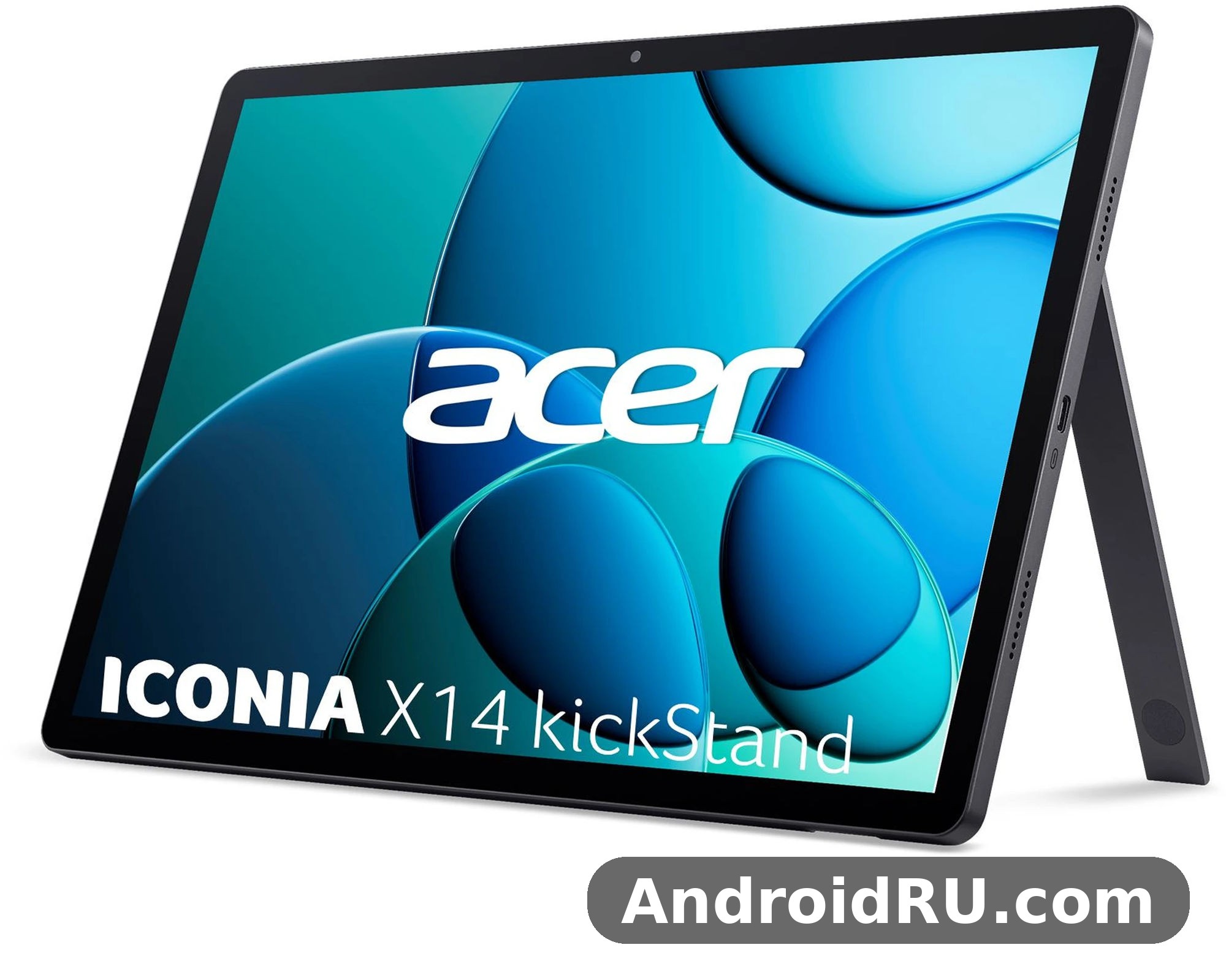
This is a specifications-based review. It works from the published Acer Iconia X14 specs, the launch announcement and the listings that followed, rather than from a hands-on test unit, so where a number was never published — charging speed is one example — this article says so plainly and points you to the official page instead of guessing. What follows covers the screen, the Allwinner A733 chip, memory, cameras, battery, speakers, connectivity and the full spec table, then stacks the tablet against its closest sibling, the Iconia X12, and ends with an honest list of pros and cons. If you want the short version first: the X14 is a large, bright-screened media and study tablet with honest mid-range performance, and its limits are just as clear as its strengths. A WiFi tablet with no SIM slot, no GPS and a single accelerometer will not suit everyone, and this review will help you decide which side of that line you sit on.
Acer Iconia X14 Review: What This Big-Screen Tablet Gets Right
The first thing to understand about this tablet is what Acer was aiming at. The Iconia X14 is not a laptop replacement and it is not a gaming flagship. It is a large-screen Android tablet built for the things people actually do on a tablet at home: streaming, reading, browsing, video calls and light productivity. The 14-inch OLED display does most of the heavy lifting in that brief, and the 8000 mAh battery, the four speakers and the microSD slot fill in the rest. Acer pairs that with Android 15 out of the box, 8GB of RAM and 256GB of UFS 3.1 storage, which is a generous memory and storage combination for a tablet at this price. You can keep a large offline video library, a stack of ebooks and a set of work documents on the device at the same time without constantly shuffling files to the cloud.
The second thing to understand is the price context. The Acer Iconia X14 price of about 310 EUR puts it below most 14-inch tablets with an OLED panel, and well below the premium tablets that dominate the top of the market. That is the whole pitch: a very large OLED screen for the money, with the trade-offs concentrated in the processor and the camera system rather than in the display. If your day is built around watching, reading and browsing, that trade works in your favour. If your day is built around heavy 3D games or professional photo editing, the same trade works against you, and the comparison section later in this article will show you the alternatives inside Acer’s own range.
Acer Iconia X14 release date and price
The Acer Iconia X14 release date story is simple. Acer announced the tablet on 3 September 2025 at IFA in Berlin, alongside the Iconia X12, the Iconia A14 and the Iconia A16, and it reached shops in November 2025. The launch price was about 310 EUR in Europe and around 350 US dollars, which makes it one of the cheapest ways to get a 14-inch OLED screen on an Android tablet. Prices drift after launch, so treat those launch figures as a starting point and check the current listing in your country before buying. One caution is worth stating here because it can cause real confusion: Acer showed a refreshed Iconia X14 at IFA 2026 with different hardware, including a MediaTek Helio G80 chip and 6GB of RAM. This review covers the 2025 model, X14-M1N, announced on 3 September 2025 with the Allwinner A733 chip and 8GB of RAM. When you shop, check the model number and the chipset on the listing so you know which version you are buying.
Inside Acer’s own 2025 tablet family, the X14 sits at the large-screen end. The smaller Acer Iconia X12: Full Review and Specifications uses a 12.6-inch AMOLED panel and a MediaTek Helio G99 chip with a bigger 10000 mAh battery, while the Acer Iconia A16 at a Glance: Review and Detailed Specifications stretches the screen to 16 inches with the same Allwinner A733 chip as the X14. The Acer Iconia A14 Review: The Good, the Bad and the Battery Life covers the smaller 14-inch sibling in the A series, and if you want something more compact still, the Acer Iconia Tab P11 (2025) Review and Detailed Specs: Key Features and Performance Covered looks at an 11-inch option from the same year. Acer’s 2025 range is not only tablets, either: the Everything About the Acer Acerone Liquid S262F5: Review, Design and Full Specifications covers a phone from the same period, which shows how wide Acer’s Android line-up had become by late 2025.
Is Acer Iconia X14 good for students?
Asking is Acer Iconia X14 good for students is really asking whether a big, cheap, WiFi-only tablet fits student life, and the honest answer is that it fits a large part of it. The Acer Iconia X14 for online classes works well on paper: a 14-inch screen keeps lecture slides readable without constant zooming, the 5 MP front camera handles video calls, the four speakers keep voices clear without earphones, and the 8000 mAh battery should last through a day of classes without hunting for a socket. Split-screen multitasking on a display this size is genuinely useful — notes on one side, a lecture or a PDF on the other — and 8GB of RAM is enough to keep a browser with several tabs, a notes app and a video call running at the same time. As a tablet for students, the X14 covers the core routine: lectures, reading, research, writing and streaming in the evening.
The limits matter too. There is no SIM slot, so the tablet needs WiFi wherever you use it, which means a phone hotspot or campus WiFi when you are away from home. There is no GPS, so it cannot double as a navigation device on field trips. No stylus is bundled or listed in the official specifications, so handwriting notes depends on buying a compatible capacitive pen separately, and palm rejection will not match a tablet with a proper active stylus system. The weight — 910 grams — is also something to feel before you buy if you plan to carry it in a bag all day with books. For a student who works mostly at a desk or on campus WiFi, those are acceptable trade-offs. For a student who needs mobile data and pen input every day, they are reasons to look elsewhere.
This Acer tablet review keeps coming back to the same balance, and the Acer X14 specs sheet explains why. This Iconia tablet is a large-screen device first and a performance device second, and this X14 tablet makes sense once you accept that order of priorities. As an Acer tablet 2025 release, it arrived with the current software of its day, and the Acer X14 Android 15 build is the foundation for everything from split-screen multitasking to the AI video features. None of that changes the verdict: judge this tablet by its screen, its battery and its memory, and it earns its price.
Acer Iconia X14 Display Quality and Design
The display is the reason this tablet exists. Acer Iconia X14 display quality starts with the panel type: OLED, which means each pixel produces its own light, so blacks are truly black and contrast is far stronger than on a typical budget LCD. Colours look rich without looking cartoonish, and dark scenes in films keep their detail instead of washing out into grey. The resolution is 1200 x 1920 pixels in a 16:10 ratio, which gives about 162 pixels per inch across the 14-inch diagonal. That pixel density is modest by phone standards, and if you hold the tablet very close you can see that text is not as razor sharp as on a high-density flagship panel. At normal viewing distance — on a desk, on a lap, on a stand — text is clean and comfortable, and video looks very good. The 16:10 ratio is a sensible choice for a tablet: wide enough for films with only thin black bars, tall enough for web pages and documents without feeling cramped.
The screen covers about 83 percent of the front face, with bezels that are slim but not vanishing. That is a practical decision on a tablet this size. You need somewhere to hold it, and a 14-inch tablet is held by its edges far more than a phone is. The panel is flat, the finish is Iron Gray, and the whole device is 8 mm thick, which keeps it feeling like a tablet rather than a slab. There is no fingerprint sensor and no face unlock hardware called out in the specifications, so unlocking is a PIN, pattern or password affair. That is normal at this price, and it keeps the cost where Acer wants it: in the screen.
A 14 inch tablet built around an OLED panel
A 14 inch tablet lives or dies by its screen, and the X14 makes the right call by spending its budget on OLED. The Acer Iconia X14 for watching movies is the strongest use case in this whole review: the OLED panel gives films deep blacks and strong contrast, the 14-inch size makes subtitles easy to read from a distance, and the four speakers mean you do not need earphones to get a decent sound. Streaming apps, downloaded films and video platforms all benefit, and the 256GB of storage plus a microSD slot means you can carry a serious offline library for a flight or a long train ride. The Acer Iconia X14 for reading ebooks is a quieter strength. An OLED screen at low brightness is easy on the eyes in a dark room, the large page shows more text per screen so you turn pages less often, and the 16:10 ratio fits a book page well in portrait orientation. If you read for an hour before bed, this is a comfortable device to hold — or better, to prop on a stand, because 910 grams gets heavy in one hand over a long chapter.
Acer Iconia X14 OLED screen brightness
The Acer Iconia X14 OLED screen brightness is one specification Acer did not publish as a number for the 2025 model, and it would be wrong to invent one here. What can be said from the panel type is that OLED handles contrast far better than LCD, so even in a bright room the picture keeps its depth, and in a dim room the screen can go pleasantly dark without the grey glow that LCD backlights produce. For outdoor use in direct sunlight, a tablet of this size is rarely the right tool anyway — the screen is large, the device is heavy, and glare is a fact of life on any glossy display. Indoors, which is where a 14-inch tablet spends nearly all of its life, the OLED panel is a clear step up from the LCD screens that dominate this price range. If you plan to use the tablet mostly outside, check the current listing or the official page for a brightness figure before deciding, because that number matters more to you than to most buyers.
Sound: Acer Iconia X14 quad speaker sound and the headphone jack
The Acer Iconia X14 quad speaker sound is the other half of the media experience. Four speakers with stereo output give films and music a wider sound than the two-speaker setup on most budget tablets, and dialogue stays clear at normal volume. These are tablet speakers, so expectations need to stay realistic: there is no deep bass, and at maximum volume the sound thins out. But for a lecture, a video call, a podcast or a film in a quiet room, the quad speakers do the job well. The 3.5mm headphone jack is a small detail that matters more than it sounds. Many tablets have dropped it, and keeping it means any ordinary wired earphones work with no adapter, no charging and no pairing. That is a practical win for students and for anyone who already owns a good pair of wired earphones. Bluetooth 5.4 covers wireless listening too, and it supports A2DP and Low Energy audio, so wireless earbuds pair quickly and stay connected.
Acer Iconia X14 weight and dimensions
The Acer Iconia X14 weight and dimensions tell you exactly what kind of device this is: 324.6 x 211 x 8 mm, and 910 grams. It is a large tablet, wider than a sheet of A4 paper, and nearly a kilogram in the hand. That size is the point — a 14-inch screen needs a 14-inch body — but it changes how you use it. This is a tablet for a desk, a lap, a stand or a sofa, not a tablet you hold up with one hand on a crowded bus. In a bag it takes up real space, so check that your bag or sleeve fits a device 324.6 mm wide before you buy. The 8 mm thickness is slim for a tablet this size, and the flat edges make it easy to grip, but the weight is the number to remember. If you already own a smaller tablet, pick up the X14 in a shop first if you can. The screen will impress you; the weight should not surprise you later.
Build, ports and the Acer Iconia X14 USB Type C port
The Acer Iconia X14 USB Type C port is a USB Type-C 2.0 connection, used for charging and for data. It is not the fastest USB standard, so large file transfers over cable will not be instant, but for charging and for moving the odd file it is fine, and USB-C means the same cable as most modern phones and laptops. Alongside it you get the 3.5mm jack and a dedicated microSDXC slot, which is a genuinely useful trio: charge, listen wired, and expand storage, all at once. The finish is Acer Iconia X14 Iron Gray colour, a dark grey that hides fingerprints better than a glossy black and looks more restrained than a bright colour would on a device this size. The build is plastic and metal in the usual budget-tablet mix, and while Acer does not claim any water or dust resistance, the device feels solid for its class. Keep a case on it: a 14-inch screen is an expensive thing to crack, and a folio case doubles as a stand, which is how this tablet is best used.
Acer Iconia X14 Performance Test: Allwinner A733, RAM and Storage
An Acer Iconia X14 performance test has to start with honest expectations. The Allwinner A733 is a budget octa-core chip built on a 12 nm process, with two Cortex-A76 performance cores running at 2.0 GHz and six Cortex-A55 efficiency cores at 1.8 GHz, plus an IMG BXM-4-64 GPU. That is a sensible, modern budget layout: the A76 cores handle bursts of work like opening apps and loading pages, while the A55 cores sip power during reading and video playback. It is not a flagship chip, and it was never meant to be. What it does is keep Android 15 smooth for everyday tasks, and the 8GB of RAM helps it do that without constantly reloading apps. If you come from an older budget tablet, the X14 will feel like a clear step up. If you come from a flagship phone, it will feel slower, and that is the trade you make for a 14-inch OLED screen at this price.
Day-to-day use is where the chip earns its keep. Browsing with several tabs, email, messaging, streaming video, reading and working in documents all run without drama. App launches take a beat longer than on a flagship, and switching between heavy apps can show a short pause, but nothing in normal use feels broken. The chip also carries Acer’s AI features: AI Super Resolution for upscaling video, and AI Smart Sensing for gesture controls. These are software features that run on the device, and they are the kind of extras that make a budget tablet feel more considered than the spec sheet alone suggests. They will not change your life, but video upscaling on a 14-inch screen is a feature you will actually notice.
Acer Iconia X14 Allwinner A733 benchmark expectations
The Acer Iconia X14 Allwinner A733 benchmark picture should be read as an expectation, not a laboratory result, because benchmark scores for this exact model vary between listings and test conditions. The A733 sits in the budget tier: comfortably ahead of the very cheapest tablet chips, clearly behind mid-range chips like the MediaTek Helio G99 in the Iconia X12, and far behind flagship silicon. In practice that means smooth scrolling and video, capable multitasking with 8GB of RAM behind it, and modest gaming performance. Synthetic benchmark numbers will not tell you much that matters here; what matters is that the chip, the RAM and the storage are balanced, so no single part bottlenecks the others in normal use. If you need heavy 3D gaming or video editing on a tablet, this is not your chip. If you need a large screen that stays smooth through a normal day, it is enough, and the money saved went into the OLED panel.
Acer Iconia X14 8GB RAM performance in daily use
The Acer Iconia X14 8GB RAM performance is one of the strongest parts of the package. Eight gigabytes is generous for a budget tablet, and it shows in the small things: apps stay in memory when you switch between them, a browser with a dozen tabs does not constantly reload, and split-screen multitasking with two apps open actually works instead of stuttering. This is the specification that keeps the tablet feeling fast a year or two after purchase, because RAM is what stops a tablet from feeling old. Storage is equally generous: the Acer Iconia X14 256GB storage is UFS 3.1, which is faster than the eMMC storage still found on cheaper tablets, so apps install quickly and large files move without long waits. As an 8GB RAM tablet with 256GB of fast storage, the X14 is well set up for the things a large tablet is for: a big media library, several large apps, and documents that stay on the device.
Acer Iconia X14 gaming performance
Acer Iconia X14 gaming performance is good for casual games and modest for demanding ones. Puzzle games, card games, 2D platformers and older 3D titles run well, and the huge OLED screen makes casual gaming genuinely enjoyable — this is a big, bright board for games that do not need a flagship GPU. Demanding 3D games will run, but expect medium settings rather than high, and expect the tablet to warm up during long sessions. The IMG BXM-4-64 GPU is an entry-level graphics part, and it is the clearest limit on gaming here. Cloud gaming is a better fit for this tablet than local heavy gaming: with WiFi 6 and a 14-inch screen, streaming a game from a cloud service plays to the X14’s strengths and sidesteps its weakest chip. If gaming is your main use, look at the comparison section before buying. If gaming is an evening extra after films and reading, the X14 handles it.
Acer Iconia X14 256GB storage and the Acer Iconia X14 microSD card slot
The Acer Iconia X14 256GB storage figure deserves a closer look, because it is better than it sounds. UFS 3.1 storage is fast storage, and on a tablet it shows up as quicker app installs, faster game loading and smoother handling of large video files. A 256GB tablet that uses slow storage would still feel slow; this one does not, because the storage keeps up with the rest of the device. Then there is the Acer Iconia X14 microSD card slot, a dedicated microSDXC slot that takes cards for extra storage. That matters because a media tablet fills up: films, offline maps of nothing — there is no GPS, remember — but films, music, ebooks, photos and documents add up fast, and a microSD card is the cheapest way to add room. As a microSD tablet, the X14 lets you keep the internal storage for apps and use a card for media, which is the sensible way to run a large-screen tablet. Not every tablet at this price still offers a card slot, and its presence here is a quiet advantage.
Acer Iconia X14 Android 15 features
The Acer Iconia X14 Android 15 features start with the operating system itself: Android 15, current at the time of launch, with the usual improvements to privacy controls, notification handling and large-screen multitasking. On a 14-inch tablet, the large-screen parts of Android 15 matter most: better split-screen behaviour, a taskbar that makes switching apps faster, and app pairs that suit a wide display. Acer adds its own touches on top, including the AI Super Resolution video upscaling and AI Smart Sensing gesture controls mentioned earlier. These features are software, so they will vary with updates, and the Acer Iconia X14 software updates picture is worth a straight answer: Acer has not published a firm multi-year update schedule for this tablet, so buyers should not assume a fixed number of Android version upgrades. Check the official page for the current software status before buying, and keep the tablet updated once you own it. Security patches and small fixes are the updates that matter most on a device like this, and they arrive through the normal Android update channel.
Acer Iconia X14 Camera Quality and Video Calls
Nobody buys a 14-inch tablet for its cameras, and Acer knows it. The Acer Iconia X14 camera quality is best described as adequate for the jobs a tablet camera actually does: scanning a document, taking a quick photo of a whiteboard, and handling video calls. The rear camera is a single 8 MP unit with autofocus and an LED flash, recording 1080p video at 30 frames per second. The front camera is a single 5 MP unit, also recording video. Those numbers are modest, and the results will be modest too: fine in good light, noisy in low light, and never a replacement for a phone camera. But that is the right way to judge them. A tablet camera is a convenience, not a creative tool, and the X14’s cameras cover the convenient jobs.
Video calls are the more important test, and here the X14 is better placed than its camera numbers suggest. The front camera sits where it should for a landscape video call, the 14-inch screen shows the other person large and clear, and the four speakers mean you can hear them without earphones. The 5 MP front sensor is enough for a sharp video call image in a well-lit room, and the 8 MP rear camera with autofocus is genuinely useful for showing a document or an object to the person on the other end. The LED flash helps the rear camera in dim rooms, though it will not rescue a truly dark scene. If you buy this tablet for online classes or remote work calls, the camera system is fit for purpose. If you buy it hoping to photograph a holiday, use your phone.
Acer Iconia X14 camera quality in daylight
The Acer Iconia X14 camera quality in daylight is the best case for both cameras. In bright, even light the 8 MP rear camera takes usable photos with reasonable colour and enough detail for a document or a whiteboard, and autofocus locks on without much hunting. The 5 MP front camera gives a clean video call image in daylight, which is the lighting most video calls happen in. Indoors under artificial light, expect softer images and more noise, and in low light expect the kind of grainy result that every budget tablet produces. The 1080p video recording at 30 frames per second is smooth enough for a video call or a short clip, and the LED flash is there for still photos in dim rooms rather than for video. Keep expectations in line with the price and the tablet will not disappoint you; expect phone-level photography and it will.
Acer Iconia X14 Battery Life and Charging
The Acer Iconia X14 battery life is built around a Li-Ion 8000 mAh battery, and on a tablet with an OLED screen and an efficient budget chip, that capacity goes a long way. OLED panels use less power when showing dark content, because black pixels are simply off, and the Allwinner A733’s efficiency cores sip power during reading and video playback. The result is a tablet that should comfortably last a full day of mixed use — browsing, video, reading and calls — and several days of light use on standby. Heavy use changes the picture: a long gaming session or hours of video at high brightness will drain the battery much faster, as they do on every tablet. The 8000 mAh battery is not the biggest in this class — the Iconia X12 carries 10000 mAh — but it is well matched to this screen and this chip, and it is the capacity that lets the X14 do its main job, which is to be a large-screen media device that does not need a charger nearby all day.
What the battery gives you in practice is freedom from the socket. Watch two films in an evening, read for an hour, join a video call, and the tablet will still have charge left. Leave it on standby for a few days and it will still wake up with most of its battery. That is the experience that matters, more than any single number, because a tablet that always needs charging is a tablet that stays at home. The X14 is not that tablet. It is a device you can take to a long study session, a flight, or a weekend away without packing the charger — though for a long trip, pack it anyway, because a dead tablet with a 14-inch screen is a heavy paperweight.
Acer Iconia X14 battery life in everyday use
The Acer Iconia X14 battery life in everyday use depends on brightness more than on anything else. A 14-inch OLED screen is the biggest power draw in the device, so the brightness setting you choose decides how long the battery lasts. At moderate brightness with mixed use — an hour of streaming, an hour of browsing, some reading and a video call — a full day is a realistic expectation, and light users will see two days. Turn the brightness up and stream video for hours, and the day shortens noticeably. Dark mode helps on OLED, because dark pixels draw almost no power, so using dark mode in reading and browsing apps is the simplest way to stretch the battery. The Acer X14 battery is a Li-Ion unit, so it will also age like every lithium battery: after a couple of years of daily charging, its capacity will be a little lower than when new. That is normal, and it is one more reason to avoid leaving the tablet on charge at 100 percent for days at a time.
Acer Iconia X14 charging time: what to expect
The Acer Iconia X14 charging time is a question with an honest gap in it: Acer did not publish a charging wattage for the 2025 model, so there is no official fast-charging figure to quote, and this article will not invent one. An 8000 mAh battery charged over a standard USB-C connection takes a few hours from empty, and the practical advice is simple: charge overnight, or top up during the day when you are not using the tablet. The USB-C 2.0 port charges at standard speeds, so do not expect the half-hour top-ups that flagship phones offer. If charging speed matters to you, check the official page or the listing for a wattage figure before buying, because that number decides whether a quick charge before a lecture is realistic. For most owners, overnight charging will be the routine, and the battery is large enough that the routine works.
How to stretch the battery on a large tablet
Stretching the battery on a 14-inch tablet comes down to three habits. First, keep brightness at the lowest comfortable level, and let the screen dim automatically when you are not looking at it. Second, use dark mode in apps that offer it, because on an OLED panel dark pixels are off pixels. Third, turn off WiFi and Bluetooth when you are reading offline, and close apps you are not using instead of leaving them running in the background. None of this is complicated, and together it can add hours to a charge. The tablet’s efficiency cores already do much of this work for you by sipping power during light tasks, so your job is simply not to fight them: avoid maximum brightness, avoid leaving the screen on while the tablet sits idle, and charge overnight rather than in short bursts.
Full Specifications
Here is the complete Acer Iconia X14 specs table, built from the published specifications for model X14-M1N. Read it as the reference for this review: every claim in the sections above traces back to a row in this table, and where a row says a feature is absent — no SIM, no GPS, no NFC — that absence is part of the honest picture. Prices and availability vary by country, so treat the price row as the launch figure.
How to read the Acer Iconia X14 specs table
The table below follows the usual layout: launch details, body, display, platform, memory, cameras, sound, connectivity, sensors, battery and miscellaneous details. The rows that matter most for a buying decision are the display, the chipset, the memory, the battery and the connectivity rows, because those five decide what the tablet can do and where it cannot go. The camera rows matter less, and the sensor row — a single accelerometer — tells you that this tablet has no gyroscope, no compass and no fingerprint sensor. If any row surprises you, that surprise is useful: it is better to find out here that there is no GPS than to find out on a road trip.
| Category | Acer Iconia X14 (X14-M1N) |
|---|---|
| Announced | 3 September 2025 |
| Status | Available. Released November 2025 |
| Dimensions | 324.6 x 211 x 8 mm (12.78 x 8.31 x 0.31 in) |
| Weight | 910 g (2.01 lb) |
| SIM | No |
| Display type | OLED |
| Display size | 14.0 inches, 568.3 cm2, about 83.0% screen-to-body ratio |
| Display resolution | 1200 x 1920 pixels, 16:10 ratio, about 162 ppi |
| Operating system | Android 15 |
| Chipset | Allwinner A733 (12 nm) |
| CPU | Octa-core (2×2.0 GHz Cortex-A76 and 6×1.8 GHz Cortex-A55) |
| GPU | IMG BXM-4-64 MC01 |
| Card slot | microSDXC (dedicated slot) |
| Internal storage | 256GB, 8GB RAM, UFS 3.1 |
| Main camera | Single 8 MP, autofocus, LED flash |
| Main camera video | 1080p at 30fps |
| Selfie camera | Single 5 MP |
| Selfie camera video | Yes |
| Loudspeaker | Yes, stereo speakers (4 speakers) |
| 3.5mm jack | Yes |
| WLAN | Wi-Fi 802.11 a/b/g/n/ac/6, dual-band |
| Bluetooth | 5.4, A2DP, LE |
| Positioning | No GPS |
| NFC | No |
| Radio | No |
| USB | USB Type-C 2.0 |
| Sensors | Accelerometer |
| Battery | Li-Ion 8000 mAh |
| Colours | Iron Gray |
| Models | X14-M1N |
| Price | About 310 EUR (about 350 US dollars at launch) |
Acer Iconia X14 no cellular connectivity: what WiFi-only means
The Acer Iconia X14 no cellular connectivity row is the one that changes the most buying decisions, so it deserves a plain explanation. This is a WiFi tablet: there is no SIM slot, no 2G, 3G or 4G, no mobile data and no GPS. At home or on campus WiFi it does everything a tablet needs to do. Away from WiFi it needs a hotspot from your phone, and it cannot navigate without a data connection and a GPS receiver it does not have. The Acer Iconia X14 WiFi 6 tablet side of the story is the good news: Wi-Fi 6 on dual bands gives fast, stable wireless at home, with better handling of crowded networks than older WiFi, and Bluetooth 5.4 keeps wireless earphones and accessories connected reliably. If your life happens mostly on WiFi, none of this matters and the lower price is a genuine saving. If you need a tablet that works on a train with no WiFi, or one that navigates on the road, this is not that tablet, and no software update will change it.
Acer Iconia X14 vs Iconia X12: Which Tablet Fits You?
The closest rival to the X14 sits inside Acer’s own range, and the Acer Iconia X14 vs Iconia X12 question is the one most buyers actually face. Both were announced on 3 September 2025, both carry 8GB of RAM and 256GB of storage, both have microSD slots and quad speakers, and both run Android 15 with the same AI features. The differences are in the screen, the chip and the battery, and those three differences decide which one fits you. The X14 gives you a bigger 14-inch OLED screen and WiFi 6 with Bluetooth 5.4, while the X12 gives you a sharper 12.6-inch AMOLED screen at 2560 x 1600, a stronger MediaTek Helio G99 chip, and a bigger 10000 mAh battery. The X12 launched at about 320 US dollars or 280 EUR, close enough to the X14’s price that the choice is about priorities, not budget.
Read the comparison as a choice between size and sharpness. The X14’s screen is larger and better for films and split-screen work, but its 1200 x 1920 resolution is lower, so text is less sharp up close. The X12’s screen is smaller but much sharper, and its Helio G99 chip is the stronger performer, so it handles demanding apps and heavier games better. The X12’s battery is bigger too, which matters on a long day. On the other side, the X14’s WiFi 6 and Bluetooth 5.4 are newer than the X12’s WiFi 5 and Bluetooth 5.2, and the X14’s larger screen is simply more comfortable for two apps side by side. There is no wrong answer here, only a better fit: pick the X14 if the biggest screen and the newest wireless matter most, pick the X12 if sharpness, performance and battery matter most.
| Feature | Acer Iconia X14 | Acer Iconia X12 |
|---|---|---|
| Display | 14.0-inch OLED, 1200 x 1920 | 12.6-inch AMOLED, 2560 x 1600 |
| Chipset | Allwinner A733 (12 nm) | MediaTek Helio G99 |
| RAM and storage | 8GB RAM, 256GB UFS 3.1 | 8GB RAM, 256GB |
| Rear camera | 8 MP, autofocus, LED flash | 8 MP class rear camera |
| Battery | 8000 mAh | 10000 mAh |
| WiFi and Bluetooth | Wi-Fi 6, Bluetooth 5.4 | Wi-Fi 5, Bluetooth 5.2 |
| Speakers | Four speakers, stereo | Four speakers, stereo |
| Card slot | microSDXC | microSDXC |
| Weight | 910 g | Lighter than the X14 (check listing) |
| Launch price | About 310 EUR / 350 US dollars | About 280 EUR / 320 US dollars |
For the full picture on the smaller sibling, read a dedicated review of the Iconia X12 before you decide. If you want a larger screen still, the 16-inch A16 from the same launch is the next step up, and the Tab P11 is the compact alternative for smaller bags. The point of this comparison is not to declare a winner. It is to show that Acer built two honest tablets at two honest prices, and the right one depends on whether you value screen size or screen sharpness more.
Pros and Cons: Who the Acer Iconia X14 Is For
Every tablet is a set of trade-offs, and the X14’s trade-offs are unusually clear. Acer spent the budget on a very large OLED screen, generous RAM and storage, four speakers and a big battery, and saved money on the processor, the cameras and the connectivity. That is a fair trade for a media and study tablet, and a poor trade for a mobile workstation. The lists below are the short version of everything above, and the section after them turns those lists into a buying decision.
Pros
- 14-inch OLED display with deep blacks and strong contrast at a price where most tablets still use LCD panels.
- 8GB of RAM and 256GB of UFS 3.1 storage, a generous combination that keeps multitasking smooth and leaves room for a large media library.
- 8000 mAh battery that lasts a full day of mixed use, helped by the efficient chip and the OLED panel.
- Four stereo speakers plus a 3.5mm headphone jack, so films, lectures and calls sound good with or without earphones.
- A dedicated microSDXC slot, WiFi 6 and Bluetooth 5.4, and Android 15 with AI video upscaling and gesture controls.
Cons
- The Allwinner A733 is a budget chip, so heavy 3D games and demanding apps run at modest settings.
- No SIM slot, no mobile data and no GPS, which limits the tablet away from WiFi.
- The 1200 x 1920 resolution is low for a 14-inch screen, so text is less sharp up close than on sharper rivals.
- At 910 grams it is heavy to hold for long periods, and no stylus is bundled or listed in the specifications.
- Charging wattage was not published, and Acer has not published a firm multi-year update schedule for this model.
Who should buy the Acer Iconia X14
The X14 suits anyone who wants the biggest screen for the money and uses a tablet mostly on WiFi: film watchers, readers, students on campus WiFi, and anyone who wants a large second screen for browsing and video calls at home. It suits a household that wants a shared tablet for the living room, a kitchen or a study desk, where the screen size matters more than pocketability. It also suits buyers who already own a phone for mobile data and photography, and want the tablet to do the big-screen jobs the phone cannot. The question is Acer Iconia X14 worth buying in 2026, and for those buyers the answer is yes, provided the price has stayed near launch and the buyer is comfortable with a budget chip. As a large tablet for films, study and reading, it remains good value well into 2026, because a 14-inch OLED screen does not get old the way a processor does.
Who should skip it
Skip the X14 if you need mobile data, GPS navigation or a stylus for daily handwriting, because no accessory fixes those gaps. Skip it if heavy gaming or demanding creative apps are your main use, because the Allwinner A733 will hold you back. Skip it if you carry your tablet everywhere and hold it in one hand, because 910 grams will tire your arm. And skip it if you need a razor-sharp screen for close reading of small text, because the 1200 x 1920 resolution on a 14-inch panel is the weakest part of the display. For those buyers, the Iconia X12 is the better Acer tablet, and the wider market has sharper, faster tablets at higher prices. The honest verdict is that the X14 is a specialist: superb at its chosen job, and not pretending to be anything else.
Frequently Asked Questions About the Acer Iconia X14
What is the Acer Iconia X14 release date?
Acer announced the tablet on 3 September 2025 and released it in November 2025. The model number is X14-M1N, it launched with Android 15, and the launch price was about 310 EUR or around 350 US dollars. A refreshed Iconia X14 with different hardware appeared at IFA 2026, so check the model number and chipset on any listing to make sure you are buying the 2025 version covered in this review.
Does Acer Iconia X14 support stylus?
No stylus is bundled with the tablet and no active stylus support is listed in the official specifications, so the question does Acer Iconia X14 support stylus has a careful answer: a basic capacitive pen may work for simple tapping and drawing, but there is no pen system with palm rejection or pressure sensitivity in the published specifications. If handwriting or drawing is a daily need, check the official page for pen compatibility before buying, or choose a tablet with a bundled active stylus instead.
Does the Acer Iconia X14 have a SIM slot or mobile data?
No. The X14 is a WiFi-only tablet with no SIM slot, no mobile data and no GPS. It connects through Wi-Fi 6 on dual bands and Bluetooth 5.4, and away from WiFi it needs a hotspot from your phone. If you need a tablet that works on mobile networks, look for a cellular model instead, because this limitation is hardware and cannot be changed by software.
How much does the Acer Iconia X14 cost?
The Iconia X14 price at launch was about 310 EUR in Europe and around 350 US dollars. Prices vary by country and by retailer, and they drift after launch, so check the current listing in your country. For a 14-inch OLED tablet with 8GB of RAM and 256GB of storage, that launch price was competitive, and if you find it at or below launch price in 2026 it remains fair value for a media and study tablet.
The Iconia X14 review in one line is this: a very large OLED screen, honest battery life and generous memory, held back by a budget chip and WiFi-only connectivity. If that combination matches your day — films, reading, classes and browsing on WiFi — the X14 is a strong buy at its price. If your day needs mobile data, a stylus or heavy gaming, spend the same money differently. Check the current price and the model number, confirm the chipset is the Allwinner A733 and the model is X14-M1N, and you will know exactly which tablet you are buying.

