

Acer Iconia V11: Design, Key Features and Full Specifications in Detail
Acer has spent years building tablets that do the basics well without asking for flagship money, and the Iconia V11 follows that exact playbook. This is a 10.92-inch Android tablet with a 90Hz screen, a Helio G99 chip, 8GB of RAM, 256GB of storage and an 8000mAh battery, announced on 16 May 2025 and released in August 2025 at around 230 EUR. It is not trying to replace a laptop or outrun a premium slate. It is trying to be the tablet you reach for on the sofa, at the kitchen table, in a lecture hall or on a long train ride — and on that brief, the spec sheet reads like a sensible shopping list.
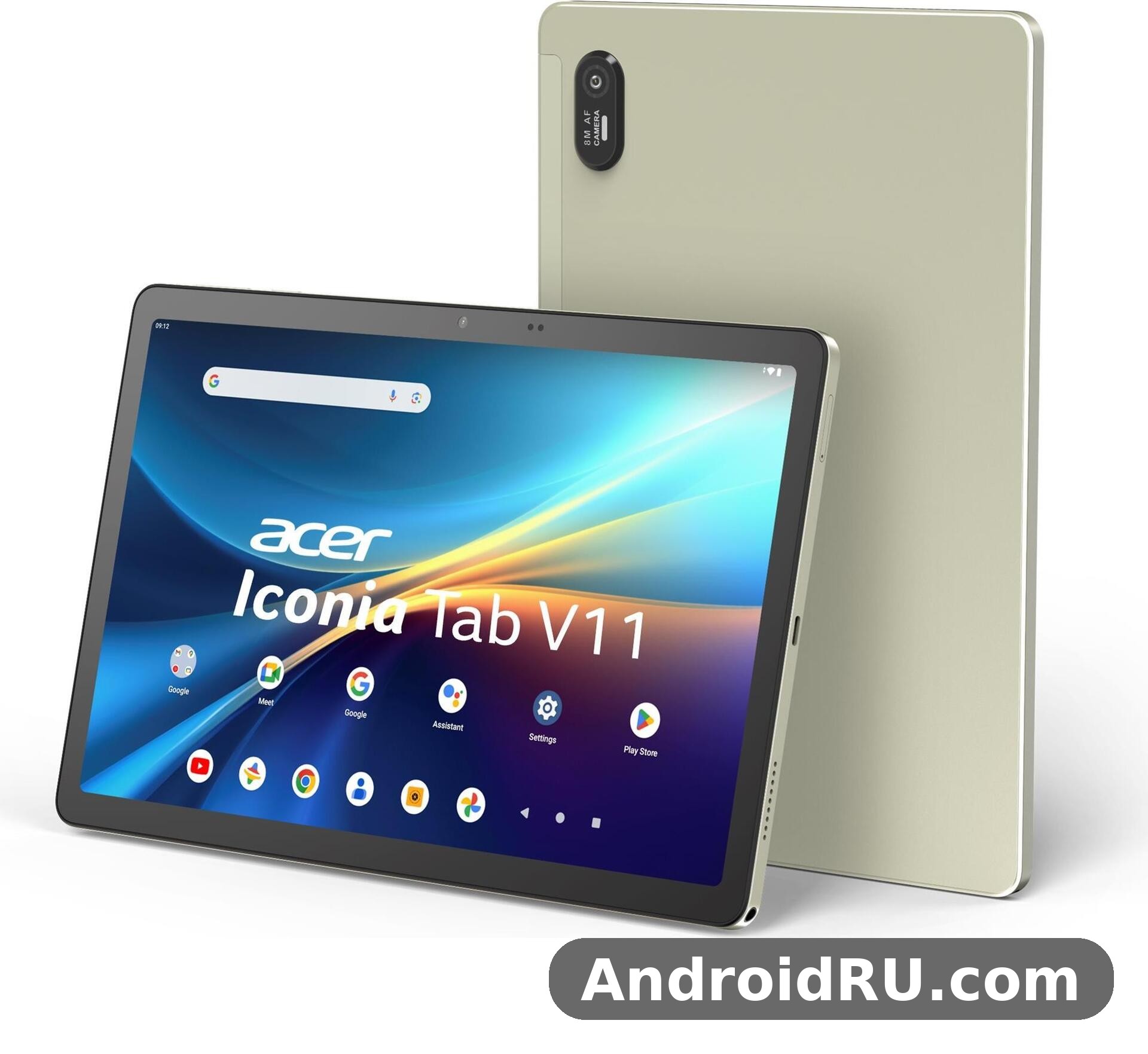
This Acer Iconia V11 review walks through the whole device the way a buyer would actually use it: the design and the built-in kickstand, the screen, the performance of the Helio G99 in everyday apps, the cameras, the battery, the software, and the full spec sheet at the end. Prices vary by country and by retailer, so where a number depends on your market I say so and point you to the official listing rather than guessing. If you are comparing it with its bigger sibling, the V12 is the other side of that family comparison, covered in detail later in this article.
Short version up front: the V11 is a comfortable media and study tablet. The 90Hz IPS panel is the nicest surprise at this price, the 8GB of RAM keeps Android 15 moving, and the kickstand plus stylus support make it more useful for notes and video calls than most tablets in its class. The trade-offs are equally clear — eMMC storage rather than faster UFS, a single 8MP rear camera, and no fingerprint reader or NFC on the spec sheet. None of those are deal-breakers for the audience this tablet is aimed at, but they set the ceiling on what it can do.
Acer Iconia V11 Design and Build: Thin, Light and Ready to Carry
Pick the V11 up and the first thing you notice is how little it weighs for its size. At 500 grams and 7.9 mm thick, it sits comfortably in one hand while you read, and it slips into a bag next to a laptop without making the bag feel loaded. The Acer Iconia V11 weight and thickness put it in the same everyday-carry class as most 11-inch tablets, and the aluminium alloy frame gives it a stiffer, cooler feel than the plastic bodies you still find at this price. The front is glass, the frame is metal, and the only colour listed on the official spec sheet is Gold, a warm finish that looks more premium than the usual grey or black.
Gold is a matter of taste, and it does show fingerprints and smudges on the frame more than a dark finish would. A slim case solves that in a day, and the tablet is light enough that a case does not ruin the portability. The V11 is sold as two models, the V11-21M and the V11-22M, with the cellular version carrying a Nano-SIM slot for LTE. If you buy the Wi-Fi-only version there is no SIM tray to worry about, so check the exact model number on the box before you assume it takes a SIM.
Acer Iconia V11 Kickstand and Stylus Support
The feature that sets this tablet apart from most rivals at the same price is the built-in three-level kickstand. It folds out of the back of the tablet and props the screen up at three angles, so you can watch a film on a tray table, prop it up for a video call, or angle it low for typing and drawing. The Acer Iconia V11 kickstand is the kind of thing you stop thinking about until you use a tablet without one and find yourself leaning it against a stack of books. It also means one less accessory to buy and carry, which matters for students and commuters.
Acer Iconia V11 stylus support is listed on the spec sheet too, which opens the door to handwritten notes, sketches and marking up documents. Acer sells the V11 as a note-taking and drawing companion, and a pen makes the 10.92-inch screen far more useful for students who annotate lecture slides or sketch ideas. Check whether a stylus is included in the box in your region, because bundles differ by market — some retailers include one, others sell it separately, and the same goes for a keyboard cover.
Gold Finish and Aluminium Frame in Daily Use
In daily use, the metal frame earns its keep. It resists the small knocks of bag life better than plastic, it does not creak when you grip it, and it helps the tablet shed heat during long video sessions. The Gold finish looks warm under indoor light and a little flashier outdoors, so if you prefer a low-key look, a case is the easy fix. Either way, the build is a genuine strength of this Acer tablet, not a corner that was cut to hit the price.
What Is in the Box and What You Will Still Need
The box contents vary by region, so treat any unboxing list as a guide rather than a promise. Expect the tablet itself, a USB-C cable and a charger in most markets, and possibly a stylus depending on the bundle. A case is worth buying on day one: the kickstand protects the back when it is folded away, but the glass front is still glass, and a 10.92-inch screen is exactly the thing that meets a table edge at the wrong angle. If you plan to type long documents, a Bluetooth keyboard is the other sensible add-on, and the Acer Iconia V11 accessories case and keyboard market already has slim covers made for this exact size.
Acer Iconia V11 Display: A 10.92-Inch 90Hz Screen for Movies and Reading
The screen is the part of this tablet you will look at for hours, so it is good news that Acer spent the money here. The Acer Iconia V11 10.92 inch display is an IPS LCD panel with a 1200 x 1920 resolution, a 16:10 aspect ratio and a 90Hz refresh rate, which works out to around 207 pixels per inch. That 16:10 shape is the right call for a tablet: it is tall enough for reading and browsing, wide enough for films without huge black bars, and practical for split-screen work.
The 90Hz refresh rate is the headline. Most tablets near this price still ship with 60Hz panels, and the step up to 90Hz makes scrolling through articles, feeds and documents feel visibly smoother. It is not a gaming-grade 120Hz or 144Hz panel, and nobody should buy this tablet for competitive gaming, but for the scrolling, swiping and page-turning that make up most tablet use, 90Hz is a real quality-of-life gain. As a 90Hz tablet it punches above its price, and once you have used it for a week, going back to 60Hz feels sluggish.
Acer Iconia V11 Display Quality in Real Rooms
Acer Iconia V11 display quality comes down to three things that matter more than the spec sheet: viewing angles, colour, and brightness. IPS panels are strong on viewing angles, and this one holds its colours well when you tilt it to share a video with the person next to you or prop it on the kickstand at an angle. Colours are natural rather than oversaturated, which suits films and photos, and the 1200 x 1920 resolution is sharp enough that text stays crisp at normal reading distance. It is not an OLED panel, so blacks will look dark grey in a dark room rather than true black, and that is the honest trade-off for the price.
Brightness is adequate for indoor use and for shaded outdoor spots, but like most IPS tablets in this class it will struggle in direct sunlight. That is normal, and it is one reason the V11 is best thought of as an indoor and on-the-move companion rather than a beach tablet. If you read outdoors a lot, an e-reader or a brighter premium tablet will serve you better. For everyone else, the screen is a clear strength.
90Hz Refresh Rate and Eye Comfort
The 90Hz panel also helps with eye comfort during long reading sessions, because motion stays smoother and text does not smear as you scroll. There is no official word on a dedicated eye-comfort certification in the spec sheet, so use Android 15’s own Night Light and dark mode for evening reading. The 16:10 ratio gives you a good line length for books and articles, and the 207 ppi density keeps small text legible without zooming.
Acer Iconia V11 for Watching Movies
The Acer Iconia V11 for watching movies is where the screen, speakers and battery come together. The 10.92-inch panel is big enough that a film feels like a film rather than a phone video, the 16:10 ratio fits most streaming content with modest bars, and the stereo speakers give you proper left-right sound instead of a single muffled driver. Pair it with the kickstand on a table or a tray and you have a genuinely pleasant portable cinema. As a tablet for movies, it is one of the better options anywhere near its launch price.
Acer Iconia V11 for Reading Ebooks
For reading, the Acer Iconia V11 for reading ebooks benefits from the same traits: a sharp panel, a comfortable weight for one-handed holding, and a screen that is big enough for a full page of text or a comic panel without constant zooming. At 500 grams it is heavier than a dedicated e-reader, so long one-handed sessions will tire your wrist sooner, but for an hour of reading in bed or on a train it is fine. The 90Hz scrolling makes flipping through a long document or a magazine-style layout feel calm rather than choppy.
Acer Iconia V11 Performance: Helio G99, 8GB RAM and 256GB Storage
Under the screen sits the MediaTek Helio G99, a 6 nm octa-core chip with two Cortex-A76 cores at 2.2 GHz for heavy work and six Cortex-A55 cores at 2.0 GHz for lighter tasks, paired with a Mali-G57 MC2 GPU. The Helio G99 is a familiar chip in affordable tablets and phones, and familiarity is a good thing here: app developers know it, Android 15 runs well on it, and its behaviour is predictable. The Acer Iconia V11 Helio G99 performance is best described as confident for everyday work — browsing with many tabs open, streaming, email, documents, social apps and video calls all run without drama.
The 8GB of RAM is the other half of the story. Many tablets at this price still ship with 4GB or 6GB, and the difference shows up when you switch between apps: 8GB keeps more apps alive in memory, so returning to a browser tab or a document does not force a reload. The Acer Iconia V11 8GB RAM 256GB storage combination is the single configuration on the spec sheet, which keeps the buying decision simple — there is no cheaper low-memory version to regret later. Storage is 256GB of eMMC with a dedicated microSDXC slot, so you can add a card for films, photos and offline files without sacrificing anything.
Acer Iconia V11 Multitasking Split Screen
Android 15 on a 10.92-inch screen makes split-screen multitasking genuinely useful, and the Acer Iconia V11 multitasking split screen experience is one of the best reasons to pick a tablet this size. Put a lecture video on one side and your notes on the other, or a document next to a browser for research, and the 8GB of RAM keeps both apps responsive. The 16:10 ratio gives each half enough width to work with, which is not true of every tablet. If you are a student or you work with reference material open beside your writing, this is a daily-use feature rather than a gimmick.
Acer Iconia V11 Gaming Performance Test: What to Expect
Talking about the Acer Iconia V11 gaming performance test in honest terms means setting expectations by the chip, not by marketing. The Helio G99 and Mali-G57 MC2 handle casual and mid-weight games well — puzzle games, card games, 2D platformers and lighter 3D titles run smoothly at sensible settings. Demanding 3D games will run, but you should expect medium graphics settings and the occasional frame dip in busy scenes rather than a locked high frame rate. This is a Helio G99 tablet, and that chip was designed for efficiency and everyday smoothness, not for flagship gaming.
Heat is well controlled for this class of chip, and the metal frame helps spread warmth so the tablet does not get uncomfortably hot in your hands during a long session. If gaming is your main reason for buying a tablet, a device with a faster chip and a higher refresh rate will serve you better. If gaming is something you do for half an hour after the real work is done, the V11 is more than capable.
eMMC Storage Speeds and What They Mean
Storage speed is the one performance compromise worth understanding. The 256GB of eMMC storage is slower than the UFS storage found in more expensive tablets, which shows up in app install times and in loading large games rather than in everyday scrolling. In practice, once an app is open, the difference fades — the 8GB of RAM and the Helio G99 matter more. Keep the internal storage for apps and use a microSD card for media, and the eMMC storage will rarely bother you. It is a fair trade for the price, and it is the same trade most tablets in this class make.
Acer Iconia V11 Cameras, Sound and Video Calls
Tablet cameras are rarely the reason anyone buys a tablet, and Acer has kept them simple here. The rear camera is a single 8MP unit with autofocus and an LED flash, recording 1080p video at 30 frames per second. The Acer Iconia V11 8MP rear camera is fine for its real jobs: scanning documents, photographing a whiteboard, snapping a quick photo of a product or a page, and the occasional outdoor shot in good light. It is not a phone camera replacement, and in low light it will show noise quickly, so keep your expectations in line with the hardware.
The front camera is a 5MP unit, and that is the camera you will actually use most, because on a tablet the front camera is for people, not landscapes. The Acer Iconia V11 camera for video calls is perfectly adequate: 5MP is enough for a clear image on a video call, and the wide 10.92-inch screen means you can see everyone in the meeting properly. Good lighting matters more than megapixels here — sit facing a window or a lamp and you will look noticeably better than you would in a dim room.
Acer Iconia V11 Front Camera Quality
Acer Iconia V11 front camera quality is good enough for classes, meetings and family calls, and that is the honest bar. Colours are natural, the image stays stable, and the camera handles indoor lighting without turning your face into a blur. Selfies are usable for social apps, though the fixed focus and modest resolution mean they will not match a modern phone. For a tablet, that is fine — the front camera exists to keep you connected, and it does that job well.
Stereo Speakers and the Acer Iconia V11 Headphone Jack
Sound is a quiet strength. The V11 has stereo speakers, which give films, music and games a sense of space that a single speaker cannot match, and the volume goes loud enough for a small room without distorting badly. The Acer Iconia V11 headphone jack is the other welcome detail: a 3.5 mm jack is disappearing from tablets, and having one means you can plug in any wired earphones without a dongle. For students in a library, commuters on a train, or anyone who already owns good wired headphones, that jack is worth more than it looks on paper.
Acer Iconia V11 Battery Life and Charging
The battery is an 8000mAh unit, and on a tablet with an efficient 6 nm chip and an IPS panel, that is a solid capacity for the size. Acer Iconia V11 battery life in everyday terms means a full day of mixed use — browsing, streaming, reading and calls — without hunting for a charger, and lighter use stretches comfortably across two days. Heavy video streaming will drain it faster, as it does on every tablet, but the combination of a big battery and an efficient chip is the right formula. As an 8000mAh tablet it compares well with rivals that ship smaller cells at the same price.
Standby drain is low, so the V11 does not punish you for leaving it in a bag for a few days. That matters for a device that is often a second screen rather than a primary phone: you pick it up, it still has charge, and you get on with your evening. The Iconia V11 battery is one of the reasons this tablet works as a travel companion — a full charge in the morning covers a long flight or a day of sightseeing photos and maps.
Acer Iconia V11 Charging Time
Acer Iconia V11 charging time is the one battery question the spec sheet does not answer directly: no charging wattage is published in the listing, and the tablet charges over USB Type-C 2.0. With an 8000mAh cell, a full charge from empty takes a few hours on a standard charger, so the practical habit is to charge it overnight or top it up while you work. Use the charger that comes in the box or a good-quality USB-C charger, and check the official listing for your region if the exact charging speed matters to your buying decision. Fast charging is not listed as a headline feature, and nobody should buy this tablet expecting a half-hour top-up to last a day.
Acer Iconia V11 Connectivity, Software and Updates
Connectivity covers the essentials and skips the extras. The Acer Iconia V11 WiFi 6 support comes through 802.11 a/b/g/n/ac/6 on dual bands, which is the current standard for a tablet at this price and keeps streaming and downloads fast on a modern home router. Bluetooth 5.2 with A2DP and LE handles headphones, keyboards and speakers, and USB Type-C 2.0 covers charging and wired accessories. There is no NFC and no FM radio on the spec sheet, and positioning is listed as unspecified, so check the official listing if satellite navigation matters to you — a Wi-Fi-only tablet is rarely anyone’s primary navigation device anyway.
The cellular model adds GSM, HSPA and LTE on a Nano-SIM, which makes the V11 usable away from Wi-Fi for browsing, streaming and calls. If you buy the V11-21M or V11-22M, confirm which of the two models carries the cellular radio in your market, because the two model numbers cover the Wi-Fi and cellular versions and retailers do not always label them clearly. A USB-C tablet with LTE is a practical combination for students and field workers who cannot rely on public Wi-Fi. As a WiFi 6 tablet, this Acer Iconia tablet covers the connectivity basics most buyers of an Iconia tablet actually need, and the V11 tablet does it without a premium price.
Acer Iconia V11 MicroSD Card Support
Acer Iconia V11 microSD card support is a dedicated microSDXC slot, which is better than the shared SIM-and-card trays some tablets use — you do not have to choose between a SIM and extra storage. A card is the cheap way to carry a library of films for a flight or a backlog of offline maps and documents, and it keeps the 256GB of internal storage free for apps. Buy a reputable card from a known brand and format it in the tablet, and it will behave like a natural extension of the built-in storage.
Acer Iconia V11 Software Updates and Android 15
The tablet ships with Android 15, which brings the current generation of Android tablet features: a taskbar for switching apps, better split-screen controls, improved notifications and the privacy controls that arrived with recent Android versions. The Acer Iconia V11 Android 15 tablet experience is clean and close to stock Android, which keeps it fast and easy to learn. Acer Iconia V11 software updates depend on Acer’s update policy for this model, and the company has not published a long-term update promise in the spec sheet — so if five years of major Android upgrades matters to you, check Acer’s official support page for the V11 before you buy, and keep the tablet updated through Settings whenever an update arrives.
Full Specifications
The Acer Iconia V11 full specifications below are taken from the published spec sheet for models V11-21M and V11-22M. The Acer Iconia V11 release date was August 2025, following the announcement on 16 May 2025, and the tablet ships in Gold. Where the spec sheet lists a feature as unspecified — sensors and positioning, for example — I say so below rather than guessing, and you should check the official listing for your exact model before buying.
| Feature | Acer Iconia V11 |
|---|---|
| Display | 10.92-inch IPS LCD, 90Hz, 1200 x 1920 pixels, 16:10, ~207 ppi |
| Operating system | Android 15 |
| Chipset | MediaTek Helio G99 (6 nm) |
| CPU | Octa-core (2x 2.2 GHz Cortex-A76 and 6x 2.0 GHz Cortex-A55) |
| GPU | Mali-G57 MC2 |
| RAM | 8GB |
| Storage | 256GB eMMC, microSDXC dedicated slot |
| Rear camera | 8MP, autofocus, LED flash, 1080p video at 30fps |
| Front camera | 5MP |
| Battery | 8000mAh |
| Sound | Stereo speakers, 3.5 mm headphone jack |
| Connectivity | Wi-Fi 802.11 a/b/g/n/ac/6 dual-band, Bluetooth 5.2, USB Type-C 2.0, LTE on cellular model, Nano-SIM |
| Extras | Stylus support, built-in three-level kickstand, no NFC, no FM radio |
| Body | 7.9 mm thick, 500 g, glass front, aluminium alloy frame |
| Colours | Gold |
| Models | V11-21M, V11-22M |
| Launch price | About 230 EUR |
Read the Iconia V11 specs as a whole and the balance is clear: a strong screen, generous memory, a big battery and practical extras, with the savings made on storage speed and cameras. For a 10.92 inch tablet at this price, that is a sensible set of priorities, because the screen, memory and battery are the parts you use every day, while the rear camera on a tablet is used a few times a month at most.
Acer Iconia V11 vs Iconia V12
The most natural comparison inside Acer’s own range is the Acer Iconia V11 vs Iconia V12 question. The V12 is the bigger sibling with a larger screen and a higher launch price, aimed at buyers who want more display space for films and split-screen work. The V11 is the lighter, cheaper and more portable of the two, and for most buyers the 10.92-inch screen is already plenty. If you carry your tablet every day, the V11’s 500 grams and smaller footprint win. If your tablet mostly lives on a desk or a kitchen counter, the V12’s extra screen space is worth the premium. Read the Acer Iconia V12 First Impressions, Review and Full Specs before deciding, and choose by how you carry it, not by which spec sheet looks longer.
Acer Iconia V11 vs Samsung Galaxy Tab A9
The Acer Iconia V11 vs Samsung Galaxy Tab A9 comparison is the one most shoppers will actually make, because the Tab A9 is the best-known budget tablet from a big brand. On paper the V11 answers with a larger 10.92-inch 90Hz screen against the A9’s smaller 8.7-inch 60Hz panel, 8GB of RAM and 256GB of storage, a bigger 8000mAh battery, and the kickstand and stylus support the A9 does not offer. The A9 answers with Samsung’s longer software support, a more widely available accessory market and a smaller body that some people prefer for reading. If screen size, refresh rate and memory matter most, the V11 is the stronger pick. If long-term updates and brand support matter most, the A9 deserves a serious look. Neither tablet is the wrong answer — they are aimed at slightly different buyers.
| Feature | Acer Iconia V11 | Samsung Galaxy Tab A9 | Acer Iconia V12 |
|---|---|---|---|
| Display | 10.92-inch IPS LCD, 90Hz, 1200 x 1920 | 8.7-inch TFT LCD, 60Hz, 800 x 1340 | Larger display than the V11, check listing |
| Chipset | MediaTek Helio G99 | MediaTek Helio G99 | Check the V12 listing for its chip |
| RAM and storage | 8GB RAM, 256GB eMMC, microSDXC | 4GB or 8GB RAM, 64GB or 128GB storage, microSD | Larger-screen sibling in the Iconia range |
| Battery | 8000mAh | 5100mAh | Bigger screen, bigger body, check listing |
| Rear camera | 8MP with LED flash | 8MP | Check the V12 listing |
| Extras | Kickstand, stylus support, 3.5 mm jack | 3.5 mm jack, no kickstand | Check the V12 listing for extras |
| Launch price | About 230 EUR | Lower, varies by market | Higher than the V11 |
The comparison table shows why the V11 stands out in its class: it is the only one of the three with a 90Hz panel, a kickstand and stylus support at this price. Acer’s own Iconia family covers the range around it too — the Our Acer Iconia iM11-22M5G Review: Audio, Key Features and Detailed Specs covers the 5G-connected sibling for buyers who need mobile data everywhere, while the Acer Iconia Duo D12 Review and Full Specifications: Everything You Should Know looks at the dual-screen idea in the same family. Acer as a brand also builds phones, and the Everything About the Acer Acerone Liquid S262F5: Review, Design and Full Specifications shows the other side of the company’s mobile range if you want an Acer phone to pair with the tablet.
Acer Iconia V11 Price, Pros and Cons, and Who Should Buy It
The Acer Iconia V11 price at launch was about 230 EUR, and the Acer Iconia V11 price in Europe has stayed in the affordable tablet bracket since then, though the exact figure depends on the retailer, the model and the bundle. In some markets the tablet is listed at a lower street price or with a stylus and case included, and in others it is still close to launch pricing. The Iconia V11 price is worth checking across two or three retailers before you buy, and the Acer V11 price is usually at its best during seasonal sales. For a budget tablet with a 90Hz screen, 8GB of RAM and 256GB of storage, the price is fair — you are paying for the screen and the memory, not for a brand premium.
Four things define the value here: a 90Hz IPS display that makes everyday scrolling feel smooth, 8GB RAM and 256GB storage that keep apps alive and files close, an 8000mAh battery that covers a full day, and a built-in kickstand that turns the tablet into a hands-free screen anywhere. Those four features are the ones you will notice in the first week, and they are the reason the V11 earns a recommendation for its target audience.
Pros of the Acer Iconia V11
- 90Hz IPS display: the 10.92-inch 1200 x 1920 panel is sharp, smooth and well suited to films, reading and browsing.
- Generous memory: 8GB of RAM and 256GB of storage, plus a dedicated microSDXC slot for more space.
- Big battery: the 8000mAh cell covers a full day of mixed use and sips power on standby.
- Kickstand and stylus support: the three-level kickstand and pen support make notes, drawing and video calls easier.
- Headphone jack and stereo speakers: wired audio without a dongle, and proper stereo sound for films.
- Light and thin: 500 grams and 7.9 mm, with an aluminium frame that feels solid for the price.
Cons of the Acer Iconia V11
- eMMC storage: slower than UFS storage, so app installs and large game loads take longer.
- Basic cameras: the 8MP rear and 5MP front cameras are fine for calls and documents, not for serious photography.
- No fingerprint reader or NFC on the spec sheet, so unlocking is by PIN, pattern or face unlock, and tap-to-pay is not an option.
- Single colour and modest brightness: only Gold is listed, and the IPS panel struggles in direct sunlight.
- Update policy unclear: Acer has not published a long-term Android update promise for this model in the spec sheet.
Who the Acer Iconia V11 Is For
Is Acer Iconia V11 good for students? Yes — it is one of the better fits in its price class. A tablet for students needs a big screen for reading, enough RAM for split-screen notes, a battery that lasts a school day, and a price that does not hurt, and the V11 delivers all four. Add a stylus for handwritten notes and a cheap keyboard for essays, and it covers most of a student’s tablet needs. The Acer Iconia V11 for kids is a fair fit too: the screen is big and bright, the battery lasts, and a case plus parental controls in Android 15 make it a manageable first tablet, though the glass front still needs a rugged case in young hands.
Beyond students, the V11 suits anyone who wants a media tablet for the sofa or the kitchen, a second screen for video calls, or a travel companion for films and books. It is a tablet with kickstand convenience and a tablet with stylus potential in one device, which is rare at this price. It does not suit buyers who need a fast camera, a fingerprint reader, guaranteed years of Android upgrades, or a gaming tablet — those buyers should look at a higher price bracket. The Acer Iconia A14 Review: The Good, the Bad and the Battery Life is worth a read if you are weighing a smaller Iconia instead, since the A14 trades screen size for portability and a different battery story.
Frequently Asked Questions
What is the Acer Iconia V11 release date?
The Acer Iconia V11 release date was August 2025. It was announced on 16 May 2025 and became available in August 2025 at around 230 EUR, running Android 15 with the Helio G99 chip, 8GB of RAM and 256GB of storage. Availability varies by country, and some markets received it later than others, so check local retailers for stock in your region.
Is Acer Iconia V11 good for students?
Yes. The 10.92-inch 90Hz screen is good for reading and lecture videos, the 8GB of RAM handles split-screen notes, the 8000mAh battery lasts a school day, and stylus support plus the built-in kickstand make it practical for classes. Add a case and a keyboard and it covers most student needs at a fair price.
Does the Acer Iconia V11 support a microSD card?
Yes, it has a dedicated microSDXC slot, so you can add a card for films, photos and documents without giving up the SIM slot on the cellular model. The 256GB of internal storage is for apps, and the card is the cheap way to carry a media library.
Can the Acer Iconia V11 run games?
It runs casual and mid-weight games well, thanks to the Helio G99 and 8GB of RAM, but demanding 3D games need medium settings and will not hold a high frame rate. It is a media and study tablet first, and a casual gaming tablet second.
Does the Acer Iconia V11 have a headphone jack?
Yes, it keeps a 3.5 mm headphone jack alongside stereo speakers and Bluetooth 5.2, so you can use wired earphones, wireless headphones or the built-in speakers depending on the situation.
Final Verdict: Is the Acer Iconia V11 Worth Buying in 2026?
The V11 is easy to sum up: it spends its money where a tablet earns it. The screen is smooth and sharp, the memory is generous, the battery is big, and the kickstand and stylus support make it useful rather than just watchable. The compromises — eMMC storage, basic cameras, no fingerprint reader or NFC, and an unclear long-term update policy — are visible, but they are the compromises every tablet near this price makes, and Acer chose the right ones to make. As an Acer tablet 2025 release that is still current in 2026, it holds up well against newer budget rivals, most of which still ship 60Hz screens and less RAM.
Buy it if you want an affordable 10.92 inch tablet for films, reading, study and video calls, and you value the 90Hz screen and the kickstand. Skip it if you need a camera-first device, a gaming tablet, or guaranteed multi-year updates. If you do buy one, start with three things today: check the exact model number so you get the Wi-Fi or cellular version you meant to buy, fit a case and a screen protector, and set up split-screen with your two most-used apps so the tablet earns its place from the first evening. That is the whole point of a tablet like this — not to impress a spec sheet, but to be the screen you reach for without thinking.

