

Our Acer Iconia iM11-22M5G Review: Audio, Key Features and Detailed Specs
The Acer Iconia iM11-22M5G arrived in India on 7 May 2026, and it is a real, released tablet, not a rumour. The Acer Iconia iM11-22M5G release date was 7 May 2026, the same day it was announced, and it went on sale through Acer outlets, Amazon and Flipkart at a starting price of INR 23,499, with listings showing INR 25,499. That price puts it in the middle of the mid-range tablet market, where buyers expect a good screen, honest battery life and speakers that do not sound thin. This Acer Iconia iM11-22M5G review 2026 looks at the tablet as a released product, with its published specification sheet as the anchor and its audio performance as the headline, because the title of this review promises audio first.
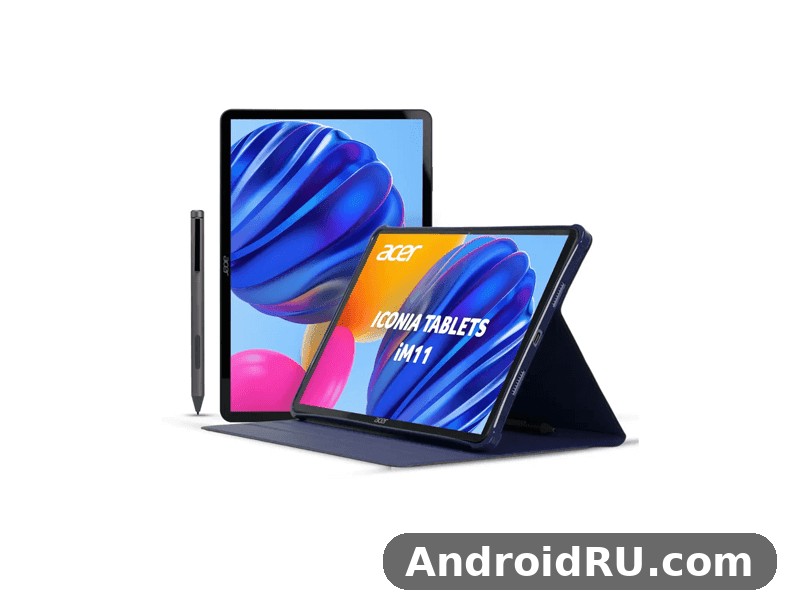
An Iconia iM11 review has to start with the audio, and here the hardware gives us something to talk about. The tablet has four speakers and a 3.5mm headphone jack, a combination that is getting rare at this price. The Acer Iconia iM11-22M5G audio quality is therefore the first thing most buyers will notice when they play a video or join a call, and it is also the feature that separates this tablet from rivals that ship with two speakers and no wired option. The rest of the package is solid mid-range hardware: an 11.45-inch 2.2K display at 90Hz, a MediaTek Dimensity 7050 chipset, 8GB of RAM, 128GB of storage and a 7,400mAh battery.
Before going further, one confusion is worth clearing up. This is not the older Iconia Tab iM11 from July 2025, which used a MediaTek Helio G99 chip, Android 14 and 4G LTE. The iM11-22M5G specs are different in the ways that matter: a newer Dimensity 7050 platform, Android 15, and 5G connectivity. If you are comparing listings, check the model code iM11-22M5G and the chipset name, because the two tablets share a screen size and a battery capacity but are not the same device. The Acer Iconia iM11-22M5G price in India, its 5G support and its Android 15 software are the three quickest ways to tell them apart.
This review works through the tablet in the order a buyer would test it: sound first, then the screen, then performance, battery and cameras, then the full specification table, a comparison with its rivals, and an honest list of pros and cons. The question running through all of it is the one every buyer asks: is Acer Iconia iM11-22M5G worth buying, and for whom? The short answer is that it suits students, home viewers and office workers who want a big-screen Android tablet with 5G, a headphone jack and a stylus option, while buyers who need a fast charger or a flagship camera should keep looking. The long answer follows, with the Acer Iconia iM11-22M5G full specifications at the end.
Acer Iconia iM11-22M5G Audio Quality: Quad Speakers and a Headphone Jack
The headline feature of this tablet is its sound. The published specification sheet lists a loudspeaker with stereo speakers, four speakers in total, and a 3.5mm headphone jack. Four speakers change how a tablet sounds in a way that a specification number alone does not capture. With two speakers, sound tends to come from one side when the tablet is held sideways for video. With four, the sound spreads across the body, voices stay centred, and music gains a sense of width that makes a film or a lecture easier to follow without headphones. The Acer Iconia iM11-22M5G quad speaker sound is therefore not a small detail; it is the feature that defines the tablet for the people who will use it most, which is anyone who watches video, listens to music or sits through long calls.
What should you expect from the iM11 audio in practice? The honest answer is that four small tablet speakers can deliver clear dialogue, a decent sense of space and enough volume for a quiet room, but they cannot deliver deep bass. Physics sets the limit: the drivers are small and the body is 7.9mm thick. Dialogue in films and voices in calls should come through cleanly, because that is where this kind of speaker arrangement is strongest. Music will sound open and detailed at moderate volume, with the high notes clear and the middle range full, while the lowest notes will stay light. If you want room-filling bass, a Bluetooth speaker or wired headphones will still do a better job, and this tablet gives you both options, which is the point.
The 3.5mm jack deserves attention because so many tablets have dropped it. A wired connection means no pairing, no charging a second device and no delay between picture and sound, which matters for video and for games. Students who study with wired earphones, office workers who take calls with a wired headset and travellers who already own good wired headphones will all find the jack useful. An Acer Iconia iM11-22M5G headphone jack test is simple to run yourself: plug in any wired headphones, play a song you know well, and listen for clean highs and a stable image in the middle. There is no special setting to enable, and the tablet should route audio to the jack as soon as it is connected.
Quad Speaker Sound in Daily Use
The Acer Iconia iM11-22M5G quad speaker sound works best in the situations this tablet is built for. In a video call, the four speakers keep voices loud enough to hear across a small room, which helps when the tablet is propped on a desk and two people are listening. In a film, the stereo spread makes dialogue easy to follow without turning the volume up to the top, and sound effects gain a little more space than a two-speaker tablet can manage. In a lecture or an online class, the clarity of speech is what matters, and that is where a four-speaker layout earns its keep: consonants stay sharp, and you can follow a fast speaker without rewinding.
Volume is a separate question from quality, and buyers should keep the two apart. A tablet can be loud and still sound harsh, or quiet and still sound clean. The sensible way to judge the Iconia speakers is to set the volume to about two-thirds, play a mix of speech and music, and listen for distortion. If the sound stays clean at that level, the tablet will handle daily use without complaint. The tablet has no FM radio, so music comes from apps, files or the browser, and the 5G and Wi-Fi 6 connections keep streaming smooth when the network is good.
Stereo Separation in Landscape Mode
Hold the tablet sideways, and the stereo separation becomes obvious. The speakers are arranged so that sound comes from both ends of the long edge, which matches how people actually watch video. In portrait mode the effect is weaker, because the speakers sit closer together in that orientation, but the tablet is a landscape device for most of its uses: video, reading, split-screen work and calls. If you prop the tablet on a stand, keep the bottom edge clear so nothing blocks the speaker openings, and the sound will stay open. A case that covers the speaker grilles will muffle the sound, so check the fit before you buy a case.
Headphone Jack and Bluetooth Audio
Bluetooth 5.2 with A2DP and LE support covers the wireless side. Pairing wireless earbuds or headphones should be straightforward, and the low-energy support helps keep the earbuds’ battery use down. Bluetooth audio always adds a small delay compared with a wire, so for games and for video editing the headphone jack is the better choice, while for walking around the house or for a workout, Bluetooth is more convenient. Having both on the same tablet means you do not have to choose one way of listening and live with its drawbacks.
For calls, the combination of speakers, a front camera and a headphone jack gives the tablet a practical edge. You can take a call on the speakers when you are alone, switch to wired headphones when other people are nearby, or use Bluetooth earbuds when you are moving around. The tablet has no NFC, which is worth knowing if you expected tap-to-pair, but Bluetooth pairing by hand takes only a few seconds. The audio package as a whole is the strongest reason to pick this tablet over a rival with two speakers and no jack, and it is the part of the review that lines up most directly with the title.
Acer Iconia iM11-22M5G Display: 11.45-Inch 90Hz Screen for Reading and Video
The display is the second pillar of this tablet. The Acer Iconia iM11-22M5G display quality rests on a simple combination: a large 11.45-inch 90Hz display, a sharp 1440 x 2200 pixel resolution, a 90Hz refresh rate and 450 nits of brightness. The 3:2 ratio is a useful choice for a tablet that will be used for reading and work, because it shows more of a page or a document than a wide cinema-style screen does, while still handling video well. The screen covers about 83.3 percent of the front, with a density of about 230 pixels per inch, which is sharp enough that text looks smooth at normal reading distance.
An 11.45 inch tablet sits in a useful middle ground. It is large enough for split-screen work, comfortable for reading a textbook or a comic, and big enough for a film to feel like a film. At the same time, at 535 grams, it is light enough to hold in one hand for a short while and easy to carry in a bag. The Acer Iconia iM11-22M5G weight and thickness, 535 grams and 7.9mm, put it in the same class as most mid-range tablets of this size, and the aluminium frame and back give it a solid feel that plastic tablets often lack. The front is glass, so a screen protector is a sensible purchase.
The 90Hz refresh rate is the detail that changes how the tablet feels day to day. An Acer tablet 90Hz screen at this price is still uncommon, and scrolling through a long article, swiping between home screens and moving through a photo gallery all look smoother at 90Hz than at 60Hz, and the difference is easy to notice once you have used it. It is not a gaming-only feature; it makes ordinary use feel more responsive. The panel is an IPS LCD rather than an OLED, which means colours are natural rather than oversaturated, viewing angles are wide, and there is no risk of burn-in from a static status bar. The trade-off is that blacks are dark grey rather than pure black, which is most visible when watching a film in a dark room.
Screen Brightness Outdoors and Reading Comfort
The Acer Iconia iM11-22M5G screen brightness outdoors is limited by its 450-nit rating, and buyers should understand what that means. Indoors, 450 nits is plenty, and the screen will look bright and clear in a classroom, an office or a living room. In shade outdoors, it stays readable. In direct sunlight, it will struggle, as most tablets at this price do, and you will find yourself shading the screen or moving indoors. That is a fair trade at this price, and it is not a reason to reject the tablet unless you plan to use it outside in bright sun every day.
For reading, the 3:2 ratio and the sharp resolution are the features that matter most. A page of text shows more lines, comics and PDFs look natural, and the 90Hz refresh keeps scrolling smooth when you move through a long document. The iM11 display handles long reading sessions well because IPS panels do not flicker the way some other panel types can, and the brightness can be turned down low enough for evening use. If you read at night, turn the brightness down and use the system night mode, and the screen will be comfortable for an hour or more.
Dimensity 7050 Performance and Gaming on the Acer Iconia iM11-22M5G
The tablet runs on the MediaTek Dimensity 7050 chipset, a 6nm chipset also listed under the model name MediaTek MT8791. The chip has eight cores: two Cortex-A78 performance cores at 2.6GHz and six Cortex-A55 efficiency cores at 2.0GHz, with a Mali-G68 MC4 graphics processor. That is a proven mid-range combination, used in phones and tablets that sell at this price, and it is a clear step up from the Helio G99 in the older iM11. A Dimensity 7050 tablet at this price is a fair deal, because the chip handles everyday work without hesitation and keeps 5G, Wi-Fi 6 and modern video formats in the same package.
An Acer Iconia iM11-22M5G performance test, if you run one with a benchmark app, would show the Dimensity 7050 in the upper mid-range: strong in everyday tasks, capable in games at moderate settings, and efficient enough that the battery is not drained by background work. Benchmark numbers vary between runs and between apps, so the useful question is not the score but what the tablet does with it. Opening apps, switching between them, loading web pages and editing a document should all feel quick, and the 8GB of RAM gives the system room to keep several apps in memory at once.
The memory and storage deserve a paragraph of their own. The tablet has 8GB of LPDDR5 RAM and 128GB of UFS 3.1 internal storage, which is faster than the UFS 2.2 storage found in cheaper tablets. UFS 3.1 matters when you install a large game, copy a folder of photos or open a heavy app, because the storage can feed data to the processor more quickly. The iM11 storage is fixed at 128GB in the listed configuration, so buyers who keep a lot of offline video or large games should plan around the microSD slot. The Acer Iconia iM11-22M5G microSD card slot uses a shared SIM slot, which means the card shares space with the second SIM, so check the tray layout before you buy both a second SIM and a card.
Multitasking Split Screen and Everyday Apps
The Acer Iconia iM11-22M5G multitasking split screen experience is where the 11.45-inch display and the 8GB of RAM come together. Android 15 supports split-screen mode, so you can keep a video or a document on one side and a browser or a notes app on the other. The iM11 multitasking setup works best with two apps rather than three, and with apps that were designed for a large screen. A student can watch a lecture on one side and take notes on the other. An office worker can keep email open beside a spreadsheet. A reader can keep a book open beside a dictionary app. The 3:2 ratio helps here, because each half of the screen stays wide enough to read.
Everyday apps should run without drama. Social apps, streaming apps, browsers with several tabs, office apps and video calls are all well inside what this chipset can do. The tablet ships with Android 15, which is a recent version, and it brings the current Android tablet features: a taskbar, improved split-screen handling and per-app language settings. On the Acer Iconia iM11-22M5G software update policy, Acer has not published a multi-year promise that could be verified for this review, so check the official page before you buy if long-term updates matter to you. That is an honest gap in the public record, and it is better to state it than to guess a number of years.
Gaming Performance on Dimensity 7050
The Acer Iconia iM11-22M5G gaming performance is good for its price, with limits that buyers should know. The Mali-G68 MC4 graphics processor handles popular games at medium settings with smooth frame rates, and the 90Hz display makes motion look fluid when a game supports it. Lighter games will run at high settings without trouble. Demanding games will need medium settings and will look best with the frame rate capped rather than pushed to the maximum. The large screen is a genuine advantage for games, because controls are easier to reach and the picture is bigger than on any phone.
Heat and Throttling During Long Sessions
Long gaming sessions will warm the back of the tablet, as they do on every thin tablet, and the chipset will slow itself down a little to stay within safe temperatures. That is normal, and it is better than a tablet that stays fast for ten minutes and then shuts down. If you play for an hour, expect the frame rate to settle slightly below its peak, and take the tablet out of a thick case while you play so heat can escape. The 7,400mAh battery gives you a useful amount of play time, but demanding games will drain it faster than video or reading, so keep the charger nearby for a long session.
Acer Iconia iM11-22M5G Battery Life and 18W Charging
The tablet has a 7,400mAh battery, and that capacity is the right size for a tablet with an 11.45-inch screen. A 7400mAh tablet in this class should get through a full day of mixed use: a few hours of video, some reading, some browsing and a video call, with charge left over in the evening. The Acer Iconia iM11-22M5G battery life depends on what you do with it, as it does on every tablet. Video streaming over Wi-Fi is efficient, gaming is hungry, and 5G use drains the battery faster than Wi-Fi, so a day of heavy 5G browsing will end sooner than a day on home Wi-Fi. The iM11 battery is a strength for students and travellers, because it removes the need to carry a charger for a normal day out.
Charging is the weakest part of the package, and it is better to say so plainly. The tablet supports 18W wired charging, which is slow by current standards. The Acer Iconia iM11-22M5G charging time 18W question has a simple answer: a full charge from empty takes a long time, and you should plan around it. Expect roughly two and a half to three hours for a full charge, and treat that as an estimate rather than a measured figure, because the real time depends on the charger, the cable and whether the tablet is in use while it charges. The iM11 charging speed means the tablet is best charged overnight or during a long break, not topped up in ten minutes before a class. There is no wireless charging, which is normal at this price.
The practical way to live with 18W charging is to charge little and often rather than waiting for the battery to run flat. Plug the tablet in when you sit down to work, and it will gain a useful amount of charge over an hour. Keep the brightness at a sensible level, turn off 5G when you are on Wi-Fi, and close games when you are not playing them, and the battery will last longer between charges. The battery is not removable, so long-term battery health matters: avoid leaving the tablet at 100 percent on a hot charger for days at a time, and store it half-charged if you will not use it for weeks.
Charging Time 18W: What to Expect
The Acer Iconia iM11-22M5G charging time 18W figure is worth a closer look, because it shapes daily habits. At 18W, the first half of the battery fills faster than the second half, which is how lithium charging works: the charger pushes hard while the battery is low, then slows down to protect it. That means a 30-minute top-up from a low battery gives you a useful amount of use, even though a full charge takes hours. Use the charger that comes in the box or a reputable 18W USB-C charger, and check that the cable is a proper USB-C cable, because a weak cable can slow charging further. The USB port is USB Type-C 2.0 with OTG support, so it can also connect to a flash drive or an accessory, which is handy for moving files.
Cameras, Video Calls and Everyday Use
The cameras on a tablet are rarely the reason to buy it, and the iM11 is no exception, but they are good enough for what a tablet camera is actually used for. The iM11 camera setup on the rear is built around a 16MP main sensor, and it is worth judging it by what a tablet camera is for rather than by phone standards. The rear has two cameras: a 16MP wide camera and a 2MP macro camera, with an LED flash and 1080p video at 30 frames per second. The Acer Iconia iM11-22M5G camera quality on the rear is best described as useful rather than impressive. The 16MP main camera takes clear photos in good light, which is enough for scanning a document, photographing a whiteboard or capturing a quick shot when no phone is at hand. In low light, expect noise and soft detail, as on most tablets in this price range.
The front camera is an 8MP unit, and it is the more important camera on this tablet, because video calls are the main job of a tablet camera. The Acer Iconia iM11-22M5G video calling quality depends on the front camera, the microphones and the network, and the hardware here is adequate for clear calls in good light. Sit facing a window or a lamp rather than with a bright window behind you, and the person on the other end will see you clearly. The front camera also handles selfies and video recording, though the published specification sheet does not list a front video resolution, so check the official page if that detail matters to you.
The 2MP macro camera is a bonus rather than a headline. The Acer Iconia iM11-22M5G macro camera samples that buyers imagine, close-ups of flowers or small objects, will be soft and low in detail, because a 2MP sensor has little resolution to work with. A tablet macro camera is best used for fun close-ups and for reading small print when you have no magnifier, not for serious photography. The tablet macro camera is a small extra, and the honest verdict is that the main camera does the real work while the macro lens fills a narrow gap.
Video Calling Quality and the 8MP Front Camera
The Acer Iconia iM11-22M5G video calling quality is helped by the whole package, not just the camera. The four speakers make the other person easy to hear, the large screen shows them clearly, and the 5G or Wi-Fi 6 connection keeps the call stable when the network is good. For the best results, use the headphone jack or earbuds in a noisy room, because the speakers can feed back into the microphone if the volume is high. The tablet has a top-mounted fingerprint sensor for quick unlocking before a call, and the front camera sits on the long edge, which is the right place for a landscape call. If you take calls all day, a small stand is worth buying, because holding a 535-gram tablet for an hour is tiring.
Acer Iconia iM11-22M5G Full Specifications
The Acer Iconia iM11-22M5G full specifications are listed in the table below, taken from the published specification sheet. The iM11-22M5G specs show a balanced mid-range tablet: a large 90Hz screen, a modern 6nm chipset, 8GB of RAM, 128GB of fast storage, 5G and a large battery. The Acer Iconia specs in this table are the numbers to check against any listing before you buy, because sellers sometimes mix this model up with the older iM11, and the chipset, the Android version and the 5G support are the three fields that prove which tablet you are looking at.
| Feature | Acer Iconia iM11-22M5G |
|---|---|
| Announced | 7 May 2026 |
| Released | 7 May 2026, available in India |
| Display | 11.45-inch IPS LCD, 90Hz, 450 nits, 1440 x 2200 pixels, 3:2 ratio, about 230 ppi, about 83.3% screen-to-body ratio |
| Operating system | Android 15 |
| Chipset | MediaTek Dimensity 7050 (6 nm), also listed as MediaTek MT8791 |
| CPU | Octa-core, 2x 2.6 GHz Cortex-A78 and 6x 2.0 GHz Cortex-A55 |
| GPU | Mali-G68 MC4 |
| RAM | 8GB LPDDR5 |
| Storage | 128GB UFS 3.1, microSDXC card slot using a shared SIM slot |
| Rear camera | Dual: 16MP wide and 2MP macro, LED flash, 1080p video at 30fps |
| Front camera | 8MP single camera, video supported |
| Sound | Stereo loudspeaker with four speakers, 3.5mm headphone jack |
| Battery | 7,400mAh, 18W wired charging |
| Connectivity | 5G SA/NSA, 4G LTE, GSM, HSPA, Wi-Fi 802.11 a/b/g/n/ac/6 dual-band, Bluetooth 5.2 with A2DP and LE, USB Type-C 2.0 with OTG, magnetic accessory connector pins |
| SIM | Nano-SIM and Nano-SIM |
| Sensors | Fingerprint sensor, top-mounted |
| Positioning | Listed as unspecified in the specification sheet |
| NFC | No |
| FM radio | No |
| Body | Glass front, aluminium frame, aluminium back, 261.7 x 177.7 x 7.9 mm, 535 g, stylus support |
| Colours | Silver listed in the specification sheet, with blue also reported at launch |
| Price | About 230 EUR; India launch from INR 23,499, with listings at INR 25,499 |
The table above is the core of this review, and it is worth reading alongside the rest of the article rather than on its own. A specification table tells you what the tablet has; the sections above tell you what those numbers feel like in use. The 90Hz display is a good example: the number is in the table, but the feeling of smooth scrolling is in the display section. The 18W charging is another: the number is small, and the battery section explains what that means for your daily routine. Keep both together when you decide.
Connectivity, Sensors and Build
The Acer Iconia iM11-22M5G 5G connectivity is the feature that gives the model its name, and it is the biggest difference from the older iM11. The tablet supports GSM, HSPA, LTE and 5G, with 5G in both SA and NSA modes, plus dual-band Wi-Fi 6 and Bluetooth 5.2. The iM11 WiFi 6 connection is the one most buyers will use most of the time, because home and office Wi-Fi is faster and cheaper than mobile data, and Wi-Fi 6 keeps the connection stable when many devices share the same router. The Acer Iconia iM11-22M5G WiFi 6 speed in practice depends on your router and your broadband plan, so a slow home connection will still be slow on this tablet, while a fast one will let the tablet show its best.
The tablet fingerprint sensor is top-mounted, which is a sensible place for it on a tablet. The Acer Iconia iM11-22M5G fingerprint sensor location means you can unlock the tablet with a finger while you pick it up, without turning it over or hunting for a sensor on the back. It is a small convenience that you will use many times a day, and it is more secure than a simple swipe. The published specification sheet lists the fingerprint sensor as the only sensor, so buyers who need a particular sensor for a specific app should check the official page before buying.
The build is glass on the front, with an aluminium frame and an aluminium back, and the tablet supports a stylus. The Acer Iconia iM11-22M5G stylus support is listed in the specification sheet, but whether a stylus comes in the box varies by market and by seller, so check the listing before you buy. The Iconia stylus, if you buy one, is useful for handwriting notes, marking up a PDF and sketching, and the 11.45-inch screen is large enough for writing to feel natural. The magnetic accessory connector pins on the USB side suggest accessories such as a keyboard cover, and the Acer Iconia iM11-22M5G accessories and keyboard options are worth checking on the official page, because availability varies by country.
What the Magnetic Accessory Connector Pins Do
The magnetic accessory connector pins are small contacts on the tablet that let an accessory connect without a cable and without using the USB port. A keyboard cover is the most likely accessory to use them, and the pins carry both power and data, so a keyboard can work without its own battery or a Bluetooth pairing step. The Iconia accessories range for this model is still taking shape, so check what is actually on sale in your country before you plan your setup around a keyboard. A simple stand and a case are the two accessories every buyer should get first, and a stylus is the third if you take handwritten notes.
How the Acer Iconia iM11-22M5G Compares With Other Acer Tablets
No tablet exists on its own, and the iM11-22M5G makes more sense when you see it next to the tablets around it. The closest comparison is with the older Iconia Tab iM11 from 2025, which shares the screen size and the battery but runs a Helio G99 chip on Android 14 with 4G LTE. The newer tablet is faster, runs newer software and adds 5G, while the older one may be cheaper where it is still on sale. An Acer tablet comparison between those two is simple: if the price gap is small, the 5G model is the better buy, and if the older model is much cheaper and you only need Wi-Fi, it is still a fair tablet.
Against the wider market, the iM11-22M5G sits between small budget tablets and large premium ones. A Samsung Galaxy Tab in the same price range is the most common alternative, and the Acer Iconia iM11-22M5G vs Samsung Galaxy Tab question usually comes down to sound and connectivity. The Acer offers four speakers, a headphone jack and 5G at its launch price, while a Samsung rival at the same price may offer a longer update promise or a more familiar software skin. There is no single winner, and the right choice depends on whether you value the speakers and the 5G connection more than the brand and the update record.
| Feature | Iconia iM11-22M5G (2026) | Iconia Tab iM11 (2025) | Samsung Galaxy Tab A11 |
|---|---|---|---|
| Display | 11.45-inch, 1440 x 2200, 90Hz | 11.45-inch, 2.2K, 60Hz | 8.7-inch, 800 x 1340 |
| Chipset | Dimensity 7050 | Helio G99 | Entry-level MediaTek |
| RAM and storage | 8GB, 128GB | 8GB, 128GB or 256GB | 4GB, 64GB |
| Mobile data | 5G and 4G LTE | 4G LTE | Wi-Fi and LTE versions vary |
| Operating system | Android 15 | Android 14 | Android 13 |
| Rear camera | 16MP and 2MP macro | 16MP | 8MP |
| Front camera | 8MP | 8MP | 5MP |
| Battery | 7,400mAh, 18W | 7,400mAh, 18W | 5,100mAh |
| Audio | Four speakers, headphone jack | Four speakers, headphone jack | Speakers, check the listing |
The comparison table shows why the 5G model is the one to buy in 2026. It is the only one of the three with a 90Hz screen, a 6nm chipset, Android 15 and 5G, and it keeps the big battery and the headphone jack that the older iM11 had. The Galaxy Tab A11 is a smaller and cheaper tablet, and it suits buyers who want something pocketable, but it gives up screen size, memory and battery. As a tablet under 25000 rupees at its launch price, the iM11-22M5G is competing with smaller tablets and with older models, and its size and speakers are its advantages in that fight.
Acer sells a wide range of tablets, and the iM11-22M5G is one part of a larger family. Readers who want to see how the rest of the family handles the same ideas can read the Acer Iconia Duo D12 Review and Full Specifications: Everything You Should Know for a different take on an Acer tablet with a focus on its own screen and features. The Acer Iconia V12 First Impressions, Review and Full Specs covers another Acer tablet in the same broad range, and it is useful for seeing how Acer balances price, display and battery across its models. The Acer Iconia Duo S12 Review: Connectivity Tested and the Complete Specs looks at connectivity in depth, which is a good companion piece if the 5G connection is your main reason for buying.
The rest of the Acer range shows the same pattern from different angles. The Acer Iconia V11: Design, Key Features and Full Specifications in Detail covers a smaller Acer tablet, and it helps to read it if you are torn between a compact tablet and the 11.45-inch screen of the iM11-22M5G. The Acer Iconia Duo S14 Review and Specifications: Storage, Design and the Verdict covers a larger model with a different balance of storage and design, and it rounds out the picture of what Acer offers at each size. An Acer tablet 2026 buyer who reads two or three of these reviews will have a much clearer sense of which size and which feature set fits their daily use, and that is time well spent before buying.
Acer Iconia iM11-22M5G Pros and Cons: Who Should Buy It
The Acer Iconia iM11-22M5G pros and cons are easy to list, because the tablet is honest about what it is. It does not pretend to be a flagship, and it does not hide its weak charging behind a big number. The Iconia iM11 price at launch, from INR 23,499, buys a large 90Hz screen, four speakers, a headphone jack, 5G and a big battery, and that is a fair trade for most buyers. The Acer tablet India buyer who wants a tablet for classes, films and office work will find most of what they need here, while the buyer who wants fast charging, a great camera or a long update promise will need to look elsewhere or pay more.
Pros
Four stereo speakers and a 3.5mm headphone jack give the tablet the best audio in its price range, and that is the feature you will notice every day. The 11.45-inch 2.2K display at 90Hz is sharp, smooth and well suited to reading and video, with a 3:2 ratio that shows more of a page. The Dimensity 7050 chipset is a proven mid-range performer with 5G, Wi-Fi 6 and enough power for games at medium settings. The 7,400mAh battery lasts a full day of mixed use, and the 8GB of RAM with 128GB of UFS 3.1 storage is the right amount for the price. The aluminium build, the top-mounted fingerprint sensor and the stylus support round out a package that feels more expensive than it is.
Cons
Charging at 18W is slow, and a full charge takes hours, which is the single biggest weakness. The rear cameras are basic, with a 2MP macro lens that adds little, and low-light photos will disappoint. The update policy is not published in a form that could be verified for this review, so buyers who keep a tablet for four or five years are taking a chance. There is no NFC, the positioning details are listed as unspecified, and the 450-nit display struggles in direct sunlight. The tablet is also fairly heavy at 535 grams, so long reading sessions are better with a stand than with one hand.
The Acer Iconia iM11-22M5G for students and work is a good fit in specific situations. A student who watches lectures, reads PDFs, takes notes with a stylus and joins video calls will use every strength this tablet has, and will rarely hit its limits. An office worker who reads documents, answers email and takes calls on the go will find the 5G connection and the big screen useful, especially when travelling. A home viewer who watches films and listens to music will enjoy the speakers and the display, and will not mind the slow charging because the tablet charges overnight. This Iconia tablet is less suited to a mobile gamer who wants maximum frame rates, a photographer who wants a great camera, or a buyer who needs the fastest possible charging.
Frequently Asked Questions About the Acer Iconia iM11-22M5G
Is the Acer Iconia iM11-22M5G worth buying in 2026?
For most buyers looking for a mid-range Android tablet, yes, with the limits in mind. The tablet offers a large 90Hz screen, four speakers, a headphone jack, 5G, 8GB of RAM and a 7,400mAh battery at a launch price from INR 23,499. Those are strong features for the money. The reasons to pause are the slow 18W charging, the basic cameras and the update policy that Acer has not published in a verifiable form. If those three things do not matter to you, the tablet is good value, and if any of them is a deal-breaker, you should compare it with a rival before you buy. This Acer tablet review has focused on the audio and the specifications because those are the features the title promises, and on both counts the tablet delivers.
Does the Acer Iconia iM11-22M5G support 5G on both SIM slots?
The specification sheet lists dual Nano-SIM slots and 5G in SA and NSA modes, along with LTE, HSPA and GSM. That means the tablet can connect to 5G networks, and it can hold two SIM cards at once. What the published sheet does not say is whether both SIM slots can use 5G at the same time, or whether one slot is limited to 4G while the other uses 5G, which is a common arrangement on dual-SIM devices. If you plan to use two 5G SIMs, check the official page or ask the seller before you buy, because that detail varies between devices and is not stated in the specification sheet used for this review.
Does the Acer Iconia iM11-22M5G come with a stylus in the box?
Stylus support is listed in the specification sheet, which means the tablet can work with a stylus, but the sheet does not say that one is included in the box. Whether a stylus is bundled varies by market, by seller and by the offer running at the time you buy. Check the listing carefully and look for the words stylus or pen in the box contents before you order, and if it is not included, budget for one separately. A stylus is worth buying for this tablet if you take handwritten notes or mark up documents, because the 11.45-inch screen is large enough for writing to feel comfortable.
Can I expand the storage with a microSD card?
Yes. The tablet has a microSDXC card slot, so you can add a card for photos, offline video, music and documents. The card slot shares space with the second SIM, which means the tray holds either two SIM cards or one SIM and one microSD card, depending on the layout. Buy a card from a reputable brand, and use it for media and files rather than for apps, because apps run faster from the internal UFS 3.1 storage. If you keep a lot of offline video, a large card is the cheapest way to make the 128GB of internal storage go further, and it is a practical upgrade for students and travellers.
Final Verdict: Is the Acer Iconia iM11-22M5G Worth Buying?
The Acer Iconia iM11-22M5G is a tablet that knows what it is good at, and its strengths line up with the way most people actually use a tablet. The audio leads: four speakers and a headphone jack make films, lectures and calls sound better than they do on most rivals at this price. The display follows: a large, sharp, smooth 90Hz screen that is good for reading, video and split-screen work. The Dimensity 7050 chipset, 8GB of RAM and 128GB of fast storage keep everyday use quick, and the 7,400mAh battery lasts a full day. An Acer Iconia 5G tablet like this one also gives you the freedom to work away from Wi-Fi, which is the feature that justifies the 5G in the model name.
As an Android 15 tablet, it ships with current software and the current tablet features, including split-screen multitasking and a modern interface. The Acer Iconia iM11-22M5G Android 15 features include the taskbar, improved split-screen handling and per-app language settings, which are small details that add up over a day of use. An Acer 5G tablet at this price is still uncommon, and the combination of 5G, a headphone jack and four speakers is the reason this tablet stands out in a crowded market. The trade-offs are real: slow charging, basic cameras and an update record that buyers should check for themselves.
The decision comes down to your daily use. If you watch video, join calls, read documents and take notes, and you want a tablet that does those things well without costing a premium, this is a strong choice. If you need fast charging, a great camera or a guaranteed update schedule, keep looking and be ready to pay more. The next step is simple: check the current price in your country, confirm that the listing is for the iM11-22M5G with the Dimensity 7050 and 5G, and check whether a stylus or a keyboard is included. Then, if the audio and the screen are what matter most to you, this tablet will not disappoint.

