

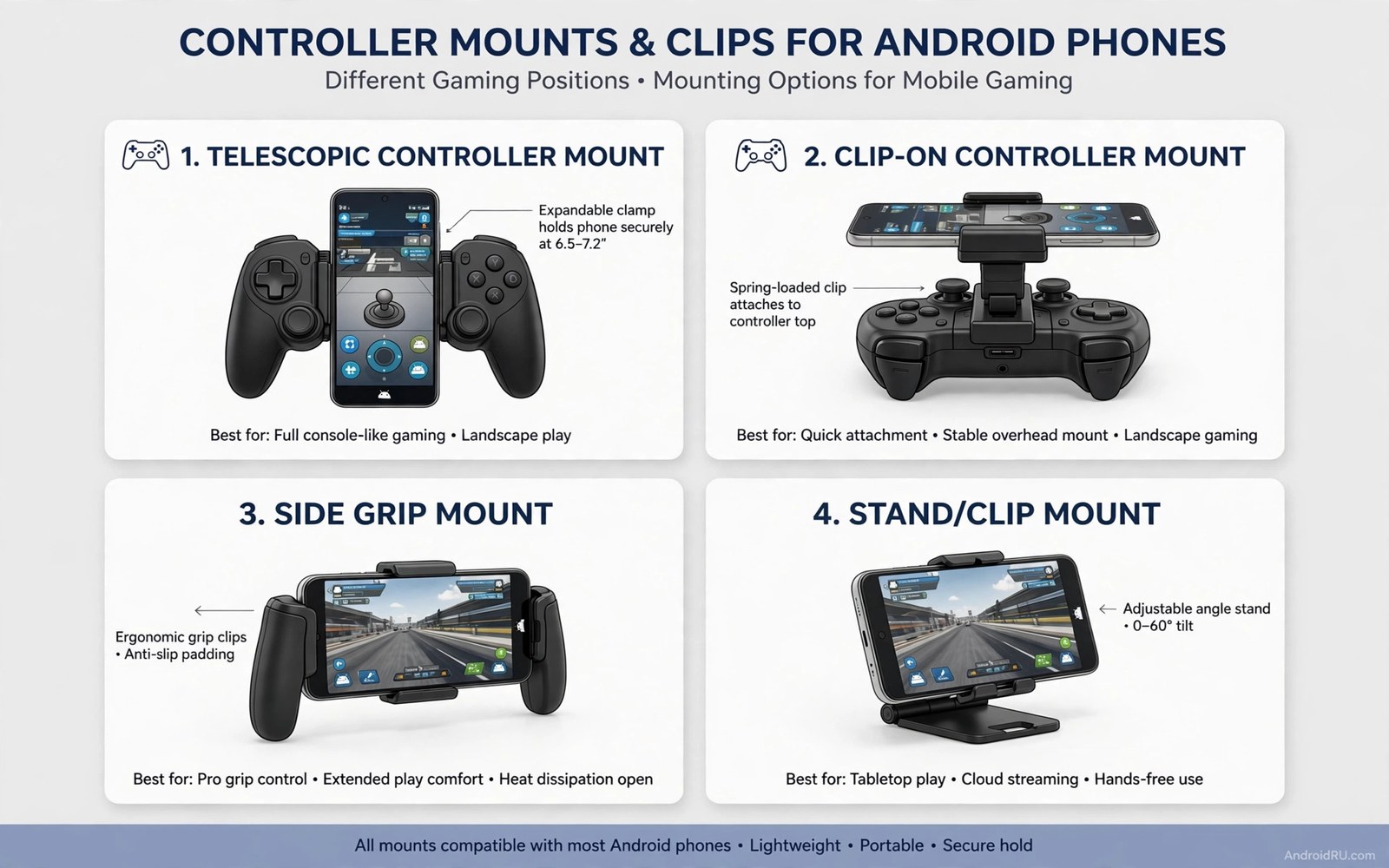
7 Controller Mount Accessories That Upgrade Mobile Game Controls
A controller feels great until the phone slides off a table or blocks your view. A mount solves that problem by holding the phone in a fixed, comfortable position. The right mount also reduces neck strain and hand fatigue during long sessions, while the wrong mount wobbles and distracts you at the worst moment.
Mounts differ by how they attach and where they hold the phone. A clip mounts the phone directly onto a controller. A stand holds the phone on a desk. A gooseneck clamp attaches to a table edge. Each type suits a different play spot, and this guide matches mount types to real play situations rather than ranking them by price alone.
Start with your usual play spot. Do you play on a sofa, at a desk, or on a bus? A sofa setup needs a stable clip or a lap stand. A desk setup needs a sturdy stand at eye level. A travel setup needs a compact clip that fits in a pocket. If you have not chosen a controller yet, read the best Bluetooth gamepads tested for Android before you buy a mount for it, because the mount must fit the controller you actually own.
How to choose a mount for your play spot
Match the mount to the place you play most, not to the mount with the best reviews. A mount that is perfect at a desk can be useless on a sofa, and a mount that is perfect on a sofa can be too bulky for travel. Think about three things: where the phone sits, how stable it stays during fast movement, and how quickly you can set it up and pack it away.
Check weight balance with the mount attached. A heavy phone on a light controller can feel top heavy, and a top heavy setup tires wrists during long sessions. Test the balance for fifteen minutes before a ranked match, because a balanced setup feels natural within a few minutes, while an unbalanced one keeps nagging at your wrists.
Sofa, desk, and travel setups
Sofa play needs a mount that works without a table: a controller clip or a lap stand. Desk play needs a mount that holds the phone at eye level while your hands stay free: a desk stand or a gooseneck clamp. Travel play needs a mount that folds flat and fits in a pocket: a compact clip or a foldable stand. One mount rarely serves all three, so pick the setup you use most and optimise for it.
Weight balance with the phone attached
Hold the controller with the phone mounted and play for fifteen minutes. If your wrists ache, the setup is top heavy, and a lighter phone, a smaller case, or a desk stand will fix it. Balance matters more than looks, because a mount you cannot hold comfortably is a mount you will stop using.
The 7 controller mount accessories that upgrade mobile controls
These seven mounts cover every common play situation. Each one names what it does, who it suits, its strengths, its weaknesses, and the verdict for who should buy it.
1. Controller clip that turns a controller into a handheld console
A controller clip holds the phone above the controller like a handheld console screen. It keeps the phone and controller as one unit, which helps when you move around the house, and it keeps the screen close to your hands for fast reactions. Pros: one unit, no table needed, fast reactions, cheap. Cons: top heavy with large phones, blocks the controller’s top buttons on some models, and tiring for long sessions. Verdict: best for action games on the sofa, where you move and aim quickly. Check clip fit before you buy one: a clip must fit your phone width with its case on, a clip that barely fits will stress the case and may slip during play, and a clip with a firm lock beats a clip that relies on friction alone.
2. Adjustable desk stand at eye level
A desk stand holds the phone at eye level while a separate controller sits in your hands. That separation suits long sessions at a table, and it suits streaming setups where the phone acts as a screen. A stand with adjustable angle helps you find a comfortable view fast, and a stand with a heavy base stays stable when you tap the screen. Pros: best ergonomics, stable, great for streaming. Cons: needs a table, not portable, and the phone sits further from your hands. Verdict: best for long sessions at a desk and for anyone who streams.
3. Gooseneck clamp for sofa and bed play
A gooseneck clamp attaches to a table edge or a bed frame and holds the phone in the air at a custom angle. It suits sofa play where no table exists, and it suits players who like to recline during story games. Pros: fully adjustable angle, no table needed, hands completely free. Cons: must clamp firmly to avoid slow drooping during play, and a weak clamp will sag within minutes. Verdict: best for relaxed story games on the sofa or in bed. Test the clamp for thirty minutes before a long session, because a clamp that droops slowly is worse than one that fails immediately.
4. Lap stand and pillow mount for relaxed play
A lap stand or pillow mount holds the phone at a low angle without a table, and it works well for slow games and cloud gaming. Pros: comfortable for relaxed play, no setup, soft and portable. Cons: fails for fast action games where the screen must stay perfectly still, and the angle is hard to adjust. Verdict: best for slow games, visual novels, and cloud gaming on the sofa. Choose a lap mount only for relaxed genres, and use a clip or a stand for anything fast.
5. Telescopic extendable clip for large phones
A telescopic clip extends to fit large phones, including phones with thick cases and phones with a battery case attached. It suits households with several phones of different sizes, because one clip adjusts to all of them. Pros: fits any phone size, adjustable width, firm lock. Cons: heavier than a fixed clip, and the sliding mechanism can loosen over time. Verdict: best for households that share one controller between several phones, or for players with a large phone and a thick case.
6. Magnetic mount with a metal plate
A magnetic mount holds the phone with a magnet and a thin metal plate stuck to the phone or its case. It suits players who mount and unmount the phone many times a day, because attaching and removing takes one second. Pros: fastest setup, no clips to adjust, clean look. Cons: weaker hold during fast movement, the plate can interfere with wireless charging, and a strong magnet near a compass can affect navigation apps. Verdict: best for casual play and for players who value fast setup over maximum grip. Test the hold with a fast game before you trust it in a ranked match.
7. Foldable travel stand that fits in a pocket
A foldable travel stand folds flat to the size of a credit card and holds the phone at a fixed angle on any flat surface. It suits travel, commuting, and waiting rooms, where a full mount is too bulky. Pros: pocket-sized, no setup, works on any table. Cons: fixed angle, less stable than a heavy stand, and useless without a flat surface. Verdict: best for travel and for players who game in short bursts away from home. Keep one in your bag even if you own a better mount, because it weighs nothing and saves the day on a train.
Match mounts to rooms and travel bags
A living room setup usually means a controller clip or a gooseneck clamp, because the sofa has no table and the TV is far away. A desk setup usually means a desk stand at eye level, because the table is there and the sessions are long. A travel bag usually means a foldable stand or a compact clip, because weight and size matter more than perfect ergonomics.
Think about the whole kit, not just the mount. A clip plus a controller fits in a jacket pocket. A desk stand plus a controller needs a bag. A gooseneck clamp needs a table edge to grip. The mount that fits your bag is the mount you will actually carry, and the mount you carry is the mount you use.
Living room and sofa setups
On a sofa, the controller clip wins for action games and the gooseneck clamp wins for story games. The clip keeps the screen close and the controls fast, while the clamp keeps your hands free and your neck neutral. A lap stand works for slow games, but it fails the moment the action speeds up, so keep it for relaxed genres only.
Desk and streaming setups
At a desk, the stand wins. Eye level is the key: a screen at eye level keeps your neck neutral for hours, while a screen too low forces your head down and causes strain. A heavy base matters too, because a stand that tips when you tap the screen is worse than no stand at all. For streaming, add a second phone or a webcam on a separate small stand, and keep the game phone at eye level in the centre.
Travel bag test for every mount
Pack the mount in the bag you actually carry, with the controller and the phone. If it fits without forcing the zip, it travels well. If you must leave something behind to fit the mount, the mount is too big for travel. The foldable stand passes this test easily, the clip passes it usually, and the gooseneck clamp rarely passes it.
Test a mount with a real input check
A mount test should include movement and button presses at the same time. Play a fast scene for fifteen minutes with the mount in place, and note any wobble, slip, or glare from the angle. A mount that wobbles during fast movement will cost you matches, and a mount that creates glare will tire your eyes. Check the phone angle for neck strain after the test: a screen too low forces your head down for an hour, while a screen at eye level keeps your neck neutral. Adjust the mount angle until the test feels comfortable, because that comfort check matters more than a stylish mount design.
You can confirm controller input from a computer with the debug bridge while the mount holds the phone. The commands below list input devices and basic details. They do not test the mount itself; they only confirm that the controller still registers cleanly in the mounted position. adb shell dumpsys input lists the connected input devices, adb shell getevent -l shows live input events, and adb shell dumpsys bluetooth_manager | grep -i -A 3 -B 3 "gamepad" shows Bluetooth gamepad details. Run them while the phone sits in the mount and the controller is connected. A clean device listing with no disconnect during the test points to a stable mounted setup. If the controller disconnects during fast movement, the mount may be pressing a button or blocking the Bluetooth antenna, and how to fix input lag on wireless controllers over Bluetooth covers the lag side of the same problem.
Fifteen-minute wobble test
Play a fast scene for fifteen minutes and watch the phone, not the game. Note any slip, any wobble, and any change in angle. A mount that holds for five minutes and slips at fifteen will fail in a real session, so the test must last the full fifteen minutes. Tighten or replace any mount that moves during the test.
Neck strain check after the test
After fifteen minutes, notice your neck. A neutral neck means the angle is right. A sore neck means the screen is too low or too high, and no mount is worth a sore neck. Adjust the angle in small steps until the test feels comfortable, and mark the position so you can return to it quickly next time.
Mapping buttons when the phone is mounted
A mounted phone changes your grip, and a changed grip changes which buttons you can reach. The guide on how to map physical controllers to touchscreen games explains remapping, and it is worth reading when the mount moves the phone to a new angle, because a button that was easy to reach on a flat phone can become awkward on a mounted one. Remap after mounting, not before, so the layout matches the real position.
Mount care and common mistakes
Over-tightening a clip is the most common mistake. A clip tightened past its stop will crack the phone case or bend the clip itself, and a bent clip never holds properly again. Tighten until the phone stops moving, then stop. A clip with a firm lock beats a clip that relies on brute force, and a clip that needs brute force is the wrong size for your phone.
Heat is the second mistake. A phone mounted above a controller can trap heat during a long session, especially while charging. Leave a gap for air, avoid charging while playing when the phone already feels warm, and take the phone out of the mount during breaks. A cool phone performs better and lasts longer than a hot one.
Over-tightening clips and clamps
Turn the screw or the clamp until the mount holds, then give it a quarter turn more and stop. Test the hold by shaking the controller gently. If the phone stays, the mount is tight enough. If you keep tightening past that point, you are damaging the mount, the case, or both.
Heat and charging while mounted
Remove the case during long sessions if the phone runs hot, and avoid fast charging while gaming. A phone that throttles from heat will stutter no matter how good the mount is, and the mount is not the cause. Keep the phone cool first, and the mount second.
Frequently asked questions
Will a clip damage my phone or controller?
A well-fitting clip will not damage either, because it grips the edges without pressing the screen or the buttons. A clip that is too small will stress the case and may slip, while a clip that is too large will wobble. Measure your phone with its case on, buy the clip size that matches, and tighten only until the phone stops moving.
Do mounts work with a phone case on?
Most mounts work with a slim case, and telescopic clips adjust to thicker cases as well. A very thick rugged case can defeat a fixed clip, so check the clip’s maximum width before you buy. A magnetic mount needs the metal plate on the case or on the phone itself, and a thick case weakens the magnetic hold.
What is the best mount for long gaming sessions?
A desk stand at eye level is best for long sessions, because it keeps your neck neutral and your hands free. A controller clip is best for long sessions without a table, though it tires wrists faster. Whichever you choose, take a five-minute break every hour, stretch your neck, and let the phone cool down.
Can I use a mount with a tablet?
Some desk stands and gooseneck clamps support small tablets, but most controller clips do not, because a tablet is too heavy and too wide. Check the mount’s maximum width and weight before you buy, and prefer a stand with a heavy base for a tablet. A tablet on a weak clip will fall, and a falling tablet breaks screens.
Pick one mount and test it tonight
Choose the mount that matches where you play most, buy one, and test it with a fifteen-minute fast scene tonight. Note the wobble, the glare, and your neck after the test. If it passes, keep it and mark the angle. If it fails, return it and try the next type on the list. A mount is a small purchase, and the right one changes every session after it.
Your next step is the play spot test: sit where you usually play, hold your phone at the angle a mount would hold it, and play for fifteen minutes. If that angle feels good, buy the mount that holds it there. If it feels wrong, adjust the angle first and then buy the mount. The angle comes first, and the mount follows it.

