

Touch controls work for a quick puzzle game. They fail for a fast platformer or a shooter. Your thumbs cover the action and your fingers slip on a smooth screen. A Bluetooth gamepad fixes both problems at once. Your hands hold a real controller and the full screen stays visible. The game suddenly feels like it was designed for a controller in the first place.
Not every Bluetooth gamepad is worth buying. Some feel hollow and creak under pressure. Some lose connection at the worst moment. Some have sticks that drift after a month. This guide sorts the real differences from marketing claims. It focuses on comfort and latency and battery life because those three factors decide whether a controller stays in your bag or ends up in a drawer.
Start by listing the games you actually play. A racing game needs good triggers and a solid grip. A platformer needs a precise directional pad. A shooter needs responsive sticks and low latency. A controller that suits one genre may frustrate another genre. If latency is your main worry then read how to fix input lag on wireless controllers over Bluetooth before you spend money on a new pad.
What we tested and how we judged it
We judged comfort first because a controller that hurts your hands will not get used. A good grip should let your fingers rest naturally for an hour. The sticks should sit where your thumbs fall without stretching. The buttons should click cleanly without a mushy feel. A controller that forces a claw grip for normal play fails this test.
We judged latency by feel in fast games rather than by a single number. A controller with high latency makes aiming feel like dragging through mud. A controller with low latency makes small corrections feel instant. We played the same fast scene with each pad and noted missed jumps and late shots. That practical test catches problems that a spec sheet hides.
We judged battery life by real sessions rather than by the box claim. A controller that dies mid match is worse than a controller with a shorter but honest battery life. We also checked charging time and whether the pad works while charging. A pad that works while charging saves a session when the battery runs low.
The controller types that suit Android best
A telescopic controller that clamps around the phone suits travel best. It turns the phone into a handheld console. It needs no separate stand. It also adds weight to the phone setup. A telescopic pad suits players who game on a bus or in a waiting room. Check the clamp size before you buy one. A clamp that barely fits your phone will stress the case and the buttons.
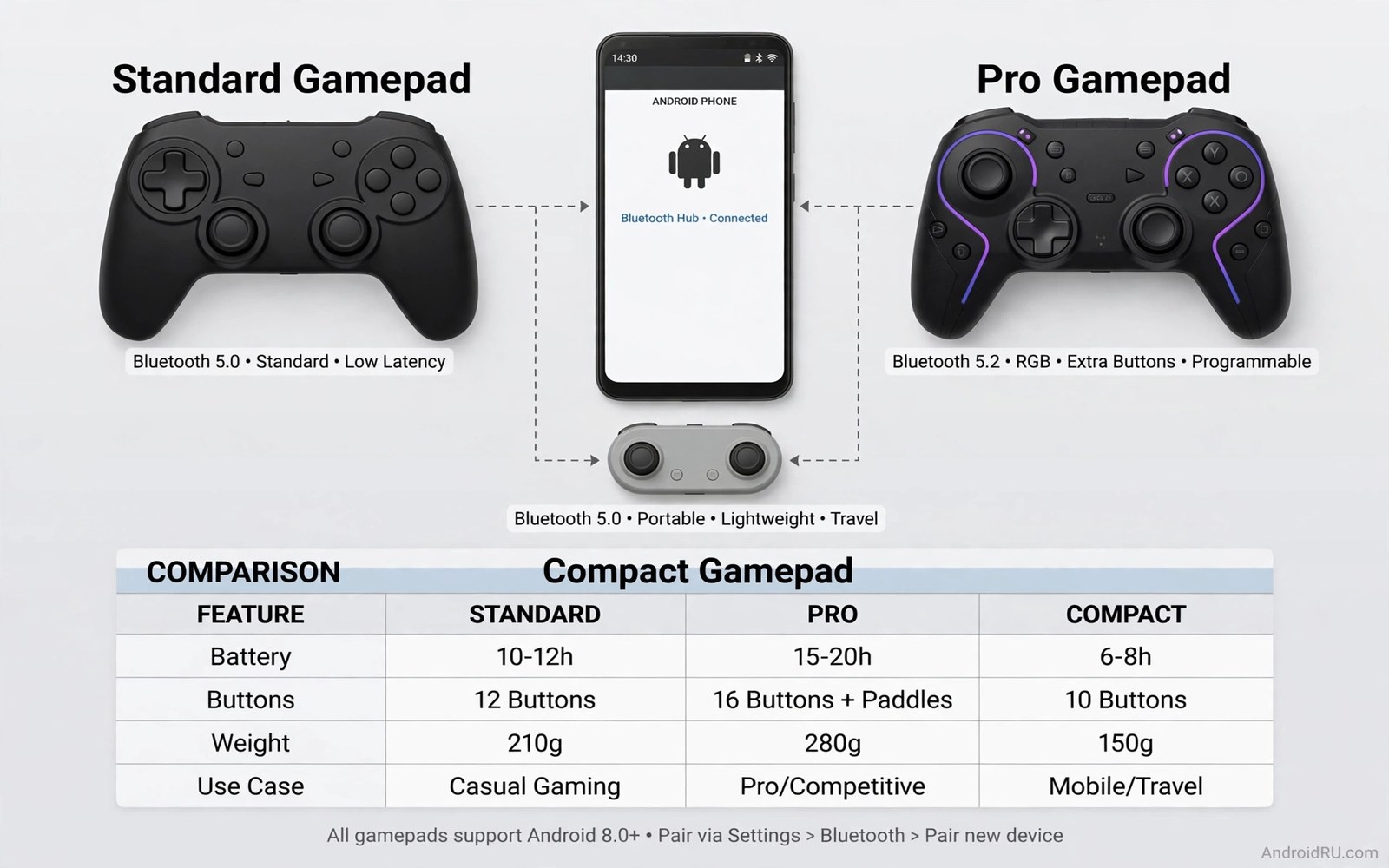
A standard console style controller suits home play best. It feels familiar and sturdy. It needs a phone stand or a table to hold the screen. It also pairs well with a television or a tablet. A standard pad suits long sessions at a desk or on a sofa. It is the best choice when comfort matters more than portability.
A compact mini controller suits a bag or a jacket pocket best. It sacrifices some comfort for size. It works well for short sessions and for travel. It fails for long ranked sessions where hand fatigue matters. Buy a mini pad as a second controller rather than as your only controller. That way you keep comfort at home and portability on the road.
Test a controller before you trust it
Pair the controller and open a game with a clear movement test. Walk in a slow circle and watch for drift. A stick that drifts will move the character without input. Test each button five times in a row. A button that misses one press in five will cost you matches. Test the triggers in a racing game. A trigger that jumps from zero to full will ruin smooth acceleration.
Check the connection at your normal play distance. Sit where you usually sit and play for fifteen minutes. Note any disconnect or stutter. Move the phone a little farther and repeat the test. A controller that only works at arm length will fail on a sofa setup. A stable connection at your real distance matters more than a long range claim on the box.
You can also list input devices from a computer with the debug bridge. The command below shows connected input devices and their basic details. It does not fix a bad controller. It only confirms that Android sees the device as expected.
adb shell dumpsys input
adb shell getevent -l
adb shell dumpsys bluetooth_manager | grep -i -A 3 -B 3 "gamepad"
The code above was written for this guide as a short device check example. Use the output to confirm that the controller appears as an input device. If the device appears and games still ignore it then check the game settings for controller input before you blame the pad.
Break in a new gamepad properly
A new gamepad needs a break-in period before ranked play. Play casual games for the first week and note any stick drift or button misses. A pad that drifts in week one will only get worse. Return it early while the return window stays open. A pad that survives week one usually lasts months.
Test every button in a training mode rather than in a live match. A training mode lets you press each button slowly and watch the response. Note any button that needs extra force or double registers a press. Those faults cost matches later. A training test finds them without rank pressure.
Charge the pad fully before the first long session and note the real battery time. Play until the low battery warning appears and record the hours. Compare that number with the box claim. A large gap between claim and reality matters for travel planning. Carry a cable when the real time falls short.
Clean the pad regularly with a dry cloth. Dust around sticks can cause drift over time. A quick wipe after long sessions keeps sticks smooth. Avoid liquids near the charging port and stick bases. Simple cleaning extends pad life more than any setting tweak.
Store the pad in a case or a drawer rather than loose in a bag. Loose storage lets sticks catch on other items and wear unevenly. A simple pouch protects sticks and triggers during travel. Good storage keeps a good pad feeling new for much longer.
Choose a pad for your main genre
A racing game needs triggers that travel smoothly from light to full press. A trigger that jumps straight to full ruins gentle acceleration out of corners. Test triggers in a racing training mode before a ranked race. A smooth trigger gives finer speed control in every corner. That fineness wins races more often than top speed alone.
A fighting game needs a directional pad that registers clean diagonals. A mushy pad will drop diagonal inputs during combos. Test diagonals slowly in training mode and watch each input register. A pad that misses one diagonal in ten will frustrate combo play. Choose a pad with a firm click for fighting games.
A shooter needs sticks that return to centre cleanly after every flick. A stick that sticks slightly off centre causes slow drift during aim. Test stick return by flicking and releasing repeatedly in training. A clean return keeps aim steady between shots. That steadiness matters more than stick tension alone.
Common mistakes
The biggest mistake is buying the cheapest pad without checking stick quality. Cheap sticks drift early and cheap buttons wear fast. A slightly better pad often lasts three times longer. The total cost per month ends up lower even though the upfront price is higher.
- Players buy a telescopic pad that does not fit their phone case and then force the clamp.
- Players ignore battery life and then lose a ranked match to a dead controller.
- Players test a pad in a menu and miss drift that only shows during slow movement.
- Players pair a pad once and never update its firmware when the maker fixes a bug.
- Players choose a mini pad for long sessions and then blame the game for hand pain.
Another mistake is keeping a bad mapping and blaming the hardware. Many games let you remap buttons inside their settings. A swapped button layout can feel like a broken controller. Check the mapping first and test the default layout before you return a pad.
FAQ
Do Bluetooth gamepads work with every Android game?
No some games support touch only and ignore controllers completely. Check the game store page and the game settings for controller support before you buy a pad for one title. Many large action and racing games support controllers well. Many casual games do not need a controller at all.
Controller support varies by game and by store listing. A game that lists controller support usually maps buttons well. A game without support may ignore the pad completely. Check support before buying a pad for one specific title. A pad purchase should serve several games rather than one.
Why does my controller feel laggy on Bluetooth?
Bluetooth adds a small delay by design. Interference and distance and other Bluetooth devices can make that delay worse. Move closer to the phone and turn off unused Bluetooth devices during play. A wired connection removes Bluetooth delay completely when a game supports it. For mount ideas that keep the phone close read seven controller mount accessories that upgrade mobile controls.
Bluetooth delay comes from packet timing and radio interference. A short distance and few competing devices keep delay low. A crowded radio environment adds jitter to every packet. Move closer and turn off unused Bluetooth devices for ranked play. A wired pad removes radio delay entirely.
Can I use a console controller on Android?
Yes most modern console controllers pair over Bluetooth with Android. Pairing steps differ by maker so follow the controller manual for pairing mode. Some features such as vibration or touchpad support may not work on Android. Core buttons and sticks usually work well in supported games. For mapping help read how to map physical controllers to touchscreen games before your first session.
Console controllers pair with Android through standard Bluetooth pairing. Put the controller in pairing mode and select it in Android Bluetooth settings. Some extra features may not work on Android. Core sticks and buttons usually work well in supported games. Test all buttons after pairing.
Conclusion
The best Bluetooth gamepad is the one that fits your hands and your games and your play distance. Comfort and stable latency beat a long feature list. A telescopic pad suits travel and a standard pad suits home play. Test drift and buttons and connection before you trust a new pad in a ranked match.
Your concrete next step is to write down your top three games and your usual play distance tonight. Pick one controller type that matches that list. Test it for fifteen minutes in a fast game and return it if drift or disconnect appears in that first test.

