

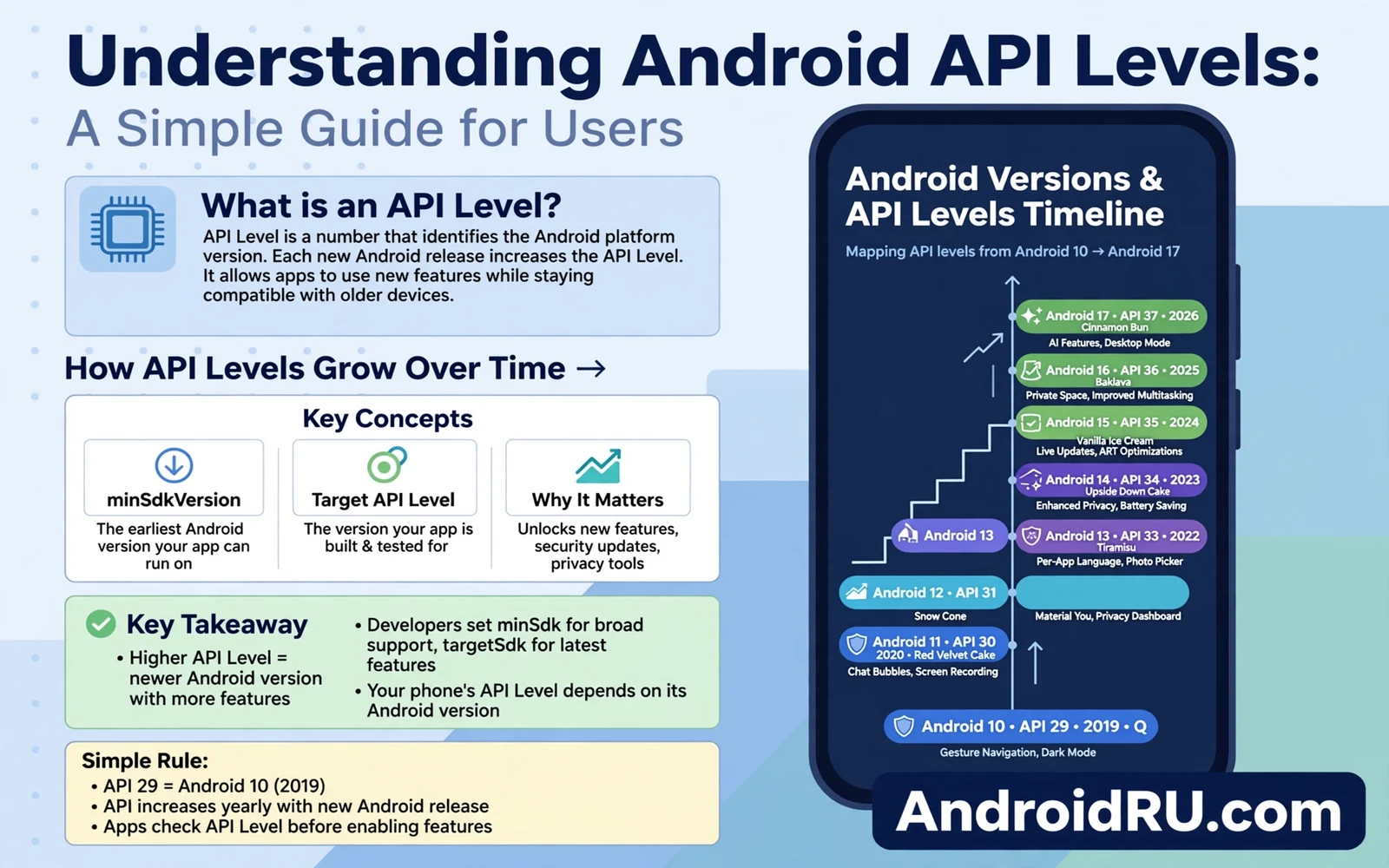
Android API levels give every Android version a number that developers and users can trust. The number tells an app which system features are available. The number tells a developer which rules an app must follow. The number tells a user in simple terms how modern a phone system is. API levels remove confusion from version names and marketing labels. A single number carries more meaning than a version name alone.
This guide explains API levels for users rather than only for developers. It explains what the number means in daily use. It explains how API levels relate to Android versions. It explains why an app may need a newer level. It explains why an old phone may stop receiving new apps. It also explains how to find the API level on your phone. A user who understands API levels can judge app requirements with calm confidence.
API levels matter because apps change with system rules. A newer level brings stricter permission rules. A newer level brings new media tools. A newer level brings new privacy controls. An app that targets a newer level must follow those rules. An app that targets an older level may still run but it may face limits on new phones. Level targeting shapes app behavior more than most users realize.
What An API Level Actually Is
An API level is an integer that marks a set of system interfaces. Interfaces are the tools that apps use to talk to the system. A camera interface lets an app take a photo. A location interface lets an app find position. A storage interface lets an app save a file. Each new level can add interfaces and can change old interfaces. An app declares the levels that it supports and the level that it targets.
Target level and minimum level are two different declarations. Minimum level sets the oldest system that can install the app. Target level sets the system behavior that the app expects. An app with a low minimum level can install on many old phones. An app with a high target level follows modern rules on new phones. Developers balance reach against modern behavior when they choose these values.
System behavior follows the target level in important ways. An app that targets a modern level faces modern permission prompts. An app that targets an old level may receive older permission behavior for compatibility. Modern behavior protects users better in most cases. Older behavior keeps an old app working but it may weaken a privacy control. Target level is therefore a safety signal as well as a technical detail.
API levels increase with major Android versions. Each major version adds a new level. Minor updates usually keep the same level. A phone that moves from one major version to the next gains a new level. A phone that receives only a monthly patch keeps its level. Level changes mark real system steps rather than small fixes.
API Levels And Android Versions
Version names and API levels move together but they are not the same thing. A version name is a marketing label that users see. An API level is a technical number that developers use. A user who knows both can translate between them. A developer who knows the level can check which interfaces exist. A support helper who knows the level can diagnose an app problem faster.
Older versions map to lower levels in order. Newer versions map to higher levels in order. The order never goes backward for a major release. A phone that updates to a newer version gains a higher level. A phone that stays on an older version keeps a lower level. That simple order lets you compare two phones even when their version names look confusing.
Some features arrive as system updates without a new level. Module updates can add core fixes without changing the level. Monthly patches can fix flaws without changing the level. A level change signals a broader framework change. A patch without a level change signals a focused fix. Both kinds of update matter. Level alone does not tell the whole update story.
Check the level on your phone in settings when an app requirement confuses you. Open about phone and look for the Android version entry. Some makers show the API level directly in that area. Some makers show only the version name. You can translate the version name to a level with an official version chart when needed. A version chart is a simple table that pairs each version with its level.
Why Apps Require A Minimum Level
Apps require a minimum level because they need interfaces that older systems lack. A new camera tool may exist only from a certain level onward. A new media format may exist only from a certain level onward. A new privacy control may exist only from a certain level onward. An app that needs that tool cannot run well on a system that lacks it. A minimum level prevents a broken install on an old phone.
Minimum levels also protect developers from endless old system testing. Testing every old level costs time and resources. A developer who drops very old levels can focus on modern behavior. A developer who keeps very old levels must handle many compatibility paths. Most developers drop old levels gradually as users move to newer phones. A gradual drop keeps most users supported while freeing developer time.
Users on old phones feel the effect when an app raises its minimum level. An app update may refuse to install on an old phone. An old app version may keep working for a while. An old app version may lose support and security fixes over time. A store may hide a new app from an old phone entirely. These effects signal that the phone system is aging beyond app support.
Raising a minimum level is not a punishment for old phone owners. Raising a minimum level reflects real technical limits. An app cannot use a new interface on a system that never had it. An app cannot follow a new privacy rule on a system that never enforced it. A developer who fakes support for an old level risks crashes and data problems. A clear minimum level is more honest than a broken install.
Target Levels And Privacy Rules
Target levels shape permission behavior in a direct way. A modern target level brings one time permission choices. A modern target level brings partial media access. A modern target level brings stricter background location rules. An app that targets a modern level must ask in modern ways. An app that targets an old level may still ask in older ways on a new phone for compatibility. Modern targeting gives users stronger controls.
Storage rules also follow target levels. Modern storage rules limit broad file access. Modern storage rules push apps toward their own folders and user chosen files. An app that targets a modern level must respect those limits. An app that targets an old level may receive broader storage access for compatibility. Broad access can expose more files than the app needs. Modern targeting reduces that exposure.
Background work rules follow target levels too. Modern rules limit background services more firmly. Modern rules push apps toward scheduled work and notifications. An app that targets a modern level must handle background limits gracefully. An app that targets an old level may drain battery faster on a new phone. Battery behavior can therefore reveal an old target level even when the app looks modern.
Play policy links target levels to store presence. A store may require new apps to target a recent level. A store may require updates to target a recent level after a grace period. These rules push developers toward modern privacy and security behavior. These rules also push old apps to update or leave the store. Users benefit when store rules keep target levels current across popular apps.
API Levels For Everyday Decisions
Use API level as one signal when you buy a phone. A phone with a recent level supports modern apps for longer. A phone with an old level may lose new apps sooner. A phone with a recent level also follows modern privacy rules for apps that target it. Level alone does not decide camera quality or battery life. Level plus support length plus hardware together decide long term value.
Use API level as one signal when you troubleshoot an app. An app that fails on an old phone may need a newer level. An app that behaves oddly on a new phone may target an old level. Check the app store page for system requirements. Check your phone level in settings. A mismatch between requirement and level explains many install failures without deeper diagnosis.
Use API level as one signal when you judge an old app. An app with no update for years likely targets an old level. An old target level may still work but it may miss modern privacy controls. An old target level may also miss modern security fixes in app code. Prefer a maintained app with a recent target level when a choice exists. A maintained app receives fixes that an abandoned app never receives.
Do not chase the highest level for its own sake. A phone with a high level but weak hardware may feel slow. A phone with a high level but short patch support may become unsafe sooner. A phone with a slightly lower level but strong hardware and long support may serve you better. Balance level with hardware and support and app needs together.
Developers And API Levels In Plain Terms
Developers check API levels before they use a new interface. A developer who wants a new camera tool checks the level that introduced it. A developer who wants broad reach adds a fallback for older levels. A fallback lets an old phone use an older method while a new phone uses the new tool. Fallbacks keep apps working across levels at the cost of extra code.
Developers test apps on several levels rather than only on the newest phone. A developer tests on a low level phone to catch old system behavior. A developer tests on a high level phone to catch modern permission behavior. A developer tests on a mid level phone to catch the middle path. Testing across levels reduces surprises for users on different phones.
Developers read framework source to understand a level change. Framework source shows exactly how an interface changed. Framework source shows exactly how a permission rule changed. Reading source beats guessing from a version name. A developer who reads source can explain a behavior change to users in plain terms. Plain explanation builds trust when an app update changes behavior.
API level changes can break an app that relied on an old behavior. An app that used a broad storage path may fail under modern storage rules. An app that used a background service freely may fail under modern background rules. Developers must update such apps for new levels. Users should update apps promptly when a developer releases a level fix. A prompt app update keeps the app working on a modern system.
Finding And Using Your Level
Find your level in about phone settings on most phones. Look for Android version and tap it for more detail when the maker allows it. Some makers show the level number directly. Some makers show only the version name and a patch date. Use an official version chart to translate a version name to a level when the number is hidden. A chart lookup takes a minute and removes guesswork.
Compare your level with an app requirement before you install a niche app. A niche app page may list a minimum system version rather than a level number. Translate that version to a level with a chart. A match means that the app should install. A mismatch means that the app may refuse to install or may behave oddly. A quick check saves a failed install and a confusing error.
Keep your level current through system updates when your maker offers them. A major update raises your level. A major update also brings modern privacy rules for apps that target the new level. A monthly patch keeps your level but improves safety within that level. Both update types matter. A current level without current patches is weaker than it looks. Current patches without a current level limit new app support.
API levels sit on top of a shared base and the Android open source foundation defines the framework that those levels describe. A shared framework lets every maker use the same level numbers. A shared framework lets developers trust a level across brands. A shared framework also lets users compare phones from different makers with one number. That shared meaning is the real power of API levels.
Version numbers and API levels move together and Android 15 versus Android 14 weighs privacy and battery and support for phones that move between those versions. A move between versions raises the level and changes app behavior rules. A move between versions also extends support for modern apps. A user who understands both the version and the level can judge the move with less confusion.
Privacy and focus changes in new Android 15 features for your phone often depend on the API level that an app targets. An app that targets the new level follows new permission prompts. An app that targets an old level may follow older prompts for compatibility. A user who knows this link can explain why two apps ask for permission in different ways. Different prompts do not always mean different trust levels.
Quick Checklist
- Find your Android version in about phone settings
- Translate the version to an API level with a chart
- Compare the level with an app minimum requirement
- Prefer maintained apps with a recent target level
- Update apps promptly after a system update
- Balance level with hardware and patch support
- Check Play requirements for new apps
- Keep system updates current when offered

