

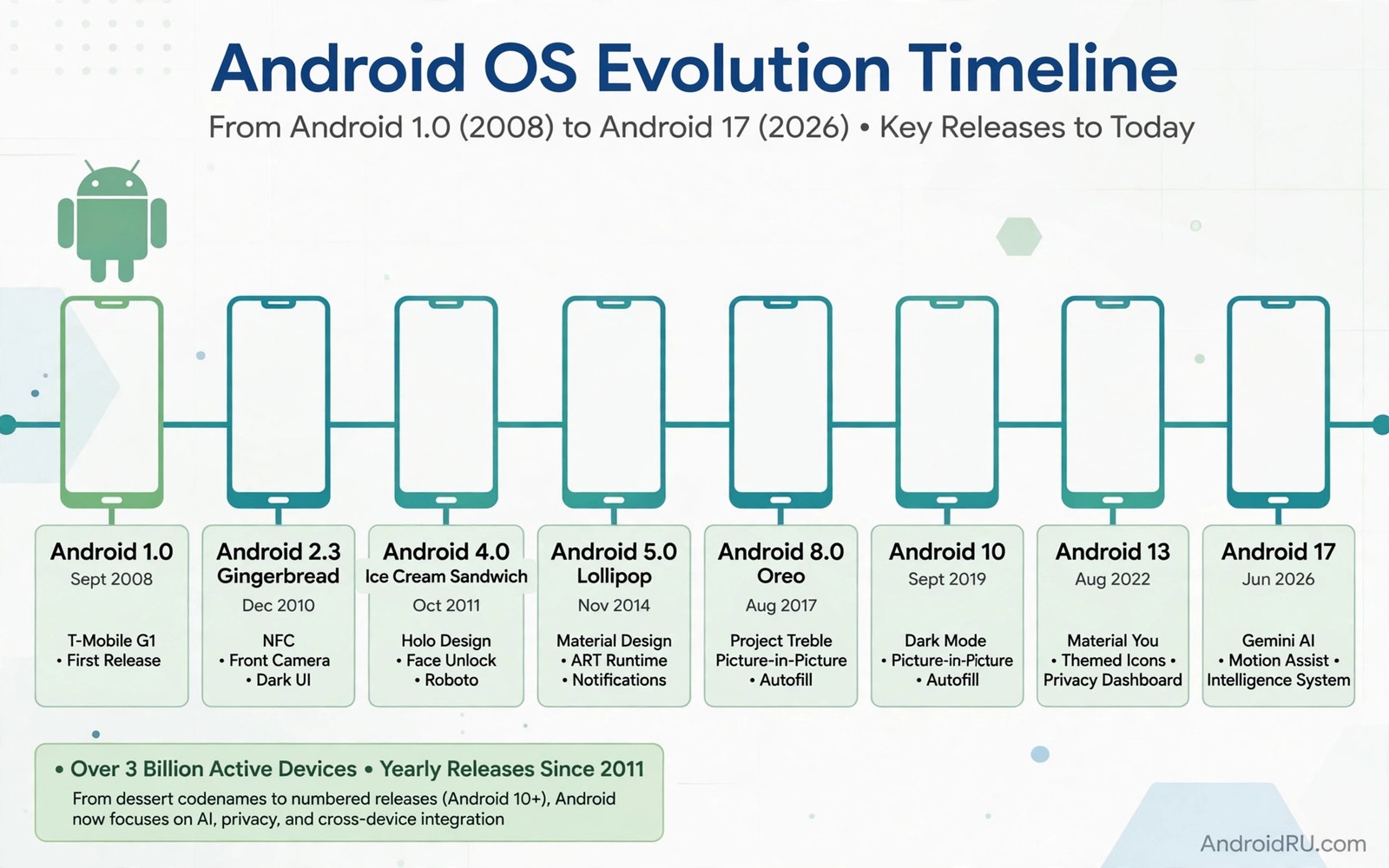
The complete evolution of Android OS names and version history tells the story of a phone system that grew from a niche product into a global platform. Early versions carried dessert names that fans loved to predict. Later versions dropped public dessert names and used numbers alone. That shift reflects a more serious and global product rather than a loss of fun.
Each major version added tools that shaped how phones work today. Notifications and permissions and multitasking all arrived in stages across many versions. Tracing that history helps owners understand why modern Android feels the way it does. If you want the present day view then how Play system updates work shows how updates now reach phones between major versions.
Early dessert era
Android Cupcake and Donut and Eclair introduced the dessert naming pattern in the early years. Those versions added widgets and better keyboards and early app store support. The system was rough by modern standards but it set the foundation for touch phones. Each release arrived on a small number of devices compared with today.
Gingerbread and Honeycomb and Ice Cream Sandwich refined the interface and unified phone and tablet design. Ice Cream Sandwich in particular gave Android a cleaner modern look. Users began to see Android as a polished alternative rather than an experiment. Hardware improved alongside software in that era.
Jelly Bean to Marshmallow growth
Jelly Bean brought smoother animations and better voice search. KitKat slimmed the system so it could run on cheaper phones with less memory. That change helped Android reach huge new markets. Lollipop introduced Material Design which still shapes Android visuals today in evolved form.
Marshmallow added granular permissions so users could control app access more precisely. That change marked a turning point for privacy on Android. Owners could finally grant location to one app and deny it to another. Privacy controls have expanded in every major version since Marshmallow.
Nougat to Pie maturity
Nougat added split screen multitasking and better notifications. Oreo improved background limits and picture in picture video. Pie introduced gesture navigation and digital wellbeing tools. Together those versions made Android feel mature for daily work and media.
adb shell getprop ro.build.version.release
adb shell getprop ro.build.version.sdk
adb shell getprop ro.build.version.codename
These commands follow the approach described in the official Android developer documentation for reading version and codename properties from a device.
Pie also shifted the visual style toward gestures rather than buttons. That shift took time for owners to learn. Gesture navigation is now standard on most Android phones. The transition shows how Android evolves interface habits gradually across versions.
Numbered era from Android 10 onward
Android 10 dropped the public dessert name and used a number alone. Internal dessert names continued inside Google but public branding became simpler and more global. Android 10 added system wide dark theme and stronger location controls. Android 11 added chat bubbles and one time permissions.
Android 12 refreshed the interface with Material You and dynamic colour. Android 13 improved privacy and tablet support. Android 14 refined battery and accessibility. Android 15 continued that steady refinement. Reading about will old devices support new AI integration shows how recent versions add AI features on top of that long foundation.
What history teaches buyers today
History shows that major versions matter less than steady support over years. A phone that receives regular patches and feature updates stays useful longer than a phone with one flashy version jump. Buyers should therefore value support length over a single version number at purchase time.
History also shows that features arrive gradually. A feature that debuts on one version often improves over the next two versions. Early adopters test the first form while patient owners receive the polished form later. Learning preparing your device for a major upgrade helps you handle each new version in that long history safely.
Android history and app compatibility
Android history shows how app compatibility shaped each version transition. Early apps written for small screens needed updates for larger displays. Apps written for old permission models needed updates for granular permissions. Each transition created a period where some apps lagged behind the system. Owners who lived through those transitions learned to update apps promptly after a major release. That habit remains valuable today because app compatibility still decides how smooth a new version feels.
The Play Store evolved alongside Android versions to help compatibility. Early stores offered little guidance about version support. Modern stores show compatibility information and update prompts more clearly. Developers can now target specific versions and test against preview builds. Those tools reduce the compatibility gap compared with early Android years. Owners benefit from a smoother transition even though some lag remains inevitable.
Hardware history also explains why some old features disappeared. Removable batteries and headphone jacks faded as designs changed. Infrared blasters and physical keyboards vanished from most phones. Each hardware change reflected market preference and design trade offs. Owners who miss an old feature should understand that software updates cannot restore hardware that no longer exists. New versions work with current hardware rather than reviving old designs.
Android history also includes failed experiments that owners may forget. Some interface ideas appeared in one version and vanished in the next. Some features launched with excitement and then faded due to low use. Those experiments show that Android development involves trial and error. Owners should therefore not mourn every removed feature as a loss. Some removals reflect genuine learning about what owners actually use.
Lessons from version history for today
Version history teaches that patience often rewards owners more than rushing to install day one releases. Early releases of a major version often contain bugs that later patches fix. Owners who wait a few weeks receive a more polished build with app compatibility improved. That lesson applies to every major version regardless of marketing excitement. Waiting is not missing out. Waiting is choosing a better experience.
History also teaches that security matters more than novelty over a long ownership period. A version with exciting features but short patch support ages poorly. A version with modest features but long patch support stays safe longer. Buyers should therefore prioritise support timelines over launch excitement. That priority becomes clearer with each year of ownership as novelty fades and security remains important.
Developers learn from history as well because they see which features survive across versions. Features that survive several versions become safe foundations for app design. Features that appear and vanish quickly teach developers to wait before adopting them deeply. That caution explains why some new system features take time to appear in popular apps. Owners who wonder why an app ignores a new feature should consider that developer caution.
Looking forward from history suggests Android will keep evolving gradually rather than through sudden revolutions. Material Design evolved over many versions. Privacy controls expanded step by step. AI features will likely follow the same gradual path. Owners should expect steady improvement rather than a single version that changes everything overnight. That expectation keeps excitement realistic and satisfaction higher.
Android history in the classroom and at work
Android history provides useful context for students learning about technology evolution. Early Android limitations show how constraints shape design. Students can trace how a rough early system grew into a polished platform through steady iteration. That story teaches that great products rarely appear fully formed. Iteration and user feedback drive improvement over years. History therefore offers lessons beyond technical facts.
Workplaces can use Android history to explain why old devices behave differently from new ones. An employee with an old phone may wonder why a new app feature is missing. History shows that features depend on system versions and hardware capabilities. That explanation helps employees understand limitations without blaming IT teams. Context reduces frustration in mixed device fleets where old and new phones coexist.
Developers study Android history to understand why certain design patterns exist. Permission models and notification systems evolved through lessons from earlier versions. A developer who understands that evolution designs apps that respect user privacy better. History therefore informs better future development as well as explaining past choices. Learning from history prevents repeating old mistakes in new apps.
Collectors and enthusiasts preserve Android history through old devices and old versions. Those devices show how interface design and hardware evolved together. Preserving that history helps future designers understand the path that led to modern Android. Enthusiast communities therefore play a valuable role in documenting a fast moving platform. Their work complements official documentation that focuses on current versions.
Common mistakes
A common mistake is assuming dessert names still decide the version order today. Numbers decide the order now and dessert names are internal only. Another mistake is romanticising an old version as faster without remembering its missing security protections. Old versions lack modern privacy controls and patch support.
- Using dessert names to order modern versions confuses the numbered system that replaced public dessert branding.
- Praising an old version for speed while ignoring its missing security and privacy protections misleads new owners.
- Assuming every historic feature arrived fully formed ignores how features matured across several versions.
Frequently asked questions
What was the first Android version?
Early commercial Android versions began with Cupcake as Android 1.5 after earlier internal builds. Cupcake introduced widgets and an on screen keyboard. Later versions built steadily on that base.
Why did Google drop dessert names?
Google moved to numbers for clarity and global accessibility. Dessert names did not translate equally across languages and cultures. Numbers give every owner the same clear version order.
Which version introduced Material Design?
Lollipop introduced Material Design as a major visual refresh. Material You later evolved that design with dynamic colour in Android 12. Both steps shaped the modern Android look.
Conclusion
Android history runs from early dessert versions through privacy maturity to the modern numbered era. Each version added a piece of the system owners use today. Numbers now give a clearer order than dessert names ever could.
Your next step is to check your current Android version and compare it with the support promise for your phone. Then plan your next purchase around long support rather than a single version number. History rewards steady support over flashy jumps.

