

Stop Cable Confusion: How USB-C Ratings (60W vs 100W vs 240W) Work
Every USB-C cable in your drawer looks the same. Same oval plug, same braided jacket, same confident packaging. Plug one into a laptop and it charges at full speed. Plug in another that looks identical and the laptop warns you it is charging slowly, or worse, the battery drains while it is plugged in. The difference is invisible, and it is printed in watts: 60, 100, or 240.
I learned this the expensive way on a work trip. My laptop died in the middle of a presentation because the cable I grabbed was a phone cable in disguise, same shape, same length, a quarter of the power my laptop needed. The fix was not a new laptop or a new charger. It was learning what the watt number on a cable actually means, and labelling every cable I own.
This guide explains the three ratings in plain terms: what 60W, 100W, and 240W mean in volts and amps, how your charger and device negotiate a safe level, how to tell cables apart when they look identical, and which rating belongs in which bag. By the end, the drawer full of lookalike cables becomes a labelled set of tools.
What a USB-C watt rating actually measures
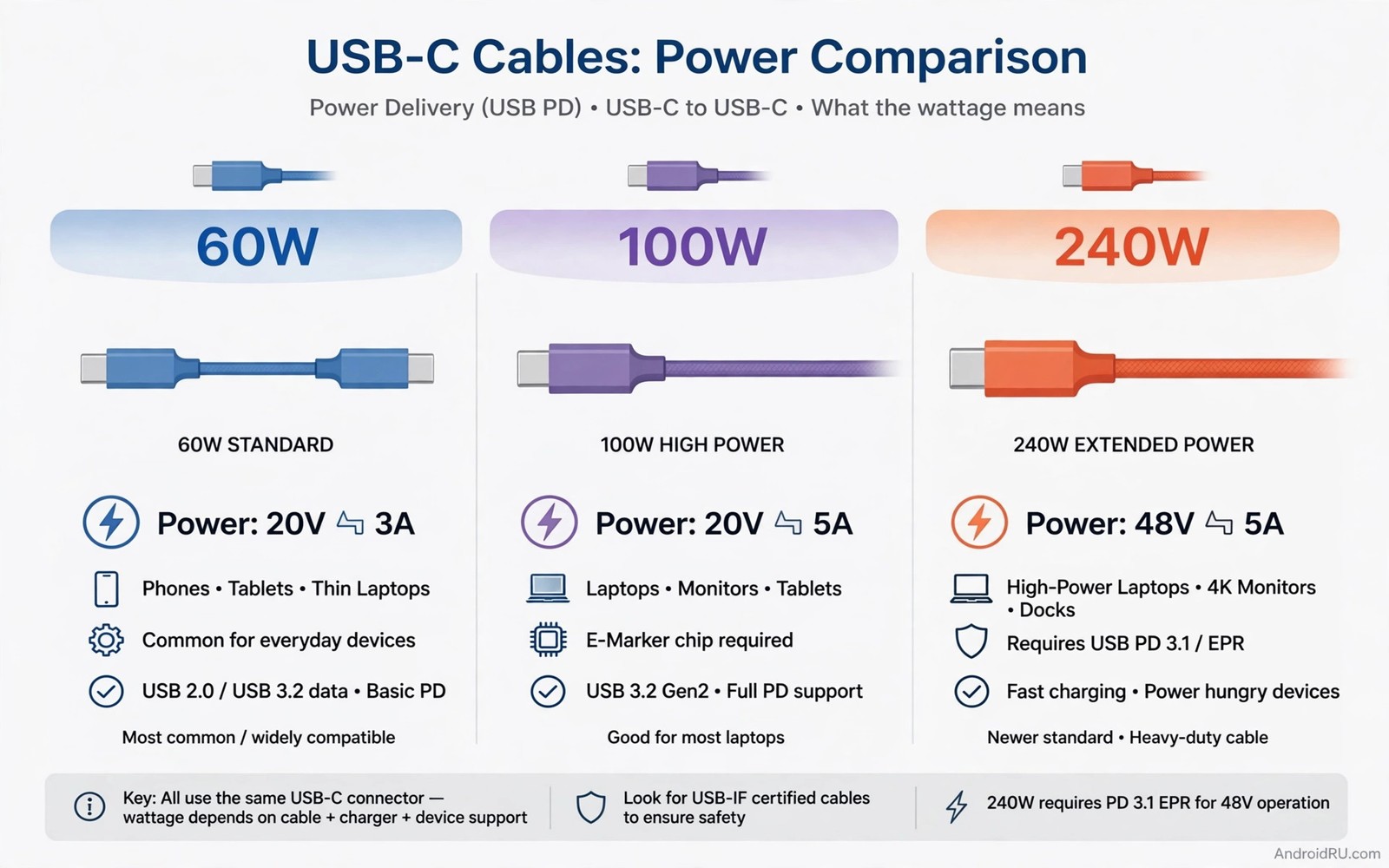
A watt rating is a promise about power, and power is voltage times current. A cable rated at 60W can safely carry 20 volts at 3 amps. A cable rated at 100W can safely carry 20 volts at 5 amps. A cable rated at 240W carries 48 volts at 5 amps, and it needs a special chip to prove it can do so safely. The number on the cable is the ceiling, the most power the cable can carry without overheating, not the power it forces into your device.
That ceiling is set by the wire inside. Thicker copper carries more current with less heat. Better insulation handles higher voltage without breaking down. A 60W cable uses thinner wire and a simpler design because it never has to carry five amps. A 240W cable uses thicker wire, stronger insulation, and an electronic marker chip that announces its rating to the charger. You cannot see any of that from the outside, which is why the rating matters more than the look.
Volts, amps, and watts in one minute
Volts are the pressure, amps are the flow, and watts are the result. Multiply them and you get power: 20 volts times 3 amps is 60 watts, 20 volts times 5 amps is 100 watts, and 48 volts times 5 amps is 240 watts. Your charger and your device negotiate a voltage and a current from a fixed list of combinations, and the cable job is to carry whatever they agree on without getting hot.
Voltage times current is the whole story behind a watt rating, and once you can do that one multiplication, every cable label in a shop starts to make sense.
Why 240W needs a chip, not just thicker wire
At 48 volts, a mistake costs more than a warm cable, so the USB standard requires a 240W cable to carry an electronic marker chip, a tiny chip inside the connector that tells the charger it is rated for 240W. Without that chip, the charger refuses to deliver more than 100W, no matter how thick the wire is. The chip is a safety handshake, and it is the reason a genuine 240W cable costs more than a 100W cable that looks the same.
Marker chips exist at lower ratings too. A 100W cable also carries a marker chip that reports its 5-amp capability, while a basic 60W cable may carry no chip at all, because 3 amps is the default every USB-C cable must handle. That is why a charger can tell a 100W cable from a 60W cable in a fraction of a second, even when your eyes cannot.
USB Power Delivery and Extended Power Range, in brief
The negotiation runs on a standard called USB Power Delivery, or USB PD. The basic version covers up to 100W. The extended version, called Extended Power Range (EPR), adds the 48-volt levels that reach 240W. A cable, a charger, and a device must all support EPR before 240W flows. If any one of them stops at 100W, the whole session stops at 100W.
60W vs 100W vs 240W: the full comparison
The three ratings cover three different jobs, and the table below puts them side by side so you can see the trade-offs at a glance. Read it as a buying guide: find your devices in the rows, then pick the rating that covers them without paying for power you will never use.
| Cable type | Max power | Voltage x current | Best for | What to check |
|---|---|---|---|---|
| 60W USB-C cable | 60W | 20V x 3A | Phones, tablets, small laptops, earbuds | Will not keep a large laptop charged under load |
| 100W USB-C cable | 100W | 20V x 5A | Most 13 to 16 inch laptops, travel kits, multi-device chargers | Needs a 100W charger to reach full speed |
| 240W USB-C cable (EPR) | 240W | 48V x 5A | Gaming laptops, mobile workstations, 16 inch pro laptops | Needs an EPR chip, an EPR charger, and an EPR device |
| Unmarked USB 2.0 cable | 7.5W to 15W | 5V x 1.5A to 3A | Data transfer and slow phone charging only | Often has no watt marking at all, never trust it with a laptop |
| Thunderbolt 4 / USB4 cable | 100W or 240W | 20V x 5A or 48V x 5A | High-speed data, monitors, docks, and laptop charging in one cable | Check both the watt rating and the data speed, they are separate specs |
The table hides one useful truth: a watt rating says nothing about data speed. A 240W cable can be a slow USB 2.0 cable for data, and a 60W cable can carry 10 Gbps. Power and data are separate specs on the same cable, so check both numbers when you buy, and do not assume a high watt rating means fast file transfers.
What the table means for a phone-only user
If you only charge a phone and earbuds, 60W covers everything. A phone rarely draws more than 25 to 30W, and a 100W or 240W cable will not make it charge faster: the phone and charger agree on the phone limit, and the extra headroom sits unused. Spend the difference on a second 60W cable for the car instead of on headroom you will never use.
That said, a 100W cable still makes sense as a shared household cable, because it charges the phone at full speed and it is ready the day someone plugs a laptop into it. The point is not that 100W is wrong for a phone, it is that it buys nothing extra for the phone itself.
What the table means for a laptop user
A laptop changes the math. A 13-inch ultrabook usually needs 45 to 65W, so a 60W cable works but leaves no margin when the processor is busy. A 15-inch laptop often needs 90 to 100W, so 100W is the sensible pick. A gaming laptop or a 16-inch pro machine can ask for 140W or more, and only a 240W EPR cable answers. Match the cable to the laptop charger, not to the phone in your pocket.
The verdict per use case
Phone and earbuds only: 60W. Phone plus a 13 to 15 inch laptop: 100W. Gaming laptop or workstation: 240W. One cable for a mixed travel bag: 100W, because it covers phones and most laptops without the price of a 240W cable. That is the whole decision in four lines, and it holds for almost every buyer.
How USB Power Delivery negotiates the safe level
Nothing in USB-C forces power into a device. The charger, the cable, and the device talk first, and they agree on a level that all three can handle. That conversation is the reason a 240W cable cannot fry a phone, and it is also the reason a weak cable can quietly cap a fast charger.
The charger offers a list of voltage and current combinations, called power profiles. The device picks the highest one it can use. The cable marker chip reports its own ceiling, and the charger drops to the lowest ceiling in the chain. If the cable says 60W, the session runs at 60W even when the charger offers 100W and the laptop wants 100W. The lowest number in the chain always wins.
The handshake, step by step
- You plug the cable in. The charger reads the cable marker chip and learns its ceiling.
- The charger offers its power profiles to the device.
- The device requests the best profile it can use.
- The charger checks the cable ceiling and delivers the lower of the two.
- The device watches the power it receives and adjusts as the battery fills.
Each step takes a fraction of a second, and the result is visible on the phone or laptop as the charging speed. A phone that reports charging rapidly got the profile it asked for. A laptop that reports a slow charger got capped somewhere in the chain, and the cable is the first place to check.
PPS and the fine print of fast charging
Some chargers offer Programmable Power Supply, or PPS, which adjusts voltage in small steps instead of jumping between fixed levels. Phones from Samsung and Google use PPS to charge faster and cooler. A cable that supports PPS carries the same watt rating, but the charger and phone must both support PPS for the benefit to appear. A 60W cable with PPS support can beat a 100W cable without it on a phone that uses PPS, another reason the watt number alone does not tell the whole story.
PPS is also the reason two 100W chargers can charge the same phone at different speeds. One offers the fine-grained PPS steps the phone wants, the other offers only fixed profiles, and the phone settles for the lower fixed profile. When a phone charges slower than expected on a strong charger, PPS support is worth checking alongside the cable.
Why a laptop can drain while plugged in
A laptop under heavy load can draw more power than a weak cable delivers. If the laptop needs 90W and the cable caps the session at 60W, the battery makes up the 30W gap and drains slowly even while plugged in. The fix is a cable rated for the laptop real draw, not a new charger, and the test is simple: watch the battery percentage during heavy work on the suspect cable, then repeat it on a cable you trust.
How to identify a cable rating in practice
Cables rarely print their rating clearly, and printing wears off, so identification is a skill, not a glance. Four checks, used together, identify almost any cable in your drawer.
Check the packaging and the product page first
A honest listing states watts, amps, and voltage together, 100W, 20V, 5A, and names the standard, such as USB PD 3.1 or EPR. A listing that only says fast charging without numbers is a warning sign. Save the product page or keep the box until you have labelled the cable, because the numbers are easier to find on day one than a year later.
For cable quality differences, the guide to cheap versus expensive USB-C cables shows what changes inside the jacket when a cable is built for 100W instead of 15W.
Read the print on the jacket
Some cables print 60W, 100W, or 240W on the jacket near the connector, along with the USB logo. The print is small and it rubs off with use, so read it early and write it on a label. A cable with no print at all is usually a low-power cable, most often a USB 2.0 data cable rated for 7.5W to 15W, and it should never be trusted with a laptop.
Look for the USB-IF certification logo as well. Certified cables carry the trident logo with a watt figure, and the certification means an independent lab tested the cable at its claimed rating. Certification is not a guarantee of perfect quality, but it is a much stronger signal than a watt claim printed by the seller alone.
Test it with a 30-minute charging check
Plug the unknown cable into your laptop with a known charger, note the battery percentage, and check again after 30 minutes of normal work. A 100W cable on a 100W charger adds far more charge in that window than a 60W cable does. Repeat the test with a cable you trust and compare the two numbers. The test is simple, it uses the gear you already own, and it beats a printed claim because it measures real performance.
Keep the test fair: use the same charger, the same laptop, and the same kind of work in both runs, and start both runs from a similar battery level, ideally below 50 percent, where charging is fastest. A test run at 90 percent battery tells you little, because charging slows as the battery fills.
For fake charger risks that affect cables, the guide to fake fast chargers and real output wattage shows how to test the charger side of the chain with the same 30-minute method.
Use a USB tester if you own many cables
A USB power meter, a small device that sits between the charger and the cable, shows live volts, amps, and watts. Plug a cable through it and the numbers on the screen name the rating in seconds. Meters cost roughly the price of one good cable, and they pay for themselves the first time they catch a cable that claims 100W and delivers 30W.
Some testers also read the cable marker chip directly and display the rating the chip reports, which settles the question without a charging test. If you own more than five USB-C cables, a tester is the fastest way to sort the whole drawer in one afternoon.
A simple log that ends drawer confusion
Keep a note with one line per cable: its rating, its length, and where you bought it. The note below is the format I use, and it takes two minutes to start.
usb_c_cable_log.txt
Cable A: 60W, 1 m, phone daily
Cable B: 100W, 2 m, laptop travel
Cable C: 240W, 1 m, gaming laptop only
Test: 30 minute gain recorded
Heat check: warm only, never hot
The weakest-link rule: charger, cable, and device
Charging speed is decided by the weakest part of the chain, and the chain has three parts: the charger, the cable, and the device. A 100W charger plus a 60W cable plus a 90W laptop gives you 60W. A 30W charger plus a 240W cable plus a phone gives you 30W. Blaming the cable when the charger is the limit, or blaming the charger when the cable is the limit, wastes money on the wrong replacement.
The lowest rating in the chain decides the real charging speed, so check all three parts before you buy anything. The check takes a minute: read the charger label, read the cable label, and check the device maximum draw in its specs.
How to find the limit in your own setup
Start with the device. A phone specs list its maximum wired charging wattage, and a laptop charger lists its wattage on the brick. Then read the cable. The smallest of the three numbers is your ceiling. If the ceiling is the cable, a better cable helps. If the ceiling is the charger, a better cable changes nothing and the money belongs in a new charger.
Write the three numbers down once for each setup you use daily: home desk, travel bag, and car. Three numbers per setup, and you will never again buy a cable to fix a charger problem.
The common misdiagnosis, and how to avoid it
The most common misdiagnosis is my charger is slow when the cable is the limit. Swap in a cable you trust and test again before you replace the charger. The second most common is my cable is fake when the charger is a 30W unit. Test each part separately and the real limit shows itself.
A third misdiagnosis is blaming the phone when the cable is a data-only cable from an old accessory box. Those cables charge at 7.5W, and the phone is not slow, it is starved. A labelled drawer makes all three mistakes rare, because the rating is on the cable instead of in your memory.
Heat, safety, and when to retire a cable
A cable carrying power near its rating gets warm, and mild warmth is normal. A connector that is hot to the touch is not. Heat is the cable telling you it is working too hard, and the right answer is to stop using it, not to push through.
Cheap cables fail here first. Thin wire heats up, wastes energy as heat, and can soften the insulation over time. A certified cable has been tested for its claimed rating by an independent lab, and the certification mark is worth more than a low price. A cable that costs a few dollars less and runs hot is not a bargain, it is a risk to the port it plugs into.
The heat check you can do with your hand
After 15 minutes of laptop charging, touch the connector and the first few centimetres of cable. Warm is fine. Hot enough that you want to let go is a warning: unplug it, let it cool, and do not use it for a laptop again. Check the connector for discoloration and the jacket for soft spots, because both are signs of heat damage inside.
Repeat the heat check on a new cable during its first week. A cable that runs hot from day one was never built for its claimed rating, and the return window is the time to find that out.
Damage that means retirement
- Frayed jacket or exposed wire: retire it at once for any high-power use.
- A bent or loose connector that wobbles in the port.
- A connector that only works at one angle.
- Scorch marks, a melted smell, or a connector that stays hot.
A damaged cable can still charge a phone, because a phone draws little power and hides the fault. A laptop draws far more and exposes it as heat. Retire the cable for laptop use the moment you see damage, and replace it rather than taping it: tape hides the fault without fixing it.
Storing cables so they keep their rating
Coil cables loosely and avoid sharp bends at the connector, because sharp bends break internal wires over time and quietly lower the safe power the cable can carry. A loose coil in a pouch beats a tight wrap around a charger. For storage ideas, the charging cable wrap hack shows a wrap method that protects the ends where cables fail first.
Buying guide: which rating for which setup
Buy the rating your devices can use, and buy one step of headroom only when the price gap is small. The cheapest cable that covers the job is the right cable, and the most expensive cable in the shop is the wrong answer for a phone.
Phone and earbuds only: 60W
Pros: cheap, light, flexible, and fast enough for any phone. Cons: cannot power a laptop under load. Who it is for: anyone whose heaviest device is a phone or a tablet. A 60W cable is the daily cable, and two of them, one at home and one in the bag, cover most people completely.
Look for a braided jacket and a certified 60W rating rather than the cheapest unmarked cable in the bin. The price gap is small and the certified cable survives far more bends before it frays.
Phone plus a 13 to 15 inch laptop: 100W
Pros: powers most laptops at full speed, charges phones just as fast, one cable for a whole travel kit. Cons: costs more and runs slightly stiffer than a 60W cable. Who it is for: travellers and hybrid workers with a laptop and a phone. This is the best single-cable answer for most people, and the rating I recommend when someone asks for one cable to do everything.
Pair it with a 100W GaN charger and the combination covers a phone, a tablet, and a laptop from one brick. The GaN charger runs cooler and smaller than an old silicon brick at the same wattage, which matters in a travel bag.
Gaming laptop or mobile workstation: 240W
Pros: the only rating that feeds a 140W-plus laptop at full speed. Cons: the most expensive, the stiffest, and wasted on a phone. Who it is for: owners of gaming laptops and pro workstations whose chargers already deliver more than 100W. Buy it only when the laptop own charger is above 100W, otherwise the extra rating never gets used.
Check that the laptop actually accepts 48V EPR charging over USB-C before you buy. Some gaming laptops still charge at full speed only through their barrel plug, and a 240W USB-C cable will not change that. The laptop specs, not the cable box, decide whether the purchase helps.
The one-cable travel answer
If you want a single cable for a bag with a phone and a laptop, take the 100W cable. It charges the phone at full speed, powers most laptops, and costs far less than a 240W cable. The 240W cable earns its place only in a bag that already holds a gaming laptop.
Frequently asked questions
Will a 240W cable charge my phone faster than a 60W cable?
No. The phone and charger agree on the phone own limit, usually 25 to 30W, and the cable delivers that, nothing more. The extra rating sits unused. A 240W cable is still useful as a universal travel cable, because it can charge the phone and the laptop with one cable, but it does not make the phone itself faster.
How can I tell a 60W cable from a 100W cable by looking at it?
Usually you cannot. The cables look alike, and thickness is a weak clue at best. Check the print on the jacket, check the packaging or product page, or run the 30-minute charging test with a laptop. Then label the cable the moment you know its rating: a label turns an identical-looking cable into an identified tool.
Is it safe to use a 100W cable with a phone?
Yes. Power Delivery negotiates a safe level for the phone, so a 100W cable does not push 100W into a phone. The phone asks for what it needs and the charger delivers that. Use a certified cable for the best safety, and retire any cable that runs hot or shows damage.
Do I need a special charger for a 240W cable?
Yes, the charger must support Extended Power Range (EPR) and offer a 48-volt profile, and the device must accept it. A 240W cable on a 100W charger delivers 100W at most. Check the charger label for EPR or a 48V profile before you buy the cable.
Why does my laptop say slow charger with a new cable?
The cable is the first suspect. An unmarked cable is often a low-power data cable rated for 7.5W to 15W, and it caps the session no matter how strong the charger is. Test with a cable you trust: if the warning disappears, the new cable was the limit, and it belongs in the phone drawer, not the laptop bag.
Label every cable tonight
The fix for cable confusion is not a new drawer or a new charger. It is a label on every cable you own. Take ten minutes tonight: gather the cables, check the packaging or run the 30-minute test on the ones you cannot identify, and write the watt rating on a small piece of tape near the connector. Store the laptop cables apart from the phone cables.
That labelled drawer ends the guessing. The next time you pack for a trip, you will reach for the 100W cable for the laptop bag and the 60W cable for the phone, and the laptop will charge at full speed because the weakest link in the chain is no longer a mystery.

