

A charger box can claim fast charging and still charge slowly. The claim may rely on a protocol that your phone does not support. The charger may also deliver far less power than its label states. A fake fast charger wastes time and it can risk heat damage. A few tests reveal the real output before you trust it daily.
Real wattage is voltage times current during actual charging. A charger that claims 65 watts should deliver high power to a device that can accept it. A phone that accepts only 25 watts will never show 65 watts even on a real charger. Test with a device that matches the charger claim. That match keeps the test fair.
This guide shows tests that need no lab equipment first. It then shows a USB meter test for users who want exact numbers. It also shows safety warning signs that mean retire the charger at once. Work through the tests in order and record each result. A record helps you return a fake charger with facts.
Check Labels And Protocols Before Plugging In
Read the charger label for output voltage and current values. A real fast charger lists several voltage levels for different devices. A fake charger may list only one vague output. Check the charging protocol names on the box. A protocol that your phone does not support will not give fast charging on your phone.
Check the charger weight and build feel. A very light high power charger can be a warning sign but weight alone proves nothing. Check for safety marks and a clear brand name. A charger with no brand and no safety marks deserves extra testing. Keep the box and receipt until the charger passes your tests.
Test Charging Time With A Known Phone
Charge your phone from a low battery level with the new charger. Note the start time and the start percentage. Note the percentage after fifteen minutes and after thirty minutes. Compare those numbers with your original charger on the same phone. A real fast charger should match or beat the original charger for that phone.
Use the same cable for both tests if you can. A weak cable can limit both chargers and hide the difference. Test at a normal room temperature. A hot phone limits charging speed by design. A fair test needs similar battery level and temperature for both chargers. The cable rating check in the difference between cheap and expensive USB-C cables helps you pick a fair test cable.
Use A USB Meter For Exact Numbers
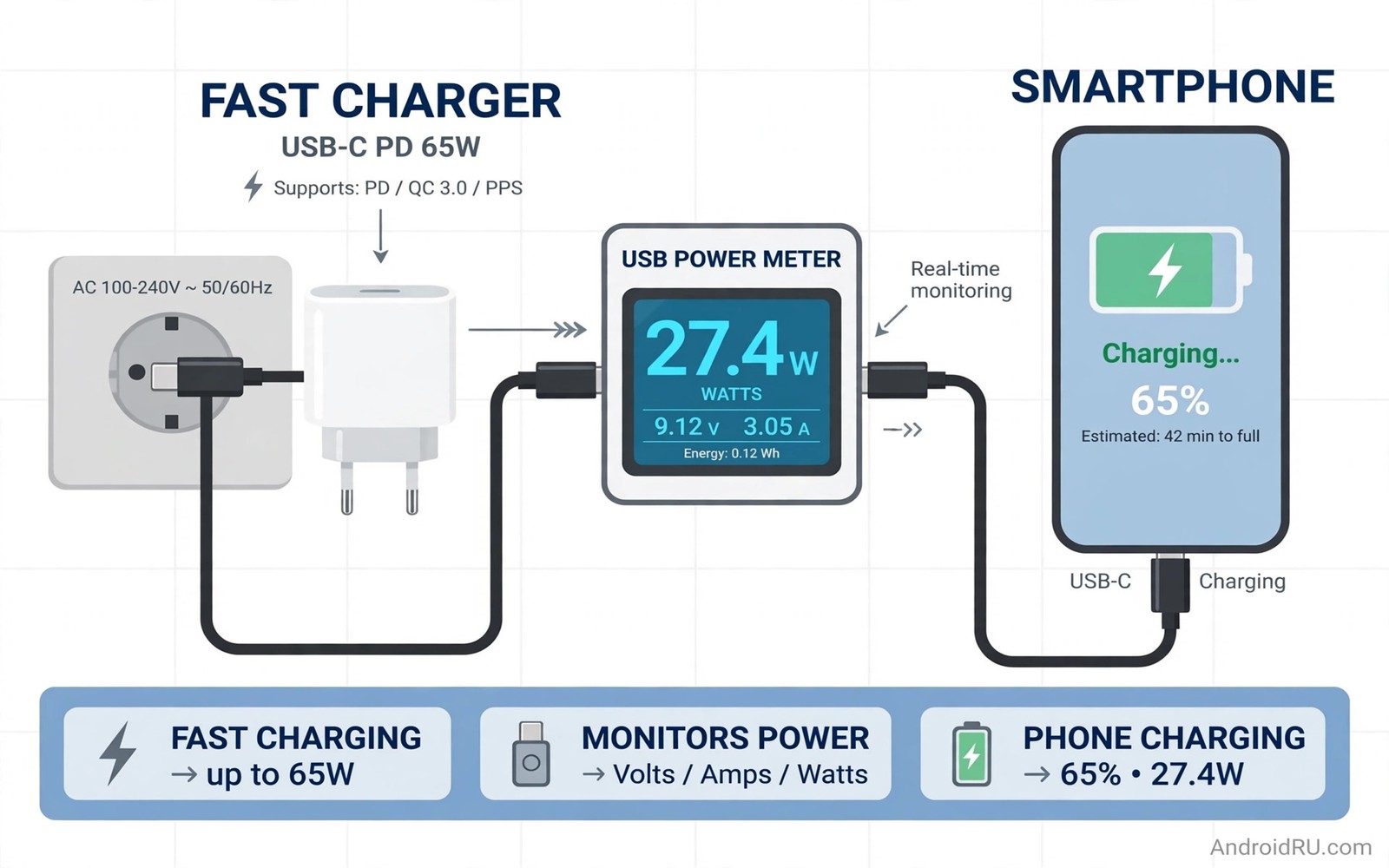
A USB meter sits between charger and cable and shows live voltage and current. Plug the meter into the charger and plug the cable into the meter. Start charging and read the voltage and current after one minute. Multiply voltage by current to estimate watts. A meter that shows far below the label on a matching device points to a fake claim.
Test the meter with your original charger first. That baseline shows what your phone normally draws. Test the new charger with the same phone and cable. Compare the two meter readings. A new charger that shows a fraction of the original charger power fails the test even if its box claims more. Keep a photo of each meter reading for a return claim.
Watch Heat Noise And Connection Stability
A charger that gets very hot during normal charging is a warning sign. Unplug it and let it cool before further tests. A charger that buzzes loudly or smells odd should be retired at once. A plug that wobbles in the socket can arc and damage the socket. Safety signs matter more than speed numbers.
Test the charger on a second device if the first test looks odd. A second device helps separate a phone limit from a charger fault. If both devices charge slowly then the charger is likely at fault. If only one device charges slowly then that device may limit power. Note the second device result in your test record.
Return A Fake Charger With Evidence
Keep the box and receipt and test photos together. Write a short note with start percentage and times and meter readings. Contact the seller with that evidence and ask for a refund or a replacement. A clear evidence note speeds a refund. A vague complaint about slow charging often gets ignored.
Buy a replacement charger from a seller with clear specs and safety marks. Check protocol support for your phone before you pay. Test the replacement in the first week with the same method. Early testing protects you from a second fake purchase. A tested charger earns daily trust.
test_phone = known_device
test_cable = rated_cable
meter_reading = voltage_times_current
retire_if = hot_or_buzzing_or_loose
The snippet above is an original example written for this guide. It shows generic settings that you can adapt to your own device. It does not copy code from any outside source.
Use the example above as a test checklist for fast chargers. It is not code to install. Follow each line in order for every new charger. Keep the checklist with your charger receipts.
Spot Fake Chargers By Packaging Clues
Packaging clues can reveal a fake charger before you plug it in. Check spelling and logo quality on the box. Blurry logos and spelling errors suggest a counterfeit product. Check for a clear model number and safety marks. A legitimate charger lists those details clearly.
Compare the box weight and contents with a known genuine charger. A fake box may lack a manual or a warranty card. A fake charger may use a generic cable with no rating. Missing paperwork is a warning sign but not proof alone. Combine packaging clues with a timed charging test for a verdict.
Check the seller reputation before you buy a charger online. A seller with many vague reviews deserves caution. A seller with detailed reviews about charging speed deserves more trust. Price alone is not a clue because genuine chargers also go on sale. Seller history plus packaging plus testing gives a strong verdict.
Keep packaging until the charger passes tests. Packaging helps a return claim if the charger fails. A return without packaging can be harder. A short retention habit protects your money. Keep the box for a week after purchase as a rule.
Protect Phones From Bad Chargers
A bad charger can stress a phone battery with unstable voltage. Use a charger with a stable output for daily charging. A stable charger keeps voltage within the phone expected range. An unstable charger can cause heat and battery wear. Daily stability matters more than peak speed claims.
Unplug a charger that makes the phone unusually hot. Heat during charging can come from the charger or the phone. Test with a different charger to separate the cause. A phone that stays cool on a second charger points to the first charger. A phone that stays hot on both chargers points to the phone or battery.
Use a surge protected outlet for valuable phones when possible. A surge protector guards against voltage spikes from the wall. Spikes are rare but they can damage chargers and phones. A surge protector is cheap insurance for expensive devices. Protection habits complement charger testing. Cable quality also protects phones and the difference between cheap and expensive USB-C cables explains cable risks.
Teach children and guests to use tested chargers only. An untested charger in a guest room can damage any phone that uses it. Label tested chargers clearly. A label prevents accidental use of a retired charger. Household charger discipline protects every phone in the home.
Test Chargers After Drops And Travel
A charger that survives a drop may still fail internally. A drop can crack internal solder joints. A cracked joint can cause intermittent charging. Intermittent charging looks like a phone fault. Post drop testing separates charger faults from phone faults.
Test a dropped charger with a timed charge. Compare the result with a known good charger. A slower result points to internal damage. A normal result suggests the drop caused no harm. Timed testing gives a clear verdict after a drop.
Inspect a travelled charger for bent prongs and cracked cases. A bent prong can damage a wall socket. A cracked case can expose internal parts. Either fault means retire the charger. Physical faults are safety faults and not cosmetic faults.
Keep a travel charger separate from a home charger. A travel charger suffers more drops and packing stress. A home charger stays safe on a desk. Separation lets you test the travel charger more often. Frequent testing catches travel damage early. Power ratings guide replacement and how USB-C ratings 60W versus 100W versus 240W work clarifies watt needs.
Replace a charger at the first sign of intermittent output. Intermittent output can stress a phone battery. A stable replacement costs less than battery wear. Replacement discipline protects phones from bad chargers. Discipline beats hope for charger faults.
If a magnetic cable could reduce plug wear then the magnetic cable trick that protects charging ports explains that protection idea.
Common Mistakes
The first mistake is trusting the box claim without a timed test. A claim is not a measurement. The second mistake is testing with a weak cable and blaming the charger. A cable can limit power as much as a charger. The third mistake is testing a hot phone and calling the charger slow. Heat limits charging by design.
Another mistake is testing a 65 watt charger with a phone that accepts only 25 watts. That mismatch cannot show full charger power. A further mistake is keeping a hot or buzzing charger in use. Safety signs mean retire the charger at once.
Frequently Asked Questions
Do I need a USB meter to spot a fake charger?
No a timed charging test with your original charger gives a strong clue. A USB meter gives exact numbers for a return claim. Start with the timed test. Buy a meter only if you test chargers often.
Why does a real charger still charge slowly sometimes?
The phone may limit charging when hot or nearly full. The cable may also limit power. Test at a low battery level with a rated cable at room temperature. That test shows the charger real speed.
Can a fake charger damage my phone?
A poor charger can deliver unstable power and excess heat. That stress can harm a battery over time. Retire any charger that gets very hot or buzzes. Use a tested charger with safety marks for daily charging.
Conclusion
Test your newest charger today with a timed charge from a low battery level. Compare it with your original charger using the same cable. If the new charger is far slower then test it with a USB meter and keep photos of the readings. Return a charger that fails with that evidence. That timed test is your concrete next step toward real fast charging.

