

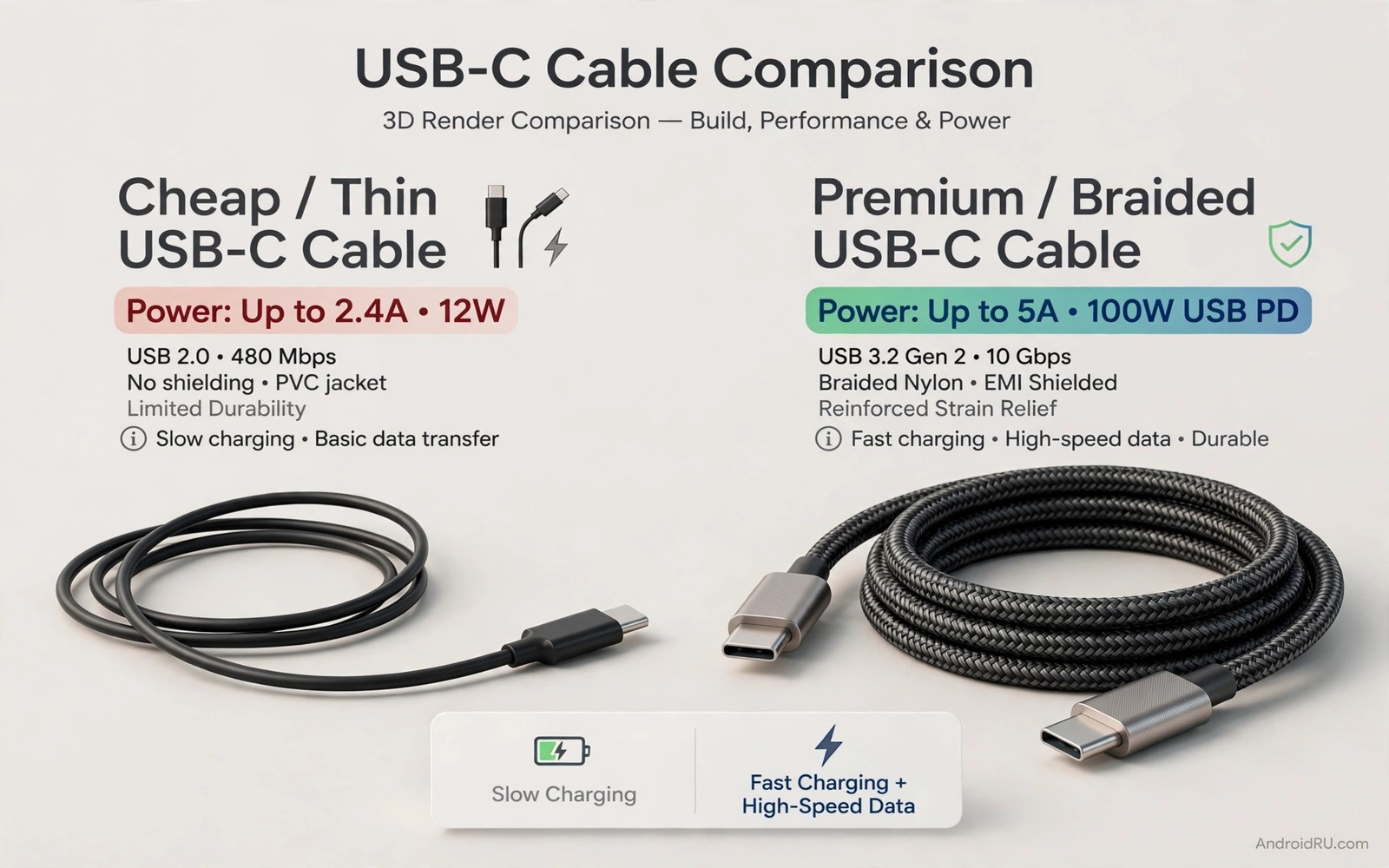
Two USB-C cables can look identical and behave very differently. One charges a phone in an hour and moves a large video in minutes. The other charges slowly and fails a file transfer halfway through. The difference hides inside the cable in wire thickness and shielding and chip design. Price alone does not reveal that hidden design.
A cheap cable often cuts costs in places that you cannot see. Thinner wires resist current and waste power as heat. Weaker shielding lets interference corrupt data. A missing chip can block fast charging or video output. An expensive cable may still be overpriced if it adds only a brand logo. The goal is to buy by spec and not by price alone.
This guide explains the four areas that matter for a USB-C cable. Those areas are power rating and data speed and video support and safety. You will learn how to read a cable spec before you buy. You will also learn simple tests that reveal a weak cable at home. That knowledge stops you from paying twice for the same cable.
Power Rating Decides Charging Speed
A cable power rating tells you how much power it can carry safely. A basic cable may carry only low power for slow charging. A cable rated for 60 watts suits most phones and small laptops. A cable rated for 100 watts or more suits larger laptops. A phone with a fast charger still charges slowly on a low power cable.
Check the cable packaging or product page for the watt rating. A cable with no rating is a gamble. Test a new cable with your fast charger and note the charging time. If a full charge takes far longer than the old cable then the new cable may limit power. Keep the rated cable for charging and use an unrated cable only for slow overnight charging if you must use it at all.
Data Speed Depends On Internal Wires
USB-C covers several data speeds under one plug shape. A basic cable may support only USB 2.0 speeds. A better cable supports USB 3 speeds or faster. A file that moves in seconds on a fast cable can take minutes on a basic cable. The plug shape alone tells you nothing about data speed.
Check the data speed rating on the product page. Look for USB 3 or USB4 wording if you move large files often. Test a large file transfer with a stopwatch. A slow transfer on a new cable points to a basic internal design. Keep a fast data cable at your desk for backups. The power rating lesson also matters for how USB-C ratings 60W versus 100W versus 240W work when you shop for a laptop cable.
Video And Extra Features Need Extra Wires
Some USB-C cables carry video to a monitor or a TV. That feature needs extra wires and a chip in some designs. A basic charging cable cannot carry video even if it fits the port. A cable that claims video support should state the resolution it supports. Test video with a short cable first because long video cables can fail at high resolution.
Check for other features only if you need them. A cable for a phone charger does not need video support. A cable for a laptop dock does need video and data and power together. Pay for extra features only when your setup uses them. A simple charging cable is fine for a bedside charger.
Safety And Build Quality Protect Your Devices
A well made cable uses proper insulation and strain relief at each plug. Strain relief is the flexible section that stops sharp bends at the plug. A cable with weak strain relief frays fast. A cable with poor insulation can overheat under high power. Check for safety marks from a recognised testing body on the packaging.
Feel the cable and plugs before you trust a new cable. A plug that wobbles in the port can damage the port over time. A cable that gets hot during charging should be retired. Heat during normal charging is a warning sign. A safe cable stays cool at its rated power and fits snugly in the port.
How To Shop Without Overpaying
Start with your real need and write it down. Note the power rating and data speed and length you need. Search for cables that meet those specs from sellers with clear specs. Ignore cables with vague claims and no numbers. A clear spec sheet is a good sign even for a mid price cable.
Compare two cables with the same specs and pick the one with better reviews for durability. A mid price cable with strong strain relief often beats a luxury cable with a fancy box. Keep the receipt and test the cable in the first week. Return a cable that fails power or data tests early. Early testing protects your money.
need = power_and_data_and_length
check = watt_rating_and_usb_speed
test = charge_time_and_file_transfer
retire_if = hot_or_loose_or_frayed
The snippet above is an original example written for this guide. It shows generic settings that you can adapt to your own device. It does not copy code from any outside source.
Use the example above as a shopping checklist for USB-C cables. It is not code to install. Tick each line before you pay for a cable. Keep the checklist for your next cable purchase.
Test Cables With Real Devices
A cable spec sheet can promise much and deliver little. Real device tests reveal the truth. Test a new cable with the exact phone or laptop you use daily. A test with a different device can mislead you about power and data. Device specific testing is the honest test.
Run a charge test and a file test on the same cable. A cable can charge well and transfer data poorly. A cable can transfer data well and charge slowly. Both tests matter for a cable that does both jobs. A cable that fails either test should not serve both jobs.
Test cable length effects with a long cable. A very long cable can drop voltage and slow charging. A short cable usually performs better for the same rating. Choose the shortest length that reaches comfortably. Shorter length is a performance choice as well as a tidy choice.
Keep a test record for cables that pass both tests. Note the brand and rating and length of passing cables. That record speeds future purchases. A record also helps family members buy the right cable. Good records prevent repeat mistakes.
Choose Cables For Specific Jobs
A bedside cable needs only reliable slow charging. A desk cable needs fast charging and fast data. A travel cable needs durability and compact packing. Different jobs need different cables. One universal cable rarely serves all jobs well.
Label cables by job with a small tag or colour. A labelled set stops the daily search for the right cable. A desk cable stays at the desk. A travel cable stays in the travel pouch. Job separation also prevents a travel cable from wearing out at a desk.
Buy a spare for the job that matters most. A spare desk cable saves a work day when the main cable fails. A spare travel cable saves a trip when a cable frays abroad. Spares are insurance for critical jobs. A spare for a bedside cable matters less.
Retire job cables by job performance and not by age alone. A desk cable that still charges fast can stay. A travel cable that frays after many trips should retire. Performance based retirement saves money and prevents failures. Watt ratings guide job choice and how USB-C ratings 60W versus 100W versus 240W work clarifies power for each job.
Maintain Cables After Purchase
A new cable needs maintenance from the first week. Inspect plugs monthly for early wear signs. Early wear near a plug warns of a habit problem. A habit change at the early wear stage saves the cable. Late inspection finds only a dead cable.
Clean cable plugs gently with a dry cloth. Dust on a plug can cause a poor connection. A poor connection can mimic a cable power fault. A clean plug restores a firm connection. Cleaning takes seconds and it prevents misdiagnosis.
Coil cables loosely for storage after every use. A loose coil habit preserves the internal wires. A tight coil habit damages the same wires daily. Habit consistency matters more than cable brand. A good habit protects even a mid price cable.
Test a cable after a drop or a crush incident. A dropped cable may look fine but fail internally. A quick charge and data test reveals hidden damage. Hidden damage caught early prevents a port fault later. Testing after incidents is a safety habit. Video capable cables need special care and how DisplayPort Alt Mode lets USB-C cables stream video to TV explains video cable needs.
Replace a cable at the first sign of internal failure. A cable that works only at an angle is already failing. Continued use risks port damage. Early replacement costs less than port repair. Replacement discipline protects phones.
A cable test kit at home can include a known good cable for comparison. Keep that reference cable in a labelled pouch and use it only for tests. A reference cable gives a baseline for every new cable you buy. Test a new cable against the reference for charging time and file speed. A hub test can also reveal port limits and what features matter most in USB hubs helps you judge hub quality fairly.
Common Mistakes
The first mistake is assuming that all USB-C cables are the same because the plug fits. The plug shape hides power and data differences. The second mistake is buying the cheapest cable for a fast charger. A weak cable wastes the charger. The third mistake is buying a luxury cable for a bedside charger that needs no data or video. Match the cable to the task.
Another mistake is trusting a cable with no watt rating. An unrated cable is a gamble at high power. A further mistake is keeping a hot cable in use. Heat is a warning and not a minor annoyance.
Frequently Asked Questions
Can a cheap cable damage my phone?
A very poor cable can overheat or deliver unstable power. A reputable cheap cable with a clear rating is usually safe. Retire any cable that gets hot or fits loosely. Safety marks and clear specs lower the risk.
Do I need a 240 watt cable for a phone?
No a phone needs far less power than a large laptop. A 60 watt cable suits most phones well. Buy a higher rating only if you also charge a laptop. Match the rating to your largest device.
Why does my cable charge slowly on a fast charger?
The cable may limit power below the charger rating. The phone may also limit charging when hot or nearly full. Test the same charger with a rated cable. If speed returns then the old cable was the limit.
Conclusion
Check the watt rating and data speed of your main cable today. Test a full charge and a large file transfer with that cable. If either test is slow then buy a cable with clear specs that match your device. Test the new cable in the first week and return it if it fails. That spec check is your concrete next step toward buying the right cable once.

