

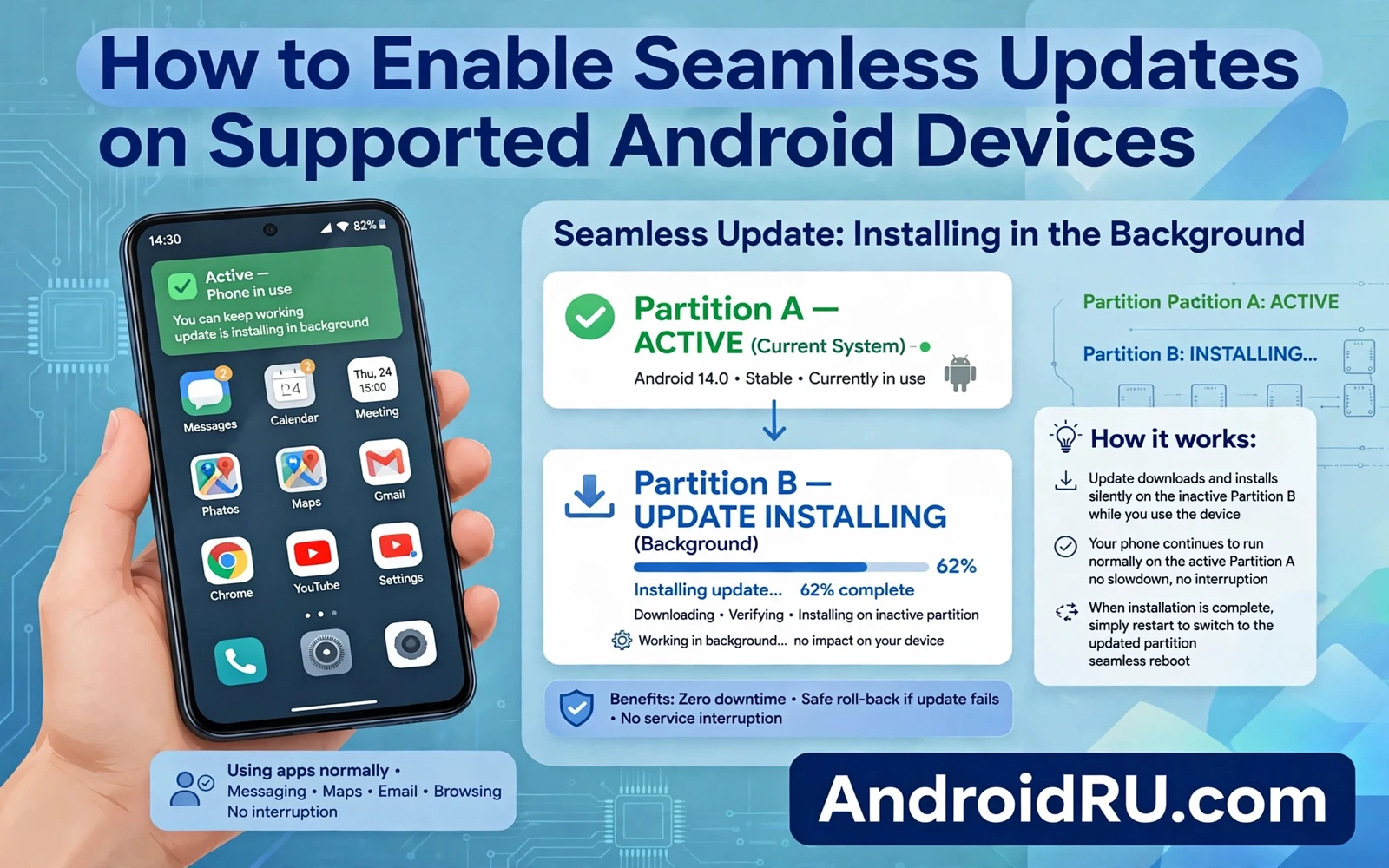
Seamless updates let an Android phone install a system update in the background while the owner keeps using the phone. The phone downloads the update and installs it onto an inactive system partition. A restart then switches to the updated partition in a short boot step. This guide explains how to enable seamless updates on supported Android devices. It also explains why owners cannot add seamless updates to phones that lack the required partition design. Readers will learn how to check support and how to manage update settings wisely.
Traditional updates forced a phone into recovery mode for a long install phase. Owners could not use the phone during that phase. A failed traditional update could leave the phone stuck without a working system. Seamless updates solve those problems with a second system partition that acts as a safety net. The active partition keeps running while the inactive partition receives the update. A failed update leaves the old partition intact for the next boot. That safety net changes updates from a risky event into a routine background task.
The wider system update story explains rollout timing and staged delivery behind seamless installs. Readers who want that background can study how Android system updates work behind the scenes before changing any update setting. Rollout stages still control when a seamless update becomes available for a given phone. Seamless design changes the install mechanics rather than the rollout policy. Owners who understand both layers set realistic expectations for update arrival.
How A B Partitions Work
A phone with seamless updates holds two copies of key system partitions called slot A and slot B. Only one slot stays active at a time while the other slot stays inactive. An update writes new system images to the inactive slot during normal phone use. The phone then marks the updated slot as the next boot target. A restart boots into the updated slot and completes final steps quickly. The owner experiences a normal restart rather than a long install screen.
Rollback protection adds safety after the boot into the updated slot. The phone can mark the new slot as successful only after it boots cleanly. A failed boot can return the phone to the previous slot automatically. That fallback protects owners from a bad update build. Fallback does not restore user data that an update may have changed. Owners should still back up important data before major updates. Partition safety and data safety solve different problems.
How To Check Seamless Update Support
- Open settings and then open system update settings
- Check whether updates install in the background
- Confirm that the phone model shipped with A B support
- Keep automatic updates on for security patches
- Restart promptly when the phone prompts for a reboot
Owners cannot enable seamless updates through a toggle on phones that lack A B partitions. Partition layout gets fixed at factory design time and it cannot change through settings. A phone that shipped without seamless support will keep using traditional recovery updates. Owners who buy a new phone and value seamless updates should check support before purchase. Reviews and maker specs sometimes mention seamless updates explicitly. Device info tools can also reveal slot support on phones that already run Android.
Project Mainline complements seamless updates by delivering some system parts through store updates. The explanation of how Project Mainline changes Android updates shows how modular parts update without a full system image. Seamless updates handle full system images while Mainline handles modular components. Together they shorten the gap between a fix and a phone. Owners benefit from both paths without managing either path directly.
Managing Update Settings For Seamless Phones
Automatic update settings control download timing and install timing on seamless phones. Owners who keep automatic downloads on receive patches sooner. Owners who restrict downloads to Wi-Fi avoid mobile data costs. Owners who postpone restarts delay the final switch to the updated slot. A postponed restart leaves security fixes inactive even though install finished. Owners should restart within a day of an update prompt for security patches. A prompt restart completes the protection that background install started.
Storage space affects seamless updates because the inactive slot needs room for new system images. A phone with very low free storage may fail to stage an update. Owners should keep a reasonable free space buffer on seamless phones. Clearing cache and archiving unused apps can free staging room. System update screens usually warn when storage blocks an update. Owners who see that warning should free space and retry rather than ignoring the update.
What To Do When A Seamless Update Fails
A failed seamless update usually leaves the phone on the old slot with a retry option. Owners should check storage and network and then retry the update. A second failure may signal a corrupted download that a fresh download can fix. Owners should avoid factory resets for a simple update failure. A reset erases data while the partition fallback already protects the system. Persistent failures across several retries deserve maker support attention.
Rollback planning matters when an update succeeds yet breaks a favorite feature. The guide on how to roll back an Android update to a previous version explains why downgrades carry data risks and extra steps. Seamless fallback only covers failed boots rather than feature regressions. Owners who dislike a successful update cannot simply flip back to the old slot. A backup taken before the update gives the safest recovery path. Owners should weigh that backup step before major version upgrades.
Seamless Updates And Device Longevity
Seamless updates improve device longevity by lowering the fear around updates. Owners who trust background installs accept patches sooner. Sooner patches close security flaws faster across the whole ecosystem. Device makers also gain because support calls about stuck updates decline. The design still depends on maker update policy for long term support. A seamless phone from a maker with short support still stops receiving updates early. Partition design removes install friction while policy still decides support length.
Seamless updates turn system maintenance into a quiet background habit. Owners keep using the phone while the update stages on the inactive slot. A short restart completes the switch and rollback protection guards the boot. Settings control download timing while storage and restart habits complete the process. Owners who check support and keep automatic updates on and restart promptly get the full benefit. That quiet routine keeps phones secure without demanding attention at every update.
Seamless Updates For Older Phones
Older phones without seamless support still receive updates through traditional recovery installs. Owners of such phones should expect longer install screens and temporary unavailability. A traditional update demands a charged battery and patience during the install phase. Owners should start traditional updates when they can spare the phone for a while. Planning update timing prevents frustration during busy hours. Traditional updates remain safe when owners follow battery and backup guidance.
Buyers who upgrade from an older phone should check seamless support on the new model explicitly. Seamless support often appears in maker specs under update or partition details. A buyer who values hassle free updates should treat seamless support as a buying criterion. That criterion matters most for owners who update promptly for security. A phone with seamless support removes a common excuse for delaying updates. Prompt updates then become a background habit rather than a chore.
Storage constrained phones face extra seamless challenges because staging needs free space. Owners should treat free space as part of update readiness. Archiving unused apps and clearing large downloads can restore staging room. A phone that constantly warns about low storage will struggle with any update method. Regular storage hygiene therefore supports update health directly. Owners who keep a buffer enjoy smoother updates of every kind.
Seamless Updates And App Compatibility
App compatibility after a seamless update usually stays smooth because apps target framework APIs rather than partition layouts. A well behaved app runs identically on the new slot after boot. An app with deep system integration may need an update after a major version change. Owners should update apps promptly after a major system upgrade. App updates after system updates close compatibility gaps quickly. A short app update pass after reboot prevents lingering glitches.
Banking and security apps sometimes need extra verification after a major update. A new system slot may trigger fresh device checks inside those apps. Owners should expect a login or verification prompt after a major upgrade. That prompt signals security diligence rather than a problem. Owners should complete verification on trusted networks only. Patience with security prompts protects accounts during transition periods.
Game performance after a seamless update can shift when graphics drivers or system services change. Most games run identically after an update. A game that stutters after an update may need a game update or a cache clear. Owners should test one favorite game after a major upgrade before judging the whole update. A single game issue rarely signals a system failure. Targeted fixes beat system resets for isolated game problems.
Seamless Updates And Enterprise Fleets
Enterprise fleets benefit strongly from seamless updates because IT teams manage many phones at once. Background staging lets employees keep working during update installs. Short restarts reduce downtime across a whole fleet. IT teams can schedule restarts during low use windows for many devices. That scheduling control keeps business operations smooth. Seamless design thus serves organizations as much as individual owners.
Fleet update compliance improves when updates demand less employee effort. Employees who face long install screens often postpone updates for weeks. Employees with seamless updates face only a short restart prompt. Compliance rates rise when friction falls. Higher compliance closes security gaps across the fleet faster. IT leaders should favor seamless capable models when refreshing fleets. That hardware choice pays dividends in security posture for years.

