

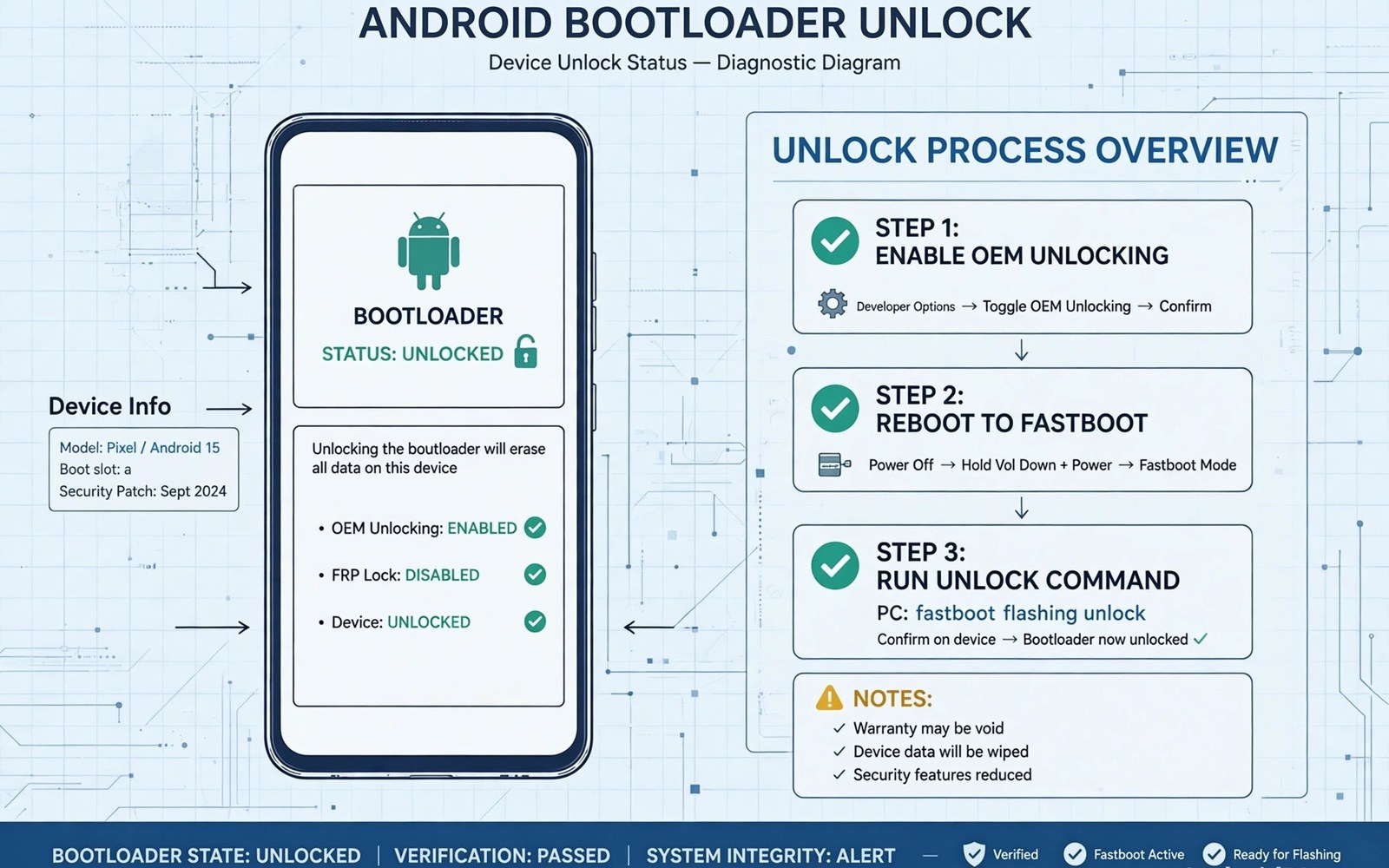
Unlocking the bootloader is the first gate for most root methods. It lets you flash custom boot images and kernels. It also wipes user data on most phones. That wipe is a safety feature by design. You should treat unlocking as a serious step rather than a casual toggle.
Not every phone allows unlocking. Some carriers lock the bootloader permanently. Some makers require an unlock code from their site. Some models allow unlocking only after a waiting period. The rules vary by brand and region and carrier. Checking first saves wasted effort.
A phone that cannot unlock is not a failed phone. It simply needs a different plan. You may use stock features and wait for a future method. You should never force an unlock with a tool made for another model. That path risks a hard brick that no software fix can repair.
The unlock check fits into the wider root journey. Review what Android rooting means and its core risks and benefits first. Then plan the next step with how boot image patching installs root access in mind. A checked bootloader makes the later steps far smoother.
Find Your Exact Model And Variant
Open settings and find the about phone section. Note the model name and model number exactly. Note the software build number as well. Note the carrier name if the phone came from a carrier. These details decide which unlock path applies to you.
Two phones can share a marketing name but differ inside. A regional variant may use a different modem or storage layout. A carrier variant may add a permanent lock. Using the wrong guide for a similar model is a common cause of failure. Exact model data prevents that error.
Write the details down on paper or in a note app. You will need them when you search for guides. You will need them again when you download firmware. Clear notes also help support forums help you faster. Vague model info leads to vague and risky advice.
Check The Maker Unlock Policy
Visit the maker support pages for bootloader unlocking. Some makers publish a clear unlock portal. Others state that unlocking voids warranty in plain terms. Others offer no official path at all. The policy page is the most reliable source for your brand.
Some makers require you to create an account first. Some require you to link the phone to that account. Some impose a waiting period of days or weeks. Some require a unique unlock key tied to your device ID. Follow the official flow exactly when one exists.
If no official path exists then be cautious. Community tools may still exist for some models. Their safety varies widely by model and by tool age. Check recent reports from users with your exact variant. Avoid tools with no recent success reports.
Check Carrier And Region Locks
Carrier phones often carry extra locks. A carrier may block the unlock toggle in settings. It may require the phone to be fully paid off first. It may require a period of active service. Contact the carrier support team for the exact rule. Get the answer in writing when you can.
Region locks can also affect unlocking. A phone sold in one region may behave differently elsewhere. Firmware for another region may not unlock the same way. Stay with firmware for your region unless a trusted guide says otherwise. Region mismatch is a quiet cause of flash failure.
Check whether the phone is still under a finance plan. Some finance plans block unlocking until paid off. Unlock attempts during a finance lock may fail without a clear error. Clearing the finance status first avoids confusion. It also protects your account standing.
Use Developer Options As A Signal
Enable developer options through the build number tap sequence. Look for the OEM unlocking toggle in that menu. If the toggle is present and active then unlocking is likely possible. If the toggle is greyed out then a lock is still in place. That grey state often reflects carrier or waiting rules.
Some phones show the toggle only after linking an account. Others show it only after a set number of days. A missing toggle does not always mean a permanent block. Research your model to learn what the toggle state means. Do not assume a permanent block from one grey toggle alone.
Use fastboot to confirm the lock state when possible. Boot into fastboot mode with the maker key combination. Run a command to read the device lock state. The output states locked or unlocked plainly. That output is stronger evidence than a menu toggle alone.
Safety Steps Before You Unlock
Back up all data before unlocking. The unlock wipe erases apps and photos and files. Copy data to a computer or cloud storage first. Verify the backup by opening a few files from it. A backup you never tested is only a hope rather than a plan.
Charge the battery above half before starting. Keep the phone plugged in during the process. Use a reliable cable and port. A power loss during unlock can corrupt the bootloader state. Stable power is a simple guard against a serious fault.
Keep your return path in mind from the start. Learn how to unroot fully and restore a factory setup before you unlock. That knowledge helps if you later need stock software. It also helps you judge whether unlocking is worth the trade for you.
Reading Fastboot Output Correctly
Fastboot output uses short lines that state facts plainly. Locked state appears as a simple locked or unlocked word. Device serial appears near the top of many outputs. Build and variant data may appear in other commands. Learn to read these lines before you act on them.
A command may fail because the phone is not in fastboot mode. It may fail because drivers are missing on the computer. It may fail because the cable is charge only. Check mode and drivers and cable before assuming a lock. Simple causes explain most fastboot errors.
Some makers use custom fastboot commands. Their output format differs from standard commands. Follow the maker guide for your brand when commands differ. Do not force a standard command that your maker does not support. Forced commands can return misleading results.
Save fastboot output to a text file for reference. A saved output helps forum helpers diagnose faults. It also creates a record of the state before unlocking. That record matters if you later need warranty help. Clear records beat memory when details fade.
Waiting Periods And Account Links
Some makers link unlocking to an account binding period. The phone must stay linked for a set number of days. Removing the account during that period can reset the timer. Keep the account linked until unlocking succeeds. Patience here avoids a frustrating restart.
Account binding also ties the phone to your identity. That link helps makers prevent theft and fraud. It also means unlocking leaves a record with the maker. Users who value privacy should weigh that record. The trade is part of the official unlock path.
Waiting periods frustrate many users but they serve a purpose. They slow down stolen phone resale and bulk unlocking. They also give users time to reconsider a risky step. Use the waiting time to back up and study. A prepared user unlocks with less risk.
Do not try to bypass a waiting period with unofficial tools. Bypass tools may exploit a security flaw that later gets patched. They may also damage the bootloader state. A damaged bootloader can block future official updates. The official wait is safer than a risky shortcut.
When Unlocking Is Not Possible
A permanently locked phone still offers many options. You can customise the launcher and icons and widgets. You can use automation apps within stock limits. You can improve privacy with permission controls. These options cover most daily needs without root.
You can also consider a different phone for experiments. A used phone with unlock support makes a good test device. It keeps your main phone stable and safe. Experiments on a spare phone carry far less risk. That separation suits curious users well.
Selling a locked phone and buying an unlockable one is another path. Check unlock policy before buying the replacement. Verify the exact variant rather than the brand alone. A careful purchase prevents repeating the same lock problem.
Accepting a lock is not a failure of skill. Makers and carriers set locks for business reasons. Users cannot control every policy choice. Focus on what your current phone can do well. A stable phone that serves daily needs is a good outcome.
A Balanced Final View
Unlock checks protect you from wasted effort and risk. A few hours of checking can save days of recovery. Model and carrier and region checks each matter. Skipping one check can cause a failure that others would have prevented. Thorough checks are never wasted time.
Document every check result in a simple note. Record the model and carrier answer and toggle state. Record fastboot output in the same note. That note helps you and helps forum helpers. It also proves useful if you revisit unlocking months later.
If unlocking proves impossible then focus on stock strengths. Modern stock Android offers deep customisation and privacy tools. A stable phone serves daily life well. Chasing an impossible unlock only adds frustration. Accept the limit and use the phone fully within it.
If unlocking proves possible then proceed slowly and carefully. Back up fully and charge fully before the unlock step. Follow the maker flow exactly without shortcuts. A slow careful unlock sets the tone for safe root work later.
Keep your unlock notes safe for future use. You may need the same checks after a phone replacement or a carrier change. Saved notes speed up the next check greatly. They also help friends with the same model avoid common pitfalls. Good notes turn a one time check into lasting knowledge.
Talk to users with your exact carrier variant before starting the unlock flow. Their experience with waiting periods and toggle states matters greatly. Variant specific reports reveal hidden carrier rules early. They also show which official steps actually worked in practice. Real reports beat general guides when the variant is unusual.
adb reboot bootloader
fastboot flashing get_unlock_ability
fastboot oem device-info
# Read locked state before any unlock step
The steps above follow the approach described in the official developer documentation and reflect common practice for this topic. They focus on model checks and carrier rules before unlocking. Readers should follow the maker process for their exact variant. When a step is unclear it is safer to pause and research further.

