

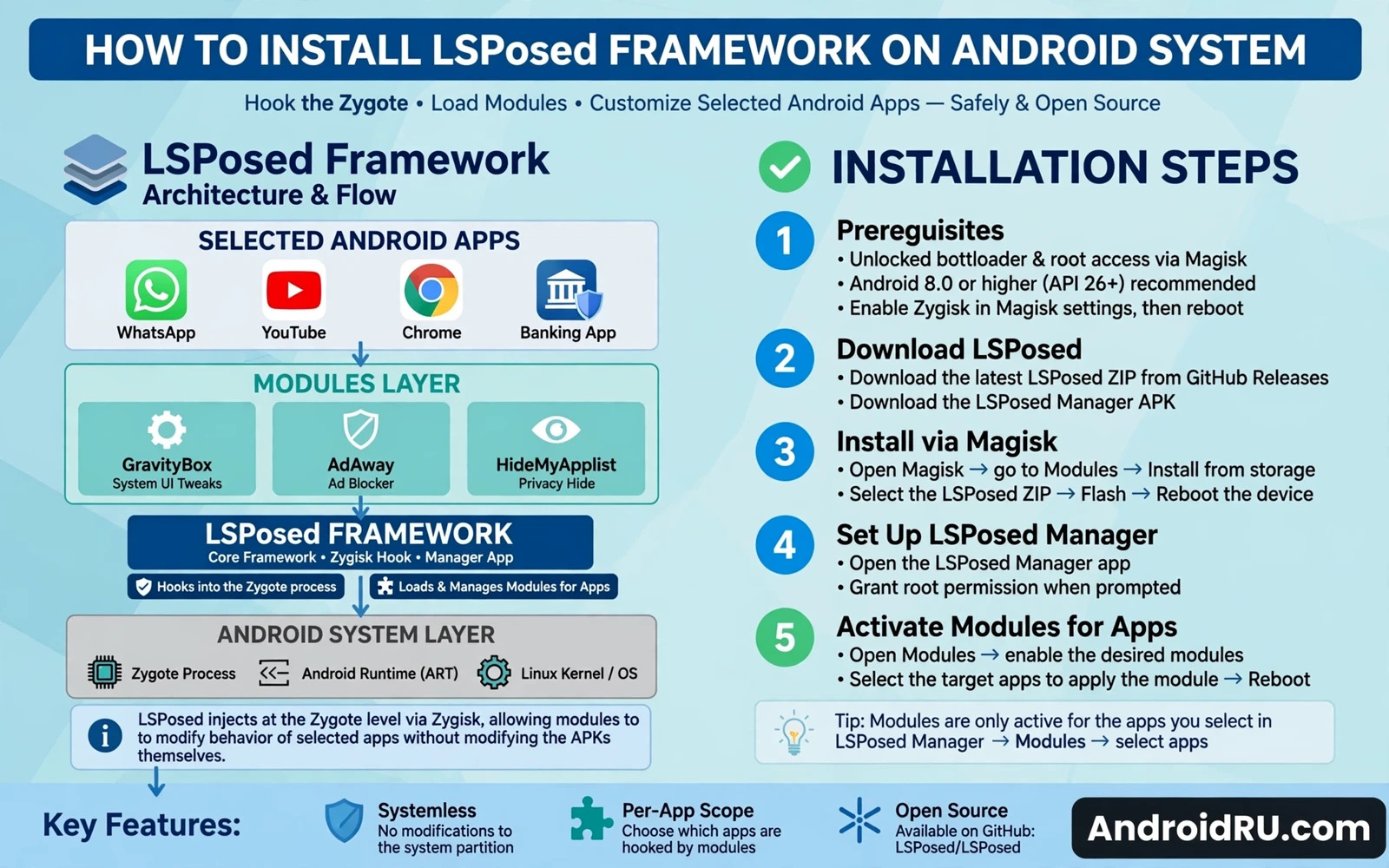
LSPosed is a framework that lets modules change app behavior without changing app files. LSPosed builds on the ideas of the older Xposed framework. LSPosed works on modern Android versions through a root method that supports Zygisk or a similar injection path. Modules hook into app code at runtime. Modules can change interface behavior. Modules can change permission behavior. Modules can change features inside a single app. This guide explains installation in safe order. It also explains scope control and troubleshooting. Read the root safety notes before you start.
LSPosed is powerful because it sits between apps and the system. A module can alter what an app sees. A module can alter what an app does. A module can alter what an app shows. That middle position also creates risk. A buggy module can crash an app. A buggy module can crash the system interface. A buggy module can cause a bootloop. Scope control limits that risk. Careful module choice limits that risk further.
What You Need Before Installation
Root access is the first requirement. LSPosed needs a root method that can inject its framework at boot. Magisk with Zygisk enabled is the most common path. KernelSU and APatch can also work when their setup supports the framework. Check framework compatibility for your root method and Android version. A mismatch can cause boot failure or a silent install that does nothing.
A working backup is the second requirement. Back up the system state before you install any framework. A recovery backup lets you restore a working phone after a bad module. A recovery backup also lets you test modules without fear. Keep the backup on external storage when possible. Keep stock firmware ready as a deeper fallback. Framework work without a backup is a gamble.
Know your Android version and your root method version. Framework builds differ by Android version. Framework builds differ by injection method. Download the framework package that matches your setup. Verify the file when the project provides a hash. A wrong build can fail to load. A wrong build can also break app startup.
Installing LSPosed Step By Step
Start with a clean rooted phone and a fresh backup. Open the root manager app and confirm root still works. Enable Zygisk when your root method uses it. Reboot once and confirm the phone boots normally. A stable base makes later troubleshooting far easier. Do not install the framework on a phone that already bootloops or crashes often.
Install the LSPosed manager app next. The manager app controls the framework. The manager app lists installed modules. The manager app controls module scope. The manager app shows framework status. Install the manager from the package that matches your root method. Open the manager and read the status screen. A green active status means the framework loaded. A missing status means the injection path failed.
Flash or install the framework module through the root manager when your setup needs that step. Some setups install the framework as a module inside the root manager. Other setups use a separate installer package. Follow the framework instructions for your exact root method. Reboot after the framework install finishes. Do not install user modules before the framework itself shows active.
Confirm the framework after reboot. Open the manager app again. Check that the framework status shows active. Check that the version matches the package you installed. Check that the system interface loads normally. Open a simple app and confirm it starts. If anything crashes at this stage then stop and troubleshoot before adding modules.
- Confirm root works and back up the phone first
- Enable Zygisk when your root method uses it
- Install the LSPosed manager app for your setup
- Install the framework through the correct path
- Reboot and confirm active status before adding modules
- Add one module at a time and test after each one
Installing And Scoping Modules
Module installation starts in the manager app. A module package installs like a normal app package in most cases. Open the manager after install. Find the module in the module list. Enable the module with its toggle. Open the scope screen for that module. Scope decides which apps the module can hook. Scope is the most important safety control in LSPosed.
Scope narrowly by default. Enable only the apps that the module truly needs. A theming module may need only the system interface app. A privacy module may need only the apps that it protects. A module scoped to every app can break apps that it was never built for. A module scoped to every app can also slow app startup. Narrow scope reduces crashes and speeds up the phone.
Reboot after you enable a module and set its scope. Some modules need a reboot to hook correctly. Some modules apply after an app restart only. Test the target app after reboot. Check that the module feature works. Check that the target app still starts fast. Check that other apps still work normally. Remove the module when the target app crashes or misbehaves.
Update modules with care. A module update can change hook points. A module update can break on a new Android version. Read the module changelog before updating. Update one module at a time. Test after each update. Keep a note of the last working version for each module. A note lets you roll back fast when an update fails.
Choosing Safe Modules
Module reputation matters more than feature count. Prefer modules with recent updates. Prefer modules with clear documentation. Prefer modules that state supported Android versions. Prefer modules with a public issue tracker and active fixes. Avoid modules that promise hidden features with no explanation. Avoid modules that ask for broad scope without a clear reason.
Module purpose should match a real need. A module that changes one annoying behavior is worth more than a module pack that changes fifty things at once. Large packs hide the cause of a crash. Large packs make scope control harder. Small focused modules are easier to test. Small focused modules are easier to remove. Build your setup from focused pieces.
When you want ideas for safe and useful modules, the top LSPosed modules to enhance Android customization collection groups modules by purpose and explains the scope each type needs. Use that collection as a shortlist and test each pick on your own phone before you keep it.
Troubleshooting Common Problems
A bootloop after a module install points to the last module first. Boot into safe mode when your framework supports module disable in safe mode. Disable the last module. Reboot normally. Remove the module fully when normal boot returns. When safe mode is not available use recovery to remove the module data or restore a backup. Do not flash random fixes from unknown uploaders.
An app crash after scoping points to a bad hook. Open the manager and narrow the scope for that module. Remove the crashing app from scope. Restart the app and test again. When the crash stops the module hook was the cause. Report the crash to the module developer with the app name and version and Android version. A clear report helps a fix arrive faster.
A framework inactive status points to the injection path. Check that Zygisk is still enabled in the root manager. Check that the root method still works after an update. Check that the framework version matches your Android version. Reinstall the framework package when the status stays inactive after a reboot. Restore a backup when reinstall still fails.
Battery drain after a framework install points to a module rather than the framework alone. Disable modules one by one and watch battery use. A module that hooks many apps can wake the phone often. A module that logs heavily can use processor time. Keep only modules that earn their battery cost with a real daily benefit.
Framework Safety And Updates
System updates need a framework plan. A system update can break framework compatibility. A system update can break module hooks. A system update can remove root entirely. Read framework update notes before you accept a system update. Update the framework after the system update when a new build supports the new version. Update modules only after the framework itself works again.
Root method choice shapes framework stability. The Magisk and KernelSU and APatch root methods comparison helps you weigh injection support and module support before you commit to a path. A root method with clean framework support saves hours of troubleshooting later.
Long term framework care is simple. Keep the module list short. Keep scope narrow. Keep backups current. Keep notes on each module and version. Remove modules that you no longer use. A lean framework setup stays stable across updates. A bloated framework setup breaks at the worst moment.
LSPosed rewards patience and punishes haste. Install the framework alone first. Confirm active status. Add one module at a time. Test each module in real use. Keep scope narrow. Keep backups ready. That routine turns a powerful framework into a stable daily tool. The complete Android rooting guide covers the backup and recovery habits that make framework experiments safe. Pair those habits with narrow scope and your phone stays both flexible and reliable.
Reading Framework Logs
Logs help you find a crashing module fast. The manager app can show recent framework events. A system log tool can show which app crashed and when it crashed. Look for the module name near the crash entry. Look for the target app name near the crash entry. A crash that mentions one module clearly points to that module. Disable that module and test again. A crash with no module name needs module by module disabling instead.
Version compatibility needs a three way check. Check the framework build against your Android version. Check the module against your Android version. Check the module against the target app version. A module built for an older target app can fail after the app updates. A module built for an older Android version can fail after a system update. Update the module when the target app updates. Remove the module when no update exists for your version.
Removing the framework cleanly needs reverse order. Disable all modules first. Reboot and confirm the phone works without hooks. Uninstall the framework package through the root manager path. Reboot again and confirm active status is gone. Test core apps after removal. A clean removal leaves no hook traces behind. A rushed removal can leave a module active without a manager to control it.

