

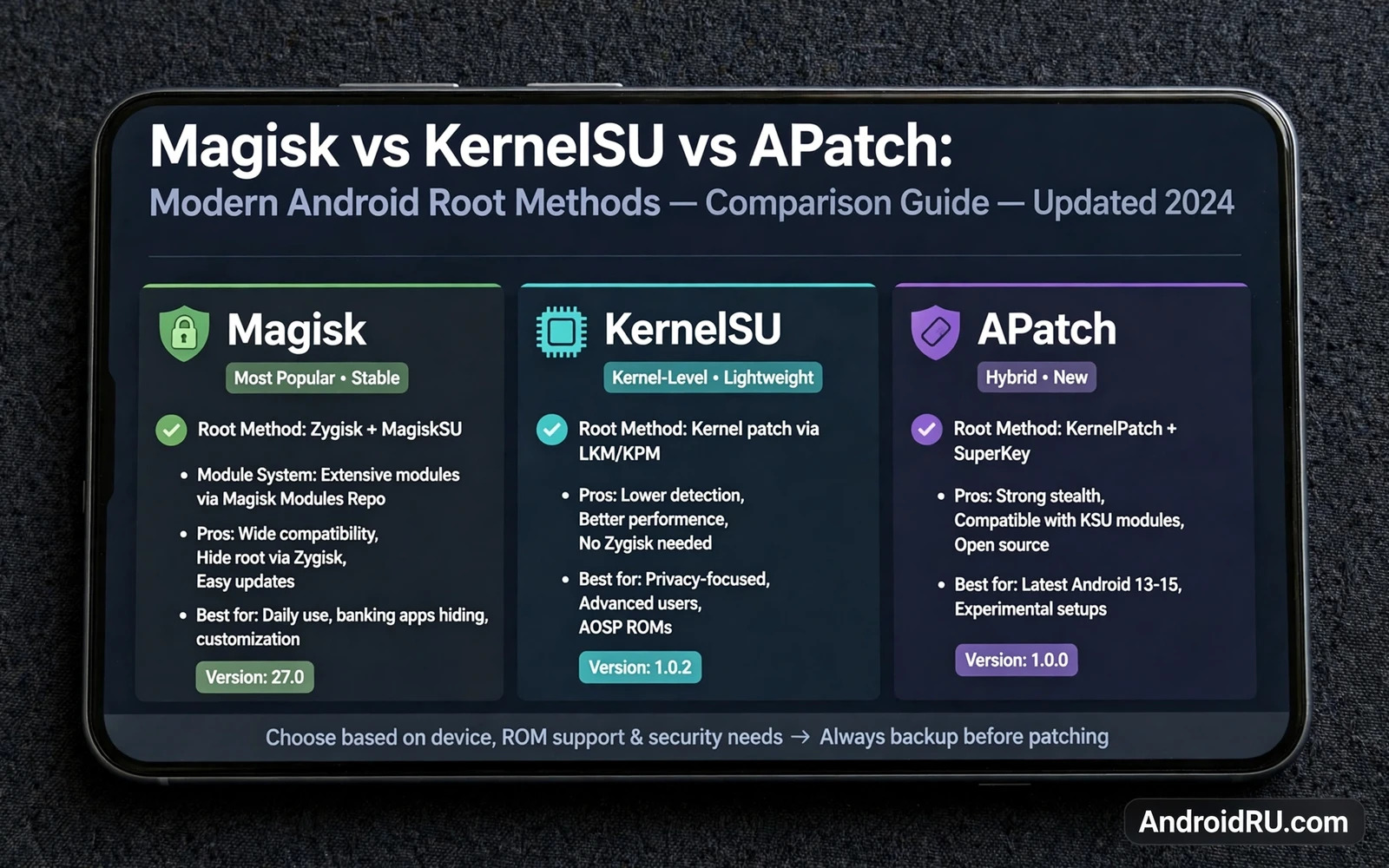
Magisk and KernelSU and APatch are the three modern paths to Android root. Each path gives apps full system rights in a different way. Each path handles modules in a different way. Each path handles updates in a different way. This guide compares the three methods on real criteria. It covers design and device support and module support and integrity behavior. It does not declare a single winner for every phone. The best method depends on your device and your Android version and your goals.
Older root methods changed the system partition directly. Modern methods avoid that direct change. Modern methods patch the boot image or the kernel instead. System files stay clean on disk. Changes load during boot. Removal becomes cleaner. Updates become less messy. Security checks still notice the change in many cases. Systemless design is a practical improvement and not a cloak of invisibility.
What Systemless Root Means In Practice
Systemless root keeps the system partition untouched. The boot image carries the patch. The kernel carries the patch in kernel based methods. Modules mount their files over system files at boot time. The real system files never change on disk. Uninstall can remove the patch and restore normal boot. That clean removal is a major advantage over older methods.
Systemless root still changes boot trust. Verified boot may report a changed boot image. Integrity checks may fail after root. Banking apps may refuse to run. Payment apps may refuse to run. These effects vary by device and by method and by Android version. Test critical apps early. Do not assume any method hides root perfectly.
Modules are the main reason users pick one method over another. Modules add features without a full system rewrite. Modules can change audio processing. Modules can change interface behavior. Modules can add system tools. Module quality varies widely. A module built for one method may not work on another method. Check module support before you commit to a method.
Magisk Overview
Magisk is the most widely known modern root method. Magisk patches the boot image for your exact software version. Magisk installs a manager app for control. Magisk uses Zygisk to inject code into app processes when needed. Magisk supports a large module collection. Magisk supports hiding tools that help some apps run on rooted devices. Magisk works on a wide range of devices and Android versions.
Magisk strengths start with maturity. Magisk has years of testing across many models. Magisk has clear documentation for common steps. Magisk has a large community that reports problems fast. Magisk updates arrive on a regular basis. Magisk module developers target Magisk first in many cases. A new user benefits from that depth of shared knowledge.
Magisk limits deserve honest note. Magisk patching needs the correct boot image for your software version. A wrong boot image can cause a boot failure. Magisk hiding tools need updates after system changes. Integrity results can change after an app update or a system update. Magisk users must follow update guides with care. A system update applied without thought can remove root or break boot.
Magisk suits users who want the largest module choice. Magisk suits users who want strong community help. Magisk suits users on devices with standard boot image patching. Magisk suits users who already know the manager app workflow. Magisk is the safe default choice when no device reason points elsewhere.
KernelSU Overview
KernelSU works at kernel level instead of patching only the boot image in the classic way. KernelSU adds a kernel module that manages root access. KernelSU installs a manager app for control. KernelSU grants root through kernel level permission checks. KernelSU supports modules through its own module system. KernelSU aims for a clean design with a small trusted base.
KernelSU strengths start with kernel integration. Kernel level control can be harder for apps to detect in some cases. KernelSU module system supports many Magisk style modules with adaptation. KernelSU manager offers clear control over which apps get root. KernelSU design appeals to users who want a modern kernel based path. KernelSU development moves fast and adds device support over time.
KernelSU limits center on kernel support. KernelSU needs a kernel that supports its module or a kernel built with its code. Some devices lack a ready kernel build. Some devices need a custom kernel flash first. Custom kernel flashing adds risk and complexity. Kernel version rules also limit support on some Android versions. Check kernel availability for your exact model before you choose KernelSU.
KernelSU suits users whose device has a ready kernel build. KernelSU suits users who prefer kernel level design. KernelSU suits users who want strong root control with a modern tool. KernelSU suits users who can flash a custom kernel safely. KernelSU is less suited to a first root attempt on a device with no kernel build.
APatch Overview
APatch patches the kernel and offers another modern root path. APatch combines kernel patching with a manager app. APatch supports modules through its own module system. APatch aims to work on kernels where other methods face limits. APatch appeals to users who want an alternative when Magisk or KernelSU does not fit. APatch development continues to grow its device coverage.
APatch strengths include kernel patch flexibility. APatch can patch kernels that lack a full custom build. APatch module system supports many common modules. APatch manager gives control over root grants. APatch can be a strong choice on devices with limited KernelSU kernel support. APatch can be a strong choice when Magisk patching faces a device specific problem.
APatch limits include smaller community depth. APatch has fewer device guides than Magisk today. APatch has fewer long term reports than Magisk today. APatch module compatibility needs checking for each module. APatch updates can change behavior on some kernels. Users should read recent reports for their exact model before choosing APatch.
APatch suits users who need a kernel patch path without a custom kernel build. APatch suits users on devices where Magisk or KernelSU support is weak. APatch suits users who accept a newer tool with a smaller guide base. APatch is less suited to users who want the largest module collection on day one.
Side By Side Comparison
Design differs in a clear way. Magisk patches the boot image and works through the manager app and Zygisk. KernelSU works through a kernel module and a manager app. APatch patches the kernel directly and works through a manager app. All three keep the system partition clean. All three load changes at boot. All three can be removed by restoring a clean boot image or kernel.
Device support differs by model. Magisk supports the widest range of devices today. KernelSU supports devices with a ready kernel build. APatch supports devices where kernel patching works cleanly. No method supports every device. Device support is the first filter in your choice. A method with no build for your model is not an option for your model.
Module support differs by ecosystem. Magisk has the largest module collection. KernelSU supports many modules through its own system. APatch supports many modules through its own system. Check your must have modules one by one. A module that you need matters more than a hundred modules that you will never install. Test modules one at a time after root.
Integrity behavior differs but no method promises a pass. All three methods can trigger integrity failures. Hiding tools exist for each method. Hiding results vary by device and by Android version and by app update. Banking apps may still refuse to run. Payment apps may still refuse to run. Treat integrity as uncertain on any rooted device. Keep a fallback device for critical payments.
Update behavior differs in detail. Magisk users often preserve root across updates with a careful manual path. KernelSU users must watch kernel compatibility after an update. APatch users must watch kernel patch compatibility after an update. All three methods need a backup before any system update. All three methods need a read of the update guide for that method. Never accept an update blindly on a rooted phone.
- Magisk for widest device support and largest module choice
- KernelSU for kernel level design on a device with a ready kernel
- APatch for kernel patching where other methods fit poorly
- Any method only after a full backup and stock firmware download
Choosing The Right Method For Your Phone
Start with device support. Search for recent reports on your exact model. Note which method users report as working. Note which method users report as broken. Note the Android version in each report. A report for an older Android version may not apply to your current version. A report for a similar model may not apply to your exact model.
Next check your must have modules. List the modules that justify root for you. Check each module against each method. Check module update dates. Check module Android version support. A stale module can cause boot problems on a new Android version. A stale module can cause battery drain. Drop any module that lacks recent maintenance.
Next check your critical apps. List banking apps and payment apps and work apps that must work. Test those apps after root on a second device when possible. Test those apps before you install many modules. A clean root test tells you what root alone breaks. A module heavy test hides the true cause of a failure.
Next check your skill and patience. Magisk guides are the most numerous for beginners. KernelSU needs kernel knowledge on some devices. APatch needs careful reading of newer guides. Pick the method whose guide you fully understand. A method that you understand beats a method that sounds better on paper.
Migration Between Methods
Migration means removing one root method and installing another. Migration needs a clean starting point. Restore the stock boot image first. Restore the stock kernel first when a custom kernel was used. Remove old manager apps and old module files. Reboot and test the clean system. Only then install the new method. A dirty migration can leave conflicting hooks.
Back up before any migration. A migration can cause a bootloop. A migration can wipe data when bootloader steps repeat. A migration can break modules that you rely on. Keep stock firmware ready. Keep a list of modules to reinstall. Install modules one at a time after migration. Test critical apps after each major step.
Risks And Safety Rules For All Three Methods
All three methods share the same core risks. Bootloader unlock wipes data on most phones. Wrong boot images can cause boot failure. Bad modules can cause bootloops. Root grants to untrusted apps can cause deep damage. Security checks can fail after root. Warranty support can change after root. These risks apply no matter which method you choose.
Safety rules apply to all three methods as well. Back up before every change. Use files for your exact model and version. Verify file hashes when provided. Install modules one at a time. Keep stock firmware ready. Keep notes on every change. Backup and recovery discipline for a first flash is set out in the complete Android rooting guide, which walks through risks and benefits and steps in safe order.
Module choice also affects safety. A performance module can change scheduler behavior. An audio module can change system audio drivers. A framework module can hook many apps at once. Each change adds a failure point. Testing modules one at a time matters most for performance and audio tweaks, and the best Magisk modules for performance battery and audio roundup shows how to test those changes safely. Framework modules need the same care, and installing LSPosed framework on Android adds another layer that deserves its own testing routine.
Verdict Without Hype
Magisk wins on breadth today. KernelSU wins on kernel level design for supported devices. APatch wins as a flexible kernel patch alternative. Breadth matters for beginners. Kernel design matters for users who value that approach. Flexibility matters for devices with weak support elsewhere. Your device filters the choice first. Your modules filter the choice second. Your critical apps filter the choice third.
Do not chase a method because it sounds newest. Do not chase a method because a single report praises it. Do not chase a method that lacks a build for your model. Choose the method with working reports for your exact phone. Choose the method whose guide you can follow without guessing. Choose the method that keeps your critical apps working. A boring working root beats an exciting broken root every time.

