

A Closer Look at the Acer Liquid Z320: Review, Specs and Real-World Use
Some phones are remembered for breaking records. The Acer Liquid Z320 is remembered for something quieter: it did the basics, it fit in one hand, and it cost very little. Announced in September 2015 at IFA in Berlin and reaching shops in November 2015, it was Acer’s entry point into the Android world that year, a small 4.5-inch phone built for people who wanted calls, messages, maps and the odd photo without paying for a flagship. A decade later it reads like a time capsule from the budget Android era, and that is exactly why it is still worth a proper look.
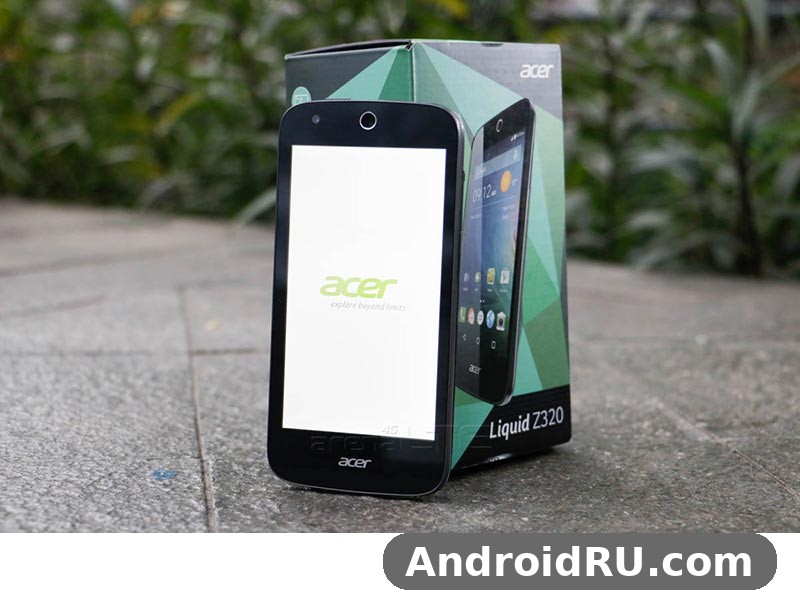
This is a review of a classic, not a buying guide for a new phone. You cannot walk into a shop and buy a new Z320 today, and you should not judge it against phones that cost five times as much and arrived ten years later. What you can do is understand what Acer got right for the money, where the hardware ran out of room, and what daily life with the phone actually felt like. That is what the rest of this article does, with the full spec sheet, a head-to-head with its closest sibling, and honest answers to the questions people still ask about it.
Short version first: the Z320 was a likeable, pocketable starter phone with a bright little IPS screen, a removable battery and clean, simple software. Its limits were just as clear. One gigabyte of RAM and eight gigabytes of storage meant you had to be choosy about apps, the 5MP camera was a daylight-only tool, and Android 5.1 Lollipop was the end of the road for official updates. If you want the detail behind that summary, keep reading.
Acer Liquid Z320 at a Glance: What This 2015 Budget Phone Was Built For
Every phone is a set of trade-offs, and the Acer Liquid Z320 review story starts with understanding which trade-offs Acer chose. The company aimed squarely at first-time smartphone buyers, parents buying a phone for a teenager, and anyone who needed a reliable second handset. The screen was small on purpose, the body was light on purpose, and the price was low on purpose. Nothing here was an accident. Acer stripped away the extras that push prices up and kept the parts people touch every day: the display, the battery, the call quality and the camera button-free simplicity of Android.
The Acer Liquid Z320 release date tells you a lot about its place in history. It arrived in the autumn of 2015, a season when 5-inch screens were already becoming the norm and 720p was the budget standard. Acer deliberately went smaller and cheaper instead. The Z320 launched at around 90 euros in Europe and close to Rs 6,969 in India, which put it in the same conversation as the cheapest Moto E and Lumia models of the day. At that price the phone did not need to beat anyone on paper. It needed to work, to last a day, and to survive being dropped into a bag with keys. Most owners would tell you it did those three things.
Who the Z320 was made for
The clearest buyer was someone moving from a feature phone to their first Android handset. The 4.5-inch screen was big enough to read messages comfortably but small enough to use with one thumb, and Android 5.1 Lollipop was friendly in a way that earlier Android versions were not. The Acer Liquid Z320 for seniors as first smartphone is a fair description of one of its real audiences: big on-screen buttons, a simple home screen, loud enough calls, and a battery you could swap if it ever wore out. It also suited teenagers whose parents wanted a cheap phone that could still run WhatsApp, YouTube and a few games, and it worked as a backup phone for travellers who wanted something light that they would not cry over losing.
It was not made for power users. If you edited video, played demanding 3D games or kept twenty apps open at once, the Z320 would have frustrated you within a week, and the Acer Liquid Z320 performance for everyday use is a very different story from its performance under heavy load. That split is the key to judging it fairly. For calls, texts, email, light browsing and music, it was genuinely pleasant. For anything heavier, it was honest about its limits, which is more than some budget phones managed.
Where it sat in the 2015 Acer Liquid range
Acer announced the Z320 alongside a whole family of small Liquid phones at IFA 2015, and the family resemblance was the point. The Z320 and its Android sibling, the Z330, looked almost identical, shared the same 4.5-inch screen, the same 2000mAh battery and the same 136 x 66.5 x 9.6 mm body, and differed mainly in the camera and the radio inside. The Z330 stepped up to a 5MP front camera and a slightly different chip setup, while the Z320 kept the 2MP front camera and the entry price. If you want the full picture of the step-up model, read the Acer Liquid Z330 Review: Everyday Performance in Everyday Use and the Full Specs and compare the two side by side.
Above them sat the larger Z530 and Z630 phones with bigger screens and bigger batteries, and at the very top of Acer’s 2015 range sat the Jade Primo, a Windows 10 Mobile flagship that played in a completely different league. The Z320 was the bottom rung, and Acer never pretended otherwise. Its job was to get people into the Liquid family cheaply, and the simple plastic body, the modest chip and the small screen were all part of that job. Knowing that context stops you from blaming the phone for not being something it never tried to be.
Acer Liquid Z320 Design and Build: Small, Light and Pocket Friendly
Pick up a modern phone and then imagine one a full centimetre shorter and noticeably narrower, and you have the Z320. The Acer Liquid Z320 design is a rounded rectangle of matte plastic with a gently curved back, a small Acer logo under the earpiece, and three capacitive touch keys below the screen. There is no fingerprint sensor, no metal frame and no glass back, because none of those things existed at this price in 2015. What you get instead is a phone that weighs 142 grams, disappears into a jeans pocket, and can be used for an hour without your hand getting tired.
The plastic is the honest kind. It does not pretend to be metal, and it does not pick up fingerprints the way glossy phones do. The back cover pops off with a fingernail, which is how you reach the removable battery, the SIM slot and the microSD slot, and the cover flexes a little when you press it hard, which is normal for a phone built this way. Corners are rounded enough that the phone does not dig into your palm, and the power button and volume rocker sit on the right edge where your thumb finds them without looking. It is not a beautiful phone by the standards of a design museum, but it is a comfortable one, and comfort matters more on a phone you hold a hundred times a day.
Dimensions, weight and in-hand feel
The Acer Liquid Z320 dimensions are 136 x 66.5 x 9.6 mm, and the Acer Liquid Z320 weight is 142 grams. Those two numbers explain almost everything about how the phone feels. At 66.5 mm wide it is a true one-hand phone: most adults can reach the far top corner with their thumb without shuffling their grip, and typing with one hand is realistic rather than a stretch. At 9.6 mm thick it is chunkier than a modern slim phone, but the curved back hides the thickness well, and the phone feels solid rather than fat. The 142-gram weight is light enough that you forget it is in your pocket, which is a compliment you cannot pay to many phones from its era.
One-hand use was a real selling point in 2015, and it is the first thing people notice when they pick a Z320 up today. The screen is small enough that your thumb covers most of it without effort, and the phone balances well because the battery sits in the middle of the body. If you have small hands, or you use your phone while carrying shopping, holding a child’s hand or standing on a bus, this shape makes sense in a way that a 6.7-inch slab never will. That is the Z320’s quiet superpower, and it is the reason some people kept theirs far longer than Acer expected.
Buttons, ports and the removable back cover
Down the right edge sit the power button and a single volume rocker, both plastic, both with a short, definite click. Below the screen are three capacitive keys for back, home and recent apps, and they light up faintly when you touch them. The microUSB 2.0 port sits on the bottom edge, the 3.5 mm headphone jack sits on top, and the rear camera and LED flash sit near the top of the back cover with a small speaker grille lower down. Nothing is in a surprising place, which is exactly what a first phone should offer.
The removable back is the feature most people miss once it is gone. Pop it off and you can pull the battery in seconds, swap a SIM, or slide in a microSD card, all without a tool. The Acer Liquid Z320 teardown story is a short one because there is so little to take apart: a few screws, a battery connector and a board that a repair shop could work on without heat guns or glue. That simplicity is why an Acer Liquid Z320 screen replacement cost and parts stayed cheap for years, and why the phone remained repairable long after sealed glass phones made repairs expensive.
Colours and the box contents
The Acer Liquid Z320 colours most often listed at launch centred on Pure White, with darker finishes appearing in some markets, and the white version was the one most shops stocked. The white plastic stays looking clean longer than you might expect, though the matte finish can pick up a faint grey tint around the edges after years in a pocket. An Acer Liquid Z320 case was a sensible buy for anyone who wanted to keep it looking new, and the slim snap-on cases sold for the phone added grip without adding much bulk.
The Acer Liquid Z320 unboxing was modest, as the price demanded: the phone, a removable 2000mAh battery, a basic wall charger, a microUSB cable and a quick-start guide. There were no earphones in most boxes, which was normal for the price, and the printed Acer Liquid Z320 manual covered the essentials in a few pages: inserting the SIM, charging the phone, and finding the settings menu. Nobody bought this phone for the box, and Acer knew it. The money went into the phone itself, which is where it belonged.
Acer Liquid Z320 Display: A 4.5-Inch IPS Panel in Daily Use
The Acer Liquid Z320 display is a 4.5-inch IPS LCD with a resolution of 480 x 854 pixels, which works out to about 218 pixels per inch. On paper that resolution sounds low, and next to a modern 1080p screen it is. In practice, at 4.5 inches, it is better than the numbers suggest. Text is readable, icons are clean, and photos look decent when you are not holding the phone six inches from your face. The IPS panel is the reason: colours stay true when you tilt the phone, and the screen does not wash out the way cheaper TFT panels of the era did.
The Acer Liquid Z320 display quality and viewing angles were a genuine strength for the price. Acer picked an IPS panel rather than the cheapest screen it could find, and the difference shows when you share a photo with the person next to you or glance at the phone lying on a table. Brightness is adequate for indoor use and for shade outdoors, though direct sunlight is its weak spot, as it was for nearly every budget phone of 2015. You will find yourself shading the screen with your hand on a bright day, and that is the honest limit of the hardware rather than a fault in your particular handset.
Resolution, brightness and viewing angles
At 218 pixels per inch, individual pixels are just about visible if you look for them, especially on small text and diagonal edges. Most owners stopped noticing after the first day, because the screen is small and you hold it at a normal distance. The 16:9 aspect ratio suited the video and apps of 2015, and the screen-to-body ratio of around 62 percent meant noticeable bezels above and below the display, with the Acer logo and earpiece taking up the top strip. Those bezels look dated now, but they gave your thumbs somewhere to rest without touching the screen, which was a practical benefit.
Brightness topped out at a level that worked well indoors and acceptably in the shade. The auto-brightness sensor did its job without fuss, and the screen dimmed sensibly at night so it did not glare in a dark room. Colours lean slightly cool and punchy rather than perfectly accurate, which flattered photos and made the home screen look lively. If you are used to an OLED panel, the blacks will look grey and the contrast will feel flat, but for a 90-euro phone in 2015, this was a good screen, and it remains the part of the phone that has aged best.
What the small screen means for typing and video
The Acer Liquid Z320 4.5 inch screen size review question really comes down to hands. Typing on a 4.5-inch keyboard is fine for short messages and searches, and the Lollipop keyboard with word prediction helped, but long emails are slow and error-prone because the keys are small. Two-thumb typing works if your hands are small; one-thumb typing with swipe input works better for most people. Video is watchable rather than cinematic: a YouTube clip looks fine on the bus, but this is not a phone you would choose for a two-hour film, and the single rear speaker means you will want earphones for anything longer than a short clip.
Reading is where the small screen quietly shines. Articles, messages and ebooks are comfortable because the phone is light enough to hold up for a long time, and the IPS panel keeps text readable from odd angles. Maps work well too, since you can hold the phone in one hand and glance at it while walking. The trade-off is that split-screen multitasking and large spreadsheets are impractical, but nobody bought a 4.5-inch phone expecting a tablet. The screen fits the phone’s mission, and the mission was never to replace a laptop.
Acer Liquid Z320 Performance: Snapdragon 210 and 1GB of RAM
Inside the Z320 sits the Qualcomm Snapdragon 210, the MSM8909, a 28 nm chip with four Cortex-A7 cores running at 1.0 GHz and an Adreno 304 graphics processor. It was the entry-level Qualcomm chip of its generation, and the Acer Liquid Z320 Snapdragon 210 processor performance is best described as calm rather than quick. It opens apps at a steady pace, scrolls through menus without drama, and handles calls, messages and music without breaking a sweat. It does not sprint. Ask it to do three heavy things at once and it will slow down and let you know, politely, that you are asking too much.
The Acer Liquid Z320 RAM is 1GB, and that single number shapes the whole experience more than the processor does. One gigabyte was normal for budget phones in 2015, and Android 5.1 was light enough to run on it, but modern apps have grown heavier and the phone has not. With one or two apps open, the Z320 feels fine. With five or six, Android starts closing background apps to free memory, which means your browser tab reloads and your music app restarts. The Acer Liquid Z320 1GB RAM multitasking limits are the single biggest reason the phone feels old today, and anyone using one now should keep their app count small and their expectations modest.
Everyday apps, calls and messaging
For the jobs the phone was built for, the performance is still adequate. Calls are clear, the earpiece is loud enough for a noisy street, and the dialler opens quickly. Messaging apps of the era ran well, and the lightweight versions of modern apps, where they still install, are the sensible choice today. Email, calendar, notes and maps all work at a pace that feels unhurried rather than broken. The Acer Liquid Z320 benchmarks from the period sat at the low end of the 2015 charts, which surprises nobody, but benchmarks never measured what this phone was for: doing one ordinary thing at a time, reliably.
Storage is the tighter squeeze. The Acer Liquid Z320 storage is 8GB on paper, but the system and pre-installed apps take a large share, leaving only a few gigabytes free for the owner. That is why the microSD slot matters so much. The Acer Liquid Z320 8GB storage expandable microSD combination only works if you actually use the card: photos, music and offline maps belong on the card, and the Acer Liquid Z320 microSD card maximum supported size is 32GB, which is enough for a generous music library and plenty of photos. Keep the internal storage for apps alone, clear cached data regularly, and the phone stays usable. Fill the internal storage to the brim and everything slows down, which is true of almost any phone.
Gaming on light titles and multitasking limits
The Acer Liquid Z320 gaming performance on light games is genuinely okay. Simple puzzle games, card games, 2D platformers and older casual titles run at a playable frame rate, and the small screen and light body make short sessions comfortable. The Adreno 304 was never a gaming chip, so demanding 3D games of the era stuttered or refused to install, and modern heavy games are out of the question. If your idea of mobile gaming is a crossword, a match-three game or a round of cards while waiting for a bus, the Z320 handles it. If it is a racing game with console-quality graphics, you bought the wrong phone.
Acer Liquid Z320 lag shows up in predictable places: switching between a heavy browser and a camera app, opening a large photo gallery, or waking the phone while several apps update in the background. The fix is boring but effective: close apps you are not using, turn off auto-updates over mobile data, and keep a few hundred megabytes of internal storage free. Acer Liquid Z320 overheating is rarely a problem because the chip runs cool and the plastic body spreads heat well; the phone may get warm during a long call or a charging session, but it does not get uncomfortably hot the way some metal phones did. Patience is the real accessory this phone needs.
Acer Liquid Z320 Camera: 5MP Rear and 2MP Front in Practice
The Acer Liquid Z320 camera setup is simple: a 5MP rear camera with autofocus and an LED flash, and a 2MP front camera. There is no optical stabilisation, no portrait mode and no night mode, because none of those existed at this price in 2015. The rear camera records 720p video, and the camera app is the stock-style Lollipop app with a shutter button, a mode switch and a handful of settings. It is a camera for capturing a moment, not for making art, and judging it on those terms is the only fair way.
The Acer Liquid Z320 camera quality in daylight is better than many people expect. In bright sun, photos are sharp enough for social media, colours are lively, and the autofocus locks on quickly for still subjects. The 5MP sensor captures enough detail for a 4×6 print or a message to a friend, and the LED flash helps a little indoors, though it washes out faces if you stand too close. The Acer Liquid Z320 5MP rear camera sample photos that owners shared at the time tell a consistent story: sunny outdoor shots look good, indoor shots look soft, and night shots are noisy and best avoided unless you have steady hands and a patient subject.
Daylight photos and what to expect after dark
Give the camera light and it rewards you. Landscapes, street scenes, food and friends in a sunny park all come out well, and the phone focuses fast enough for a child or a pet that holds still for a second. The dynamic range is narrow, so bright skies wash out while shadows go dark, and you will lose detail in high-contrast scenes. The trick owners learned was to tap the brightest part of the scene to set the exposure, and to take two shots instead of one. After dark, the small sensor struggles: photos get grainy, colours go muddy, and the flash only reaches a couple of metres. It is a daylight camera, and there is no shame in that at this price.
Video is 720p, which was standard for the class, and clips are fine for a short message or a memory of a birthday, though they shake without stabilisation and the microphone picks up wind easily. Hold the phone with both hands, keep clips short, and the results are perfectly watchable. The camera is the part of the phone where progress since 2015 is most obvious, and nobody should buy a Z320 today expecting modern photo quality. As a record of a moment, though, it still does the job.
Video calls and the front camera
The Acer Liquid Z320 front camera video call quality is adequate for what it is: a 2MP sensor that puts your face on screen clearly enough for a call, without flattering you. In good light, a video call looks fine, and the small screen means the other person’s face is small but visible. In dim light the image gets noisy, and you will want a lamp nearby. The front camera is also the difference between the Z320 and its sibling: the Z330’s 5MP front camera was its main upgrade, which tells you how Acer saw the market. For selfies, the 2MP sensor is soft and best used in bright daylight; for a quick video call with family, it does exactly what is needed.
Acer Liquid Z320 Battery Life and Charging in Real-World Use
The Acer Liquid Z320 battery is a removable 2000mAh Li-Po unit, and in a phone with a small screen and a modest chip, 2000mAh goes further than the number suggests. A light user in 2015 could get through a full day with charge to spare: a few calls, a hundred messages, some browsing and a bit of music. A heavy user who streamed video and kept the screen bright would need a top-up by the evening. The Acer Liquid Z320 battery life test that mattered was never a lab number; it was whether the phone survived a working day, and for most owners it did, which is why the battery rarely made the complaints list.
Screen size is the hidden battery saver here. A 4.5-inch 480p panel draws far less power than a 5.5-inch 1080p panel, and the Snapdragon 210 sips power rather than gulping it. Standby drain was low, so the phone lost little overnight, and the removable battery meant that even when the cell aged, the fix was a new battery rather than a new phone. That is a practical advantage that sealed phones cannot offer, and it is a big part of why some Z320 handsets are still running a decade later on their second or third battery.
How long the 2000mAh battery lasts
Expect roughly a day of light to moderate use from a healthy battery: calls, texts, some browsing and an hour or two of music or video. Heavy use, especially video streaming over mobile data with the brightness up, will cut that to well under a day. The Acer Liquid Z320 charging time from zero percent is around two to three hours with the charger supplied in the box, since the phone has no fast charging and the included charger is a modest one. Charging overnight was the normal routine, and it still is the sensible routine for a phone of this age.
Battery age matters more than the original capacity now. A cell that has spent ten years in a drawer may hold far less than 2000mAh, and the first thing to check on a second-hand Z320 is whether the battery still lasts a day. The good news is that the Acer Liquid Z320 removable battery replacement guide is barely a guide at all: pop off the back cover, lift out the old battery, drop in a new one, and the phone is back to full health in a minute. No tools, no glue, no repair shop visit. That single design choice is worth more than any battery optimisation Acer could have written into software.
Charging time and the removable battery advantage
Charging is slow by modern standards and there is no point pretending otherwise. The microUSB port and the basic charger mean you plan charging rather than grabbing five minutes for half a day of use. Keep a spare charged battery in your bag and the slow charging stops mattering, which is exactly how many owners used the phone. The Acer Liquid Z320 charger supplied in the box is a standard 5V unit, and any decent microUSB charger works as a replacement, though a very cheap one may charge even more slowly. The phone does not support wireless charging, and nobody expected it to at this price.
One practical tip: if the phone has been sitting unused for months, charge it for at least half an hour before judging it dead. Deeply discharged cells can take a while to wake up, and the screen may stay black for several minutes before the charging icon appears. That behaviour is normal for a removable battery that has been fully drained, and it is not a sign that the phone is broken.
Acer Liquid Z320 Software: Android 5.1 Lollipop and Acer Touches
The Acer Liquid Z320 Android version is 5.1 Lollipop, and it shipped with a light Acer skin rather than a heavy redesign. The home screen, the app drawer and the notification shade were close to stock Android, with Acer’s own apps for contacts, gallery and file management adding a few touches. Lollipop brought the material design look, heads-up notifications and a proper quick-settings panel, and on a small screen those changes mattered: notifications were readable at a glance, and the settings menu was simple enough for a first-time user to learn in an afternoon.
The Acer Liquid Z320 Android 5.1 Lollipop features that owners used most were the everyday ones: the pull-down quick settings for Wi-Fi and torch, the lock-screen notifications, and the smart lock options that kept the phone unlocked at home. Acer added its own touches sparingly, which was a good decision on 1GB of RAM, since every extra background service costs memory. The result was software that felt light and stayed out of the way, which is the highest praise you can give a budget phone’s software. The Acer Liquid Z320 features were deliberately few, and that restraint is why the phone stayed quick on 1GB of RAM.
Lollipop features that still mattered
The Acer Liquid Z320 hidden features and useful settings are modest but worth knowing. The quick-settings panel can be rearranged to put the torch and data toggle first, the battery saver mode stretches the last 15 percent of charge, and the built-in data usage screen shows which app is eating your mobile data. The Acer Liquid Z320 WiFi hotspot setup step by step is short: open Settings, tap More, tap Tethering and portable hotspot, turn on the Wi-Fi hotspot, and set a password so neighbours cannot join. The Acer Liquid Z320 Bluetooth pairing with wireless headphones follows the same simple path through Settings, and Bluetooth 4.0 keeps the connection stable for music and calls.
The phone also has an FM radio, which needs wired earphones as an aerial and remains genuinely useful where mobile data is expensive or patchy. GPS works for maps and navigation without mobile data if you download maps in advance, and the file manager makes moving photos to the microSD card a two-minute job. These are not headline features, but they are the features that made the phone useful in daily life, and they are the ones owners actually remember.
Storage, microSD and app limits
The honest software story is about limits. The Acer Liquid Z320 firmware stayed on Android 5.1 for its whole official life, and there was never an official Acer Liquid Z320 software update to Android 6, so the phone never received Marshmallow’s permission controls or Doze battery saving. Security patches stopped years ago, which means the phone should not be used for banking or sensitive accounts today. That is not a flaw in the review; it is a fact of owning a ten-year-old phone, and it applies to every phone of its generation.
App compatibility is the practical consequence. Many modern apps require newer Android versions and simply will not install, and the ones that do install may run slowly on 1GB of RAM. The Acer Liquid Z320 problems most owners meet today are software problems, not hardware ones: an app that needs Android 6 or later, a browser that cannot load a modern website properly, or a game that refuses to install. Lightweight apps, older app versions and the browser cover most daily needs, and the phone still works well as a calls-and-messages device. Expecting it to run a 2026 app catalogue is expecting too much.
Acer Liquid Z320 Full Specifications
The Acer Liquid Z320 full specifications and review detail below is the complete picture, gathered from the launch specifications and the spec sheets that followed the phone through its life. Use it as the reference for the whole article: every claim in the sections above traces back to a line in this table, and the comparison table after it shows how the Z320 differed from its two closest siblings.
| Category | Acer Liquid Z320 |
|---|---|
| Announced | September 2015, at IFA Berlin |
| Released | November 2015 |
| Launch price | About 90 euros in Europe; close to Rs 6,969 in India |
| Dimensions | 136 x 66.5 x 9.6 mm |
| Weight | 142 g |
| Build | Plastic body, removable back cover, removable battery |
| SIM | Micro-SIM; dual SIM version sold in some markets |
| Display | 4.5-inch IPS LCD, 480 x 854 pixels, about 218 ppi, 16:9 |
| Chipset | Qualcomm MSM8909 Snapdragon 210, 28 nm |
| CPU | Quad-core 1.0 GHz Cortex-A7 |
| GPU | Adreno 304 |
| RAM | 1GB |
| Storage | 8GB internal, microSD slot up to 32GB (dedicated slot) |
| Operating system | Android 5.1 Lollipop at launch; no official update beyond 5.1 |
| Rear camera | 5MP, autofocus, LED flash, 720p video |
| Front camera | 2MP |
| Battery | Removable Li-Po 2000mAh, microUSB charging, no fast charging |
| Network | GSM, HSPA and LTE on the MSM8909 variant; 3G on some regional versions |
| Connectivity | Wi-Fi 802.11 b/g/n, Bluetooth 4.0, GPS, FM radio, microUSB 2.0, 3.5 mm jack |
| Sensors | Accelerometer, proximity sensor |
| Colours | Pure White most widely listed; darker finishes in some markets |
| In the box | Phone, removable battery, wall charger, microUSB cable, quick-start guide |
The table hides one interesting detail: the Z320 shared its body with the Z330, the M320 and the M330, four phones that looked identical and differed mainly in software and chips. That shared body is why accessories and covers were easy to find, and why the phone felt more polished than its price suggested. Acer spread the tooling cost across four models and spent the savings on the IPS screen, which was the right call.
How the Z320 compares with the Z330 and Z630
The Acer Liquid Z320 vs Acer Liquid Z330 comparison is the one most buyers actually made in 2015, because the two phones sat side by side in shops and looked the same. The Z330 cost more and gave you a 5MP front camera and a slightly different radio setup, while the Z320 kept the price down with a 2MP front camera. Everything else, the screen, the battery, the body and the software, was essentially shared. If selfies and video calls mattered to you, the Z330 was worth the extra money. If they did not, the Z320 was the smarter buy.
The bigger step up was the Z630 family, which moved to a 5.5-inch screen and a much larger battery. That is a different kind of phone for a different kind of buyer, and the comparison below keeps the focus on what changed rather than declaring a winner, because the right choice depended on hand size and pocket size as much as on specs.
| Feature | Liquid Z320 | Liquid Z330 | Liquid Z630 |
|---|---|---|---|
| Display | 4.5-inch IPS, 480 x 854 | 4.5-inch IPS, 480 x 854 | 5.5-inch IPS, 720 x 1280 |
| Front camera | 2MP | 5MP | 8MP |
| Rear camera | 5MP, LED flash | 5MP, LED flash | 8MP, LED flash |
| Battery | 2000mAh, removable | 2000mAh, removable | 4000mAh, removable |
| RAM and storage | 1GB, 8GB | 1GB, 8GB | 1GB or 2GB, 8GB or 16GB |
| Size and weight | 136 x 66.5 x 9.6 mm, 142 g | 136 x 66.5 x 9.6 mm, 142 g | 156.3 x 77.5 x 8.9 mm, 165 g |
| Best for | Small hands, first phone, backup | Selfies and video calls on a budget | Big screen and long battery life |
For the full story of the bigger sibling, see What the Acer Liquid Z630 Gets Right: Review and Detailed Specifications, and for the 5.5-inch model’s sharper variant, the Acer Liquid Z630S: Design, Software and Full Specifications in Detail covers the extra RAM and storage. The Z320’s place in that family is clear: it was the smallest, lightest and cheapest, and for the buyers it was made for, that was the whole point.
Acer Liquid Z320 Pros and Cons: The Honest Balance
The Acer Liquid Z320 pros and cons in 2026 look different from the way they looked in 2015, because the phone has not changed and the world has. In 2015 the limits were forgivable for the price; in 2026 they are the reason the phone is a classic rather than a daily driver. The Acer Liquid Z320 price at launch in 2015 was around 90 euros, and at that price the balance was fair. Today the same balance makes it a collector’s item, a backup phone, or a first phone for someone who only needs the basics, and nothing more.
It helps to remember how wide Acer’s 2015 range was. At the top sat a Windows 10 Mobile flagship, and if you are curious how different Acer’s ambitions were at the other end of the scale, Is the Acer Liquid Jade Primo Worth It? Review, Specs and Verdict shows a phone built for Continuum and desktop-style work, the opposite of the little Z320. Acer even built a gaming tablet the same year, and the Acer Predator 8 Specifications and Detailed Overview: Software Explained is a useful reminder that the Z320 came from a company that was trying everything at once. The Z320 was the humble end of that range, and it knew its job.
Pros
The 4.5-inch IPS display is the first pro: bright, honest colours and wide viewing angles on a phone that fits one hand. The removable 2000mAh battery is the second, because a battery you can swap in a minute keeps a phone alive for years. The third is the size and weight: 142 grams and 66.5 mm wide make it one of the most comfortable phones Acer ever sold. The fourth is simplicity. Android 5.1 with a light skin, a microSD slot, an FM radio and a headphone jack add up to a phone that does ordinary things without fuss. The fifth is price, both then and now: it was cheap at launch, and second-hand examples cost almost nothing today. The Acer Liquid Z320 accessories that owners actually bought were simple too, a case, a spare battery and a memory card, and none of them cost much.
Cons
The Snapdragon 210 with 1GB of RAM is the main con, and it drives most of the others. Multitasking is limited, heavy apps struggle, and modern software has moved past the phone. The 8GB of storage is tight even with a microSD card, because apps cannot all move to the card. The 5MP camera is a daylight-only tool, the screen resolution is low by modern standards, and there is no fast charging, no fingerprint sensor and no official software update beyond Android 5.1. The single rear speaker is quiet, and the Acer Liquid Z320 speaker volume and call quality split neatly: calls are loud and clear, while music and video through the speaker are thin and best routed through earphones.
Fixing the common problems
Most of the Acer Liquid Z320 problems owners meet have simple fixes. If the phone slows down, clear cached data, uninstall apps you do not use, and keep at least a few hundred megabytes of internal storage free. If it freezes, the Acer Liquid Z320 hard reset using hardware buttons runs like this: hold the power and volume-down buttons together until the phone vibrates, then use the volume keys to reach recovery mode and confirm a wipe. The Acer Liquid Z320 factory reset without password steps use the same recovery menu, which is the way back in when a forgotten lock code shuts you out, though it erases everything on the phone, so it is a last resort rather than a first step.
The Acer Liquid Z320 dual SIM card slot setup is straightforward on the dual SIM version: power the phone off, pop the back cover, slide the micro-SIM cards into their slots, replace the battery and cover, then choose which SIM handles calls and data in Settings. Acer Liquid Z320 connectivity covers Wi-Fi 802.11 b/g/n, Bluetooth 4.0, GPS and FM radio, and if Wi-Fi drops, forgetting the network and reconnecting fixes most cases. Adventurous owners sometimes ask about Acer Liquid Z320 root guides, and they still exist in enthusiast forums, but rooting a phone with no security updates left adds risk without adding much, and for most owners the stock software is the safer choice.
Who should still consider one, and who should skip it
Consider a Z320 if you want a tiny backup phone, a first phone for a child or an older relative, a spare for travel, or a piece of 2015 Android history to keep on a shelf. It is also a good choice for a digital detox: with so few modern apps available, the phone naturally limits distraction, and the small screen discourages long sessions. Skip it if you need banking apps, modern messaging features, a good camera, or a phone that will run the apps of 2026. Those are fair reasons to choose something newer, and the Z320 will not argue with you.
Frequently Asked Questions About the Acer Liquid Z320
Is the Acer Liquid Z320 still worth buying in 2026?
Acer Liquid Z320 is it still worth buying is a question with two answers. As a main phone for modern life, no: the old Android version, the 1GB of RAM and the missing app support rule it out. As a backup phone, a first phone for a light user, or a collector’s piece, yes, for the price of a meal you get a working piece of Android history with a removable battery and a pocketable body. The Acer Liquid Z320 verdict depends entirely on which of those buyers you are, and being honest about that is the whole point of this review.
Does the Acer Liquid Z320 support 4G LTE?
Yes, on the MSM8909 Snapdragon 210 variant, which is the version most markets received. That chip includes an LTE modem, so the phone connects to 4G networks where they use bands the phone supports. Some regional versions were sold as 3G-only, so check the exact model before assuming LTE. Either way, the speeds are modest by modern standards, and the phone is better suited to calls, messages and light browsing than to heavy streaming over mobile data.
Can the Acer Liquid Z320 run modern apps?
Only some of them. Apps that still support Android 5.1 will install, and lightweight versions of popular apps are the best bet. Many current apps require Android 6 or later and will not install at all, and heavy apps that do install may run slowly on 1GB of RAM. The browser remains the most flexible tool on the phone, since many services work through a mobile website even when their app does not. Treat the phone as a calls, messages, music and maps device and it stays useful; treat it as a modern smartphone and it will disappoint you.
How much storage does the Acer Liquid Z320 really leave free?
Out of the 8GB inside, the system and pre-installed apps take a large share, leaving only a few gigabytes free for the owner on a fresh phone. That is why the microSD slot matters: a card of up to 32GB holds photos, music and offline maps, while the internal storage is kept for apps. Move photos to the card regularly, clear cached data, and avoid installing apps you do not need, and the phone stays usable. Let the internal storage fill up completely and everything slows down.
Does the Acer Liquid Z320 have a removable battery?
Yes, and it is one of the phone’s best features. The 2000mAh battery lifts out in seconds once the back cover is off, with no tools and no glue. A fresh battery restores a tired phone to full health, and a spare battery in your pocket is worth more than any power bank for a phone this small. It is a design choice from an era when phones were made to be opened, and it is the main reason working Z320 handsets are still around a decade after launch.
So where does that leave this little phone? A Closer Look at the Acer Liquid Z320: Review, Specs and Real-World Use comes back to the same answer the phone gave in 2015: it was never trying to be the best phone, only the most sensible one for the money. The Acer Liquid Z320 specs tell the story in numbers, a 4.5-inch IPS screen, a Snapdragon 210, 1GB of RAM, 8GB of storage, a 5MP camera and a removable 2000mAh battery, and the real-world use tells it in experience, a phone that fit one hand, lasted a day, and asked for very little. If you own one, charge it, put a memory card in it, and keep it as a backup or a reminder of how far phones have come. If you are thinking of buying one, buy it for what it is, a small classic with honest limits, and you will not be disappointed.

