

Acer Predator 8 Specifications and Detailed Overview: Software Explained
The Acer Predator 8 was Acer’s first serious attempt at a gaming tablet, and it arrived at a moment when Android tablets were trying to prove they could be more than big phones. Announced at IFA in Berlin in September 2015 and released in November of the same year, this 8-inch slate carried the aggressive styling of Acer’s Predator gaming line, four front-facing speakers, a sharp Full HD screen, and an Intel processor that was unusual for an Android device. It was not a phone, it had no SIM slot, and it never pretended to be a productivity machine. It was built for one job: playing games on the couch, on a plane, or in bed, without needing a console or a PC.
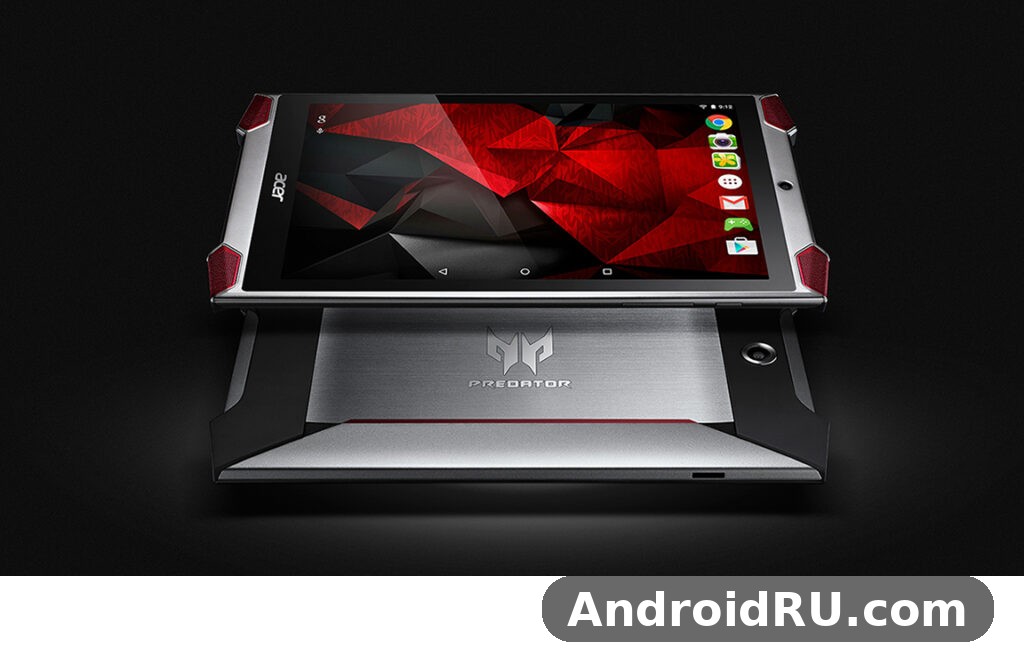
This Acer Predator 8 review looks at the tablet the way it deserves to be looked at today: as a piece of 2015 hardware with a clear identity, honest strengths, and limits that were obvious even at launch. You will find the full specifications, a plain explanation of the software, how the tablet performed in the games of its era, how long the battery lasted, and whether it makes any sense to buy one second-hand in 2026. Nothing here is dressed up as a modern flagship, because the Predator 8 never was one, and that is exactly what makes it interesting.
If you are hunting for a cheap retro gaming tablet, a collector’s item from Acer’s Predator range, or simply a hand-me-down slate for a child, the details below should answer your questions. The short version is that the Predator 8 was loud, fast for its class, and genuinely fun for the games of 2015, held back by 2GB of RAM, a 4,420mAh battery that had to feed a hungry Intel chip, and software support that stopped far too early.
What the Acer Predator 8 Was: A Gaming Tablet From 2015
To understand the Acer Predator 8 tablet, it helps to remember the market it entered. In 2015, the Android tablet market was crowded with cheap 7-inch and 10-inch slates, most of them built to a price and powered by modest ARM chips. Acer saw a gap: a compact tablet aimed squarely at gamers, with the Predator branding that already decorated its gaming laptops and monitors. The result was the GT-810, sold as the Predator 8, a device that looked like nothing else on the shelf, with sharp angles, flared speaker corners, and a black-and-red finish that shouted its intentions from across a shop floor.
The Acer Predator 8 GT-810 model number explained in plain terms is simple. GT-810 was Acer’s internal model code for this tablet, the name used on retail listings, boxes, and support pages, while Predator 8 was the marketing name. When you see a second-hand listing for a GT-810, it is the same device described in this article, in either its 32GB or 64GB storage version. There was only one screen size, one processor, and one RAM configuration, so there are no hidden variants to worry about when shopping for one.
Acer Predator 8 Release Date and Price at Launch
The Acer Predator 8 release date November 2015 is confirmed by launch coverage and by Acer’s own retail rollout: the tablet was shown at IFA at the start of September 2015, reached the UK in mid-October, and went on general sale in November 2015 in the United States and Europe. The Acer Predator 8 price at launch 299 dollars in the US made it one of the more affordable gaming tablets of its time, undercutting the Nvidia Shield Tablet it was most often compared with, while in the UK it started at around 249 pounds and in parts of Europe at 350 euros. For that money, buyers got the full package: the tablet, a charger, and the four-speaker audio system built into the body, with no keyboard or controller in the box.
That price positioned the Predator 8 as a mid-range gaming tablet rather than a premium one. It cost far less than an iPad mini of the same year and roughly the same as a good mid-range phone, yet it offered a larger screen, louder speakers, and a processor tuned for games. The trade-off was the software: Android 5.1 Lollipop at a time when newer versions were already on the horizon, and a level of long-term update support that turned out to be thin. Buyers in 2015 got a strong deal for the hardware; buyers in 2026 get a piece of history at a second-hand price, and the maths is very different.
Who the Predator 8 Was Made For
Acer aimed the Predator 8 at a very specific reader: someone who plays games on a tablet every day and is tired of weak speakers, washed-out screens, and chips that stutter in 3D titles. It was also an easy fit as an Acer Predator 8 tablet for kids and family use, because the 8-inch size suits smaller hands, the price was low enough to survive a drop without tears, and the loud speakers meant no headphones were needed for casual play in the living room. Parents liked that it was a Wi-Fi-only device with no mobile bill attached, and children liked that it looked like a piece of gaming gear rather than a homework tool.
The tablet also appealed to commuters and travellers who wanted a compact media device. An 8-inch screen is big enough for films and comics yet small enough to hold one-handed on a train, and the 350-gram weight kept it comfortable on long journeys. It was never meant for office work, and anyone who bought it hoping for a laptop replacement was disappointed, but as a games and media slate it hit its target cleanly. The Acer Predator 8 gaming tablet for casual games is the right way to think about it: the racing, puzzle, and platform titles that filled the Play Store in 2015 ran well, looked good, and sounded better than on almost any rival tablet.
Acer Predator 8 Display and Design
The screen is the first thing anyone notices about the Predator 8, and for good reason. The Acer Predator 8 8 inch Full HD display measures 8.0 inches across, uses an IPS LCD panel, and runs at 1920 x 1200 pixels, which works out to about 283 pixels per inch. That is a 16:10 aspect ratio, slightly taller than the 16:9 screens on many phones, and it suits games and films well because it gives a little extra height for on-screen controls without shrinking the picture. Colours are bright and punchy for an LCD of its era, viewing angles are wide thanks to the IPS technology, and Acer used a zero air gap design, bonding the glass close to the panel to cut reflections and make the image feel closer to the surface.
The Acer Predator 8 screen 1920×1200 resolution review from launch-era critics was broadly positive. Reviewers praised the sharpness of text, the richness of game graphics, and the way the screen held up outdoors compared with cheaper tablets. It was not an OLED panel, so blacks were dark grey rather than true black, and it could not match the contrast of a Samsung tablet of the same year, but at this price the display was one of the tablet’s strongest cards. The Acer Predator 8 display still looks respectable today for reading, comics, and older games, even if it cannot match the brightness or colour range of a modern mid-range slate.
The 8 Inch Full HD Screen in Daily Use
In daily use, the 8-inch size hits a sweet spot that larger tablets miss. It is large enough that touch controls in games do not crowd the action, yet small enough to grip with one hand while the other taps, swipes, or holds a snack. Films fill the screen nicely with only thin black bars, ebooks are comfortable for long reading sessions, and web pages render at a readable size without constant zooming. The 283 ppi density means individual pixels are invisible at normal viewing distance, so text looks clean and game textures look smooth rather than blocky.
There are limits worth knowing. The screen is a 2015 LCD, so it is not as bright as a modern tablet in direct sunlight, and the glass picks up fingerprints quickly during long gaming sessions. There is no high refresh rate here, no HDR support, and no stylus, because none of those were expected in a 299-dollar tablet in 2015. What you get instead is a solid, sharp, well-sized panel that does its job without fuss, and for retro gaming and media playback that is still enough in 2026.
Build Quality, Weight and the Four-Speaker Layout
The Acer Predator 8 design is the loudest thing about the tablet, in both senses. Sharp angles, flared corners, and a black plastic body with red accents make it look like a piece of gaming hardware rather than a plain slate, and the four speaker grilles at the corners give it a shape unlike any other tablet of its time. The Acer Predator 8 weight 350 grams thin design combination works well in the hand: at 350 grams and 8.7 mm thick, it is light enough for long sessions and thin enough to slip into a jacket pocket or a small bag, and the flared corners actually help the grip, giving fingers something to hold on to during tense moments in a game.
The Acer Predator 8 speakers four front facing speakers are the tablet’s signature feature, and they deserve the attention. Four speakers sit at the front corners, two at the top and two at the bottom, firing sound towards the listener rather than away from the body. The Acer Predator 8 quad front speaker sound quality was praised at launch for volume, clarity, and a sense of space that no tablet with rear speakers could match. Games sound bigger, dialogue in films is easier to follow, and music has a presence that makes the tablet feel like a small portable speaker. They cannot replace a proper Bluetooth speaker for bass, but for a tablet they were, and remain, genuinely impressive.
Holding the Tablet for Long Gaming Sessions
Long sessions are where the Predator 8’s shape earns its keep. The flared speaker corners act as natural hand rests, keeping palms away from the screen and giving the tablet a secure grip in landscape mode, which is how most games are played. At 350 grams, the weight is spread evenly, so arms do not tire as quickly as with a 10-inch tablet, and the plastic body stays cooler to the touch than a metal one during extended play. The power and volume buttons sit within easy reach of a thumb, and the micro USB port is placed so a charging cable does not dig into the hand while playing.
The Aggressive Predator Styling
Not everyone loved the styling, and that is worth saying plainly. The sharp lines and red accents that gamers found exciting looked loud and toy-like to buyers who wanted a discreet tablet for the office or the living room. The plastic body, while light and practical, did not feel as premium as the metal shells on rival tablets, and it picked up scratches more easily. Those are fair criticisms, but they miss the point of the device: Acer built a gaming tablet that looked like gaming hardware, and for its target audience that was a feature, not a flaw.
Acer Predator 8 Performance and Gaming
The heart of the Predator 8 is its processor, and it was an unusual choice that said a lot about Acer’s ambitions. The Acer Predator 8 Intel Atom x7-Z8700 processor is a quad-core Intel Cherry Trail chip running at 1.6 GHz, with burst speeds up to 2.4 GHz, paired with Intel HD Graphics. In 2015, most Android tablets used ARM chips from Qualcomm, MediaTek, or Nvidia, so an Intel Atom inside an Android gaming tablet was a talking point in itself. Intel’s pitch was that its chip could deliver strong single-thread performance and solid graphics in a small, cool-running package, and on paper the numbers backed that up: four cores, a modern 14 nm process, and a GPU that handled the 3D titles of the day without breaking a sweat.
The Acer Predator 8 gaming performance test results reported by launch-era reviewers were encouraging. Asphalt 8, Modern Combat 5, and other demanding 3D games of 2015 ran smoothly at the tablet’s native resolution, with steady frame rates and quick loading times, and reviewers noted that the tablet stayed responsive when switching between games and the home screen. The Acer Predator 8 Intel HD Graphics gaming performance was good enough that the tablet could hold its own against the Nvidia Shield Tablet, the benchmark for Android gaming at the time, in many titles, even if the Shield’s Tegra K1 had an edge in the most demanding games. For the casual and mid-core games that most people actually play, the Predator 8 was fast, fluid, and fun.
Gaming on the Intel Atom x7-Z8700
In practice, gaming on this chip felt confident rather than strained. Touch response was quick, frame pacing was steady in the racing and shooter titles of the era, and the high-resolution screen made games look crisp without the chip having to push an excessive number of pixels. The 1920 x 1200 resolution is demanding, but the Atom x7-Z8700 handled it well in 2015 titles, and the four speakers added a sense of immersion that made even simple games feel bigger. The Acer Predator 8 games library was simply the Google Play catalogue of the time, which meant thousands of titles, from casual puzzle games to full 3D adventures, and the tablet’s job was to run them well, which it did.
Today, the picture is different, and honesty matters here. The Acer Predator 8 performance that impressed reviewers in 2015 will not run the heaviest modern Android games at high settings, and some newer titles may not install at all because they require a newer Android version or a 64-bit ARM processor. Light and older games, emulators for classic consoles, and the huge catalogue of casual titles still run fine, which is why the tablet survives as a retro gaming device. Anyone buying one in 2026 should expect a machine for the games of its era, not a rival to a current gaming phone.
Multitasking With 2GB of RAM
The Acer Predator 8 2GB RAM multitasking performance was the tablet’s most obvious weak point, even at launch. Two gigabytes of LPDDR3 RAM was acceptable for a 299-dollar tablet in 2015, but it was already the minimum for comfortable Android use, and it showed whenever several apps were open at once. Switching between a game, a browser with several tabs, and a music app could force apps to reload, and heavy web pages sometimes refreshed when returning to them. The Acer Predator 8 RAM limit also meant that background apps were closed aggressively, so a game paused for a long phone call or a long video could restart from scratch rather than resuming where it stopped.
For single-task use, which is how most people use a gaming tablet, 2GB was fine. One game at a time, one film at a time, one book at a time: the tablet handled all of that without complaint. The trouble only arrived when the tablet was asked to juggle, and the lesson for modern buyers is to keep expectations modest, close apps that are not in use, and avoid running a browser with a dozen tabs alongside a game. The Acer Predator 8 processor is capable, but the RAM ceiling is the real limit on what the tablet can do at once.
Heat and Throttling in Long Sessions
The Acer Predator 8 gaming tablet overheating and throttling question came up in launch coverage, and the answer was reassuring for a tablet of its class. The Atom x7-Z8700 runs cooler than the chips it replaced, and the plastic body spreads heat well, so the tablet got warm during long gaming sessions without becoming uncomfortable to hold. Some throttling appeared after extended play in the most demanding titles, with frame rates dipping slightly as the chip managed its temperature, but reviewers found the effect mild, and far less severe than on some rival tablets that turned hot within minutes. In short, the Predator 8 could be played for hours without the heat becoming a reason to stop.
Acer Predator 8 Software Explained
The software is where the title of this article points, so it deserves a careful explanation. The Acer Predator 8 Android 5.1 Lollipop software shipped on the tablet at launch, and it was a near-stock version of Android, which was good news. There was no heavy skin over the top, no rewritten settings menu, and no confusing custom launcher. The home screens, app drawer, notification shade, and settings all behaved the way Android 5.1 behaved on any other device of the era, which meant anyone who had used an Android phone could pick up the Predator 8 and feel at home within minutes. The Acer Predator 8 software felt clean, fast, and familiar, and that was a deliberate choice by Acer.
Android 5.1 Lollipop brought the material design look that defined Android in 2015: bold colours, card-based notifications, smooth animations, and a quick settings panel that dropped down with a swipe. On the Predator 8, those animations ran smoothly thanks to the Atom chip, and the 8-inch screen gave the interface room to breathe. Multi-user support was included, so different family members could have separate profiles with their own apps and settings, a genuinely useful feature on a shared family tablet. Google’s apps were all present and correct, including the Play Store, Gmail, Maps, YouTube, and Chrome, and the tablet supported Google Now, voice search, and the full range of Android widgets.
Android 5.1 Lollipop on the Predator 8
Running Android 5.1 Lollipop in 2015 meant the Predator 8 had the latest Android features of its moment, including smart lock, priority notifications, and improved battery management. The interface was responsive, the app drawer was uncluttered, and the settings menu was the standard Android layout, so finding options like Wi-Fi, display brightness, and storage took no learning at all. Acer kept its changes light, adding its own touches around the edges rather than rebuilding the system, and the result was a tablet that felt like Android first and Acer second.
The plain truth is that Android 5.1 is now very old, and that shapes everything about using the tablet in 2026. Many modern apps require Android 6.0 or later, some require Android 8 or higher, and the built-in browser and WebView are far behind current security standards. The tablet still runs the apps that were built for its era, and it still plays local media and older games perfectly well, but it should not be used for banking, email, or any account that needs current security. Treat it as a retro gaming and media device, keep it off sensitive accounts, and it remains useful and enjoyable.
PredatorSense and Gaming Software Features
The Acer Predator 8 PredatorSense gaming software features were the software centrepiece of the tablet, and they are worth explaining because they are what made the Predator 8 a gaming tablet rather than a tablet that happened to play games. PredatorSense was Acer’s gaming control app, a hub where players could manage their games, check system information, and adjust settings for play. It collected installed games in one place, so the home screen stayed tidy, and it gave quick access to the tablet’s gaming features without digging through settings menus.
Alongside PredatorSense, Acer included game-focused touches such as a game launcher that gathered titles together, quick toggles for silencing notifications during play, and profile-style settings that let the tablet behave differently when a game was running. The idea was simple: when you open a game, the tablet should get out of the way, silence interruptions, and give the game the screen, the speakers, and the processor. The Acer Predator 8 full specifications explained in the table below include these software features because they were part of the product, not an afterthought, and they are the clearest sign that Acer thought about how gamers actually use a tablet.
TacSense Haptic Feedback
The Acer Predator 8 TacSense haptic feedback gaming system was the tablet’s most unusual feature, and the one that reviewers talked about most. TacSense used vibration motors built into the body to give physical feedback during games: a rumble when a car hit a barrier, a thud when a character landed, a pulse when a weapon fired. The idea was to add a sense of touch to the flat glass screen, making games feel more physical without needing a controller, and in the titles that supported it the effect was genuinely noticeable. It did not work in every game, because developers had to support it, but in the racing and action titles that did, it added a layer of feedback that no other Android tablet offered.
TacSense worked alongside the four speakers, so sound and vibration arrived together, and the combination made the tablet feel more alive than its rivals. The strength of the feedback could be adjusted, and it could be turned off entirely for quiet play or for games where it was distracting. It was a gimmick in the best sense of the word: not essential, not present in every game, but fun when it worked, and a clear sign that Acer was trying to make mobile gaming feel different rather than simply faster.
Pre-installed Apps
The Predator 8 shipped with a fair amount of pre-installed software, and launch-era coverage was honest about it: alongside Google’s apps and Acer’s own gaming tools, there were trial apps and third-party titles that many owners never opened. Most of these could be disabled from the settings menu, and some could be uninstalled, but they took up storage and added clutter to the app drawer on first boot. The Acer Predator 8 unboxing experience reflected this: inside the box were the tablet, a charger, a cable, and a quick-start guide, and the first thing most owners did after switching the tablet on was to spend ten minutes disabling the apps they did not want. It was a common complaint about Android tablets in 2015, and the Predator 8 was no exception.
Software Updates After Launch
The Acer Predator 8 Android Lollipop update to Marshmallow story is a short and disappointing one. At launch, Acer and several reviewers suggested that an update to Android 6.0 Marshmallow was likely, and owners waited for it, but the update never arrived in most markets, and the tablet remained on Android 5.1 Lollipop for its whole official life. Security patches also stopped early, which is normal for a budget tablet of that era but still worth knowing before buying one second-hand. The Acer Predator 8 update situation is the tablet’s biggest weakness as a daily device, and it is the main reason this article recommends it as a retro gaming and media tablet rather than a general-purpose slate. If you buy one, check which Android version it runs before you pay, and assume that 5.1 is what you will be living with.
Acer Predator 8 Cameras, Battery and Connectivity
No gaming tablet is bought for its camera, and the Predator 8 does not try to change that. The Acer Predator 8 camera setup is simple: a 5-megapixel camera on the back and a 2-megapixel camera on the front, with no flash on either. The Acer Predator 8 camera 5MP rear 2MP front combination was modest even in 2015, and it shows in the results. In bright daylight, the rear camera takes usable photos for quick notes, scanning documents, or capturing a whiteboard, but colours are flat, detail is soft, and low-light shots are noisy and often blurred. Video recording is basic, and there is no optical stabilisation, so moving shots wobble.
The front camera is best thought of as a video-call camera, and for that job it is adequate. Skype and Hangouts calls, the video apps of the era, worked fine in good light, and the 2-megapixel sensor was enough for a small video window. Nobody should buy a Predator 8 for photography, and Acer clearly knew that, because the cameras were given no special software, no manual controls, and no marketing attention. They are there because a tablet needs cameras, not because anyone expected them to impress, and the honest verdict is that they do the job and nothing more.
Rear and Front Cameras in Practice
In practice, the rear camera is useful for the kind of quick, functional photos that a tablet is often used for: photographing a document, a receipt, or a page in a book. The autofocus is slow by modern standards, and the shutter lag means moving subjects often blur, so it pays to hold the tablet steady and take a second shot to be safe. The front camera, meanwhile, is fine for video calls in a bright room and poor in a dim one, which is true of almost every tablet camera of its generation. If photography matters to you, use your phone; if it does not, the Predator 8’s cameras will not get in your way.
Battery Life and Charging
The 4,420mAh battery is one of the most important numbers on the Predator 8’s spec sheet, because it had a hard job: feeding an Intel chip, a bright Full HD screen, four speakers, and a vibration system, all in a 350-gram body. The Acer Predator 8 battery life 4420mAh test figures from launch-era reviews put real-world use at around 6 to 7 hours of mixed use, including web browsing, video playback, and gaming, with lighter use stretching further and heavy 3D gaming pulling it down towards 4 to 5 hours. Video playback was the strongest case, with the tablet lasting through several episodes of a show, while long sessions of demanding games drained it fastest.
The Acer Predator 8 charging time and battery drain picture is straightforward. Charging from empty to full over the micro USB port took around 3 to 4 hours with the supplied charger, which was slow even in 2015 and feels slower now, so overnight charging was the sensible routine. Battery drain in standby was modest, and the tablet could sit unused for days without losing much charge, which made it a good occasional-use device. After a decade, any second-hand Predator 8 will have a battery that has lost some of its original capacity, so buyers should expect shorter life than the launch figures and should test the tablet by playing a video for half an hour and watching how far the percentage falls. The Acer Predator 8 battery is sealed inside the body, so replacing it is a repair-shop job, not a home one.
WiFi, Bluetooth and Ports
Connectivity on the Predator 8 was strong for its price. The Acer Predator 8 WiFi 802.11ac 2×2 MIMO speed support meant the tablet could use the fastest Wi-Fi standard of its era, with two antennas working together for better range and throughput, and reviewers found downloads and streaming were quick and stable on a good home network. The Acer Predator 8 WiFi performance held up well for online gaming and HD video streaming, which are the two uses that stress a tablet’s wireless connection most, and the 2×2 MIMO design helped the signal stay solid at a distance from the router.
The Acer Predator 8 Bluetooth 4.0 connectivity features covered the usual accessories: wireless headphones, Bluetooth speakers, keyboards, and game controllers all paired without fuss, and a controller turned the tablet into a more serious gaming machine for titles that supported one. The Acer Predator 8 Bluetooth range was the standard 10 metres or so, and pairing was handled through the normal Android settings menu. Ports were simple: a micro USB port for charging and data, a 3.5 mm headphone jack, and a microSD card slot. The Acer Predator 8 microSD card up to 128GB support is important, because it more than doubles the usable space on the 32GB model and gives the 64GB model room for a large game and media library. The Acer Predator 8 32GB storage expandable microSD combination, in particular, made the cheaper model a sensible buy, since a card cost far less than the jump to 64GB. There is no HDMI port, no USB-C, and no SIM slot, because this is a Wi-Fi-only tablet, and that is a limit worth knowing before you buy.
Acer Predator 8 vs Nvidia Shield Tablet
Every Acer Predator 8 comparison from the launch era measured it against the same rival: the Nvidia Shield Tablet, the device that defined Android gaming in 2014 and 2015. The Acer Predator 8 vs Nvidia Shield Tablet comparison is the right one to make, because the two tablets were aimed at the same buyer, cost similar money, and took different routes to the same goal. Nvidia bet on its own Tegra K1 chip, a stylus, and a controller ecosystem; Acer bet on an Intel chip, four speakers, and aggressive styling. Both were 8-inch tablets, both ran near-stock Android, and both were bought by people who wanted games to look and sound good.
The table below lays out the differences plainly, so you can see where each tablet won. The Predator 8 had the louder audio system and the lower launch price, while the Shield Tablet had the stronger graphics chip, a stylus, and longer software support. Neither was a clear winner for everyone, and the right choice depended on which trade-offs mattered more to the buyer.
| Feature | Acer Predator 8 | Nvidia Shield Tablet |
|---|---|---|
| Display | 8.0 inch IPS LCD, 1920 x 1200 | 8.0 inch IPS LCD, 1920 x 1200 |
| Processor | Intel Atom x7-Z8700, quad-core up to 2.4 GHz | Nvidia Tegra K1, quad-core 2.2 GHz |
| Graphics | Intel HD Graphics | Nvidia Kepler, 192 cores |
| RAM | 2GB LPDDR3 | 2GB |
| Storage | 32GB or 64GB, microSD up to 128GB | 16GB or 32GB, microSD up to 128GB |
| Speakers | Four front-facing speakers | Two front-facing speakers |
| Battery | 4,420mAh | 5,200mAh |
| Rear camera | 5 megapixels | 5 megapixels |
| Front camera | 2 megapixels | 5 megapixels |
| Operating system | Android 5.1 Lollipop | Android 5.1 Lollipop, later updated |
| Extras | TacSense haptics, PredatorSense app | Stylus, Shield controller support, game streaming |
| Launch price | 299 dollars | 299 dollars |
Where the Predator 8 Wins
The Predator 8 wins on sound and on value. Four speakers beat two in any room, and the TacSense vibration system added a physical dimension that the Shield Tablet simply did not offer. The 32GB base storage was double the Shield’s 16GB, which mattered when games were getting larger, and the aggressive design made the tablet feel like a piece of gaming gear rather than a plain slate. For a buyer whose priority was loud, fun, casual gaming on a budget, the Predator 8 was the more entertaining choice, and the lower street price it soon reached made that case stronger.
Where the Shield Tablet Wins
The Shield Tablet wins on graphics power, software support, and the ecosystem around it. The Tegra K1 was the stronger gaming chip, the Shield controller was a proper gamepad rather than a phone accessory, and Nvidia kept updating the tablet’s software for years after Acer had moved on. The Shield also had a stylus for note-taking and drawing, a larger battery, and a better front camera. For a buyer who wanted the most powerful Android gaming tablet and the longest useful life, the Shield was the safer purchase, and history proved that right: Shield tablets stayed useful for longer than Predator 8 units did.
Acer’s 2015 range was broad, and the Predator 8 sat at its gaming end while the company’s phones covered everyday use. Readers who want to see how Acer balanced gaming hardware with affordable phones from the same era can look at The Acer Liquid Zest, Reviewed in Detail: Specs, Everyday Performance and More, a review of a budget phone that shared the same practical, value-first approach. For a very different take on Acer hardware, Is the Acer Liquid Jade Primo Worth It? Review, Specs and Verdict covers a phone that aimed much higher, with a desktop-style mode and a premium price.
Full Specifications
The Acer Predator 8 specs below are the complete launch specifications, gathered from Acer’s launch material and the specification listings that followed the IFA announcement. They describe the tablet as it shipped in November 2015, in both storage versions, and they are the numbers to check against any second-hand listing before you buy. If a listing claims a different screen size, a different processor, or more RAM, it is describing a different device, or it is wrong.
| Specification | Acer Predator 8 (GT-810) |
|---|---|
| Announced | September 2015, at IFA Berlin |
| Released | November 2015 |
| Model number | GT-810 |
| Display | 8.0 inch IPS LCD, 1920 x 1200 pixels, 283 ppi, 16:10, zero air gap |
| Processor | Intel Atom x7-Z8700, quad-core 1.6 GHz, burst up to 2.4 GHz |
| Graphics | Intel HD Graphics |
| RAM | 2GB LPDDR3 |
| Storage | 32GB or 64GB internal, microSD card slot up to 128GB |
| Rear camera | 5 megapixels, autofocus, 1080p video |
| Front camera | 2 megapixels |
| Battery | 4,420mAh, non-removable, micro USB charging |
| Operating system | Android 5.1 Lollipop |
| Speakers | Four front-facing speakers |
| Haptics | TacSense vibration feedback |
| Software | PredatorSense gaming hub, near-stock Android |
| Wi-Fi | 802.11 a/b/g/n/ac, 2×2 MIMO |
| Bluetooth | Bluetooth 4.0 |
| Ports | Micro USB, 3.5 mm headphone jack, microSD slot |
| Sensors | Accelerometer, gyroscope, ambient light, proximity |
| Dimensions | 217.9 x 127 x 8.7 mm |
| Weight | 350 grams |
| Colours | Black with red accents |
| Cellular | None, Wi-Fi only, no SIM slot |
| Launch price | 299 dollars, 249 pounds, 350 euros |
Storage Options: 32GB or 64GB
The choice between the 32GB and 64GB versions was simpler than it looked. The Acer Predator 8 storage in both versions is the same type and speed, and both take the same microSD cards, so the only difference is how much room you start with. Games in 2015 were smaller than they are now, but a handful of large 3D titles could still fill a 32GB tablet quickly, especially once the operating system and pre-installed apps took their share. The 64GB model was the safer pick for anyone who planned to keep many games installed, while the 32GB model made sense for buyers who were happy to manage their library and lean on a microSD card for films and music.
One practical note: apps in Android 5.1 could not always be moved to the microSD card, so the card was best used for media rather than games. Photos, music, films, and downloaded videos sat happily on a 128GB card, freeing the internal storage for apps. The Acer Predator 8 storage setup rewards a little planning, and a cheap microSD card remains the best upgrade you can buy for a second-hand Predator 8 today.
What the Spec Sheet Leaves Out
A spec sheet never tells the whole story, and the Predator 8 is a good example. It does not mention that the tablet has no fingerprint sensor, no NFC, no GPS accuracy worth relying on for navigation, and no cellular connection of any kind. It does not mention that the plastic body scratches, that the screen attracts fingerprints, or that the 2GB of RAM is the real limit on multitasking. It also does not mention the things that made the tablet fun: the way the speakers filled a room, the rumble of TacSense in a racing game, or the sheer novelty of an Intel chip inside an Android tablet. Those are the details that only come from using the device, and they are why a review has to go beyond the numbers.
The Acer Predator 8 used tablet price in 2026 is also absent from any spec sheet, and it is worth stating plainly: these tablets now sell second-hand for a small fraction of their launch price, often the cost of a family meal rather than a gadget budget. At that price, the Predator 8 is a low-risk retro gaming tablet, but buyers should still check the screen for dead pixels, the battery for swelling, the speakers for distortion, and the charging port for looseness before paying. A tablet that has sat in a drawer for years may need a long charge before it will even switch on.
Acer Predator 8 Verdict: Pros, Cons and Who It Suits
The Acer Predator 8 verdict depends entirely on when you are asking the question. In 2015, it was a strong, affordable gaming tablet with the best speakers in its class, a sharp screen, and a processor that handled the games of the day with ease. In 2026, it is a retro device with an old Android version, a tired battery in most second-hand units, and no path to modern apps. Both verdicts are true, and the honest conclusion is that the Predator 8 is worth buying today only for the right buyer, at the right price, for the right job.
The Acer Predator 8 gaming tablet worth buying today question has a clear answer: yes, if you want a cheap tablet for older games, emulators, films, and ebooks, and you accept its limits; no, if you need a daily tablet for modern apps, banking, or work. At second-hand prices, the risk is low and the fun is real, but the tablet will not replace a modern device, and it should not be bought as one.
Pros
The Acer Predator 8 pros start with the audio. Four front-facing speakers gave this tablet sound that no rival in its price range could match, and they still impress today for films and games. The 8-inch Full HD screen is sharp and well-sized, the Intel Atom x7-Z8700 handled the games of its era smoothly, the 350-gram body is light and comfortable, and the microSD slot makes storage cheap to expand. TacSense haptics added a playful touch that no other tablet offered, and the near-stock Android 5.1 software was clean and easy to use. At its 299-dollar launch price, the whole package was genuinely good value.
- Four front-facing speakers with loud, clear sound that fills a room.
- Sharp 8-inch Full HD IPS display with wide viewing angles and a zero air gap design.
- Intel Atom x7-Z8700 processor that ran 2015 games smoothly at native resolution.
- Light 350-gram body with a grippy, gamer-focused design and flared speaker corners.
- MicroSD card slot supporting up to 128GB, making storage cheap to expand.
- TacSense haptic feedback, a unique feature that added physical sensation to games.
- Near-stock Android 5.1 Lollipop with the PredatorSense gaming hub included.
Cons
The Acer Predator 8 cons are just as clear. Two gigabytes of RAM limited multitasking even at launch, the 4,420mAh battery gave only 6 to 7 hours of mixed use and far less in heavy games, and charging took 3 to 4 hours. The cameras were basic, with a 5-megapixel rear camera and a 2-megapixel front camera that produced soft, noisy photos. The plastic body scratched easily, the screen picked up fingerprints, and there was no SIM slot, no USB-C, and no HDMI output. Worst of all, the software support ended early: the promised update to Android 6.0 Marshmallow never arrived for most owners, leaving the tablet on Android 5.1 with old security patches and growing app incompatibility.
- Only 2GB of RAM, which forces apps to reload when multitasking.
- Android 5.1 Lollipop with no Marshmallow update in most markets and no modern security patches.
- Basic cameras that are fine for video calls and poor for photography.
- Battery life of 6 to 7 hours in mixed use, less in demanding games, with slow charging.
- Plastic body that scratches and a screen that shows fingerprints quickly.
- Wi-Fi only, with no SIM slot, no NFC, and no fingerprint sensor.
Who Should Buy One in 2026
The Predator 8 suits a narrow but real audience in 2026. It suits collectors of Acer Predator hardware, retro gamers who want a period-correct Android tablet for the games of 2015, parents looking for a cheap, Wi-Fi-only tablet for a child, and anyone who wants a spare media tablet for films and ebooks in the kitchen or the bedroom. It does not suit anyone who needs a daily tablet for modern apps, school work, or sensitive accounts, and it does not suit buyers who expect long battery life or a camera they can rely on.
Acer built many affordable devices in this era, and the Predator 8 shared its value-first thinking with the company’s phones. Readers curious about the budget side of Acer’s 2015 line-up can read Acer Liquid Zest Plus in Review: Usability, Value for Money and Every Spec That Matters, while Acer Liquid Z330 Review: Everyday Performance in Everyday Use and the Full Specs covers an even cheaper phone from the same period. For the flagship end of the range, Acer Liquid Jade 2 at a Glance: Review and Detailed Specifications shows what Acer could do when it aimed higher.
Acer Predator 8 Frequently Asked Questions
Is the Acer Predator 8 still worth buying in 2026?
It is worth buying only at a low second-hand price and only for retro gaming, media playback, and reading. The tablet runs older games and emulators well, its screen and speakers still impress for films, and it makes a good spare or children’s tablet. It is not worth buying as a main tablet, because Android 5.1 Lollipop blocks many modern apps, the battery in a decade-old unit will be tired, and there are no security updates. Pay a small amount, check the screen, speakers, battery, and charging port before you pay, and treat it as a fun retro device rather than a daily driver.
Can the Acer Predator 8 run modern games?
It can run light and older games, casual titles, and emulators for classic consoles, but it cannot run the heaviest modern Android games at high settings, and some newer titles will refuse to install because they need a newer Android version or a 64-bit ARM processor. The Intel Atom x7-Z8700 and 2GB of RAM were strong in 2015 and are modest now. If your game library is mostly titles from 2015 to 2018, the Predator 8 will serve you well; if you want the latest releases, a modern tablet is the right purchase.
Does the Acer Predator 8 have a SIM card slot?
No, the Predator 8 is a Wi-Fi-only tablet with no SIM slot and no cellular connection of any kind. It connects to the internet through Wi-Fi 802.11ac with 2×2 MIMO, and through Bluetooth 4.0 for accessories, but it cannot make calls, send texts, or use mobile data. That is worth knowing before you buy, because it means the tablet is only online when a Wi-Fi network is in range, which is fine at home and a limit everywhere else.
How much storage does the Acer Predator 8 have?
The tablet shipped in two versions, with 32GB or 64GB of internal storage, and both versions have a microSD card slot that accepts cards up to 128GB. The operating system and pre-installed apps take a share of the internal storage, so the usable space is less than the headline number, and the microSD card is best used for films, music, and photos rather than apps. For most buyers, the 32GB model with a cheap microSD card was the best-value combination, and that remains true on the second-hand market today.
The Predator 8 is a reminder of a time when Android tablets were allowed to be strange, loud, and fun. Acer took a gamble on an Intel chip, four speakers, and a vibration system, and for the games of 2015 that gamble paid off. The tablet’s flaws were real, and its short software life is the reason it faded quickly, but its strengths were real too, and they are still visible a decade later in any unit that has been looked after. If you find one cheap, charge it up, load a few games from its era, and turn the volume up: that is the experience Acer built it for, and it still delivers it.

