

Acer Liquid M320 Review: Audio and Display Put to the Test
Some phones are remembered for breaking records. The Acer Liquid M320 is remembered for something quieter: it was one of the small group of phones that shipped with Windows 10 Mobile instead of Android, at a time when Microsoft was still trying to build a third mobile platform. This Acer Liquid M320 full specifications and review looks at that experiment as it really was, with the audio and the display at the centre, because those are the two things a buyer in 2015 would have noticed every single day. The phone was announced in September 2015, and the Acer Liquid M320 release date November 2015 is the date that matters for anyone placing it in history: it arrived as a budget Windows phone in the same season as a flood of cheap Android handsets.
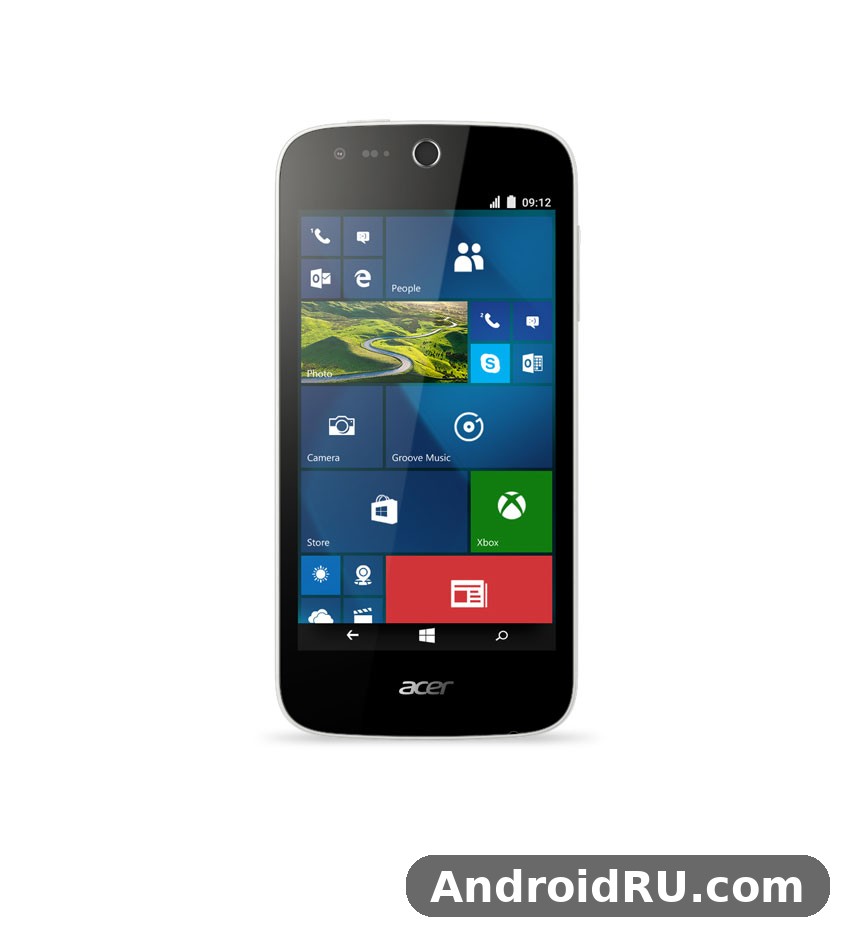
On paper, the hardware was modest even for its year. A 4.5-inch screen, 1 GB of RAM, 8 GB of storage, a 5 MP rear camera and a 2000 mAh battery do not sound exciting in 2026, and they were not exciting in 2015 either. What made the phone interesting was the combination: a compact body, a removable battery, a dedicated microSD slot, FM radio, and an operating system built around Live Tiles rather than app icons. This Acer Liquid M320 review treats it as a classic from its era, not as a rival to a modern handset, and it judges the audio and the display against the budget phones of 2015, which is the only fair comparison.
Readers come to this phone for different reasons. Some are collectors tracking down old Windows phones. Some want to know whether a cheap second-hand unit can still serve as a spare phone, a music player, or a bedside radio. Others simply want the facts: the Acer Liquid M320 specs, the Acer Liquid M320 price at launch, and what the screen and the speaker were actually like. This article covers all three angles, with a full spec table, a head-to-head comparison, and a plain verdict at the end. Where a number comes from the launch-era spec sheet, it is stated as such; where a judgement comes from period reviews and the hardware itself, it is framed that way, and where current availability is uncertain, the article says so rather than guessing.
Acer Liquid M320 Audio Test: Speaker, Headphones and Call Sound
Audio was one of the few areas where a small budget phone could still surprise people in 2015, because a loudspeaker, a headphone jack and an FM radio cost very little to include and mattered a lot to daily use. The Acer Liquid M320 audio setup is simple: a single loudspeaker, a standard 3.5 mm headphone jack, Bluetooth 4.0 with A2DP for wireless listening, and an FM radio tuner. There is no stereo speaker pair, no dedicated audio chip marketed on the box, and no noise-cancelling microphone array. That simplicity is the whole story, and it shapes everything that follows. Acer Liquid M320 sound quality should be judged on clarity at normal volume, not on bass depth or concert-level loudness, because the hardware was never built for that.
Speaker Volume and Clarity
The loudspeaker sits on the body of a compact 142-gram phone, and it behaves like most single speakers of its size: clear enough for ringtones, alarms, speakerphone calls and short videos, but thin when pushed hard. An Acer Liquid M320 speaker volume test with headphones nearby tells only half the story, because the speaker and the headphone output are different paths; the speaker on its own is best described as adequate for a quiet room and strained in a noisy street. Voices come through cleanly at mid volume, which is what matters for calls on speaker and for spoken-word video. Music loses its low end quickly, and at maximum volume the sound hardens, with the small driver distorting on bass-heavy tracks. That is normal for the class, and period buyers who compared it with other budget phones of late 2015 would have found it ordinary rather than poor.
Placement matters too. A rear or edge-mounted speaker on a phone this size is easily muffled when the handset lies face up on a soft surface, so a simple habit, propping the phone upright or laying it face down, makes a real difference to how loud it sounds. The Windows 10 Mobile volume controls of the era gave separate sliders for ringtones and media in the settings, so a user could keep alerts loud and music at a comfortable level without constantly adjusting one master control. For a phone that many buyers used as an alarm clock and a pocket radio, that small detail counted. The loudspeaker will not replace a portable speaker, and it was never meant to, but for notifications, navigation prompts and hands-free calls it does the job it was designed for.
Headphones and the 3.5 mm Jack
Plug in a pair of wired earphones and the phone improves noticeably, which is true of almost every budget handset of its generation. The 3.5 mm jack delivers a clean stereo signal with enough power for ordinary earphones, and the lack of a headphone jack problem that later phones introduced is a genuine advantage for anyone who still owns wired headphones. Listening at moderate volume, the output is balanced, with voices forward and no obvious hiss on quiet passages. Push the volume to the top and the limits of the budget audio path show up as a slight harshness, but few listeners will spend long at that level. The phone also supports Bluetooth 4.0 with A2DP, so wireless headphones and portable speakers pair without a cable, though the Bluetooth audio of 2015 carried the usual slight delay on video that buyers of the time learned to live with.
FM radio deserves a mention here because it is a feature that has almost disappeared from modern phones, and on this handset it works through the headphone cable as an antenna. An Acer Liquid M320 FM radio reception quality test in a city depends heavily on signal strength and on the earphones used as the aerial, so results vary from street to street; in strong-signal areas the radio is clear and steady, while in concrete buildings and underground car parks it fades like any small tuner. For listeners who wanted the radio without using mobile data, that was a real saving in 2015, and it remains one of the more likeable traits of the phone today. Anyone buying a used unit for music should test the jack first, since a worn socket is one of the commonest faults on phones of this age, and a loose connection will crackle long before the speaker itself fails.
What to Check Before Buying a Used Unit for Music
A used M320 bought for music duty needs three quick checks: play a track through the loudspeaker at mid and high volume, listen through wired earphones while wiggling the plug gently, and switch on the FM radio with earphones attached. If the speaker rattles, the jack crackles, or the radio finds no stations where another phone does, the fault is usually wear rather than software, and a repair may cost more than the phone is worth. Check also that the volume buttons respond cleanly, because a stuck button can leave the phone muted at the worst moment. These checks take two minutes and they separate a usable music companion from a parts donor.
Call Quality and the Microphone
An Acer Liquid M320 call quality and microphone test comes down to two things: how clearly the other person hears you, and how clearly you hear them. The earpiece is loud enough for normal street use, and voices sound natural rather than tinny, which is the main requirement for a phone that was sold as a dual-SIM daily handset in many markets. The microphone picks up speech well at normal holding distance, and callers in period use reported no unusual complaints about muffled audio. In a moving car or a windy street, the single microphone has no advanced noise cancellation to lean on, so background noise reaches the other end more readily than on a modern handset. That is a fair trade for the price, and it was a fair trade in 2015 as well.
The Acer Liquid M320 dual SIM 3G HSPA support matters for call quality in a practical way: the phone works on GSM and HSPA networks with speeds up to 42.2 Mbps down and 5.76 Mbps up on paper, and it has no 4G LTE radio at all. Voice calls run over the 2G and 3G networks, so call quality depends on the local network rather than on the phone alone, and in areas where 3G has since been switched off, the phone may fall back to 2G for calls or lose service entirely. Anyone considering the phone as a spare in 2026 should confirm that a 2G or 3G network still operates on their carrier before relying on it for calls. That single check matters more than any audio setting on the handset.
Bluetooth Pairing for Wireless Listening
Acer Liquid M320 Bluetooth 4.0 pairing with speakers is straightforward: switch Bluetooth on in settings, put the speaker or headphones into pairing mode, and select the device from the list. Pairing in 2015 was usually stable once completed, and the phone remembers paired devices between sessions. A2DP streaming covers music and podcasts, and the hands-free profile covers calls through a car kit or headset. If a modern Bluetooth speaker refuses to pair, the cause is usually a newer Bluetooth profile on the speaker rather than a fault in the phone, and a wired connection through the 3.5 mm jack is the reliable fallback. Keep the phone within a few metres of the speaker, since the small antenna in a budget handset of this era loses range through walls faster than a modern phone does.
Acer Liquid M320 Display Test: IPS LCD Indoors and in Sunlight
The display is the part of this phone that buyers will look at most, and it is also the part where the budget shows most clearly. The Acer Liquid M320 display is a 4.5-inch IPS LCD panel with a resolution of 480 by 854 pixels, which works out to about 218 pixels per inch, and it covers roughly 61.7 percent of the front face. Those numbers were entry-level in late 2015, when many budget rivals had already moved to 720p panels, and they are the reason the title of this article puts the display to the test rather than taking it on trust. An Acer Liquid M320 4.5 inch display quality review has to weigh sharpness, brightness, colour and outdoor visibility together, because a screen can be weak in one area and fine in another.
Sharpness at 480 by 854
At 218 pixels per inch, individual pixels are visible if you hold the phone close and look for them, and small text has a slightly soft edge compared with a 720p screen of the same size. In normal use, reading messages, browsing Live Tiles, checking email, the softness fades into the background, because the eye stops hunting for pixels once the content matters more than the panel. The 16:9 aspect ratio suits video better than the taller screens that came later, and the 4.5-inch size keeps the whole screen within easy thumb reach. Icons and tiles look clean, and the Windows 10 Mobile interface, with its large flat tiles and bold type, was arguably kinder to a low-resolution panel than a dense Android home screen would have been. For buyers who used the phone mainly for calls, messages and light browsing, the resolution was a fair compromise; for buyers who read long articles or watched a lot of video, it was the first thing they would have wanted to improve.
Colours, Viewing Angles and Brightness
IPS LCD technology gives this panel one genuine strength: viewing angles. Colours stay consistent when the phone is tilted, and the screen remains readable when shared with someone sitting beside you, which is more than could be said for the cheaper TN panels that still appeared on some ultra-budget phones of the era. Colours are natural rather than vivid, with whites that lean slightly cool and blacks that look dark grey in a dark room, because an LCD panel cannot switch its backlight off per pixel the way an OLED panel can. Contrast is modest but honest, and the screen does not oversaturate photos the way some budget AMOLED panels of the period did. Brightness is adequate indoors and weaker outdoors, which leads directly to the sunlight question.
Acer Liquid M320 display quality in sunlight is the weakest part of the screen story. The panel has no high-brightness outdoor mode and no anti-reflective coating of the kind that later budget phones adopted, so direct sun washes the image out and forces the user to shade the screen with a hand or step into shadow. Under a cloudy sky or in the shade it remains usable, and the auto-brightness sensor adjusts the backlight as light changes, though it reacts a beat slower than a modern sensor. Anyone who used the phone for navigation on a sunny day would have felt this limit, and it is worth stating plainly: this is an indoor-first screen. Inside a home, an office or a bus, it is comfortable for hours; in bright sun, it asks for patience.
Reading Outdoors on a 4.5-inch Screen
Outdoor reading improves with three simple habits: raise the brightness manually instead of trusting auto-brightness, switch the interface to a dark background with light text where the app allows it, and angle the screen away from direct sun. A matte screen protector can cut reflections a little, though it also softens the image slightly, so it is a trade-off rather than a fix. The small screen helps here in one way: there is less glass to catch reflections than on a large handset. None of this turns the panel into a sunlight champion, but it makes a sunny bus stop manageable rather than hopeless.
Video Playback on a Small Screen
Acer Liquid M320 video playback quality on YouTube and other video apps of the era was limited by the panel rather than by the processor: 480p video matches the screen resolution, so clips look as sharp as the hardware allows, while 720p video is downscaled and gains nothing. The 4.5-inch size makes video a personal activity rather than a shared one, and the single loudspeaker means that watching without earphones is a compromise in any noisy room. With earphones in, the experience improves a lot, and the phone handles casual viewing, short clips and catch-up TV well enough for its class. Longer films expose the limits: the battery drains faster, the screen feels cramped, and the low resolution softens fine detail in dark scenes. Buyers who wanted a media device first and a phone second were better served by a tablet, and Acer’s own small tablets of the same era offered a larger screen for that job, as in the Acer Iconia One 8 B1-820 Specifications, Review and Verdict: Is It Worth It? article, which shows how much difference a bigger panel makes for video.
Acer Liquid M320 Design, Build and Everyday Handling
The Acer Liquid M320 design is a study in compact practicality. At 136 by 66.5 by 9.6 mm and 142 grams, it is small and light by any standard, and it fits in a shirt pocket, a small bag or a jeans pocket without the bulk that later phones normalised. The 4.5-inch screen leaves generous bezels by modern standards, and the screen-to-body ratio of about 61.7 percent tells that story plainly, yet the proportions make one-handed use easy: the thumb reaches the far corner without shifting grip, and the phone can be operated while holding a bag or a ticket in the other hand. For buyers who found the 5-inch and 5.5-inch phones of late 2015 too large, this size was a genuine selling point rather than a compromise.
Build quality matches the price. The body is plastic with a removable back cover, and the cover gives access to the removable battery, the microSD slot and the SIM slots. That removable back is a feature modern phones have abandoned, and it mattered in 2015: a cracked cover could be replaced cheaply, a dead battery could be swapped in seconds, and a user could carry a spare cell for a long day. The phone feels solid enough in the hand, with no obvious creaks in a well-kept unit, though the plastic picks up scratches and the glossy finishes show fingerprints. A decade on, a used unit will show its history in the cover and the corners, so the condition of the back and the frame tells a buyer more about how the phone was treated than any spec number does.
Size, Weight and One-Hand Use
One-hand use is where the M320 earns its keep. The narrow 66.5 mm width means the keyboard is reachable without stretching, and the 9.6 mm thickness gives the hand something to hold onto, unlike the wafer-thin slabs that can feel slippery. At 142 grams it is light enough to carry all day without noticing it, and it disappears into a pocket in a way that a 6-inch phone never will. The trade-off is screen space: web pages need more scrolling, the keyboard is cramped for large hands, and split-screen work is not practical. For a second phone, a festival phone, or a handset for someone who values pocketability over screen size, those trade-offs are acceptable; for a primary media device, they are not.
Colours, Materials and the Removable Back
Acer Liquid M320 colors were limited to two launch finishes, Mystic Black and Pure White, and both are restrained rather than flashy. The black version hides fingerprints better and looks more formal, while the white version shows scuffs less on the back but can discolour around the edges with age. Neither finish pretends to be premium, and that honesty suits the phone. The removable back cover is held by clips rather than screws, so it can be prised off with a fingernail, and the battery underneath lifts out without tools. That simplicity is the reason the phone remains repairable in a basic sense: a battery swap needs no heat gun, no adhesive, and no specialist tools, which is more than can be said for most phones sold today.
Cases, Accessories and the MicroUSB Charger
Acer Liquid M320 accessories for a phone of this age are mostly found on second-hand marketplaces and in old stock bins: simple snap-on covers, wallet cases, screen protectors and spare batteries. An Acer Liquid M320 case is worth buying for a used unit, because a soft cover protects the plastic body and improves grip, and it costs a fraction of what a repair would. The Acer Liquid M320 charger is a standard microUSB charger, and almost any 5V USB charger with a microUSB cable will work, though a worn cable is the commonest cause of slow charging on old phones. A buyer should test the microUSB port for looseness, since a port that only charges at one angle is a sign of wear, and replacement needs a repair shop rather than a new cable.
Acer Liquid M320 Windows 10 Mobile and Snapdragon 210 Performance
Performance is where the M320’s story splits in two: the hardware and the software. The hardware is a Snapdragon 210 processor, the Qualcomm MSM8909 built on a 28 nm process, with four Cortex-A7 cores running at 1.1 GHz and an Adreno 304 graphics processor. The Acer Liquid M320 Windows experience runs on Microsoft Windows 10, the mobile edition, with 1 GB of RAM and 8 GB of internal storage. Acer Liquid M320 Snapdragon 210 processor performance was entry-level even in 2015, and it should be judged on smooth basic tasks rather than on benchmarks or heavy games. The chip handles calls, messages, email, the camera and light apps without drama, and it struggles the moment several demanding apps compete for the same small pool of memory.
Acer Liquid M320 performance in everyday use is best understood as steady rather than fast: the phone opens its core apps without fuss and keeps them running, but it never feels quick the way a modern budget handset does. The Acer Liquid M320 features that owners remember most are not raw speed but the practical ones, the removable battery, the microSD slot, the FM radio and the headphone jack, and those features say a lot about who this Acer phone was built for. As an Acer smartphone from 2015, it was aimed at buyers who wanted a simple, affordable handset tied to Microsoft services, not at buyers chasing benchmark scores, and that positioning explains both its calm interface and its narrow app catalogue.
Live Tiles, Cortana-Era Features and the App Gap
Acer Liquid M320 Windows 10 Mobile features centred on Live Tiles, the home screen of resizable tiles that showed information at a glance, and on a clean settings layout that many users found easier to follow than Android menus of the time. The system included the Edge browser of its era, the Outlook mail client, the Office mobile apps, the Cortana assistant in supported regions, and the Action Centre for notifications and quick settings. For a user whose life already ran on Microsoft services, that integration was a real draw: mail, calendar and documents lined up without extra setup. The catch, and it was a large one, was the app catalogue. The Windows Store of the era carried the major services but missed many smaller apps, and some popular apps arrived late or never arrived at all. Acer Liquid M320 Windows Store apps still working in 2026 is a question with a short answer: the platform was discontinued, Microsoft ended support for Windows 10 Mobile, and most services behind those apps have since moved on, so a buyer today should treat the phone as a device for calls, music, radio, photos and offline use rather than as a gateway to current apps.
That app gap shaped the phone’s reputation more than any hardware limit did. A buyer who wanted the newest social apps or the latest games was disappointed, while a buyer who wanted a simple phone with good Microsoft integration was content. The interface itself aged gracefully in one respect: Live Tiles and large type remain readable and calm, and the system does not demand constant attention the way a notification-heavy modern phone does. The Acer Liquid M320 update path ended with the platform itself, and there is no official route to a newer operating system, so security updates and new features stopped years ago. Anyone using the phone today should avoid banking, shopping and sensitive accounts on it, and should treat it as a secondary or offline device.
1 GB of RAM in Daily Use
An Acer Liquid M320 1GB RAM performance test from its own era would have shown the same pattern that every 1 GB phone of 2015 showed: one app at a time runs fine, two apps are manageable, and three or more bring reloads and pauses. The browser is the heaviest single app, and modern web pages with scripts and advertising ask far more of the hardware than 2015 pages did, so browsing today feels slower than it did at launch. Email, messaging, the dialler and the camera remain usable, because those apps were built for the hardware. The practical rule for a current owner is to keep the number of open apps small, to close the browser when it is not needed, and to avoid running music, navigation and browsing at the same time. Follow that rule and the phone stays responsive; ignore it and the 1 GB limit announces itself within minutes.
Gaming on Casual Titles
Acer Liquid M320 gaming performance on casual games is the right frame for this chip: puzzle games, card games, simple platformers and older casual titles run at a playable pace, while demanding 3D games of its own era already ran at reduced settings and current heavy games are out of reach. The Adreno 304 graphics processor was built for light work, and the 480p screen actually helps it, because there are fewer pixels to push than on a 720p panel. Short sessions are fine, and the small screen suits quick games rather than long ones. A buyer who wants a retro gaming device will find more joy in the casual catalogue than in anything demanding, and should check that the specific titles they want still run on Windows 10 Mobile before buying.
Storage, microSD Expansion and File Handling
Acer Liquid M320 8GB storage expandable microSD is the storage story in one line: 8 GB of internal eMMC 4.5 storage, of which the system and preinstalled apps take a share, leaving only a few gigabytes free for the user, plus a dedicated microSDXC slot for expansion. The Acer Liquid M320 microSD card slot dedicated expansion matters because the slot is separate from the SIM slots, so adding a card does not cost a SIM, and the card can hold photos, music, video and documents. That separation was a thoughtful design choice on a budget phone, and it is the reason the small internal storage was liveable in 2015. A buyer today should fit a card before doing anything else, and should keep apps on the internal storage while moving media to the card, because the phone has no room to be generous. The Acer Liquid M320 storage situation also explains why the phone suits offline media so well: load a card with music and photos, and the phone becomes a compact media player that does not need the cloud.
File handling on Windows 10 Mobile was straightforward, with a file explorer for moving files between internal storage and the card, and USB transfer through the microUSB port for loading content from a computer. The phone also supports Wi-Fi 802.11 b/g/n with hotspot mode, Bluetooth 4.0, GPS and FM radio, while NFC is absent. Acer Liquid M320 GPS navigation accuracy in cities was adequate for its era, with the GPS receiver locking on in open sky and guiding through city streets, though the small screen and the 3G-only data connection made live traffic and map updates slower than on a modern handset. For offline use, preloaded maps and a car mount made the phone a workable navigator, and that remains true for anyone who treats it as a spare rather than a primary device. Buyers weighing an Android alternative from the same maker will find a different balance of apps and hardware in the Acer Liquid Z530S Overview: Review, Value for Money and Complete Specifications article, where a larger screen and more memory change the daily experience.
Acer Liquid M320 Camera: 5 MP Rear and 2 MP Front in Daylight
The camera setup is as simple as the rest of the phone: a single 5 MP rear camera with autofocus and an LED flash, and a single 2 MP front camera. There is no second lens, no optical stabilisation, and no advanced night mode, so the Acer Liquid M320 camera should be judged on daylight snapshots and video calls rather than on photography as a hobby. That is not a criticism so much as a statement of purpose: this was a budget phone camera for capturing a moment quickly, not for replacing a dedicated camera, and period buyers understood that from the price alone.
Rear Camera in Daylight
Acer Liquid M320 camera quality in daylight is acceptable for its class, and that is the best light for any small sensor of this size. In bright sun, photos show natural colours, reasonable detail in the centre of the frame, and enough sharpness for sharing on a message thread or printing at a small size. Edges soften, fine textures like foliage and brickwork lose definition, and the dynamic range is narrow, so a bright sky and a shaded subject rarely both expose well in the same shot. The autofocus is slow by modern standards and hunts in low contrast, so a still subject in good light gives far better results than a moving subject in shade. For a quick photo of a receipt, a whiteboard, a landmark or a friend in the park, the camera does the job; for a photo that will be cropped, enlarged or printed large, it does not.
Video from the rear camera is recorded in standard definition for its class, and it suits short clips rather than long recordings. There is no stabilisation, so walking while filming produces shake, and panning quickly produces judder. Hold the phone steady with both hands, keep clips short, and the results are watchable on the phone itself and on a small screen. The LED flash helps at close range indoors, though it washes out nearby subjects and does nothing for distant scenes. The camera app of the era offered basic controls and a few scene modes, and the simplest advice remains the best: use daylight, hold still, and take two shots of anything important.
Front Camera and Video Calls
Acer Liquid M320 front camera selfie quality is modest, as the 2 MP resolution suggests. Selfies in good light are recognisable and shareable, with soft skin detail and a narrow dynamic range that blows out bright backgrounds. Indoors, noise appears quickly, and the fixed-focus lens means the subject needs to be at arm’s length for the sharpest result. Video calls were the front camera’s real job in 2015, and for that purpose it was adequate: the other person could see you clearly enough to talk, even if the image would not impress anyone as a photograph. The small screen makes framing a call easy, and the earpiece and microphone are good enough that the conversation matters more than the picture. Anyone buying the phone for video calls today should remember that the apps that carried those calls in 2015 have mostly ended support on this platform, so the front camera now serves best for simple selfies and quick snaps.
Low Light and the LED Flash
Low light is where the camera shows its budget most plainly. The small sensor gathers little light, the lens is slow, and the software has no multi-frame night mode to rescue a dark scene, so indoor evening shots come out noisy, soft and often blurred by a slow shutter. The LED flash freezes a nearby subject and adds light, but it flattens faces and creates harsh shadows, so it is a tool for emergencies rather than for portraits. The practical advice for low light is to move closer to a light source, to brace the phone against a wall or a table, and to accept that some scenes are beyond the hardware. A buyer who photographs mainly outdoors in the day will be content; a buyer who photographs mainly indoors at night will be disappointed, and that split is true of almost every 5 MP budget camera of 2015.
Acer Liquid M320 Battery Life and Charging on a 2000 mAh Cell
The battery is a 2000mAh removable battery, a Li-Ion cell that lifts out from under the back cover, and it is one of the most practical features on the phone. An Acer Liquid M320 battery life test in its own era would have landed in the same area as other 2000 mAh budget phones: a full day of light use, or a shorter day of heavy use, with the screen as the biggest drain. The Acer Liquid M320 battery in daily use covers calls, messages, email and light browsing comfortably, while video, navigation and gaming cut the day short. The 4.5-inch screen helps here, because a smaller, lower-resolution panel draws less power than the large 720p screens on rival handsets, and the modest processor sips power rather than gulping it.
Standby Time and a Typical Day
Acer Liquid M320 2000mAh battery standby time was one of its quiet strengths, because Windows 10 Mobile in its idle state was frugal, and a phone left on a desk lost little charge overnight. In active use, the pattern was familiar: a morning of messages and calls, an afternoon of browsing and music, and an evening charge before bed. Heavy days, with navigation running and the screen at full brightness, could end by late afternoon, and that is where the removable battery earned its keep. Carrying a charged spare cell turned a dead phone into a working phone in under a minute, with no cable and no waiting, and that convenience is hard to overstate for travellers and for anyone far from a socket. A decade on, any original battery will have lost capacity, so a used unit should be judged on a fresh cell rather than on the one that has been inside since 2015.
Charging Time With microUSB
Acer Liquid M320 charging time with microUSB cable is unhurried by modern standards: there is no fast charging, so a full charge from empty takes a few hours on a standard 5V charger. That pace was normal in 2015, and it shaped how owners used the phone: charge overnight, top up during the day if needed, and keep a spare battery for emergencies rather than waiting for a quick top-up. A worn cable or a dusty port slows charging further, so a buyer should test with a known-good cable and check that the port holds the plug firmly. If the phone charges only at one angle, the port is worn and needs a repair shop, while a phone that charges slowly on every cable may simply have a tired battery. The microUSB 2.0 port also handles data transfer to a computer, so one cable covers both jobs.
Battery Replacement and Spare Parts
Acer Liquid M320 spare parts availability today is limited, as it is for any discontinued phone from 2015, and buyers should expect to hunt through second-hand marketplaces and old stock rather than ordering from a current catalogue. Batteries appear more often than screens, because the removable design made spares a normal purchase, while back covers and cases appear in small numbers. Acer Liquid M320 screen replacement cost in India and in other markets varies too much to state as a single figure, since it depends on whether the part is original, used, or a compatible copy, and on local labour rates, so a buyer should get a quote from a repair shop before committing. Before ordering parts, run through the Acer Liquid M320 hard reset and factory reset steps in the settings, because a phone that seems dead or sluggish may simply need a reset rather than a new part, and a reset costs nothing. A battery swap, by contrast, is a job any owner can do: remove the back, lift the old cell out, drop the new one in, and the phone is ready. That ease of repair is a genuine advantage that modern sealed phones have lost.
Acer Liquid M320 battery replacement guide for beginners can be summed up in four steps: switch the phone off, remove the back cover from the notch at the edge, lift the battery out by its edge, and fit the replacement the same way round before replacing the cover. No tools are needed, and the only caution is to buy a battery of the correct model and to avoid swollen or damaged cells, which should be taken to a recycling point rather than used. If a battery feels puffy, smells odd, or makes the back cover lift, stop using it and have it checked, because a swollen lithium cell is a safety issue rather than a performance quirk.
Full Specifications
For a quick check of Acer Liquid M320 specs, the table below gathers the launch-era figures in one place. The numbers come from the specification sheet published at launch, and they describe the phone as it shipped in late 2015. Regional variants existed, particularly around single-SIM and dual-SIM models, so a buyer checking a specific unit should confirm the SIM configuration and the exact model marking on the box or under the battery. The Acer Liquid M320 release in November 2015 followed the September announcement by about two months, and the phone was sold as a budget Windows handset in several markets, with period listings in India placing the Acer Liquid M320 price in India 2015 at around Rs. 9,499 at launch.
| Feature | Acer Liquid M320 |
|---|---|
| Operating system | Microsoft Windows 10 (Windows 10 Mobile) |
| Announced | September 2015 |
| Released | November 2015 |
| Status | Discontinued |
| Display | 4.5-inch IPS LCD, 480 x 854 pixels, 16:9, about 218 ppi, about 61.7% screen-to-body ratio |
| Chipset | Qualcomm MSM8909 Snapdragon 210 (28 nm) |
| CPU | Quad-core 1.1 GHz Cortex-A7 |
| GPU | Adreno 304 |
| RAM | 1 GB |
| Storage | 8 GB, eMMC 4.5, microSDXC dedicated slot |
| Rear camera | 5 MP, autofocus, LED flash, video recording |
| Front camera | 2 MP |
| Battery | Li-Ion 2000 mAh, removable |
| Dimensions | 136 x 66.5 x 9.6 mm |
| Weight | 142 g |
| SIM | Single SIM (Micro-SIM) or Dual SIM (Micro-SIM, dual stand-by) |
| Network | GSM / HSPA, HSPA 42.2 / 5.76 Mbps, no 4G LTE |
| Wi-Fi | Wi-Fi 802.11 b/g/n, hotspot |
| Bluetooth | 4.0, A2DP |
| Positioning | GPS |
| NFC | No |
| Radio | FM radio |
| USB | microUSB 2.0 |
| Audio | Loudspeaker, 3.5 mm jack |
| Sensors | Accelerometer, proximity |
| Colours | Mystic Black, Pure White |
What the Spec Sheet Means in 2026
Read as a whole, the spec sheet describes a phone built for essentials rather than for excess. The 1 GB of RAM and the 8 GB of storage were tight even at launch, and they are the two numbers that limit the phone most today. The Snapdragon 210 was a budget chip that prioritised efficiency over speed, and the 2000 mAh battery was sized to match a small screen rather than to impress on a chart. The absence of 4G LTE is the single most important limitation for a buyer in 2026, because networks have moved on and 3G is being switched off in many countries. The presence of FM radio, a removable battery, a dedicated microSD slot and a headphone jack are the counterweights: features that modern phones have dropped, and that give this old handset a small but real second life as a spare, a media player, or a collector’s piece.
Acer Liquid M320 vs Acer Liquid M330 and Rivals: Comparison Table
Acer Liquid M320 vs Acer Liquid M330 comparison is the natural starting point, because the two phones were announced together in September 2015 as Acer’s pair of Windows 10 Mobile handsets, and they share most of their hardware. The M330 is the near-twin of the M320, with the same class of display, the same Snapdragon 210 platform, the same 1 GB of RAM and 8 GB of storage, and the same Windows software, differing mainly in design details and in market positioning. A buyer choosing between them in 2015 was choosing on looks, price and availability rather than on performance, and a collector today will find the same thing: the two phones feel like siblings. The table below compares the M320 with the M330 and with the Acer Liquid Z530, an Android handset from the same maker and the same season, to show how the operating system and the screen size changed the daily experience.
| Feature | Acer Liquid M320 | Acer Liquid M330 | Acer Liquid Z530 |
|---|---|---|---|
| Operating system | Windows 10 Mobile | Windows 10 Mobile | Android 5.1 Lollipop |
| Display | 4.5-inch IPS LCD, 480 x 854 | 4.5-inch IPS LCD, 480 x 854 | 5.0-inch IPS LCD, 720 x 1280 |
| Chipset | Snapdragon 210, quad 1.1 GHz | Snapdragon 210, quad 1.1 GHz | MediaTek MT6735, quad 1.3 GHz |
| RAM | 1 GB | 1 GB | 2 GB |
| Storage | 8 GB, microSDXC slot | 8 GB, microSDXC slot | 16 GB, microSD slot |
| Rear camera | 5 MP, autofocus, LED flash | 5 MP, autofocus, LED flash | 8 MP, autofocus, LED flash |
| Front camera | 2 MP | 2 MP | 8 MP |
| Battery | 2000 mAh, removable | 2000 mAh, removable | 2420 mAh, removable |
| Network | GSM / HSPA, no LTE | GSM / HSPA, no LTE | GSM / HSPA / LTE |
| Weight | 142 g | About 142 g class | 145 g |
| Best for | Compact Windows phone fans | Compact Windows phone fans | Android apps and larger screen |
M320 Against the M330
The M330 is so close to the M320 that the choice between them comes down to condition, price and design preference rather than to specifications. Both run Windows 10 Mobile, both use the Snapdragon 210, and both share the same memory, storage and camera class, so the audio and display verdicts in this article apply to the M330 in broad terms as well. A collector who finds a clean M330 at a fair price should not wait for an M320 to appear, and a buyer who finds a clean M320 should not pay extra for an M330 on the strength of the name alone. For a closer look at the sibling model, the Acer Liquid M330 Review: Usability in Everyday Use and the Full Specs article covers its daily use and its own specification table in detail.
M320 Against the Liquid Z530
The Z530 shows what the same money bought on Android in late 2015: a larger 5-inch 720p screen, twice the RAM, twice the storage, an 8 MP camera on both sides, and 4G LTE. On hardware alone, the Z530 is the stronger phone, and a buyer who wanted apps, a bigger screen and faster data would have chosen it without hesitation. The M320 answers with Windows 10 Mobile, a smaller and lighter body, and a cleaner interface for Microsoft services, which suited a narrower audience. That split is the honest verdict: the Z530 was the better all-rounder, and the M320 was the better choice only for buyers who specifically wanted Windows. The Should You Buy the Acer Liquid Z530? Review and Full Specs article weighs that Android alternative on its own terms, and the higher-spec Z530S sibling is a useful comparison for anyone weighing the whole Liquid range of that season.
Pros, Cons and Verdict: Who Should Still Consider the Acer Liquid M320
The Acer Liquid M320 pros start with its size and its simplicity. It is compact, light, easy to hold, and easy to repair in the small ways that matter, with a removable battery and a dedicated microSD slot. The IPS display has good viewing angles, the headphone jack and FM radio make it a capable little music player, and the Windows 10 Mobile interface is calm and readable. The Acer Liquid M320 cons are just as clear: the platform is discontinued, the app catalogue is frozen in time, there is no 4G LTE, the 1 GB of RAM and 8 GB of storage are tight, and the 480p display struggles in sunlight. Neither list is surprising, and both follow directly from the spec sheet and from the history of the platform. A fair Acer Liquid M320 verdict has to hold both lists at once rather than picking one.
Pros
Compact and light at 142 grams, with true one-hand use and a pocket-friendly 4.5-inch body. Removable 2000 mAh battery that can be swapped in seconds, plus a dedicated microSDXC slot that does not cost a SIM. IPS LCD display with steady colours and wide viewing angles indoors. Headphone jack, FM radio and Bluetooth 4.0 for music without mobile data. Clean Windows 10 Mobile interface with Live Tiles, good Microsoft service integration, and a calm notification style. Low price on the second-hand market, which makes it a cheap spare, a collector’s item, or a first phone for learning the platform.
Cons
Windows 10 Mobile is discontinued, with no official updates and most current apps unavailable, so the phone cannot serve as a modern daily handset. No 4G LTE, and 3G networks are being switched off in many countries, which limits calls and data. Only 1 GB of RAM and 8 GB of storage, which brings reloads and constant storage management. A 480 by 854 display that is soft at close range and washed out in direct sunlight. A 5 MP rear camera and a 2 MP front camera that are weak in low light and limited for anything beyond quick snapshots. Spare parts are scarce, batteries are old, and a used unit may need a new cell before it is usable. Acer Liquid M320 problems on a used unit usually come from age rather than design: worn microUSB ports, tired batteries, loose headphone jacks and scratched covers are the faults to check first.
Who It Is For, and Who Should Skip It
The M320 suits three kinds of buyer. Collectors of Windows phones will value it as a clean example of Acer’s brief Windows experiment, and its compact size makes it an easy addition to a shelf. Owners who want a simple spare phone for calls and messages on a network that still supports it will find it usable, provided they accept the app limits. Listeners who want a pocket music player and radio with a headphone jack will get real use from it, especially with a microSD card full of music. It does not suit buyers who need current apps, mobile banking, 4G data, a good camera, or a primary phone for 2026, and those buyers should look at a modern budget Android handset instead. A buyer whose main need is a larger screen for video might also consider a small tablet for media duty, as described in the Acer Iconia Tab 10 A3-A30 Complete Specifications: Every Detail, From Everyday Performance to Design article, which shows how a 10-inch panel changes the experience entirely.
Frequently Asked Questions About the Acer Liquid M320
Is the Acer Liquid M320 an Android phone?
No. The Acer Liquid M320 is a Windows phone, running Microsoft Windows 10 Mobile, and it is not an Android handset. That distinction explains most of its strengths and most of its limits: the Live Tiles interface, the Microsoft service integration, the smaller app catalogue, and the end of official support all follow from the operating system. Buyers who want Android apps should look at Acer’s Android models of the same era, such as the Liquid Z530, rather than expecting this phone to run them.
Can you still use the Acer Liquid M320 in 2026?
Yes, with clear limits. The phone still makes calls and sends messages on networks that support its 2G and 3G radios, still plays music and FM radio, still takes photos, and still works offline with a microSD card. What it cannot do is run current apps, receive security updates, or connect to 4G LTE, and many services that worked in 2015 have since ended support for Windows 10 Mobile. The Acer Liquid M320 second hand price in 2026 reflects that reality: it sells as a cheap spare, a media player, or a collector’s piece rather than as a daily phone, and a buyer should confirm network support on their carrier before paying. The Acer Liquid M320 value today is in its simplicity and its history, not in its performance.
How long does the Acer Liquid M320 battery last on a charge?
On a healthy battery, the phone covers a full day of light use, with calls, messages and light browsing, and a shorter day of heavy use, with video, navigation or gaming. Standby time is good, because the system idles frugally and the small screen draws little power when off. A decade-old original battery will hold less than its original 2000 mAh, so a used unit should be fitted with a fresh cell for a fair test, and the removable design makes that swap a one-minute job. Screen brightness is the biggest lever on battery life: keep it near half indoors and the phone lasts noticeably longer.
Does the Acer Liquid M320 support 4G LTE?
No. The phone supports GSM and HSPA only, with speeds up to 42.2 Mbps down and 5.76 Mbps up on paper, and it has no LTE radio. That was already a limitation in late 2015, when budget Android rivals were adding 4G, and it is a much larger limitation now, as carriers switch off 3G networks. A buyer who needs mobile data should check which networks remain available on their carrier, and should treat the phone as a Wi-Fi and offline device if 3G is gone in their area. The dual-SIM model adds flexibility for calls, but it does not add LTE.
The bottom line is simple. The Acer Liquid M320 was a modest Windows phone with a clear purpose: a compact, affordable handset for buyers who wanted Microsoft’s mobile system rather than Android. Its audio is adequate and honest, with a clean headphone output, a usable loudspeaker and a likeable FM radio, while its display is comfortable indoors and limited in sunlight, with a low resolution that was entry-level even in 2015. The 4.5-inch IPS LCD display and the removable battery define the daily experience more than any other two features, and the discontinued platform defines its limits today. For a collector, a spare, or a pocket music player, it remains an interesting piece of history; for a modern daily phone, it is not the right choice, and this article has given the facts needed to make that call with confidence. A reader who wants to check the numbers once more can start with the full specifications table above, then compare the sibling models before deciding.

