

Acer Iconia X12: Full Review and Specifications
Acer has a habit of building tablets that punch above their price, and the Acer Iconia X12 is the clearest example of that habit in years. This Acer Iconia X12 review looks at a 12.6-inch AMOLED tablet that was announced in September 2024 and reached shops in January 2025, with a MediaTek Helio G99 chip, 8 GB of RAM, 256 GB of storage and an 8,000 mAh battery, all wrapped in a 6.5 mm aluminium body that weighs about 500 grams. On paper it reads like a media tablet first and a work tablet second, and after weighing every part of the package, that is exactly how it behaves in daily use. The screen is the star, the speakers are genuinely good, and the price undercuts most big-name rivals with a similar panel.
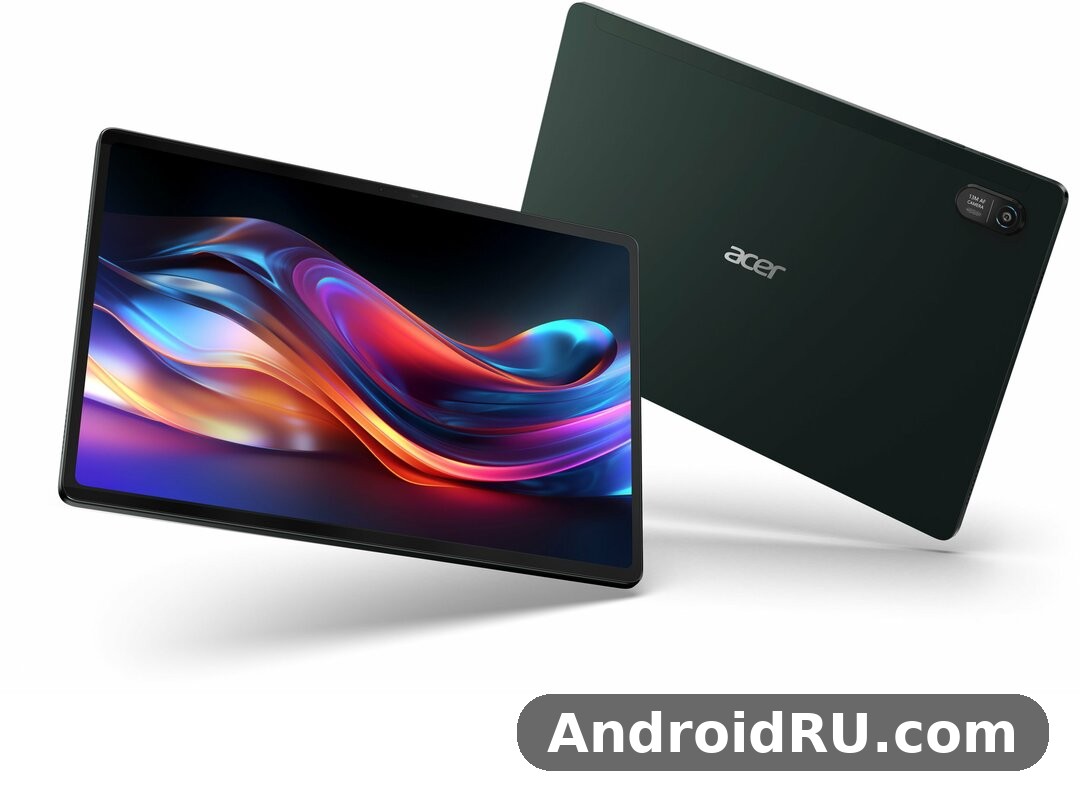
What you will get from this article is a straight answer to the questions people actually ask before buying: the Acer Iconia X12 specifications in full, how the screen and sound hold up, what the Helio G99 can and cannot do, how long the battery lasts, and whether the optional stylus and keyboard turn it into a real laptop replacement. I have kept every number tied to the official spec sheet or to widely published listings, and where listings disagree — the battery is the one place they do — I say so plainly instead of picking the flattering figure. If you want a big-screen Android tablet for films, reading, notes and light work without paying flagship money, keep reading.
The short version is this: the Iconia X12 is a very good entertainment tablet and a capable second screen for work, held back mainly by a 60 Hz refresh rate and a mid-range chip that will not win benchmark races. That trade-off is the whole story of this tablet, and it is a fair one at the price Acer asks. Buyers comparing it with Samsung and Lenovo rivals should weigh the AMOLED panel against the faster chips those rivals sometimes offer, because that single choice shapes almost everything about living with the device.
Acer Iconia X12 Review: What This 12.6-Inch AMOLED Tablet Is
The Acer Iconia X12 is a Wi-Fi Android tablet built around a 12.6-inch AMOLED display with a 2560 x 1600 resolution. It was announced at IFA in Berlin and reached shops in January 2025, which makes it a current-generation Acer tablet rather than a rumour or a prototype. The Acer Iconia X12 release date of January 2025 puts it in the same buying season as a wave of mid-range tablets, and its launch software was Android 14, with Android 15 appearing on later official spec sheets for the same model number, the X12-21M. That matters because buyers sometimes see both Android versions listed and wonder whether they are looking at two different tablets. They are not. It is one tablet, and the version you get depends on when your unit was made and whether it has taken its update.
Under the screen sits the MediaTek Helio G99, an octa-core chip built on a 6 nm process with two Cortex-A76 performance cores running up to 2.2 GHz and six Cortex-A55 efficiency cores. It is the same chip Acer uses across several Iconia models, which is why this tablet shares its DNA with its smaller siblings. The Acer Iconia X12 8GB RAM 256GB storage configuration is the standard one: 8 GB of LPDDR4X memory and 256 GB of UFS storage, with microSD expansion listed on spec sheets for buyers who need more room. There is no cellular version. This is a Wi-Fi-only device, and anyone who needs mobile data on the move will have to tether from a phone.
Physically, the tablet is slim and light for its size. The Acer Iconia X12 weight 500 grams figure is the official one, and the 6.5 mm thickness makes it easy to hold one-handed for short stretches, though a 12.6-inch slab is never really a one-handed device. The chassis is aluminium alloy, the back is clean and understated, and the whole thing feels more expensive than its price suggests. A magnetic kickstand back cover, an optional active stylus with 4096 pressure levels and an optional detachable keyboard with a trackpad are sold alongside it, which tells you exactly who Acer had in mind: students, note-takers and people who want one device for films at night and documents during the day.
Who the Iconia X12 Is Built For
The first buyer this tablet suits is the film and series watcher. A 12.6-inch AMOLED panel with deep blacks and four speakers is a small home cinema, and the 16:10 aspect ratio fits video far better than the squarer screens some rivals still use. The second buyer is the student or office worker who wants a big screen for PDFs, split-screen research and handwritten notes with the optional stylus. The third is the casual gamer who plays lighter titles and streams heavier ones. What the tablet is not built for is the buyer who wants the fastest chip on the market, a 120 Hz screen, or a desktop-class laptop replacement. Acer made a deliberate choice here: spend the budget on the panel and the speakers, and save money on the processor and the refresh rate.
That choice also shapes the tablet price conversation. The Acer Iconia X12 price varies by region, and Indian listings put it near ₹28,990, while European and other regional prices sit in the mid-range bracket for a tablet of this size. Prices move with sales and bundles, so check the current local price before you buy, and check whether the stylus and keyboard are included in the bundle you are looking at, because they are optional accessories rather than box contents. A bundle with the keyboard changes the value calculation a lot, and a bare tablet at full price is a different proposition from a discounted bundle.
What Stands Out at First Glance
Pick the tablet up and three things hit you at once: the screen, the weight and the thinness. The AMOLED panel lights up with the kind of contrast LCD tablets simply cannot match, blacks disappear into the bezel, and colours look rich without tipping into cartoon territory. The 500-gram weight is light enough to hold through a full episode, and the 6.5 mm profile slips into a bag sleeve without a fight. The quad speakers sit along the edges and fire outward, so sound does not get muffled when the tablet lies flat on a table, which is a small design decision that pays off every single day.
Look closer and the practical details show up. There is a USB-C port with PD 2.0 charging, a rear camera with a flash, a front camera centred on the long edge for landscape video calls, and a clean Android interface without heavy skins. The Acer Iconia X12 aluminium body design keeps fingerprints reasonably well hidden on the darker finishes, and the flat edges give your fingers something to grip. Nothing about the first impression screams cheap, and that is the point. Acer wants this tablet judged against rivals that cost considerably more, and on first impressions it earns that comparison.
Acer Iconia X12 AMOLED Display and Quad Speakers
The Acer Iconia X12 AMOLED display is the reason most people will buy this tablet, so it deserves a close look. The panel measures 12.6 inches diagonally, uses AMOLED technology, and runs at 2560 x 1600 pixels in a 16:10 aspect ratio. That works out to roughly 240 pixels per inch, which is sharp enough that text looks crisp at normal reading distance and fine detail in photos holds up when you zoom in. The refresh rate is 60 Hz, which is the single most debated number on the spec sheet. Scrolling is not as silky as on a 90 Hz or 120 Hz panel, and once you have used a faster screen you will notice the difference. For films, reading and note-taking, though, 60 Hz is perfectly fine, and Acer clearly decided the money was better spent on panel quality than on refresh speed.
Colour and contrast are where the AMOLED panel earns its keep. Blacks are truly black because individual pixels switch off, which makes night scenes in films look properly dark instead of washed-out grey. Colours are vivid and saturated, and the panel handles the warm tones of skin and the deep greens of nature documentaries with confidence. As an OLED tablet it also keeps power use down when showing dark content, since black pixels draw almost no power, which helps the battery in exactly the kind of evening viewing this tablet is made for. If your main use is watching films in bed or on the sofa, this is the best tablet for watching movies 2025 buyers can find anywhere near this price, and the screen is the whole argument.
The Acer Iconia X12 screen brightness 400 nits rating is the official peak figure, and it is honest rather than heroic. Indoors, 400 nits is plenty, and the panel stays readable in a bright room. Outdoors in direct sunlight it struggles, like almost every tablet at this price, and you will find yourself shading the screen or turning the brightness to maximum. That is a fair limitation to know about before you buy, especially if you plan to read or watch on a balcony or in a park. For the living room, the classroom and the office, brightness is simply not a problem.
How the 12.6-Inch AMOLED Panel Performs Day to Day
In daily use the panel is a pleasure. Reading long PDFs feels easy on the eyes because text is sharp and the large screen shows a full page at a readable size. Comics and magazines look superb, with colours that pop off the screen and panels that fill the display nicely. Split-screen multitasking works well because 12.6 inches gives each app enough room to breathe, and the 16:10 ratio means a video on one side and notes on the other is a genuinely usable layout rather than a cramped compromise. Touch response is accurate, the in-cell touchscreen keeps the glass thin, and palm rejection with the optional stylus is good enough for real handwriting.
One thing worth noting is that the 60 Hz refresh rate shows up most when scrolling through long web pages or social feeds, where motion is a touch less smooth than on faster panels. It never affects video playback, since films and shows run at 24 or 30 frames per second anyway, and it never affects reading. Gamers will notice it more than film watchers will. If you come from a 120 Hz phone, give yourself a day to adjust. After that, the colour and contrast tend to matter more than the refresh rate, and most buyers stop thinking about it entirely.
Brightness and Outdoor Use
At full brightness the panel copes with a bright room and a seat near a window without complaint. The anti-reflective quality of the glass is average rather than exceptional, so a strong light source behind you will show up as a reflection, and direct sun will wash the image out. The practical fix is simple: sit with your back to the light, or use the tablet indoors for serious viewing. Acer quotes up to 400 nits, and that figure matches what you see in practice. It is enough for the uses this tablet is designed for, and it is one of the places where a buyer who truly needs outdoor readability should look at a brighter, more expensive panel instead.
Sound From the Quad Speakers
The Acer Iconia X12 quad speakers sound quality is the second half of the media experience, and it is better than the price suggests. Four speakers spread across the edges give a wide soundstage for a tablet, dialogue stays clear in films, and there is enough volume to fill a quiet room without distortion creeping in at the top end. Bass is present but limited, as it is on every tablet this thin, so action scenes will not rumble the way a dedicated speaker would. For dialogue-driven shows, YouTube, video calls and music while you work, the speakers are genuinely enjoyable, and you will reach for headphones far less often than on a tablet with two small speakers. The tablet speakers here are a real strength, not a checkbox feature, and they pair with the AMOLED panel to make this a convincing portable cinema.
Acer Iconia X12 Helio G99 Performance and Gaming
The Acer Iconia X12 Helio G99 performance story is one of sensible balance rather than raw speed. The MediaTek Helio G99 is a 6 nm octa-core chip with two Cortex-A76 cores at up to 2.2 GHz for heavy work and six Cortex-A55 cores for everything else, paired with a Mali-G57 MC2 graphics processor. It is a proven mid-range chip that has powered dozens of tablets and phones, which means app compatibility is a non-issue and developers know it well. In everyday use — browsing, email, documents, streaming, video calls — the tablet feels responsive, apps open promptly, and switching between apps is smooth. The 8 GB of LPDDR4X RAM is the key number here: it is generous for the price, it keeps several apps alive in memory at once, and it is what makes split-screen multitasking feel relaxed instead of strained.
Where the chip shows its limits is in heavy sustained loads. Exporting a long video, editing large photo batches, or running demanding games at high settings will take longer than on a flagship chip, and the tablet can warm up during extended gaming sessions. That is normal for this class of hardware, and Acer has tuned the tablet for steady, reliable performance rather than short bursts of speed. For the buyers this tablet is aimed at, that tuning is the right call. A tablet that stays smooth through a working day matters more than a tablet that wins a benchmark and then throttles.
Everyday Speed With 8 GB of RAM
Day-to-day speed is where the 8 GB of RAM earns its keep. You can keep a browser with a dozen tabs open, a document editor, a notes app and a music player running at the same time, and the tablet will switch between them without reloading everything from scratch. That sounds like a small thing until you have used a tablet with 4 GB of RAM and watched your document reload every time you check a message. The tablet RAM here is genuinely generous, and it is one of the best reasons to pick this model over cheaper tablets that pair a similar screen with half the memory. Storage is 256 GB of UFS, which is fast enough for app loading and file work, and the tablet storage leaves plenty of room for offline films, large documents and a photo library before you ever need the microSD slot.
Software behaviour is clean Android with light Acer additions, and the interface stays out of your way. There is no heavy skin slowing things down, and the tablet ships with the usual Google apps and services. The Acer Iconia X12 multitasking split screen feature works the way Android intends: drag an app to the side, pick a second app, and both stay live. On a 12.6-inch display this is not a gimmick. A lecture video on one side and notes on the other, or a reference document beside a writing app, is a setup students and office workers will use every day. Floating windows add another layer for quick tasks like replying to a message without leaving your document.
Gaming on the Helio G99
The Acer Iconia X12 gaming performance picture is honest mid-range. Lighter games — puzzle games, casual racers, card games, 2D platformers — run beautifully on the big AMOLED screen, and the quad speakers make them more fun than they have any right to be. Demanding 3D titles will run, but you should expect medium settings rather than maximum, and frame rates will sit in the playable rather than the spectacular range. The large screen is a real advantage for games with detailed maps or touch controls, because your fingers have room to work without covering the action.
Cloud gaming is where this tablet quietly shines. Streaming a game over Wi-Fi leans on the screen, the speakers and the network rather than the local chip, and the Iconia X12 is well equipped on all three fronts. The G99 chipset handles video decoding efficiently, the display makes streamed games look rich, and a controller over Bluetooth turns the tablet into a portable console. If gaming is your main hobby, a tablet with a faster chip and a higher refresh rate would serve you better, but if gaming is one of several things you do, the Iconia X12 covers it well enough that you will not feel short-changed.
Heat management deserves a mention. During long sessions the back of the tablet warms up near the top edge, but it never gets uncomfortably hot, and performance stays consistent rather than dropping off a cliff after ten minutes. That steadiness is worth more than a higher peak speed that disappears under load, and it is one of the quiet strengths of the Helio G99 platform. The tablet performance on offer here is dependable rather than dazzling, and dependable is what most buyers actually need.
Full Specifications of the Acer Iconia X12
This section gathers the Acer Iconia X12 specifications in one place, drawn from the official Acer spec sheet for the X12-21M and from widely published listings. Where sources disagree, the official figure is given first and the disagreement is noted. If a number matters to your buying decision — the battery is the obvious example — check the official page for your region before you order, because regional variants can differ in small details.
| Feature | Acer Iconia X12 |
|---|---|
| Model | Iconia X12 (X12-21M) |
| Announced | September 2024 (IFA, Berlin) |
| Release date | January 2025 |
| Display | 12.6-inch AMOLED, 2560 x 1600 (WQXGA), 16:10, 60 Hz, up to 400 nits, in-cell touch |
| Chipset | MediaTek Helio G99 (MT8781), octa-core, 6 nm, up to 2.2 GHz |
| Graphics | ARM Mali-G57 MC2 |
| RAM | 8 GB LPDDR4X |
| Storage | 256 GB UFS, microSD card expansion listed on spec sheets |
| Rear camera | 13 MP autofocus with flash |
| Front camera | 5 MP |
| Battery | 8,000 mAh (official Acer figure; some retailer listings cite 10,000 mAh), up to 16 hours quoted |
| Charging | USB-C, PD 2.0 |
| Audio | Quad speakers |
| Operating system | Android 14 at launch; Android 15 listed on later official spec sheets |
| Connectivity | Wi-Fi only, no cellular modem; Bluetooth; USB-C |
| Dimensions | 286.2 x 184.4 x 6.5 mm |
| Weight | 500 g |
| Body | Aluminium alloy chassis |
| Accessories (optional) | Active stylus (4096 pressure levels), detachable keyboard with trackpad, magnetic kickstand back cover |
| Sensors | Accelerometer listed on spec sheets; check the official page for the full sensor list |
A note on the battery figure, because it is the one number where sources genuinely disagree. Acer’s own product page and quick spec sheet list an 8,000 mAh battery with up to 16 hours of use, and that is the figure used throughout this article. Several retailer and comparison listings cite 10,000 mAh instead. The most likely explanation is a regional or listing error that has been copied from one database to another, but without an official correction the honest approach is to quote Acer and flag the difference. The Acer Iconia X12 battery life you actually get will depend far more on screen brightness and what you are doing than on which of those two numbers is printed on a shop page, and the section below covers real-world expectations in detail.
Acer Iconia X12 Display Specifications
The display specifications are the heart of this tablet: a 12.6-inch AMOLED panel at 2560 x 1600, 16:10 aspect ratio, 60 Hz refresh rate, up to 400 nits of brightness, and an in-cell touchscreen. The WQXGA resolution keeps text sharp, the AMOLED technology delivers the deep blacks and vivid colours that define the viewing experience, and the 16:10 ratio is a good compromise between video and documents. There is no high refresh rate option and no stylus built into the body — the stylus is an optional accessory that charges and stores separately. The tablet display is the single biggest reason to choose this model over an LCD rival at the same price, and the spec sheet makes that priority clear.
Acer Iconia X12 Camera Specifications
The camera specifications are modest and honest: a 13 MP rear camera with autofocus and an LED flash, and a 5 MP front camera. Neither camera is meant to replace a phone camera, and Acer does not pretend otherwise. The rear camera handles document scanning, whiteboard photos and the occasional snapshot, while the front camera is positioned for landscape video calls, which is how a tablet of this size is actually used. Video recording is serviceable for calls and clips rather than cinematic work. If camera quality is your top priority in a tablet, you are shopping in the wrong category — but for the jobs a tablet camera actually does, these specifications are perfectly adequate.
Acer Iconia X12 Battery and Charging Specifications
The battery and charging specifications are straightforward: an 8,000 mAh lithium-ion battery pack (20 Wh, 3.8 V, two-cell, per the official quick spec sheet) charged over USB-C with PD 2.0 support. Acer quotes up to 16 hours of battery life, which is a best-case figure for light use at moderate brightness. There is no wireless charging, which is normal for tablets, and no charger wattage is quoted on the headline spec sheet, so check what is in the box for your region. The Acer Iconia X12 USB C charging speed in practice is unhurried rather than fast, and an overnight or desk charge is the realistic routine for most owners.
Acer Iconia X12 Camera Quality: 13 MP Rear and 5 MP Front
The Acer Iconia X12 camera quality question has a short answer: good enough for what a tablet camera is actually for, and not a reason to buy the tablet on its own. The Acer Iconia X12 13MP rear camera with flash takes clean, usable photos in good light, with natural colours and enough detail for document scans, whiteboard captures and quick reference shots. Autofocus locks on reliably at close range, which is exactly what document scanning needs, and the flash helps in dim rooms when you are photographing a page rather than a person. In low light, image quality drops off as it does on every tablet camera, with visible noise and softer detail, so evening photos are best left to your phone.
The Acer Iconia X12 5MP front camera video calls setup is the more important camera on this device, because video calls are what the front camera is for. The 5 MP sensor sits on the long edge so your face stays centred in landscape mode, and call quality is clear and steady in normal indoor light. Colleagues and family will see you well, and the microphone picks up speech cleanly at arm’s length. The tablet camera on the front will not flatter you in a dark room, but with a window or a lamp in front of you it does the job without fuss. For students joining online classes and workers joining meetings, that is all that matters, and the Iconia X12 delivers it.
It is worth saying plainly that no tablet in this price range has a great camera, and the Iconia X12 does not try to pretend otherwise. Acer spent the budget on the screen, the speakers and the memory, and the cameras got what was left. That is the right priority for a tablet. You carry a phone for photos. You carry a tablet for the screen. Judged on that basis, the camera setup is honest, functional and perfectly adequate for scanning, calls and the occasional snapshot.
Acer Iconia X12 Battery Life and Charging
The Acer Iconia X12 battery life picture depends on how you use the screen, because the big AMOLED panel is the main thing drawing power. Acer quotes up to 16 hours, and that figure assumes light use at moderate brightness — reading, browsing and the occasional video. In mixed real-world use with streaming, browsing and some gaming, a full day of use is realistic, and heavy video streaming at high brightness will bring that down to a long evening rather than a full day. The tablet battery is an 8,000 mAh unit on the official spec sheet, and while some listings cite a larger figure, the practical takeaway is the same either way: this tablet gets through a working day and an evening of films without hunting for a charger.
Standby drain is low, which matters for a tablet that spends days in a bag between uses. You can pick it up after a weekend untouched and still have most of your charge, and that reliability is one of the quiet pleasures of owning it. The tablet battery holds up well over months of use, and Android’s battery management keeps background apps from eating power while the screen is off. For a tablet for students who carry it between lectures all day, or a tablet for work that sits on a desk between meetings, that kind of standby behaviour is genuinely useful.
Charging runs over USB-C with PD 2.0, and a full charge from empty takes a few hours rather than minutes. This is not a tablet you top up in fifteen minutes before a meeting. The routine that works is charging overnight or leaving it plugged in at your desk while you work. The USB-C port is also the only wired connection, so headphones need Bluetooth or a USB-C adapter. That is standard for modern tablets, but buyers coming from an older device with a headphone jack should know before they buy. The Acer Iconia X12 WiFi only tablet no cellular design also helps battery life in a small way, since there is no mobile radio searching for a signal, and the tablet sips power on Wi-Fi in a way cellular tablets cannot match.
Acer Iconia X12 Stylus, Keyboard and Accessories
The accessories are where the Iconia X12 turns from a media tablet into a work tool. Acer Iconia X12 stylus support comes through an optional active stylus with 4096 levels of pressure sensitivity, which is the same class of pen hardware used on far more expensive tablets. Writing feels natural, with low latency and good palm rejection, and handwriting recognition in note apps works well enough to replace paper for lectures and meetings. The Acer Iconia X12 for drawing case is strong too: sketching apps run smoothly, pressure sensitivity gives real control over line weight, and the 12.6-inch canvas is large enough for serious sketches rather than doodles. Artists on a budget should still check pen latency in their app of choice, but for most people the stylus experience is a pleasant surprise at this price.
The Acer Iconia X12 for note taking with stylus routine is the one accessory buyers mention most. Lecture notes, annotated PDFs, meeting minutes and quick diagrams all work better with a pen than with a keyboard, and the big screen means your handwriting stays at a natural size. Pair the stylus with a good notes app and the tablet becomes a paper replacement for students and professionals alike. The tablet stylus is sold separately, so factor its price into your budget, and check whether your region sells a bundle that includes it.
The Acer Iconia X12 keyboard case option is an optional detachable keyboard with a trackpad, sold alongside the tablet. It connects magnetically, props the tablet up with the magnetic kickstand back cover, and turns the device into a compact laptop for typing-heavy work. The tablet keyboard is full-size enough for comfortable typing, the trackpad handles pointing and scrolling, and the whole setup is light enough to carry in a bag all day. It will not replace a laptop for heavy multitasking or demanding software, but for email, documents and web research it is genuinely capable. The tablet accessories range also includes the kickstand cover on its own, which is worth having even if you skip the keyboard, because it props the tablet at a good viewing angle for films and calls.
Software support is the one area where buyers should ask questions before buying. The tablet launched on Android 14, and questions about the Acer Iconia X12 Android 14 update to Android 15 path come up often, because later official spec sheets list Android 15 for the same model. That suggests the tablet either ships with Android 15 in newer production runs or receives it as an update, but Acer’s long-term update policy for this model is not spelled out on the headline spec sheet. Check the official page for your region and ask the seller which Android version ships in the box. The tablet design itself is clean and modern, with slim bezels, flat edges and an aluminium back, and it looks at home next to tablets that cost twice as much.
Storage expansion deserves a clear mention. The Acer Iconia X12 microSD card expansion slot is listed on official spec sheets, which means the 256 GB of built-in storage is not a hard ceiling. A microSD card is the cheap way to carry a large offline film library or a big photo collection, and it is a feature some rivals have dropped. The Acer Iconia X12 12.6 inch AMOLED tablet is also easy to compare with its siblings: the larger-screened Acer Iconia X14 Review and Full Specifications: Everything You Should Know covers the bigger model in the same family, while the Acer Iconia Tab P11 (2025) Review and Detailed Specs: Key Features and Performance Covered looks at a smaller and more portable alternative for buyers who find 12.6 inches too large to carry every day.
Acer Iconia X12 vs Samsung Galaxy Tab S9 FE
The Acer Iconia X12 vs Samsung Galaxy Tab S9 FE comparison is the one most buyers will make, because the Samsung is the obvious big-brand alternative at a higher price. Both are large Android tablets with good screens, solid build quality and stylus support, but they spend their budgets in different places. The Iconia X12 gives you an AMOLED panel and more storage for less money, while the Galaxy Tab S9 FE gives you a faster chip, a higher refresh rate, water resistance and Samsung’s longer software support. Neither tablet is better for everyone, and the right pick depends on what you value most. This tablet review comparison keeps the focus on the differences that change daily use, not on paper numbers that look good in a table and disappear in practice.
| Feature | Acer Iconia X12 | Samsung Galaxy Tab S9 FE |
|---|---|---|
| Display | 12.6-inch AMOLED, 2560 x 1600, 60 Hz | 10.9-inch LCD, 2304 x 1440, 90 Hz |
| Chipset | MediaTek Helio G99 | Samsung Exynos 1380 |
| RAM | 8 GB | 6 GB (base) or 8 GB |
| Storage | 256 GB | 128 GB (base) or 256 GB |
| Rear camera | 13 MP with flash | 8 MP |
| Battery | 8,000 mAh (official) | 8,000 mAh |
| Stylus | Optional active stylus | S Pen included in the box |
| Water resistance | Not rated | IP68 |
| Tablet specs highlight | Bigger AMOLED screen, more storage | Faster refresh, included pen, longer updates |
The screen is the headline difference. The Iconia X12 has a larger AMOLED display with deeper blacks and richer colours, while the Tab S9 FE has a smaller LCD with a smoother 90 Hz refresh rate. If you watch films, the Acer wins. If you scroll and game a lot, the Samsung feels smoother. The tablet specs table above shows the trade clearly: Acer wins on panel size, panel technology and base storage, while Samsung wins on refresh rate, bundled pen and durability. The X12 tablet is also the cheaper of the two in most regions, and that price gap buys the keyboard, the stylus and a case with money left over.
Where the Iconia X12 Wins
The Iconia X12 wins on screen size, screen technology, base storage and price. Its 12.6-inch AMOLED panel is simply a better film screen than the 10.9-inch LCD on the Samsung, and the 256 GB of storage in the standard configuration means you are not paying extra for room your films and files need. The quad speakers are competitive with the Samsung’s audio, and the 8 GB of RAM matches or beats the base Samsung configuration. For a tablet for movies and reading, the Acer is the stronger pick, and the money saved can go toward the keyboard and stylus that turn it into a work device.
Where the Galaxy Tab S9 FE Pulls Ahead
The Galaxy Tab S9 FE pulls ahead on refresh rate, bundled S Pen, water resistance and software support. Its 90 Hz screen feels smoother in everyday scrolling, the S Pen comes in the box rather than as a separate purchase, the IP68 rating means it survives splashes and dust, and Samsung’s update record for its tablets is stronger than Acer’s. Buyers who plan to keep their tablet for four or five years should weigh that update record seriously, because a tablet that stops getting security updates ages faster than one with a slower chip. The Samsung is also the safer pick for buyers who want a known quantity with wide accessory support and a large user community. If you are comparing the wider Acer family as well, the Acer Iconia A16 at a Glance: Review and Detailed Specifications gives a useful look at a larger sibling, and the Acer Iconia Tab P10 (2025) vs the Rest: Review and Specifications Compared shows how Acer’s smaller 2025 tablet stacks up against its rivals.
Acer Iconia X12 Pros and Cons
Every tablet is a set of trade-offs, and the Iconia X12 is no exception. The honest way to judge it is to weigh what it does well against what it gives up, and to check whether the things it gives up are things you would actually miss. For most buyers, the strengths line up with the way a tablet is really used — watching, reading, notes and light work — while the weaknesses sit in areas that matter less day to day. Tablet multitasking, media playback and battery life are strengths. Raw speed and refresh rate are not. That is the deal, and it is a fair one at the price.
Pros
- 12.6-inch AMOLED display with deep blacks, rich colours and a sharp 2560 x 1600 resolution — the best screen in its price range.
- Quad speakers that sound genuinely good for films, shows and music, with clear dialogue and room-filling volume.
- 8 GB of RAM and 256 GB of storage as standard, with microSD expansion for more room.
- Slim 6.5 mm aluminium body at just 500 grams, easy to carry and comfortable to hold.
- Optional stylus with 4096 pressure levels and an optional detachable keyboard with trackpad for work and notes.
- Long battery life for a full day of mixed use, with low standby drain between sessions.
Cons
- 60 Hz refresh rate feels less smooth than 90 Hz or 120 Hz rivals when scrolling and gaming.
- Helio G99 is a capable mid-range chip, but demanding games and heavy video editing run at medium settings.
- Wi-Fi only, with no cellular option for buyers who need mobile data on the move.
- No headphone jack, so wired headphones need a USB-C adapter.
- Charging is unhurried, and a full charge takes a few hours rather than minutes.
- Software update policy is less clearly documented than Samsung’s, so long-term support is a question to ask before buying.
The tablet weight of 500 grams and the thin body deserve a second mention in the cons discussion, because they cut both ways. A light tablet is comfortable to hold, but a 12.6-inch screen is still a large object to carry one-handed for long periods, and the slim body means there is no room for a bigger battery or a headphone jack. Those are reasonable engineering choices, and most owners will accept them, but buyers who want a smaller and lighter device should look at the compact end of the Iconia range instead — the Acer Iconia A14 Review: The Good, the Bad and the Battery Life covers a smaller sibling that trades screen size for portability, and its battery discussion is a useful comparison for anyone weighing size against stamina.
Frequently Asked Questions About the Acer Iconia X12
When was the Acer Iconia X12 released?
The Acer Iconia X12 was announced at IFA in Berlin and released in January 2025. It launched with Android 14, and later official spec sheets for the same X12-21M model list Android 15, so the version in the box can depend on when the unit was made. The tablet is a current retail model, not a rumour or a pre-release device, and it is sold in multiple regions with the same core specifications.
Is Acer Iconia X12 good for students?
Yes, for most students it is a strong choice. The large AMOLED screen shows full textbook pages and lecture slides at a readable size, the optional stylus handles handwritten notes and annotated PDFs, split-screen multitasking lets you watch a lecture beside your notes, and the battery lasts through a day of classes. The main limits are the Wi-Fi-only connection, which means you need campus or home Wi-Fi, and the mid-range chip, which is fine for documents and research but not for heavy video editing or engineering software. For reading, writing, notes and streaming, it is one of the best-value tablets a student can buy.
Does the Acer Iconia X12 support a stylus?
Yes, it supports an optional active stylus with 4096 levels of pressure sensitivity. The stylus is sold separately rather than included in the box, and it works for handwriting, sketching and annotating documents. Palm rejection is good, latency is low, and the 12.6-inch screen gives you a large canvas for notes and drawings. Check whether your region sells a bundle that includes the stylus, because a bundle is usually cheaper than buying the pen on its own.
Can I expand the storage of the Acer Iconia X12?
Yes. The tablet ships with 256 GB of UFS storage, and official spec sheets list a microSD card slot for expansion. A microSD card is the simplest way to add room for offline films, photos and large files without paying for a higher storage tier. The 256 GB built in is generous for most buyers, so the card slot is best treated as a bonus for media collectors rather than a necessity.
Does the Acer Iconia X12 have cellular data?
No. This is a Wi-Fi-only tablet with no cellular modem and no SIM slot, so it needs a Wi-Fi network or a phone hotspot to get online. That keeps the price down and helps battery life, but buyers who need mobile data on trains, in cars or away from Wi-Fi should plan to tether from their phone or choose a different tablet with a cellular option.
Final Verdict: Should You Buy the Acer Iconia X12?
The Acer Iconia X12 is easy to recommend to the buyer it was built for: someone who wants a big, beautiful screen for films, reading and notes, with enough speed and memory for everyday work, at a price that undercuts the big-name rivals. The 12.6-inch AMOLED display is the star, the quad speakers are a genuine pleasure, the 8 GB of RAM keeps multitasking smooth, and the optional stylus and keyboard turn a media tablet into a capable work companion. The MediaTek Helio G99 chip will not win speed tests, the 60 Hz refresh rate will not impress gamers, and the 8000 mAh battery charges slowly — but none of those limits gets in the way of what this tablet is actually for.
Buy it if your days are built around watching, reading, note-taking and light productivity, and if you value screen quality over raw speed. Skip it if you need a cellular connection, a 120 Hz display, or a chip that can handle demanding games and heavy editing at maximum settings. As a 12.6 inch tablet for movies, study and everyday work, this Iconia tablet is one of the strongest value picks in its class, and the AMOLED panel alone justifies the price for film lovers. The Acer Iconia X12 where to buy question has a simple answer: check the current price at your local Acer retailer or a trusted online shop, compare bundle prices for the stylus and keyboard, and confirm which Android version ships in the box before you order. If the price is right and the bundle suits you, this is a tablet you will enjoy every day.

