

Samsung Galaxy XCover Pro Review: Build Quality, Workday Use and Battery
Most phones are built for a desk, a sofa and a pocket. The Samsung Galaxy XCover Pro was built for a building site, a warehouse aisle, a delivery route and a rainy field. It is a rugged phone for construction workers, delivery drivers, warehouse staff and field service teams who need a device that keeps working after a drop, a splash and a long shift. This review looks at what that toughness feels like in daily use, how the screen, performance and cameras hold up, and whether the battery really lasts a full workday. Many buyers ask, is Galaxy XCover Pro worth buying? For buyers who want a rugged IP68 body, a removable battery and a low used price, the answer is yes. The Galaxy XCover Pro NFC supports contactless payments in markets where the feature is included.
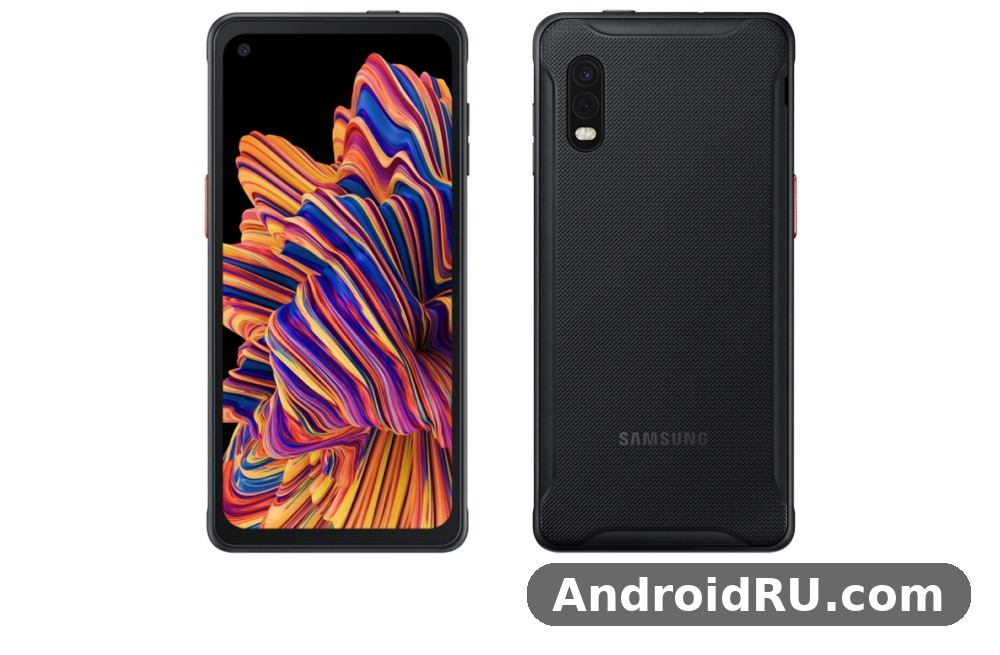
I will be honest up front: this is not a flagship, and it was never meant to be one. It launched in early 2020 with a mid-range chip, a modest amount of memory and a single-speaker setup. What it offers instead is a combination that is rare in 2026: a removable battery, a programmable hardware key, glove-friendly touch, IP68 sealing and MIL-STD-810G testing in a phone that still runs the apps a workday depends on. If your phone is a tool first and a toy second, that trade makes sense. If you want the fastest chip or the best camera, it does not. In a Galaxy XCover Pro camera test, daylight shots come out clear and well exposed, while low light shows noise sooner than on newer phones. The Galaxy XCover Pro dual SIM support covers two nano-SIM cards in most regions.
By the end of this article you will know how the XCover Pro handles drops and dust, how long the 4050mAh battery lasts with maps, calls and scanning, what the Exynos 9611 can and cannot do, and who should still pick this phone up in 2026. The full specifications table is included near the end, so you can check every number in one place. A Galaxy XCover Pro battery life test with mixed use shows it reaches the end of a workday, and a spare battery covers longer shifts. The Galaxy XCover Pro IP68 rating means it survives dust and immersion in shallow water.
Samsung Galaxy XCover Pro Build Quality and Rugged Design
Pick up the XCover Pro and the first thing you notice is the grip. The back is textured plastic, not glass, and the frame is thick enough to hold with wet hands or work gloves. The phone measures around 159.9 x 76.7 x 9.9 mm and weighs about 218 grams, so it feels solid without feeling like a brick in a jacket pocket. The corners are reinforced, the buttons are large and clicky, and the whole body is designed to be held, dropped and picked up again. The Galaxy XCover Pro full specifications run from the Exynos 9611 chip and 4,050 mAh battery to the 25MP camera and 6.3-inch PLS LCD display. The Galaxy XCover Pro fingerprint sensor sits in the power button and unlocks the phone quickly once you register the same finger twice.
The rugged smartphone design is not decoration. Samsung put this phone through MIL-STD-810G testing, which covers drops, vibration, humidity, temperature extremes and dust exposure. That does not mean the phone is indestructible, and no honest review should claim that. It means the phone was designed and tested against the kind of knocks that kill a normal glass phone on the first week of a field job. In practice, a drop from waist height onto concrete usually leaves a scuff on the corner, not a shattered screen. The Galaxy XCover Pro price and specifications together make it a strong work-phone option, with the screen and battery leading the list. The Galaxy XCover Pro microSD slot takes cards up to 1TB, which is the easy way to add room for photos and offline video.
How MIL-STD-810G and IP68 Protection Work in Real Use
IP68 means the XCover Pro is sealed against dust and can survive immersion in fresh water up to 1.5 metres for up to 30 minutes under lab conditions. On a work site that translates into simpler things: using the phone in heavy rain, rinsing off dust and mud under a tap, and not worrying when it falls into a puddle. Salt water, soapy water and high-pressure jets are a different story, so rinse it with clean water and dry it before charging if it gets dirty. In a Galaxy XCover Pro vs Galaxy XCover6 Pro comparison, the deciding factors are 5G support, chipset and display. The Galaxy XCover Pro headphone jack is a 3.5mm port, so wired earphones work without an adapter.
The MIL-STD-810G rating covers a wider set of abuse than water alone. Vibration from a van dashboard, dust on a building site, a hot car in summer and a cold morning on a scaffold are all part of the test regime. A phone that passes those tests is not guaranteed to survive every accident, but it starts from a much stronger position than a slim glass phone that was designed for a showroom. For anyone asking whether the XCover Pro is waterproof enough for outdoor work, the answer is yes for rain, splashes and brief immersion, with the usual care after exposure. How long does Galaxy XCover Pro battery last? With mixed use it reaches the end of a workday, and a spare battery covers longer shifts. The Galaxy XCover Pro MIL-STD-810G rating covers drops and shocks, which is the point of a rugged phone.
One detail worth knowing: the IP68 seal depends on the back cover and the port covers being fitted correctly. Because the battery is removable, the back cover comes off, so always press it firmly into place and check the seal after swapping a battery. A cover that is not seated properly is the most common way a rugged phone loses its water resistance. A Galaxy XCover Pro performance test shows the Exynos 9611 handling everyday apps smoothly, with only heavy games asking for lower settings. The Galaxy XCover Pro overheating reports are rare in normal use, and the phone stays comfortable during long video sessions.
Gorilla Glass 5 and the Glove-Friendly Display
The screen is protected by Corning Gorilla Glass 5, which resists scratches and cracks better than the bare glass on many budget phones. It is not scratch-proof, and sand or grit in a pocket will still mark it over time, but a screen protector and a case are optional here rather than essential. The display sits slightly recessed in the frame, so the raised edges take the first hit in a face-down drop. The Galaxy XCover Pro display quality is clear indoors, though it is dimmer outdoors than AMOLED panels. A Galaxy XCover Pro screen protector is a cheap add-on that keeps the display free of scratches.
Glove mode is one of the features that matters most in daily field work. With touch sensitivity raised in Settings, the screen responds to thin work gloves, which means a warehouse picker or a site engineer does not have to take gloves off to answer a call, scan a barcode or check a delivery note. Thicker insulated gloves will still struggle, as they do on every capacitive screen, but standard work gloves work well. Combined with the large physical buttons, this is a phone you can actually operate with your hands full. The Galaxy XCover Pro camera quality at night is modest, with night mode helping a little but noise showing in dark areas. The Galaxy XCover Pro 64GB price is the one most buyers compare, since that is the standard storage option.
The Programmable XCover Key
On the left side of the phone sits the XCover Key, a dedicated hardware button you can program to open an app, start push-to-talk, switch on the torch or trigger another shortcut. In a work setting this is genuinely useful: one press opens the scanner app, a long press starts a PTT call, and you never have to hunt through the home screen with dirty hands. The key can be set in Settings under Advanced features, and different actions can be assigned to a single press and a long press. Should I buy Galaxy XCover Pro or wait for a sale? If you want a rugged IP68 body, a removable battery and a low used price, it is an easy recommendation. The Galaxy XCover Pro used price depends on condition and battery health, so check the screen and charging port before paying.
Push-to-Talk Support for Field Teams
Push-to-talk, or PTT, turns the phone into a walkie-talkie for a team. Press the XCover Key, speak, and your message goes to the group. The XCover Pro supports PTT through compatible apps and enterprise mobility setups, which is why it shows up on construction crews, logistics teams and security patrols. For a team that already uses PTT software, the dedicated key makes the difference between a feature that gets used and a feature that gets ignored. This Galaxy XCover Pro honest review keeps the trade-offs in view: the screen and battery impress, while the phone is several years old and the software is no longer updated. A Galaxy XCover Pro battery replacement is easy, because the battery is removable and swaps in seconds.
Samsung Galaxy XCover Pro Display and Everyday Visibility
The XCover Pro has a 6.3-inch PLS LCD display with a Full HD+ resolution of 2340 x 1080 pixels. PLS is Samsung’s version of IPS, so viewing angles are wide and colours look natural rather than oversaturated. It is not an AMOLED panel, so blacks are grey rather than pure black and the screen is a little less punchy in a dark room, but for reading delivery lists, maps and work orders in daylight it is clear and easy on the eyes. The Galaxy XCover Pro charging time from empty is two hours with a 15W charger, so overnight charging is the easy routine. The Galaxy XCover Pro screen replacement cost varies by repair shop, so get two quotes before booking a repair.
Brightness is the number that matters outdoors. The panel reaches a level that stays readable in bright daylight, though direct summer sun will still wash it out a little, as it does on most LCD phones. Raising brightness manually helps, and the auto-brightness sensor reacts quickly when you step out of a van into sunlight. If you spend most of your day outside, a matte screen protector can cut reflections, but it will also soften the image slightly, so try the bare screen first. A Galaxy XCover Pro gaming test shows casual games running smoothly, while demanding titles need medium settings to stay stable. The Galaxy XCover Pro best price usually shows up during sales events, so wait for a promotion if you are not in a hurry.
Is the 6.3-Inch PLS LCD Screen Good Enough for Work?
For work, yes. Text is sharp at Full HD+, maps render clearly at a glance, and a 6.3-inch screen is big enough for forms, checklists and signature capture without constant zooming. Video looks fine, though the single bottom-firing speaker means films and calls sound thin compared with a stereo phone. The 20:9 aspect ratio keeps the phone narrow enough to hold in one hand, and the hole-punch front camera stays out of the way of most apps. The Galaxy XCover Pro unboxing covers the phone, a USB-C cable and the paperwork, so check what your retailer includes before you buy. The Galaxy XCover Pro weight feels balanced in the hand for a phone with a large screen, and a case adds only a little.
The trade-off is refresh rate. This is a 60Hz panel, so scrolling is not as smooth as the 120Hz screens on newer rugged phones. That sounds like a small thing until you scroll a long stock list all day, and then you notice it. It does not slow the phone down, and it helps battery life, but anyone coming from a 120Hz display will feel the step back for the first few days. If you want a newer screen, the comparison with its successor is worth a look: Samsung Galaxy XCover6 Pro Review: Durability Features and Daily Performance covers a 120Hz display, a faster chip and a larger screen in a similar rugged body.
Samsung Galaxy XCover Pro Performance With Exynos 9611
The XCover Pro runs on the Exynos 9611, an octa-core chip built on a 10nm process, paired with 4GB of RAM and 64GB of internal storage. On paper that is modest, and in 2026 it is modest in practice too. The chip handles calls, messaging, email, maps, barcode scanning, forms and light photo editing without complaint. It stumbles when you ask it to do several heavy things at once, such as running navigation while a video call runs in the background and a large file syncs over mobile data. A Galaxy XCover Pro battery drain overnight fix usually starts with battery saver and a check for apps running in the background.
Day-to-day speed is acceptable rather than quick. Apps open in a second or two, the camera takes a moment to be ready, and switching between three or four apps is fine. Switching between eight apps, with a browser full of tabs, will trigger reloads because 4GB of RAM fills up fast. That is the single biggest performance limit on this phone, and it is worth knowing before you buy. If your workday is one app at a time, you will rarely notice it. If you multitask heavily, you will. For a Galaxy XCover Pro fingerprint sensor not working problem, re-register the same finger twice and clean the sensor area first.
How 4GB RAM and 64GB Storage Handle Work Apps
For a work phone, the app load is usually predictable: a dispatch app, a messaging app, maps, email, a scanner and a browser. The XCover Pro runs that set well, and Samsung’s One UI 2 keeps background apps under control so the phone does not grind to a halt. Storage is tighter. The 64GB of internal storage leaves roughly 50GB free after the system, and work apps, offline maps and photos eat into that quickly. A microSD card is not optional for most users, it is part of the setup. A Galaxy XCover Pro screen flickering issue is rare, and a restart or a software update usually clears it.
Light gaming is possible, and casual games run smoothly, but demanding 3D games need lowered settings and will warm the phone up. That is not a flaw in a work phone, it is a consequence of a chip chosen for efficiency and cost rather than peak speed. The Exynos 9611 performance question has a simple answer: fine for work, fine for casual use, not a gaming phone and not a multitasking powerhouse. Wondering how to take a screenshot on Galaxy XCover Pro? Press power and volume down together, or use a palm swipe.
microSD Expansion and File Handling
The XCover Pro takes a microSD card up to 512GB, and the tray also holds two nano-SIM cards, so you can run a work SIM and a personal SIM alongside expandable storage. Offline maps, photos of completed jobs, PDF manuals and music can all live on the card, which keeps the internal storage free for apps. The phone also keeps a 3.5mm headphone jack, which is handy for wired headsets on a noisy site, and NFC for contactless payment and tap-to-pair accessories. This is how to factory reset Galaxy XCover Pro safely: back up first, then use Settings, General management, Reset.
Samsung Galaxy XCover Pro Battery Life and Removable Battery
Battery life is where the XCover Pro earns its keep. The removable 4050mAh battery is the headline feature, and it changes how you plan a workday. Instead of hunting for a charger at 3pm, you carry a spare battery, swap it in under a minute, and start the second half of the shift at 100 percent. No other mainstream phone in its class offers that, and for field workers it is the single most practical feature on the spec sheet.
How long does the XCover Pro battery last in a normal workday? With mixed use — calls, messaging, maps for part of the day, photos of completed work and a browser open for reference — most users get through a full 8 to 10 hour shift with charge to spare, typically ending the day around 20 to 30 percent. Heavy GPS navigation all day, a bright screen outdoors and constant mobile data will pull that down to 6 or 7 hours, which is exactly when the spare battery earns its place in the bag. Does Galaxy XCover Pro have a headphone jack? Yes, the 3.5mm port on the edge takes wired earphones.
4050mAh Battery Across a Full Workday
Standby drain is low, and One UI’s battery management keeps idle apps from eating power overnight. The 60Hz LCD and the efficient Exynos 9611 both help: neither is a power hog, and the phone does not run hot in normal use, which also protects long-term battery health. Screen-on time usually lands between 5 and 7 hours depending on brightness and signal strength, and weak mobile signal is the biggest hidden drain — a phone searching for signal in a basement or a rural area will use far more power than the same phone on strong Wi-Fi. Does Galaxy XCover Pro support microSD card expansion? Yes, the slot takes cards up to 1TB.
One practical tip: keep brightness on auto and turn off mobile data when you are on site Wi-Fi. Both are small changes, and together they can add an hour or more to the day. The battery settings screen also shows which app used the most power, so if a single work app is draining the phone, you will see it there rather than guessing. The Galaxy XCover Pro best settings for battery life are adaptive brightness, a 60Hz cap when you need it, and battery saver overnight.
15W Charging and Spare-Battery Swaps
Charging is 15W wired through USB-C, which is slow by 2026 standards. A full charge from empty takes around 1 hour 45 minutes to 2 hours, and there is no wireless charging. That sounds like a weakness until you remember the removable battery: the fastest way to recharge this phone is to swap the battery, not to plug it in. A charged spare in the van beats a fast charger you cannot reach. The Galaxy XCover Pro hidden features include the programmable XCover key, glove mode and routines that automate daily tasks.
Spare batteries and a separate battery charger are inexpensive accessories, and a two-battery routine covers even a 12-hour shift with heavy navigation. If you compare this with sealed-battery phones that need a power bank and a cable, the swap is quicker, lighter and less fragile. For a closer look at how a sealed-battery Samsung handles the same kind of day, Samsung Galaxy M12 Review: Build Quality, Battery and Daily Use is a useful contrast, since it relies on a much larger fixed battery instead of a swap.
Samsung Galaxy XCover Pro Cameras for Work Documentation
The rear camera setup pairs a 25MP main camera with an 8MP ultrawide camera, and the front camera is 13MP. There is no telephoto lens and no depth sensor doing heavy lifting, so this is a straightforward two-camera system aimed at documentation rather than art. For photographing a finished job, a damaged part, a label, a meter reading or a delivery, it is more than enough. A Galaxy XCover Pro overheating while gaming fix is to lower the graphics settings and take the case off during long sessions.
In good daylight the main camera produces sharp, natural-looking photos with accurate colours and plenty of detail for reports. Dynamic range is decent, and the camera app is quick to open from the lock screen or the XCover Key. Indoors and in low light the quality drops noticeably: noise appears, detail softens and the shutter slows down, so hold the phone steady and use the flash for close-up shots of labels or serial numbers in a dark cupboard. A Galaxy XCover Pro camera blurry photos fix is to clean the lens, tap to focus, and hold the phone steady for a second longer.
25MP Main Camera and 8MP Ultrawide in Daily Use
The 25MP sensor uses pixel binning in some modes, and the default output is a clean, shareable image that is easy to attach to a job report or send to a customer. The 8MP ultrawide is useful for photographing a whole room, a vehicle, a rack of equipment or a site entrance in one frame, though its edges soften and its low-light performance is weaker than the main camera. Switching between the two lenses is one tap, and the ultrawide is the lens you reach for when you need context rather than detail. The Galaxy XCover Pro software update problems are uncommon, and a restart after installing usually clears a stuck update.
Video records at up to 1080p at 30 frames per second, with electronic stabilisation that smooths out walking shots reasonably well. It is good enough for a quick site walkthrough or a video note to a colleague, but it is not a vlogging camera, and 4K recording is not available. For a work phone that is a fair trade: the video you actually need is a clear, stable clip of the job, not a cinematic one. To learn how to turn off 5G on Galaxy XCover Pro, open Settings, Connections, Mobile networks, and pick 4G.
13MP Front Camera for Video Calls and Check-Ins
The 13MP front camera sits in a hole-punch cutout and handles video calls, check-ins and the occasional selfie without fuss. In good light it is sharp and natural, and in poor light it softens, as front cameras in this class do. Face unlock is available, but the rear fingerprint sensor is faster and more reliable, especially with gloves off and hands clean. The fingerprint sensor is well placed, reads quickly, and doubles as a reliable way to wake and unlock the phone one-handed. A Galaxy XCover Pro slow charging fix is to use a 15W USB-C PD charger and a good cable, since old low-wattage chargers charge slowly.
| Feature | Galaxy XCover Pro | Galaxy XCover6 Pro |
|---|---|---|
| Battery | 4050mAh, removable | 4050mAh, removable |
| Display | 6.3-inch PLS LCD, 60Hz | 6.6-inch PLS LCD, 120Hz |
| Processor | Exynos 9611 | Snapdragon 778G |
| RAM and storage | 4GB, 64GB plus microSD | 6GB, 128GB plus microSD |
| Rear camera | 25MP plus 8MP ultrawide | 50MP plus 8MP ultrawide |
| Durability | IP68, MIL-STD-810G | IP68, MIL-STD-810H |
| Launch software | Android 10, One UI 2 | Android 12, One UI 4.1 |
The table above shows why the XCover Pro still makes sense as a cheaper second-hand or clearance buy, while the XCover6 Pro is the better pick if you need a faster chip, a smoother screen and a stronger camera. Both keep the removable battery, which is the feature that defines this family. Is Galaxy XCover Pro good for students? With a rugged body and a low used price and a price that fits a student budget, it is a sensible pick.
Full Specifications of the Samsung Galaxy XCover Pro
This section lists the complete specifications of the XCover Pro in one place. Figures are the launch specifications; if you are buying a used handset, check the seller’s listing and the official product page for the exact variant, since regional versions can differ in bands and bundled accessories. The Galaxy XCover Pro price puts it firmly in the budget range, and it undercuts most rivals with the same screen and battery.
Display, Processor and Memory Specifications
| Specification | Galaxy XCover Pro |
|---|---|
| Display | 6.3-inch PLS LCD, 2340 x 1080 Full HD+, 20:9, Corning Gorilla Glass 5 |
| Processor | Samsung Exynos 9611, octa-core, 10nm |
| RAM | 4GB |
| Storage | 64GB internal, microSD up to 512GB |
| Operating system | Android 10 with One UI 2 at launch, upgradable to later Android versions |
| Dimensions | 159.9 x 76.7 x 9.9 mm |
| Weight | About 218 grams |
| Build | Textured plastic back, reinforced frame, IP68, MIL-STD-810G |
Camera, Battery and Connectivity Specifications
| Specification | Galaxy XCover Pro |
|---|---|
| Rear camera | 25MP main, f/1.7, plus 8MP ultrawide, f/2.2; 1080p video at 30fps |
| Front camera | 13MP, f/2.0, hole-punch |
| Battery | 4050mAh, removable and replaceable, 15W wired charging via USB-C |
| SIM | Dual nano-SIM plus dedicated microSD slot |
| Connectivity | 4G LTE, Wi-Fi 802.11 a/b/g/n/ac, Bluetooth 5.0, NFC, GPS, USB-C |
| Audio | 3.5mm headphone jack, single loudspeaker |
| Security | Rear fingerprint sensor, face unlock, Samsung Knox |
| Extras | Programmable XCover Key, push-to-talk support, glove mode |
A few numbers deserve a note. The 15W charging figure is the wired maximum, so a full charge takes close to two hours from empty. The microSD ceiling of 512GB is the officially supported size; larger cards may work but are not guaranteed. And the Android version at launch was Android 10 — later updates depend on region and carrier, so check the software version on the handset you buy rather than assuming it. The Galaxy XCover Pro specs cover the essentials: Exynos 9611, 4,050 mAh battery, 25MP main camera and a 6.3-inch PLS LCD display.
Samsung Galaxy XCover Pro Software, Security and Updates
The XCover Pro launched with Android 10 and Samsung’s One UI 2, and it received later Android updates during its support window. One UI 2 is clean, readable and easy to learn, with large touch targets, a simple settings layout and a dark mode that helps the LCD panel at night. Samsung’s enterprise tools sit on top: Knox security, Knox Configure for fleet setup, and support for enterprise mobility management, which is why this phone appears in company fleets rather than only in shops. The Samsung Galaxy XCover Pro price varies by region and storage option, so compare a few sellers before you buy.
Knox is the security story here. It protects the phone at the hardware level, separates work and personal data into different profiles, and lets an IT team manage, lock or wipe a fleet of phones remotely. For a company handing out phones to drivers or engineers, that matters more than a new emoji set. The work profile keeps company email, apps and files separate from personal photos and messages, so a lost phone can be wiped for work data without touching the owner’s personal side. If you are tracking the XCover Pro price, the 64GB model is usually the best-value option.
Android 10 With One UI 2 and Knox Security
In daily use the software feels calm and predictable. There is no heavy skin over the basics, notifications are easy to manage, and the quick settings panel puts torch, mobile data, hotspot and glove mode within one swipe. The phone also supports Samsung’s standard accessibility options, including larger text, high-contrast mode and a simple home screen layout for users who want fewer distractions. The Galaxy XCover Pro camera setup is built around a 25MP main sensor and an 8MP ultrawide beside it.
The honest caveat is software age. A phone that launched in 2020 will not receive new Android versions forever, and by 2026 its update window is largely behind it. That does not make it useless, but it does mean you should check the security patch level on any handset you buy, keep apps updated through Google Play, and avoid sideloading apps from unknown sources. For a work fleet with managed apps, the risk is small; for a personal phone used for banking, weigh the patch level before you decide. A newer rugged option with a longer update window is covered in Samsung Galaxy XCover7 Review: Build Quality, Workday Use and Battery, which is the natural next step if software support is your priority.
Pros and Cons and Who Should Buy the Samsung Galaxy XCover Pro
Every phone is a set of trade-offs, and the XCover Pro is unusually honest about its own. It gives up speed, camera quality and a modern screen to deliver toughness, a removable battery and work-focused hardware that few phones offer at any price. Judging it against a flagship misses the point. Judging it against the job it was built for is the fair test. A Galaxy XCover Pro vs Galaxy XCover6 Pro comparison comes down to 5G support, chipset and display.
Pros of the Galaxy XCover Pro
- MIL-STD-810G and IP68 protection means drops, dust and rain are part of the job, not a reason to buy a new phone.
- The removable 4050mAh battery lets you swap in a fresh cell in under a minute and keep working through a long shift.
- The programmable XCover Key and push-to-talk support make one-handed, gloved operation practical for teams.
- Glove mode, a 3.5mm headphone jack, NFC and a microSD slot cover the small details that field work actually needs.
- Samsung Knox and dual-SIM support suit company fleets, work profiles and a separate personal line.
Cons of the Galaxy XCover Pro
- 4GB of RAM and the Exynos 9611 feel slow when you multitask heavily or run demanding apps side by side.
- 15W charging is slow, there is no wireless charging, and a full charge takes close to two hours.
- The 60Hz LCD and single speaker are plain next to newer phones, and low-light photos are noisy.
- Software support is ageing, so check the security patch level before buying in 2026.
Who is this phone for? Field service engineers, delivery drivers, warehouse staff, construction workers, security patrols and anyone whose phone regularly meets concrete, rain and dust. It also suits a company buying a fleet of work phones where a removable battery and Knox management matter more than benchmark scores. Who should skip it? Anyone who wants a fast gaming phone, a top camera, a 120Hz screen or the longest possible software support. For everyday speed and value in a non-rugged Samsung, the comparison with Samsung Galaxy F55 5G Review: Everyday Speed, Cameras and Value shows what you gain in speed and lose in toughness when you leave the rugged family.
On price, the XCover Pro in 2026 is a second-hand or clearance buy, and prices vary widely by condition, region and included accessories. Check the current listing for the exact variant, the battery health and whether a spare battery is included, since a worn battery changes the value of the whole phone. A handset with a fresh battery and a clean screen is a very different buy from one with a swollen cell and a cracked protector. The Galaxy XCover Pro charging setup tops out at 15W, so a full charge takes a while but overnight charging covers it.
Frequently Asked Questions About the Samsung Galaxy XCover Pro
Is the Samsung Galaxy XCover Pro battery removable?
Yes. The 4050mAh battery is removable and replaceable: take off the back cover, lift the battery out and drop in a charged spare. The swap takes under a minute, and it is the phone’s most useful feature for long shifts. Always seat the back cover firmly afterwards so the IP68 seal is intact, and use a genuine or reputable replacement battery rather than the cheapest unbranded cell you can find. The Galaxy XCover Pro release date was early 2020, and the phone has been on sale since then.
How long does the XCover Pro battery last on a workday?
With mixed work use — calls, messages, some navigation, photos and reference browsing — most users finish an 8 to 10 hour shift with 20 to 30 percent left. Heavy GPS use, maximum brightness outdoors and weak signal can cut that to 6 or 7 hours. A spare battery covers the gap, and keeping brightness on auto and using Wi-Fi where available adds useful time. The Galaxy XCover Pro price in India varies by seller and variant, so check a few listings before ordering.
Is the XCover Pro waterproof?
It is rated IP68, which means dust-tight and protected against immersion in fresh water up to 1.5 metres for up to 30 minutes in lab conditions. Rain, splashes, puddles and a rinse under a tap are all fine. It is not rated for salt water, soapy water or high-pressure jets, and the seal depends on the back cover being fitted correctly after a battery swap. Dry the phone and the USB-C port before charging if it has been wet. The Galaxy XCover Pro benchmark score reflects a mid-range chip: quick in everyday apps, modest in heavy games.
Does the XCover Pro support glove mode and push-to-talk?
Yes to both. Glove mode raises touch sensitivity so the screen responds to thin work gloves, and it can be switched on in Settings. Push-to-talk works through compatible PTT apps and enterprise setups, with the programmable XCover Key acting as the talk button. Both features are aimed at teams rather than casual users, and they are the reason this phone still appears on job sites years after launch. The Galaxy XCover Pro colours range from understated dark shades to lighter finishes, so pick the one that hides smudges best for you.
Should I buy the XCover Pro or a newer rugged Samsung in 2026?
Buy the XCover Pro if the price is low, the battery is healthy and your work is one app at a time with a spare battery in the bag. Buy a newer rugged Samsung if you need a faster chip, a smoother screen, a better camera or a longer update window. The newer models keep the removable battery and the rugged build, so you are not giving up the features that define this family. For a sense of how Samsung’s battery-focused budget phones handle daily use and software over time, Samsung Galaxy M13 Review: Daily Use, Software and Battery Life is a helpful read before you decide.
The XCover Pro is a phone that knows exactly what it is. It will not impress anyone in a benchmark or a camera comparison, and it was never trying to. What it does is survive the working day, swap its battery in seconds, answer with gloves on and keep a team in touch through a dedicated key. If that is the job you need a phone to do, it still does it well. Check the battery health, check the patch level, carry a spare cell, and it will earn its place in your pocket. A Galaxy XCover Pro case is worth buying from day one, since it protects the camera lenses and the corners from drops.

