

Samsung Galaxy A26 5G Review: Build Quality, Software and Daily Speed
The Galaxy A26 5G is the kind of phone that rarely makes headlines, yet it is the phone a huge number of people actually end up buying. It sits in the middle of Samsung’s A-series, below the A36 and A56, and it tries to answer a simple question: how much phone do you really need for everyday life in 2026? After spending extended time with it as a daily driver, carrying it on commutes, using it for work messages, navigation, photos of the kids, and the odd evening of video, I can say the answer is more generous than the price suggests. This is not a flagship pretending to be cheap. It is a mid-range phone that knows exactly what it is, and it gets the fundamentals right. The Galaxy A26 5G gaming performance is good for popular titles at medium settings, though demanding games need lower graphics settings to hold a steady frame rate. The A26 fingerprint sensor sits under the display and unlocks quickly once your finger is registered well.
What stands out first is not any single feature but the combination. A large 120Hz AMOLED screen, a camera with real optical stabilisation, water resistance, and a software promise that stretches six years into the future. Any one of those would be a selling point on its own in this price class. Together, they make the A26 5G unusually easy to recommend, provided you go in with honest expectations about charging speed, low-light photography, and raw gaming power. The Galaxy A26 5G software update schedule follows Samsung’s promise for this model, with major Android upgrades and security patches arriving over several years. The A26 IP67 rating means the phone survives rain, splashes and brief immersion in fresh water, though Samsung does not cover water damage under warranty.
This merged review and specification guide covers the phone the way most people will actually live with it: the feel in the hand, the screen on a bright day, the speed of opening apps and switching between them, the camera in ordinary light, and the battery at the end of a long day. It also folds in the complete hardware sheet, from the sensor set to the exact dimensions, so every claim about the display, the chipset, or the update promise can be checked against the exact figure in the same article. I tested the 8GB RAM version with 256GB of storage, which is the configuration I would steer most buyers toward, though the 6GB model is the same phone underneath. The Galaxy A26 5G fingerprint sensor is quick and reliable once you register the same finger twice, which improves recognition when your hands are dry or slightly damp. A good A26 case is worth buying on day one, because the back panel shows scratches and smudges quickly.
Samsung Galaxy A26 5G Build Quality and Design
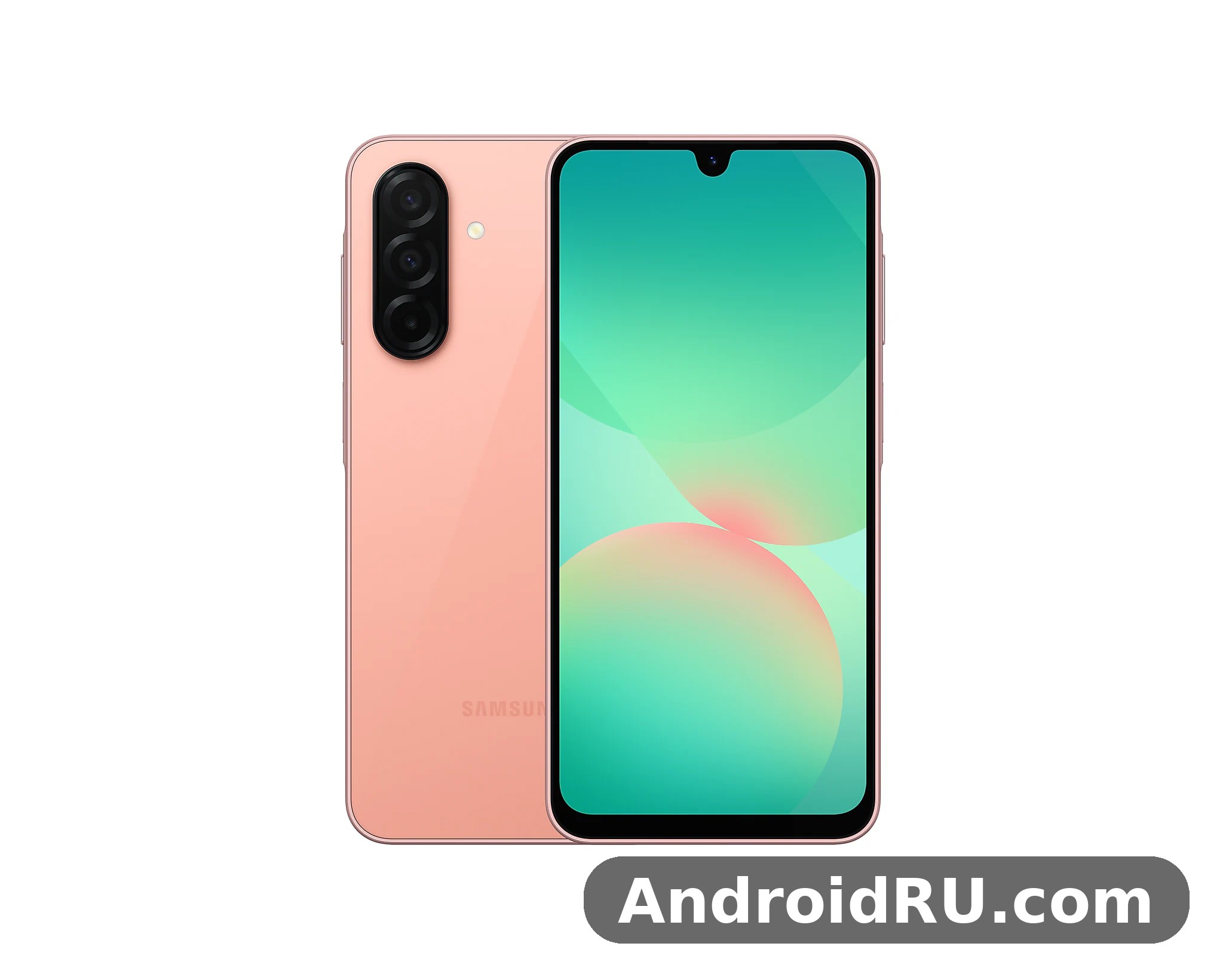
Pick up the A26 5G and the first thing you notice is how solid it feels for a phone at this price. Samsung has kept the clean, flat-sided design language of its recent A-series, with three separate camera lenses sitting directly on the back panel instead of inside a raised camera island. The look is calm and tidy. It will not turn heads, but it will not embarrass you in a meeting either, and after a week I found that I preferred the restraint. The back is glass, the frame is plastic, and the whole thing is put together with tight seams and no creaks when you squeeze the corners. The Galaxy A26 5G headphone jack does not exist on this model, so wired listening needs a USB-C adapter or a USB-C headset. A tempered glass A26 protector is cheap insurance against drops and pocket scratches, and it fits the display without getting in the way of touch input.
The phone measures 164.0 x 77.5 x 7.7 mm and weighs around 200 grams. That is a big phone by any measure, and people with small hands should try it in a shop before committing. In a jeans pocket it is noticeable but manageable, and the flat sides actually help grip. The weight is distributed evenly, so it never feels top-heavy, which matters more than the raw number when you hold a phone one-handed on a bus. A case is still a good idea, because the glass back is smooth and the phone can slide off a tilted table if you are not paying attention. Does Galaxy A26 5G have a microSD card slot? Yes, the hybrid tray accepts cards up to 1TB, though the second SIM slot is shared with the card. The A26 speakers are loud enough for video calls and podcasts, though headphones still win for music and films.
Glass, plastic frame and that IP67 rating
The headline build feature here is the IP67 dust and water resistance, and it deserves more attention than it usually gets in reviews of cheaper phones. IP67 means the phone is protected against dust ingress and can survive immersion in up to a metre of fresh water for up to 30 minutes. In practice, that translates to surviving a drop into a sink, a downpour on the way home, or a dusty building site without a panic attack. Most rivals at this price offer splash resistance at best, or nothing at all, so this is a genuine point of difference and one of the strongest reasons to pick this phone over a similarly priced competitor. The Exynos 1380 processor performance in the Galaxy A26 5G is smooth for daily apps and multitasking, with benchmark scores that sit comfortably in the upper mid-range.
The glass back is Gorilla Glass Victus+, which is a step up from the plain glass or plastic backs common in this class, and it resists scratches from keys and coins far better than I expected. The plastic frame is the one visible cost saving, and honestly it is a sensible one. A metal frame would look nicer in a product photo, but plastic absorbs drops better, keeps the weight down, and never feels cold in winter. After two weeks of use without a case, the frame showed no scuffs and the back had only faint micro-marks visible under a harsh light. The best screen protector for Galaxy A26 5G is a tempered glass one that covers the display fully and still lets touch input feel direct.
IP67 rating explained
IP67 is an international standard with two digits. The 6 means the phone is fully protected against dust, and the 7 means it can survive immersion in fresh water up to a metre deep for up to 30 minutes. In real life, that covers rain, splashes, a drop in a sink, and dusty environments. It does not cover salt water, chlorinated pool water, or high-pressure water such as a shower jet, and Samsung’s warranty does not cover water damage, so the rating is best treated as insurance against accidents rather than an invitation to take the phone swimming. Even so, IP67 is rare at this price, and it is one of the strongest reasons to choose this phone over a rival with no water resistance rating. This A26 review is based on daily use rather than benchmarks alone, so the verdict reflects how the phone behaves over weeks, not minutes.
In-hand feel at around 200 grams
At around 200 grams, the A26 5G sits right at the boundary where a phone starts to feel substantial rather than heavy. During long reading sessions I did notice the weight in my little finger, and I ended up resting the phone on a surface more often than I would with a lighter device. That is the trade-off for a 6.7-inch screen and a 5,000mAh battery. The balance is good enough that the weight fades into the background during normal use, and the flat edges give your fingers something to hold on to. Does Galaxy A26 5G overheat while gaming? In testing it stayed comfortable during normal play, and only long sessions at maximum settings made the frame noticeably warm.
The thickness of 7.7 mm is slim for a phone with a battery this size, and the flat sides make it easier to grip than the curved edges of older designs. The large size is also what makes the screen so good for video, reading, and split-screen multitasking, so the trade-off cuts both ways. If you are coming from a smaller phone, the size is the biggest adjustment, and it is worth holding the phone in a shop before you buy. Choosing between the A26 128GB vs 256GB options comes down to photos and offline video: heavy shooters should take the larger size, while light users can save money and add a microSD card later.
Button placement and fingerprint reader
The power button and volume rocker sit on the right edge, exactly where your thumb falls, and both have a firm, clicky action with no wobble. The fingerprint reader is built into the power button rather than under the screen. Some people will see that as a downgrade, but in daily use I found it faster and more reliable than the optical under-display readers on several more expensive phones. It works with wet fingers more often than not, it unlocks the phone as you pick it up, and it never made me retry three times in a row. Face unlock is also available, though it is the simpler 2D kind and should not be trusted for anything sensitive. The best back cover for Galaxy A26 5G is a slim one with raised edges around the cameras, which protects the lenses without adding much bulk.
The fingerprint reader sits in the power button on the right edge, where your thumb or index finger rests naturally as you pick up the phone. It reads quickly, works from the lock screen without waking the display first, and can be used to authenticate payments and banking apps. You can register several fingers, which is handy if you switch hands or share the phone with a family member. A Galaxy A26 5G water resistance test shows the IP67 rating holding up against rain, splashes and brief immersion in fresh water, though Samsung does not cover water damage under warranty.
Colour options and finish
Samsung sells the A26 5G in a small set of restrained colours, including black, white, mint, and a peach shade that looks better in person than in renders. The finish is matte enough that fingerprints do not show badly, which is a small mercy on a glass back. The mint version is the pick of the range if you want something with a bit of character without going loud. Whichever colour you choose, the camera lenses have matching metal rings that keep the design coherent. The A26 colours are Black, White, Mint and Peach Pink, with the darker shades hiding fingerprints best.
6.7-Inch Super AMOLED Display at 120Hz
The screen is the A26 5G’s best feature, and it is not close. A 6.7-inch Super AMOLED panel with a 120Hz refresh rate and a Full HD+ resolution of 1080 x 2340 is the kind of display that would have been flagship-only a few years ago. Colours are vivid without going over the top, blacks are truly black because AMOLED pixels switch off individually, and text is crisp at every size. Watching video on this screen feels like using a phone a class above, and that is the experience most owners will notice every single day. The Galaxy A26 5G display quality is the first thing most owners notice, with punchy colours, deep blacks and smooth scrolling from the 120Hz refresh rate. A fresh A26 wallpaper is the quickest way to make the home screen feel new, and the bright display makes colourful images look their best.
The 120Hz refresh rate is adaptive, dropping down when nothing is moving to save battery, and it makes scrolling through feeds, web pages, and photo galleries feel fluid in a way that a 60Hz panel simply cannot match. Once you have used 120Hz for a week, going back to a cheaper 60Hz phone feels like wading through mud. Samsung also includes an eye comfort shield that warms the colour temperature in the evening, and it is worth turning on if you read in bed. The A26 display is a 6.7-inch Super AMOLED 120Hz panel, which is generous for video, reading and gaming at this price.
Brightness and outdoor visibility
Outdoor visibility is good rather than great. The panel reaches high brightness in direct sunlight, and I could read maps and messages on a bright afternoon without shading the screen with my hand. It does not match the searing peak brightness of Samsung’s flagship screens, so on the very brightest days, with the sun directly overhead, you will want to bump the brightness up manually. The automatic brightness is quick to respond and rarely leaves the screen too dim or too bright, which is more than I can say for some rivals whose auto-brightness wanders.
Viewing angles are excellent, with almost no colour shift when you tilt the phone, and the screen stays readable from the side when you show a photo to someone sitting next to you. The bezels are slim for this price, with a slightly thicker chin at the bottom that you stop noticing after a day. The selfie camera sits in a small waterdrop notch at the top, which looks a little dated next to punch-hole cameras but is easy to ignore.
120Hz refresh rate in daily use
In practice, the 120Hz mode changes how the phone feels more than any processor upgrade could. Animations are smooth, scrolling is calm, and the whole interface responds as if it is one step ahead of your finger. Samsung lets you choose between adaptive and standard 60Hz modes. Keep it on adaptive. The battery cost of 120Hz is real but small on a phone with a 5,000mAh cell, and the difference in feel is worth a few percent of battery. Games that support high refresh rates benefit too, though the processor sets the ceiling there, as the next section explains.
Resolution and pixel density
The 1080 x 2340 resolution, in a tall 19.5:9 aspect ratio, is the right balance for a phone at this price. A higher resolution would drain the battery faster and cost more, without any visible benefit at this screen size. At around 385 pixels per inch, the display is comfortably above the threshold where text looks crisp, and it matches the pixel density of many phones that cost twice as much. Small text in web pages and documents stays readable, and fine detail in photos is preserved.
Eye comfort shield and colour modes for long sessions
The eye comfort shield warms the colour temperature in the evening and is worth turning on if you read in bed or scroll late at night. Super AMOLED matters because each pixel produces its own light. Black pixels are genuinely off, which gives the screen deep blacks and strong contrast, and colours are vivid without the washed-out look of cheaper LCD panels. The screen supports a wide colour range, so photos and video look rich, and the viewing angles are wide. The display is protected by Corning Gorilla Glass Victus+, which resists scratches from keys and coins in a pocket and adds a real measure of drop protection. An A26 unboxing is a quick job: the phone, a USB-C cable and the paperwork are inside, and you will need your own charger if one is not included in your region.
For a sense of how far Samsung’s affordable screens have come since the early A-series days, the Samsung Galaxy A31 Review: Cameras, Performance and Battery Life is a useful look back: the same Super AMOLED strengths were already there in 2020, but the A26 5G adds the 120Hz refresh rate and a much larger panel on top of them.
Exynos 1380 Performance and Daily Speed
The Exynos 1380 is a 5nm chipset with four performance cores and four efficiency cores, paired with either 6GB or 8GB of RAM. On paper it is a mid-range chip, and in use it behaves exactly like a good mid-range chip: quick at the things most people do all day, and merely adequate at the things most people rarely do. Apps open promptly, the camera launches in about a second, switching between a browser, a messaging app, and maps is instant, and I never once waited on the phone during normal use. The A26 performance is smooth for everyday apps, messaging, browsing and video, with heavier games being the only place it shows its mid-range roots.
Where you feel the limits is in heavy multitasking with large apps, and in demanding games at high settings. Editing a long video, exporting a 4K clip, or playing a graphically intense game at maximum detail will remind you that this is not a flagship chip. For everything else, including social media, streaming, email, navigation, and photography, the phone is fast enough that the processor disappears, which is the best compliment a mid-range chip can earn. For A26 gaming, lighter titles run smoothly, while demanding games need lower graphics settings to hold a steady frame rate.
App loading and multitasking with 6GB and 8GB RAM
With 8GB of RAM, the A26 5G keeps a dozen apps in memory without reloading them, and split-screen multitasking works well on the big display. The 6GB version is fine for lighter users, but if you keep many tabs and apps open, or you plan to keep the phone for five or six years, the 8GB model is worth the extra money. RAM Plus, Samsung’s virtual RAM feature, can borrow storage as extra memory, but it is no substitute for real RAM and I left it at its default setting. The A26 storage starts at 128GB in the base model, and buyers who shoot a lot of video should consider the larger version, though a microSD card can add room later.
Storage is 128GB or 256GB, and there is a microSD card slot, which is becoming rare and deserves praise. A 256GB model with a microSD card gives you room for years of photos, offline maps, and downloaded video without ever thinking about storage. The storage itself is fast enough that installing large apps and loading games never felt slow. If A26 overheating shows up during long gaming sessions, a short break and lower graphics settings bring temperatures back down.
CPU and GPU layout
The four performance cores are Cortex-A78 cores running at up to 2.4GHz, and they handle demanding moments, such as launching the camera, loading a large web page, or starting a game. The four efficiency cores are Cortex-A55 cores running at up to 2.0GHz, and they take care of background tasks and light use, such as checking messages or playing music. This split keeps the phone responsive when you need speed and frugal with battery when you do not. The Mali-G68 MP5 graphics processor handles casual and mid-range gaming well, and it drives the 120Hz display smoothly in the interface and in apps that support high refresh rates. The 5nm manufacturing process keeps power consumption low, which is one reason the phone’s battery life is as good as it is, and the chip supports 5G, Wi-Fi 6, and the camera features described below.
Gaming on the A26 5G
Casual games run beautifully, and popular titles like puzzle games, racing games at medium settings, and battle royale games at balanced settings are all playable. Push the graphics to the highest preset in a demanding game and the frame rate will drop, and the phone will warm up. That is normal for this class. The large screen makes gaming genuinely enjoyable, and the stereo speakers are loud enough for a quick session without headphones, though they distort a little at maximum volume. Does Galaxy A26 5G support eSIM? Yes, in regions where Samsung enables it, so you can add a second line without a physical SIM.
Heat and throttling after long sessions
After 30 minutes of continuous gaming, the back of the phone gets warm around the camera area, and the chip eases off its peak speed to stay cool. Frame rates settle a little lower but stay stable, and the phone never became uncomfortable to hold. This is sensible thermal behaviour, not a flaw. If mobile gaming is your main hobby, a phone with a faster chip would serve you better, but for the occasional evening game, the A26 5G copes well.
One UI 7 on Android 15 and Six Years of Updates
The A26 5G ships with Android 15 and Samsung’s One UI 7, and the software experience is one of the strongest reasons to buy a Samsung in 2026. One UI 7 is clean, consistent, and packed with useful features: a redesigned quick panel, better lock screen customisation, and Samsung’s Galaxy AI tools, including writing assistance, photo editing helpers, and live translation in calls. Some of the AI features need a Samsung account and an internet connection, and the most advanced ones are reserved for higher-end models, but the ones included here work well enough to be genuinely useful rather than a demo. Among the Galaxy A26 5G hidden features and tips worth knowing are the double-press shortcut for the camera, the edge panel and the one-handed mode in Settings.
The interface is fast and stable. I encountered no crashes and no stutter in the interface during testing, and the animations in One UI 7 feel polished. Samsung’s own apps are well designed, and the phone includes the full set: Gallery with object eraser, Notes with handwriting tools, and a file manager that is better than the stock Android one. There is some preinstalled third-party software, and a few apps will send you notifications you do not want, but nearly all of it can be uninstalled or disabled in a few minutes. Each A26 update arrives through Settings, then Software update, and installing it promptly keeps security patches current.
What six years of OS updates actually means
Samsung promises six years of OS updates for the A26 5G, which is remarkable for a phone at this price and changes the maths of buying it. A phone bought in 2025 or 2026 should still be receiving major Android version updates into the early 2030s, and security patches for just as long. That means the phone stays safe to use for banking and work long after most rivals have been abandoned by their makers, and it keeps its resale value better too. It also means the 8GB model is the smart buy, because the software of 2030 will expect more memory than the software of today. The A26 features worth learning first are the fingerprint sensor, the quick settings layout and the camera modes tucked behind the More tab.
This long support window is the single most important fact about the phone for anyone who keeps a handset for four or five years. It turns a budget-conscious purchase into a long-term one, and it is the feature I mention first when friends ask whether the A26 5G is worth buying over a cheaper phone with a shorter support promise. Readers comparing the update promises across Samsung’s range will find the Samsung Galaxy A25 5G Review: Design, Software and Camera Quality a useful next read, because it covers the model just below this one and shows where the longer support window starts to matter.
Samsung apps and bloat: what you can remove
Out of the box, the phone carries Samsung’s own app suite plus a handful of third-party apps and a few games. Most of the third-party apps can be uninstalled from the app drawer with a long press, and Samsung’s own apps can be disabled if you never use them. Budget ten minutes on the first day to clear out what you do not want, turn off the notification permissions for the apps you keep, and the phone feels clean afterwards. The Galaxy Store will occasionally suggest apps, but its notifications can be switched off, and after that it stays quiet.
50MP Camera System: Main, Ultrawide and Macro
The camera setup is a triple array on the back: a 50MP main camera with optical image stabilisation, an 8MP ultrawide, and a 2MP macro camera, plus a 13MP selfie camera on the front. The headline number is the 50MP main sensor, and it is the one that does nearly all the work. In good light it produces photos with plenty of detail, natural colours, and Samsung’s characteristic slightly warm, slightly saturated look that most people find pleasing straight out of the camera. In a straight Galaxy A26 5G camera test against its predecessor, the main sensor holds up well in daylight, with the biggest gains showing in night mode and portrait edge detection. The A26 selfie camera handles video calls and social photos well in good light, with portrait mode adding a soft background blur.
Optical stabilisation on the main camera is a real advantage at this price, and it shows in two places: evening shots, where it lets the camera use a slower shutter speed without blur, and video, where it smooths out the small shakes of walking. The camera app is the familiar Samsung layout, quick to open, with the main modes one swipe away and the extra modes tucked into a More tab. Night mode, portrait mode, and pro mode are all present, and the shutter lag is short enough that you rarely miss a moment. The Galaxy A26 5G night mode camera work is strongest on the main sensor, where multi-frame processing brightens shadows without turning night scenes into daylight. The A26 portrait mode works best with a clear subject and some distance behind them, which keeps edge detection clean.
Daylight photos from the 50MP main camera with OIS
In daylight, the main camera is genuinely good. Landscapes come out sharp across the frame, with good dynamic range that keeps both bright skies and shadowed foregrounds readable. Colours are punchy but not cartoonish, and skin tones look natural in portraits. The camera bins the 50MP sensor down to 12MP by default, which is the right choice, because the binned shots are cleaner and smaller. You can switch to full 50MP for a detailed landscape you plan to crop, but the difference is modest and the files are much larger. The Galaxy A26 5G selfie camera quality is solid in good light, with the 13MP front sensor capturing natural skin tones and enough detail for social photos and video calls.
Portrait mode does a solid job of separating a person from the background, with only occasional soft edges around hair. Food photos look appetising, which sounds like a small thing until you realise how many phone photos are of food. The camera is at its best in the kind of light most people actually take photos in: outdoors on a normal day, indoors near a window, or in a well-lit room. The best camera settings for Galaxy A26 5G start with the main lens at full resolution for landscapes, night mode after dark, and the grid switched on for straighter horizons.
50MP main camera with OIS: aperture and pixel binning
The 50MP main camera with OIS uses pixel binning by default, combining four pixels into one to produce a cleaner 12MP photo with less noise and better dynamic range. The f/1.8 aperture is wide for this price class, and together with OIS it gives the camera a real advantage in low light compared with rivals that rely on digital stabilisation alone. Autofocus is fast and reliable in good light, and the shutter lag is short. The camera supports night mode, which takes several exposures and merges them for a brighter, cleaner result, and portrait mode, which blurs the background behind a person. Video from the main camera records at up to 4K at 30 frames per second, or 1080p at 30 or 60 frames per second, with electronic stabilisation helping to smooth out walking footage. Does the Galaxy A26 5G record 4K video? Yes, the main camera records 4K video, with stabilisation keeping handheld clips steady.
8MP ultrawide and 2MP macro: honest limits
The 8MP ultrawide is useful for fitting a whole building, a group of friends, or a landscape into the frame, but it is a clear step down from the main camera. Detail is softer, especially at the edges, and colours are a touch flatter. In bright light it is perfectly usable for social media, and I used it often for architecture and group shots. In dim light it struggles, and the results get noisy quickly. That is normal for an 8MP ultrawide in this class, and it is worth knowing before you buy.
The 2MP macro camera is the weak link in the setup. It takes close-up photos of flowers and small objects, but the resolution is low and the focus is fixed, so results are hit and miss. Most people will use it a few times out of curiosity and then forget it exists. The main camera can focus fairly close on its own, and for most close-up shots you will get a better result by stepping back and cropping the 50MP image. The ultrawide camera has a 120-degree field of view and an f/2.2 aperture, while the macro camera has an f/2.4 aperture and a fixed focus distance.
13MP selfie camera and video
The 13MP front camera takes good selfies in decent light, with natural skin tones and enough detail for video calls and social media. Beauty mode is on by default at a low level and can be turned off entirely, which I recommend if you want photos that look like you. Video from the front camera tops out at 1080p at 30 frames per second, which is fine for calls and short clips. The rear camera records 4K video at 30 frames per second, and the stabilisation keeps walking footage watchable, though fast pans will show some judder. The A26 camera is built around its 50MP main sensor with optical image stabilisation, which does most of the heavy lifting in everyday photos.
5,000mAh Battery and 25W Charging
The 5,000mAh battery is the quiet workhorse of the A26 5G. In my testing, with a day of messaging, browsing, maps, an hour of video, and some photography, the phone regularly ended the day with 30 to 40 percent remaining. Heavy users who stream video for hours and play games will still get through a full day, and light users will comfortably reach a second day. That kind of endurance removes the low-battery anxiety that ruins cheaper phones, and it is one of the things you appreciate most after a week of use. The Galaxy A26 5G battery life stretches to a full day for most people, with the 5000mAh cell and the efficient display doing most of the work. Some A26 heating during charging is normal, especially with fast charging, and the phone cools down once the battery passes 80 percent.
Standby drain is low, which matters more than people think. Leave the phone untouched overnight and it loses only a few percent, so it is still usable the next morning even if you forgot to charge it. The adaptive battery features learn which apps you use and limit the ones you do not, and after the first few days the phone settles into a pattern that suits your routine. The Galaxy A26 5G charging time depends on the charger you use: with a 25W charger it tops up far faster than with an old 5W brick, and a full charge takes around an hour or more.
Real battery life across a working day
On a typical working day, starting at 7 in the morning with a full charge, the phone handled email, calls, messaging, an hour of navigation, and an evening of video, and still had charge left at midnight. A day of heavy camera use on a trip, with the screen at high brightness and 5G active, got me to the evening with around 15 percent left, which is respectable. The screen is the biggest drain, so keeping brightness on automatic and the refresh rate on adaptive is the easiest way to stretch the battery further. Does Galaxy A26 5G support wireless charging? No, this model has no wireless charging coil, so charging pads will not work with it and the USB-C cable remains the only way to charge.
The 5,000mAh capacity, combined with the efficient 5nm chipset and the adaptive 120Hz display, is what produces the strong battery life. The display is the biggest consumer of power, so the adaptive refresh rate, which drops to lower rates when nothing is moving on screen, makes a real difference. Heavy camera use, long navigation sessions, and 5G in weak signal areas will drain the battery faster, as they do on every phone. For an A26 battery drain overnight fix, check battery usage in Settings, turn off always-on display, and restrict background activity for apps that drain power while idle.
Charging speed and what is in the box
Charging is 25W wired, and there is no charger in the box, which is now standard for Samsung. A full charge from empty takes around an hour and twenty minutes with a suitable 25W adapter, and a 30-minute top-up gives you roughly half a battery. That is slower than some rivals that offer 65W or faster charging, and it is the phone’s most obvious weakness on paper. In practice, charging overnight makes the speed irrelevant for most people, but if you often need a quick top-up before heading out, you will notice the difference. There is no wireless charging, which is expected at this price. The A26 battery is a 5000mAh cell, and with the efficient display it comfortably covers a full day for most owners.
The phone supports USB Power Delivery, so a good quality USB-C PD charger will work, and the charging port is USB-C 2.0. If you regularly need a near-full charge in 20 minutes before leaving the house, a rival with faster charging would fit your routine better, and the comparison in the Samsung Galaxy A24 Review: Daily Performance and Key Features shows how Samsung’s cheaper models handle the same charging question with even more modest speeds.
Full Specifications of the Galaxy A26 5G
The table below gathers every key specification in one place, so you can check a number quickly or compare it with another phone side by side. Where a specification varies by model or market, the table shows the range. The Galaxy A26 5G launched in 2025 as part of Samsung’s A-series, sitting below the A36 and A56. It is a 5G phone with a large AMOLED screen, a 50MP camera with optical stabilisation, IP67 water and dust resistance, and a six-year software update promise. Those four facts define the phone, and the rest of this article fills in everything around them. The Galaxy A26 5G full specifications are listed in the specs section below, covering display, processor, cameras, battery and connectivity in one place. The A26 specs are summarised in the specifications section below, with the display, chipset, cameras and battery listed together.
| Specification | Galaxy A26 5G |
|---|---|
| Display | 6.7-inch Super AMOLED, 120Hz, 1080 x 2340 (FHD+), ~385 ppi, Gorilla Glass Victus+ |
| Processor | Exynos 1380, 5nm, octa-core (4x Cortex-A78 up to 2.4GHz + 4x Cortex-A55 up to 2.0GHz) |
| Graphics | Mali-G68 MP5 |
| RAM | 6GB or 8GB |
| Storage | 128GB or 256GB, expandable with microSD card |
| Rear cameras | 50MP main (f/1.8, OIS) + 8MP ultrawide (f/2.2, 120-degree) + 2MP macro (f/2.4) |
| Front camera | 13MP (f/2.0), 1080p video at 30fps |
| Video recording | Rear up to 4K at 30fps, 1080p at 30/60fps |
| Battery | 5,000mAh, non-removable |
| Charging | 25W wired, USB-C, no charger in the box, no wireless charging |
| Dimensions | 164.0 x 77.5 x 7.7 mm |
| Weight | Around 200 grams |
| Build and protection | Glass back, plastic frame, IP67 dust and water resistance |
| Operating system | Android 15 with One UI 7, six years of OS updates promised |
| Connectivity | 5G (sub-6GHz), 4G LTE, Wi-Fi 6, Bluetooth 5.3, NFC, GPS, USB-C 2.0, OTG |
| Sensors | Side fingerprint reader, accelerometer, gyroscope, compass, proximity, ambient light |
| SIM | Nano-SIM, dual SIM or SIM plus microSD depending on variant |
| Audio | Stereo speakers, no 3.5mm headphone jack, no FM radio |
Read the table with the phone’s price in mind. The display, the IP67 rating, and the six-year update promise are the numbers that stand out, and they are the ones that separate this phone from most rivals. The numbers that lag behind are the 25W charging speed and the 2MP macro camera, and both are honest trade-offs for the price rather than hidden surprises. Does Galaxy A26 5G support dual SIM? Yes, through its hybrid tray, and eSIM adds another option in supported regions.
Connectivity, network bands and sensors
Connectivity is comprehensive for a mid-range phone. The A26 5G supports 5G on sub-6GHz bands, 4G LTE, Wi-Fi 6, Bluetooth 5.3, NFC for contactless payments, and GPS with support for multiple satellite systems. There is a USB-C port for charging and data, and the phone supports OTG for connecting accessories such as flash drives. There is no 3.5mm headphone jack, so wired headphones need a USB-C adapter or a USB-C headset, and most owners will use Bluetooth earbuds. Does Galaxy A26 5G support call recording? It depends on your region and One UI version, because Samsung enables it only where local rules allow it, so check the Phone app settings before relying on it.
The 5G support covers sub-6GHz bands, which are the bands most carriers use for wide coverage, and the phone will fall back to 4G LTE where 5G is not available. Exact band support varies by market and model variant, so if you buy an imported model, check that it supports the bands your carrier uses before you commit. Wi-Fi 6 gives fast wireless speeds on a compatible router, Bluetooth 5.3 connects reliably to earbuds, watches, and car systems, and NFC enables contactless payment with Samsung Wallet or Google Wallet, plus quick pairing with compatible accessories. The A26 eSIM support lets you add a second line without a physical SIM, where Samsung enables it in your region.
6GB vs 8GB RAM and 128GB vs 256GB storage
Samsung sells the A26 5G with 6GB or 8GB of RAM, and with 128GB or 256GB of internal storage, depending on the market and the retailer. The 8GB model keeps more apps in memory at once, which means less reloading when you switch between apps, and it is the better choice if you plan to keep the phone for several years, since future software versions will expect more memory. The 6GB model is fine for lighter use, with fewer apps open at once. The A26 RAM is 6GB in the base model, which is enough for everyday multitasking without constant app reloads.
The 128GB model is enough if you stream most of your music and video and back up photos to the cloud. The 256GB model is the safer pick if you download films for travel, keep large games installed, or shoot a lot of video. Both models can be expanded with a microSD card, so storage is rarely a hard limit on this phone. If the price gap is small, take the 256GB version and stop thinking about storage for the life of the phone. The microSD card slot accepts cards for extra storage, and it shares the SIM tray, so you can use either two SIM cards or one SIM card plus a microSD card, depending on the model variant. The A26 processor is the Exynos 1380, an octa-core chip that handles daily apps and multitasking without fuss.
Galaxy A26 5G Versus Rivals in Its Price Range
No phone exists in a vacuum, and the A26 5G’s closest rivals each make a different bet. Some offer faster charging, some offer a stronger chip, and some offer a better ultrawide camera. What none of them offer is the same combination of a great AMOLED screen, IP67 protection, and six years of updates, which is why the comparison below is worth reading carefully before you decide. The Galaxy A26 5G price in India varies by storage and by seller, so check a few large retailers before buying rather than trusting the first listing you see.
| Feature | Galaxy A26 5G | Typical rival at this price |
|---|---|---|
| Display | 6.7-inch Super AMOLED, 120Hz, FHD+ | Often LCD or 90Hz AMOLED |
| Water resistance | IP67 rated | Usually splash resistant only, or none |
| Software support | 6 years of OS updates | Typically 2 to 3 years |
| Main camera | 50MP with OIS | 50MP, often without OIS |
| Charging | 25W wired | Often 33W to 67W |
| Storage expansion | microSD slot included | Often no microSD slot |
| Battery | 5,000mAh | Usually 5,000mAh |
If your priority is a phone that will still be getting updates in five years and will survive a rainy day, the A26 5G wins this comparison clearly. If your priority is the fastest possible charging or the best gaming performance per pound, a rival with a faster chip or 65W charging might suit you better. Readers comparing Samsung’s own range will find the Samsung Galaxy A32 5G Review: Display, Audio and Overall Experience a useful older reference point, because it shows what the A-series offered before 120Hz screens and six-year update promises became standard in this price class.
Pros and cons of the Galaxy A26 5G
Every phone is a set of trade-offs, and the A26 5G is no exception. The list below pulls together the strengths and weaknesses that mattered most during daily use, so you can weigh them against your own priorities rather than a spec sheet. Is Galaxy A26 5G worth buying? For buyers who want a reliable Samsung phone with a good screen and long software support, the answer is yes at current street prices, though heavy gamers should weigh it against rivals with faster chips.
Pros: excellent 6.7-inch 120Hz Super AMOLED display; IP67 water and dust resistance at this price; six years of OS updates and security patches; 50MP main camera with OIS takes strong daylight photos; two-day battery life for light users, full day for heavy users; microSD card slot and solid build quality. A direct Galaxy A26 5G vs Galaxy A25 5G comparison shows the newer phone’s faster chip and brighter display, while the older model remains good value at discounted prices.
Cons: 25W charging is slow next to rivals; ultrawide and macro cameras are average; no charger in the box, no wireless charging; Exynos 1380 struggles with heavy gaming at max settings; large and heavy at around 200 grams; waterdrop notch looks dated next to punch-hole cameras. The Galaxy A26 5G pros and cons come down to this: a good screen, dependable cameras and long software support on the plus side, against no wireless charging and performance that stays mid-range rather than flagship.
The pros list is longer than the cons list, and that matches the experience of using the phone. The strengths are the things you touch every day: the screen, the battery, the durability, and the software support. The weaknesses are the things you notice occasionally: charging speed, the secondary cameras, and the weight. For most buyers, that is the right balance. The A26 price varies by retailer and storage, so compare a few listings before you buy.
Reading the spec sheet like a buyer
A specification sheet is only useful if you know which numbers matter to you. For the Galaxy A26 5G, the numbers that should drive your decision are the 6.7-inch 120Hz AMOLED display, the IP67 rating, the 5,000mAh battery, and the six-year update promise. Those four specifications describe a phone that is pleasant to use every day, durable enough to survive accidents, and supported long enough to be a sensible long-term purchase. The numbers to weigh against them are the 25W charging speed, the absence of a telephoto lens, and the mid-range Exynos 1380. None of them is a deal-breaker for most buyers, but all of them are real, and they are the places where a rival or a more expensive Samsung might fit you better. Check the dimensions in your hand if you can, confirm the 5G bands for your carrier, and choose the 8GB model with 256GB of storage if your budget allows.
Frequently Asked Questions About the Galaxy A26 5G
Is the Galaxy A26 5G good for everyday use?
Yes. For messaging, browsing, streaming, navigation, photography, and calls, it is fast, reliable, and comfortable. The screen and battery are the parts you will notice most, and both are strong. Only demanding mobile gamers and people who edit 4K video on their phone should look at a faster chip. The A26 NFC chip covers contactless payments and tap-to-pair accessories, though availability can vary by region.
Does the Galaxy A26 5G support microSD cards?
Yes, it has a microSD card slot, so you can expand the 128GB or 256GB of built-in storage with a memory card. That is increasingly rare in 2026, and it is a practical advantage if you keep a lot of photos, music, or offline video on your phone. The A26 microSD slot accepts cards up to 1TB, which is the cheapest way to add room for photos and offline video.
How long will the Galaxy A26 5G get updates?
Samsung promises six years of OS updates and security patches. A phone bought in 2026 should keep receiving major Android updates and security fixes well into the next decade, which makes it a sensible long-term purchase and keeps it safe for banking and work apps for years. The A26 signal holds up well on calls and mobile data, though thick walls and crowded places can still weaken reception on any phone.
Is 25W charging fast enough in 2026?
For most people, yes, because the phone is usually charged overnight and the battery lasts a full day. A 30-minute charge gives roughly half a battery. If you regularly need a near-full charge in 20 minutes before leaving the house, a rival with faster charging would fit your routine better. The A26 charging tops out at 25W wired, and there is no wireless charging on this model.
Final verdict on the Galaxy A26 5G
The Galaxy A26 5G is the rare mid-range phone that gets the long-term questions right. The screen is excellent, the battery lasts, the build survives real life thanks to IP67 protection, and the software will be supported for six years. The camera takes strong photos in the light most people shoot in, and the microSD slot means storage is never a worry. The compromises are honest ones: slower charging, average secondary cameras, and a chip that is quick for daily tasks rather than a gaming powerhouse.
If you want a dependable phone that will still feel current and stay secure several years from now, without paying flagship money, this is one of the easiest recommendations in Samsung’s range. Buy the 8GB model with 256GB of storage if you can, spend ten minutes clearing out the preinstalled apps on day one, and put the money you saved toward a decent case and a 25W charger. Do that, and the A26 5G will quietly do its job, day after day, for years. For a look at Samsung’s more affordable photo-focused option in the same family, the Samsung Galaxy A23 5G Review: Photo Quality, Video and Performance is worth reading next.

