

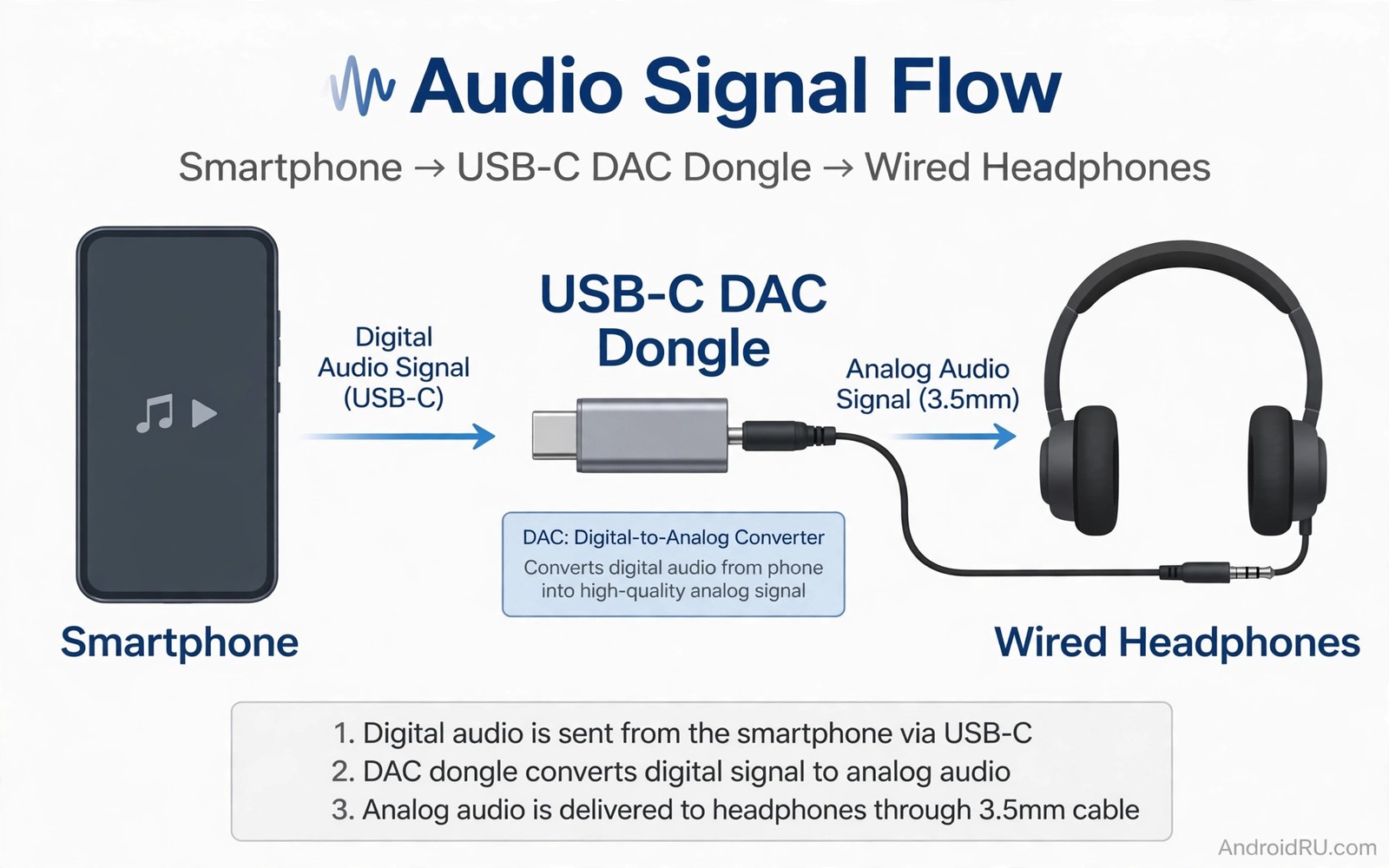
A cheap DAC dongle can make wired headphones sound thin and quiet even when the headphones are good. The problem is not the cable or the phone alone. It is the tiny chip inside the dongle that converts digital audio and drives the headphone speakers. A weak chip lacks power and adds noise that hides detail in music. A better amp chip delivers cleaner power and lets the headphones play as designed. Understanding that chip difference saves money on repeat dongle purchases.
A DAC turns digital files into an analogue signal that headphones can play. An amplifier then boosts that signal to a level that moves the headphone drivers. Cheap dongles often combine both jobs in a minimal chip with low power output. That design works for easy earbuds but struggles with larger headphones that need more current. The result is low volume and weak bass and a flat soundstage that feels closed in.
A quality dongle uses a stronger amp stage and better power filtering. It can drive harder headphones without distortion at normal listening levels. It also keeps background hiss low during quiet passages. Those gains are audible in everyday listening and not only in lab tests. A good dongle is an investment in every wired headphone you own. For a related audio upgrade path see external USB DACs that upgrade Android sound for more detail on hiss and clarity.
How to read a dongle specification honestly
Output power is the first number to check and it is often given in milliwatts at a certain impedance. A higher power figure at the same impedance usually means better drive for demanding headphones. Compare numbers at the same impedance because a figure at a low impedance does not tell you about a high impedance headphone. A dongle that claims high power without an impedance figure is hiding the context. Ask for both numbers before you trust a claim.
Signal to noise ratio tells you how much clean signal sits above background hiss. A higher ratio usually means quieter backgrounds during soft music. Total harmonic distortion tells you how much the chip changes the original signal. A lower distortion figure usually means a cleaner sound at higher volumes. These numbers do not guarantee good sound alone but they help you spot a weak chip quickly. A dongle with poor numbers in all three areas is unlikely to sound good.
Chip identity matters because some chips are known for stable Android support and low power draw. Other chips may work but need more phone battery or show compatibility quirks. Look for reviews that name the chip and test it with several headphones. A review that only praises a dongle without naming the chip or testing power is weak evidence. Real tests with real headphones give a clearer picture than a spec sheet alone.
Power and impedance in plain language
Impedance is resistance to the audio signal and different headphones present different loads. Low impedance earbuds are easy to drive and need little power. High impedance headphones need more voltage to reach the same volume. A weak dongle may play a high impedance headphone but it will sound quiet and thin. A stronger amp provides the voltage and current needed for full bass and dynamics. That is why the same dongle can sound fine on one pair and poor on another.
Sensitivity also matters because it describes how loud a headphone gets from a given power level. A sensitive headphone needs less power to sound loud. A less sensitive headphone needs more power for the same volume. Check both impedance and sensitivity for your headphones before choosing a dongle. A dongle that matches your headphone load will sound better than a random premium dongle that does not. Matching matters more than price alone.
Battery drain is a practical trade because a stronger amp can use more phone power. A good design balances power with efficiency so the phone lasts through a listening session. Test battery use during a normal day and not only during a short demo. A dongle that drains the phone fast may be a poor daily choice even if it sounds great. Daily usability and sound quality must both pass for a dongle to earn a permanent place in your pocket. For cable factors that also affect sound see cheap versus expensive USB-C cables because a poor cable can waste a good dongle.
Test a dongle before you keep it
Use the same headphones and the same tracks for every dongle test. Choose a track with deep bass and a track with quiet vocals and a track with wide instruments. Listen at a normal volume and note bass control and vocal clarity and background hiss. A good dongle keeps bass tight and vocals clear without harsh treble. A weak dongle may sound loud enough yet lose bass control on complex passages. Write short notes after each test so memory does not blur the comparison.
Test at a low volume too because hiss shows up best in quiet passages. Pause the music and listen for a faint hiss from the headphones. A clean dongle should sound silent during a pause. Test with the phone charging as well because some dongles pick up noise from a charger. A dongle that stays clean in both tests is a strong daily choice. Return a dongle that hisses loudly or distorts at normal volume even if the price was low.
dac_test_notes.txt
Headphones: 32 ohm wired
Track A: bass control good
Track B: vocal clarity good
Pause hiss: silent
Battery after one hour: minus 4 percent
The notes above are an original example written for this guide. They show a simple format for comparing dongles without special measurement tools. Use the same format for each dongle you test. Consistent notes make the better dongle obvious after two or three tests.
Keep the winning dongle in a small case to protect the connector from pocket strain. A bent connector is a common cause of intermittent sound and it is often blamed on the chip. Treat the dongle as a small audio component and not as a disposable cable. Good care extends its life and keeps the sound stable. A protected dongle also avoids the repeat purchase cycle that cheap dongles create.
Match the dongle to your daily headphones
Think about where you listen most before you choose a dongle. A commuter who uses easy earbuds needs only a light dongle with clean output. A home listener with large headphones needs a stronger amp stage for full dynamics. A traveller who switches between both needs a dongle that handles both loads without hiss. Your listening pattern should decide the power level you buy.
Test a shortlist with the same playlist and the same volume setting. Note which dongle keeps bass tight on a busy track and which dongle keeps vocals clear on a quiet track. A dongle that wins on both tests is the right match for daily use. Keep the winner and return the rest rather than collecting dongles that sit unused in a drawer.
Common mistakes
The most common mistake is buying the cheapest dongle and expecting premium sound. A minimal chip cannot drive demanding headphones well no matter how good the headphones are. Another mistake is judging a dongle only by maximum volume because loudness can hide distortion and weak bass. A clean dongle at a moderate volume sounds better than a distorted dongle at a high volume. Judge by clarity and control and not by loudness alone.
People also blame headphones for a dongle problem and buy new headphones instead. Test the headphones on a known good source before replacing them. A simple swap test can save a large purchase. If the headphones sound good on another source then the dongle is the weak link. Fix the weak link first and keep headphones that already perform well.
A third mistake is ignoring the phone connection and cable quality. A loose USB-C connector can cause dropouts that look like a chip fault. Clean the phone port gently and test with a different cable if the dongle allows it. A stable connection is the foundation for any audio test. For port care that protects every dongle see clean dirty USB-C ports without damage before you test a new dongle.
FAQ
Do I need a DAC dongle if my phone has a headphone jack?
A phone with a headphone jack already has an internal DAC and amp. A dongle may still help if the internal audio is noisy or weak. Test the internal jack first with your headphones and a quiet track. If the sound is clean and loud enough then a dongle adds little value. Buy a dongle only when the internal audio shows a clear weakness.
Some phones without a jack need a dongle for any wired listening. In that case the dongle choice matters more because it becomes the main audio path. Choose a dongle that matches your headphone impedance. A good match gives clean sound for every wired session.
Will a better DAC dongle fix quiet headphones?
A stronger amp can fix quiet sound when the cause is low power output. It cannot fix a damaged headphone driver or a poor ear tip seal. Test the headphones on another source to isolate the cause. If they sound loud elsewhere then a stronger dongle should help. If they sound quiet everywhere then the headphones may need service or replacement.
Check volume limits and audio settings on the phone as well. Some phones limit volume for hearing safety and that limit can mimic a weak dongle. Turn off any volume limiter for the test and compare again. A settings check is free and it prevents an unnecessary purchase.
How much should I spend on a DAC dongle?
A solid dongle for easy earbuds often costs little more than a cheap dongle. A dongle for demanding headphones costs more because the amp stage is stronger. Spend based on your headphone load and not on a generic premium claim. A mid range dongle with a named chip and good power figures is often the best value. Avoid the cheapest dongle if you own headphones that need real power.
Set a budget after you check your headphone impedance and sensitivity. That data guides the power you need. A dongle that meets that power need is enough. Extra spending beyond that need buys features you may not hear in daily listening.
Conclusion
Amp chips change audio because they decide how much clean power reaches your headphones. Cheap dongles save money on the chip and the sound shows it on demanding headphones. A better dongle delivers tighter bass and quieter backgrounds and a wider soundstage. Reading power and noise figures and testing with your own headphones turns a confusing purchase into a clear choice.
Your concrete next step is to check your headphone impedance and sensitivity tonight. Compare those numbers with the power figure of your current dongle at the same impedance. If the dongle falls short then test one mid range dongle with a stronger amp stage this week. Keep the dongle only if bass control and quiet passages clearly improve at normal volume.

