

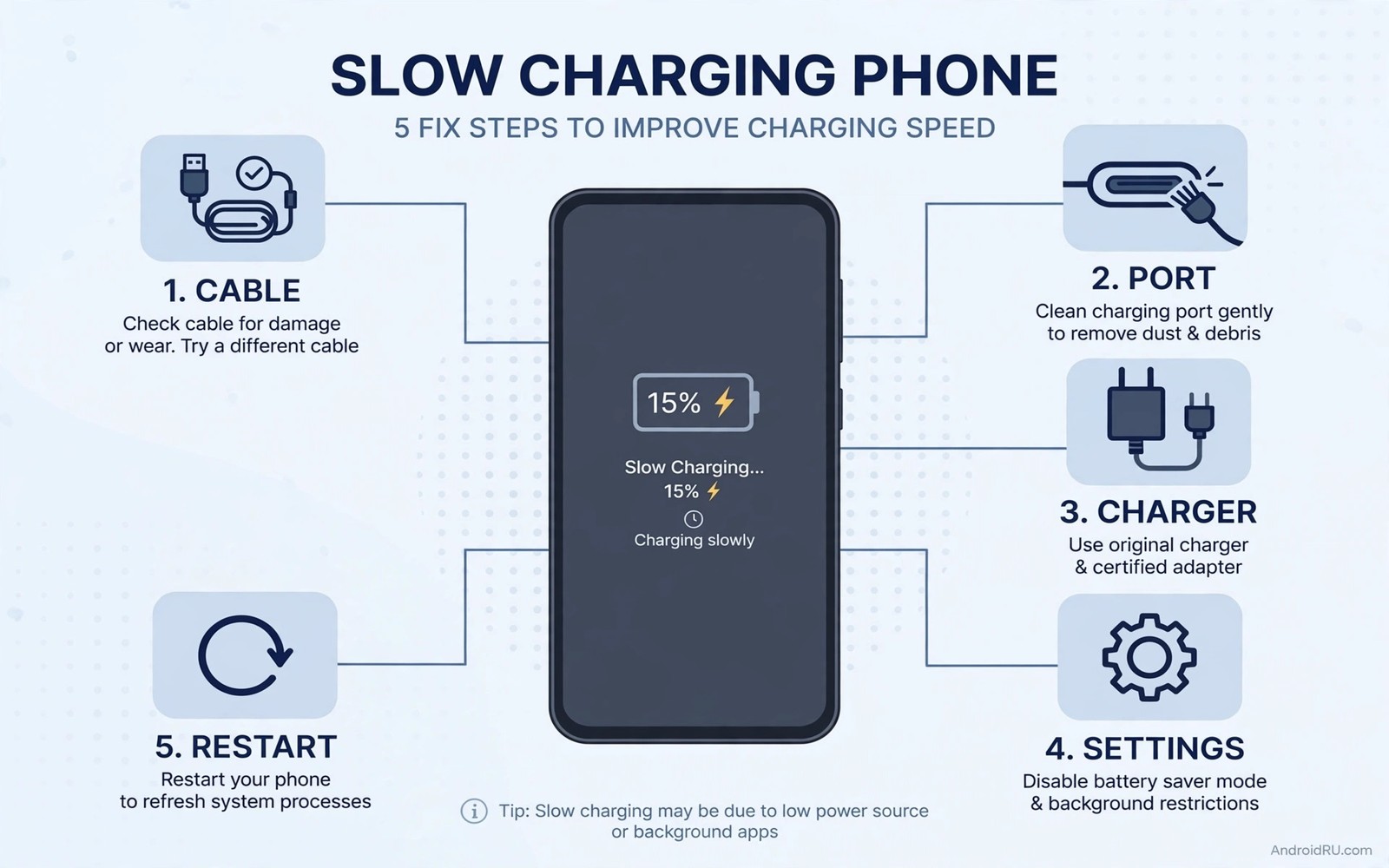
Slow charging frustrates everyone. You plug in at 20 percent. An hour later you have 35 percent. You need to leave soon. The phone is not ready. Slow charging has many causes. Some are trivial. Some are serious. Most are fixable in minutes. A bad cable is the top cause. A dirty port is second. A weak charger is third. Software limits are fourth. Heat is fifth. This guide walks through five quick fixes in order. Start at fix one. Test after each fix. Stop when charging returns to normal. That order saves time. It also prevents buying a new charger you do not need.
Fix one: try a different cable
Cables fail silently. Internal wires break from bending. Connectors loosen from use. A damaged cable still passes some current. It passes far less than rated. The phone charges slowly. It may also charge intermittently. Swap the cable first. Use a known good cable from another device. Use a short quality cable for the test. Short cables have less resistance. They deliver power more reliably. Note charge speed with the new cable. If speed returns to normal then the old cable was the problem. Discard it. Do not keep a damaged cable as a spare. It will waste your time again. It may also damage the port through poor contact. A cable is cheap. Time is not.
Check cable type as well. A data cable and a charge cable may look identical. Some cheap cables use thin wires. Thin wires cannot carry fast charging current. They limit power automatically. The phone negotiates lower power to stay safe. That negotiation looks like slow charging. It is actually protection. Use a cable rated for your phone charging speed. Check the packaging or maker specs. A cable rated for 60 watts handles most Android fast charging. A cable rated for 10 watts does not. Match cable to charger. Mismatched pairs bottleneck at the weakest link. The weakest link is often the cable. Replace it and the bottleneck disappears.
Fix two: clean the charging port gently
Lint builds up in charging ports. Pocket lint packs tightly over months. It prevents full plug insertion. Partial insertion causes poor contact. Poor contact limits current. It also causes intermittent charging. The phone may show charging then not charging repeatedly. Clean the port carefully. Power off the phone first. Use a wooden toothpick or a plastic pick. Do not use metal tools. Metal can short contacts. It can also scratch them. Gently scrape lint from the port bottom. Work in bright light. You will be surprised how much lint comes out. A phone that barely charged may charge normally after cleaning. That fix takes two minutes. It costs nothing.
Check the port after cleaning. The plug should insert fully with a firm click. It should not wobble. Wobble signals port damage or a worn plug. Try a different cable after cleaning. If wobble persists with multiple cables then the port may need repair. Do not force a plug into a damaged port. Forcing worsens damage. A repair shop can replace a port for a moderate cost. That repair restores fast charging fully. It also prevents future intermittent issues. Clean ports regularly. Check every few months if you carry the phone in a pocket. Pocket users accumulate lint fastest. A quick check prevents slow charging surprises.
Fix three: use the right charger and outlet
Charger wattage matters. A 5 watt charger charges slowly by design. It may take four hours for a full charge. A phone that supports 25 watt charging needs a 25 watt charger for speed. Check your charger rating. It is printed in small text on the unit. Compare it with phone specs. If the charger is far below phone capability then slow charging is expected. Replace it with a suitable quality charger. Do not buy the cheapest high wattage unit. Buy a certified unit from a reputable maker. Quality matters for safety and stability. A good 25 watt charger beats a bad 65 watt charger in real speed. Stable power charges faster than unstable power that throttles.
Outlet and power source matter too. A computer USB port delivers low power. It may deliver only 5 watts. Charging from a laptop is slow by design. Use a wall outlet for fast charging. A car charger varies widely. Cheap car chargers deliver low power. Quality car chargers deliver full phone speed. Test wall charging first to isolate the problem. If wall charging is fast then the source was the bottleneck. If wall charging is also slow then the problem lies elsewhere. Power strips with many devices can also limit power in rare cases. Try a direct wall outlet for the test. Direct testing removes variables. It gives a clear answer.
Fix four: check software limits and heat
Software may limit charging deliberately. Battery saver modes can slow charging to reduce heat. Adaptive charging can slow the final stretch to protect the cell. Those limits are intentional. They feel like slow charging. They are actually protection. Check if battery saver is on during charging. Turn it off for a test if you need speed. Check adaptive charging settings. Adaptive charging holds at 80 percent overnight. It finishes before your alarm. That pattern looks slow in the morning. It is designed that way. Disable it temporarily if you need a fast full charge before an early departure. Re-enable it for normal nights. Understanding the limit prevents unnecessary hardware replacement.
Heat also limits charging speed. A hot phone charges slowly by design. The system reduces current to control temperature. Gaming while charging creates heat. Sunlight while charging creates heat. A thick case traps heat. Remove the case if the phone feels warm. Move to a cooler spot. Stop heavy use during charging. Let the phone cool for ten minutes. Charging speed should recover as temperature falls. That recovery proves heat was the limiter. If speed stays slow after cooling then another cause remains. Heat limits are safety features. They protect the battery. Do not bypass them with unofficial tools. Work with them by cooling the phone.
Background apps can also slow apparent charging. A phone downloading updates while charging gains charge slowly. Net gain equals charge input minus usage output. Heavy usage during charging cancels much of the input. Close heavy apps during a fast charge session. Turn on airplane mode for a true speed test. Airplane mode cuts radio use sharply. It also cuts background sync. Charging in airplane mode shows maximum possible speed. Compare that speed with normal speed. A large gap means background use was masking charging. A small gap means charging itself is slow. That test separates usage from hardware.
Fix five: restart and check for updates
A restart fixes stuck charging negotiation. The phone and charger negotiate power levels through software. A bug can leave negotiation at a low level. The phone charges slowly until negotiation resets. Restart the phone with the charger unplugged. Plug in after restart. That fresh negotiation often restores full speed. It takes two minutes. It solves a surprising number of slow charging reports. Do this after any system update. Updates can leave charging drivers in a odd state. A restart aligns them. It is the simplest software fix. Try it before buying new gear.
Check for system updates as well. Updates often fix charging bugs. They improve power negotiation. They improve thermal management. Install a pending update then restart. Test charging again. If a specific app causes slow charging through heavy background use then update that app too. An app with a sync bug can drain faster than charging adds power. That net loss looks like slow charging. It is actually drain. Battery Usage will show that app at the top. Restrict or update it. That fix restores net charging speed. You can learn more about drain versus charging in overnight drain from system services and in apps worth deleting to save battery. Drain control and charging speed are linked.
When slow charging signals a bigger problem
Slow charging that survives all five fixes needs deeper diagnosis. A failing battery charges slowly due to high resistance. The charging circuit limits current to protect it. A damaged port charges slowly due to poor contact. A failing charger charges slowly due to unstable output. Test with a known good charger and cable at a wall outlet. If speed remains slow then the phone is suspect. Check battery health if your phone reports it. Low capacity plus slow charging points at battery wear. Check port wobble with multiple cables. Persistent wobble points at port damage. Both need professional repair. Do not keep using a phone with a damaged port. It can worsen and risk safety.
Swelling is a stop signal during slow charging diagnosis. A swollen battery may charge slowly and heat up. Stop using it. Seek repair at once. Do not attempt to fix swelling with software. Swelling is hardware failure. It needs physical replacement. Heat during slow charging also deserves attention. A phone that gets hot while charging slowly has a problem. Normal slow charging should stay cool. Hot slow charging suggests resistance or a short. Stop and seek diagnosis. Safety outweighs convenience. A repair shop can test the battery and port directly. That test gives a definitive answer. It also prevents further damage.
Slow charging diagnosis log
Cable test: new cable, speed normal, old cable faulty
Port test: lint removed, plug now clicks firmly
Charger test: wall 25W, full speed restored
Software test: restart done, adaptive charging understood
Result: cable was the cause, no repair needed
The log above follows a simple fix tracking pattern used by many Android power users to solve slow charging without buying unnecessary gear. It records each fix and its result. It stops at the fix that worked. It prevents repeating failed fixes. It also documents the cause for future reference. If slow charging returns then check the log first. The same cause often recurs. A cable that failed once may fail again if bending habits continue. A port that filled with lint will fill again. Logs turn one fix into a lasting lesson.
Common mistakes
Many owners buy a new charger before trying a new cable. Cables fail more often than chargers. Test cables first. Many owners clean ports with metal tools. Metal shorts contacts and scratches them. Use wood or plastic only. Many owners charge from a laptop and blame the phone. Laptop ports deliver low power by design. Use a wall outlet for testing. Many owners ignore heat limits and demand fast charging on a hot phone. Heat limits protect the battery. Cool the phone first. Many owners keep a frayed cable as a spare. A damaged cable wastes time and risks the port. Discard it. Many owners blame software for a hardware port problem. Port wobble with multiple cables means hardware repair.
Another mistake is using a cheap high wattage charger as a fix. A bad charger may charge slower than a good lower wattage charger. Quality beats claimed wattage. Pair charger choice with hidden risks of cheap chargers before buying. A quality charger plus a quality cable plus a clean port gives the best speed safely. Any weak link in that chain limits speed. Fix links in order. Cable then port then charger then software then heat. That order is efficient and safe.
FAQ
Why did my phone suddenly charge slowly? A cable or port issue is most likely. Lint and cable damage develop gradually then cross a threshold. Swap cable and clean port first. Those fixes solve most sudden slowdowns.
Does fast charging always mean a fast charger? No. Cable and port and phone support must all match. A fast charger with a slow cable charges slowly. A fast charger in a dirty port charges slowly. All links must support speed.
Is slow charging bad for the battery? Slow charging itself is gentle. It generates less heat. It is actually good for longevity. Slow charging caused by a damaged port or cable is different. Fix the cause. Then enjoy slow charging when you do not need speed.
Conclusion
Slow charging usually has a simple cause. Swap the cable first. Clean the port gently with a non-metal tool. Use a suitable quality wall charger. Check software limits and heat. Restart the phone. Test after each fix. Stop when speed returns. If all five fixes fail then test battery health and port condition professionally. Do not buy new gear until you test cable and port. Start with the cable swap right now. That single swap solves more slow charging cases than any other fix.

