

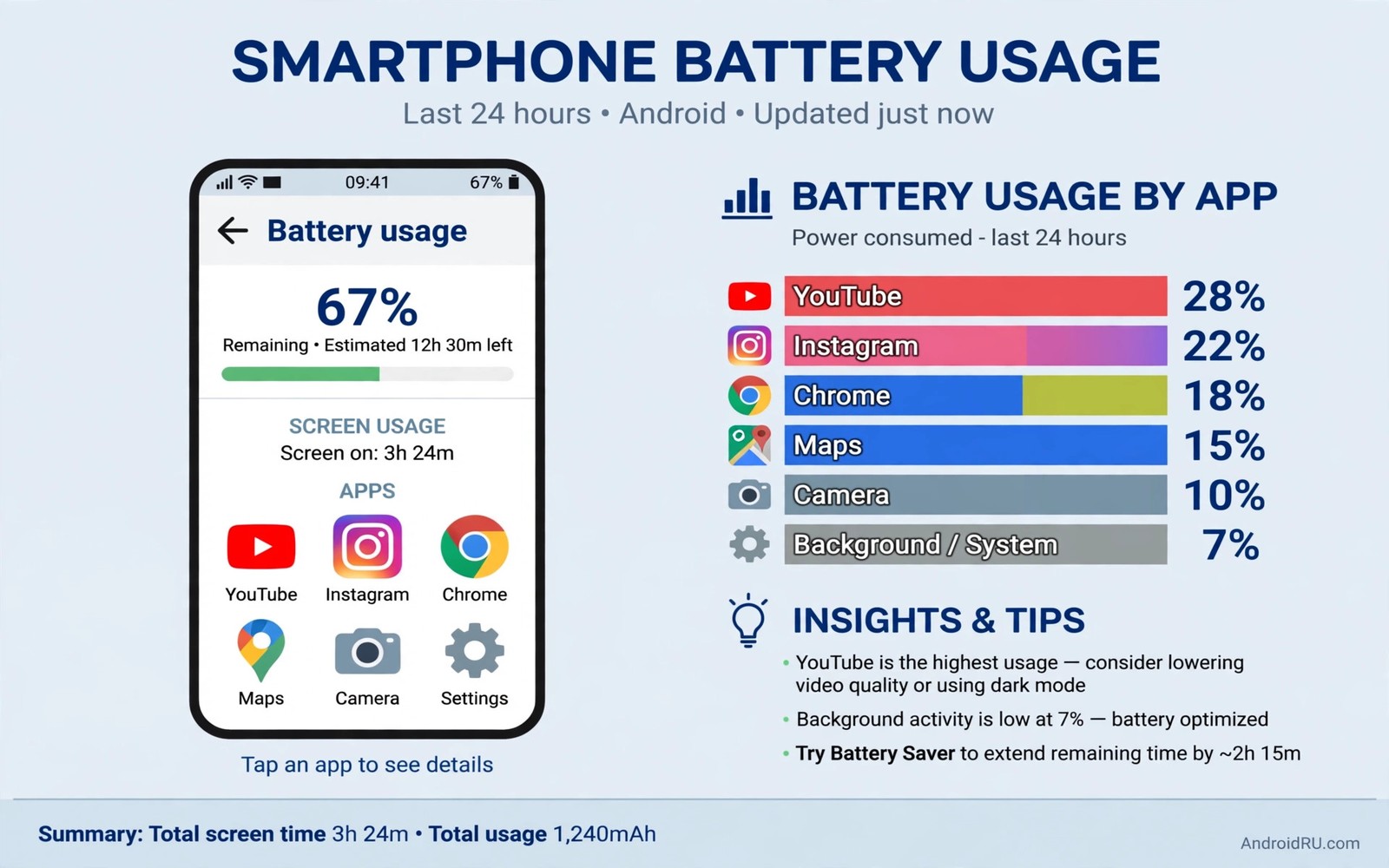
Your battery chart tells a blunt story every week. A few apps eat power while you sleep. They eat power while you work. They eat power while the phone sits untouched. You did not open them today. They still appear at the top. That pattern is not normal use. It is background greed. Some app types are famous for it. Social feeds poll constantly. Free games push offers hourly. Shopping apps track location silently. Cleaner apps fight the system. Old apps with broken sync retry forever. Deleting the worst offenders beats tweaking settings forever. This guide names five types to remove first. It explains why each type drains. It gives a safer replacement for each one.
How to find your personal worst offenders
Open Settings and then Battery. Open Battery Usage. Sort by background time if your phone allows it. Look for apps with high background use and low screen time. That ratio is the smoking gun. An app you opened for five minutes should not run for five hours. Tap the app. Check its permissions. Check its background data use. An app with location and background data and notifications is a triple threat. It can wake the phone for any reason. It can download in the background. It can track movement all day. Remove that combination when the app does not need it. Your chart will improve within a day. Your phone will sleep deeper at night.
Do not judge by name alone. A messaging app you use hourly deserves background access. A game you opened once last month does not. A news app you read daily may deserve some background use. A coupon app you forgot deserves none. Judge by your own use. Check last opened date in the app info screen. An app unused for 30 days is a candidate for removal. Android may already hibernate such apps. Hibernate pauses permissions and background work. Deletion goes further. It frees storage. It removes trackers. It removes update checks. It removes the chance of a future bug draining power. Unused apps are pure cost. Delete them without sentiment.
1. Social apps you scroll but never need instantly
Social apps are the biggest background drain for most owners. They preload video. They check for new posts constantly. They track location for tags and ads. They send push messages for every like and comment. A feed app can use more background power than the screen time suggests. Video autoplay in the background is a hidden cost. Some apps keep playing audio after you leave. Some keep refreshing the feed in anticipation. That anticipation wastes data and power. You do not need instant alerts for every post. You need messages from people. Those are different needs. Separate them.
Replace heavy social apps with the browser version for casual scrolling. The browser version still shows posts. It does not run all day in the background. It does not track location constantly. It uses power only while open. Keep the full app only for the one network you message on daily. Restrict the rest. Turn off background data for social apps you keep. Turn off autoplay video in their settings. Turn off location permission entirely. Those three changes cut drain a lot. Deletion cuts it completely. Try the browser version for one week. Most owners never reinstall the app. They enjoy a quieter phone and a longer battery.
2. Free games with constant offers and ads
Free games monetize attention. They push offers to bring you back. They preload ads in the background. They check for events hourly. They may run timers for energy and rewards. A game you played once can keep waking the phone for weeks. Ad networks inside games add their own tracking. Those trackers run even when the game is closed. They download new ad creatives. They report location and device data. That work uses radio power. Radio power is the most expensive power on a phone. A game with hourly ad refresh can cost several percent overnight. It can cost more during the day.
Delete games you no longer play at once. No nostalgia is worth nightly drain. For games you still play then restrict background activity. Turn off notifications for events and offers. Turn off background data. Play only on Wi-Fi if the game downloads large ads. Better still choose paid games without ad networks when possible. A one time purchase often removes the ad engine entirely. The battery saving alone can justify the price. A phone without ad heavy games sleeps far better. It also stays cooler. Cooler operation protects the battery over years. Games are fun. Background ad engines are not.
3. Shopping and coupon apps that track everywhere
Shopping apps want to know when you pass a store. They use location in the background for that. They use Bluetooth scanning for beacons. They push coupons based on where you walk. That tracking runs all day. It runs at night too if permissions allow it. A coupon app you used once at a mall may track you for months. It may upload location batches hourly. It may wake the phone for each batch. The battery cost is steady and silent. The benefit is a coupon you never use. That trade is poor. Delete shopping apps after a purchase. Reinstall only when you need to buy again. The store website works fine for browsing.
Check Bluetooth scanning in location settings as well. Shopping apps often rely on it. Turn off Bluetooth scanning when you do not need it. Turn off Wi-Fi scanning too. Those scans help location accuracy. They also help trackers find you. A phone with scanning off still navigates fine with GPS. It simply reveals less to nearby beacons. That privacy gain pairs with a battery gain. Two benefits from one toggle. Keep only the shopping app you use weekly. Restrict its location to while using the app. That setting alone stops all day tracking. It preserves checkout when you open it. It stops silent drain when you close it.
4. Cleaner and booster apps that fight Android
Cleaner apps promise speed and battery life. They deliver the opposite on modern Android. They kill apps aggressively. Android restarts those apps. The kill and restart loop uses more power than leaving apps alone. Cleaner apps also run their own background service. They scan files constantly. They show ads and notifications. They ask for broad permissions. They may upload device data. Android already manages memory well. It freezes unused apps efficiently. It hibernates forgotten apps automatically. A third party killer disrupts that system. It creates churn. Churn costs battery. Delete every cleaner and booster app. Your phone will run smoother without them.
Use built in tools instead. Android storage settings show large files clearly. Battery settings show real drain clearly. Files by Google can clear junk safely when needed. Those tools do not run all day. They run when you open them. That on demand pattern is efficient. It is also safer. A cleaner app with broad access can delete useful files. It can break app data. It can expose private files to its own servers. Removal eliminates those risks. If a cleaner app came preinstalled and cannot be deleted then disable it. Disabling stops its service. It hides the icon. It prevents updates. That is the next best step.
5. Old apps with broken sync and endless retries
Old apps break quietly. A developer stops updating an app. A server changes its API. The app keeps trying the old endpoint. It retries every few minutes. Each retry wakes the radio. Each failure triggers another retry. The battery chart shows steady background use. The app itself may crash on open. It may show a blank screen. It still drains in the background. Apps tied to dead services are common. Old fitness apps and old news apps fit this pattern. Old apps for closed stores fit it too. Their sync never succeeds. Their retry never stops. Deletion is the only fix. No setting repairs a dead server.
Spot these apps by their background pattern. They show background time without screen time. They show data use without new content. They may show repeated crash notices. Check the app version date in the store. An app not updated in two years is suspect. An app with a dead developer website is suspect. Replace it with a current alternative. A modern app uses efficient push. It uses batched sync. It respects battery optimization. The difference is visible overnight. A phone without retry loops sleeps deeply. Deep sleep is the foundation of good battery life. You can see how hidden workers add up in system services that eat battery in secret and how social apps hijack battery through constant polling. Those guides complement deletion. Delete first. Tune second.
A safe deletion routine
Delete in small batches. Remove three apps today. Watch battery for two days. Remove three more if drain persists. Small batches reveal which removal helped. Mass deletion hides the cause. Back up any data first. Export chats from a messaging app before deleting it. Save photos from a gallery app before deleting it. Most social and shopping apps store data in the cloud. Deletion does not erase your account. Reinstall restores it. Games may lose local progress if they lack cloud save. Check save status before deleting a game you may return to. A careful routine avoids regret. It also builds confidence. You will delete more freely once you see the gain.
App audit checklist
Name: ________  Last opened: ________
Screen time: ________  Background: ________
Permissions: location / background data / notifications
Decision: keep / restrict / delete
Review after 2 days: battery change ________
The checklist above follows a simple audit pattern used by many Android power users to decide deletion without guessing. It forces a comparison of screen time and background time. It forces a permission review. It forces a two day follow up. A decision without data is a guess. A decision with data is a fix. Copy the checklist into a note. Fill it for your top five drain apps. Delete the worst one first. Measure the change. That measured gain motivates the next deletion. It also prevents deleting an app you actually need.
Common mistakes
Many owners delete a messaging app they need instantly. That breaks important alerts. Restrict instead of deleting for essential apps. Many owners keep a game for nostalgia while it drains nightly. Nostalgia is not worth a dead morning battery. Many owners install a cleaner to fix drain caused by another app. Cleaners add drain. They do not remove it. Many owners delete an app but leave its account syncing. Remove the account too if you abandon the service. Many owners judge apps by icon count rather than background time. An app with a small icon can drain hugely. Trust the chart. Many owners reinstall a deleted app out of habit within a day. Give the browser version a full week first.
Another mistake is deleting system apps blindly. System apps handle core functions. Deleting or disabling the wrong one breaks notifications or location. Focus on user installed apps first. Those are safe to remove. They reinstall from the store if needed. System apps need research before any change. A user app with high background time is a clear target. A system service with high background time needs a settings fix instead. That distinction matters. It keeps the phone stable while cutting waste. Pair deletion with overnight drain fixes for system services for a complete result. Deletion plus tuning beats either alone.
FAQ
Will deleting an app delete my account? No in most cases. Your account lives on the service server. Reinstalling and signing in restores it. Local data may be lost. Back up chats and photos first.
Should I restrict an app instead of deleting it? Restrict apps you still need occasionally. Delete apps you have not opened in a month. Restriction stops background work. Deletion stops everything including updates and trackers.
Why does a deleted app still appear in battery stats? Stats cover a past window. The app entry fades after the window passes. It will disappear from the next full day chart. No action is needed.
Conclusion
Background greed hides in plain sight on the battery chart. Social apps and ad heavy games lead the list. Shopping trackers and cleaner apps follow close behind. Old apps with broken sync waste power forever. Open Battery Usage today. Find apps with high background time and low screen time. Delete the worst three. Restrict the ones you still need. Watch the chart for two days. Repeat until overnight drain falls to a few percent. Start with the app at the top of your chart right now.

