

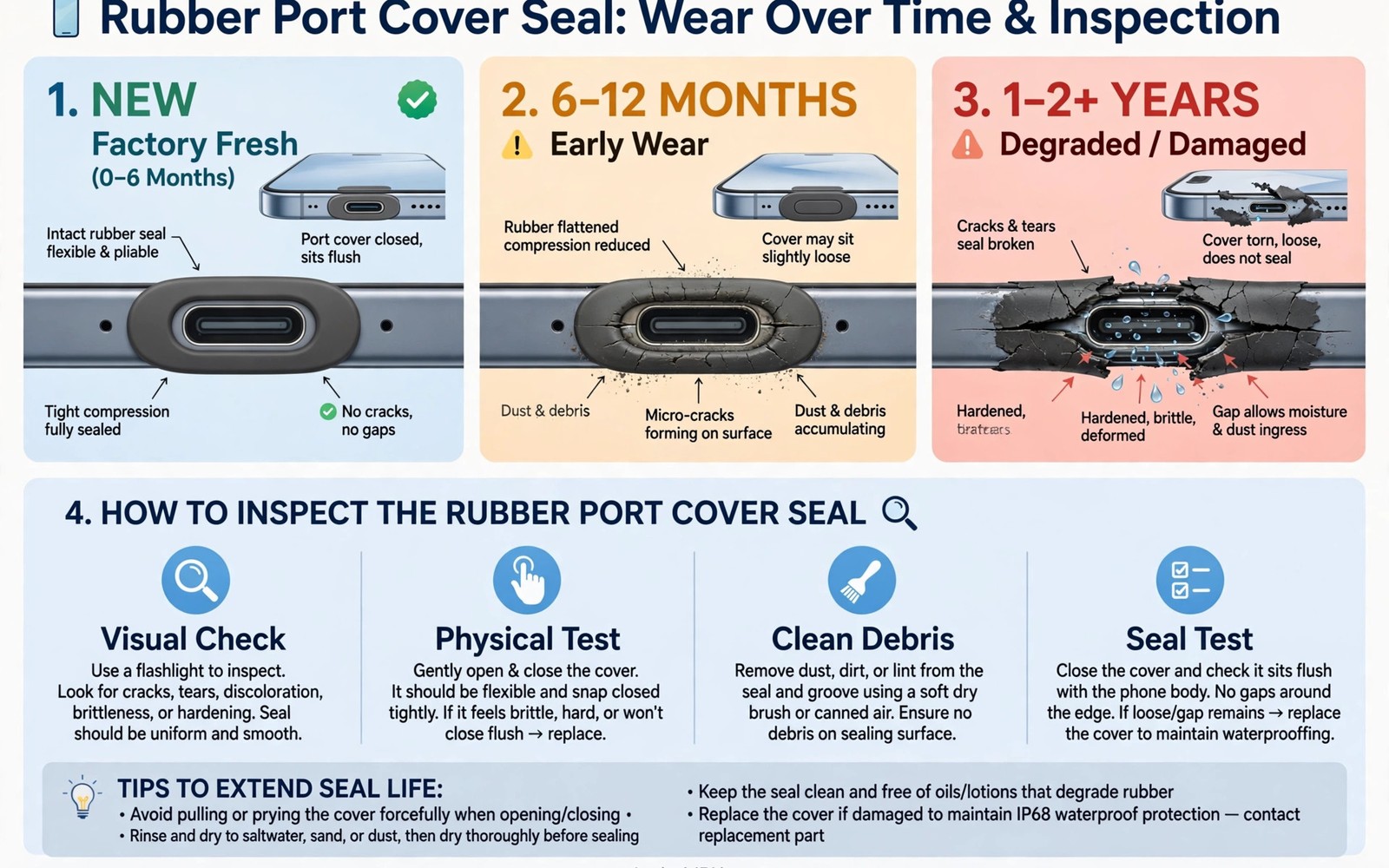
Maintaining waterproof seals rubber port covers wear over time is a quiet maintenance task that protects expensive phones. Seals look simple and they are easy to ignore. They also decide whether a phone survives rain and puddles after a year of hard use. Rubber ages and covers loosen and grit scratches seal faces. This guide explains how to inspect and clean and replace seals before they fail.
A waterproof seal works by compression. A rubber cover presses against a smooth frame face. That pressure blocks water entry. Any gap in that pressure path lets water through. Aging reduces rubber elasticity and pressure falls. The waterproof ratings explained in plain language describe factory test results. Real world seal life depends on care after purchase. Inspection and cleaning preserve the factory result for years.
Seal care also matters for phones used in kitchens and bathrooms. Steam from cooking and showers ages seals faster than dry air. A phone used as a kitchen timer faces steam daily. A phone used for music in a bathroom faces steam and splashes. Steam carries heat into small seal gaps. Frequent steam exposure shortens seal life even without direct water contact. Keep phones away from direct steam when possible.
How rubber seals age and lose pressure
Rubber hardens with heat and sunlight. A phone left on a sunny dashboard ages seals fast. Rubber also takes a permanent set under long compression. A cover held shut for months may not spring back fully when opened. That set reduces sealing pressure on the next closure. Repeated opening and closing wears hinge points and cover edges.
Chemicals accelerate aging. Soap and solvents dry rubber. Salt water leaves crystals that lift seal faces. Dust acts as an abrasive between seal and frame. Each factor alone causes slow wear. Together they can shorten seal life to under a year in harsh work. Harsh environment users need more frequent checks.
Weekly inspection routine that takes minutes
Inspect port covers once a week in harsh use and once a month in normal use. Open each cover and look at the rubber face. Look for cracks and flattening and tears. Look for grit stuck on the seal. Feel the cover closing force. A cover that closes loosely has lost pressure. A cover that sticks or drags may carry grit.
Check the frame face too. Scratches on the frame face break the seal path. A scratched frame may need service even when the cover looks new. Photograph any damage for warranty records. Early photos help claims when a seal later fails. A two minute check prevents a dead phone after the next rainstorm.
adb shell dumpsys battery | grep -i health
adb shell settings get system screen_brightness
adb shell dumpsys display | grep -i -m 3 'mDisplayState'
Attribution: the snippet above is an original example prepared for this article. It follows a standard public pattern for Android device checks and it does not copy code from any vendor site.
Cleaning seals without damaging them
Clean seals with clean water and a soft cloth. Remove grit gently with a soft brush. Do not use sharp tools on seal faces. A scratch from a tool can ruin an otherwise good seal. Dry seals fully before closing covers. Trapped water under a cover can breed mould and corrode contacts.
Avoid solvents on seals unless the maker approves them. Alcohol wipes may be safe for brief cleaning on some models. Repeated solvent use dries rubber over time. Use mild soap for stubborn dirt and rinse with water. Keep cleaning products away from open ports. A clean seal closes with even pressure and holds water out.
Port use habits that extend seal life
Wireless charging reduces port opening frequency. Every avoided opening saves hinge wear. Use wireless charging at home and at camp when your phone supports it. Keep a dust plug in unused ports on dusty sites. A plug keeps grit out of the seal area. Remove plugs gently to avoid pulling seal material.
Close covers fully after every cable use. A half closed cover gives no protection. Listen and feel for the click or snap that signals full closure. Check closure after charging in the dark. Many water failures trace to a cover left open after night charging. A habit of checking closure after each charge prevents most failures.
When to replace covers and seals
Replace a cover at the first sign of tearing or permanent flattening. Do not wait for a water failure to prove the damage. Order spares from the maker or an authorised dealer. Generic covers may use different rubber and fit poorly. A poor fit cover is worse than a worn original because it gives false confidence.
Some phones allow user replacement of port covers. Others need service centre replacement. Check your model manual before forcing a cover off. Forcing a sealed cover can break hinge mounts. Service replacement also lets staff test water resistance after fitting. A tested replacement restores confidence for field use.
Testing water resistance after maintenance
Home water tests carry risk and should stay gentle. A light splash test can reveal a gross seal failure. It cannot prove full factory rating. Never pressure test a phone at home with jets or immersion. A home test that fails can kill a phone. A home test that passes proves little about deep immersion.
For critical work use authorised service testing when available. Service centres can pressure test seals safely. Test after any screen repair or major drop. Repairs often disturb seals even when the phone looks intact. A service test after repair restores trust before the next wet season.
Steam kitchens bathrooms and daily habits
Kitchen steam rises from pots and kettles directly onto nearby phones. A phone on a counter beside a boiling pot faces repeated steam bursts. Move the phone away from the stove during cooking. A metre of distance cuts steam exposure greatly. Use a wall mount away from steam sources for kitchen timers.
Bathroom steam during hot showers fills the room with warm moisture. A phone on a bathroom shelf absorbs that moisture daily. Moisture enters ports and speaker grilles over time. Keep the phone outside the bathroom during showers when possible. A hallway shelf protects the phone without losing music access through an open door.
Sunscreen and lotion on hands transfer to seal faces during handling. Oily residue attracts dust to seals. Dust on a seal face breaks the compression path. Wipe hands before handling port covers after applying lotion. Clean seal faces gently when residue builds up. Hand hygiene protects seals indirectly.
Pocket lint also threatens seals over time. Lint gathers in port openings and under cover edges. A lint layer under a cover prevents full closure. Brush port areas gently with a dry soft brush weekly. A clean port area closes fully and seals properly. Lint removal is a tiny task with real protective value.
Seasonal changes affect rubber too. Cold winters harden rubber temporarily. Hot summers soften it. A seal that leaks in winter may seal again in summer warmth. Do not judge a seal by one season alone. Inspect seals across seasons and replace those that fail in any season. Year round reliability matters more than single season performance.
SIM trays and other seals beyond port covers
Port covers are not the only seals on a waterproof phone. SIM trays carry their own rubber seals. Speaker grilles use mesh and adhesive seals. Camera lenses use gasket seals against the frame. Each seal ages at its own rate. A phone can pass port cover inspection while a SIM tray seal fails silently. Inspect SIM tray seals whenever you swap cards. Look for flattening and cracks on the tray gasket.
Button seals also wear with use. Power and volume buttons move through gasket seals thousands of times. Worn button seals admit water slowly around the button shaft. Sticky or gritty buttons may signal seal wear. Clean around buttons gently with a soft brush. Never force a sticky button with sharp tools. Service a phone whose buttons feel gritty or loose. Button seal failure is easy to miss and costly when water enters.
Charging port seals deserve special attention because charging happens daily while other seals sit untouched. A charging port cover may open and close twice per day for years. That cycle count far exceeds any other seal on the phone. Hinge wear appears first on charging covers for that reason. Wireless charging cuts charging cover cycles dramatically. A phone charged wirelessly at home and at work may open its port cover only on trips. That habit alone can double charging seal life. Wireless charging is a seal protection strategy as much as a convenience feature.
Common mistakes
The biggest mistake is ignoring seals until water enters. Seal wear is gradual and invisible without inspection. Another mistake is cleaning seals with solvents or sharp tools. Both damage the seal face and shorten life.
A third mistake is leaving a port cover half closed after charging. An open cover defeats all water protection at once. A fourth mistake is using a poor fit generic cover. A generic cover may look right while it seals badly. Use maker spares for critical seals.
A fourth mistake is testing seals by submerging a phone after maintenance. A home immersion test can kill a phone with a hidden seal flaw. Leave immersion testing to service centres with proper equipment. Home checks should stay visual and gentle.
Frequently asked questions
How often should I inspect waterproof seals?
Inspect weekly in harsh outdoor or site work. Inspect monthly in normal daily use. Inspect after every hard drop and after every repair. Frequent checks catch wear before it causes failure.
Can I replace a port cover myself?
Some models allow user replacement with simple tools. Others need service centre fitting. Check your manual before forcing a cover. Service fitting also allows a water test after replacement.
Does a screen repair affect water resistance?
Yes often. Opening a phone disturbs seals and adhesives. Ask the repair shop whether water resistance was restored and tested. Treat an untested repaired phone as not waterproof.
Conclusion
Maintaining waterproof seals rubber port covers wear over time is simple work with large rewards. Weekly inspection and gentle cleaning and prompt replacement keep factory water protection alive. A cover checked after every charge prevents the most common water failure of all. The how rugged phones earn their toughness rating adds useful context for this choice. The choosing a tough phone for site and trail work adds useful context for this choice.
Your concrete next step is to inspect every port cover on your phone today. Clean any grit gently and check closing force. Order a maker spare cover now when any cover shows flattening or cracks.
Move your phone away from steam sources starting today. That single habit extends seal life more than any cleaning product. Small placement choices protect expensive water resistance for years.

