

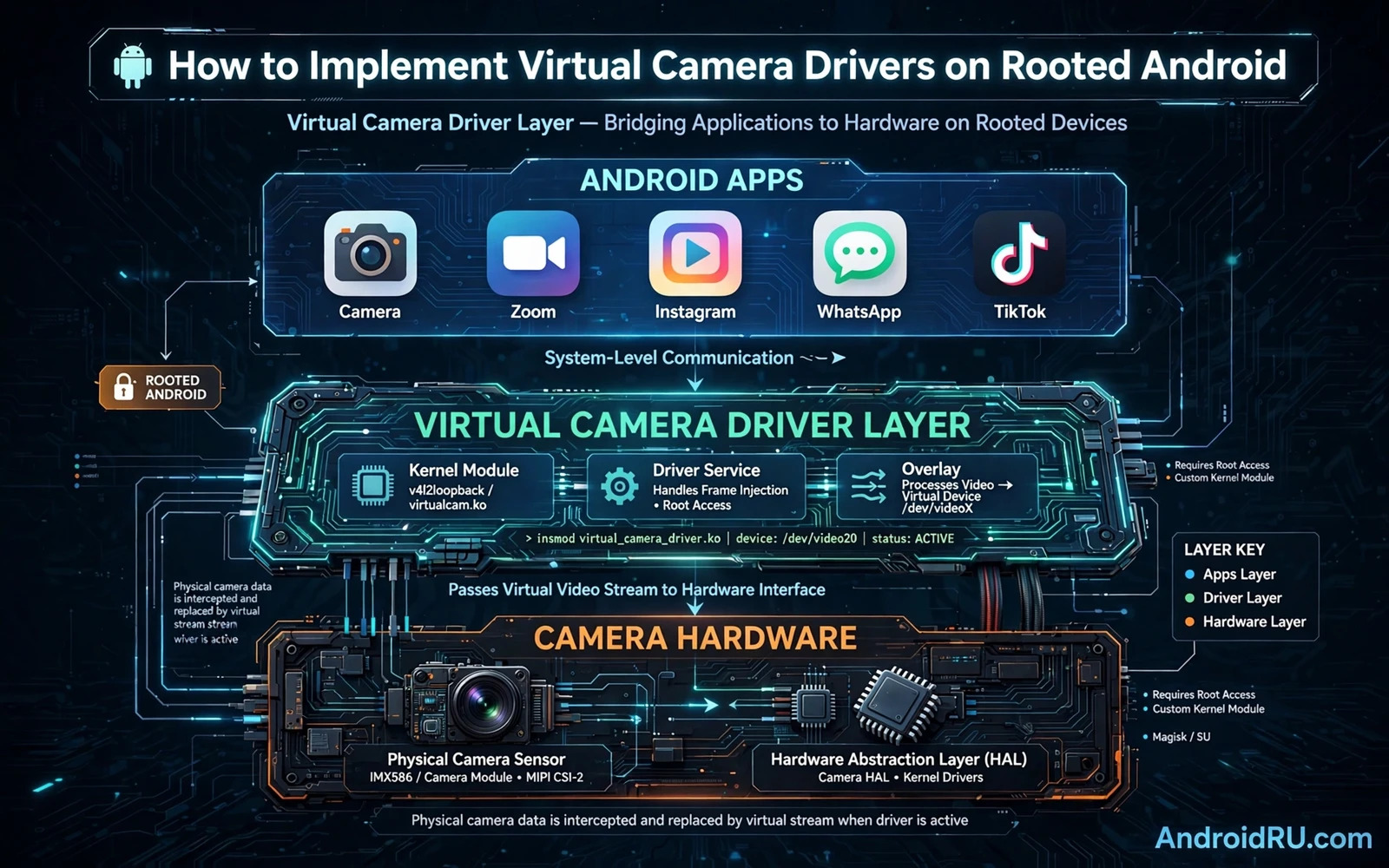
What a Virtual Camera Driver Really Does
A virtual camera driver presents a camera device that does not map to a physical sensor. Apps that open this camera receive frames from a chosen feed instead of frames from real hardware. The feed can come from a video file or from a live stream or from a generated image sequence. The driver must still behave like a normal camera for opening and closing and preview and capture. If the behaviour differs too much from a real camera then apps may freeze or crash or reject the device.
On rooted Android a virtual camera is usually built as a layer above the hardware rather than as a kernel driver alone. The layer can sit at the framework level or at the app level depending on the design goal. A framework level layer can affect many apps at once and it needs careful handling of permissions and sessions. An app level layer affects one app at a time and it is easier to test and easier to remove. The choice between these layers shapes the whole project and it should be made before any code is written.
Before any root work begins a full backup is essential because a wrong change can cause data loss or a bootloop or a device that will not start normally. Root access can also void a warranty and it can break payment apps and banking apps and integrity checks. A test device that holds no personal data is the safest place for this kind of experiment. A backup stored outside the phone protects the work when the phone itself cannot boot.
Mapping the Android Camera Path First
Android camera data flows from an app through a camera API and then through framework services and then through a hardware abstraction layer and then to a driver. Camera2 exposes sessions and capture requests and output surfaces. CameraX builds on Camera2 and hides much of that detail behind simpler use cases. A virtual camera must respect sessions and requests and surfaces or the app will see broken previews or failed captures. Mapping this path on the target device is the first technical task and it prevents blind guessing later.
Each device can differ in camera service behaviour and in supported formats and in session limits. A design that works on one phone may fail on another phone that uses a different camera stack. Testing on the exact target model matters more than testing on a generic emulator for this kind of work. Notes about supported formats and session behaviour should be kept in one place so later changes stay consistent. A clear map also helps when a bug appears because the failing layer can be found faster.
Developers who want the hook layer explained at a deeper level can study how Android camera hooking works in practice before they choose a hook point for a virtual camera. That background helps to separate a safe app layer hook from a risky framework change. It also shows why a hook that replaces frames must still honour timing and format and session state. A virtual camera that ignores those rules will look correct in a simple test and fail in a real app.
Choosing a Hook Point With Care
A hook at the app layer wraps camera calls inside the target app process. This approach is precise and it limits the blast radius when something goes wrong. A hook at the framework layer changes behaviour for many apps and it demands stronger testing and a clear rollback plan. A native layer hook can reach deeper paths but it is harder to debug and harder to keep stable across updates. The safest path for a first build is the narrowest hook that still meets the goal.
Frame delivery is the heart of a virtual camera. Frames must arrive at the expected size and format and rate for the session that the app requested. A mismatch in size or format can break preview or recording or face detection in the app. A frame source that stalls can freeze the app or cause a timeout in the camera session. Buffer handling must therefore be tested with long sessions and with app switching and with screen rotation and with backgrounding.
Audio must be handled as a separate decision and not as an automatic side effect of video replacement. Some apps expect microphone audio alongside camera video and some apps expect silence or a separate audio path. Mixing a video feed with an unrelated audio feed can confuse a live app and it can also create a privacy problem when audio is captured without a clear purpose. The design should state plainly whether audio is replaced or left untouched and why that choice was made.
Building the Virtual Feed
A virtual feed starts as a producer that can supply frames on demand. The producer may read from a file or decode a stream or render a scene. The producer must convert its output to a format that the camera pipeline accepts. Conversion should happen once per frame and it should avoid extra copies when possible. A producer that is slow will cause dropped frames and a producer that is fast but unstable will cause jitter in preview and recording.
Preview and capture paths often need different handling even when they share one feed. Preview favours low latency and smooth motion. Capture favours full resolution and correct orientation and colour. A virtual camera that serves preview well but fails capture will disappoint users in exactly the moment they care about most. Both paths should be tested with the same feed and with the same session settings that real apps use.
State handling is easy to overlook and hard to fix later. The virtual camera must handle open and close and reopen cleanly without leaking sessions or buffers. It must handle an app that crashes while a session is open. It must handle a second app that tries to open the same virtual camera while the first app still holds it. Clear ownership rules and clear cleanup on session end prevent a large class of hangs and crashes.
Testing Without Breaking the Phone
Testing should start on a spare device with a full backup and a known working recovery image. Each change should be small and reversible so a failure points to one change rather than to a whole batch of changes. Logs should be collected during each test and the test steps should be written down before the test runs. A test that cannot be repeated is a weak test because its result cannot be trusted for the next build.
Real apps reveal problems that unit tests miss. A video call app may request a specific resolution or a specific frame rate or a specific format that a simple test app never requests. A social app may open and close the camera many times in one session. A camera app may mix preview and capture and video in ways that stress session handling. Testing with several real app patterns gives a truer picture than testing with one friendly test app alone.
Readers who build system level tweaks often pair a virtual camera with module work and they can explore building a custom Magisk module from scratch to learn how a systemless change is packaged and tested. A module package keeps the virtual camera change separate from the system image and it makes removal simpler when a test fails. That separation is valuable because a virtual camera is experimental by nature and it will need several rounds of fixes.
Recovery and Removal Planning
Every virtual camera build needs a removal path that works even when the main build fails. A module can be disabled from recovery when the system will not boot normally. A framework change needs a backup of the original files so the original state can be restored. A test plan that has no removal path is incomplete because the first serious failure will turn a small experiment into a long recovery task. Recovery steps should be tested before they are needed rather than during a crisis.
Updates deserve the same care as the first install. A system update can replace framework files and it can change camera service behaviour. A virtual camera that survives an update by luck may break silently after the next update. After each system update the virtual camera should be retested with the same app patterns and the same session checks. A changelog that records what changed in each build makes that retest faster and more reliable.
Developers who move from a camera layer to a general hook design can also study creating a custom LSPosed hooking module for a structured way to hook framework methods safely. That approach suits cases where the virtual camera logic lives at the framework layer rather than inside one app. It also forces a clear choice about which methods to hook and which methods to leave alone.
Privacy and Responsible Use
A virtual camera changes what other people see and hear in a call or a stream. That power carries a clear responsibility to avoid deception. A virtual camera should never be used to mislead another person about identity or location or presence in a live interaction. Labels and disclosure matter when a feed is not a live camera view. Developers should build honest defaults and they should document the limits of the virtual feed in plain language.
Permissions and consent also matter inside the device. A virtual camera that runs with root privilege can reach data that a normal app cannot reach. That privilege should be used only for the camera task and it should not be used to collect unrelated data. Code that is small and focused is easier to audit and easier to trust than code that reaches into many unrelated parts of the system. A focused design is both a technical choice and an ethical choice.
A finished virtual camera is judged by stability and honesty rather than by cleverness alone. It should open fast and close cleanly and deliver frames at the requested format and survive app switching and survive long sessions. It should fail in a visible way rather than silently feeding a wrong frame. It should be removable in minutes rather than hours. When those goals are met the driver is ready for wider testing and for honest feedback from real users.
Choosing Test Apps Wisely
Test apps should cover different camera behaviours rather than only one friendly example. A video call app and a social camera app and a barcode scanner app use the camera in different ways and they stress different parts of a session. A virtual camera that passes only one pattern may fail on the next pattern that users actually use. A test set with several real patterns gives a truer picture of readiness than a single passing demo.
Test results should be recorded with device model and system version and app pattern and observed behaviour. That record lets a later build be compared fairly against an earlier build. A regression that appears in one pattern but not in others points to a specific session behaviour rather than to a general failure. Good records turn testing from a feeling into evidence that the team can act on.
virtual-camera design checklist
check camera session behaviour on target device
choose narrowest hook point that meets goal
test preview and capture with real app patterns
keep full backup and tested removal path
label virtual feed clearly and avoid deception

