

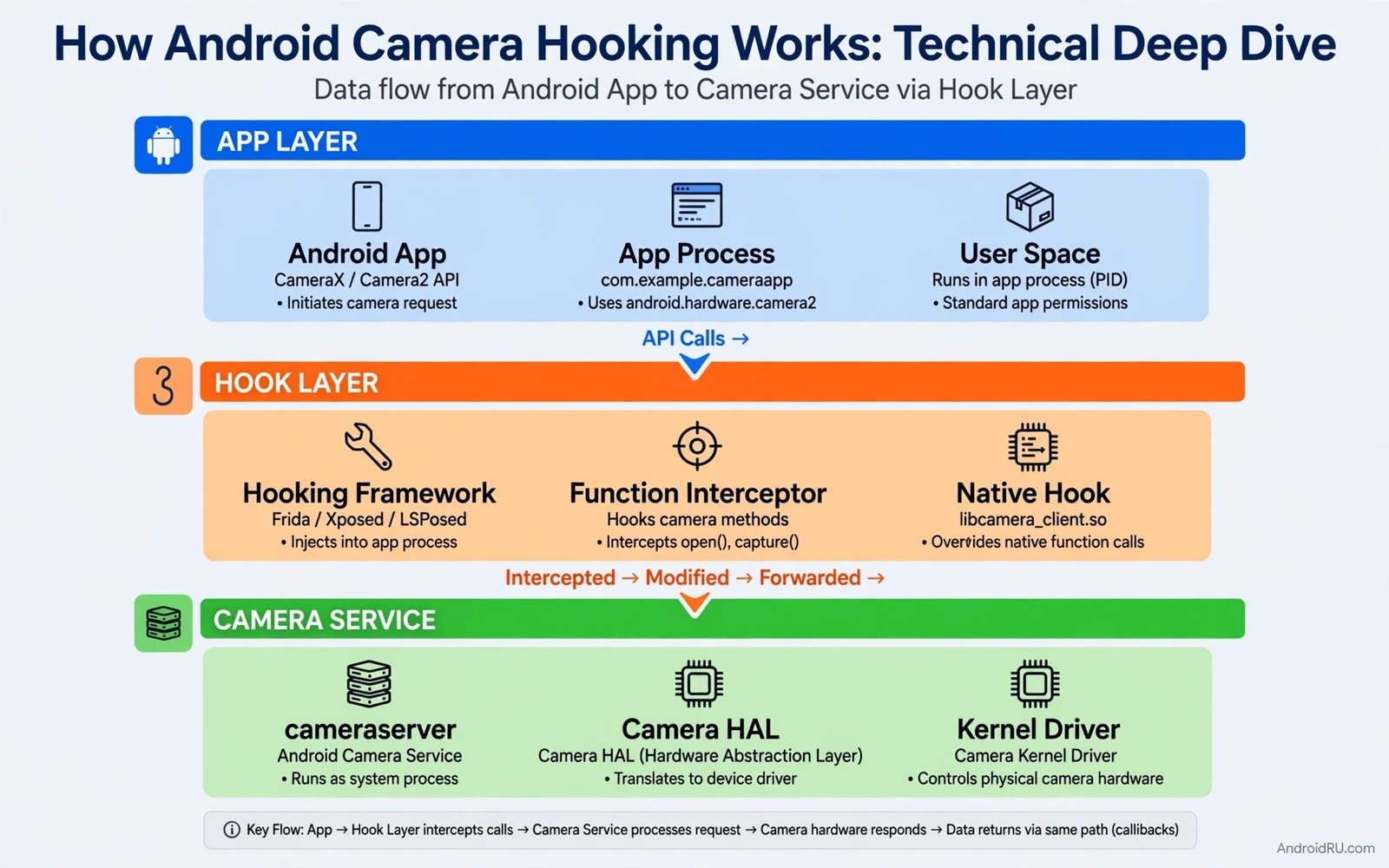
What Camera Hooking Means at a Technical Level
Camera hooking means intercepting a call in the camera pipeline and changing what happens at that point. The interception can replace a frame or modify a frame or log a call or block a call. The hook sits between the app that requests camera data and the component that supplies that data. The exact hook point decides what the hook can change and what it cannot change.
Android camera access passes through several layers. An app uses a camera API to request a camera session. The framework validates the request and forwards it to a camera service. The camera service talks to a hardware abstraction layer. The hardware layer talks to the camera driver and the sensor. A hook can sit at the app layer or at the framework layer or at a native layer depending on the method used.
Hooking is different from using a normal camera API in the intended way. A normal API call asks the system for camera data through a public contract. A hook changes the behaviour of a call after the app made it. That distinction matters for stability and for security and for policy. A hook that changes frames can break an app that expects real sensor data.
The Camera APIs That Apps Normally Use
Older apps may use the legacy camera API that offers a simpler but more limited model. Newer apps use Camera2 which exposes manual controls and multiple streams. CameraX builds on Camera2 and offers a simpler lifecycle aware model for common use cases. Each API still ends at the same framework service and the same hardware path for the actual sensor data.
Camera2 sessions define capture requests and output surfaces. A capture request sets focus and exposure and frame rate and other controls. An output surface receives frames in a chosen format such as a preview surface or an image reader. A hook that targets Camera2 must understand sessions and requests and surfaces to change a result without breaking the session.
CameraX hides much of that detail behind use cases such as preview and image capture and video capture. A hook at the CameraX level sees a higher level abstraction. A hook at the Camera2 level sees more detail and more responsibility. The choice of layer trades simplicity against control and it also changes the failure modes when a hook is wrong.
Where a Hook Can Sit in the Pipeline
An app layer hook replaces or wraps a method inside the app process. A framework hook changes a framework method that many apps share. A native hook changes a function inside a native library that handles camera data. Each position has a different scope. An app layer hook affects one app. A framework hook can affect many apps and can destabilise the whole device when it fails.
A Java level hook often uses a framework that can intercept method calls at runtime. The hook registers a callback for a target method and runs custom code before or after the original method. A native hook patches a function pointer or a function entry in memory. Native hooks can reach data that Java hooks cannot see but they also carry higher crash risk when the target library changes.
Frame replacement is the most visible hook behaviour. The hook supplies its own image data instead of sensor data. The app then processes the supplied frames as if they came from the camera. A frame hook must match the expected format and size and timing. A mismatch can cause a black preview or a crash or a distorted image that reveals the hook.
How a Typical Hook Flow Works Step by Step
The hook framework loads into the target process when the app starts. It locates the target method by class name and method name and signature. It installs a callback that the runtime calls instead of the original method or in addition to it. The callback decides whether to run the original method or to return custom data.
For a camera session hook the callback may watch the session creation call. It may record the requested output surfaces and the requested formats. It may then supply a custom producer that feeds frames into those surfaces. The app continues to run its normal code while the data source behind the surface has changed.
Timing matters in a frame hook. Camera frames arrive on a schedule that the app expects. A custom producer must deliver frames at a plausible rate and in the expected format. A producer that delivers frames too slowly can cause stutter. A producer that delivers frames in the wrong format can cause a surface error that ends the session.
Root and Framework Requirements in Practice
Many camera hooking methods need elevated privileges or a hooking framework on the device. A rooted device can load framework modules that intercept calls across apps. A non-rooted device has far stronger limits on cross app interception. A developer should never assume that a hook that works on a rooted test device will work on a normal user device.
Hooking frameworks differ in how they load and how they scope a module. Some frameworks target a single app package. Others target system processes with wider scope. Wide scope increases the chance of breaking unrelated apps. Narrow scope is safer for testing and it makes failures easier to trace to one target.
System updates can break hooks without warning. A framework method signature may change in a new Android version. A native library layout may change with a vendor update. A hook that depends on an exact internal shape must be retested after every relevant update. A hook that depends on a public API is more stable but it offers less control.
Why Camera Hooking Is Fragile by Nature
Camera pipelines vary across vendors and across device models. One vendor may use a custom camera service extension. Another vendor may use a different buffer handling path. A hook written for one device may fail on another device even when both run the same Android version. Device variation is a core reason why camera hooks need per device testing.
Concurrency adds another layer of fragility. Camera sessions run across threads and buffers move between producer and consumer. A hook that blocks a camera thread can freeze a preview. A hook that holds a buffer too long can stall the pipeline. A hook must be fast and must release resources promptly to avoid pipeline stalls.
Audio interception faces similar pipeline questions but with different layers. The audio framework discussion in how the Android audio framework connects to the kernel shows how a HAL layer sits between framework code and hardware. Camera work has a parallel HAL layer and the same lesson applies about testing each layer separately.
Legitimate Uses and Clear Misuse Boundaries
Legitimate uses include accessibility research and testing and virtual camera development on a test device that the developer owns. A developer may feed test frames into an app to check how it handles varied lighting or motion. A researcher may study a camera pipeline with proper authorisation on a test device. These uses stay inside a controlled environment with a clear purpose.
Misuse includes deceiving a verification system that relies on live camera data. A hook that feeds a recorded face or a recorded document into an identity check undermines the purpose of that check. Misuse also includes capturing camera data from another app without consent. A hook must never cross an app boundary to collect data that the user did not intend to share.
Developers who build camera tools should add clear disclosure in the tool itself. A virtual camera tool should show that the feed is virtual and not live sensor data. Hidden virtual feeds create confusion and they create risk for apps that depend on live data. Transparency is a design requirement for this kind of tool and not an optional label.
Stability and Security Risks to Weigh
A bad camera hook can crash the target app or can crash the camera service. A crash in a shared service can affect other apps that use the camera at the same time. A hook that leaks buffers can drain memory over time. A hook that runs heavy image processing on a camera thread can overheat the device during a long session.
Security risk grows when a hook module has broad scope or broad permissions. A module that can intercept camera calls in many apps becomes a high value target for abuse. Keep module scope narrow and keep the module code auditable. Remove a test module from a daily device when testing ends.
Hooking in general also appears in system level customisation work. The module approach in creating custom Xposed and LSPosed hooking modules explains how a module is scoped and loaded. That scoping discipline matters even more for camera hooks because the data involved is highly sensitive.
Testing a Camera Hook Responsibly
Test on a dedicated device that does not hold personal accounts or personal photos. Use a simple test app that you control so that failures point to the hook and not to a complex third party app. Start with logging only and confirm that the hook fires at the expected method. Add frame replacement only after logging proves that the hook point is correct.
Test across camera modes such as preview and photo capture and video recording when the hook claims to cover them. A hook that works for preview may fail for capture because capture uses a different request path. Test with front and back cameras separately when both matter. Test after a device reboot to confirm that the module loads in a normal startup order.
Some camera use cases involve a virtual device driver rather than a simple method hook. The driver discussion in implementing virtual camera drivers on rooted Android covers that deeper approach. A developer should choose the shallowest method that meets the test goal and should not choose a driver when a method hook is enough.
When Not to Use a Camera Hook
Do not use a camera hook as a shortcut for a missing public API. A public API or a documented virtual camera path is more stable and more honest for users. Do not use a hook to work around a permission denial. A denied camera permission is a user decision and a hook that bypasses it violates user trust.
Do not ship a camera hook inside a consumer app that runs on normal user devices. A consumer app cannot rely on root or on a hooking framework on a user device. A consumer app that depends on a hook will fail for most users and will create support problems that are hard to diagnose. Keep hooks in test tools and in research tools with clear scope.
Do not use a hook to test a production verification flow. A verification flow tested with fake frames proves nothing about live behaviour. Test verification with real camera input on a real device. Use fake frames only for user interface tests that do not depend on live identity or live presence.
- A hook point decides what can change and what can break
- App scope is safer than system wide scope
- Frame format and timing must match the session
- Test preview and capture and video separately
- Never bypass a camera permission denial with a hook

