

What the Acer Iconia A1-830 Gets Right: Review and Detailed Specifications
The Acer Iconia A1-830 arrived in early 2014 as a compact 7.9-inch tablet with a 4:3 screen, an Intel processor instead of the usual ARM chip, and a price that undercut many small tablets of its day. This Acer Iconia A1-830 review and full specifications guide looks back at what the slate did well, where it fell short, and what it can still do more than a decade after launch. It was announced in January 2014 and reached buyers in March 2014, priced at 169 euros in Europe, which put it in direct competition with budget 7-inch and 8-inch tablets from rival brands. As an Acer tablet 2014 shoppers could buy without spending flagship money, it promised a readable screen, a solid build, and enough power for books, video, and light apps.
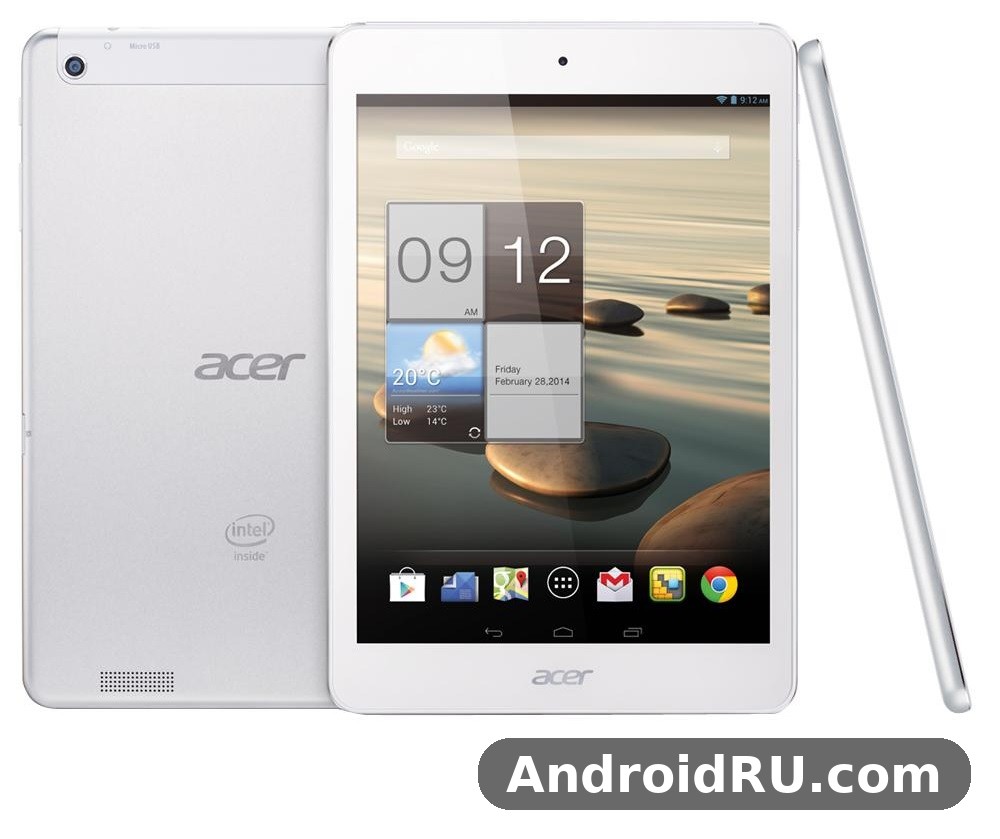
The Acer Iconia A1-830 tablet price and release date set the tone for everything that followed. The Acer Iconia A1-830 price at launch was 169 euros, about $230 at the time, and the Acer Iconia A1-830 release followed its January 2014 announcement by roughly two months. That timing mattered: the tablet went on sale just as 7.9-inch slates were finding an audience among readers who wanted something larger than a phone and lighter than a 10-inch tablet. The Acer Iconia A1-830 features list was honest rather than flashy: a 7.9-inch IPS display, an Intel Atom Z2560 chip, 1GB of RAM, 16GB of storage, a 5MP rear camera, and a 4000mAh battery, and this guide works through each of them in turn.
Design and Build Quality
The Acer Iconia A1-830 design was simple and practical. A white plastic shell wrapped around the 7.9-inch screen, with a silver Acer logo on the back and a clean front face with slim side bezels for the time. The Acer Iconia A1-830 dimensions of 203 x 138.4 x 8.2 mm made it easy to hold in one hand, and the Acer Iconia A1-830 weight of 380 grams kept it light enough to carry in a bag all day without noticing it. An Acer Iconia A1-830 vs Acer Iconia B1-720 comparison shows how the two tablets aimed at different buyers: the B1-720 was the smaller, cheaper 7-inch option, while the A1-830 offered the larger 4:3 screen and the faster Intel chip. Readers who want the full story on the smaller sibling can read Acer Iconia B1-720 Review: Connectivity, Software and Usability for a closer look at how Acer tuned its budget line.
A 7.9-Inch Slate Built Around Reading
The Acer Iconia A1-830 white colour model dimensions and weight details were 203 x 138.4 x 8.2 mm and 380 grams, and those numbers shaped how the tablet felt in daily use. The 4:3 shape gave it a book-like feel, with enough width to hold comfortably in portrait mode and enough height to show a full page of text without constant scrolling. The plastic back had a light texture that stopped it sliding off a table, and the corners were rounded so the slate sat well in the palm. The Acer Iconia A1-830 speakers deliver modest mono sound from the back of the slate, which was fine for spoken-word video and audiobooks, though music sounded thin at higher volume. An Acer Iconia A1-830 tablet case and screen protector accessories list is now limited to generic 7.9-inch sleeves and pouches, since fitted cases for a 2014 tablet are long out of production.
Ports, Buttons and the White Finish
Around the edges, the A1-830 kept things simple: a microUSB port for charging and data, a 3.5 mm headphone jack, a microSD slot, and a power button with a volume rocker on the side. The white finish looked clean when new, though it showed scuffs and dirt more easily than darker tablets, so a case was a sensible buy even in 2014. The buttons had a firm click, the microSD tray sat flush with the frame, and nothing rattled when the tablet was shaken. For a budget slate, the build was tidy and consistent, with no sharp edges and no flex in the back panel when pressed.
Display: A 4:3 IPS Panel Built for Reading
The Acer Iconia A1-830 display was the main reason to pick this tablet over its cheaper rivals. This 7.9 inch tablet used a 7.9-inch LED-backlit IPS panel with a resolution of 1024 x 768 pixels, giving a density of about 162 pixels per inch. These Acer Iconia A1-830 7.9 inch display specifications explained in plain terms mean text looked smooth enough for long reading sessions, while photos and web pages showed natural colours and steady contrast. Acer quoted viewing angles of up to 178 degrees, and the IPS panel lived up to that claim: the image stayed readable when the tablet was tilted, shared across a table, or propped up on a stand.
Resolution, Brightness and Viewing Angles
Acer Iconia A1-830 screen resolution and viewing angles were the real selling point of the hardware. The 1024 x 768 resolution was modest by modern standards, and fine print could look slightly soft next to a high-density screen, but for books, news, and comics it was more than enough. Brightness was adequate indoors and usable outdoors in shade, though direct sunlight washed the panel out, as it did with most tablets of the era. Acer Iconia A1-830 IPS display colour accuracy for photo viewing was decent for its price, with warm skin tones and steady whites that made the screen pleasant for browsing photo albums.
Reading, Video and Everyday Use
The Acer Iconia A1-830 for reading ebooks and watching videos made sense from the first day of use. The 4:3 shape suits pages of text, web articles, and magazines, and the 7.9-inch size is large enough to read comfortably without zooming every few lines. Video in 16:9 leaves black bars at the top and bottom, which is the trade-off of a 4:3 screen, but the picture itself was clean and the IPS panel kept colours stable from side angles. The screen quality of this era of Acer tablets is a useful point of comparison, and readers can see how a phone from the same period handled its panel in Acer Liquid Z5 Review: Screen Quality in Everyday Use and the Full Specs.
Performance and the Intel Atom Z2560
The Acer Iconia A1-830 performance story starts with its unusual chip. The Intel Atom Z2560 processor in Acer Iconia A1-830 is a dual-core part running at 1.6 GHz with Hyper-Threading, paired with a PowerVR SGX544MP2 graphics unit. As an Intel Atom tablet, it stood out from the ARM-based rivals that filled the budget shelves in 2014, and the chip gave it enough speed for browsing, email, books, and video. The Acer Iconia A1-830 chipset was a Clover Trail part, which meant it ran Android well but could feel slow when several heavy apps were open at once. The smaller sibling in the same family took a different approach to speed and price, as covered in Acer Iconia B1-721 Specifications, Review and Verdict: Is It Worth It?.
Everyday Apps and Multitasking on 1GB of RAM
Acer Iconia A1-830 1GB RAM performance for everyday apps was acceptable in 2014 and is the main limit today. The Acer Iconia A1-830 RAM of 1GB handled a browser with a few tabs, a reading app, and music in the background, but switching between large apps often forced a reload. The Acer Iconia A1-830 storage starts at 16GB, and the system and preinstalled apps took a share of that, so owners who kept many apps, books, or offline videos needed the microSD slot. For single-task use, reading, watching a video, or checking mail, the tablet felt smooth; it was only heavy multitasking that exposed the 1GB ceiling.
Graphics and Games on the PowerVR SGX544MP2
Acer Iconia A1-830 PowerVR SGX544MP2 graphics performance for games was enough for casual titles and 2D games, with smooth play in puzzle games, card games, and simple racers. Acer Iconia A1-830 games from 2014 ran well at the native 1024 x 768 resolution, and the 4:3 screen suited many older titles that were designed before widescreen phones took over. Demanding 3D games of the period ran, but with lower detail and occasional stutters, which was normal for a budget tablet with 1GB of RAM.
What Runs Well
Light games, reading apps, video players, and web browsing run well on the A1-830, and these are the tasks the tablet was built for. Casual games hold a steady frame rate, ebooks turn pages without delay, and standard-definition video plays without dropped frames.
What Struggles
Heavy 3D games, large web pages with many images, and several apps open at once can make the tablet pause or reload. The 1GB of RAM is the bottleneck here, not the Intel chip, and closing background apps is the simplest way to keep things moving.
Software: Android 4.2 Jelly Bean in 2014
The Acer Iconia A1-830 Android software shipped as Android 4.2 Jelly Bean, the version of Android that was current when the tablet launched. The Acer Iconia A1-830 Android 4.2 Jelly Bean features included lock-screen widgets, quick settings in the notification shade, and the Google Now launcher of the time, along with Acer’s own touches such as its reading and media apps. The Acer Iconia A1-830 software stayed close to stock Android, with a clean home screen, a standard app drawer, and a small set of Acer utilities rather than a heavy skin. This Android Jelly Bean tablet feels dated now, but in 2014 the interface was current and easy to learn.
Acer Apps, Updates and the Limits of Jelly Bean
How to update Acer Iconia A1-830 to a newer Android version has no official answer, because Acer did not release a newer Android build for this tablet. Owners stayed on Android 4.2, which means many current apps now need a newer Android version and will not install. Acer Iconia A1-830 Jelly Bean apps that still work in 2026 are few, and they are mostly offline tools: ebooks, old media players, simple games, and basic utilities that do not need a current web service. An Acer Iconia A1-830 hard reset using hardware buttons step by step means holding the power and volume buttons together to reach recovery mode, then choosing the wipe option, a useful last resort if the tablet freezes or a forgotten lock blocks the home screen. An Acer Iconia A1-830 factory reset without losing important data starts with a backup, so photos and files should be copied to a computer or a microSD card before the wipe begins.
Cameras: 5MP Rear and 2MP Front
The Acer Iconia A1-830 camera setup was basic even by 2014 standards. The Acer Iconia A1-830 camera pair is a 5MP rear camera and a 2MP front camera, with no flash on either side. The rear camera records 1080p video, while the front camera is aimed at video calls rather than selfies. The camera app is simple, with a shutter button, a switch between photo and video, and a small set of scene modes. A flagship phone from the same Acer family took imaging far more seriously, and its camera story is told in Acer Liquid S2: Full Review and Specifications.
Daylight Photos and Video Calls
Acer Iconia A1-830 camera quality for photos and video was basic but usable in good light. Acer Iconia A1-830 5MP rear camera sample photos in daylight look soft at full size, with muted colours and little fine detail, though they are fine for quick notes, documents, and sharing at small sizes. Low light brings noise quickly, and the lack of a flash rules out night shots. Acer Iconia A1-830 front camera quality for video calls today is poor, with a soft, noisy image that suits only a short call in a bright room.
Battery Life and Connectivity
The Acer Iconia A1-830 battery is a built-in Li-Ion unit rated at 4000mAh, and Acer claimed up to 7.5 hours of use with Wi-Fi on and the screen at half brightness. Acer Iconia A1-830 battery life and charging time were modest even in 2014, and the tablet charged over microUSB at a slow pace by modern standards, taking several hours from empty to full. There is no fast charging and no removable battery, so owners planned charging overnight. Acer Iconia A1-830 charging port microUSB cable replacement options are still easy to find, since the same cable served almost every Android device of the era.
The 4000mAh Battery in Real Use
Acer Iconia A1-830 4000mAh battery standby time in real use stretched over days when the tablet sat idle, while active use, reading with Wi-Fi on or watching video, brought it closer to the claimed 7.5 hours. Screen brightness was the biggest factor: at full brightness the battery drained much faster, while a dim screen for reading stretched a charge well past a day of light use. An Acer Iconia A1-830 replacement battery and repair guide for beginners is hard to find now, and opening a sealed 2014 tablet to swap a glued-in cell is a job for a repair shop rather than a first project.
Wi-Fi, Bluetooth and microSD Expansion
Acer Iconia A1-830 WiFi tablet connectivity and Bluetooth covered the basics for a Wi-Fi-only slate. The Acer Iconia A1-830 WiFi radio is 802.11 b/g/n on 2.4 GHz, the Acer Iconia A1-830 Bluetooth radio is version 3.0 for headsets and file sharing, and the tablet also has GPS with A-GPS for maps and location apps. There is no cellular modem, so the tablet never made calls or used mobile data. Acer Iconia A1-830 16GB storage with microSD card expansion gave owners room to grow: the Acer Iconia A1-830 microSD slot takes cards up to 32GB, and the Acer Iconia A1-830 microSD card maximum size supported in 2014 was 32GB, which was plenty for books, music, and offline video at the time.
Pros and Cons
Looked at as a whole, the A1-830 earned its place by doing the simple things well. Acer Iconia A1-830 problems and common issues after years include a tired battery, an old Android version, and 1GB of RAM that limits what the tablet can run, but the screen, the build, and the price still read well on paper. The lists below sum up the balance.
- 7.9-inch IPS display with wide viewing angles and a book-friendly 4:3 shape
- Intel Atom Z2560 chip with Hyper-Threading for smooth everyday use
- Light 380-gram body that is easy to hold for long reading sessions
- microSD expansion up to 32GB alongside 16GB of built-in storage
- Low launch price of 169 euros for a name-brand 7.9-inch tablet
- Only 1GB of RAM, which limits multitasking and newer apps
- Android 4.2 Jelly Bean with no official update to a newer version
- Basic 5MP and 2MP cameras with no flash and weak low-light results
- 1024 x 768 resolution that looks soft next to later high-density screens
- Wi-Fi only, with no cellular option and slow microUSB charging
Full Specifications
These Acer Iconia A1-830 specs come from the launch record and the specification sheet published at announcement. The Acer Iconia A1-830 tablet was announced in January 2014 and released in March 2014, and the table below lists the full hardware and software details.
| Feature | Detail |
|---|---|
| Brand | Acer |
| Model | Iconia A1-830 |
| Announced | January 2014 |
| Released | March 2014 |
| Status | Discontinued; classic 2014 tablet |
| Display | 7.9-inch LED-backlit IPS LCD, 1024 x 768 pixels, 4:3, 162 ppi |
| Chipset | Intel Atom Z2560 |
| CPU | Dual-core 1.6 GHz with Hyper-Threading |
| GPU | PowerVR SGX544MP2 |
| RAM | 1GB |
| Storage | 16GB |
| Card slot | microSD up to 32GB |
| Operating system | Android 4.2 Jelly Bean |
| Rear camera | 5 MP |
| Front camera | 2 MP |
| Video recording | 1080p |
| Battery | Li-Ion 4000 mAh, non-removable |
| Battery life | Up to 7.5 hours (Acer claim) |
| Wi-Fi | Wi-Fi 802.11 b/g/n |
| Bluetooth | 3.0 |
| GPS | Yes, with A-GPS |
| USB | microUSB 2.0 |
| Audio | 3.5 mm jack |
| Dimensions | 203 x 138.4 x 8.2 mm |
| Weight | 380 g |
| Colours | White |
| Price at launch | 169 euros (about $230) |
Frequently Asked Questions
These questions cover the points buyers and collectors ask most often about the A1-830.
Is the Acer Iconia A1-830 still worth buying?
Only for a narrow purpose. As a reader for offline ebooks, a simple video player, or a collector’s piece from 2014, it still works. As a daily tablet for current apps, banking, or streaming services, it is not a good buy, because Android 4.2 cannot run most current software.
What is the Acer Iconia A1-830 release date?
The Acer Iconia A1-830 release date was March 2014, two months after the tablet was announced in January 2014. It went on sale in white at 169 euros in Europe, about $230 at the time.
Does the Acer Iconia A1-830 support a microSD card?
Yes. The Acer Iconia A1-830 microSD slot accepts cards up to 32GB, which adds room for books, music, photos, and offline video beside the 16GB of built-in storage.
Can the Acer Iconia A1-830 run modern apps?
Mostly no. The tablet runs Android 4.2 Jelly Bean, and most current apps need a newer Android version. Offline apps that were built for Jelly Bean can still work, but web services, streaming apps, and banking apps have moved on.
Verdict: Who Should Still Care About This Tablet
The A1-830 got the fundamentals right: a good screen for its price, a comfortable size, a capable Intel chip, and a battery that lasted a working day of reading. Its limits were honest ones for a 169-euro tablet in 2014: 1GB of RAM, a modest display resolution, and cameras that were only there for convenience. Where to buy a used Acer Iconia A1-830 tablet in 2026 comes down to second-hand marketplaces and auction listings, where prices are low and condition varies widely, so buyers should check the battery and the screen before paying. The Acer Iconia A1-830 accessories that still matter are a generic sleeve, a screen protector, and a spare microUSB cable. For readers who want to compare it with another budget Acer from the same era, the entry-level phone story is told in Is the Acer Liquid Z4 Worth It? Review, Specs and Verdict.
Today the A1-830 survives as a classic Acer tablet for collectors and for readers who want a simple, offline device. It will not replace a current tablet, and it should not be bought with that hope. But as a record of what a good budget slate looked like in early 2014, a readable 4:3 IPS screen, an Intel chip, and a fair price, it still earns its place on the shelf.

