

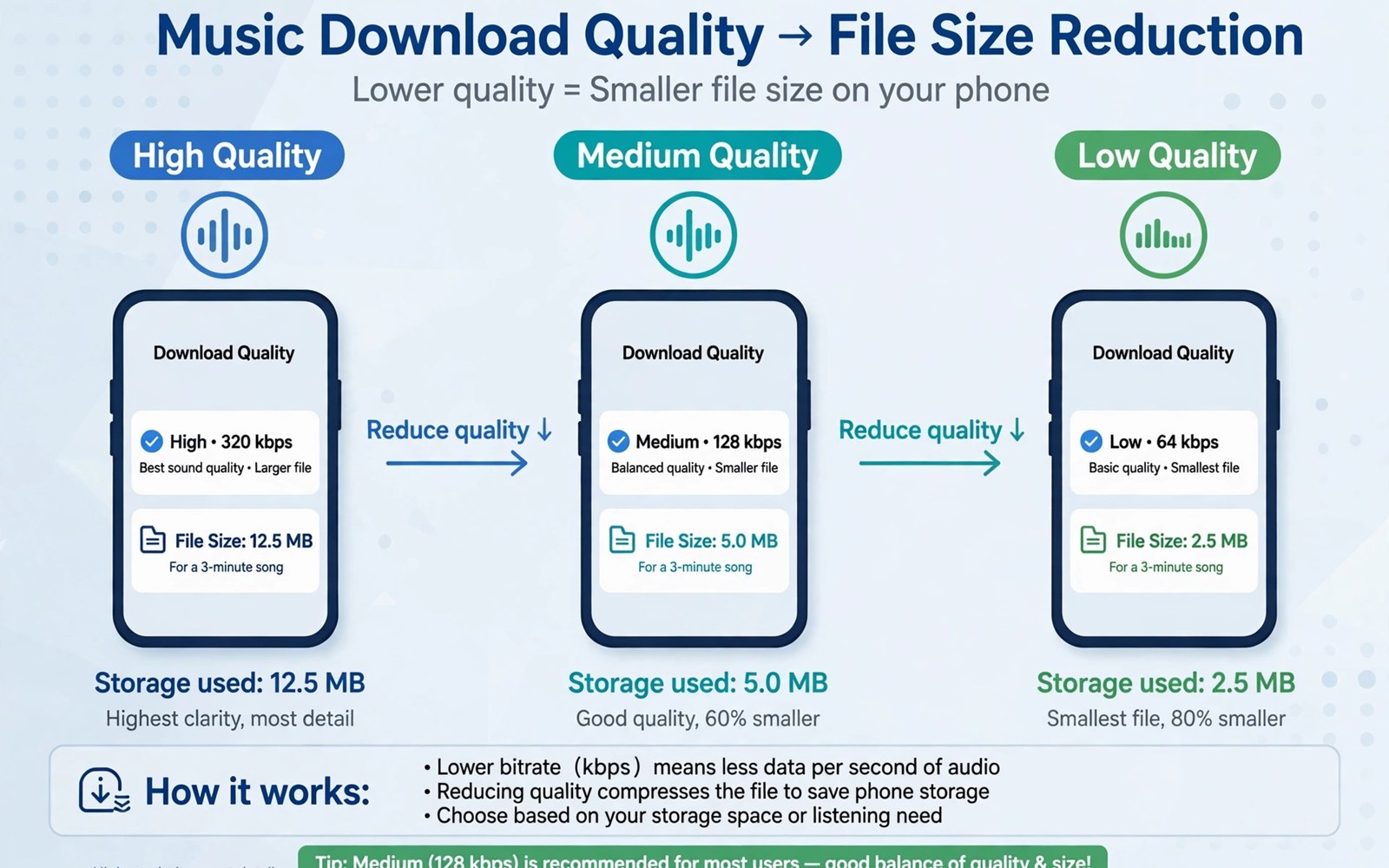
Music downloads feel small one song at a time. A playlist with hundreds of songs grows into gigabytes quickly. High quality audio uses far more space than normal quality audio. A phone that also holds photos and apps feels that growth fast. Lowering audio size is a simple trade that frees real space.
Sound quality differences are hard to notice on phone speakers and on basic earphones. A normal quality download often sounds fine for daily listening. A high quality download suits a quiet room with good headphones. Matching quality to listening gear saves space without ruining enjoyment. Owners who juggle many media types may also like storage hacks for owners of 64GB smartphones for a wider plan.
Start by checking how much space music downloads use in Settings. Open app storage for the music app and note the user data size. Compare that size with the number of downloaded playlists. A few large playlists often explain most of the usage. That comparison tells you whether quality or playlist count is the bigger lever.
Lower download quality in settings
Open the music app settings and open audio quality. Choose normal quality for downloads when space matters. Keep streaming quality higher when you listen on Wi-Fi with good headphones. Downloads and streaming can use different quality settings in many apps. That separation lets you save space offline while enjoying better sound online.
Change the setting before you download a new playlist. Existing downloads keep their old quality until you remove and redownload them. Remove a large playlist and download it again at the new quality to realise the saving. Check the app storage size after the redownload. A clear drop confirms that the change worked. The same redownload logic helps when you clean Telegram download cache taking over devices by removing and refetching only needed media.
Manage offline playlists with intent
Keep offline only the playlists that you play without Wi-Fi often. A commute playlist and a workout playlist deserve offline status. A playlist that you play only at home does not need a download. Streaming at home uses no phone storage. Removing a home only playlist frees space without changing your listening.
Review downloads monthly and remove playlists that you have not played in weeks. A monthly review keeps downloads aligned with real listening. A playlist that returns to favour can be downloaded again quickly on Wi-Fi. That flexibility makes removal painless. A download is a convenience rather than a permanent collection.
Estimate download size with a short script
songs = 200
normal_mb = 5
high_mb = 12
print("normal total MB", songs * normal_mb)
print("high total MB", songs * high_mb)
print("saved MB", songs * (high_mb - normal_mb))
The snippet above follows a standard pattern for estimating playlist download size at two quality levels. It only prints estimates and it changes no file. You can adapt the song count for your own playlists.
An estimate makes the quality trade concrete. A large playlist can save more than a gigabyte by moving from high to normal quality. A small playlist may save only a modest amount. Use the estimate to decide which playlists deserve a redownload first. Large playlists give the biggest return for the effort.
Balance downloads across devices
Music downloads on a phone do not need to mirror downloads on a tablet or a computer. Each device can hold the playlists that suit its use. A phone can hold commute playlists. A tablet can hold home listening playlists. A computer can hold a full library. A device specific download plan saves space on every device. A mirrored plan wastes space on devices that rarely play certain playlists.
Review downloads on each device separately. A playlist that you downloaded on a tablet may not need a phone copy. A playlist that you downloaded for a trip may not need to stay after the trip. A device review takes minutes and it frees space that a phone only review misses. A balanced plan treats each device as a separate listener with separate needs.
Use streaming for discovery and downloads for favourites. A new playlist deserves streaming first to test whether you like it. A playlist that becomes a favourite deserves a download for offline use. A playlist that you stream rarely does not deserve download space. That discovery first habit prevents downloads from accumulating by default.
Clean up podcast and audiobook downloads too
Podcasts and audiobooks can fill storage as surely as music playlists. A podcast app may download new episodes automatically. An audiobook app may keep finished books downloaded indefinitely. Review podcast settings and limit automatic downloads to recent episodes. Delete finished audiobooks after you finish listening to them. A finished book that stays downloaded is wasted space.
Set a podcast retention rule such as keeping only the latest three episodes. A retention rule deletes older episodes automatically after new ones arrive. A rule keeps the podcast current without manual cleanup. A manual cleanup of dozens of old episodes feels tedious and it often gets postponed. An automatic retention rule prevents that pile from forming.
Check audio app storage separately from music app storage. A podcast app with a large cache can rival a music app in size. A combined audio check gives a true picture of audio storage use. A true picture helps you decide whether music or podcasts deserve the next cleanup. A single app check can mislead you when another audio app holds the real bulk.
Advanced audio management for commuters
Commuters rely on offline audio because networks drop in tunnels and on trains. A commuter playlist needs to be downloaded before departure. A download prepared at home on Wi-Fi avoids data costs and dropouts. A commuter who prepares downloads nightly never faces a silent commute. A nightly preparation habit fits naturally into an evening routine.
Rotate commuter playlists weekly to keep listening fresh. A playlist that never changes becomes boring and it wastes download space on songs that you skip. A weekly rotation replaces stale songs with new favourites. A rotation also keeps download size stable because old songs leave as new songs arrive. A fresh rotation makes a commute enjoyable rather than repetitive.
Use a single audio app for commuting to simplify download management. Several audio apps each hold their own downloads and caches. A single app holds one download set that is easy to review. A single app also builds a listening history that improves recommendations. A focused app choice simplifies both storage and discovery.
Download podcasts for a commute in addition to music. A podcast episode can fill a long commute better than a short song set. A podcast download at home prepares a long form listen without data use. A mix of music and podcasts suits different commute moods. A varied offline library makes every commute feel different.
Check commuter downloads before leaving home each morning. A quick check confirms that last night downloads completed. A check also reveals a failed download that can be retried on home Wi-Fi. A morning check takes seconds and it prevents a silent commute. A prepared commuter arrives calmer than an unprepared one.
A practical audio checklist for workouts
A workout audio checklist starts with a playlist downloaded the night before a session. A night before download ensures offline playback in a gym with poor signal. A gym with poor signal can interrupt streaming at a critical moment. An offline playlist plays smoothly regardless of network. A prepared playlist supports a focused workout.
Choose workout audio quality that suits gym earphones rather than studio headphones. Gym earphones and ambient noise hide quality differences. A normal quality download sounds fine in a gym environment. A high quality download wastes space for no audible benefit in that setting. A quality choice matched to the environment is practical.
Rotate workout playlists monthly to keep training fresh. A stale playlist can make workouts feel repetitive. A monthly rotation introduces new energy to training. A rotation also keeps download size stable as old songs leave. A fresh playlist can motivate a harder session.
Delete workout playlists that you skip consistently. A skipped song in every workout is a song that does not belong in the playlist. A playlist cleaned of skipped songs plays without interruptions. A clean playlist supports a steady workout rhythm. A rhythm without skips feels better than a larger playlist with constant interruptions.
Common mistakes
One common mistake is downloading every liked song automatically. A second mistake is keeping high quality downloads for phone speaker listening. A third mistake is forgetting downloads on an old device that you no longer use. Each mistake fills storage with music that adds little enjoyment.
Another mistake is deleting the music app data instead of managing downloads inside the app. A data clear removes login and settings as well as downloads. Manage downloads from the app library screen instead. That screen shows exactly which playlists use space.
Frequently asked questions
Will lower quality sound noticeably worse?
Normal quality sounds fine on phone speakers and on basic earphones. Differences appear mainly on high quality headphones in a quiet room. Test the same song at both qualities with your usual gear. Keep high quality only for playlists that you play with good headphones.
Do I need to redownload after changing quality?
Existing downloads keep the quality that they were downloaded at. Remove a playlist and download it again to apply the new quality. Check app storage after the redownload to confirm the saving. New downloads after the change use the new quality automatically.
Can I keep some playlists in high quality?
Keep high quality for a favourite playlist that you play with good headphones. Use normal quality for commute and workout playlists. A mixed approach saves space while preserving sound where it matters most. Review the mix monthly as listening habits change.
Conclusion
Spotify download size is a controllable trade between sound quality and storage. Normal quality suits most daily listening gear. Playlist intent matters as much as quality because home only playlists need no download. A monthly review keeps downloads aligned with real use.
Your concrete next step is to change download quality to normal today and remove one large home only playlist. Redownload a favourite commute playlist at the new quality on Wi-Fi. Readers who need more room can follow ways to free a large amount of phone storage quickly as the next cleanup step.

