

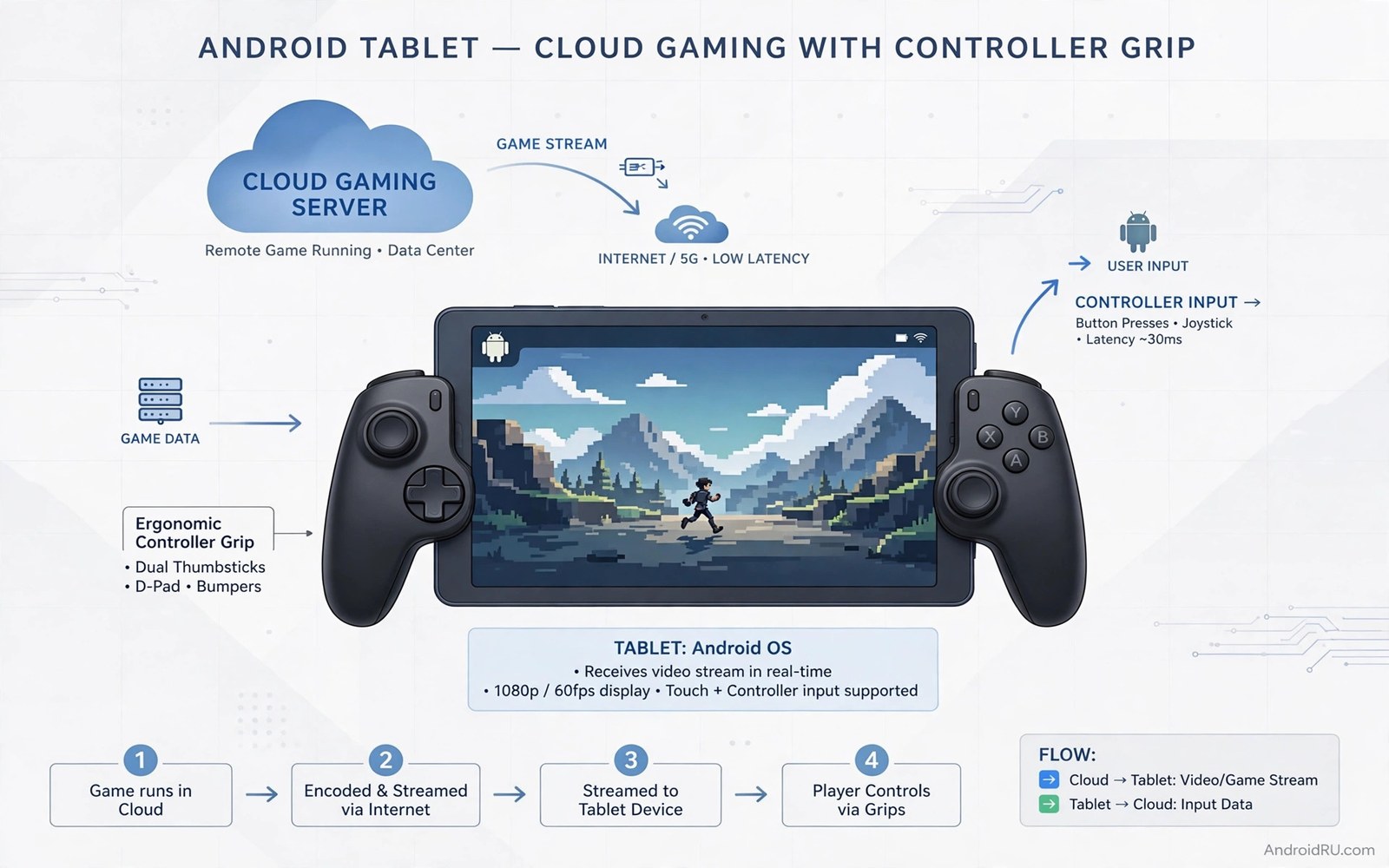
A tablet sits between a phone and a dedicated handheld in size. Its screen is large enough for real games. Its body is light enough to carry anywhere. Cloud gaming removes the need for a strong tablet chip. The tablet only decodes a video stream and sends input back. That combination makes a tablet a surprisingly good portable console.
The build has four parts. A tablet with a decent screen and battery. A controller that fits your hands for long sessions. A network setup that stays stable at home and on travel Wi-Fi. A case and stand setup that protects the tablet on the road. Each part matters. A great controller cannot fix a weak network. A great network cannot fix a terrible screen angle.
Start by testing your tablet and network with a cloud game you already like. Play for thirty minutes in your usual spot at home. Note the screen comfort and the stream stability and the battery drain. That test shows which part needs work first. If phone cloud play interests you too then read the secret hack to use cloud gaming on low-end budget phones for the smaller screen version of this plan.
Pick the tablet setup that suits gaming
Screen brightness and colour matter more than raw resolution for cloud play. A bright screen stays readable in a well lit room. A dim screen forces eye strain during long sessions. Test the tablet at your usual brightness before you buy accessories. A tablet that needs maximum brightness all day will drain battery fast.
Battery life decides how portable the console really is. A tablet that lasts two hours of streaming needs a charger nearby. A tablet that lasts four hours can handle a travel day. Test battery drain in one thirty minute cloud session and project the total. Carry a power bank for travel sessions that exceed that projection.
Storage matters less for cloud gaming than for native gaming. Cloud games run on a server and need little local space. Keep enough free storage for the cloud app and updates. A tablet with modest storage still works well as a cloud console. That fact makes an older tablet a good candidate for this build.
Choose a controller and mount for a tablet
A standard Bluetooth controller suits tablet play best. A telescopic controller rarely fits a large tablet. A standard pad pairs cleanly and feels familiar for long sessions. Choose a pad with good battery life and comfortable grips. Test the pad for fifteen minutes in a fast game before a travel day.
A tablet stand or case with a built in stand holds the screen at a good angle. A stand that holds the tablet upright on a table works well at home. A case stand works well on a train or in a hotel room. Avoid a flimsy stand that collapses when you tap the screen. A stable stand keeps the stream view steady during play.
A mount that clips a controller to a tablet can work for smaller tablets. Check the clip width and weight balance before you buy one. A heavy tablet on a light controller feels top heavy fast. A separate stand and controller often feels better for tablets above ten inches. For mount ideas read seven controller mount accessories that upgrade mobile controls before you choose a mounting style.
Build a stable network plan for home and travel
At home use the 5 GHz Wi-Fi band and sit near the router for serious sessions. A clean local link gives the lowest cloud delay. Pause large downloads on the home network during play. A family video stream can crowd the link and cause stream stutter. A quiet network at home gives the best cloud result.
On travel use hotel or café Wi-Fi only after a speed test. A crowded public network can give high jitter even with good download speed. Lower the stream quality one step on public Wi-Fi. A stable lower quality stream beats a stuttering high quality stream. Avoid cloud play on a public network for competitive games. Save competitive sessions for a trusted home network.
Mobile hotspot play works as a backup when Wi-Fi is bad. A strong mobile signal can carry a medium quality stream well. Watch data use closely on a hotspot. An hour of cloud play can use several gigabytes. Set a data warning on the tablet before hotspot play starts.
Check the tablet Wi-Fi link with commands
The debug bridge can report Wi-Fi status and link details on a connected tablet. The commands below only read information. They do not change any network setting. Use them to compare the home link and a travel link before a session.
adb shell dumpsys wifi
adb shell dumpsys wifi | grep -i -A 3 -B 3 "link speed"
adb shell dumpsys battery
adb shell settings get global wifi_on
The code above was written for this guide as a short Wi-Fi check example. A strong link speed with low jitter points to a good cloud session. A weak link speed points to distance or interference rather than a cloud service problem.
Pack a tablet cloud console for travel
A travel pack for a tablet console starts with a checklist. List the tablet and controller and stand and charger and cable. Check each item the night before travel. A missing cable can ruin a travel session completely. A checklist prevents that simple failure.
Charge every device fully before departure. A tablet and a controller and a power bank all need full charges. A power bank extends tablet play beyond its internal battery. Test the power bank with the tablet before travel. A power bank that charges slowly will disappoint on a long trip.
Download offline backup games before travel as well. Cloud play needs a network that travel may not provide. A native game backup keeps the tablet useful on a plane. Choose two native games that run offline. That backup turns a dead network into a minor inconvenience.
Protect the tablet with a sturdy case for transit. A case with corner protection guards against bag bumps. Keep the tablet in a padded compartment away from heavy items. A controller pouch protects sticks during transit. Good packing keeps gear safe across many trips.
Plan travel sessions around network quality at each stop. A hotel Wi-Fi may suit story games well. A café Wi-Fi may suit only short casual sessions. Save competitive play for a trusted home network. That planning keeps travel gaming enjoyable rather than frustrating.
Use a tablet console on the go
A tablet console on the go needs a plan for changing networks. A train Wi-Fi may drop between stations and interrupt a stream. A café Wi-Fi may require a login page that breaks a session. Test the network before starting a long game session on the go. A short test prevents a mid game disconnect.
Battery planning matters more on the go than at home. A tablet stream drains battery steadily for hours. A power bank should be charged and tested before departure. A low battery warning during a boss fight or a ranked match ruins the session. Plan charging stops into a travel day when possible.
Comfort on the go needs a compact stand and a quiet play spot. A noisy café table may distract from story games. Headphones help focus in public spaces without disturbing others. A small stand keeps the screen steady on a moving train table. Those small items make travel play genuinely enjoyable.
Common mistakes
The biggest mistake is buying a telescopic controller for a large tablet without checking fit. A clip that cannot hold the tablet safely will slip during play. Use a standard controller and a separate stand for large tablets. That setup is stabler and more comfortable.
- Players use maximum stream quality on public Wi-Fi and then blame the cloud service.
- Players skip a battery test and then run out of power mid session on travel.
- Players use a flimsy stand that collapses during a fast game scene.
- Players ignore data use on a hotspot and then hit a mobile data limit.
- Players play competitive games on a crowded public network and then suffer jitter.
Another mistake is treating a tablet cloud console as a replacement for all native gaming. Cloud play needs a network at all times. Native games work offline on a plane or in a low signal area. Keep one or two native games installed for offline moments. That backup keeps the tablet useful everywhere.
FAQ
Can an old tablet work as a cloud console?
Yes an old tablet often works well for cloud play. Cloud gaming needs video decoding rather than a strong game chip. A tablet with a decent screen and a clean Wi-Fi link can stream well. Test the tablet with a free cloud trial before you buy accessories for it.
An old tablet often works well for cloud play. Cloud gaming needs video decoding rather than a strong game chip. A tablet with a decent screen and clean Wi-Fi can stream well. Test with a free cloud trial before buying accessories.
Do I need a special cloud gaming tablet?
No a normal Android tablet works fine with a cloud app and a controller. A special gaming tablet may offer a brighter screen or better speakers. Those extras help but are not required. A standard tablet with a good stand and controller gives most of the benefit.
A normal Android tablet works fine with a cloud app and a controller. A special gaming tablet may offer a brighter screen or better speakers. Those extras help but are not required. A standard tablet with a good stand gives most of the benefit.
How do I protect the tablet on travel?
Use a sturdy case that covers the corners and the screen when closed. Carry the controller in a separate padded pouch. Keep the tablet in a bag compartment away from heavy items. For home PC streaming on a tablet read how to stream PC games directly to an Android phone for a local stream plan that also works on a tablet.
Use a sturdy case with corner protection for travel. Carry the controller in a separate padded pouch. Keep the tablet away from heavy items in a bag. A padded compartment protects the screen during transit.
Conclusion
An Android tablet becomes a portable cloud console with a standard controller and a stable network and a good stand. Cloud play removes the need for a strong tablet chip. Home Wi-Fi gives the best result and travel Wi-Fi needs a lower stream quality. A native game backup keeps the tablet useful offline.
Your concrete next step is to test one thirty minute cloud session on your tablet tonight at home. Note battery drain and stream stability and screen comfort. Buy a controller and a stand only after that test shows a stable stream in your usual spot.

