

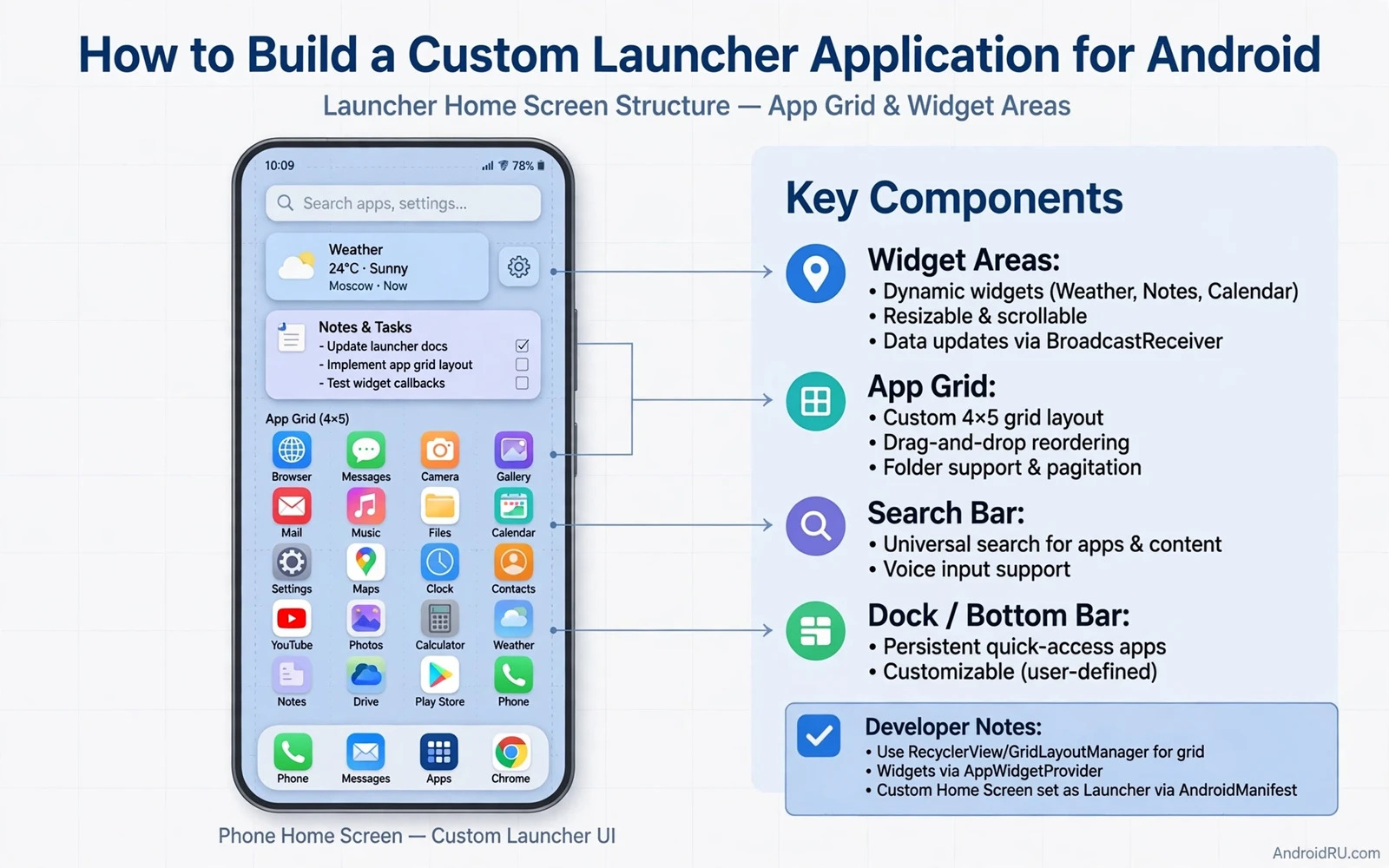
A launcher is the app users see first every time they unlock a phone. It owns the home screen and the app drawer and often the widget host. Building a launcher means designing the daily starting point for everything else on the device. It also means handling performance and stability under constant use. This guide covers the core pieces of a launcher and the pitfalls that sink many first attempts.
A launcher starts as a home activity that the system offers as a default home choice. The user selects it in system settings after installing it. The system then launches it whenever the user presses home. That role carries responsibility. A launcher crash returns the user to a fallback or to a blank screen. Stability matters more for a launcher than for most apps because a launcher failure blocks access to everything else.
Start with a minimal launcher that shows a grid of apps and opens them reliably. Add a drawer and widgets and search only after the grid works flawlessly. A launcher with a perfect grid beats a launcher with many half working features. Users judge a launcher by daily reliability first and by extra features second. Build the foundation before the decoration.
<intent-filter>
    <action android:name="android.intent.action.MAIN" />
    <category android:name="android.intent.category.HOME" />
    <category android:name="android.intent.category.DEFAULT" />
</intent-filter>
Home screen grid
The home screen grid holds icons and widgets in cells. Design the grid to adapt to screen size and orientation. A grid that fits a phone may waste space on a tablet. Let users choose grid size within sensible limits. Save the grid layout per user so an update never rearranges icons without permission. Losing a user layout on update is the fastest way to lose a launcher user.
Icon rendering needs care. Load app icons through the package manager and cache them at the display size. Loading full size icons for every app wastes memory. Cache icons on disk with invalidation when an app updates. An icon that stays stale after an app update looks broken. Listen for package changes and refresh the affected icons promptly.
Drag and drop makes the grid feel alive. Users drag icons to new positions and onto each other to create folders. Implement drag with clear visual feedback. Highlight the target cell during a drag. Show a folder preview when two icons overlap. Test drag on small screens where fingers cover the target. A drag interaction that feels precise earns trust. A drag that drops icons randomly frustrates at once.
App drawer and search
The app drawer lists every installed app in a scrollable view. Sort it alphabetically by default and let users search by name. Search should match as the user types without lag. Index app names at startup and update the index on package changes. A drawer search that lags on every keystroke feels broken even when results are correct.
Hide apps only when the user explicitly chooses to hide them. A hidden app that the user cannot find feels like a deleted app. Provide a clear hidden apps section in settings with an unhide action. Never hide system apps by default because users need them for device functions. Respect user choice and make every hide reversible in one place.
Folders in the drawer and on the home screen need a simple model. A folder holds a list of app identifiers and a name. Store folders in the same layout store as the grid. Sync folder changes at once so a crash never loses a folder edit. Test folder editing after a reboot because layout persistence bugs appear only across restarts.
Widgets and hosting
A launcher hosts widgets from other apps. Hosting requires a widget host component and permission handling for widget binding. The system asks the user to allow binding when a widget is added. Handle a denied binding gracefully with a clear explanation. A widget that fails silently after a denied binding looks like a launcher bug. Explain the permission and offer a retry path.
Widget sizing inside the grid needs a clear rule. A widget spans a number of grid cells. Resize handles let users change the span. Enforce minimum and maximum spans from the widget provider. A widget forced smaller than its minimum breaks its layout. Readers who build widgets can continue with the piece on building custom widgets for home screens and understand provider constraints from the other side. Host and provider must agree on size rules.
Widget updates flow through the system while the launcher displays them. The launcher must not poll widgets for updates. It displays the remote views the system provides. A launcher that interferes with update timing drains battery and breaks widget freshness. Trust the system update flow and focus launcher effort on layout and interaction.
Design and themes
Launcher design sets the visual tone for the whole device. Icon packs and themes let users personalise the home screen deeply. Support icon packs through the standard icon pack interface when the launcher targets that audience. Test icon packs with missing icons because a pack rarely covers every app. Fall back to the default icon for missing entries with a consistent mask.
Material design guidance helps launcher surfaces feel native. Readers who design interfaces can continue with the piece on Material Design 3 guidelines for developers and apply its shape and colour rules to drawer and folder surfaces. A launcher that follows system language feels like part of the device rather than an overlay.
Dark theme support matters for a launcher because the home screen is visible in every lighting condition. Readers who implement themes can continue with the piece on implementing dark theme support in apps and carry theme tokens into launcher layouts and drawer surfaces. A launcher that respects the system theme feels integrated at once.
Performance and stability
A launcher must stay fast under constant use. Cold start time matters because users press home dozens of times per day. Keep the home activity light and defer heavy work until after the first frame. Cache the app list and the layout on disk so startup reads locally. A home press that waits for a full package scan feels sluggish even when the scan takes only a second.
Memory use needs discipline. A launcher holds icon caches and widget views for the whole session. Set cache limits and evict aggressively when memory pressure rises. A launcher that grows unbounded will be killed by the system at the worst moment. Test long sessions with many widgets and many apps. A launcher that survives a week of daily use without growth is ready for users.
Crash handling deserves special design. A launcher crash should recover to a usable home screen fast. Avoid a crash loop where the home activity crashes on every launch. Guard layout loading with a fallback to a default grid when stored layout data is corrupt. A fallback grid with all apps visible beats a crash loop that locks the user out of the phone.
Ship a launcher users keep
Test on several devices and launchers contexts. A launcher behaves differently as a default home and as a secondary home. Test setting it as default and removing it as default. Test after a system update because home behaviour can change. Test with a large app count because a drawer with hundreds of apps stresses search and scrolling.
Gather feedback on the default experience before adding exotic features. Users keep a launcher when the basics feel perfect. Grid reliability and drawer search and widget stability matter more than a novel gesture. Add one distinctive feature at a time and measure whether users keep it enabled. Features that users disable add maintenance cost without value.
Building a launcher is building a home. It must welcome the user every time and never lose their arrangement and never block their apps. Achieve that reliability first and personalisation second. A launcher that masters both becomes the daily starting point users choose to keep.
Launcher backup and restore
Launcher backup protects the most personal part of the phone. A user layout with folders and widget placements represents hours of arrangement. Back up that layout to the user account when the user enables backup. Restore it after a device change or a reinstall. A restore that recreates folders exactly earns deep loyalty. A restore that loses folders earns an uninstall.
Backup design must handle missing apps gracefully. A restored layout may reference an app that is not installed on the new device. Show a placeholder for the missing app with an install action when the app becomes available. Never silently drop a missing app from a folder because the user may install it later and expect the folder intact. Placeholders preserve intent across device changes.
Privacy matters for launcher backup too. A layout reveals which apps a user values and how they organise them. Encrypt backup data in transit and at rest. Let users disable layout backup separately from other backup types. A user who disables backup should see local layout data stay local. Respect for layout privacy builds trust in the launcher as a whole.
Test restore on a different device model. Grid sizes and widget spans differ across screens. A layout from a large phone may not fit a small phone grid. Adapt the layout during restore with a clear rule such as shrinking spans and moving overflow items to the drawer. Test restore across sizes so users who change phones keep a usable home screen.
Gesture navigation and launchers
Gesture navigation changes how launchers handle home and back actions. A launcher must work smoothly with gesture navigation on modern devices and with button navigation on older devices. Test swiping home from every screen state including an open folder and an open drawer and a widget configuration screen. A gesture that conflicts with a launcher drag creates confusion because the user cannot tell which action the system will take. Reserve screen edges for system gestures and keep launcher drag handles away from those edges. Clear edge rules keep gestures predictable. Test gesture behaviour after a system update because navigation handling can change between versions. A launcher that adapts quickly to navigation changes keeps users who upgrade their system without friction. Gesture reliability matters as much as grid reliability because users invoke home dozens of times per day and every failed gesture erodes trust in the launcher.

