

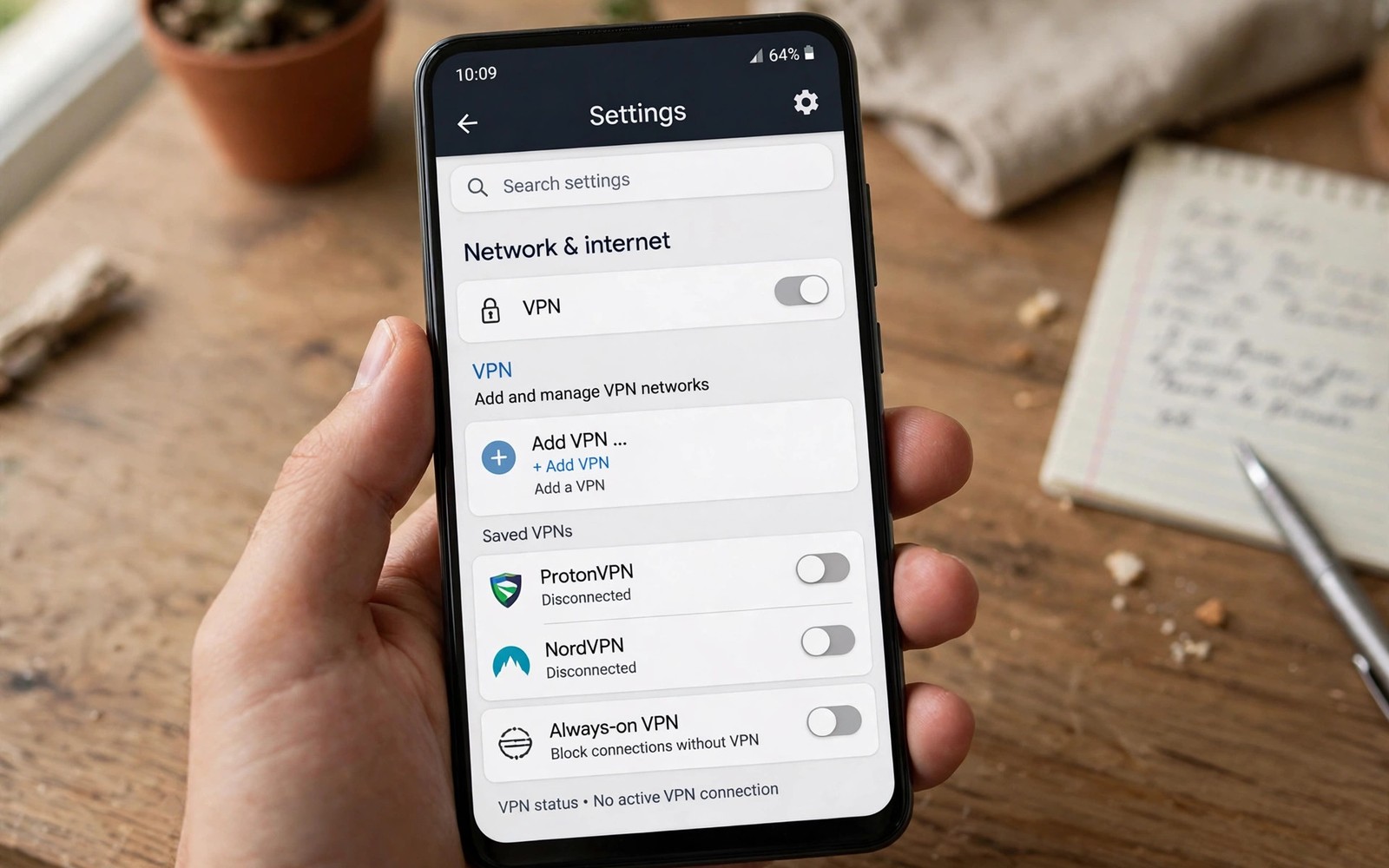
System VPN profiles let Android connect to a VPN without installing a separate VPN app. You enter server details and credentials directly in Settings under Network and internet. Android builds the tunnel using its built-in VPN client and standard protocols. The connection behaves like an app VPN once it becomes active on the phone.
Workplaces and schools commonly distribute system profiles because they need no app store approval. An administrator can share server address and protocol type and login details by email or portal. Users enter those details once and reconnect with a single tap afterwards. Learning what a mobile VPN is and why you need one explains the tunnel that system profiles create in the same way as app tunnels.
System profiles suit users who prefer minimal apps and direct control over connection settings. They also integrate cleanly with Android always-on VPN and per-app routing features. The trade is fewer convenience features such as automatic server selection and built-in kill switch toggles. Manual profiles reward users who value simplicity and transparency.
Where System Profiles Live in Settings
Open Settings and go to Network and internet and then VPN to see existing profiles. The screen lists profiles added manually and profiles created by VPN apps. Tapping a profile name opens its detail screen with connect and edit options. The gear icon beside a profile opens always-on and per-app settings for that profile.
Adding a profile starts with the plus button on the VPN screen in most Android versions. Android asks for a profile name and a protocol type such as IKEv2 or L2TP or PPTP. Older protocols appear for compatibility but modern setups should avoid PPTP entirely. IKEv2 offers the best balance of security and roaming support among built-in options.
Protocols Available Without an App
IKEv2 with IPsec is the recommended built-in protocol for modern Android system profiles. It handles network switching well because it can re-establish sessions quickly after roaming. It also supports strong authentication methods including certificates and secure passwords. Most workplace VPN gateways support IKEv2 alongside newer app based protocols.
L2TP with IPsec remains available for older gateways that have not migrated to IKEv2 yet. It requires a pre-shared key plus user credentials which adds configuration complexity. PPTP should be avoided because its encryption is weak by modern standards. A gateway that only offers PPTP needs an upgrade before it deserves trust.
Always-On VPN and Per-App Routing
Always-on VPN makes Android reconnect the profile automatically after reboot and network changes. Enabling it turns the VPN into a system requirement rather than an optional connection. The block connections without VPN option stops all traffic when the profile cannot connect. Together they provide system level kill switch protection without a third-party app.
Per-app settings let you choose which apps use the VPN profile and which bypass it. That system feature mirrors split tunneling inside commercial VPN apps on Android. Reading how split tunneling works for specific apps explains the privacy trade of bypassing the tunnel for specific apps. Keep bypass lists short even when system settings make exceptions easy to add.
- Add profiles under Network and internet then VPN
- Prefer IKEv2 over older built-in protocols
- Enable always-on VPN for automatic reconnection
- Enable block connections without VPN for full protection
- Keep bypass lists short in per-app settings
- Verify server details and phone clock on failures
Managing Credentials Securely
System profiles store credentials in Android credential storage protected by device lock. A strong device PIN or biometric lock protects stored VPN passwords from casual access. Avoid sharing profile credentials through insecure channels such as plain group messages. Administrators should rotate shared credentials when staff leave or devices are lost.
Certificate based profiles avoid password sharing entirely by using device certificates for authentication. Certificates can be revoked individually when a device is lost or replaced. That revocation advantage makes certificates preferable for larger organisations. Personal users can still benefit from certificate profiles when their provider supports them.
Troubleshooting System Profile Connections
Connection failures often come from a typo in the server address or an incorrect protocol choice. Double-check the server hostname character by character against the administrator details. Confirm that the phone clock is accurate because certificate checks fail with wrong time. A wrong clock is a surprisingly common cause of IKEv2 failures.
Network firewalls can block VPN ports on restrictive Wi-Fi networks such as hotels and schools. Switching to mobile data tests whether the local network blocks the VPN protocol. If mobile data works then the Wi-Fi network is the likely blocker. Contact the network administrator or use mobile data for VPN tasks in that location.
You can also explore data compression features in encrypted browsers for more context on neighbouring topics in this series.
Putting System VPN Profiles Into Practice
Open Android Settings and go to Network and internet and then VPN to start profile creation. Tap the plus button and enter the profile name exactly as your administrator provided it. Select IKEv2 as the protocol type for modern security and roaming support on Android. Enter the server address and credentials carefully without extra spaces at either end. Save the profile and tap its name to connect for the first time on the phone.
Enable always-on VPN from the profile gear icon after the first successful connection test. Enable block connections without VPN alongside always-on for complete traffic protection. Test the profile after a phone restart to confirm that it reconnects automatically. A restart test proves that always-on works rather than merely appearing enabled. Note any failure for your administrator before relying on the profile for work tasks.
Troubleshooting System Profile Problems
Authentication failures often come from a typo in the server address or username or password. Re-enter credentials character by character rather than trusting autocomplete entries blindly. Check the phone clock accuracy because certificate validation fails when the clock is wrong. A clock error of even a few minutes can break IKEv2 authentication completely. Automatic time settings usually fix clock drift without manual adjustment.
Firewall blocks on hotel and school Wi-Fi can prevent system VPN protocols from connecting. Test the profile on mobile data to determine whether the local network blocks VPN traffic. If mobile data works then the Wi-Fi network is the blocker rather than the profile. Contact the network administrator or use mobile data for VPN work in that location. Knowing the blocker saves hours of profile reconfiguration for a network problem.
Building a Habit That Lasts
Review system VPN profiles quarterly and delete profiles you no longer need for work or school. Old profiles with stored credentials create unnecessary exposure if the phone is lost. Deleting unused profiles reduces the attack surface without affecting daily use at all. Quarterly reviews catch profiles left over from completed projects and former employers. Clean profiles reflect current needs rather than accumulated history.
Keep administrator contact details handy for profile problems that require server side fixes. Some failures need gateway changes that users cannot fix from the phone alone. Prompt reporting with error details helps administrators diagnose gateway issues faster. Clear communication between users and administrators keeps workplace VPNs reliable for everyone. Good reporting habits benefit the whole organisation beyond your own device.
Explain system profiles to colleagues who struggle with VPN app installation restrictions. System profiles need no app store access which helps on managed or restricted devices. Sharing the Settings path helps colleagues connect without waiting for app approval processes. Simple guidance spreads workplace VPN adoption more effectively than lengthy manuals.
Advanced Tips and Next Steps
Use certificate authentication for system profiles when your organisation offers that option. Certificates avoid password sharing and enable individual revocation for lost devices. Certificate setup takes more initial effort than password entry on Android. Long term management becomes easier because revocation replaces password rotation for departing users. Organisations with many devices benefit most from certificate based system profiles.
Consider a dedicated work profile for system VPN profiles that serve only workplace resources. Work profiles isolate VPN traffic and credentials from personal apps on the same phone. Isolation prevents personal apps from accidentally using a work tunnel for unrelated traffic. Work profile separation also simplifies removal when employment ends without wiping personal data. Android work profiles exist precisely for this separation purpose on modern phones.
Test system profile behaviour during airplane mode toggles to confirm reconnection reliability. Airplane toggles simulate network interruptions that occur during travel and commuting. Reliable reconnection after toggles indicates a profile that will survive real world use. Unreliable reconnection signals a gateway or protocol issue worth reporting to administrators. Testing under realistic interruptions beats testing only under stable home Wi-Fi conditions.
Keep a screenshot of profile settings in a secure location for faster reconfiguration after a phone reset. Screenshots should exclude passwords while including server addresses and protocol choices. Secure storage prevents the screenshot itself from becoming a credential leak risk. A password manager note offers safer storage than a photo gallery for profile details. Recovery preparation saves hours during phone replacement emergencies.
Report system profile problems to administrators with exact error messages and timestamps for faster diagnosis. Exact errors help administrators distinguish client problems from gateway problems quickly. Timestamps let administrators correlate client failures with gateway logs on their side. Good reporting shortens resolution time for everyone sharing the same gateway. Collaborative troubleshooting improves workplace VPN reliability beyond individual fixes alone.
profile:
  type: ikev2
  server: vpn.example
  username: user
  always_on: true
The steps above follow the approach described in the official developer documentation for Android networking and privacy controls. The guidance reflects standard system behaviour for VPN profiles and always-on mode on Android devices.

