

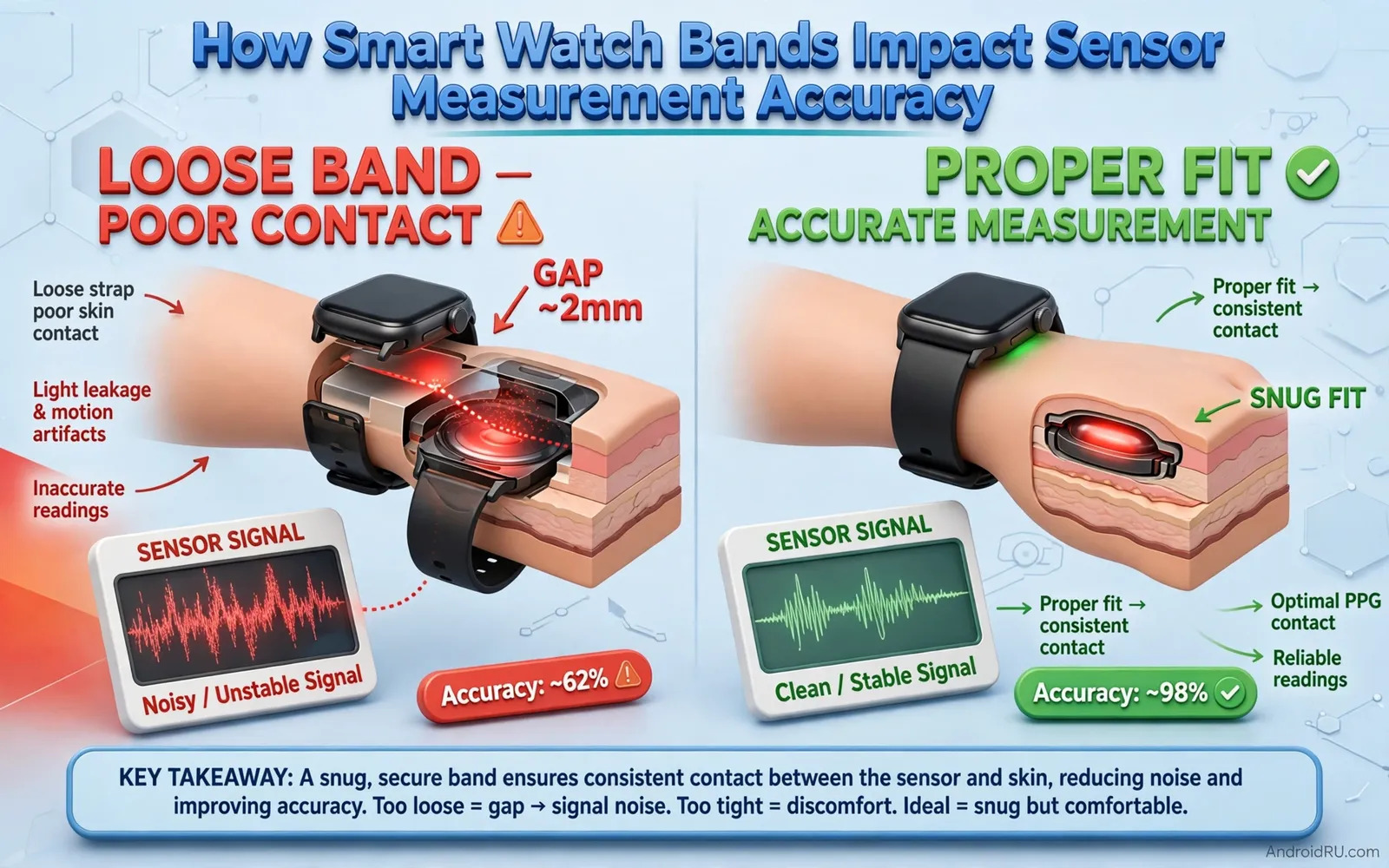
How Smart Watch Bands Impact Sensor Measurement Accuracy
I changed my watch band one morning and watched my resting heart rate jump by eight beats for no reason. Nothing else had changed. Same watch, same wrist, same morning routine. The only difference was a stiff leather band that let the watch rock slightly with every step. I swapped back to my silicone band, and the numbers settled the next day. That small experiment taught me something most watch owners never hear: the band is part of the sensor system, not just a strap that holds a screen on your wrist.
A smartwatch measures your body through sensors on its underside, and those sensors need steady contact with skin to work. The band controls how firmly they press, how much the watch moves during activity, and how much outside light leaks under the sensor. Change the band and you change the data, even when the watch itself stays exactly the same. This article explains how that happens, which materials help and which hurt, how to fit a band properly, and how to test a new band before you trust it with training decisions.
Readers comparing wearable hardware can explore smartwatches compatible with Android phones to see how sensor designs differ across models. Sensor layouts, LED counts, and sampling rates vary, and a band that works well on one watch may behave differently on another, so treat the advice here as a system to test on your own wrist rather than a universal rule.
How Optical Heart Sensors Work Through Skin, Light and Steady Contact
Optical heart sensors, usually called PPG sensors, shine green and sometimes red or infrared light into your skin and measure how much light bounces back as blood pulses through the vessels underneath. Each heartbeat changes blood volume slightly, and that change alters the reflected light. Software turns those tiny light changes into a heart rate, and over longer windows into heart rate variability, stress estimates, and sleep stages.
That measurement depends on a stable optical path. When the watch slides, the distance between the sensor and the skin changes, outside light leaks in, and the light signal gets noisy. Software has to filter that noise, and filtering works up to a point, then it starts guessing. A stable band reduces movement artefacts and gives the software cleaner data to work with, which is why two watches with the same sensor can report very different accuracy when their bands fit differently.
Electrical sensors need steady contact too. ECG electrodes on the watch case and crown measure the heart’s electrical signal when you touch them, and skin temperature and blood oxygen sensors also rely on the watch sitting flat and still. A band that keeps the watch centred on the wrist and snug without pain gives every sensor its best chance. A band that lets the watch tilt or slide robs every sensor at once, which is why fit problems show up across heart rate, sleep, and oxygen readings together rather than in one metric alone.
Why Movement Artefacts Distort Heart Rate More During Exercise
During a run, your arm swings, your wrist flexes, and sweat changes the skin surface. Each of those adds noise to the optical signal, and the noise often repeats at a rhythm close to your stride rate, which can fool the software into locking onto your cadence instead of your pulse. That is the classic cadence lock error, where a watch reports 170 beats per minute because your feet are striking at 170 steps per minute, not because your heart is beating that fast. A snug band that limits sliding cuts that error sharply, while a loose band invites it.
How Light Leakage Under the Sensor Creates False Readings
Sunlight and bright indoor light can enter the gap between a loose watch and the skin and flood the optical sensor. The sensor then measures room light as well as reflected LED light, and the pulse signal drowns in the background. This is most obvious outdoors on a bright day, when a loose band produces jumpy heart rate graphs that smooth out the moment you shade the watch with your other hand. A band that holds the sensor flat against the skin blocks that leak and keeps the measurement honest.
What a Clean PPG Signal Looks Like on a Watch Graph
A clean heart rate graph during steady exercise rises smoothly, holds a plateau, and falls gradually when you slow down. A noisy graph jumps up and down by ten beats or more within seconds, drops out to zero, or shows flat steps that look like a staircase. If your graph looks like the second kind, check the band before you blame the watch, because fit is the most common cause and the cheapest to fix.
Silicone vs Nylon vs Leather vs Metal: Band Materials and Sensor Accuracy Compared
Material choice changes three things at once: how well the band grips, how it handles sweat, and how it conforms to your wrist. No material wins on all three, so the right choice depends on what you do most while wearing the watch.
Silicone bands suit workouts because they resist sweat, wash easily, and grip skin reasonably well. They can trap sweat underneath during long sessions and can irritate sensitive skin if worn very tight for days, so rinse them after sweaty workouts and let the skin dry. Nylon fabric bands breathe better and feel lighter, which helps during long daily wear, but they absorb sweat, need washing, and can stretch slightly when wet, which loosens the fit exactly when you need it tight. Leather bands look smart for daily wear but absorb moisture, degrade with sweat, and suit workouts poorly. Metal link bands look premium but add weight, can slide more during activity, and can feel cold in winter.
| Material | Grip and sensor stability | Sweat and comfort | Best use |
|---|---|---|---|
| Silicone | Good grip, holds position well | Resists sweat, can trap moisture under the band | Running, gym, swimming |
| Nylon fabric | Good when dry, loosens when wet | Breathable and light, absorbs sweat | Daily wear, hiking, long walks |
| Leather | Fair, can shift as it softens | Absorbs moisture, degrades with sweat | Office and formal daily wear |
| Metal links | Weaker grip, slides during activity | Cool and dry, heavy, can pinch | Formal wear, short daily use |
| Elastic nylon | Very good, stretches to hold shape | Breathable, dries fast, needs washing | Running and sleep tracking |
Each material trades comfort, durability, and sensor stability differently, and owning two bands often beats searching for one perfect band. A silicone or elastic band for workouts and sleep, plus a leather or metal band for the office, gives you better data and better comfort than any single band used for everything. Readers tracking health with wearables can also review fitness trackers and health apps for Android for the software side of health data, because the app you pair with the watch decides how trends are shown and how easy it is to spot a bad reading.
Silicone Bands for Workouts: Sweat Resistance and Easy Washing
Silicone is the default workout band for good reasons. It does not absorb sweat, it rinses clean under a tap, and its soft surface grips skin without needing a very tight fit. The trade-off is trapped moisture: sweat can sit between the band and the skin during a long session, which softens the skin and can cause irritation over days of tight wear. Wash the band after sweaty sessions, dry it fully, and loosen it by one notch when you are not exercising.
Nylon Fabric Bands for Breathability During Long Daily Wear
Nylon feels lighter than silicone and lets air reach the skin, which helps during all-day wear in warm weather. The catch is stretch. A nylon band that fits perfectly when dry can loosen as it absorbs sweat, and that loosening lets the watch slide during the second half of a run. If you run in nylon, choose a band with a snug elastic weave or a micro-adjust clasp, and check the fit halfway through a long workout.
How to Tell Whether Your Band Material Is Hurting Accuracy
Wear the band for a week of similar workouts and look at the heart rate graphs. If the graphs are smooth with one band and jumpy with another, the band is the variable, not your fitness. Swap bands, keep the workouts similar, and compare. That simple A/B test settles most material debates faster than any review.
Fit Tightness and Wrist Position: The One-Finger Test and Workout Adjustments
Fit guidance from watch makers usually describes a snug fit that allows one finger under the band with effort. That guidance balances contact, comfort, and circulation. During workouts a slightly tighter fit often improves heart readings because movement increases, so tighten by one notch before a run or a gym session. During sleep a slightly looser fit often improves comfort and sleep quality, though it may reduce reading stability, so loosen by one notch at bedtime if the watch presses into your wrist overnight.
Wrist position matters too. Sensors work best on the flat top of the wrist, away from the wrist bone, with the watch face centred and the sensor window flat against the skin. A watch sliding toward the hand or toward the forearm changes the optical path and can weaken readings, because the skin over the bone is thinner and the sensor tilts. After you put the watch on, slide it until the sensor sits on the flat area, then tighten. Check the position again after ten minutes of activity, because bands settle and wrists change shape slightly as blood flow increases.
Wrist size and shape affect which band widths and materials work best. A wide stiff band may bridge over a small wrist and leave gaps under the sensor. A narrow flexible band may conform better to a curved wrist. Band hole spacing matters because a band that jumps from too loose to too tight in one notch never achieves a good fit. Micro adjustment clasps and elastic bands solve that problem by offering finer steps, and they are worth the small extra cost if your wrist falls between standard holes.
How to Fit Your Band in Thirty Seconds Before a Workout
Position the watch on the flat wrist away from the bone. Tighten to snug without pain. Shake your arm gently and check that the watch does not slide more than a few millimetres. Do ten jumping jacks or a short jog in place and check again. If the watch slides, tighten by one notch or switch to a band with finer adjustment. That routine costs seconds and improves the data that every health feature depends on.
Why the Same Fit Feels Different at Your Desk, on a Run, and in Bed
Your wrist changes size during the day. Heat, exercise, and salt intake make it swell slightly, while cold and rest make it shrink. A band that feels perfect at a desk may slip during a run when sweat lubricates the skin, and a band that feels snug during a workout may feel tight and uncomfortable overnight when your wrist is still and the watch presses one spot for hours. Adjust by one notch between contexts instead of searching for a single setting that fits all three, because no single setting does.
Micro-Adjustment Clasps and Elastic Bands for In-Between Wrists
If every band you try is either too loose or too tight, the problem is hole spacing, not your wrist. Look for bands with a sliding micro-adjust clasp, a hook-and-loop closure, or an elastic weave that stretches to your exact size. These close the gap between standard holes and often turn a watch that seemed inaccurate into one that tracks cleanly.
Running, Swimming, Weightlifting and Sleep: Best Band Choice for Each Activity
Different activities stress the band in different ways, so the best band for a run is rarely the best band for sleep. Match the band to the activity you care about most, and change bands when the activity changes if you want the best data from both.
Runners benefit from a light silicone or elastic nylon band that stays put without bouncing, because arm swing is the biggest source of movement artefacts. Swimmers need a band that tolerates chlorine or salt water, dries quickly, and does not stretch when wet, which rules out leather and most woven nylon. Weightlifters need a band that does not pinch under wrist wraps and does not catch on equipment, so a low-profile silicone band worn slightly looser during lifts, or a band removed during heavy sets, works best. Sleep trackers benefit from a soft low-profile band that does not press into the wrist overnight, with the watch loosened by one notch. Office users may prefer a leather or metal band for appearance during the day and a soft band for workouts and sleep.
Best Band for Running and Heart Rate Accuracy During Cardio
For running, choose a light silicone or elastic band, tighten by one notch before you start, and wear the watch slightly higher on the wrist, about one finger width above the wrist bone. That position keeps the sensor on flat skin and reduces sliding from arm swing. Check the first five minutes of the heart rate graph after your run: a smooth rise means the fit worked, while jumps and dropouts mean you should tighten the band or try a different material.
Best Band for Swimming, Sleep Tracking and Weightlifting
For swimming, silicone wins because it does not absorb water or stretch, and it rinses clean of chlorine. For sleep, a soft elastic or thin silicone band worn one notch looser avoids pressure marks and still tracks well, because you move less in bed than on a run. For weightlifting, a flat silicone band under a wrist wrap can pinch, so wear the watch on the opposite wrist during heavy sets or take it off for the heaviest lifts and put it back on between sets. No single band handles all three perfectly, which is why two cheap bands beat one expensive compromise.
Sweat, Tattoos, Hair and Skin: What Blocks Optical Sensors
Skin conditions, tattoos, and hair affect optical sensors regardless of band choice, and the band can only help or hurt at the margins. Dark tattoos under the sensor can absorb light and weaken heart readings, because the ink absorbs the same green light the sensor uses. Dense wrist hair can scatter light and reduce signal quality. Sweat changes the optical properties of skin during a workout, and lotions and sunscreen can create a film over the sensor window that blocks light entirely.
Clean the sensor window gently and regularly, because a dirty sensor window degrades every reading no matter how good the band may be. Use a soft damp cloth, avoid harsh chemicals that could damage coatings, and wipe the window after workouts and after applying sunscreen or lotion. If you have a tattoo exactly where the sensor sits, try wearing the watch on the other wrist or slightly higher on the forearm, where the skin is clear, and compare the readings before you decide the watch is faulty.
Sensitive skin needs band materials that minimise irritation over long wear. Medical grade silicone and soft nylon often suit sensitive skin better than leather treated with chemicals or metal alloys that contain nickel. Test a new band for a full day before committing to continuous wear and watch for redness or itching under the band. Wash the band before first use to remove manufacturing residues, and rotate between two bands made from different materials so skin recovers from any single material exposure. Clean the sensor window and the band after every sweaty workout, because residue on either one degrades the next reading before the workout even starts.
How to Handle Tattoos, Wrist Hair and Lotion Under the Sensor
If a tattoo sits under the sensor, move the watch to the other wrist or slide it higher toward the forearm and test for a week. If wrist hair scatters the signal, trim the small patch under the sensor rather than shaving the whole wrist, and keep the band snug so the sensor presses through the hair to the skin. Apply lotion and sunscreen at least fifteen minutes before putting the watch on, and wipe the sensor window if you apply either one while wearing it.
How to Test a New Band: A Step-by-Step Accuracy Check
Change bands carefully and check sensor contact after each change. A new band may sit the watch slightly higher or lower, or may change the angle of the sensor against the skin, and that small shift can change the data more than the material itself. Do a short test workout and compare readings against perceived effort before trusting a new band for important training data. If readings jump wildly or drop out frequently, adjust tightness or position before blaming the watch.
- Put the new band on and position the watch on the flat wrist away from the bone, then tighten to snug without pain.
- Record your resting heart rate for five quiet minutes and note the number, because a stable resting reading is the easiest baseline to compare.
- Walk briskly for ten minutes at a steady pace and watch the heart rate graph for smoothness rather than the average number.
- Do a short run or a bodyweight circuit at a known effort level and compare the peak heart rate with the same workout on your old band.
- Sleep one night with the new band and check whether sleep stages and resting heart rate look similar to the previous nights.
- If any step shows jumps, dropouts, or a resting rate far from your normal range, adjust tightness by one notch or change position before you repeat the test.
Keep notes on band changes during training blocks so later data reviews can explain sudden shifts. A heart rate that rises by five beats after a band change may mean the band loosened, not that your fitness fell. A sleep score that drops after a band change may mean the watch slid overnight, not that you slept worse. Notes turn those mysteries into simple explanations.
How to Compare a New Band Against Your Old Band Fairly
Compare like with like. Use the same workout, the same time of day, and the same effort level for both bands, and look at the shape of the graph rather than a single number. A fair test needs at least three similar workouts per band, because one workout can be noisy for reasons that have nothing to do with the band, such as heat, caffeine, or a poor night of sleep.
Reading Trends, Not Single Numbers: Interpreting Watch Data Safely
Health data from a wrist device should guide trends rather than diagnose conditions. A single unusual reading may reflect a loose band, a cold wrist, or a workout artefact rather than a health event. Look for patterns across days and across similar activities before drawing conclusions. Compare readings from the same band and the same fit when tracking progress, because changing bands mid-programme introduces a variable that can mimic improvement or decline.
Watch data becomes most useful when viewed as trends across weeks rather than as isolated daily numbers. Resting heart rate trends can reflect fitness changes, illness, stress, and sleep quality over time. Sleep duration trends can reveal patterns linked to late meals, screen use, or travel. Step trends can reveal activity changes linked to work patterns or seasons. A single unusual day rarely means much on its own because bands, sensors, and life all vary. Trends across similar weeks give a steadier picture and support better decisions about training and rest.
Seek professional medical advice for concerning symptoms regardless of what a watch reports. A watch cannot diagnose heart problems or sleep disorders or other medical conditions. It can highlight patterns worth discussing with a clinician. Sharing watch data with a clinician works best when the data includes context, so note band changes, illness, travel, and training load alongside the numbers. Bring questions rather than conclusions to a consultation, because a watch highlights patterns worth discussing rather than diagnosing conditions itself.
When a Sudden Change in Your Data Means the Band, Not Your Body
Suspect the band first when a reading changes suddenly on the same day you changed bands, when only one metric changes while the others stay normal, or when the change reverses the moment you tighten the band or switch back to the old one. Suspect your body when the change builds gradually over days, shows up across several metrics at once, and matches how you feel. That simple check saves a lot of worry and a lot of wasted training adjustments.
Care, Cleaning and a Practical Fit Checklist for Accurate Sensors
Wash silicone and nylon bands regularly following maker guidance and dry them fully before wearing, because damp bands stretch, slip, and irritate skin. Inspect band pins and clasps for wear, because a failed pin can drop an expensive watch onto concrete. Rotate bands to let skin breathe and to extend band life. Clean the sensor window with a soft damp cloth and avoid harsh chemicals that could damage coatings. Store spare bands away from direct sun and heat so materials do not degrade between uses.
Band rotation and skin care support long-term wearable use. Alternate wrists occasionally when the main wrist needs a break and let skin breathe after workouts. Clean bands after sweating and dry skin fully before refitting. Watch for irritation under the band, because persistent redness signals a need for a different material, a looser fit, or a break from wear. Comfort and skin health matter as much as data quality, because a watch left in a drawer due to irritation tracks nothing at all.
- Position the watch flat on the wrist away from the bone
- Tighten to snug without pain or restricted circulation
- Adjust one notch tighter for workouts than for sleep
- Clean sensors and bands regularly for stable readings
- Rinse the wrist and band after workouts and dry both fully
- Rotate between two bands so skin recovers and bands last longer
Readers choosing affordable wearables can explore smartwatches under 200 compatible with Android for models where band choice still shapes the experience. A cheaper watch with a well-fitted band often reports cleaner data than an expensive watch with a loose one, because the sensor can only measure what the band lets it touch.
How Often Should You Replace a Watch Band?
Replace a silicone band when it feels sticky, holds a smell after washing, or no longer holds its shape. Replace a nylon band when it stretches, frays, or will not stay tight during workouts. Replace a leather band when it cracks, stiffens, or absorbs so much sweat that it stays damp. Replace any band when the pins, clasp, or spring bars show wear, because a band failure costs far more than a new band. A stretched band that slips during runs is the most common hidden cause of inaccurate heart rate data, and replacing it is cheaper than replacing the watch.
Smart Watch Band FAQ: Real Questions About Fit, Materials and Accuracy
How tight should a smartwatch band be for accurate heart rate readings?
Snug enough that the watch does not slide when you shake your arm, with one finger fitting under the band only with effort. Tighten by one notch for workouts and loosen by one notch for sleep. If the band leaves deep marks, restricts circulation, or causes numbness, it is too tight and the discomfort will make you wear it looser anyway, which defeats the purpose.
Can changing my watch band really change my heart rate data?
Yes. A different band can change how firmly the sensor presses, how much the watch slides, and how much light leaks under the sensor, and all three change the optical signal. I saw my own resting heart rate shift by several beats after a band change, and it settled when I returned to the old band. Test any new band with a short workout and compare the graph before you trust it for training.
What is the best watch band material for accurate sensor readings during exercise?
Silicone and elastic nylon give the most stable readings during exercise, because they grip well, resist sweat, and hold their shape when wet. Silicone is the safer default for swimming and heavy sweating, while elastic nylon is lighter and more breathable for running. Avoid leather and metal links for workouts, because leather absorbs sweat and metal slides during activity.
Why does my heart rate reading jump around during runs but look fine at rest?
Movement is the usual cause. At rest the watch sits still, so the optical signal is clean. During a run, arm swing and sweat let the watch slide, outside light leaks in, and the software can lock onto your stride rate instead of your pulse. Tighten the band by one notch, wear the watch slightly higher on the flat wrist, and check the graph again. If it smooths out, the band was the problem.
Does a loose band affect sleep tracking and blood oxygen readings too?
Yes, because the same sensors measure sleep and blood oxygen through the same optical path. A loose band that slides overnight creates gaps in sleep stage data and noisy oxygen readings, and it can also miss the small movements that help the watch tell light sleep from deep sleep. A soft band worn one notch looser than your workout fit, but still snug enough not to slide, is the best compromise for the night.
Start tonight with the thirty-second fit check: flat wrist, snug without pain, no sliding when you shake your arm. Then pick one band for workouts and one for the rest of the day, and test the workout band on your next run. Small changes to the band cost almost nothing, yet they decide whether the numbers on your wrist are worth trusting.

