

Redmi 14C Review: Everyday Speed, Cameras and Value
The Redmi 14C arrived on August 30, 2024, as Xiaomi’s answer to a simple question: how much phone can you get for very little money? The Redmi 14C release date August 30 2024 global launch put it straight into the busiest corner of the budget market, where a big screen, a long-lasting battery and a decent camera matter far more than benchmark records. This Redmi 14C review looks at the phone the way most buyers will actually use it: messaging, video, social apps, photos of family and friends, and the odd game on the bus home.
At its heart is the MediaTek Helio G81 Ultra, a 12nm octa-core chip with two Cortex-A75 cores at 2.0 GHz and six Cortex-A55 cores at 1.8 GHz, paired with Mali-G52 MC2 graphics. The Redmi 14C Helio G81 Ultra performance for daily use is the first thing this review checks, because a budget phone lives or dies on how it handles ordinary tasks. Around that chip sit 4GB, 6GB or 8GB of RAM, 64GB, 128GB or 256GB of eMMC 5.1 storage, a 6.88-inch display with a 120Hz refresh rate, a 50MP main camera and a 5160mAh battery. On paper it reads like a phone that costs much more, so the real question is where the corners were cut.
The short answer is that the Redmi 14C is a value-first phone for everyday tasks, built around a huge screen and a battery that keeps going. It is not a gaming phone and it is not a camera flagship, yet for calls, chats, video and photos in good light it covers the basics with room to spare. The rest of this review works through the design, the display, the speed, the cameras, the battery and the software, then ends with the full specifications, the pros and cons, and the people this phone suits best.
Design and Build Quality
The Redmi 14C is a big phone, and it does not try to hide it. It measures 171.9 x 77.8 x 8.2 mm and weighs between 204 and 211 grams depending on the finish, so it fills a pocket and a hand in equal measure. The frame is plastic, the front is protected by Corning Gorilla Glass 3, and the back is either glass or a silicone polymer finish that Xiaomi calls eco leather, depending on the colour you pick. The Redmi 14C Gorilla Glass front is a genuine plus at this price, because it shrugs off the small scratches that bare glass picks up in a pocket full of keys and coins.
The Redmi 14C fingerprint sensor sits on the side, built into the power button, which keeps the back clean and makes unlocking feel natural once your thumb learns the spot. The Redmi 14C fingerprint sensor side mounted how it works is simple: rest your thumb on the button and the phone opens, with no need to wake the screen first. Owners find it quick enough for daily use, and it doubles as a power key, so the layout stays tidy.
The Redmi 14C NFC availability market region dependent explained simply: some regions get NFC and some do not, so check the model sold where you live before counting on tap to pay. The Redmi 14C 3.5mm headphone jack FM radio features are small extras that still matter to plenty of buyers, letting you plug in wired earphones and listen to local radio without using mobile data. The Redmi 14C virtual proximity sensor during calls issues are worth a mention too: the phone uses a virtual sensor instead of a hardware one, so the screen can stay on or switch off a beat late during calls, and a cheek can occasionally brush a button.
A Big Phone With a Familiar Redmi Look
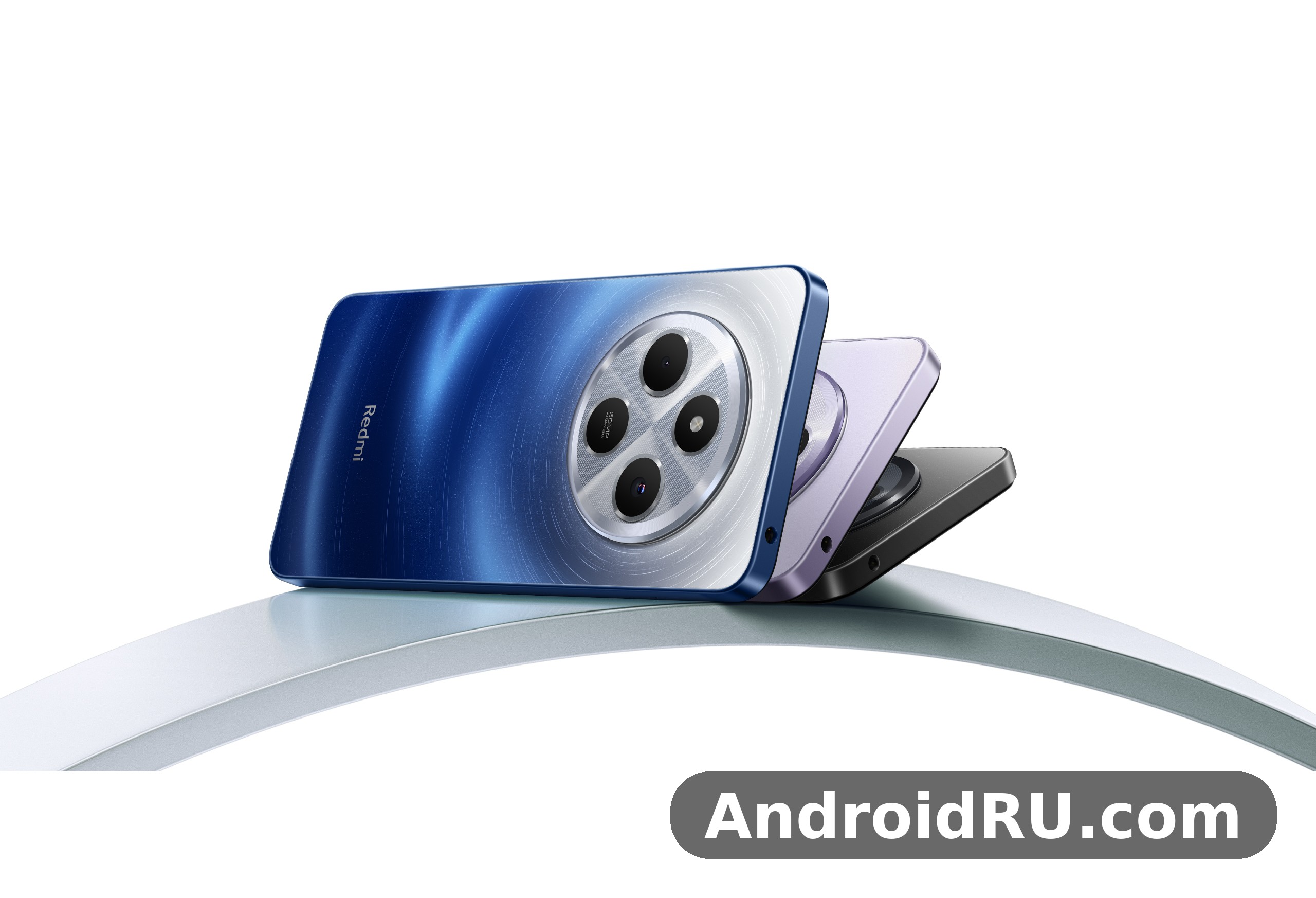
The camera island is a large circle in the top corner of the back, a look Redmi has used across its recent budget range. It holds the 50MP main camera, a depth helper and a small auxiliary lens, with the flash sitting beside it. The Redmi 14C Starry Blue color design first impressions lean on the starry pattern on the back, which catches the light without looking loud, while the other finishes are quieter and easier to keep clean.
Redmi 14C colors run to four choices, and each one suits a different taste. The Redmi 14C Midnight Black version suits buyers who want the phone to disappear into a pocket or a case. The Redmi 14C Sage Green version adds a soft matte look that hides fingerprints well. The Redmi 14C Dreamy Purple version is the boldest choice of the four, and the Redmi 14C Starry Blue version sits in between, with a pattern that rewards a second glance. All four share the same large camera circle and the same side-mounted sensor.
Colours and In-Hand Feel
A phone this size is a two-handed device for most people, and the Redmi 14C is honest about that. The Redmi 14C weight 211 grams one handed use comfort is a trade-off: the heaviest finishes feel solid and planted, yet reaching the top of the screen with one thumb takes a stretch, and a case adds more bulk still. The curved edges of the back help the grip, and the eco leather finishes add friction that the smooth glass backs lack, so choosing a finish is also choosing how the phone feels in the hand.
Durability Notes Worth Knowing
The Redmi 14C Gorilla Glass 3 screen protection durability is decent for the price, and the phone is listed as dust and splash resistant, which covers rain and the odd spill even though it carries no formal water resistance rating. A case and a screen protector are still sensible buys, because the large glass front is the most exposed part of a phone this size, and a drop onto a corner can crack any glass. The plastic frame will pick up scuffs over time, yet it also absorbs knocks that would dent metal, so it is a fair trade at this price.
Display: Big, Smooth and Bright Enough
The Redmi 14C 6.88 inch display 120Hz refresh rate is the headline feature of this phone, and it shapes everything else about using it. The Redmi 14C display is an IPS LCD panel measuring 6.88 inches, with a resolution of 720 x 1640 pixels and a density of around 260 pixels per inch. The Redmi 14C 120Hz panel makes scrolling through feeds and menus feel smooth in a way that 60Hz budget screens cannot match, and once you have used it, going back feels sluggish.
Brightness is rated at 450 nits in typical use and 600 nits in high brightness mode, which is enough for indoor use and workable outside, though direct sun still washes the panel out. The Redmi 14C screen brightness outdoor visibility under sunlight is workable rather than great: you can read messages and check maps, yet photos and video lose punch until you step into shade. For a phone at this price, that is a fair result, and the large size makes video and reading genuinely pleasant.
The 120Hz Refresh Rate in Daily Use
The 120Hz mode is adaptive, so the phone can drop the refresh rate when nothing is moving and save battery. In daily use, owners find the Redmi 14C display feels fluid when scrolling social apps, swiping between home screens and browsing long pages, which is where most owners spend their time. Games rarely hold 120 frames per second on this hardware, so the high refresh rate matters most for the interface rather than for play, and that is fine: a smooth interface makes a budget phone feel faster than its chip suggests.
Sharpness, Brightness and Outdoor Use
Colours on the IPS panel are natural rather than vivid, with decent viewing angles and no sign of the tint shift that cheaper LCDs sometimes show. Video looks good for the size, and the large panel suits subtitles, e-books and long video calls. Readers comparing screens may also like Redmi Note 11T 5G Review: Display Quality, Speed and Daily Use, which looks at a sharper panel from an older Redmi Note and shows how much display quality has changed across generations.
What the 720p Panel Means at 6.88 Inches
The Redmi 14C 720p display sharpness at 6.88 inches is the panel’s main compromise. At around 260 pixels per inch, small text is readable and icons look clean, yet fine detail in photos and tiny text can look slightly soft if you hold the phone close and look for it. Most owners will not notice it in daily use, because the size and the smooth refresh rate do more for comfort than extra pixels would. The lower resolution also helps the battery and the chip, since there are fewer pixels to push, which is part of why this phone lasts as long as it does.
Performance and Everyday Speed
The Redmi 14C performance story starts with honest expectations. The Helio G81 Ultra is a 12nm chip built for efficiency rather than speed, with two performance cores and six efficiency cores, and it handles the daily round of messaging, browsing, maps, music and video without complaint. The Redmi 14C Helio G81 chip is not built to win benchmarks, and it does not need to be: it is built to keep a cheap phone feeling quick through a normal day.
App opening times are reasonable on the 6GB and 8GB models in owner reports, and switching between a handful of apps is smooth. The Redmi 14C eMMC 5.1 storage speed real world impact shows up when installing large apps or copying files, where the older storage standard is slower than the UFS storage in pricier phones, yet it rarely gets in the way of opening a chat or loading a web page. The Redmi 14C microSD card slot expandable storage options keep the phone flexible too, because a cheap card can hold photos, music and offline video without touching the built-in storage.
Helio G81 Ultra in Real Daily Tasks
In the daily round, the chip spends most of its time on light work: typing, scrolling, playing video and keeping background apps alive. On paper and in owner reports, the Redmi 14C Helio G81 Ultra performance for daily use holds up well here, and the 120Hz display helps the phone feel quicker than the raw numbers suggest. Heavy web pages with lots of ads can slow things down, and the camera app can take a beat to open, yet nothing in the ordinary routine feels broken. This is the level of speed most buyers in this price range actually need.
Gaming on the Redmi 14C
The Redmi 14C gaming experience is best described as casual-friendly. Light games run well, and popular titles at low to medium settings are playable, though demanding 3D games need the lowest graphics options and still drop frames in busy scenes. The Redmi 14C gaming performance Helio G81 Ultra test reports from owners point to the same picture: fine for a quick match or a puzzle game, not the phone to buy for competitive play. The large screen and the big battery do help, since long sessions stay comfortable and the battery drains slowly, and the phone stays cool enough to hold. Players who want a stronger gaming record from an older Redmi should read the Redmi Note 10 Review: Gaming, Multitasking and Battery Life, which covers a phone that handled games with more headroom in its day.
RAM, Storage and Multitasking
Choosing the right variant matters more than usual on this phone. The Redmi 14C 8GB RAM 256GB storage variant price sits at the top of the range, and it is the version to buy if the budget stretches: 8GB of RAM keeps more apps alive in the background, and 256GB of room means photos and apps never force a clear-out. The Redmi 14C 8GB model feels noticeably calmer than the base version, while the Redmi 14C 256GB option also suits anyone who records a lot of video or keeps offline maps and music on the phone.
The Redmi 14C 4GB model is the cheapest way in, and it is also the one where the limits show first. The Redmi 14C 4GB RAM multitasking lag user reports are the clearest warning in owner feedback: with only 4GB, switching between apps can reload them from scratch, and heavy apps can stutter. The Redmi 14C 128GB version with 6GB of RAM is the middle ground most buyers should aim for, and it is worth noting that a 128GB model also exists with 4GB and with 8GB, so the RAM figure matters more than the storage figure when you choose. If you must buy the cheapest model, keep the number of background apps low and the phone will still serve you well, yet the 4GB model is the one to skip when any better variant is within reach.
The Redmi 14C dual SIM nano SIM dedicated microSD slot means you never have to choose between a second SIM and more room: both SIMs and the card fit at once. That is a small detail that matters for travellers and for anyone who keeps work and personal numbers on one phone, and it is one of the reasons this phone suits buyers who want flexibility without paying for it.
Cameras: The 50MP Main Sensor
The Redmi 14C camera setup is simple on purpose: a 50MP main camera with an f/1.8 lens and phase detection autofocus, a 2MP depth helper, and a small auxiliary lens, with a 13MP front camera for selfies. The Redmi 14C 50MP sensor is the largest in this price range for its generation, and it does most of the work, while the depth helper assists portrait shots and the auxiliary lens adds little in practice. Video tops out at 1080p at 30 frames per second on both cameras, which is standard for the price.
The Redmi 14C 50MP camera quality in daylight photos is the strongest part of the camera story. In good light, shots are detailed and colours are natural, with enough sharpness for social sharing and prints at small sizes. The camera app is straightforward, with HDR, night mode and portrait mode all easy to reach, and the large sensor helps keep noise down when the light is generous.
Daylight Photos and the 50MP Camera
Outdoors, the main camera is at its best with landscapes, street scenes and food photos, and the autofocus locks on quickly for still subjects. Detail holds up when you crop in a little, and the HDR mode balances bright skies against shaded ground without turning the picture into a painting. For a closer look at how Redmi cameras have been judged in this price range, the Redmi Note 10 Pro Review: Camera Quality, Battery and Value is a useful comparison, because it shows what an older Redmi Pro model could do with a stronger sensor and a higher price.
Low Light, Night Mode and Video
When the light drops, the 50MP sensor has to work harder, and the results are mixed in the usual budget way. The Redmi 14C night mode camera samples low light show cleaner images than the standard mode, with brighter shadows and less noise, yet fine detail still softens and moving subjects blur. The Redmi 14C 1080p video recording 30fps camera test clips look steady enough for family video and short clips, with natural colours and acceptable sound, though there is no stabilisation to smooth out walking shots, so hold the phone with both hands for the best results.
Selfies and Video Calls
The Redmi 14C 13MP selfie camera video calls quality is good enough for daily use, with natural skin tones in good light and a portrait mode that blurs the background with reasonable accuracy. The Redmi 14C selfie camera sits in a small waterdrop notch at the top of the display, and it records video at 1080p, which suits video calls and short clips for social apps. In dim rooms the front camera loses detail quickly, so move near a window or a lamp for the best selfies.
Battery Life and Charging
The Redmi 14C battery is a 5160mAh unit, and it is the feature most owners will praise first. The Redmi 14C 5160mAh cell is large for a phone this thin, and paired with an efficient chip and a 720p display, it stretches a charge further than the number alone suggests. For messaging, video, calls and browsing, a full day is comfortable, and lighter users can reach well into a second day before hunting for a charger.
Reports from owners line up with what a Redmi 14C battery life 5160mAh all day test suggests: a full day is easy, and light users can stretch it further. The Redmi 14C battery life depends on the screen, as always, so heavy video and gaming will shorten it, yet the 120Hz display and the efficient chip keep the drain modest for ordinary use. In short, a full day is easy, and light users can stretch it further, which is exactly what a budget phone should promise.
How Long the 5160mAh Battery Lasts
With mixed use, expect the phone to end the day with charge to spare, and with light use the second day is realistic. Standby drain is modest, so the phone loses little overnight, and the large battery also suits travellers and anyone who cannot charge at work. The 5160mAh size is one of the reasons the Redmi 14C feels like a bigger phone than its price: it removes the low-battery worry that follows many budget handsets.
18W Charging in Practice
Charging is the weaker half of the battery story. The Redmi 14C charging speed 18W how long to charge question has a slow answer: a full charge from empty takes well over two hours with the 18W wired charger, and a quick top-up before leaving the house adds only a modest amount. The Redmi 14C charging setup supports PD, and a charger is included in the box in most regions, yet there is no fast top-up here to save a rushed morning. For a fair comparison of charging across Redmi generations, the Redmi Note 11S 5G Review: Screen Quality, Cameras and Charging shows how a slightly older Redmi handled the same trade-off between battery size and charging speed.
Software: HyperOS on Android 14
The Redmi 14C HyperOS experience starts on Android 14, with Xiaomi’s HyperOS layer on top. The Redmi 14C Android 14 HyperOS software update support now stretches further than buyers expected at launch: the phone is listed as upgradable to Android 16 with HyperOS 3, which gives this budget phone a longer life than many rivals at the same price. The interface is clean and customisable, with large icons, a simple control centre and plenty of themes, and it runs well on the Helio G81 Ultra for daily tasks.
As with other Xiaomi phones, there are pre-installed apps and occasional ads in system apps, and some of these can be removed or switched off in settings. The Redmi 14C HyperOS layer also brings the usual Xiaomi extras: a security app, a cleaner, a file manager and a gallery with basic editing tools, all of which work without fuss. The Redmi 14C Bluetooth 5.4 WiFi dual band connectivity covers the basics too, with Wi-Fi Direct, GPS, GLONASS, Galileo and BDS for positioning, plus USB Type-C with OTG for flash drives and accessories.
HyperOS Features and Daily Experience
Daily use of HyperOS on this phone is smooth and predictable. Notifications are easy to manage, the lock screen can show widgets and shortcuts, and the settings menu is laid out clearly enough that most owners will find what they need without a guide. The software feels lighter than older Xiaomi skins, and the phone rarely gets in the way of the task at hand, which is the best compliment a budget interface can earn.
Updates: Android 16 and HyperOS 3
The Redmi 14C HyperOS 3 Android 16 upgrade timeline is already in motion, with the phone listed as upgradable to Android 16. The Redmi 14C update path gives buyers a reason to keep the phone longer, because a budget phone that keeps getting updates stays useful and stays secure. Check the updater in settings for the latest build in your region, since rollouts arrive at different times in different markets, and install updates over Wi-Fi when the battery is charged.
Full Specifications
The Redmi 14C specs in full are listed below, covering the display, the chip, the cameras, the battery and everything else that defines the phone. The Redmi 14C models sold around the world carry the numbers 2411DRN47C, 2409BRN2CA, 2409BRN2CG and 2409BRN2CY, and some features, such as NFC, vary by market.
| Launch | Announced August 30, 2024; released August 30, 2024 |
| Body | 171.9 x 77.8 x 8.2 mm; 204 / 207 / 211 g; glass front with Gorilla Glass 3, plastic frame, glass or silicone polymer back; dual Nano-SIM; dust and splash resistant |
| Display | 6.88-inch IPS LCD, 120Hz, 450 nits typical, 600 nits high brightness mode; 720 x 1640 pixels, about 260 ppi; Corning Gorilla Glass 3 |
| Platform | Android 14, upgradable to Android 16, HyperOS 3; MediaTek Helio G81 Ultra, 12nm; octa-core, 2×2.0 GHz Cortex-A75 and 6×1.8 GHz Cortex-A55; Mali-G52 MC2 |
| Memory | microSDXC dedicated slot; 64GB with 4GB RAM, 128GB with 4GB RAM, 128GB with 6GB RAM, 128GB with 8GB RAM, 256GB with 4GB RAM, 256GB with 8GB RAM; eMMC 5.1 |
| Main Camera | Dual: 50 MP, f/1.8, 28mm wide, PDAF, plus 2 MP depth sensor and auxiliary lens; LED flash, HDR; video 1080p at 30fps |
| Selfie Camera | 13 MP, f/2.0, 26mm wide; HDR; video 1080p at 30fps |
| Sound | Loudspeaker; 3.5mm headphone jack |
| Comms | Wi-Fi 802.11 a/b/g/n/ac, dual-band, Wi-Fi Direct; Bluetooth 5.4, A2DP, LE; GPS, GLONASS, GALILEO, BDS; NFC, market and region dependent; FM radio; USB Type-C 2.0, OTG |
| Features | Fingerprint sensor, side-mounted; accelerometer; compass; virtual proximity sensing |
| Battery | Li-Po 5160 mAh, non-removable; 18W wired charging, PD |
| Misc | Colours: Midnight Black, Sage Green, Dreamy Purple, Starry Blue; models 2411DRN47C, 2409BRN2CA, 2409BRN2CG, 2409BRN2CY; price around 205 euro at launch |
Pros and Cons
Every budget phone is a list of trade-offs, and the Redmi 14C is no exception. The big screen, the long battery life and the 50MP camera are real strengths, while the slow charging, the 720p panel and the lack of 5G are the costs of the low price. Weighing them side by side makes the decision easier.
What We Like
- Large 6.88-inch 120Hz display that makes video, reading and scrolling pleasant.
- 5160mAh battery that lasts a full day with ease and stretches further with light use.
- 50MP main camera that takes detailed photos in good daylight.
- Side-mounted fingerprint sensor, 3.5mm headphone jack, FM radio and a dedicated microSD slot.
- HyperOS on Android 14 with an upgrade path to Android 16 and HyperOS 3.
- Low launch price of around 205 euro for the features on offer.
What Could Be Better
- 18W charging is slow, with a full charge taking well over two hours.
- 720p resolution looks soft on a screen this large when viewed closely.
- No 5G support; the phone is limited to LTE networks.
- 4GB RAM models can lag when multitasking, and eMMC 5.1 storage is slow for large files.
- Virtual proximity sensor can misbehave during calls.
- Plastic frame and heavy build at up to 211 grams.
Verdict: Who Should Buy the Redmi 14C?
Redmi 14C Review: Everyday Speed, Cameras and Value is a fair summary of this phone, because speed, cameras and value are exactly where it aims. The Redmi 14C price and value for money 2024 positioning puts it among the cheapest ways to get a huge 120Hz screen, a battery that can stretch to two days with light use and a 50MP camera in one handset, and for buyers who want those three things, it is hard to beat. This Redmi 14C pros and cons honest review verdict comes down to a simple trade: accept slow charging and a 720p panel, and you get a phone that covers the daily round with ease.
The Redmi 14C vs Redmi 13C which one to buy question has a simple answer too: the 14C brings the bigger 6.88-inch 120Hz display, the larger battery and the newer HyperOS base, so it is the better pick unless the older model is much cheaper where you live. Buyers who want 5G should look elsewhere, and the Redmi 13 5G Review: Everyday Speed, Cameras and Value is worth reading if a 5G connection matters more to you than the bigger screen. For everyone else, this is a big screen, big battery, modest price phone, and that combination is why it sells.
Buy the 6GB or 8GB model, put a case on it, and the Redmi 14C will serve as a daily phone for years, with updates carrying it to Android 16. It is not the fastest phone, nor the best camera, nor the quickest to charge, yet it gets the everyday job done at a price that leaves money for everything else.
Frequently Asked Questions
Is there a Redmi 14C 5G model?
No. The Redmi 14C 5G question comes up often, yet this phone supports GSM, HSPA and LTE only, with no 5G radio. If you need 5G, look at a different Redmi model, because no variant of the 14C adds it.
How good is the Redmi 14C camera for photos?
The Redmi 14C camera is good in daylight, where the 50MP main sensor takes detailed shots with natural colours. In low light it relies on night mode to clean up noise, and the 13MP front camera handles selfies and video calls well in good light.
How long does the Redmi 14C battery last?
The Redmi 14C battery lasts a full day with mixed use and can stretch into a second day with light use, thanks to the 5160mAh cell, the efficient Helio G81 Ultra chip and the 720p display. Heavy gaming and video will shorten that, yet most owners will end the day with charge to spare.
Does the Redmi 14C support microSD cards?
Yes. The phone has a dedicated microSDXC slot, so you can add a card without giving up a SIM slot. The Redmi 14C dual SIM nano SIM dedicated microSD slot setup takes two Nano-SIM cards and a memory card at the same time.
Will the Redmi 14C get Android 16?
Yes, the phone is listed as upgradable to Android 16 with HyperOS 3. Rollout timing varies by region, so check the updater in settings for the latest build for your model.

