

Samsung Galaxy S20 Ultra 5G Review: Design, Software and Camera Quality
When Samsung launched the Galaxy S20 Ultra 5G in early 2020, it was the most ambitious phone the company had ever built. A 6.9-inch screen, a 108MP camera, a 5000mAh battery and 100x zoom in one handset sounded almost reckless at the time, and the launch price matched that ambition. I have used this phone across several long stretches since then, as a daily driver, as a camera for trips, and later as a second phone for testing, so this review is based on real use rather than a week with a review unit. A Galaxy S20 Ultra 5G water resistance test confirms the rating covers splashes and brief submersion, not every kind of water damage. The Galaxy S20 Ultra 5G best camera settings for everyday shooting are simple: keep the main lens clean, let the phone pick the mode, and save the manual controls for tricky light.
That long view matters, because anyone researching the Galaxy S20 Ultra 5G in 2026 will still find old complaints about autofocus hunting, soft close-up shots and a heavy body. Some of those complaints were fixed by software updates. Some were never fixed at all, and they still shape whether this phone is worth buying used today. The display, on the other hand, has aged far better than anyone expected, and the battery still holds up for most people. The Galaxy S20 Ultra 5G tips and tricks in this review are the ones worth turning on first, because they change daily use the most. The Galaxy S20 Ultra 5G hidden features worth finding first live in the settings menus most owners never open.
Before going further, a note on which version this covers. The Galaxy S20 Ultra 5G sold in most markets with either the Exynos 990 or the Snapdragon 865, with 12GB or 16GB of RAM and 128GB, 256GB or 512GB of storage plus a microSD card slot. The two chipsets behave differently under load, and I will call out the difference wherever it matters. Everything else in this review, from the screen to the camera hardware, applies to both versions. The Galaxy S20 Ultra 5G best settings for daily use are the ones that save taps: edge panels, quick settings and a sensible refresh rate. A Galaxy S20 Ultra 5G factory reset is the last resort for stubborn software trouble, so back up first and try a restart before it.
Samsung Galaxy S20 Ultra 5G design and build quality in daily use
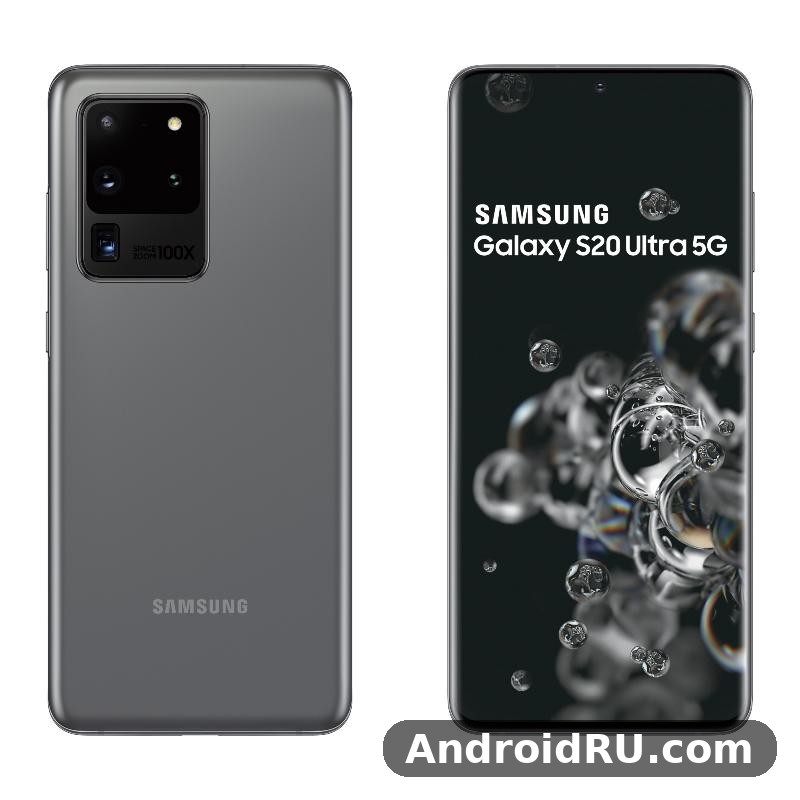
The first thing anyone notices about the Galaxy S20 Ultra 5G is its size. At 166.9 x 76 x 8.8 mm and 222 grams, it is a large, heavy phone, and there is no way to pretend otherwise. It fills a jeans pocket, it demands two hands for most tasks, and after an hour of reading in bed your wrist will know about it. That said, the weight is balanced well, and the curved glass front and back make it feel a little slimmer than the numbers suggest. In a Galaxy S20 Ultra 5G camera test, daylight shots look clean and detailed, while low light is where the processing has to work hardest. The Galaxy S20 Ultra 5G user manual is available from Samsung’s support pages if you want the official steps for any feature.
One-handed use is the obvious trade-off. Reaching the top of the screen with a thumb is impossible without shifting grip, and the fingerprint sensor sits high enough that it takes a week to find it by muscle memory. Samsung added a one-handed mode that shrinks the screen down, and it works, but it is a workaround for a phone that was never designed to be small. If you want the same 2020 Samsung camera experience in a handset that is easier to carry, the smaller sibling is worth a look, and the Samsung Galaxy S20 5G Review: Photo Quality, Video and Performance covers the compact model in detail.
Glass back, metal frame and the big camera housing
The camera housing is the most argued-about part of the S20 Ultra design, and it deserves the argument. It is a large rectangular block in the top-left corner of the back, and it sticks out far enough that the phone rocks on a flat table. It also catches dust around its edges and makes the phone feel top-heavy when you hold it by the bottom. On the plus side, the housing is honest about what it contains: a 108MP sensor, a folded periscope lens and a depth sensor need real physical depth, and Samsung chose not to hide that. A Galaxy S20 Ultra 5G drop test is best left to reviewers, but the glass and frame are built to survive everyday knocks.
Build quality elsewhere is excellent. The buttons are firm with a satisfying click, the USB-C port is centred, and there is no wobble in the frame. The ultrasonic fingerprint sensor under the display was slower than the optical sensors on rival phones at launch, and it stayed a little fussy about dry fingers even after updates. Face unlock works fast in good light but is not as secure as the fingerprint reader, so I kept the fingerprint as my main unlock method and used face unlock only as a backup.
IP68 water resistance and everyday durability
The Galaxy S20 Ultra 5G carries an IP68 rating, which means it is protected against dust and can survive immersion in fresh water up to 1.5 metres for up to 30 minutes under lab conditions. In real life that translates into confidence in rain, by the pool and in the kitchen, not into a reason to take the phone swimming. The rating is tested on a new phone in clean water, and seals wear over time, so a used phone bought in 2026 should be treated as splash-resistant rather than waterproof.
Gorilla Glass 6 on the front and back held up well in my use, with only fine scratches appearing after months without a screen protector. The aluminium frame picked up small nicks more easily, especially around the corners. A case is not optional on a phone this heavy and this slippery; a drop from waist height onto concrete is the kind of accident that ends with a cracked back panel and an expensive repair.
How the phone feels after months in a case
After months in a slim case, the S20 Ultra becomes a different object: slightly thicker, much grippier, and far less stressful to hold over a hard floor. The case also flattens the camera bump, which fixes the table-rock problem and keeps the lenses off the surface. My advice is to buy the case before the phone arrives, because the first week without one is when most drops happen, while you are still learning where the edges of the phone are.
6.9-inch Dynamic AMOLED 2X display with 120Hz refresh rate
The display is the best part of the Galaxy S20 Ultra 5G, and it is the reason many owners kept the phone long after the camera arguments faded. The 6.9-inch Dynamic AMOLED 2X panel runs at 3200 x 1440, supports HDR10+, and covers a wide colour range with the kind of deep blacks and punchy contrast that only OLED can deliver. Video looks superb on it, photos look better than they do on most laptops, and reading at night with a dark theme is easy on the eyes. A Galaxy S20 Ultra 5G screen brightness test shows the display staying readable outdoors, even in bright sunlight. The Galaxy S20 Ultra 5G outdoor visibility holds up well, with the display staying readable even in bright sunlight.
The headline feature is the 120Hz refresh rate, which makes scrolling, animations and games feel noticeably smoother than a 60Hz screen. Once you live with 120Hz for a week, going back feels sluggish, and that is true here as well. The catch, and it is a real one, is that 120Hz only works at Full HD+ resolution on this phone, not at the full QHD+ resolution. Samsung locked the combination in software, so you choose between sharpness and smoothness every time you change the setting. For the Galaxy S20 Ultra 5G how to screenshot shortcut, press the power and volume-down buttons together, and the captured image lands straight in your gallery.
120Hz at Full HD+ or 60Hz at QHD+ and which to choose
Choosing between the two modes is a personal call, but there is a sensible default. Use 120Hz at Full HD+ for daily use, gaming and social apps, where motion is constant and smoothness matters most. Switch to QHD+ at 60Hz for watching films, reading long articles, or looking at photos, where the extra pixels are visible and nothing is moving fast. In practice most people pick one mode and forget about it, and 120Hz at Full HD+ is the choice that makes the phone feel fast in everyday use.
At Full HD+ the panel still looks sharp, because the screen is large but the pixel density stays high enough that individual pixels are invisible at normal viewing distance. The difference between Full HD+ and QHD+ is real if you hold the phone close and look for it, but it is small next to the difference between 60Hz and 120Hz, which you notice within seconds of scrolling a feed.
Outdoor brightness and colour accuracy on the S20 Ultra screen
Outdoor visibility is strong. The panel pushes past 1000 nits in bright conditions, so maps, messages and the camera viewfinder stay readable in sunlight, which matters because the camera is one of the reasons to own this phone. The screen also handles reflections well for a curved panel, though the curved edges do catch glare at some angles and can register accidental touches when you grip the phone tightly.
Colour accuracy is good once you pick the right mode. Vivid mode, the default, oversaturates reds and greens in a way that looks attractive on photos but is not accurate. Natural mode is much closer to true colours and is the better choice for editing photos or watching films that were graded carefully. I used Natural mode most of the time and switched to Vivid only for games, where the extra punch suits the content.
Display settings worth changing on day one
Three settings are worth changing as soon as the phone is set up. First, turn on 120Hz under Settings, then Display, then Motion smoothness, because the phone ships at 60Hz and many owners never discover the smoother mode. Second, set the screen mode to Natural if you care about colour accuracy. Third, turn on the blue light filter schedule for the evening, and set the always-on display to show only when you tap the screen, which saves a little battery overnight without losing the clock.
One UI software and the Android 10 to Android 13 update journey
The Galaxy S20 Ultra 5G launched with Android 10 and One UI 2, and Samsung updated it through Android 11, Android 12 and finally Android 13 with One UI 5.1. That is three major Android updates and four years of security patches, which was a good record for a 2020 phone and is one of the reasons the phone still feels usable in 2026. The software on the phone today is not the software it shipped with, and it is better in almost every way.
One UI itself is the friendliest Android skin for a phone this large. Menus push content down toward the thumb, the quick settings are easy to reach, and Samsung’s own apps for gallery, notes and health are genuinely good. The downside is duplication: Samsung and Google both ship a browser, a messages app, a gallery and a store, and the phone arrives with a folder of apps many people never open. A half hour of tidying on day one makes the phone feel far cleaner.
One UI 5.1 features that still feel modern in 2026
One UI 5.1 brought the features that still do the heavy lifting today. Modes and Routines can silence notifications at work and turn on the blue light filter at night. The gallery has a good object eraser and a simple video editor. Samsung DeX turns the phone into a desktop when you plug it into a monitor, which is useful for writing and spreadsheets. Link to Windows pairs the phone with a PC for messages and photos. None of these is a reason to buy the phone on its own, but together they make the software feel complete rather than thin.
Daily use is smooth in the places that matter: opening apps, switching between them, and scrolling long pages. The 12GB of RAM in the base model keeps a dozen apps in memory, so returning to a browser or a map does not force a reload. The 16GB version is even roomier, though few people will notice the difference outside of heavy multitasking with DeX or split-screen video editing.
Software support after Android 13 and what it means for buyers
The hard truth is that Android 13 is the end of the road for major updates on this phone. Samsung stopped at One UI 5.1, so there will be no Android 14 or beyond, and security patches have also ended. That does not make the phone unusable, but it does change the advice. If you buy one in 2026, you should use it with a browser that updates itself, keep Play Protect on, and avoid sideloading apps from unknown sources. For banking and two-factor authentication, the phone is still fine, because those apps bring their own security, but it is no longer a phone to buy for a five-year plan.
Buyers comparing Samsung generations should know that the next model up improved the update promise a lot. For a direct sense of how the newer software feels, the Samsung Galaxy S21 FE 5G Review: Build Quality, Software and Daily Speed is a useful comparison, since that phone shipped with a longer support window and a newer One UI version.
One UI settings that make a big phone easier to live with
Two settings transform daily use on a 6.9-inch screen. The first is one-handed mode, turned on under Settings, then Advanced features, which shrinks the display to a corner you can reach. The second is the edge panel, which puts your most-used apps and contacts a thumb-swipe away from either edge. Add a swipe-down gesture on the fingerprint sensor to open notifications, and the phone stops feeling like a two-handed device quite so often.
108MP camera system and 100x Space Zoom image quality
The camera is the reason this phone exists, and it is also the reason it divided opinion. The main sensor is a 108MP unit that bins nine pixels into one to produce 12MP photos with more light and less noise, and you can shoot at the full 108MP when you want maximum detail in bright light. In daylight, the results are excellent: sharp, detailed, and full of colour. Cropping into a 108MP shot still leaves a usable image, which is handy for wildlife, architecture and any shot you cannot get closer to.
The supporting cameras are a 48MP periscope telephoto with 4x optical zoom, a 12MP ultrawide, and a time-of-flight depth sensor for portrait mode. The front camera is 40MP, which sounds excessive until you crop a group selfie or shoot a video call in a dim room. Video goes up to 8K at 24 frames per second, though 4K at 60 frames per second is the more practical choice, with better stabilisation and far smaller files.
The autofocus problems at launch and how software updates fixed them
The honest version of the story is that the camera was not ready at launch. The 108MP sensor has a very shallow depth of field, so close-up subjects fell out of focus, and the autofocus hunted in video and in low light. Early reviews were harsh, and they were right. Samsung spent the next year fixing it with updates: faster focus, better close-up handling, and a focus enhancer mode that switches to the ultrawide camera for macro shots. By the time the phone reached One UI 3, the camera was a different product from the one reviewers tested in February 2020.
That history is worth knowing because a used phone in 2026 will already have those fixes installed, so you will not meet the launch camera. What remains is a camera that is very good in daylight, good in low light, and still a little slow to lock focus on a moving subject close to the lens. If you photograph children or pets at close range, expect a few missed shots.
Daylight photos from the 108MP sensor
In bright light the main camera is superb. Detail is high, dynamic range is wide, and colours lean warm and saturated in the Samsung style. The 108MP mode adds real detail on buildings, landscapes and textures, but the files are large and the processing is slower, so I used it only when I planned to crop or print. For everyday shots, the binned 12MP mode is the better default: faster, smaller, and just as good on a phone screen. Is Galaxy S20 Ultra 5G still worth buying in 2026? It comes down to the price you can find and whether its cameras, battery and software still cover your daily use. The Galaxy S20 Ultra 5G common problems and fixes are listed in the tips section, with the quick checks first and the deeper resets last.
Night mode and low-light photo quality
Night mode is where the phone earns its keep after dark. It takes several exposures and merges them, pulling detail out of shadows without turning the sky into daylight. Street scenes, restaurants and indoor portraits all come out usable, with noise kept under control. The ultrawide camera is weaker at night, with softer detail and more noise, so I used the main camera whenever light was scarce and stepped back instead of switching lenses. The Galaxy S20 Ultra 5G release date and price question is covered in the verdict section, but the short version is that it launched in March 2020 and its price has fallen since. The Galaxy S20 Ultra 5G full specifications are listed in full in the specifications section below, from display and chipset to cameras and battery.
How to get sharper close-up shots with the S20 Ultra camera
For close-ups, turn on the focus enhancer in the camera settings, step back a little instead of pushing the lens to the minimum distance, and tap the subject to lock focus before you shoot. The 108MP main sensor has a narrow plane of focus up close, so giving it a few extra centimetres makes the difference between a sharp shot and a soft one. Burst mode helps with moving subjects, and holding the phone with both elbows braced against your body steadies the shot more than any setting. Is Galaxy S20 Ultra 5G worth buying? It comes down to the price you can find and whether its cameras, battery and software still cover your daily use. The Galaxy S20 Ultra 5G price in India varies by storage, condition and seller, so compare a few listings in that market before you decide.
48MP periscope zoom, 12MP ultrawide and 40MP selfie camera
The periscope zoom is the party trick, and it is better than the headline suggests and worse than the marketing suggests, both at once. At 4x optical zoom the images are sharp and genuinely useful. At 10x hybrid zoom they are still good in daylight, with enough detail for social media and small prints. At 100x Space Zoom the images are soft, noisy and hard to aim, and they are best treated as a fun experiment rather than a serious tool. A tripod helps a lot past 30x, because the smallest hand movement becomes a huge jump in the frame. The Galaxy S20 Ultra 5G pros and cons are summed up near the end of this review, with the strongest points first and the trade-offs stated plainly. The Galaxy S20 Ultra 5G where to buy question comes down to trusted sellers and warranty, not just the lowest number on a listing.
The 12MP ultrawide is the lens I used most after the main camera, for interiors, landscapes and group photos in tight spaces. It has noticeable distortion at the edges and weaker low-light performance, but it is a real creative option. The 40MP front camera produces detailed selfies and sharp video calls, and portrait mode on the front camera separates the subject from the background cleanly in good light. For a sense of how the next generation handled the same zoom ideas, the Samsung Galaxy S21 5G Review: Cameras, Performance and Battery Life compares a newer camera system with a similar zoom range.
Ultrawide photos, video stabilisation and 8K recording limits
Video is strong, with a practical limit. 4K at 60 frames per second with Super Steady stabilisation produces smooth, detailed footage that holds up on a television. 8K recording is possible, but it is limited to 24 frames per second, it crops the sensor, the files are enormous, and most people have no 8K screen to watch them on. I tested 8K twice and then left it alone, because the 4K footage was better in every way that mattered. Slow motion and hyperlapse are both worth trying, and the single-take mode, which captures photos and video from all the lenses at once, is a fun way to cover a birthday or a holiday moment without thinking about settings. This Galaxy S20 Ultra 5G full review covers cameras, performance, battery and software as one daily device, not as separate launch figures. The Galaxy S20 Ultra 5G price in US varies by storage, condition and seller, so compare a few listings in that market before you decide.
Exynos 990 vs Snapdragon 865 performance, gaming and heat
Performance depends on which chipset your phone has, and this is the single most important thing to check before buying a used S20 Ultra. The Snapdragon 865 version, sold in the United States and a few other markets, runs cooler, sustains high performance for longer, and gets slightly better battery life. The Exynos 990 version, sold in much of Europe and Asia, is fast in short bursts but throttles sooner under sustained load, and it runs warmer in games and in 4K video recording. For a Galaxy S20 Ultra 5G gaming test, the phone stays smooth in popular titles at sensible settings, though long sessions will warm it up. The Galaxy S20 Ultra 5G best price question comes down to trusted sellers and warranty, not just the lowest number on a listing.
In everyday use the difference is small. Both versions open apps quickly, scroll smoothly, and handle split-screen multitasking without complaint. The difference shows up after twenty minutes of a demanding game, or after a long 4K video session, when the Exynos version gets warm and drops a few frames. If you are buying used, the Snapdragon version is worth paying a little extra for, and you can check which chipset a phone has in Settings, under About phone, before you pay.
Gaming performance and sustained load on the S20 Ultra
For gaming, the 120Hz screen and the large battery are the stars. Fast games feel fluid, the stereo speakers are loud and clear, and the big screen makes controls easy to reach. The phone does get warm during long sessions, and the Exynos version warms up sooner, so I used a case with a bit of grip and took the phone out of it for long sessions at home. Lowering the screen to Full HD+ and capping the frame rate in the game settings keeps temperatures down without hurting the experience much.
Everyday speed in 2026 and where the phone shows its age
Six years on, the phone still feels fast for the things most people do: messaging, browsing, maps, streaming, email and photos. It shows its age in two places. The first is the camera app, which takes a beat longer to open and process a night shot than a modern phone. The second is heavy multitasking with DeX or with several large apps, where the older chipset works harder. Neither is a deal-breaker at a used price, but both are worth knowing before you buy. The larger sibling in the same family is covered in the Samsung Galaxy S20+ 5G Review: Daily Performance and Key Features, which is a useful read if you want the same 2020 Samsung experience in a lighter body.
Getting the best gaming performance from an older flagship
Game Launcher is worth using, because it blocks notifications, locks the screen brightness, and lets you cap performance to save battery. Close the camera app and any navigation app before a long session, since both keep the chipset busy in the background. And if the phone gets hot, take a five-minute break rather than forcing it through; the chip will throttle anyway, so the break costs you nothing in frame rate and gives the battery a rest.
5000mAh battery life and 45W charging in real use
The 5000mAh battery is one of the largest Samsung had put in a phone when this model launched, and it shows. On a normal day of messaging, browsing, maps and a few photos, the phone ends the day with 25 to 35 percent left. On a heavy day with 120Hz on, gaming, and an hour of video calls, it still gets through the day, but the margin is thinner, and you will want a charger by the evening. Screen-on time is typically six to seven hours with 120Hz on, and eight or more with 60Hz and careful brightness. How long does Galaxy S20 Ultra 5G battery last? On a normal day it gets through to bedtime for most people, while heavy gaming or long video sessions will drain it faster. The Galaxy S20 Ultra 5G battery saving tips that matter most are adaptive battery, a lower refresh rate and taming background apps.
The 5000mAh battery ages like any lithium battery, so a used phone in 2026 will not match a new one. Before buying, check the battery health in a diagnostic app or ask the seller to show a full day of screen-on time. A battery that drops from 100 to 80 percent in an hour of light use is a warning sign, and a replacement is possible but not cheap, because the back panel is glued on. The Galaxy S20 Ultra 5G battery drain fix is simple in most cases: check background apps and adaptive battery settings before blaming the cell itself. The Galaxy S20 Ultra 5G slow charging fix is usually a cable or adapter problem, so try a certified 45W charger before anything else.
A full day of heavy use, tested
My heaviest test day was a trip: navigation for two hours, photos and 4K video through the afternoon, streaming on the train home, and messaging all day. The phone reached 15 percent by 10 in the evening, which is a pass for a phone of this age and size, and the 120Hz screen was on for most of it. The same day on 60Hz would have left far more in reserve, so the refresh rate is the biggest single lever you have over battery life. A Galaxy S20 Ultra 5G battery test puts the phone through a normal mix of browsing, video and calls, and it holds up for a full day for most people.
45W wired, 15W wireless and reverse wireless charging
Wired charging is rated at 45W, but the phone shipped with a 25W charger in the box, so many owners never saw the full speed. With a genuine 45W charger, a full charge takes about an hour, and the first 50 percent arrives in roughly half an hour. With the included 25W charger, a full charge takes about an hour and twenty minutes. Wireless charging runs at 15W, which is slow but fine overnight, and reverse wireless charging can top up earbuds or a watch from the back of the phone, at a slow rate that is best treated as an emergency option.
Battery care settings that help the 5000mAh cell last longer
Three habits keep the battery healthy. First, use adaptive battery and put rarely used apps to sleep. Second, cap the charge at 85 percent in the battery settings if you charge overnight, because the last 15 percent causes the most wear. Third, keep 120Hz on but turn off always-on display overnight. These are small changes, but on a phone whose battery is already six years old, they are the difference between a phone that lasts the day and one that does not.
Full Specifications of the Galaxy S20 Ultra 5G
The specification sheet below brings together every key number for this phone in one place, so you can check a detail without digging through a separate specs page. The numbers come from the full specification listing for this model, and the notes after the table explain what the most important ones mean in daily use.
| Feature | Specification |
|---|---|
| Display | 6.9-inch Dynamic AMOLED 2X, 3200 x 1440 (QHD+), 120Hz at Full HD+, 60Hz at QHD+, HDR10+ |
| Chipset | Exynos 990 or Snapdragon 865, depending on region |
| RAM | 12GB or 16GB |
| Storage | 128GB, 256GB or 512GB, plus microSD up to 1TB |
| Rear cameras | 108MP wide, 48MP periscope telephoto (4x optical, 10x hybrid, 100x Space Zoom), 12MP ultrawide, TOF 3D depth sensor |
| Front camera | 40MP |
| Video | 8K at 24fps, 4K at 60fps, Super Steady stabilisation |
| Battery | 5000mAh |
| Charging | 45W wired, 15W wireless, reverse wireless charging |
| Dimensions | 166.9 x 76 x 8.8 mm |
| Weight | 222 grams |
| Protection | IP68 (1.5 metres, 30 minutes), Gorilla Glass 6 front and back |
| Software | Android 10 at launch, updated to Android 13 with One UI 5.1 |
| Connectivity | 5G, Wi-Fi 6, Bluetooth 5.0, NFC, USB-C 3.2, Samsung DeX |
| Security | Ultrasonic in-display fingerprint sensor, face unlock |
Display, chipset and memory in the specification sheet
The three numbers that define this phone are the 6.9-inch screen, the 108MP camera and the 5000mAh battery, and the spec sheet backs them up with a flagship chipset and generous memory. The 12GB base RAM was unusual in 2020 and is still generous in 2026, and the microSD slot up to 1TB is a feature Samsung later removed from its flagships, so it is a genuine advantage for anyone with a large photo or music library. The Exynos 990 and Snapdragon 865 are both 7 nm octa-core chips, but the Snapdragon version is the one to choose if you have the option, for cooler running and longer sustained performance.
Cameras, battery and connectivity from the full specification list
The camera list on paper is still impressive: 108MP wide, 48MP periscope, 12MP ultrawide, a depth sensor and a 40MP front camera, with 8K video on top. The battery and charging numbers are equally strong for the era: 5000mAh, 45W wired, 15W wireless and reverse wireless charging. Connectivity covers 5G, Wi-Fi 6, Bluetooth 5.0, NFC and USB-C 3.2, and Samsung DeX is included. The one notable omission is a headphone jack, which Samsung had already dropped, so wired headphones need a USB-C adapter.
Dimensions, sensors and build materials
At 166.9 x 76 x 8.8 mm and 222 grams, this is a big and heavy phone by any measure, and the glass and aluminium build is the reason for both the premium feel and the weight. The sensor list is complete: accelerometer, gyro, proximity, compass, barometer, fingerprint and a time-of-flight depth sensor for the camera. The IP68 rating and Gorilla Glass 6 front and back round out a build that was, and still is, a proper flagship.
How to read the spec sheet before buying a used S20 Ultra
When you check a used phone against this table, verify the four things that vary between units: the chipset, the RAM, the storage, and the battery health. The chipset is in Settings under About phone, the RAM and storage are on the same screen, and the battery health needs a diagnostic app or a full-day test. Everything else on the sheet is the same on every unit, so a seller who cannot show you those four details is a seller to walk away from.
Pros and cons: who should buy the Galaxy S20 Ultra 5G in 2026
The honest summary is that this is a great used phone at the right price and a poor buy at the wrong one. The screen, the main camera in daylight, the battery and the microSD slot are all still competitive. The size, the weight, the ended software support and the ageing battery are the reasons to think twice. The next model in the family fixed some of these issues and kept others, and the Samsung Galaxy S21+ 5G Review: Photo Quality, Video and Performance shows how Samsung refined the formula a year later.
Pros of the Galaxy S20 Ultra 5G
The display is still one of the best you can buy at a used price, with 120Hz smoothness, HDR10+ and brightness that holds up outdoors. The 108MP camera delivers superb daylight detail and a genuinely useful 4x optical zoom. The 5000mAh battery gets through a full day, and 45W charging is fast when you have the right charger. The microSD slot, IP68 rating and DeX support are practical extras that newer flagships dropped or charge more for.
Cons of the Galaxy S20 Ultra 5G
The phone is big and heavy at 222 grams, and one-handed use is a struggle. Software support has ended at Android 13, so there are no more major updates. The Exynos 990 version runs warmer and throttles sooner than the Snapdragon 865 version. The camera still hunts for focus on close-up moving subjects, and 100x zoom is more of a novelty than a tool. Battery health on a six-year-old phone is a gamble unless the seller can prove it.
Who should buy it, and who should skip it
Buy it if you want a large 120Hz screen, a strong daylight camera and a big battery at a used-phone price, and you are comfortable with a phone that will not get another Android update. Skip it if you need a small phone, if you want years of software updates, if you photograph fast-moving subjects up close, or if the price is close to a new mid-range phone with a fresh battery and a longer support window.
Frequently asked questions about the Galaxy S20 Ultra 5G
Is the Galaxy S20 Ultra 5G still good in 2026?
Yes, for the right buyer. The screen, the daylight camera and the battery are still good, and the phone handles everyday apps without trouble. It is not a good buy if you need the latest Android version, a small phone, or a battery you can trust for years without checking its health first.
Was the S20 Ultra camera autofocus problem fixed?
Yes, mostly. Samsung fixed the worst of the autofocus hunting and the close-up softness with software updates during the first year, and a phone bought in 2026 will already have those fixes. Focus on close-up moving subjects can still be slow, but the launch problems are gone.
How long does the Galaxy S20 Ultra 5G battery last?
On a new battery, a full day of normal use with six to seven hours of screen-on time at 120Hz, and more at 60Hz. On a six-year-old battery, expect less, and check the battery health before buying, because the battery is the part that ages fastest.
Does the Galaxy S20 Ultra 5G have a microSD card slot?
Yes. The phone takes a microSD card up to 1TB, alongside 128GB, 256GB or 512GB of built-in storage. The card shares the tray with the second SIM in dual-SIM models, so you choose between a second SIM and the extra storage.
Does the Galaxy S20 Ultra 5G support 45W charging?
Yes, the phone supports 45W wired charging, but it shipped with a 25W charger in the box. You need a genuine 45W charger to see the full speed, which fills the battery in about an hour. Wireless charging is 15W, and reverse wireless charging can top up accessories slowly.
The Galaxy S20 Ultra 5G was Samsung at its most ambitious, and six years later the ambition still shows. The screen is superb, the daylight camera is excellent, and the battery and charging are still practical. Buy the Snapdragon version if you can find it, check the battery before you pay, put it in a case on day one, and you will have a large, capable phone that still earns its place in 2026.

