

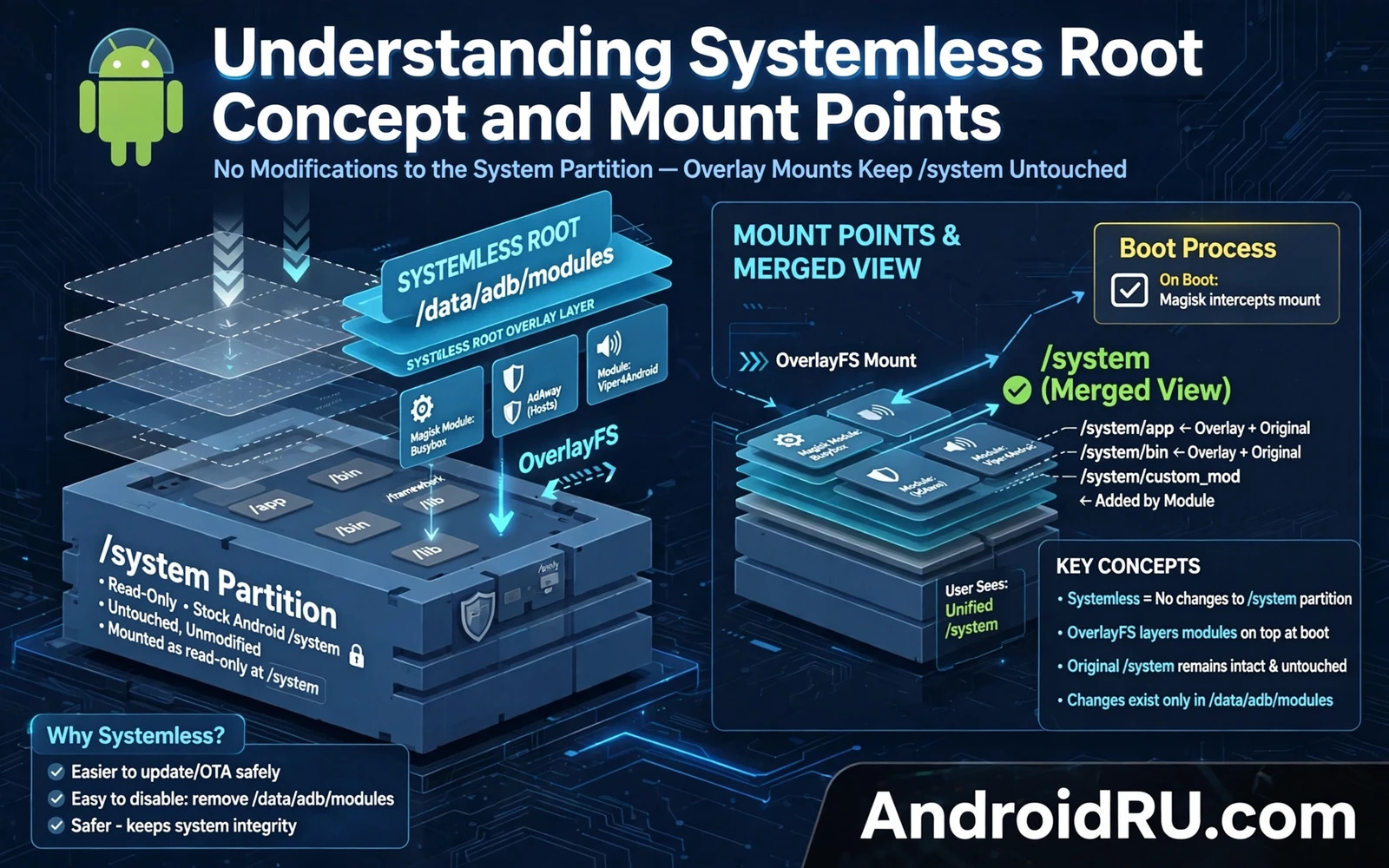
System Root Versus Systemless Root
Traditional system root modifies files directly in the system partition. A root binary and a management app are written into system locations. The system partition itself changes. Updates that verify system integrity may fail because the partition no longer matches the expected state. Reverting system root requires restoring the original system files.
Systemless root leaves the system partition untouched. It modifies the boot image to load an overlay at boot time. The overlay presents modified files to the running system while the underlying system partition remains original. Applications see the modified view. Integrity checks that read the raw system partition see the original files. That separation is the core idea.
The overlay approach makes disabling root much simpler. Disabling the systemless framework restores the original system view on the next boot. No system file restore is needed because no system file was changed. That simplicity is valuable for troubleshooting and for returning to stock behaviour temporarily.
Systemless root still requires an unlocked bootloader and a modified boot image. It is not a no risk method. A bad boot image can prevent booting. A bad module can still break the system view. The safety advantage is reversibility rather than invulnerability. Owners should not confuse easier reversal with zero risk.
How Mount Points Create The Overlay
A mount point is a directory where a filesystem or an overlay is attached. At boot the system mounts partitions at standard mount points such as system and vendor and product. A systemless framework adds overlay mounts on top of selected directories. Files in the overlay shadow files in the underlying partition. The system reads the overlay file first when both exist.
Overlay mounts can add new files and can replace existing files and can hide files by presenting an empty view. Module files are organised so that each module contributes its own overlay entries. The framework merges module entries at boot. A conflict between two modules that replace the same file must be resolved by module order or by disabling one module. Conflicts are a common cause of mysterious behaviour.
Mount order matters because a later mount can shadow an earlier mount. The framework applies mounts in a defined sequence. Owners who understand order can predict which module wins a conflict. Owners who ignore order may enable two conflicting modules and wonder why only one effect appears.
Some mounts are temporary and exist only in memory. Others are backed by files on a data partition. Temporary mounts disappear on reboot unless the framework recreates them. Persistent module files survive reboot and are reapplied each boot. That distinction explains why disabling a module requires a reboot to take full effect in some cases.
Why Updates Behave Differently Under Systemless Root
System updates often replace the boot image. A systemless framework lives in the boot image so an update can overwrite it. Owners must reinstall the framework after an update using the preservation method for their device. Skipping that step can leave modules inactive or can leave the device unrooted after an update. Update guides for systemless root always include a framework preservation step for this reason.
System partition integrity checks are more likely to pass under systemless root because the system partition is untouched. That does not guarantee that every integrity check will pass. Some checks examine the boot image or the running system view rather than the raw partition. A check that examines the running view will see the overlay and may fail. Owners should test integrity sensitive apps after any change.
Module updates also interact with the overlay. Updating a module replaces its overlay files. A module update that changes a replaced system file can alter system behaviour immediately after reboot. Test module updates one at a time. Bulk module updates hide the source of a new problem just as bulk system changes do.
Data partition changes persist across systemless root toggling. A module that writes settings to data storage leaves those settings behind when disabled. A clean test after disabling a module should therefore consider data leftovers. A truly clean test may require clearing module data in addition to disabling the module.
Practical Rules For Systemless Modules
Install one module at a time and reboot and test before adding the next. A stable system with one new module is evidence. A stable system with five new modules proves nothing about any single module. Slow installation is the price of reliable troubleshooting.
Keep modules that modify the same system area from conflicting. Read module descriptions for overlap. A camera module and a system UI module rarely conflict. Two modules that both replace the same system library almost certainly conflict. Overlap awareness prevents hours of confusion.
Back up the boot image before installing a new framework version or a risky module. A boot backup is small and fast to restore through fastboot or recovery. It is the fastest repair for a boot image problem. Keep the backup on external storage so a phone failure cannot take it with it.
For hands on context the storage module guide that explains how to enable unlimited Google Photos storage via modules shows a module that relies on systemless properties. The startup scripts guide that explains how to run custom scripts on Android system startup shows boot time application of changes. The FastbootD guide that explains how to use FastbootD mode for dynamic partition flashing shows how modern partition layouts interact with boot images. Together they ground the overlay concept in real workflows.
Mount Namespaces And Visibility
Mount namespaces isolate what different processes see in terms of mounted filesystems. A systemless overlay visible in one namespace may be invisible in another namespace depending on how mounts propagate. Namespace behaviour explains why a module effect appears in one app but not in another app. Visibility differences are not necessarily bugs. They may reflect namespace isolation working as designed.
Global mounts affect all processes while private mounts affect only a specific namespace. Systemless frameworks use a mix of global and private mounts to balance visibility and isolation. Owners troubleshooting a module that works in one app but not in another should consider namespace visibility. A module scoped to a namespace will not affect processes outside that namespace.
Storage mounts interact with systemless overlays because external storage has its own mount rules. A module that modifies a file on external storage may behave differently from a module that modifies a system file. External storage visibility depends on scoped storage rules in addition to mount rules. Two rule systems together create complex visibility behaviour.
Debugging mount visibility requires inspecting mount tables from the relevant process context. A mount table viewed from a terminal may differ from a mount table viewed from an app process. Context matters for mount inspection. Owners should inspect mounts from the same context as the affected app when possible. Cross context inspection can mislead.
Reboot clears temporary mounts and recreates systemless overlays from module files. A mount problem that disappears after reboot may have been caused by a stale mount rather than by module files. Persistent problems after reboot point to module files. Transient problems point to mount state. That distinction guides whether to edit module files or to simply reboot.
Module conflicts at the mount level appear as one module shadowing another module file. The shadowing module wins visibility while the shadowed module appears disabled. Owners should check mount order when two modules target the same file. Order determines visibility. Disabling the winning module reveals the shadowed module. That test confirms a mount conflict diagnosis.
Systemless Root And App Compatibility
App compatibility under systemless root depends on what the app checks. An app that checks the system partition will likely pass because the partition is untouched. An app that checks the boot image or the running system view may fail because those views show modification. Compatibility cannot be predicted from systemless status alone. Each app check method produces a different result.
Hiding tools attempt to present a clean view to selected apps by masking root indicators. Hiding works by intercepting checks and returning clean results. Hiding effectiveness varies by app because apps use different check techniques. A hiding tool that defeats one app may fail against another app with stronger checks. Owners should test hiding per app rather than assuming universal success.
Banking apps deserve special caution under any root method including systemless root. A banking app that detects modification may refuse to run or may limit features. Owners who depend on banking should keep a non rooted device or a separate profile for banking where possible. Separation avoids a conflict between modding interest and financial access.
Game anti cheat systems also check for modification and may ban accounts detected on modified devices. A game account ban can remove progress and purchases permanently. Owners should never run a valued game account on a modified device unless they accept ban risk. Ban risk is a property of the game policy rather than a technical flaw in systemless root.
Enterprise apps may check device integrity before allowing work data access. A modified device may be denied work email or work documents. Employees should not modify a work device without employer approval. Personal modding belongs on personal devices. Work data protection policies exist for good reasons and should be respected.
Long term compatibility requires ongoing maintenance because app checks evolve. An app update can introduce a new check that defeats a previously working hiding method. Owners should test critical apps after every app update that mentions security. Security updates in apps often include stronger integrity checks. Testing after security updates catches new failures early.

