

Samsung Galaxy S20+ 5G Review: Daily Performance and Key Features
Six years after launch, the Galaxy S20+ 5G still turns up in used-phone listings, trade-in chats and searches asking whether it is still worth buying in 2026. That is not an accident. Samsung gave this phone a 6.7-inch Dynamic AMOLED 2X screen with a 120Hz refresh rate, a Snapdragon 865 or Exynos 990 chip depending on the region, 12GB of RAM, a 4500mAh battery and a versatile triple camera with a 64MP telephoto sensor. On paper it was a flagship through and through, and in daily use much of that hardware still feels fast, bright and capable. For a Galaxy S20+ 5G gaming test, the phone stays smooth in popular titles at sensible settings, though long sessions will warm it up.
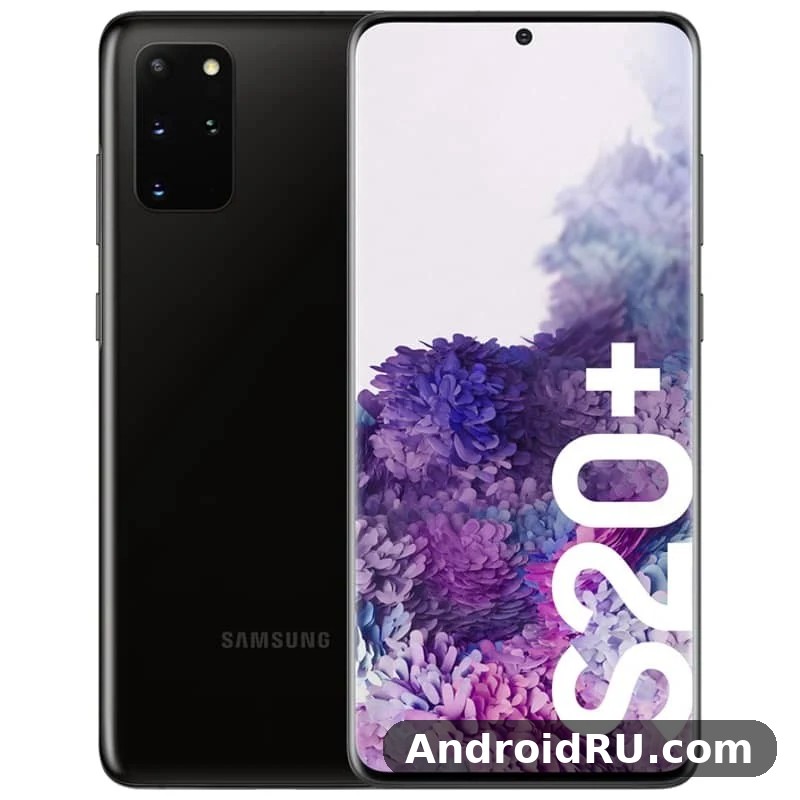
I spent weeks using the S20+ 5G as a daily phone, and then kept it as a second device for testing, so the impressions here come from ordinary life rather than a benchmark chart: commuting with maps and music, photographing in daylight and at night, gaming in the evening, and charging it every night like everyone else does. The phone that emerges from that use is a balanced one. It does not have the Ultra’s headline camera or its huge battery, but it is lighter, easier to hold, and easier to live with every day.
This review covers the phone as it is in 2026: the performance after years of updates, the screen and camera in daily use, the battery after six years, and the software support that has now ended. It also folds in the full specification sheet, so every number behind the impressions is in one place. If you are choosing between this phone and its bigger sibling, the Samsung Galaxy S20 Ultra 5G Review: Design, Software and Camera Quality covers the Ultra’s larger screen, 108MP camera and 5000mAh battery in the same depth.
Samsung Galaxy S20+ 5G at a glance: 6.7-inch 120Hz display and 4500mAh battery
The S20+ 5G sits in the middle of Samsung’s 2020 range, and that middle position is its strength. The 6.7-inch screen is large without being unwieldy, the 4500mAh battery is big enough for a full day, and the camera system covers wide, normal and zoom shots without the bulk of a periscope lens. At 161.9 x 73.7 x 7.8 mm and 186 grams, it is noticeably lighter and slimmer than the Ultra, and the difference is obvious the first time you pick both phones up. How long does Galaxy S20+ 5G battery last? On a normal day it gets through to bedtime for most people, while heavy gaming or long video sessions will drain it faster. A Galaxy S20+ 5G screen brightness test shows the display staying readable outdoors, even in bright sunlight.
The headline numbers are easy to list: a QHD+ Dynamic AMOLED 2X panel with 120Hz at Full HD+, a flagship 2020 chipset, 12GB of RAM, 128GB or 512GB of storage with a microSD slot up to 1TB, a 12MP main camera with a 64MP telephoto and a 12MP ultrawide, and IP68 water resistance. What matters more is how those numbers behave in daily use, and that is where this review spends its time. A Galaxy S20+ 5G water resistance test confirms the rating covers splashes and brief submersion, not every kind of water damage. The Galaxy S20+ 5G battery saving tips that matter most are adaptive battery, a lower refresh rate and taming background apps.
What you get in the box and on day one
The phone shipped with a 25W charger, a USB-C cable, and AKG-tuned USB-C earbuds in most markets, though the exact box contents varied by region. There is no headphone jack, so wired headphones need a USB-C adapter or the included earbuds. Setting the phone up takes about half an hour, and the first thing worth doing is turning on the 120Hz refresh rate, because the phone ships at 60Hz and the smoother mode is the single biggest improvement you can make on day one. The Galaxy S20+ 5G outdoor visibility holds up well, with the display staying readable even in bright sunlight. The Galaxy S20+ 5G battery drain fix is simple in most cases: check background apps and adaptive battery settings before blaming the cell itself.
Design, IP68 rating and in-display fingerprint reader
The design is classic Samsung flagship: glass front and back, a slim aluminium frame, and a small centred hole-punch camera at the top of the screen. The camera housing on the back is a modest rectangle compared with the Ultra’s large block, and the phone sits flat on a table without rocking. The curved screen edges look elegant and make swiping from the sides feel smooth, though they can catch glare and register accidental touches if you grip the phone tightly. The Galaxy S20+ 5G slow charging fix is usually a cable or adapter problem, so try a certified 25W charger before anything else. For the Galaxy S20+ 5G how to screenshot shortcut, press the power and volume-down buttons together, and the captured image lands straight in your gallery.
The IP68 rating protects against dust and immersion in fresh water up to 1.5 metres for up to 30 minutes in lab conditions, which in practice means confidence in rain and by the pool, not an invitation to swim with the phone. The ultrasonic fingerprint sensor under the display was slower than the optical sensors on rival phones at launch, and it stayed a little fussy about dry fingers. A screen protector can make it worse, so if you use one, register your fingerprints again after applying it. A Galaxy S20+ 5G battery test puts the phone through a normal mix of browsing, video and calls, and it holds up for a full day for most people. A Galaxy S20+ 5G drop test is best left to reviewers, but the glass and frame are built to survive everyday knocks.
Build quality after years of use
After years of use, the S20+ 5G holds up well. The frame picks up small nicks at the corners, and the glass back shows fine scratches without a case, but there is no flex, no creaking, and the buttons stay firm. The phone is slim enough at 7.8 mm that a slim case adds little bulk, and a case is still worth using, because the glass back is slippery and a drop onto concrete is an expensive repair on any glass phone.
Daily performance with Snapdragon 865 and 12GB RAM
Daily performance is the S20+ 5G’s strongest suit. The Snapdragon 865 version, sold in the United States and selected markets, and the Exynos 990 version, sold in much of Europe and other regions, are both fast for ordinary tasks: apps open quickly, switching between them is smooth, and the 12GB of RAM keeps a dozen apps in memory without reloading. Scrolling through long feeds, editing photos, and running maps with music in the background all feel effortless.
The 12GB of RAM is the quiet hero here. It was generous in 2020 and it is still generous in 2026, and it is the reason the phone does not feel old in normal use. Where the two chipsets differ is under sustained load, and that difference is worth understanding before you buy, because it affects gaming, video recording, and battery life.
Snapdragon 865 vs Exynos 990: Which version runs cooler?
The Snapdragon 865 version runs cooler and sustains high performance for longer. The Exynos 990 version is just as fast in short bursts, but it throttles sooner when the load continues, and it gets warmer in games and during long 4K video recording. In a twenty-minute gaming session the Snapdragon phone stays smooth while the Exynos phone drops a few frames and feels warm to the touch. Battery life is also slightly better on the Snapdragon version, by roughly half an hour of screen-on time in my testing.
If you are buying used, the Snapdragon version is worth a small premium, and you can check which chipset a phone has under Settings, then About phone, before you pay. If only the Exynos version is available at a good price, it is still a fine phone for everyday use; the difference only matters for long gaming sessions and heavy video work.
Gaming on the S20+ 5G: frame rates, heat and 120Hz smoothness
Gaming is where the 120Hz screen earns its keep. Fast games feel fluid, the stereo speakers are loud and clear, and the large screen makes on-screen controls easy to reach. Most popular games run at high settings without trouble, and the phone handles an hour of play without becoming uncomfortable to hold, though the Exynos version warms up sooner. The 4500mAh battery loses about 15 to 20 percent per hour of heavy gaming at 120Hz, so a long session needs a charger nearby.
Best settings for long gaming sessions
Game Launcher is worth using, because it blocks notifications, locks brightness, and lets you cap performance to save battery. Drop the screen to Full HD+ if it is not already there, cap the in-game frame rate at 60 for games that do not benefit from 120Hz, and close the camera and navigation apps before you start, since both keep the chipset busy in the background. If the phone gets hot, take a five-minute break; the chip will throttle anyway, so the break costs nothing in frame rate.
6.7-inch Dynamic AMOLED 2X display in everyday use
The 6.7-inch Dynamic AMOLED 2X display is the part of this phone I would miss most if I switched away from it. It runs at 3200 x 1440, supports HDR10+, and delivers the deep blacks, strong contrast and vivid colour that define Samsung’s best screens. Video looks superb, photos look better than they do on most laptops, and reading with a dark theme at night is easy on the eyes. The centred hole-punch camera is small and easy to ignore after a day.
The 120Hz refresh rate makes scrolling, animations and games feel noticeably smoother than a 60Hz screen, and once you live with it for a week, going back feels sluggish. The catch is the same as on the Ultra: 120Hz only works at Full HD+ resolution, not at the full QHD+ resolution. You choose between sharpness and smoothness, and for daily use the smoothness wins.
120Hz refresh rate: what changes and what it costs in battery
The cost of 120Hz is battery life. In my testing, 120Hz costs roughly an hour of screen-on time compared with 60Hz over a full day, which is a real but acceptable trade for most people. The screen draws more power because it redraws twice as often, and the chipset works harder to feed it. If you are heading into a long day without a charger, switching to 60Hz is the single most effective battery saving you can make, ahead of lowering brightness or turning off background sync.
At Full HD+ the panel still looks sharp, because the pixel density stays high enough that individual pixels are invisible at normal viewing distance. The difference between Full HD+ and QHD+ is real if you hold the phone close and look for it, but it is small next to the difference between 60Hz and 120Hz, which you notice within seconds of scrolling a feed.
Outdoor visibility and colour accuracy
Outdoor visibility is strong, with brightness pushing past 1000 nits in bright conditions, so maps, messages and the camera viewfinder stay readable in sunlight. The curved edges catch some glare at certain angles, but the flat centre of the screen stays clear. Colour accuracy is good once you pick the right mode: Vivid, the default, oversaturates reds and greens in a way that looks attractive but is not accurate, while Natural mode is much closer to true colours and is the better choice for editing photos or watching carefully graded films.
Display settings worth changing on day one
Turn on 120Hz under Settings, then Display, then Motion smoothness, because the phone ships at 60Hz. Set the screen mode to Natural if you care about colour accuracy. Turn on the blue light filter for the evening, and set the always-on display to show only when you tap the screen, which saves a little battery overnight without losing the clock. These four changes take two minutes and improve the phone every day after.
Camera review: 12MP main, 64MP telephoto and 12MP ultrawide
The camera system is a triple setup with a depth sensor: a 12MP main camera with large pixels and optical stabilisation, a 64MP telephoto that enables 3x hybrid zoom, a 12MP ultrawide, and a depth sensor for portrait mode. The front camera is 10MP. There is no 108MP sensor and no periscope zoom here, and the phone is better for it in one way: the main camera has a wider depth of field, so close-up shots are sharper and focus is faster than on the Ultra. The Galaxy S20+ 5G best camera settings for everyday shooting are simple: keep the main lens clean, let the phone pick the mode, and save the manual controls for tricky light. In a Galaxy S20+ 5G camera test, daylight shots look clean and detailed, while low light is where the processing has to work hardest.
In daylight, the main camera produces sharp, detailed photos with the warm, saturated Samsung look. Dynamic range is wide, colours are pleasing, and the camera handles backlit scenes well. The 64MP telephoto is the most interesting part of the system, because it crops into a high-resolution sensor to give a clean 3x hybrid zoom, and it doubles as a high-resolution mode for detailed shots in bright light.
Daylight photos and 3x hybrid zoom
At 1x, photos are excellent in good light, with fine detail and natural-looking skin tones in portraits. At 3x hybrid zoom, images stay sharp enough for social media and small prints, which makes the zoom genuinely useful for travel, concerts and anything you cannot walk closer to. Beyond 10x, digital zoom takes over and quality falls off quickly, so I treated 30x as a curiosity rather than a tool. The ultrawide is good for interiors and landscapes, with some softness at the edges and weaker performance in low light.
For a direct comparison with the smaller model in the same family, which shares much of this camera thinking in a more compact body, the Samsung Galaxy S20 5G Review: Photo Quality, Video and Performance is worth reading alongside this review.
Night mode and low-light video
Night mode takes several exposures and merges them, pulling detail out of shadows without turning the night into day. Street scenes, restaurants and indoor portraits all come out usable, with noise kept under control on the main camera. The ultrawide is weaker at night, so I used the main camera whenever light was scarce and stepped back instead of switching lenses. Video at night is decent at 4K with stabilisation, though it is softer and noisier than daytime footage, and the phone can struggle to hold focus on moving subjects in dim rooms.
10MP front camera for video calls and selfies
The 10MP front camera is modest on paper and good in practice. Selfies are sharp in good light, portrait mode separates the subject from the background cleanly, and video calls look clear, which matters more than megapixels for a front camera. In low light the front camera is softer and noisier, but it stays usable, and the screen can act as a flash for a quick selfie in a dark room.
Camera modes worth trying first
Single Take is the mode to try first, because it captures photos and video from several lenses at once and picks the best moments for you, which is ideal for birthdays and holidays. Night mode is the second, for any shot after dark. Pro mode is the third, for anyone who wants manual control over focus, shutter speed and white balance. Super Steady video is worth turning on for walking shots, and slow motion is fun for sports and pets.
Battery life and 25W charging: a full day, most days
The 4500mAh battery gets through a full day of normal use: messaging, browsing, maps, streaming and photos, ending the day with 20 to 30 percent left on a healthy battery. Screen-on time is typically five to six hours with 120Hz on, and six to seven hours at 60Hz. On a heavy day with gaming, video calls and an hour of navigation, the phone reaches the evening with little to spare, and you will want a charger by bedtime.
The battery ages like any lithium battery, so a used phone in 2026 will not match a new one. Before buying, check the battery health in a diagnostic app or ask the seller to show a full day of screen-on time. A battery that drops from 100 to 80 percent in an hour of light use is a warning sign, and a replacement is possible but not cheap, because the back panel is glued on.
How to make the battery last longer
The biggest lever is the refresh rate: switching from 120Hz to 60Hz saves roughly an hour of screen-on time. The next is brightness, because the large AMOLED panel is the biggest power draw; adaptive brightness handles this well if you let it. Adaptive battery and sleeping unused apps help in the background, and turning off always-on display overnight saves a little more. Capping the charge at 85 percent in the battery settings reduces long-term wear if you charge overnight, which is the habit that most affects a battery that is already six years old.
Wireless charging and PowerShare in daily use
Wired charging is 25W over USB-C, and a full charge takes about 60 to 75 minutes with the included 25W charger. Wireless charging runs at 15W, which is slow but fine overnight on a charging pad, and reverse wireless charging, called PowerShare, can top up earbuds or a watch from the back of the phone at a slow rate. PowerShare is best treated as an emergency option for accessories, not as a way to charge another phone, because it is slow and it drains the host battery quickly.
Charging habits that protect an ageing battery
Charge with the included 25W charger rather than a faster third-party brick, since the phone cannot use more than 25W anyway. Avoid leaving the phone on a hot car dashboard while charging, because heat is the main enemy of battery health. And if you use wireless charging every night, keep the phone out of its case or use a thin one, because a thick case traps heat on the charging pad.
One UI 2 on Android 10: software, updates and daily quirks
The Galaxy S20+ 5G launched with Android 10 and One UI 2, and Samsung updated it through Android 11, Android 12 and finally Android 13 with One UI 5.1. That is three major Android updates and four years of security patches, which was a good record for a 2020 phone. The software on the phone today is not the software it shipped with, and it is better in almost every way, with smoother animations, better privacy controls, and features like Modes and Routines that still feel modern. The Galaxy S20+ 5G tips and tricks in this review are the ones worth turning on first, because they change daily use the most. The Galaxy S20+ 5G hidden features worth finding first live in the settings menus most owners never open.
One UI is the friendliest Android skin for a large phone. Menus push content down toward the thumb, the quick settings are easy to reach, and Samsung’s own apps for gallery, notes and health are genuinely good. The downside is duplication: Samsung and Google both ship a browser, a messages app and a gallery, and the phone arrives with apps many people never open. A half hour of tidying on day one makes the phone feel far cleaner. The Galaxy S20+ 5G best settings for daily use are the ones that save taps: edge panels, quick settings and a sensible refresh rate. A Galaxy S20+ 5G factory reset is the last resort for stubborn software trouble, so back up first and try a restart before it.
Software tips that make daily use smoother
Modes and Routines can silence notifications at work and turn on the blue light filter at night without you thinking about it. Samsung DeX turns the phone into a desktop when you plug it into a monitor, which is useful for writing and spreadsheets. Link to Windows pairs the phone with a PC for messages and photos. The edge panel puts your most-used apps a thumb-swipe away from either edge, and one-handed mode shrinks the screen to a reachable corner. Together these make a 6.7-inch phone far easier to live with than its size suggests. The Galaxy S20+ 5G user manual is available from Samsung’s support pages if you want the official steps for any feature.
The hard truth is that Android 13 is the end of the road for major updates on this phone, and security patches have also ended. That does not make the phone unusable, but it changes the advice: use a browser that updates itself, keep Play Protect on, and avoid sideloading apps from unknown sources. For banking and two-factor authentication the phone is still fine, because those apps bring their own security, but it is no longer a phone to buy for a five-year plan. Buyers who want a longer support window should look at the newer Fan Edition models, and the Samsung Galaxy S21 FE 5G Review: Build Quality, Software and Daily Speed shows what the next generation offered in software support.
What to do when an app misbehaves on older software
When an app crashes or drains the battery on this phone, the first step is to clear its cache under Settings, then Apps, then the app name. If that fails, check whether the app has an update in the Play Store, because developers often fix issues for older Android versions without saying so. As a last step, put the app to sleep in the battery settings, or uninstall it and use the web version instead. These steps fix most software quirks without a factory reset.
Full Specifications of the Galaxy S20+ 5G
The specification sheet below brings together every key number for this phone in one place, so you can check a detail without digging through a separate specs page. The numbers come from the full specification listing for this model, and the notes after the table explain what the most important ones mean in daily use. Is Galaxy S20+ 5G still worth buying in 2026? It comes down to the price you can find and whether its cameras, battery and software still cover your daily use. The Galaxy S20+ 5G common problems and fixes are listed in the tips section, with the quick checks first and the deeper resets last.
| Feature | Specification |
|---|---|
| Display | 6.7-inch Dynamic AMOLED 2X, 3200 x 1440 (QHD+), 120Hz at Full HD+, 60Hz at QHD+, HDR10+, always-on display |
| Chipset | Exynos 990 or Snapdragon 865, depending on region |
| RAM | 12GB |
| Storage | 128GB or 512GB, plus microSD up to 1TB |
| Rear cameras | 12MP wide, 64MP telephoto (3x hybrid zoom), 12MP ultrawide, depth sensor |
| Front camera | 10MP |
| Video | 8K at 24fps, 4K at 60fps, Super Steady stabilisation, slow motion |
| Battery | 4500mAh |
| Charging | 25W wired, 15W wireless, reverse wireless charging (PowerShare) |
| Dimensions | 161.9 x 73.7 x 7.8 mm |
| Weight | 186 grams |
| Protection | IP68 (1.5 metres, 30 minutes), Gorilla Glass 6 front and back |
| Software | Android 10 at launch, updated to Android 13 with One UI 5.1 |
| Connectivity | 5G, Wi-Fi 6, Bluetooth 5.0, NFC, USB-C, Samsung DeX, Samsung Pay, Knox |
| Security | Ultrasonic in-display fingerprint sensor, face unlock |
Screen, processor, RAM and storage specifications
The screen is the headline: 6.7 inches, QHD+ resolution, 120Hz at Full HD+, HDR10+ and an always-on display. The chipset is the Snapdragon 865 in the United States and selected markets, and the Exynos 990 in much of Europe and other regions, both 7 nm octa-core flagship chips from 2020. RAM is 12GB on every version, storage is 128GB or 512GB, and the microSD slot accepts cards up to 1TB in the hybrid SIM tray, which is a feature Samsung later removed from its flagships. The Galaxy S20+ 5G release date and price question is covered in the verdict section, but the short version is that it launched in March 2020 and its price has fallen since. The Galaxy S20+ 5G full specifications are listed in full in the specifications section below, from display and chipset to cameras and battery.
Battery, cameras and connectivity specifications
The battery is 4500mAh with 25W wired charging, 15W wireless charging and reverse wireless charging. The camera system is a 12MP main, a 64MP telephoto with 3x hybrid zoom, a 12MP ultrawide and a depth sensor, with a 10MP front camera and 8K video recording. Connectivity covers 5G, Wi-Fi 6, Bluetooth 5.0, NFC and USB-C, with Samsung DeX, Samsung Pay and Knox security included. There is no headphone jack, so wired headphones need a USB-C adapter. Is Galaxy S20+ 5G worth buying? It comes down to the price you can find and whether its cameras, battery and software still cover your daily use. The Galaxy S20+ 5G price in India varies by storage, condition and seller, so compare a few listings in that market before you decide.
Design, dimensions, sensors and software specifications
At 161.9 x 73.7 x 7.8 mm and 186 grams, the S20+ 5G is slim and light for a phone with a 6.7-inch screen and a 4500mAh battery. The build is Gorilla Glass 6 front and back with an aluminium frame, and the IP68 rating covers dust and water immersion. The sensor list includes an accelerometer, gyro, proximity sensor, compass, barometer and fingerprint sensor. Software launched as Android 10 with One UI 2 and finished at Android 13 with One UI 5.1. The Galaxy S20+ 5G pros and cons are summed up near the end of this review, with the strongest points first and the trade-offs stated plainly. The Galaxy S20+ 5G where to buy question comes down to trusted sellers and warranty, not just the lowest number on a listing.
How to check a used S20+ 5G against this specification sheet
When you check a used phone against this table, verify the four things that vary between units: the chipset, the storage size, the battery health, and the condition of the screen and back glass. The chipset and storage are in Settings under About phone, the battery health needs a diagnostic app or a full-day test, and the glass needs a look under a bright light for hairline cracks. Everything else on the sheet is the same on every unit, so a seller who cannot show you those four details is a seller to walk away from. The Fan Edition model that followed this phone kept much of this hardware at a lower price, and the Samsung Galaxy S20 FE 5G Review: Design, Battery Life and Usability is a useful comparison before you decide.
Pros and cons of the Galaxy S20+ 5G in 2026
The honest summary is that this is a well-balanced used phone at the right price. The screen, the daily performance, the camera flexibility and the microSD slot are all still competitive. The ended software support, the ageing battery and the chipset lottery are the reasons to think twice. The 6.7-inch 120Hz AMOLED display is still the best reason to buy this phone, and it is the part that feels least like a six-year-old device. This Galaxy S20+ 5G full review covers cameras, performance, battery and software as one daily device, not as separate launch figures. The Galaxy S20+ 5G price in US varies by storage, condition and seller, so compare a few listings in that market before you decide.
Pros
The display is superb, with 120Hz smoothness, HDR10+ and brightness that holds up outdoors. Daily performance is fast and smooth, thanks to 12GB of RAM and a flagship chipset. The camera covers wide, normal and 3x zoom shots, and night mode is genuinely useful. The phone is slim and light at 186 grams, with IP68 protection, a microSD slot, wireless charging and DeX support. At a used price, that is a lot of phone. The Galaxy S20+ 5G best price question comes down to trusted sellers and warranty, not just the lowest number on a listing.
Cons
Software support has ended at Android 13, so there are no more major updates or security patches. The Exynos 990 version runs warmer and throttles sooner than the Snapdragon 865 version. Battery health on a six-year-old phone is a gamble unless the seller can prove it. There is no headphone jack, the fingerprint sensor is fussy about dry fingers, and the camera struggles with moving subjects in low light. The next generation improved several of these points, and the Samsung Galaxy S21 5G Review: Cameras, Performance and Battery Life shows how Samsung refined the formula a year later.
Who should buy the S20+ 5G, and who should skip it
Buy it if you want a large 120Hz AMOLED screen, a flexible triple camera, 12GB of RAM and IP68 protection at a used-phone price, and you are comfortable with a phone that will not get another Android update. Skip it if you need years of software updates, if you game for hours at a time on the Exynos version, if you need a small phone, or if the price is close to a new mid-range phone with a fresh battery and a longer support window.
Checklist before you buy a used S20+ 5G
Check the chipset under Settings, then About phone, and prefer the Snapdragon 865 version. Check the battery health with a diagnostic app, or ask for a full day of screen-on time. Test the fingerprint sensor with dry fingers, test all three rear cameras, and record a minute of 4K video to check for overheating. Look at the screen under a bright light for burn-in and hairline cracks, and confirm the microSD slot and the USB-C port work. Finally, check the IMEI against a stolen-phone database, and buy from a seller who accepts returns.
Galaxy S20+ 5G FAQ: still worth it, battery, updates and more
Is the Galaxy S20+ 5G still worth it in 2026?
Yes, at the right price. The screen, the performance and the camera are still good, and the phone handles everyday apps without trouble. It is not a good buy if you need the latest Android version, a small phone, or a battery you can trust for years without checking its health first. The used price should be well below a new mid-range phone, or the comparison stops making sense.
How long does the S20+ 5G battery last with 120Hz on?
About five to six hours of screen-on time on a healthy battery, which is a full day of normal use. Switching to 60Hz adds roughly an hour of screen-on time. On a six-year-old battery, expect less, and check the battery health before buying, because the battery is the part that ages fastest.
Does the S20+ 5G still get Android updates?
No. The phone launched with Android 10 and finished at Android 13 with One UI 5.1, and Samsung has ended major updates and security patches for it. The phone still works well, but you should use a browser that updates itself, keep Play Protect on, and avoid sideloading apps from unknown sources.
Is the Snapdragon 865 or Exynos 990 version better?
The Snapdragon 865 version is better. It runs cooler, sustains high performance for longer in games and video recording, and gets slightly better battery life. The Exynos 990 version is just as fast for everyday tasks, but it throttles sooner under sustained load. Check the chipset in Settings under About phone before you pay.
Can the S20+ 5G camera still compete in 2026?
Yes, for daylight and social media. The 12MP main camera is sharp in good light, the 3x hybrid zoom is genuinely useful, and night mode produces usable low-light shots. It cannot match a modern flagship for low-light detail, focus speed on moving subjects, or computational photography, but at a used price it is far better than the camera on a new budget phone.
Does the S20+ 5G have a microSD slot and a headphone jack?
Yes to the microSD slot, no to the headphone jack. The phone accepts a microSD card up to 1TB in the hybrid SIM tray, alongside 128GB or 512GB of built-in storage. Wired headphones need a USB-C adapter or a USB-C headset, and the phone also supports Bluetooth 5.0 for wireless headphones.
The Galaxy S20+ 5G is the balanced member of Samsung’s 2020 range, and it has aged into a sensible used buy. The 4500mAh battery, the 120Hz screen, the 12GB of RAM and the flexible camera still cover the daily needs of most people, and the slim 186-gram body is easy to carry. Buy the Snapdragon version, check the battery, put it in a case, and you will have a capable flagship that still earns its place in 2026.

