

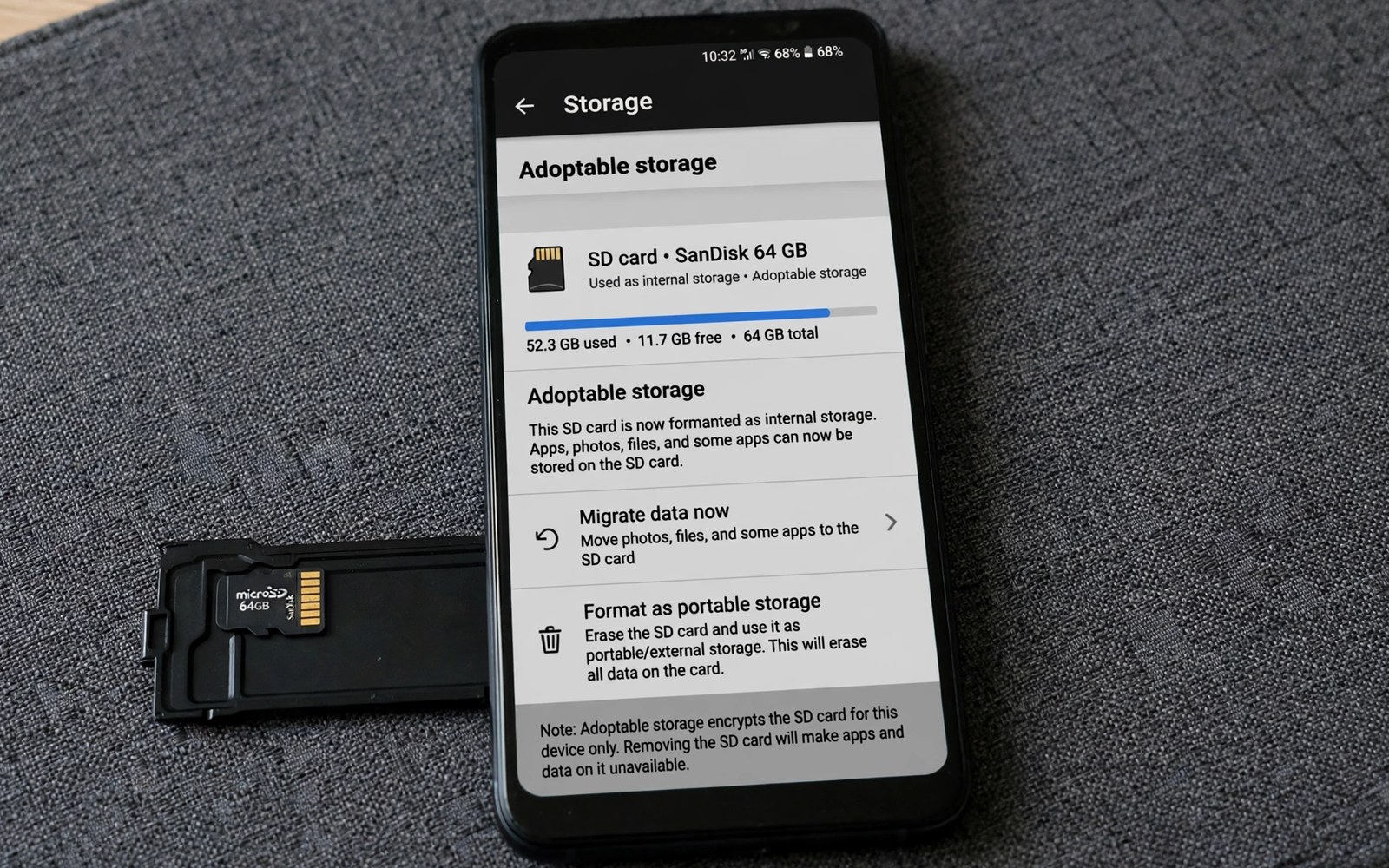
Internal storage fills fast when apps and photos compete for the same space. A memory card sits in the phone yet apps cannot always use it freely. Adoptable storage changes that relationship by formatting the card as an extension of internal storage. The system then treats the card and the internal store as one pool. That change can rescue a phone with a small internal store.
Adoption is not a simple plug and play upgrade. The card becomes tied to that phone and it cannot be read easily in another device. Removing the card after adoption can break apps that live partly on it. A slow card can also slow the whole phone because apps wait for card reads. Those trade offs mean adoption suits some owners and harms others. Owners who move apps without adoption can read how moving apps to a memory card actually works to compare the two paths.
Check whether your phone offers adoption before you plan around it. Some brands hide the option and some brands remove it entirely. A phone that lacks the option needs a different strategy such as moving media to the card. A phone that offers adoption still needs a fast card for good results. A card rated for video work usually performs better than a bargain card.
Prepare a card for adoption
Back up everything on the card before adoption because the process formats the card. Copy photos and documents to a computer and test that the copies open. Buy a card with a high speed rating when possible. A slow card will frustrate you every time an adopted app opens. A fast card keeps the merged pool feeling like real internal storage.
Charge the phone fully before you start adoption. A power loss during formatting can corrupt the card and the phone storage view. Remove the card safely only after the process finishes and the phone confirms the new storage pool. Test an adopted app by opening it and using it for a few minutes. A smooth test gives confidence that the card speed is enough. The same preparation matters when you format memory cards properly without losing data for any other purpose.
Live with adopted storage day to day
Treat the adopted card as part of the phone rather than as removable media. Do not remove it to copy files to a computer. Use a cable or a network share for file transfers instead. Removing an adopted card can corrupt app data and it can force a repair that loses settings. A card that stays put is a card that stays reliable.
Watch storage in Settings as one pool rather than as two separate stores. The system manages placement behind the scenes. You can still move individual apps between internal and adopted storage when the app screen offers that choice. Move large games to the card when internal space gets tight. Keep critical messaging apps on internal storage when you want the fastest launch.
Check storage pools with a short script
import shutil
for path in ["/sdcard", "/storage/emulated/0"]:
    total, used, free = shutil.disk_usage(path)
    print(path, "free", free // 1000000000, "GB")
The snippet above follows a standard pattern for reporting free space on storage paths. It only reports storage totals and it leaves every file untouched. You can adapt the paths for storage locations on your own test system.
A free space report helps you see whether adoption actually relieved pressure. Compare free space before adoption and after adoption with the same apps installed. A real gain shows up as more room for new apps and updates. A small gain may mean that the card is too slow or too small for the job.
Migrate apps back when adoption no longer suits you
Adoption may suit a phone at one stage of its life and not at another. A new phone with larger internal storage may make adoption unnecessary. A card that ages may become slower and less reliable. Migration back to internal storage frees you from a card that no longer performs well. Migration needs planning because internal space must hold the returning apps.
Free internal space before you start a migration. Remove unused apps and clear large caches first. A migration that runs out of internal space halfway can leave apps in a confusing state. Check internal free space against the total size of adopted apps. A comfortable margin prevents a halfway failure. A margin also leaves room for system updates during the migration.
Move apps back one category at a time rather than all at once. Move messaging apps first because they matter most for daily communication. Move games next because they are large and easy to test. Test each app after its move by opening it and using a core feature. A category by category migration isolates a problem to a single group when one occurs.
Choose cards that survive adoption workloads
Adoption workloads differ from simple media storage workloads. Adopted apps read and write small files frequently. A card designed only for sequential video recording may struggle with that pattern. A card with a high random read and write rating handles app workloads better. Check card specifications for application performance ratings when they are published. A card with a strong application rating costs more but it protects daily performance.
Avoid using an old card from a camera for adoption without testing it first. An old card may have worn cells that slow down under app workloads. A test with a demanding app reveals wear before adoption locks the card to the phone. A new card with a warranty is a safer adoption candidate. A warranty also gives you a replacement path when a card fails early.
Monitor adopted card health through app launch times. A sudden slowdown across many adopted apps can signal card wear. A slowdown in one app usually signals that app rather than the card. A pattern across many apps deserves a card check. Replace a wearing card early while migration is still possible.
Advanced adoption for work phones
Work phones benefit from adoption differently from personal phones. A work phone may need many business apps that cannot move easily. Adoption gives those apps room without a larger internal store. A work phone also needs reliability because a failure disrupts business. A fast card and a regular backup are therefore more important for work adoption than for casual personal use. A work adoption plan should include a spare card ready to swap.
Separate work data from personal data when adoption merges storage. A merged pool can blur the line between work files and personal photos. A clear folder system preserves that line even when storage merges. Work documents belong in a work folder. Personal photos belong in a pictures folder. Folder discipline matters more after adoption because the system no longer separates by device location.
Plan an exit strategy for work adoption before you start it. A work phone may be replaced on a schedule. A replacement phone needs a migration plan for adopted data. A migration plan includes a backup of work files to a computer or to a company cloud. A plan written before adoption prevents a rushed migration later. A written plan also helps IT support help you when a phone fails.
Test adopted work apps under real workload conditions. A messaging app that works in a test may struggle under heavy group traffic. A document app that opens small files may struggle with large spreadsheets. A real workload test reveals performance issues before they affect a deadline. A test that mirrors daily work is more valuable than a simple open and close check.
Monitor work phone storage monthly even after adoption succeeds. Adoption solves a space problem but it does not stop apps from growing. A monthly check catches a growing app before it fills the merged pool. A monthly check also catches a card that starts to slow down. Regular monitoring keeps adoption a solution rather than a hidden risk.
A practical adoption checklist for first timers
A first time adoption checklist starts with a card test that you complete before any format. Copy a large video to the card and play it back fully. A video test reveals a slow card before adoption locks it to the phone. A card that stutters on video will frustrate adopted app use. A card that plays video smoothly is a promising adoption candidate.
Back up the card and the phone before adoption begins. A phone backup protects app data that might move during adoption. A card backup protects old card contents that formatting will erase. Two backups before adoption cover both sides of the process. A process with two backups is safe to start even when something goes wrong.
Charge the phone and plug it in during adoption. A power interruption during formatting can corrupt both internal and card storage views. A plugged in phone removes that risk. A quiet hour without calls or updates also helps adoption complete cleanly. A calm adoption window is worth scheduling deliberately.
Test adopted apps immediately after adoption with their core features. Open a messaging app and send a test message. Open a game and load a saved level. A core feature test for each major app confirms that migration succeeded. A test that fails early can be fixed while you still remember the steps that you took.
Common mistakes
One common mistake is adopting a slow bargain card and then blaming the phone for lag. A second mistake is removing an adopted card to read it in a computer. A third mistake is adopting a card without a backup of its old contents. Each mistake turns a helpful feature into a data loss story.
Another mistake is expecting adoption to fix a phone with a failing internal store. Adoption adds space but it does not repair hardware problems. A phone that crashes often needs diagnosis rather than more storage. Solve stability first and add storage second.
Frequently asked questions
Can I use an adopted card in another phone?
An adopted card is encrypted for the phone that adopted it. Another phone cannot read it without reformatting it. Copy files through a cable before you move to a new phone. Plan a fresh card for the new device when possible.
Will adoption slow down my phone?
A fast card keeps most apps feeling normal. A slow card can delay app launches and game loading. Test with a demanding app after adoption. Replace a slow card early rather than living with daily lag.
Can I undo adoptable storage?
You can migrate data back to internal storage when the phone offers that option. The process needs enough internal free space for the move. Back up important files before you start the migration. Format the card normally only after the migration finishes.
Conclusion
Adoptable storage helps a small phone when the card is fast and the owner accepts that the card stays put. Backup and a full charge and a speed test make adoption safe. Daily use needs a mindset shift from removable media to permanent phone storage. App placement choices then keep the merged pool balanced.
Your concrete next step is to check today whether your phone offers adoption in storage settings and note the card speed rating. Back up the card before you adopt anything. Readers who prefer a simpler path can follow storage hacks for owners of 64GB smartphones without adopting a card.

