

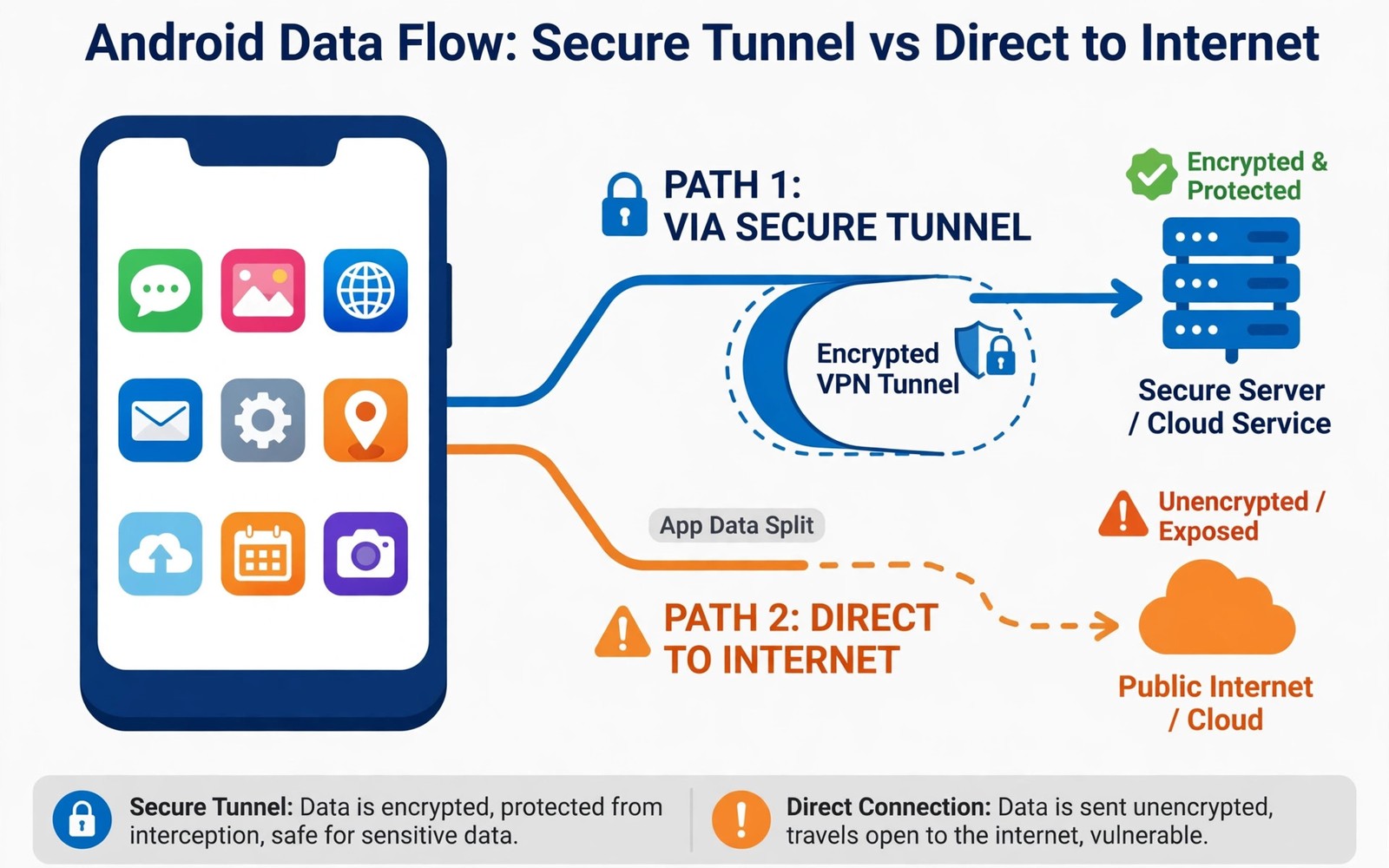
Split tunneling lets you decide which Android apps use the VPN tunnel and which apps connect directly to the internet. Most VPN apps route every app through the tunnel by default once connected. Split tunneling breaks that rule in a controlled way for apps you choose yourself. The rest of your traffic keeps full VPN protection while the chosen apps bypass it.
People use split tunneling when a specific app refuses to work through a VPN connection. Banking apps and streaming apps sometimes block VPN server addresses as a fraud prevention measure. A local service may also need your real location to function correctly on your phone. Split tunneling solves those conflicts without forcing you to disconnect the VPN entirely. Learning what a mobile VPN is and why you need one explains the default full tunnel behaviour that split tunneling changes.
The trade is straightforward because every bypassed app loses VPN protection for its own traffic. That app reveals your real IP address and its traffic becomes visible to the local network again. The risk stays contained when only one low sensitivity app bypasses the tunnel. It grows quickly when many apps or a sensitive app bypass protection without careful thought.
How Split Tunneling Routes Traffic
Android VPN apps implement split tunneling by adding routing rules for the apps you select. Traffic from protected apps enters the tunnel interface created by the VPN app. Traffic from bypassed apps uses the normal network interface instead of the tunnel. The system keeps both paths active at the same time without confusing the two streams.
Some apps offer the opposite mode where only chosen apps use the VPN and everything else connects directly. That inverse mode suits users who need VPN protection for one work app only. Most daily users prefer the default mode with a few bypass exceptions instead. The safer default protects everything unless you deliberately create an exception.
Why Apps Break Under a VPN
Banking apps may reject VPN connections because a foreign server address looks like account takeover activity. Streaming services block VPN addresses to enforce regional licensing rules for their catalogues. Local delivery and ride apps may need your real location to match you with nearby services. These blocks are business decisions rather than signs that your VPN is broken.
Corporate apps sometimes require a direct connection to a local network resource that the VPN cannot reach. Split tunneling lets that single app reach the local resource while other apps stay protected. The alternative of disconnecting the VPN exposes every app on the phone during that session. A narrow exception is safer than a full disconnect in almost every case.
Privacy Risks of Bypassing the Tunnel
A bypassed app can leak your real IP address to its servers even while the VPN icon shows in your status bar. That leak matters if you use split tunneling to hide your location from a service. The service sees your real address from the bypassed app and may link it to your account. Other protected apps stay hidden but the bypassed app creates a clear exception.
Local network observers can also see traffic from bypassed apps that lack their own encryption. Most major apps use transport encryption today which limits what observers can read. Metadata such as destination and timing may still leak even when contents stay encrypted. Reading whether your mobile carrier can see your browsing traffic clarifies what carriers and networks can still observe in each case.
- Bypass only apps that fail clearly through the VPN
- Keep the bypass list as short as possible
- Never bypass browsers used for sensitive accounts
- Test protected apps after changing split tunnel settings
- Review the bypass list every few months
- Combine split tunneling with a working kill switch
Choosing Which Apps to Bypass
Bypass only apps that clearly fail through the VPN and that handle low sensitivity data. A music streaming app or a local news app is a lower risk bypass than a messaging app. Never bypass a browser you use for sensitive accounts simply for convenience. Keep the bypass list short and review it every few months as app behaviour changes.
Test each bypass candidate by trying the app through the VPN first before adding an exception. Many apps work fine through VPNs after a server change or an app update. A bypass added for an old problem may stay long after the problem disappears. Removing stale exceptions restores protection without any real loss of function.
Setting Up Split Tunneling Safely
Open your VPN app settings and find split tunneling or per-app connection settings. Choose the bypass mode and select only the apps that need direct access. Save the list and test each bypassed app plus one protected app to confirm routing. Check your visible IP address inside a protected browser to confirm the tunnel still works.
Combine split tunneling with a kill switch so protected apps stop if the tunnel drops. Remember that bypassed apps keep working during a tunnel failure because they never used the tunnel. That behaviour is expected and it is another reason to keep the bypass list minimal. Review the list after major app updates that might change network behaviour.
You can also explore encrypted web browsers focused on privacy for more context on neighbouring topics in this series.
Putting Split Tunneling Into Practice
Open split tunneling settings in your VPN app and start with an empty bypass list for safety. Add one app at a time only after confirming that it truly fails through the VPN tunnel. Test the app after each addition to confirm that only that app changed behaviour. Adding many apps at once makes it hard to identify which exception caused a later problem. A slow deliberate setup prevents a bypass list that grows without any real justification.
Verify routing after setup by checking your visible address inside a protected browser on the phone. The browser should show the VPN server address while a bypassed app uses the real address. That contrast confirms that split tunneling works as intended on your device. If both show the same address then the bypass setting did not apply correctly. Re-check the app selection and restart the VPN connection before testing again.
Troubleshooting Split Tunneling Problems
Some apps ignore split tunneling settings because they use system services that route differently. A banking app that still fails after bypass may depend on a helper service that remains protected. Adding the helper service to the bypass list can fix the issue when the app allows it. If the app offers no helper option then a full VPN pause may be the only workaround. Use a full pause briefly and reconnect immediately after finishing the sensitive task.
Apps that worked through the VPN before an update may suddenly need a bypass after the update. App updates can change network libraries and server endpoints in ways that interact with VPN routing. Test a failing app through a different VPN server before adding a permanent bypass. A server change sometimes fixes the problem without creating a lasting exception. Permanent bypasses should follow failed server tests rather than precede them.
Building a Habit That Lasts
Review the bypass list every month alongside other privacy settings on your Android phone. Remove apps you no longer use because a bypass for a deleted app serves no purpose. Remove apps whose VPN problems disappeared after later updates fixed the underlying issue. A monthly review keeps the list honest and prevents silent growth over years of use.
Document the reason for each bypass entry in a short personal note on the phone. A reason note prevents future confusion about why an app bypasses protection at all. Future you can judge whether the original reason still applies after months have passed. Documentation turns a mysterious list into an auditable set of deliberate decisions.
Explain split tunneling trade-offs to family members who share a device with bypass settings. Show them that bypassed apps reveal the real address even while the VPN icon remains visible. That visible icon creates a false sense of full protection when bypasses exist on the device. Shared awareness prevents someone from adding sensitive apps to the bypass list casually.
Advanced Tips and Next Steps
Use split tunneling for a local smart home app that needs direct local network access to function. Smart home apps often fail through VPN tunnels because they discover devices by local broadcast. A narrow bypass for that single app restores local discovery without exposing other apps. Test whether the app works through the VPN first because some smart home apps use cloud relays instead. Cloud relay apps may work fine through a VPN without any bypass at all.
Consider time based split tunneling habits when your VPN app supports scheduled profiles or shortcuts. Enable full protection during work hours and allow a bypass only for a specific evening streaming task. Scheduled habits reduce the chance that a bypass stays active long after its original purpose ended. Manual toggling requires discipline that schedules can enforce more reliably over time. Automation helps when willpower fades during busy evenings at home.
Audit split tunneling decisions after every major app update because updates can change network behaviour. An app that needed a bypass last year may work perfectly through the VPN after a rewrite. Removing stale bypasses restores protection without any loss of function in those cases. Update audits also catch new apps that silently added themselves to a bypass list. Vigilance after updates keeps the bypass list aligned with current reality rather than history.
Explain split tunneling to other device users with a concrete example involving a banking app. Show them that the banking app sees a real address while the browser still shows a VPN address. Concrete contrast makes the abstract routing concept immediately understandable to non-experts. Understanding prevents other users from adding sensitive apps to the bypass list casually. Shared understanding protects the whole household when devices are shared between family members.
Keep a written list of bypass reasons outside the VPN app for review during security audits. A reason list transforms mysterious exceptions into deliberate decisions with clear justification. Auditors and future you can judge each exception against current needs quickly. Lists also reveal patterns such as many bypasses for one provider that might indicate a broader problem. Pattern recognition improves decisions beyond individual exception reviews alone.
split_tunnel:
  mode: exclude_apps
  bypass: [banking_app]
  protected: all_other_apps
  kill_switch: true
The steps above follow the approach described in the official developer documentation for Android networking and privacy controls. The guidance reflects standard system behaviour for per-app VPN routing on Android devices.

