

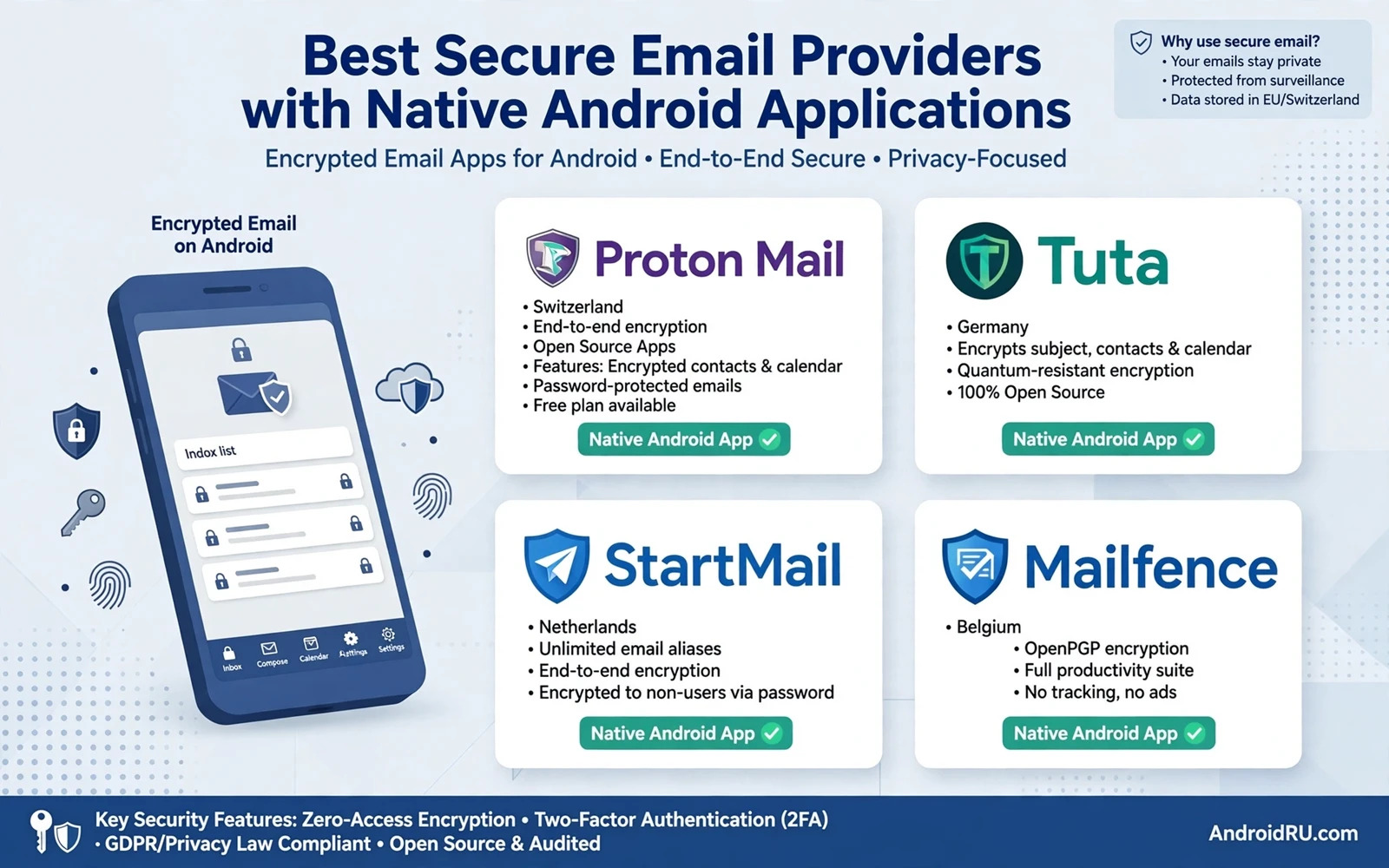
Email carries password resets and banking alerts and work documents and personal conversations. A secure email provider protects that content with encryption and with privacy policies that limit logging and with native Android apps that support modern authentication. A provider that offers strong encryption on the web but a weak or outdated Android app undermines daily security because most users read email primarily on their phones. Native Android support therefore belongs at the centre of provider choice rather than as an afterthought.
Secure email differs from ordinary email in several concrete ways. End to end encryption protects message contents from the provider itself when both parties use compatible encryption. Zero access encryption protects stored messages so that the provider cannot read your mailbox even under legal pressure. Strong authentication protects login with security keys or app codes. Minimal logging limits metadata retention. A provider that offers all four protections gives a stronger mailbox than a provider that offers only transport encryption while storing messages in plain text.
This guide compares the qualities that matter for secure email on Android and the tradeoffs between maximum privacy and everyday usability. You will learn how to evaluate encryption claims and how to test a native app and how to migrate without losing mail. No provider makes email perfectly private because email metadata and recipient compatibility impose real limits. The best provider reduces exposure honestly while keeping mail usable every day.
Encryption Models And Honest Limits
End to end encryption for email works smoothly when both sender and recipient use the same provider or compatible keys. It becomes complicated when you email someone on an ordinary provider because that recipient cannot decrypt an end to end encrypted message without a shared key or a password protected link. Many secure providers solve this with encrypted links that recipients open in a browser with a password that you share separately. That method protects content but adds friction. Judge a provider by how gracefully it handles external recipients rather than by encryption claims for internal mail alone.
Zero access encryption protects stored mail from provider reading while still allowing the provider to deliver mail normally. That model suits most users better than pure end to end encryption for every message because it preserves search and filtering and spam protection inside the mailbox. A zero access provider cannot read your stored messages but it can still see metadata such as sender and recipient and timing. Accept that metadata limit honestly. Email was never designed as a metadata free system and no provider can erase metadata entirely while delivering mail across the internet.
Native Android App Quality Checklist
Test the native Android app before committing to a provider. Check that the app supports biometric unlock and modern authentication and push notifications that do not leak message content onto the lock screen. Check that search works quickly and that attachments open safely and that offline access covers recent mail. Check that the app receives regular updates and that its Play Store listing shows a responsive developer. An app that lags behind the web version for months signals a provider that treats Android as secondary.
Check notification privacy carefully because lock screen previews can expose sensitive subjects and senders to anyone who glances at your phone. A good native app lets you hide message content in notifications while still alerting you to new mail. Check widget and wearable support if you rely on those features. Check battery usage after a week because an inefficient mail app that polls constantly can drain power. A secure provider with a poor Android app will push you back to a less private provider through daily frustration.
Authentication Account Recovery And Aliases
Strong authentication protects a secure mailbox from credential theft. Choose a provider that supports security keys or app based codes for login and switch on the strongest method that you will use consistently. Check account recovery options before migration because a secure provider with weak recovery can lock you out permanently after a lost device. Some privacy focused providers offer recovery codes that you must store safely. Record those codes in a password manager immediately after setup and test recovery on a second device when possible.
Aliases and custom domains add practical privacy value. Aliases let you give different addresses to shopping and newsletters and banking without exposing your main address everywhere. A breach of one alias does not expose your main mailbox identity. Custom domain support lets you keep your email address when switching providers later. That portability prevents lock in and makes future migration far easier. A provider that supports aliases and custom domains gives you long term flexibility that a provider with a single fixed address cannot match.
Migration Without Losing Mail
Migrate in stages rather than switching overnight. Create the new secure mailbox and test sending and receiving with a few trusted contacts. Set up forwarding from the old mailbox for a transition period or check the old mailbox regularly for stragglers. Import old mail through the provider migration tool when offered and verify that folders and important messages transferred correctly. Update password reset addresses on banking and shopping accounts gradually starting with the most important services.
Keep the old mailbox active for several months after migration because some services and contacts will keep using the old address. Notify important contacts of the new address directly rather than relying on an automatic reply alone. An automatic reply that announces your new address to every sender can leak the new address to spammers. Use a selective notification approach for trusted contacts and let less important senders discover the change slowly through your replies from the new address.
Provider Choice For Different Users
Privacy focused users who prioritise maximum encryption should choose a provider with zero access storage and strong authentication and a proven Android app even when the service costs more than a free mailbox. Users who prioritise compatibility should choose a provider with graceful external recipient handling and reliable spam filtering and fast search. Business users should check custom domain support and admin controls and compliance features that their work requires. Students and casual users may prefer a free tier with solid encryption and an honest privacy policy over a premium tier with features that they will never use.
Free secure email tiers deserve careful reading because free services must fund themselves somehow. Check whether the free tier limits storage or aliases or support in ways that will frustrate you later. Check whether the provider shows ads inside the mailbox or sells aggregated data. A free tier funded by subscriptions from paying users is healthier than a free tier funded by advertising profiles. Read the privacy policy for the free tier specifically because terms can differ between free and paid plans.
Secure mail depends on strong account habits so harden logins with enabling two-factor authentication across apps and compare client options in top email clients for Android to manage multiple accounts while best encrypted note apps to protect sensitive ideas covers private notes that often travel beside email.
- Test the native Android app for biometric unlock and notification privacy before committing
- Choose zero access or end to end encryption with honest metadata limits
- Switch on the strongest authentication method you will use consistently
- Use aliases to separate shopping and newsletters from banking mail
- Migrate in stages and keep the old mailbox active for several months
Evaluating A Secure Provider Free Trial
A free trial reveals more about a secure email provider than any marketing page. Sign up with a test address first and send mail to yourself and to an external ordinary mailbox. Check how the provider handles external recipients and whether encrypted links work smoothly for them. Test the Android app for a full week of real mail including attachments and search and offline reading. A provider that feels awkward during a trial will feel worse after migration when switching costs rise.
Test support responsiveness during the trial because secure providers vary widely in support quality. Ask a genuine question about encryption or migration and measure response time and answer quality. A provider that answers slowly or vaguely during a trial will answer worse during a real account emergency. Check community forums for migration stories from users with similar needs. A pattern of lost mail during migration is a warning that no feature list can outweigh.
Decide on price honestly after the trial by comparing the paid tier that you actually need rather than the flagship tier. A free tier may suffice for a secondary mailbox while a paid tier may be essential for a primary mailbox with custom domain support. Check whether annual billing saves money without locking you into a provider that you have not yet trusted for a full year. Start monthly if doubt remains and switch to annual only after the provider proves itself through daily use.
Secure Email For Work And Personal Separation
Work and personal email separation protects both domains when one mailbox faces a compromise. Keep work mail in a provider chosen by your employer or by work policy and keep personal mail in a secure provider chosen for privacy. Never forward work mail automatically to a personal mailbox because forwarding copies confidential content into a system outside employer control. Read work mail in its own app and personal mail in its own app so that a compromise of one mailbox does not expose the other.
Review email provider choices after a job change because work mail access usually ends with employment. Export personal contacts and personal mail that lived in a work mailbox before access ends when policy allows it. Set up a personal secure mailbox before leaving a job so that password resets for personal services do not depend on a work address that will disappear. Separation planned before a transition prevents the common crisis where personal accounts become unreachable after work access ends.
The best secure email provider with a native Android application is the one that protects stored mail and supports strong authentication and runs a polished Android app that you enjoy using daily. Evaluate encryption honestly and test the app thoroughly and migrate in stages. That careful choice gives you a mailbox that respects privacy without turning everyday email into a chore.

