

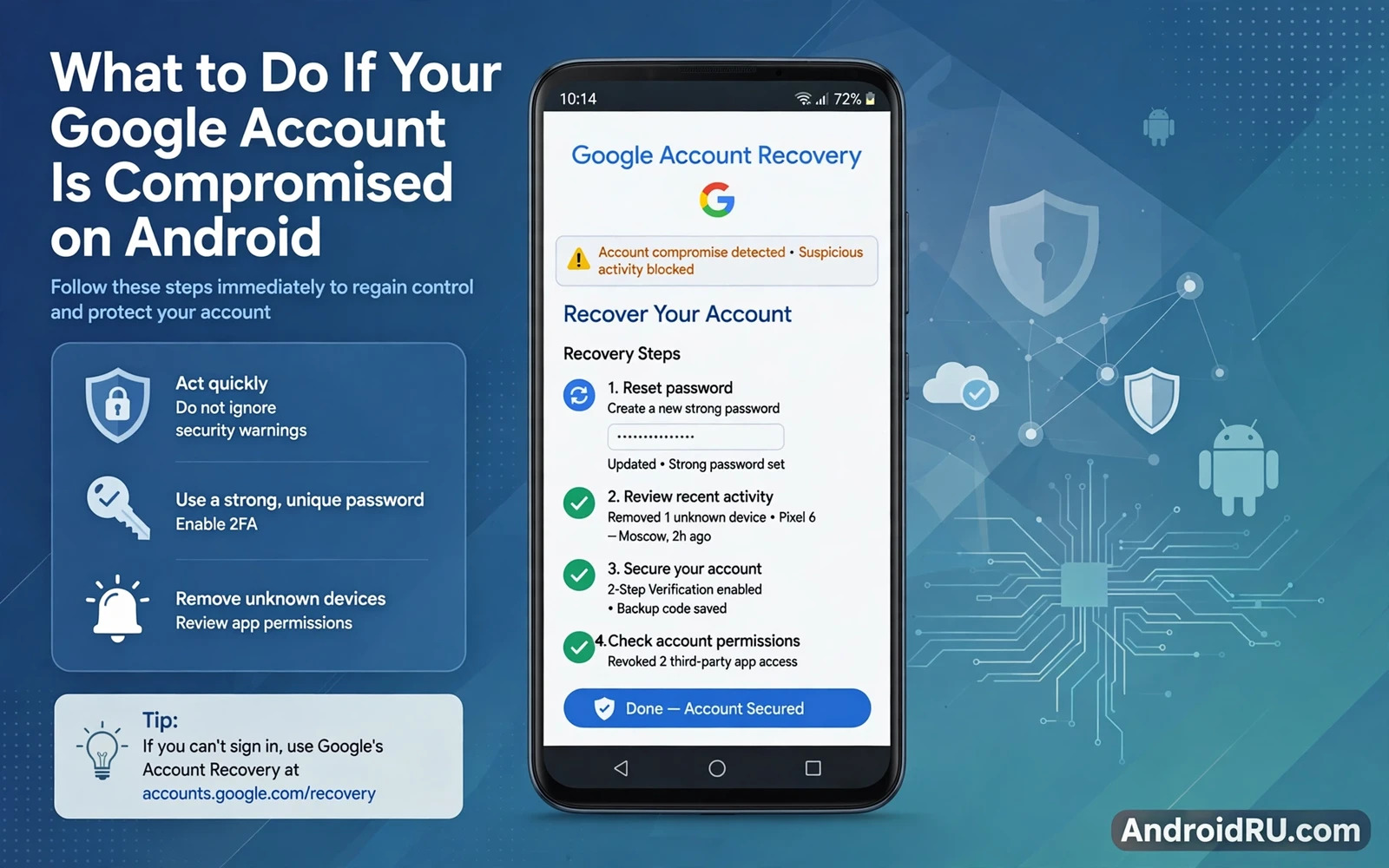
A compromised Google account is serious because that single account often controls email and cloud storage and photos and app purchases and password resets for many other services. An attacker inside your Google account can read email to find other accounts and can reset passwords through email links and can access cloud files that contain personal documents. Fast and ordered action limits that damage. Panic and random clicking waste the critical window during which lockout is still possible.
Compromise signs include password changes that you did not make and recovery options changed without your action and emails sent from your account that you did not write and unfamiliar devices in your account device list and new app permissions that you did not grant. Any one of those signs deserves immediate investigation. Several signs together confirm compromise rather than a mere false alarm. Treat confirmation calmly and follow a recovery order that removes attacker access before you spend time investigating how entry happened.
This guide gives that recovery order step by step. You will regain control and revoke attacker sessions and restore recovery options and check for hidden persistence and harden the account against repeat entry. You will also learn when to use account recovery tools and when to seek official support. The order matters because changing a password without revoking sessions can leave an attacker logged in through an existing session.
Act Immediately From A Trusted Device
Start recovery from a device that you trust and that you believe is clean. A compromised phone may contain malware that captures your new password as you type it. Use a trusted computer or a family member device that you can verify. Open account security settings independently by typing the address yourself rather than clicking any link in a suspicious message. Speed matters but device trust matters more because recovering onto a compromised device hands the new credentials straight back to the attacker.
If you still have account access change the password immediately to a long unique value that you have never used elsewhere. Store the new password in a password manager rather than memorising a weak replacement under stress. If you lost access entirely use the official account recovery flow and answer identity questions carefully. Recovery may ask about previous passwords or account creation details. Provide accurate answers without guessing wildly because repeated wrong answers can delay recovery.
Sign Out Attacker Sessions And Devices
After a password change open the sessions and devices page and sign out of every session except the trusted device that you are using for recovery. Attacker sessions can survive a password change on some services when they hold refresh tokens. Signing out everywhere forces every device to authenticate again with the new password. Remove unfamiliar devices from the device list entirely. Check the list twice because an attacker device may hide among familiar device names with a slightly different model label.
Review third party app access and revoke every app and service that you do not recognise. Attackers often grant a malicious app access to Gmail or Drive as a persistence method that survives password changes. A revoked app loses its token immediately. Review connected sites and services with the same scepticism. Keep only apps that you actively use and that come from developers that you trust. Reconnect a legitimate app later if revoking it breaks a workflow.
Restore Recovery Options And Check Persistence
Restore your recovery email and recovery phone to values that only you control. An attacker who changed recovery options can use them to regain access after you change the password. Check both values character by character rather than glancing at the summary. Add a recovery option that you control through a separate channel if possible. A recovery phone that you physically hold and a recovery email on a separate secure account together give strong recovery resilience.
Check Gmail for hidden persistence tricks that survive password changes. Look for filters that forward mail to a stranger or that delete security messages automatically. Look for delegation settings that grant another account access to your mailbox. Look for forwarding addresses that you did not add. Remove every suspicious filter and delegation and forwarding rule. Check Drive sharing for files shared with unknown accounts and revoke that sharing. Persistence tricks are quiet and they explain many repeat compromises.
Check Damage Across Email Drive And Purchases
Review sent email for messages that the attacker sent in your name. Warn contacts who received phishing messages from your account so that they do not click malicious links. Review Drive for deleted files and for new files that the attacker may have planted. Review Google Photos for unexpected sharing. Review Play purchase history for unauthorised app or media purchases and request refunds through official support channels when needed. Document damage with screenshots and timestamps because that record helps support cases and police reports.
Check other accounts that used your Google email for password resets. An attacker with email access may have reset banking and social and shopping accounts during the compromise window. Change passwords on high value accounts starting with banking and email and cloud storage. Prioritise accounts that share the compromised password because those accounts fell together. A password manager helps you identify reuse quickly and replace reused passwords with unique values systematically.
Harden The Account Against Repeat Entry
Switch on the strongest two factor method that your situation allows. Security keys offer the strongest protection against phishing because they verify the genuine sign in site cryptographically. App based codes offer strong protection and work well on most phones. Text message codes offer weaker protection than the other methods but they still beat password only access. Choose the strongest method that you will actually use consistently because a strong method that you disable during frustration protects nothing.
Review security settings monthly after a compromise because attackers sometimes return through a forgotten persistence path. Check devices and third party access and filters on a schedule until you are confident that the account is clean. Consider a security checkup inside your Google account that walks through each area systematically. Keep a written recovery plan for the future that lists your recovery email and recovery phone and two factor method. A plan written during calm prevents panic decisions during the next incident.
Compromise response starts with alert literacy so read enabling two-factor authentication across apps before hardening and compare device warning signs in signs your Android phone is hacked and how to fix it while locating and remotely wiping a lost Android phone covers device loss that often accompanies account compromise.
- Recover from a trusted clean device rather than from a possibly compromised phone
- Change the password and then sign out of all other sessions and devices
- Restore recovery email and phone to values only you control
- Remove hidden Gmail filters and forwarding rules and unknown third party access
- Switch on the strongest two factor method you will use consistently
Recovering Accounts Linked To A Compromised Google Account
A compromised Google account often cascades into linked accounts because email password resets give an attacker a path into banking and shopping and social services. Start cascade recovery with a list of services that use your Google email for login or for password reset. Prioritise banking and payment services first and then email linked services and then social accounts. Change each password to a unique value and switch on stronger verification for each service in turn. Work through the list methodically rather than changing passwords at random.
Check each linked service for attacker activity during the compromise window. Look for new shipping addresses on shopping accounts and new payment methods on payment accounts and new posts or messages on social accounts. An attacker who changed a shipping address may be preparing a fraud order that has not shipped yet. An attacker who added a payment method may be testing stolen card access. Report suspicious activity through each service official support channel and keep screenshots of evidence for every report.
Prevent future cascades by reducing single point dependence on one email account. Use a password manager to give every service a unique password so that one leak cannot cascade by reuse alone. Use separate email aliases for banking and for shopping and for social services where your provider supports aliases. Review which services can reset through email alone and add stronger verification to the services that allow it. Those structural changes mean that a future Google account incident stays contained instead of spreading across your digital life.
Account Recovery Planning Before The Next Incident
Account recovery planning before the next incident saves far more time than recovery improvisation during a crisis. Write down your recovery email and recovery phone and two factor method and store that note outside the phone itself. Test account recovery from a trusted computer while access still works so that you know the steps before stress arrives. A tested recovery plan turns a future compromise from a panic into a rehearsed routine with a clear first step.
Share recovery planning with a trusted contact who can help when you lose all devices at once. A trusted contact who knows where recovery codes live and how to reach support can act while you remain locked out. Choose that contact carefully and update them when recovery details change. Recovery planning feels unnecessary during calm periods and it proves invaluable during the one incident where every device is unavailable. Prepare the plan now while you have full access and a clear mind.
A compromised Google account feels overwhelming but a clear order restores control. Recover from a trusted device and change the password and revoke sessions and restore recovery options and remove hidden persistence and harden verification. Work through those steps methodically and check linked accounts for knock on damage. That discipline turns a serious compromise into a contained incident with a stronger account on the other side.

