

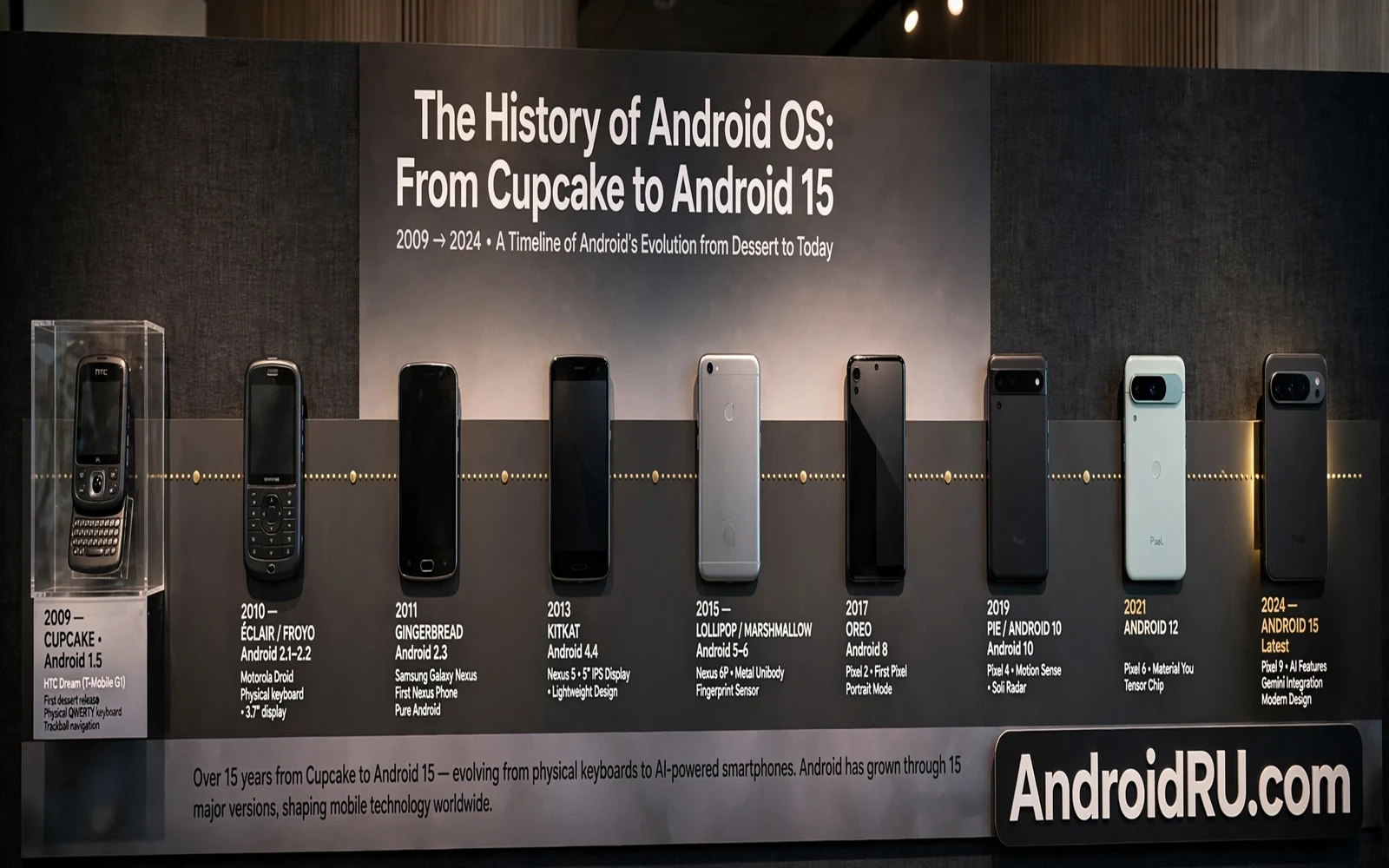
Android began as a system for phones with small screens and limited hardware. Early versions focused on basic tasks like calls and messages and simple apps. The system grew quickly as phones gained touch screens and faster processors and better cameras. Each version added a layer of polish and power. The history of Android is a story of a small mobile system growing into a platform for phones and tablets and watches and televisions and cars.
Dessert names marked the early era. Cupcake opened the dessert sequence. Donut and Eclair and Froyo followed with steady improvements. Gingerbread refined the interface. Honeycomb focused on tablets. Ice Cream Sandwich united phone and tablet design. Jelly Bean smoothed the interface. KitKat slimmed the system for modest hardware. Each name marked a step toward the modern system that users know today.
Lollipop brought a new design language with bold color and layered motion. Marshmallow brought clearer permission control. Nougat brought split screen multitasking. Oreo brought notification channels and background limits. Pie brought gesture navigation and adaptive battery tools. The dessert era ended with Pie. Later versions use numbers alone. Numbers make the order clear without a dessert debate.
This guide follows that path from Cupcake to Android 15 in plain language. It focuses on changes that shaped daily use. It avoids a list of minor tweaks that only developers noticed. It shows how privacy and performance and design evolved together. A user who knows this history can judge new versions with more calm and less hype.
The Early Dessert Era
Cupcake introduced an on screen keyboard and video recording and app widgets in a basic form. These features seem simple today. They were major steps when phones still used physical keyboards. An on screen keyboard freed screen space for content. Widgets gave users live info without opening an app. Video recording turned a phone into a pocket camera for everyday moments.
Donut improved search and camera handling. Eclair improved maps and contacts and browser speed. Froyo improved speed and added portable hotspot support. Each early version fixed rough edges rather than redesigning the system. Early Android felt experimental and open. Early Android also felt rough in places where later versions feel polished.
Gingerbread refined the interface with a darker theme and better copy and paste. Honeycomb took a bold step for tablets with a new layout for large screens. Honeycomb never reached phones in the same form. Its tablet ideas still shaped later large screen design. Ice Cream Sandwich merged the phone and tablet paths into one design. That merge made app development simpler and made the system feel unified.
Jelly Bean focused on smoothness. The system aimed for consistent frame timing and faster touch response. Users noticed a phone that felt more fluid even on modest hardware. KitKat focused on efficiency. The system ran better on phones with limited memory. KitKat also brought a cleaner design and better printing and screen recording support in later tools. Efficiency and smoothness together made Android usable on a wider range of prices.
Design Matures With Lollipop And Marshmallow
Lollipop introduced Material Design with bold color and shadows and motion. Apps gained a consistent visual language. Buttons and cards and menus behaved in similar ways across apps. The new design made Android feel modern and coherent. The new design also demanded more from hardware. Older phones felt the cost of richer animation and layering.
Marshmallow shifted focus to control. Users could grant permissions one by one instead of all at once at install. A flashlight app no longer needed contacts access by default. A messaging app could gain camera access only when it needed it. This change shaped modern privacy thinking. Permission control is now a core Android idea rather than a hidden setting.
Marshmallow also introduced smarter power saving. Doze mode reduced background work when the phone sat still. App standby limited apps that you rarely opened. Battery life improved for many users without any action. Power saving became a system job rather than a user chore. Later versions built on this idea with stricter background rules.
Fingerprint support arrived in a system form during this era. Fingerprint unlock became consistent across apps and devices. A secure lock method became easy for everyday users. Easy security helps adoption more than a complex security feature. Users who can unlock fast are more likely to lock the phone at all.
Multitasking And Control In Nougat Oreo And Pie
Nougat brought split screen to phones in a system form. Users could run two apps side by side. Users could reply to messages from a notification without opening the full app. Nougat also brought bundled notifications that grouped alerts by app. These changes helped large phones feel useful rather than merely large. Multitasking became a daily tool rather than a rare trick.
Oreo brought notification channels that let users control alert types inside one app. A messaging app could have a loud channel for direct messages and a quiet channel for group updates. Oreo also limited background work more firmly. Apps could no longer run freely in the background without limits. Battery life and performance improved for users who never touched a setting.
Oreo also introduced picture in picture video for phones. A video could shrink to a small window while you used another app. This feature suited video calls and navigation and casual viewing. Picture in picture showed how Android treated the phone as a multitasking device. A phone could now handle a video and a task at once without a full app switch.
Pie brought gesture navigation as an option. Users could swipe to go home and swipe to switch apps. Pie also brought adaptive battery tools that learned app use patterns. Pie brought digital wellbeing tools that showed screen time and app use. These tools framed phone use as a health question as well as a tech question. Balance became part of the system story.
The Numbered Era From 10 To 13
Android 10 dropped dessert names for public version numbers. The system gained a dark theme and gesture navigation as a standard option. Location permission gained a one time choice. Users could share location only while using an app. Privacy control moved closer to daily decisions. A one time permission reduced long term tracking without blocking the app entirely.
Android 11 refined conversations and device controls. Conversations gained a dedicated space in notifications. Device controls for smart home tools gained a quick panel. Screen recording arrived as a system feature. Permission auto reset removed access from apps that you stopped using. Each change made a common task faster or safer without a redesign.
Android 12 brought a major visual refresh with dynamic color. The system picked colors from wallpaper and applied them across menus and widgets. Privacy gained a dashboard that showed recent permission use. Camera and microphone indicators showed when those sensors were active. Visual identity and privacy transparency advanced together in this version.
Android 13 refined that visual system and added per app language settings. Users could set one app to one language and another app to another language. Photo permission became more precise with partial media access. Users could share only selected photos with an app. Tablet and large screen support improved with better multitasking tools. The numbered era kept the system steady while polishing details that matter daily.
Android 14 And The Path To 15
Android 14 focused on customization and health and accessibility. Lock screen customization gained more options. Health data gained stronger controls. Accessibility tools gained clearer settings. The system also improved battery tools and app behavior for large screens. Android 14 felt like a mature system refining its strengths rather than chasing a new identity.
Android 15 builds on that maturity with stronger privacy and focus tools. Partial screen sharing gives you finer control during calls. Focus tools gain clearer rules for contacts and apps. Personalization gains better contrast and widget behavior. Performance gains come from tighter background management. Android 15 does not reinvent the phone. Android 15 sharpens the phone that Android 14 already built.
Security support links the whole history together. Early versions had short support windows and slow patches. Modern versions have longer support windows and faster monthly patches. A modern phone receives fixes for years. An early phone often stopped receiving fixes quickly. Longer support is one of the largest real improvements in Android history even though it is less visible than a new design.
Large screen support also links the eras. Honeycomb tried tablet design early. Android 12 and later versions returned to large screens with better tools. Foldable phones now need that large screen work. A system that handles a folding display well owes a debt to tablet experiments from many years ago. History repeats in Android as hardware cycles back to larger screens.
What History Teaches Users Today
History teaches that early features often return in polished form. Widgets began simply and later became central to personalization. Split screen began as a power feature and later became a standard tool. Permission control began as a simple toggle and later became a full manager. A feature that feels rough today may become essential after a few versions of polish.
History also teaches that design trends cycle. Early Android used dark themes and simple icons. Later Android used bright colors and bold motion. Modern Android uses dynamic color that adapts to wallpaper. Each cycle keeps some ideas and drops others. A user who chases every trend will change themes often. A user who picks a calm setup will enjoy any version more.
Support length teaches the most practical lesson. A phone with a long patch window stays safe longer. A phone with a short window becomes risky sooner. Check support before you buy. A beautiful design cannot replace patches. A fast processor cannot replace patches. History shows that support decides how long a phone stays trustworthy.
Android 15 versus Android 14 and whether the upgrade is worth it follows the same refinement pattern as the whole history. Most upgrades polish a working system. Few upgrades replace it entirely. A modern upgrade refines rather than reinvents. That pattern has held from early versions to today.
Privacy and focus and personalization carry the story in new Android 15 features for your phone just as earlier themes carried earlier versions. Privacy grew from Marshmallow permission control. Focus grew from Pie wellbeing tools. Personalization grew from Lollipop design and Android 12 dynamic color. Android 15 gathers threads that began many versions ago.
Early Android testing was rough and unofficial for most users while installing the latest Android beta on Google Pixel today follows official enrollment with clear rollback warnings. Testing early software is now a choice with known risks rather than a gamble with unknown tools. A user who understands those risks can test with a backup and a second device.
Quick Checklist
- Note the dessert order from Cupcake through Pie
- Compare permission control across Marshmallow and later versions
- Check support length before buying any phone
- Review privacy settings after each major upgrade
- Test split screen and widgets on a large screen
- Back up before moving to a new version
- Keep a calm theme rather than chasing every trend
- Judge a new version by daily tasks not by hype

