

Samsung Galaxy M15 5G Review: Display, Cameras and Budget Trade-Offs
Budget phones usually ask you to pick one strength and live with the rest. The Samsung Galaxy M15 5G does not quite escape that rule, but it picks its strengths well. A bright Super AMOLED screen, a very large battery and four years of promised operating system updates are the three reasons this phone keeps appearing in shortlists, and they are also the three reasons it still matters in 2026, two years after its launch. This Galaxy M15 5G review looks at the display, the cameras and the budget trade-offs in the title, then goes further into performance, battery life, software and the full specifications, so you can decide with facts rather than a spec sheet alone.
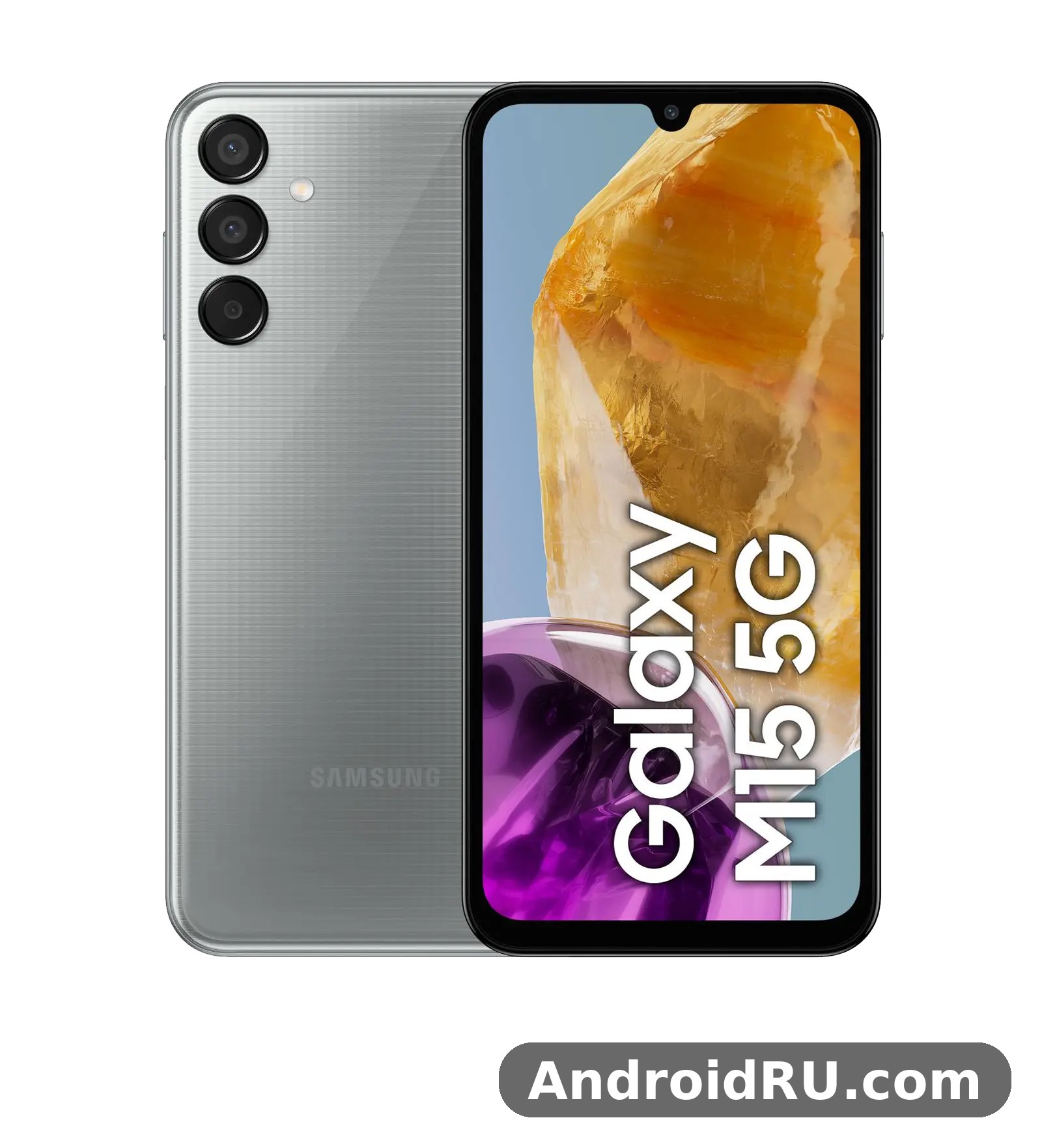
The short version is this: if you watch a lot of video, read on your phone for hours, or simply hate charging every night, the M15 5G is easy to recommend. If you want the fastest camera, the loudest speakers or the quickest charging in this price range, you will find rivals that do one of those things better. The Galaxy M15 5G price in India 2026 has settled well below its launch price in many shops, which changes the maths again, because a phone that was good value at launch can become a bargain once the next generation arrives. Check the current price in your own market before you buy, because regional prices and bundled offers move often.
Is Galaxy M15 5G worth buying in 2026? For a second phone, a first phone for a teenager, a work phone, or a main phone for someone whose day is mostly calls, messages, video and social apps, the answer is yes, with the reservations set out below. For heavy gaming or for someone who photographs in low light every evening, the answer is more careful. The rest of this article explains why, section by section, with the Galaxy M15 5G specs in a full table near the end.
Galaxy M15 5G Display Review: 6.5-inch Super AMOLED at 90Hz
The Galaxy M15 5G Super AMOLED display is the phone’s best feature, and a display review has to start with the panel, because the screen is the single biggest upgrade over the LCD panels that still dominate this price range. The phone has a 6.5-inch Super AMOLED display with a 1080 x 2340 Full HD+ resolution, a 90Hz refresh rate and a rated peak brightness of 800 nits. In plain terms, colours look rich without looking cartoonish, text is sharp at 396 pixels per inch, and scrolling through a long feed feels smooth rather than juddery. The Galaxy M15 5G display is protected by a flat panel with a small waterdrop notch for the front camera, which is a dated look in 2026 but a practical one, because it keeps the bezels simple and the screen area large.
Watching video is where the panel earns its keep. Dark scenes in a film hold detail instead of turning into a grey wash, which is the usual weakness of cheap LCD screens. Samsung’s video enhancer lifts brightness and contrast for supported video apps, and the difference is visible in a dim room. The 90Hz refresh rate does not make games faster on its own, but it makes the whole interface feel more responsive: menus glide, web pages scroll cleanly, and the keyboard feels a fraction quicker under your thumb. That said, the refresh rate is adaptive only in a limited sense, and the phone drops back to 60Hz in some apps and when the battery saver is on.
Galaxy M15 5G Screen Brightness Outdoor Sunlight
Galaxy M15 5G screen brightness outdoor sunlight is a fair question for a budget phone, because many cheap AMOLED panels look great indoors and wash out at noon. The M15 5G reaches a rated 800 nits in high brightness mode, which is enough to read messages and check maps in direct sun in most conditions. It is not as bright as a flagship panel, and a very bright midday sky in the tropics will still force you to shade the screen with your hand, but for everyday outdoor use it holds up. Auto brightness works well once it has had a day or two to learn your habits, and the extra brightness mode in the display settings is worth turning on if you spend a lot of time outside.
How to Get Smooth Scrolling From the 90Hz Panel
Galaxy M15 5G how to enable 90Hz refresh rate is a search that appears often, because the setting is not where every buyer expects it. Open Settings, tap Display, tap Motion smoothness, then choose Adaptive or High, depending on the One UI version on your phone. Adaptive lets the phone switch between 60Hz and 90Hz to save power, while High holds 90Hz more often. If the screen still feels like 60Hz in a particular app, that app may cap its own frame rate, which is common in video apps and some games. Battery saver also forces 60Hz, so a phone that suddenly feels less smooth after you turn on power saving is behaving as designed, not broken.
Colours, Eye Comfort and Always On Display
Two display modes are on offer: Vivid and Natural. Vivid is the default and suits video and games, while Natural is closer to accurate colour and suits photo editing. Eye comfort shield warms the colour temperature in the evening and can be scheduled, and dark mode is genuinely useful on an AMOLED panel because black pixels draw almost no power. There is no always on display in the usual Samsung sense on this model, which is one of the small budget cuts, and the waterdrop notch means there is no punch-hole camera to hide. None of that spoils the core point: at this price, a Full HD+ Super AMOLED screen with 90Hz is still the M15 5G’s strongest card.
What the Display Does Not Do
Honesty matters here. There is no 120Hz option, no HDR certification that changes much in practice, and no stereo speaker pair to match the screen for films, because the phone has a single bottom-firing speaker. The Galaxy M15 5G speakers are loud enough for a video in a quiet room, but they distort at full volume and they are easy to cover with a palm when you hold the phone sideways. If you watch a lot of video, a cheap pair of wired earphones through the USB-C port or a Bluetooth set makes a bigger difference than any screen setting. The display is the star; the audio is a supporting act.
Galaxy M15 5G Camera Quality: 50MP Triple Camera in Daylight and Low Light
The Galaxy M15 5G camera is a triple rear system: a 50MP main camera with an f/1.8 aperture, a 5MP ultrawide camera with an f/2.2 aperture, and a 2MP macro camera with an f/2.4 aperture. The front camera is a 13MP unit with an f/2.0 aperture, set in the waterdrop notch. Video tops out at 1080p at 30 frames per second from both the rear and front cameras, with no 4K option and no optical image stabilisation. Those are the facts, and they set the expectations fairly: this is a daylight camera first, a social camera second, and a low-light camera only with patience.
In good light the 50MP main camera produces clean, well-exposed photos with Samsung’s familiar warm colour. Detail is strong in the centre of the frame, skin tones look natural rather than over-smoothed, and the phone’s scene optimiser lifts greens and blues in landscapes without going over the top. The Galaxy M15 5G camera quality in low light is weaker, as it is on almost every phone at this price, but night mode helps. It takes a longer exposure and combines frames, so you need a steady hand and a still subject. The result is brighter than the scene looked to your eye, with more noise in the shadows and softer edges, but usable for a social post.
Galaxy M15 5G Night Mode Camera Samples and What They Show
Galaxy M15 5G night mode camera samples posted by owners tend to show the same pattern: street scenes and shop fronts come out bright and readable, while very dark scenes turn muddy and lose fine detail. That is not a flaw in one unit; it is the limit of a small sensor without optical stabilisation. The practical tip is simple: brace the phone against a wall or a railing, tap to focus on the brightest part of the scene, and let night mode finish before you move. The phone also offers a dedicated night mode in the camera app’s More section, separate from the automatic night detection in the main photo mode, and the dedicated mode is worth using when the light is genuinely poor.
Ultrawide, Macro and the Galaxy M15 5G Selfie Camera
The 5MP ultrawide camera is useful for buildings, groups and landscapes, but it is the weakest lens on the phone. Colours shift slightly cooler than the main camera, edges soften, and low light turns it noisy fast. Use it when the wider field of view is the point of the shot, and switch back to the main camera when quality is the point. The Galaxy M15 5G ultrawide lens has a fixed focus, so it cannot double as a close-up lens. The Galaxy M15 5G macro camera is a 2MP unit that needs bright light and a very steady hand; it is a fun extra rather than a reason to buy the phone, and most owners will use it a few times and then forget it exists.
The Galaxy M15 5G selfie camera is a 13MP unit that does a solid job in daylight, with decent detail and Samsung’s portrait mode for blurred backgrounds. Video calls look clean, and the front camera records 1080p video at 30 frames per second, which is enough for calls and short clips. In dim indoor light, selfies get softer and noisier, and the screen flash helps only at close range. The Galaxy M15 5G video from the rear camera is stable enough for a walk-and-talk clip thanks to electronic stabilisation, but it cannot match a phone with optical stabilisation, and fast pans will show judder.
Galaxy M15 5G Portrait Mode Edge Detection and Best Daylight Settings
Galaxy M15 5G portrait mode edge detection is decent for a budget phone when the subject is a person standing against a plain background in good light. Hair edges are the usual weak point, with occasional stray strands blurred or left sharp, and busy backgrounds confuse the depth map. The fix is to step back, keep the subject a metre or two from the background, and check the blur level before you shoot rather than after. Galaxy M15 5G best camera settings for daylight are simple: leave the main camera on the default photo mode, turn off the beauty filter or set it to the lowest level, tap to focus on your subject, and let the phone handle exposure. Galaxy M15 5G slow motion video 1080p is available in the camera app for short clips, and it is a nice extra for a pet or a child running, though the resolution and light requirements limit it to bright days.
Camera Verdict in One Paragraph
Judge the camera on what it is for. For daylight photos, food, friends and holidays, it is good. For the Galaxy M15 5G camera quality in low light, it is average for the price, better than a cheap LCD rival with a smaller sensor, worse than any phone with a larger sensor or optical stabilisation. The 50MP mode is worth using only when you plan to crop heavily, because the regular 12.5MP pixel-binned output is cleaner and smaller. If the camera is your first priority, look at the comparison section below before you decide.
Galaxy M15 5G Performance and Gaming: Dimensity 6100+ in Daily Use
Under the screen sits the MediaTek Dimensity 6100+ chipset, built on a 6nm process, with an octa-core CPU made of two Cortex-A76 cores at 2.2GHz and six Cortex-A55 cores at 2.0GHz, plus a Mali-G57 MC2 GPU. That is a modest, efficient chip, and the Galaxy M15 5G performance matches that description. Everyday tasks feel fine: opening apps, switching between a browser and a chat app, scrolling a feed, and watching video all run without drama. The phone is sold with 4GB, 6GB or 8GB of RAM and 128GB of storage, with some markets also offering a 256GB variant, and the Galaxy M15 5G storage can be expanded with a microSD card. The Galaxy M15 5G RAM you choose matters more than it looks on a spec sheet, because 4GB is tight for heavy multitasking in 2026, while 6GB or 8GB gives the phone room to keep several apps in memory.
The Galaxy M15 5G processor is not a gaming chip, and the phone does not pretend otherwise. Light games run well, and popular titles at medium settings are playable, but demanding games need low graphics settings and still drop frames in busy scenes. The Galaxy M15 5G chipset stays cool in normal use and warms up under a long gaming session, which is normal for a plastic-bodied budget phone. The Galaxy M15 5G Antutu score in published runs sits in the region of 400,000 to 450,000 in AnTuTu v10, which places it firmly in the budget class rather than the mid-range, and that range is a fair guide rather than a precise promise, because scores vary with temperature, software version and background apps.
Galaxy M15 5G Gaming Performance Test in Real Terms
A Galaxy M15 5G gaming performance test is more useful when it talks about settings than about frame-rate graphs. In a popular battle royale at smooth graphics and medium frame rate, the phone holds a playable frame rate with occasional dips when many players are on screen. In a racing game at medium settings, it runs cleanly for a short session and gets warmer after twenty minutes. In a heavy open-world game, you will need the lowest settings and you should expect stutters in towns and during effects-heavy fights. The phone does not throttle aggressively in the first ten minutes, which is good, but a long session in a warm room will slow it down, and that is where a cooling break or a lower setting helps more than any booster app.
Galaxy M15 5G Heating Issue While Gaming and How to Handle It
Galaxy M15 5G heating issue while gaming is a phrase that appears in owner forums, and it is worth separating normal warmth from a real problem. A phone that feels warm after half an hour of gaming is normal. A phone that becomes too hot to hold, shuts down, or drains very fast while idle is not, and that kind of behaviour points to a faulty app, a bad update, or a hardware fault. Galaxy M15 5G overheating in normal use is rare on this model. To keep temperatures down, close background apps before a long session, take the case off if the phone feels hot, avoid charging while gaming, and keep the phone out of direct sun. If the phone still gets very hot while doing nothing, check the battery usage screen for an app using power in the background and clear its cache before you blame the hardware.
RAM, Storage and the Galaxy M15 5G MicroSD Slot
Galaxy M15 5G RAM Plus virtual RAM explained in one line: the phone can use part of its storage as extra virtual memory, which helps keep more apps open but does not make the phone faster in the way real RAM does. It is worth leaving on at the default 4GB setting for the 6GB and 8GB models, and it is not a substitute for buying the 6GB model in the first place if you multitask a lot. The Galaxy M15 5G microSD card slot supports cards up to 1TB, which is generous, and it is a dedicated slot in most variants, so you do not have to choose between a second SIM and extra storage. Move photos and video to the card, keep apps on the internal storage, and the 128GB base storage goes a long way.
Galaxy M15 5G Fingerprint Sensor and Daily Reliability
The Galaxy M15 5G fingerprint sensor is a side-mounted unit built into the power button, and it is fast and reliable once your finger is registered twice, once dry and once slightly damp. If it fails often, re-register the finger you use most, keep the sensor clean, and check that your case is not pressing on the button. Face recognition is also available and works in good light, but it is less secure than the fingerprint sensor and struggles in the dark. The Galaxy M15 5G fingerprint sensor not working after a software update is usually fixed by deleting the old fingerprint and adding it again, rather than by a factory reset.
Connectivity, 5G and Call Quality
Galaxy M15 5G 5G support covers the common sub-6GHz bands used in India and many other markets, with dual SIM 5G standby, Wi-Fi 5, Bluetooth 5.3, NFC in some regions, and a USB-C port. Galaxy M15 5G dual SIM 5G standby settings live under Settings, then Connections, then SIM manager, where you can pick which SIM handles data and which handles calls. Galaxy M15 5G 5G network speed test results vary a lot by carrier and location, so a speed test on this phone says more about your network than about the phone, but the modem holds a signal well and switches between 5G and 4G without long drops. Call quality is clear, the earpiece is loud enough for a busy street, and the phone supports voice over LTE and voice over Wi-Fi where your carrier offers them.
Galaxy M15 5G Battery Life and 25W Charging: The 6000mAh Advantage
The battery is the other headline. The Galaxy M15 5G battery is a 6000mAh unit, which is 20 percent larger than the 5000mAh battery in most phones at this price, and that difference shows up every day. With the screen at 90Hz, a mix of video, browsing, messaging and calls, the phone comfortably lasts a full day and often reaches the second morning with charge to spare. Lighter users report two full days, and that is not marketing talk; it is the natural result of a large battery plus an efficient 6nm chip and an AMOLED screen that sips power on dark content. 6000mAh battery is the phrase that sells this phone, and for once the headline matches the experience.
Galaxy M15 5G battery life test results from owners and reviewers line up: around two days of moderate use, a day and a half of heavy use, and a full day even with a lot of video and navigation. A Galaxy M15 5G 6000mAh battery drain test overnight typically shows only a few percent lost, provided no app is misbehaving in the background. If your phone loses a lot of charge overnight, the battery usage screen will usually name the culprit, and it is almost always a single app rather than the battery itself. Dark mode, adaptive brightness and the 60Hz option all stretch the battery further, though most owners will happily trade a little endurance for the smoother 90Hz screen.
Galaxy M15 5G Charging Time 25W: What to Expect
Galaxy M15 5G charging time 25W is the trade-off that comes with the big battery. The phone supports 25W wired charging, but there is no charger in the box in most markets, so you need a compatible 25W USB-C charger of your own. A full charge from empty takes roughly an hour and a half to two hours, depending on the charger and the temperature, and a half-hour top-up gives you roughly a third of a charge. That is slower than rivals that charge at 45W or 65W, but the large battery means you charge less often, so the slower speed matters less in practice than it looks on paper. The Galaxy M15 5G charging speed is steady rather than spectacular, and the phone does not get very hot while charging, which is good for long-term battery health.
Battery Care, Power Saving and the 85 Percent Limit
Galaxy M15 5G battery protection limit 85 percent is a setting worth knowing about. Under Settings, then Battery, then Battery protection, you can cap charging at 85 percent, which reduces wear if you usually charge overnight and do not need a full battery every morning. It is a small feature with a real benefit over two or three years of ownership. Power saving mode limits the refresh rate, background data and some visual effects, and it can stretch a low battery through the rest of the day. Galaxy M15 5G auto restart schedule weekly is another quiet helper: set the phone to restart once a week at night, and it clears temporary glitches before they become annoyances. None of these settings are exciting, and all of them are the reason this phone ages well.
How the Battery Changes the Whole Phone
A big battery changes how you use a phone. You stop carrying a power bank for a normal day, you stop checking the battery percentage every hour, and you start using the phone more freely for video and navigation. That freedom is the real value of the 6000mAh cell, and it is why the M15 5G keeps winning recommendations for students, delivery riders, travellers and anyone who is away from a charger all day. The charging speed is the price you pay for it, and for most buyers that is a fair exchange.
Galaxy M15 5G vs Galaxy M14 5G Comparison: What Changed
Galaxy M15 5G vs Galaxy M14 5G comparison is the question most Samsung buyers ask first, because the two phones look similar and cost similar money. The headline change is the screen: the M15 5G has a 6.5-inch Super AMOLED display with 90Hz, while the M14 5G has a 6.6-inch PLS LCD display with 90Hz. Side by side, the AMOLED panel has deeper blacks, richer colours and better contrast, and that alone is a reason to pick the M15 5G if you watch video. The chip also changes: the M15 5G uses the MediaTek Dimensity 6100+, while the M14 5G uses Samsung’s Exynos 1330. In everyday use the difference is small, with both chips handling normal apps well, but the Dimensity chip is a little more efficient, which helps the battery.
Other parts of the two phones are close. Both have a 6000mAh battery with 25W charging, a 50MP main camera, a 13MP front camera, a side fingerprint sensor and a microSD slot. The M15 5G is slightly lighter and thinner, and it launched with Android 14 and One UI 6, a generation newer than the M14 5G’s launch software. Both phones were promised long update support, which is a Samsung strength in this price range. The table below sets out the main differences in one place.
| Feature | Galaxy M15 5G | Galaxy M14 5G |
|---|---|---|
| Display | 6.5-inch Super AMOLED, 90Hz, 1080 x 2340 | 6.6-inch PLS LCD, 90Hz, 1080 x 2408 |
| Chipset | MediaTek Dimensity 6100+ | Samsung Exynos 1330 |
| Rear camera | 50MP + 5MP ultrawide + 2MP macro | 50MP + 2MP depth + 2MP macro |
| Front camera | 13MP | 13MP |
| Battery | 6000mAh, 25W charging | 6000mAh, 25W charging |
| Launch software | Android 14, One UI 6 | Android 13, One UI 5.1 |
| Weight | About 217g | About 206g |
If you already own an M14 5G, there is no need to upgrade for the screen alone, because the M14 5G is still a good phone with the same battery. If you are choosing between the two today and the price gap is small, the M15 5G is the better buy, mainly for the AMOLED screen and the newer launch software. For a wider view of the family, the Samsung Galaxy M14 5G Review: App Performance and Camera Quality covers the older phone in detail, and the Samsung Galaxy M31 Review: Everyday Speed, Cameras and Value shows how far the M series has come since the older 6000mAh models. The Samsung Galaxy M31s Review: Build Quality, Battery and Daily Use is another useful reference point for the battery-first tradition this phone continues.
How the M15 5G Compares With Other Budget Rivals
Against rivals from other brands, the M15 5G wins on screen quality, battery size and update promise, and loses on charging speed and camera versatility. Some rivals offer 120Hz LCD screens, faster charging and a charger in the box, and a few offer an ultrawide camera with a higher resolution. None of them combine a Super AMOLED screen, a 6000mAh battery and four promised operating system updates at this price as neatly as Samsung does. That combination is the whole pitch: the phone is not the best at any one thing except endurance and screen quality, but it is good at enough things at once that few buyers regret it.
Full Specifications
The Galaxy M15 5G launch took place in April 2024, with the phone announced on 5 April 2024 and reaching shops shortly after. The table below is the full specification list, checked against the published specifications for this model. Regional variants can differ in small ways, such as NFC support, the exact 5G bands, or the RAM and storage combinations on sale, so check the official page for your market if one detail matters to you.
| Specification | Galaxy M15 5G |
|---|---|
| Display | 6.5-inch Super AMOLED, 90Hz, 1080 x 2340, 396 ppi, 800 nits peak |
| Chipset | MediaTek Dimensity 6100+ (6nm), octa-core 2×2.2GHz + 6×2.0GHz |
| Graphics | Mali-G57 MC2 |
| RAM | 4GB, 6GB or 8GB |
| Storage | 128GB, with a 256GB variant in some markets, microSD up to 1TB |
| Rear camera | 50MP f/1.8 main + 5MP f/2.2 ultrawide + 2MP f/2.4 macro |
| Front camera | 13MP f/2.0 |
| Video | 1080p at 30fps, rear and front |
| Battery | 6000mAh, 25W wired charging, no charger in the box in most markets |
| Software | Android 14 with One UI 6 at launch, 4 OS updates promised |
| Dimensions | 164.0 x 76.8 x 9.3 mm |
| Weight | About 217g |
| Security | Side-mounted fingerprint sensor, face recognition |
| Connectivity | 5G, 4G LTE, Wi-Fi 5, Bluetooth 5.3, NFC in some regions, USB-C 2.0 |
| SIM | Dual SIM with dual 5G standby, dedicated microSD slot in most variants |
| Audio | Single bottom speaker, no 3.5mm headphone jack |
| Colours | Light Blue, Dark Blue, Gray |
Galaxy M15 5G Dimensions, Weight and Build
The Galaxy M15 5G dimensions are 164.0 x 76.8 x 9.3 mm, and the Galaxy M15 5G weight is about 217g. That is a tall, fairly heavy phone, and the weight is the direct cost of the 6000mAh battery. The body is plastic with a matte finish that resists fingerprints better than glossy plastic, and the flat sides and flat back make it easy to grip. There is no official water resistance rating, so treat rain as something to avoid rather than something to test. A case is worth buying on day one, because the plastic back scuffs easily and the screen has no flagship-grade protection. The Galaxy M15 5G unboxing is simple: the phone, a USB-C cable, a SIM ejector tool and paperwork, with no charger and no case in the box in most markets.
Galaxy M15 5G Software, One UI and Updates
The Galaxy M15 5G Android 14 software at launch was paired with One UI 6, and Samsung promised four major operating system updates and five years of security updates, which would take the phone to Android 18 in theory. A Galaxy M15 5G software update Android 15 arrived as part of that promise, and further updates follow the same pattern, so a phone bought in 2026 still has years of support ahead of it. The Galaxy M15 5G update schedule is not as fast as a flagship’s, and major updates can arrive months after the newest models, but they do arrive, which is more than most budget rivals can say. Galaxy M15 5G One UI is the clean, familiar Samsung interface, with a good keyboard, a useful gallery app, and Samsung’s own apps alongside Google’s, which means some duplication that you can disable or ignore.
Galaxy M15 5G hidden features One UI 6 include several tools that owners often miss. Galaxy M15 5G one handed mode gesture navigation can be turned on under Settings, then General management, then Language and input, or through the gesture settings, and it shrinks the screen so your thumb can reach the top. Galaxy M15 5G secure folder setup guide in brief: open Settings, tap Security and privacy, tap Secure Folder, sign in with your Samsung account, and choose a lock method, and you get a private space for apps and files. Galaxy M15 5G Knox security Vault protection sits underneath that, with the phone’s security platform keeping sensitive data separate from the main system. Galaxy M15 5G call recording without announcement depends on your region and carrier, because Samsung enables or disables call recording by market, so check whether the record button appears in your dialler before you rely on it. Galaxy M15 5G volume buttons remap shortcut is not offered as a built-in option, so owners who want a double-press shortcut use a third-party button app instead. Galaxy M15 5G microSD card slot up to 1TB means you can keep a large photo and video library on the phone without paying for a higher storage model.
Galaxy M15 5G Colours and Which One to Pick
The Galaxy M15 5G colours are Light Blue, Dark Blue and Gray. Light Blue is the most distinctive and hides fingerprints well, Dark Blue looks the most understated, and Gray is the safest choice if you plan to use a case anyway. Colour does not affect price in most shops, so pick the one you like looking at, because you will see the back of the phone every time you pick it up.
What Is Missing From the Box and From the Phone
The honest list of missing items is short but real: no charger in the box, no case in the box, no 3.5mm headphone jack, no stereo speakers, no wireless charging, and no official water resistance rating. None of those are unusual at this price in 2024, and all of them are trade-offs Samsung made to keep the screen, battery and update promise at this price. Knowing them in advance means none of them will surprise you after you buy.
Galaxy M15 5G Pros and Cons: Who Should Buy It
Every budget phone is a set of trade-offs, and the M15 5G is no exception. The pros are strong and easy to list, the cons are real and easy to understand, and the balance between them depends on how you use a phone. Super AMOLED display quality, Dimensity 6100+ chipset efficiency and the large battery are the three strengths that define the phone, and the 50MP main camera in daylight is a fourth. Put together, they make a phone that is pleasant to use every day, even if it never feels fast or flashy.
Pros of the Galaxy M15 5G
The pros start with the screen and the battery, and they continue with software. A 6.5-inch Super AMOLED display with 90Hz at this price is still rare, and it makes everything from video to reading feel better than the price suggests. The 6000mAh battery gives two days of moderate use, which removes the daily anxiety of a dying phone. Four promised operating system updates and five years of security updates mean the phone stays current long after most budget rivals are forgotten. The 50MP main camera is good in daylight, the side fingerprint sensor is fast, the microSD slot takes cards up to 1TB, and the phone is light enough in software to feel clean once you disable the apps you do not use.
Cons of the Galaxy M15 5G
The cons are the price of those pros. Charging at 25W is slow for a 6000mAh battery, and there is no charger in the box. The ultrawide and macro cameras are weak, low-light photography is average, and video is limited to 1080p at 30 frames per second with no optical stabilisation. The single speaker is ordinary, there is no headphone jack, and the plastic body has no water resistance rating. Performance is fine for daily use but modest for heavy gaming, and the waterdrop notch looks dated next to punch-hole screens. None of these cons is a deal-breaker on its own, but together they are the reason this phone costs what it does.
Who the Galaxy M15 5G Is For
This phone is for the buyer who values the screen and the battery above everything else: students who watch lectures and video on their phone, commuters who read and listen for hours, parents who want a reliable phone for a teenager, and anyone who wants a second phone that simply lasts. It is also a good choice as a work phone, because the battery, the dual SIM support and the secure folder cover the practical needs without a flagship price. It is not the right phone for a serious mobile gamer, a keen night photographer, or someone who needs the fastest charging possible. If you are coming from an older M series phone, the Samsung Galaxy M13 Review: Daily Use, Software and Battery Life and the Samsung Galaxy M12 Review: Build Quality, Battery and Daily Use show what the family looked like a generation or two earlier, and the jump in screen quality to the M15 5G is the clearest upgrade of all.
Students and Commuters
Students get the most from this phone: a bright screen for reading, a battery that survives a long day of classes, and a price that leaves money for a case and a charger. Commuters get the same benefits on a train or a bus, with downloaded video and music lasting the whole journey without a power bank. Both groups should buy the 6GB model if they can, because it keeps more apps open and ages better.
Buyers on a Tight Budget
Buyers on a tight budget should check the Galaxy M15 5G price in India 2026 and in their own market, compare the 4GB and 6GB models, and remember to budget for a 25W charger and a case. The 4GB model is fine for light use, but the 6GB model is the better long-term buy for most people, and the price gap is usually small. If the 6GB model is out of reach, the 4GB model with a microSD card is still a sensible phone, provided you do not multitask heavily.
Galaxy M15 5G FAQ and Final Verdict
The questions below are the ones buyers ask most often after reading a review like this one. Each answer adds a practical detail rather than repeating a paragraph above, so you can use this section as a quick check before you buy.
Is the Galaxy M15 5G worth buying in 2026?
Yes, for the right buyer. If you want a bright AMOLED screen, a 6000mAh battery and years of software updates at a budget price, it is still one of the best value phones you can buy in 2026, especially once street prices have fallen. If you want fast charging, strong low-light photos or heavy gaming performance, look at a newer mid-range phone instead, because the M15 5G was never built for those jobs.
How long does the Galaxy M15 5G battery last on a normal day?
Most owners get through a full day easily and reach the second morning with charge left, which means about two days of moderate use. Heavy video, navigation and gaming cut that to a day and a half, and a full day of very heavy use still ends with the phone alive in the evening. Overnight drain is only a few percent when no app is misbehaving.
Does the Galaxy M15 5G support 5G on both SIM cards?
Yes, the phone supports dual SIM 5G standby, so both SIM slots can connect to 5G networks where your carriers offer them, though only one SIM handles mobile data at a time. You can choose which SIM is used for data and which for calls under Settings, then Connections, then SIM manager, and the phone switches between 5G and 4G as the signal changes.
Will the Galaxy M15 5G get Android 15 and later updates?
Yes. Samsung promised four major operating system updates for this phone, starting from Android 14 with One UI 6, so Android 15 is part of that promise, followed by further versions, plus five years of security updates. Major updates arrive later on a budget phone than on a flagship, so expect a wait of weeks or months after the newest models get the same version.
Is the Galaxy M15 5G good for gaming?
It is good for light and medium games at medium settings, and playable for popular battle royale and racing titles if you keep the graphics modest. It is not a gaming phone, and demanding games need low settings and still drop frames in busy scenes. If gaming is your main use, a phone with a faster chip and a better cooling design will serve you better, even if its battery is smaller.
The final verdict is straightforward. The Samsung Galaxy M15 5G is a battery-first budget phone with a screen that belongs on a more expensive device, a camera that is good in daylight and average after dark, and software support that outlasts most rivals. Its trade-offs are visible and honest: slow charging, a single speaker, no charger in the box, and modest gaming speed. If those trade-offs fit your day, buy it, preferably the 6GB model, with a 25W charger and a case, and turn on the 90Hz display, the battery protection limit and the weekly auto restart on your first evening with the phone. If they do not fit, the comparison section above will point you to the right alternative, and the full specifications table will help you check any detail before you spend your money.

