

Samsung Galaxy M31s Review: Build Quality, Battery and Daily Use
Some phones try to do everything. The Galaxy M31s never pretended to. Samsung built it around three clear ideas: a bright Super AMOLED screen, a battery that lasts two days, and a camera that covers everyday shots without fuss. Announced on 30 July 2020 and released on 6 August 2020, it arrived as a slightly sharper version of the Galaxy M31, with a punch-hole screen, faster 25W charging and the Single Take camera mode borrowed from the flagship Galaxy S20 line. This Galaxy M31s review looks at how those choices hold up as a used phone in 2026, when the hardware is six years old but the battery-first idea still makes sense.
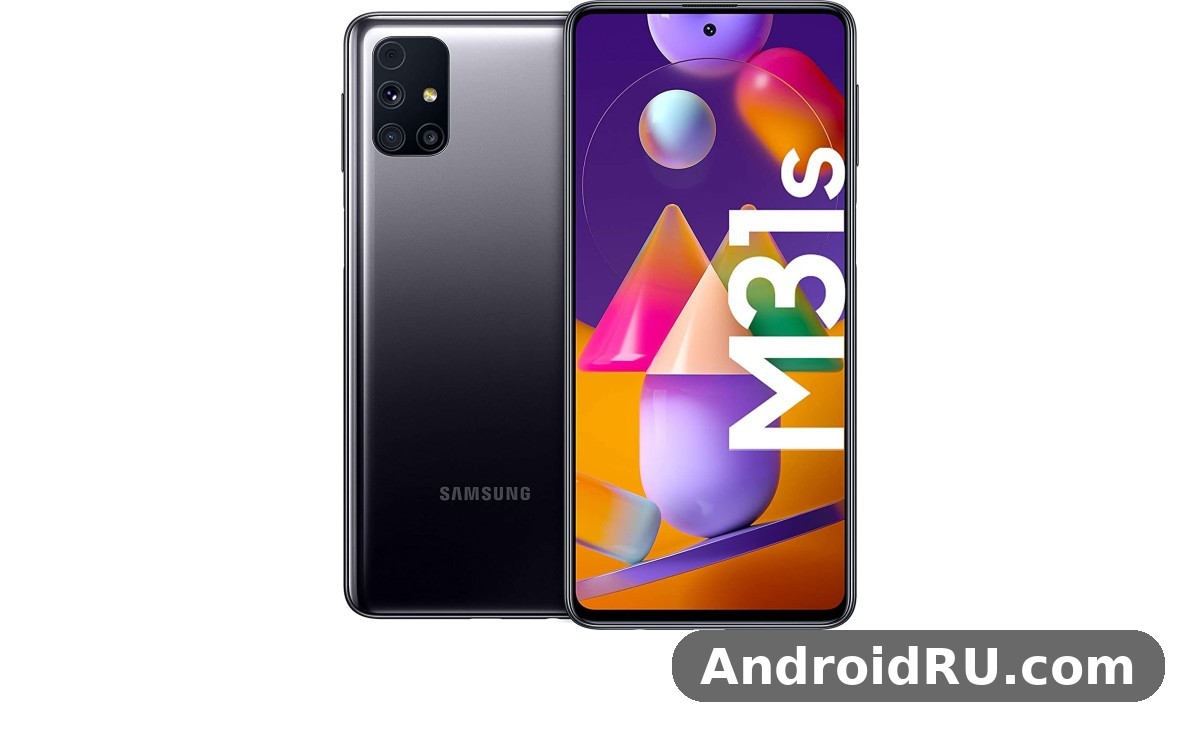
If you are shopping for a cheap second phone, a spare handset for travel, or a first smartphone for a family member, the M31s is the kind of device that shows up again and again in used listings. It is not fast by 2026 standards, it has no 5G, and it stopped receiving major software updates at Android 12. What it still offers is a genuinely good screen for the money, a 6,000mAh cell that embarrasses many new phones, and a 64MP main camera that takes solid daylight photos. The rest of this article works through the build, the screen, the battery, the cameras, the everyday speed and the full spec sheet, so you can decide with real numbers instead of nostalgia.
Samsung Galaxy M31s Build Quality and Design in Daily Use
Pick the M31s up and the first thing you notice is the weight. At 203 g and 9.3 mm thick, it is a heavy phone, and the 6,000mAh battery is the reason. Samsung used a plastic back with a glossy, gradient finish and a plastic frame, which keeps the phone from feeling fragile even though it is not metal or glass. The back curves gently into the frame, the corners are rounded, and the rectangular camera module sits in the top-left corner with a small step rather than a large bump. In the hand it feels solid and dense rather than cheap, and the glossy back does pick up fingerprints quickly, so most owners end up using a case within the first week.
The Galaxy M31s weight of 203 g is worth thinking about before you buy. It is 12 g heavier than the Galaxy M31, and you feel that difference at the end of a long day of reading or watching video with one hand. A slim Galaxy M31s case helps with grip and takes the edge off the slippery back, but it adds a little more bulk to a phone that is already thick. On the plus side, the plastic body is practical: it does not shatter the way glass does, it survives drops onto pavement better than a glass sandwich, and the phone still looks tidy after years of use if it lived in a case. The Samsung M31s came in two colours, Mirage Black and Mirage Blue, and the Galaxy M31s colors both use the same glossy gradient treatment, with the blue shifting toward violet under bright light. The Galaxy M31s Mirage Black vs Mirage Blue choice is mostly about taste, since both finishes show fingerprints the same way, though the black hides small scuffs a little better.
Button placement is simple and sensible. The power button and volume rocker sit on the right edge, within easy reach of a thumb, and the power button doubles as the fingerprint reader. That answers the Galaxy M31s fingerprint sensor location question directly: it is a side-mounted sensor in the power key, not an under-display reader and not a rear sensor like the one on the Galaxy M31. The M31s fingerprint reader is fast and reliable in practice, and it works with a wet or slightly dirty finger far better than the early in-display readers of the same era. A USB-C port, a 3.5 mm headphone jack and a single loudspeaker sit along the bottom edge, while the SIM tray on the left holds two nano-SIM cards plus a dedicated microSD card. The Galaxy M31s speaker is a single bottom-firing unit. It gets loud enough for video in a quiet room and for speakerphone calls, but it is mono, so music sounds flat next to a phone with stereo speakers, and it is easy to cover with a palm while gaming in landscape.
How the plastic body holds up after years of use
Plastic ages differently from glass. It does not crack, but it does scratch, and the glossy back of the M31s shows fine hairline marks after months in a pocket with keys or coins. The frame can pick up small nicks at the corners from drops, yet the phone keeps working because there is no glass back to shatter. One weak point worth checking on a used unit is the USB-C port, which can collect lint and feel loose after years of daily charging, and another is the power button, which does double duty as the fingerprint sensor and therefore gets pressed far more often than a normal key. When you inspect a second-hand M31s, press the power button ten times, unlock with a registered finger, and wiggle the charging cable gently to check for a loose connection.
What is in the box and what you still need to buy
New units shipped with a 25W charger in the box, a USB-C cable, a SIM ejector tool and a quick start guide. That charger matters, because the phone supports 25W wired charging and a slower 15W brick leaves real time on the table. If you are buying used, ask whether the original 25W adapter is included, since a generic slow charger changes the daily experience more than most buyers expect. M31s accessories worth adding are a thin case, a tempered glass screen protector for the Gorilla Glass 3 panel, and a microSD card if you plan to keep a large offline music or video library, because the dedicated slot makes expansion painless.
Build verdict in one paragraph
The build is honest mid-range work from 2020: heavy, glossy, plastic, and tougher than it looks. It will not win a design award in 2026, but it does not feel fragile, the side fingerprint reader is a genuine improvement over the rear reader on the M31, and the headphone jack plus microSD slot are two features many newer phones have dropped. If you want a light phone, look elsewhere. If you want a sturdy daily phone and you do not mind the weight, the body is not a reason to say no.
Galaxy M31s Display Quality Review: Super AMOLED, Infinity-O and Gorilla Glass 3
The screen is the second reason this phone exists, after the battery. The Galaxy M31s display is a 6.5-inch Super AMOLED panel with a 1080 x 2400 resolution, a 20:9 aspect ratio and about 405 pixels per inch, protected by Corning Gorilla Glass 3. Colours are vivid in the default Vivid mode, blacks are properly black because each pixel lights itself, and text stays sharp at normal reading distance. The Galaxy M31s Infinity-O display punch hole sits centred at the top of the screen and holds the 32MP front camera. It is smaller and less distracting than the waterdrop notch on the Galaxy M31, and after a day or two most people stop noticing it, except in full-screen video where the hole can sit over a corner of the picture.
This Galaxy M31s display quality review has to be honest about two limits. First, the panel runs at 60Hz, so scrolling is not as smooth as the 90Hz and 120Hz screens that became standard a year or two later. Second, peak brightness is modest by 2026 standards, roughly in the 420-nit range for typical content, which means the screen is comfortable indoors and readable outdoors on a cloudy day, but it can wash out under harsh direct sunlight. The M31s screen still beats the LCD panels on many budget phones of its era for contrast and colour, and video looks genuinely good on it, with deep blacks in dark scenes and punchy colours in bright ones. The M31s display also supports an always-on display, so the time, date and notification icons can sit on the black screen without waking the whole panel, at a small battery cost.
For reading, the 6.5-inch size is a sweet spot: large enough for comfortable article and ebook text, small enough to hold in one hand. The 20:9 ratio makes the phone tall and narrow, which helps when scrolling through feeds, though it also means some older apps show black bars at the top and bottom of video. Samsung’s screen settings let you switch between Vivid and Natural colour modes, adjust the white balance, turn on a blue light filter for the evening, and set the screen timeout. If you watch a lot of video on the phone, Vivid mode with the brightness turned up is the way to go; if you read for hours, Natural mode is easier on the eyes and the colours stay closer to accurate.
Outdoor visibility and eye comfort
Outdoors, the M31s screen is usable but not outstanding. The AMOLED panel keeps contrast high even in bright light, which helps more than raw brightness alone, and turning off auto-brightness and pushing the slider to maximum gives the best result in sunlight. For night reading, the dark mode in One UI pairs well with the AMOLED panel, since black pixels switch off entirely, and the blue light filter can be scheduled from sunset to sunrise. The 60Hz refresh rate is the main thing you notice when you switch back from a newer phone, and it is a matter of feel rather than function: everything still works, it simply does not glide the way a 120Hz panel does.
Display settings worth changing on day one
Three settings make the biggest difference. Turn on dark mode, set the screen mode to Natural if you want accurate colours or Vivid if you want punch, and set the always-on display to show on tap rather than always, so it does not drain the battery overnight. The Galaxy M31s best settings for battery saving also include lowering the screen timeout to 30 seconds and keeping auto-brightness on, since the screen is the largest single power draw on any phone and this panel is no exception.
Galaxy M31s Battery Life Test: 6000mAh, Two Days and 25W Charging
The battery is the headline feature, and it earns the headline. The Galaxy M31s battery is a 6,000mAh lithium-polymer cell, and this Galaxy M31s 6000mAh battery review starts with the number that matters most: published tests recorded around 24 hours of continuous HD video playback and close to two full days of mixed use with moderate screen time. One independent lab measured 21 hours and 49 minutes of Wi-Fi web browsing, which translates in real life to two working days of calls, messaging, maps and video without hunting for a charger. The Galaxy M31s screen on time for a typical user lands in the range of 9 to 12 hours spread over two days, depending on brightness, signal strength and how much video is involved, and heavy users who stream video for hours still get through a full day with charge to spare.
That endurance changes how you use a phone. You stop carrying a power bank for a day trip, you stop checking the battery percentage every hour, and you stop charging overnight out of habit, because the phone still has 30 or 40 percent left the next morning. The 6000mAh battery is the single biggest practical advantage this phone holds over newer mid-range phones with 5,000mAh cells, and it is the reason the M31s still makes sense as a second phone or a travel phone in 2026. The trade-off is weight and thickness, and it is also charging time: a big cell takes longer to fill, which is why the 25W charging support matters so much.
The Galaxy M31s charging time 25W figures from published tests are useful and concrete: about 34 percent in 30 minutes, about 65 percent in one hour, and a full charge in roughly an hour and a half to an hour and three quarters with the supplied 25W adapter. Galaxy M31s charging with a 15W brick is noticeably slower, adding roughly half an hour to a full charge, so the original adapter is worth keeping. The phone also supports 4.5W reverse wired charging over USB-C, which is slow but genuinely useful in a pinch: the Galaxy M31s reverse charging 4.5W use case is topping up wireless earbuds or a friend’s phone from your own battery, and with 6,000mAh to share you can give away a meaningful amount of charge and still have plenty left.
Galaxy M31s battery drain overnight fix and everyday battery care
A healthy M31s should lose only 1 to 3 percent overnight with the screen off. If yours loses 8 percent or more, the Galaxy M31s battery drain overnight fix starts with the battery usage screen in Settings, which names the app responsible. Common culprits are a messaging app stuck syncing, a poorly behaved social app running in the background, or weak mobile signal forcing the radio to work hard all night. The practical fixes are to turn on adaptive battery, put rarely used apps to sleep, switch off always-on display, and use Wi-Fi instead of mobile data overnight. The M31s battery also benefits from avoiding a full 0 to 100 percent cycle every day; keeping the charge between about 20 and 80 percent when you can slows long-term wear on a cell that is already several years old.
How the battery holds up after six years
Any M31s you buy in 2026 has a battery that has lived through hundreds of charge cycles, so some capacity loss is normal. A well-kept unit still delivers well over a day of use, while a heavily used one may drop to a day and a bit. The warning signs are a phone that drops from 20 percent to zero in minutes, a back panel that feels warm during light use, or a battery that swells and lifts the back cover, in which case the phone should not be charged and the battery should be replaced by a repair shop. A battery replacement is inexpensive for this model and, because the endurance is the whole point of the phone, it is worth doing rather than living with a tired cell. When you test a used M31s, charge it to full, use it normally for two hours, and check how far the percentage has fallen; that quick check tells you more than any seller’s promise.
Charging habits that keep the big battery healthy
Use the 25W adapter when you are in a hurry and a slower charger overnight, keep the phone out of direct sun while charging, and do not leave it plugged in at 100 percent for days at a time. The Galaxy M31s slow charging problem fix is usually simple: clean lint out of the USB-C port with a wooden toothpick, try a different cable, and check that the adapter is really a 25W Samsung unit rather than a generic 5W brick. If the phone still charges slowly after that, the port or the battery may need a repair shop to look at it.
Galaxy M31s Camera Quality Review: 64MP Quad Camera, Single Take and Night Mode
The camera system is a quad setup on the back: a 64MP main camera with an f/1.8 aperture and phase-detection autofocus, a 12MP ultra-wide camera with a 123-degree field of view, a 5MP macro camera, and a 5MP depth sensor. The front camera is a 32MP unit with an f/2.2 aperture, set into the punch hole. The 64MP quad camera is the spec that sells the phone, but the useful detail is that the main sensor bins four pixels into one by default, producing 16MP photos with better light gathering and less noise than a full 64MP shot in most conditions. A dedicated 64MP mode exists in the camera app for scenes where you want maximum detail and plan to crop later.
This Galaxy M31s camera quality review finds the same pattern that reviewers reported at launch: strong daylight photos, decent portraits, and weaker low-light and video work. In bright light the main camera produces sharp, detailed images with lively Samsung colours and reliable autofocus, and the Galaxy M31s 64MP camera samples from daylight scenes hold up well when viewed on a large screen. The 12MP ultra-wide camera covers landscapes and group shots, though its edges soften and detail drops compared with the main lens. The 5MP macro camera needs good light and a steady hand, and it is best treated as a fun extra rather than a serious tool. Portrait mode uses the depth sensor to separate the subject from the background, and it works best outdoors with a clear gap between the person and what is behind them.
Galaxy M31s low light camera performance is the weak spot. Night shots from the main camera are usable, with noise kept under control, but they lack the brightness and detail of newer phones with larger sensors and better night processing. The dedicated Galaxy M31s night mode helps: it takes several frames and combines them, brightening shadows and pulling out a little more detail, though it crops the frame slightly and needs a steady hand or a surface to rest the phone on. The ultra-wide camera struggles most after dark, producing soft, noisy images that are best avoided at night. If you take most of your photos indoors in the evening, set your expectations accordingly and lean on the main camera, not the wide one.
Galaxy M31s Single Take feature explained
Single Take was the camera headline at launch, and the Galaxy M31s Single Take feature explained in plain terms is this: you press the shutter once, the phone records for about 10 to 15 seconds, and it hands you a set of results instead of one photo. You get a best shot, a few filtered stills, a smart crop, a hyperlapse clip and a boomerang-style clip, all from the same moment. It is genuinely useful at a birthday, on a walk, or anywhere the moment will not repeat, because it removes the choice of photo or video in advance. The catch is that the outputs are lower resolution than a normal photo, so Single Take is for fun and for social sharing, not for your best-quality shots.
Galaxy M31s 4K video recording test and selfie camera
Video tops out at 4K at 30 frames per second on both the rear and front cameras, with 1080p at 30 frames per second as the smoother everyday option. The Galaxy M31s 4K video recording test results from launch reviews were mixed: detail is good in bright light, but stabilisation is the weak point, with noticeable shake when walking and no optical stabilisation to help. Gyro-based electronic stabilisation works in 1080p and steadies footage considerably, so 1080p is the better choice for walking video, while 4K suits a tripod or a static scene. The M31s video quality is fine for clips shared with friends and family, and less suited to serious video work.
The M31s selfie camera is a 32MP unit that takes detailed, bright selfies in good light, with a wide mode for group shots and a live-focus option for blurred backgrounds. Skin tones lean slightly smooth and bright in Samsung’s default processing, which some people like and others turn down in the settings. Video calls look sharp, and 4K selfie video is available if you need it, though 1080p is again the steadier choice. One quirk reported by some owners is the camera app occasionally stuttering when switching to the front camera on an older software build, which a software update and a cleared camera cache usually fix.
Camera settings that improve everyday photos
Turn on the 64MP mode only when you need to crop, leave the default 16MP binned mode on for everything else, and use night mode for static low-light scenes rather than moving subjects. Tap to focus on the subject before shooting, keep the lens clean, and use the ultra-wide camera for landscapes in daylight only. Those four habits do more for your photos than any accessory, and they cost nothing.
Galaxy M31s Performance and Gaming: Exynos 9611, 6GB and 8GB RAM
The Galaxy M31s performance story is the least exciting part of the phone, and honesty matters here. The Galaxy M31s processor is the Samsung Exynos 9611, a 10 nm octa-core chip with four Cortex-A73 cores at 2.3 GHz and four Cortex-A53 cores at 1.7 GHz, paired with a Mali-G72 MP3 graphics processor. It was already a familiar chip when the M31s launched, having powered the Galaxy M31, the Galaxy A51 and several other Samsung mid-range phones, and in 2026 it is simply slow by modern standards. Everyday tasks still work: calls, messaging, email, maps, music and web browsing run acceptably, and the phone handles a dozen open apps without falling over, but heavy apps take a second or two longer to open than on a current budget phone, and the camera app can hesitate when it processes a 64MP shot.
The Galaxy M31s 8GB RAM multitasking review picture is better than the 6GB model, and that difference is worth paying a little extra for on the used market. With 8GB of RAM you can switch between a browser with several tabs, a messaging app, maps and a music player without the phone reloading apps constantly. With 6GB the same workload still works, but apps reload more often and the phone feels tighter. Both variants ship with 128GB of UFS 2.1 storage, and the Galaxy M31s storage can be expanded with a microSD card in the dedicated slot, so storage is rarely the limiting factor. The Galaxy M31s microSD card slot support covers cards up to 512GB, which is plenty for offline video, photos and music libraries.
M31s gaming is possible but modest. Light games such as casual puzzle and card games run without trouble, and popular battle royale titles run at low to medium graphics settings with playable frame rates, though the phone warms up and the frame rate dips during long sessions. The Galaxy M31s gaming performance test results from launch reviews showed the same pattern: the chip can sustain medium settings, but it cannot hold high settings smoothly, and the Mali-G72 MP3 graphics processor is the bottleneck rather than the CPU. The Galaxy M31s heating issue while gaming is real on long sessions, with the back of the phone getting noticeably warm after 20 to 30 minutes of a demanding game, and the phone may throttle performance to keep temperatures in check. M31s overheating is not dangerous in normal use, but it is a reason to keep graphics settings low, take breaks during long sessions, and avoid gaming while the phone is charging, which adds heat from both directions.
Everyday speed: what feels fast and what feels slow
What still feels fine in 2026 is the basics: unlocking with the side fingerprint reader, scrolling through feeds, typing, taking a quick photo, and streaming music over Bluetooth. What feels slow is opening the camera from cold, switching between the camera and a heavy app, loading a large web page with many images, and installing app updates, which can take a while on the older storage. The practical fix is to keep the phone tidy: uninstall apps you do not use, clear the cache of heavy social apps from time to time, and restart the phone once a week. Those small habits keep the M31s feeling responsive far longer than leaving 40 apps running in the background.
Performance verdict
Judge the Exynos 9611 by the job, not by the benchmark chart. For calls, messages, video, reading and light gaming it is enough, and the 8GB model with 128GB of storage is the one to buy. For heavy gaming, video editing or a phone you expect to feel fast for three more years, a newer chip is the better choice. The battery and screen carry this phone; the processor simply keeps up.
Galaxy M31s Software: Android 10 to Android 12 and One UI 4.1
The M31s launched with Android 10 and One UI 2.1, and Samsung updated it through Android 11 and finally to Android 12 with One UI 4.1. That is the end of the road: the Galaxy M31s Android 12 update was the last major version, and the phone no longer receives new Android versions or regular security patches. The Galaxy M31s update history is still respectable for a 2020 mid-range phone, with two major version upgrades, but anyone buying in 2026 should know the software is frozen in time and plan accordingly.
One UI 4.1 on this phone is clean, familiar and easy to live with. The Galaxy M31s One UI 4.1 features list includes a system-wide dark mode, a customisable quick panel, a privacy dashboard that shows which apps used the camera and microphone, refined widgets, and Samsung’s own apps for gallery, notes, health and file management. Galaxy M31s software also includes Samsung Knox security features, a secure folder for private files, and dual messenger support for running two accounts of the same messaging app. The interface is consistent and well translated, and the settings menus are laid out logically, which matters more than it sounds when you are setting up a phone for a parent or a child.
Living with frozen software in 2026 takes a little care. Most popular apps still support Android 12, but that will change gradually, and banking apps are usually the first to demand a newer version. Before buying, check that the apps you rely on still list Android 12 as supported, keep the apps themselves updated through the app catalogue, and use a browser that still receives updates on Android 12. The Galaxy M31s for students daily use case still works well, since the apps students need most, such as messaging, video, documents and email, run fine on Android 12, and the two-day battery is a real advantage on a long day of classes.
Software tips for a phone that no longer gets updates
Turn on automatic app updates, use a strong lock screen with the fingerprint reader plus a PIN, review app permissions once after setup, and avoid installing apps from unknown sources. Those four steps cover most of the risk of running an older Android version, and they take about ten minutes. If a banking app stops supporting Android 12, that is the moment to retire the M31s from primary use and move it to second-phone duty, where the battery and screen still shine.
Full Specifications
The Samsung Galaxy M31s full specifications below are taken from the published spec sheet and cross-checked against the launch details. Two figures deserve a note: the weight is 203 g, not the 191 g of the lighter Galaxy M31, and the ultra-wide camera is 12MP, not 8MP. Both corrections come from the published specifications, and both matter when you compare this phone with its siblings.
| Feature | Samsung Galaxy M31s |
|---|---|
| Announced / released | 30 July 2020 / 6 August 2020 |
| Status | Discontinued; sold new in 2020-2021, available used in 2026 |
| Dimensions | 159.3 x 74.4 x 9.3 mm |
| Weight | 203 g |
| Build | Plastic back and frame, Gorilla Glass 3 front |
| SIM | Dual nano-SIM + dedicated microSD slot |
| Display | 6.5-inch Super AMOLED, 1080 x 2400, 20:9, about 405 ppi, 60Hz |
| Display protection | Corning Gorilla Glass 3 |
| Operating system | Android 10 at launch, upgradable to Android 12, One UI 4.1 |
| Chipset | Exynos 9611 (10 nm) |
| CPU | Octa-core: 4×2.3 GHz Cortex-A73 and 4×1.7 GHz Cortex-A53 |
| GPU | Mali-G72 MP3 |
| RAM | 6GB or 8GB |
| Storage | 128GB UFS 2.1, microSDXC up to 512GB |
| Rear camera | 64MP f/1.8 wide with PDAF, 12MP f/2.2 ultra-wide 123-degree, 5MP macro, 5MP depth |
| Rear video | 4K at 30fps, 1080p at 30fps, gyro-EIS |
| Front camera | 32MP f/2.2 wide, 4K at 30fps, 1080p at 30fps |
| Battery | Li-Po 6,000mAh, non-removable |
| Charging | 25W wired, 4.5W reverse wired |
| Audio | Single loudspeaker, 3.5 mm headphone jack |
| Connectivity | Wi-Fi 802.11 a/b/g/n/ac dual-band, Bluetooth 5.0, GPS, GLONASS, GALILEO, BDS, NFC (region dependent), FM radio, USB-C 2.0 with OTG |
| Sensors | Side-mounted fingerprint, accelerometer, gyro, compass, virtual proximity |
| Colours | Mirage Black, Mirage Blue |
| Model numbers | SM-M317F, SM-M317F/DS |
| Launch price | About 300 EUR; India launch about Rs. 20,499 for 6GB and Rs. 22,499 for 8GB |
The Galaxy M31s specs table above is the reference to come back to when a seller’s listing disagrees with it. The most common listing mistakes are the weight, the ultra-wide megapixel count, and the claim of 5G, which this phone does not have. It is a 4G LTE phone, and any listing that promises 5G on an M31s is wrong.
Reading the spec sheet like a buyer
Three numbers decide whether this phone fits you. The 6,000mAh battery decides endurance, the 6.5-inch Super AMOLED panel decides how good video and reading look, and the Exynos 9611 decides how fast everything feels. Everything else, from the 64MP camera to the 25W charging, is supporting detail. If those three numbers line up with what you need, the rest of the sheet is good news. If you need 5G, a 120Hz screen or a faster chip, no other line on the sheet will fix that, and you should look at a newer model instead.
What the spec sheet does not tell you
A spec sheet cannot tell you how a phone feels after a year, which is why this review spends so much time on daily use. The plastic back scratches, the battery keeps its charge well, the side fingerprint reader stays fast, and the camera app is the slowest part of the everyday experience. Those are the details that decide whether you enjoy the phone, and they only show up after weeks of use.
Galaxy M31s vs Galaxy M31 and Galaxy M31s vs Galaxy M32 5G
The Galaxy M31s vs Galaxy M31 comparison is the one most buyers actually face, because the two phones share a chip, a battery and a main camera. The differences are in the details: the M31s has a larger 6.5-inch punch-hole display instead of a 6.4-inch notched one, 25W charging instead of 15W, a side-mounted fingerprint reader instead of a rear one, a 12MP ultra-wide camera instead of 8MP, and the Single Take camera mode. The M31 is lighter at 191 g, which is where the 191 g figure in some listings comes from, and it is the lighter phone to carry. If you are choosing between the two on the used market, read the Samsung Galaxy M31 Review: Everyday Speed, Cameras and Value alongside this article, since it covers the older phone’s daily use in the same depth.
The Galaxy M31s vs Galaxy M32 5G comparison is a different question, because the M32 5G is a newer phone with 5G and a faster, more efficient Dimensity 720 chip, but it gives up the Super AMOLED screen for a 6.5-inch HD+ TFT LCD panel and drops the battery to 5,000mAh with 15W charging. Its main camera is 48MP rather than 64MP, and its front camera is 13MP rather than 32MP. For a buyer in 2026, the choice is simple: pick the M32 5G if you need 5G and newer software support, and pick the M31s if you want the better screen, the bigger battery and the stronger cameras. The Samsung Galaxy M32 5G Review: App Performance and Camera Quality covers the newer phone’s speed and camera in detail.
| Feature | Galaxy M31s | Galaxy M31 | Galaxy M32 5G |
|---|---|---|---|
| Display | 6.5-inch Super AMOLED, 1080 x 2400, 60Hz | 6.4-inch Super AMOLED, 1080 x 2340, 60Hz | 6.5-inch TFT LCD, 720 x 1600, 60Hz |
| Chipset | Exynos 9611 | Exynos 9611 | Dimensity 720 |
| RAM and storage | 6GB or 8GB, 128GB | 6GB or 8GB, 64GB or 128GB | 6GB or 8GB, 128GB |
| Battery | 6,000mAh | 6,000mAh | 5,000mAh |
| Charging | 25W wired, 4.5W reverse | 15W wired | 15W wired |
| Rear camera | 64MP + 12MP ultra-wide + 5MP macro + 5MP depth | 64MP + 8MP ultra-wide + 5MP macro + 5MP depth | 48MP + 8MP ultra-wide + 5MP macro + 2MP depth |
| Front camera | 32MP | 32MP | 13MP |
| Fingerprint reader | Side-mounted | Rear-mounted | Side-mounted |
| Network | 4G LTE | 4G LTE | 5G |
| Software at launch | Android 10, up to Android 12 | Android 10, up to Android 12 | Android 11, up to Android 13 |
The Exynos 9611 chipset is the shared weakness of the two older phones, while the 25W fast charging is the M31s advantage that shows up every single day. On the used market, the M31s usually costs a little more than the M31, and that premium is fair for the faster charging, the punch-hole screen and the better ultra-wide camera. Against the M32 5G, the M31s usually costs less, and the screen and battery are the reasons to accept the older chip and the lack of 5G.
Galaxy M31s price in India 2026 and second-hand pricing
The Galaxy M31s price in India 2026 is a used-market price, since the phone has been discontinued for years. Searches for the Galaxy M31s price in India 2026 mostly return used listings and refurbished units, with the 6GB model typically cheaper than the 8GB model by a modest amount. The Galaxy M31s second hand price check should always start with the battery: ask the seller for the battery health if they know it, test the phone for two hours as described earlier, and check the screen for burn-in by opening a plain grey image at full brightness. The M31s price for a good used unit is low enough that it competes with new budget phones, and the decision comes down to whether you value the AMOLED screen and the 6,000mAh battery more than a warranty and a newer chip. Prices vary by city, condition and included accessories, so check current listings in your area rather than trusting a single number.
Pros, Cons and Who the Galaxy M31s Fits in 2026
Every phone is a set of trade-offs, and the M31s is unusually honest about its own. Its strengths are concentrated in three areas, and its weaknesses are concentrated in two, which makes the buying decision straightforward once you know your priorities.
Pros of the Galaxy M31s
- Two-day battery life from the 6,000mAh cell, with 25W charging that refills it in about an hour and a half.
- A bright, colourful 6.5-inch Super AMOLED display that still beats the LCD screens on many budget phones.
- A capable 64MP main camera with a 12MP ultra-wide lens, Single Take mode and 4K video.
- A practical body with a headphone jack, a dedicated microSD slot, dual SIM support and a fast side fingerprint reader.
- A clean One UI experience that is easy to set up for a first-time smartphone user.
Cons of the Galaxy M31s
- The Exynos 9611 chip feels slow next to current budget phones, especially when opening the camera or switching heavy apps.
- No 5G, and software support ended at Android 12, so some apps will stop supporting it over time.
- At 203 g and 9.3 mm, it is heavy and thick, and the glossy plastic back attracts fingerprints.
- Low-light photos and video stabilisation are weak, and the single speaker sounds flat.
- The 60Hz screen is smooth enough, but it does not feel as fluid as the 90Hz and 120Hz panels on newer phones.
Who should buy it and who should skip it
The M31s fits a second phone, a travel phone, a first smartphone for a teenager or a parent, and anyone whose top priority is battery life on a tight budget. It fits a student who needs a phone that survives a long day of classes without a charger, and it fits a reader or video watcher who wants an AMOLED screen without paying for a new phone. It does not fit a heavy gamer, a person who needs 5G, or a buyer who wants years of software updates ahead. If you want a newer M-series phone with 5G, the Samsung Galaxy M15 5G Review: Display, Cameras and Budget Trade-Offs and the Samsung Galaxy M33 5G Review: Daily Use, Software and Battery Life cover two newer options, and the Samsung Galaxy M14 5G Review: App Performance and Camera Quality covers a cheaper 5G alternative. All three are worth reading before you decide between a used M31s and a newer budget phone.
A quick check before you pay
Check the battery over two hours of normal use, test the side fingerprint reader, open the camera and take one photo with each lens, play a video at full brightness to check the screen, and confirm the phone is not locked to a carrier or an account. Those five checks take fifteen minutes and catch nearly every problem a used M31s can hide.
Frequently Asked Questions About the Galaxy M31s
Is Galaxy M31s worth buying in 2026?
Yes, for the right buyer. If you want a cheap phone with a great AMOLED screen and a two-day battery, and you accept a slow chip, no 5G and software frozen at Android 12, it is good value on the used market. Buy the 8GB model if the price gap is small. If you need 5G, long software support or heavy gaming, buy a newer phone instead.
How long does the Galaxy M31s battery last?
Published tests recorded around 24 hours of continuous HD video playback and 21 hours and 49 minutes of Wi-Fi web browsing, and typical mixed use lands at close to two days. Real battery life depends on screen brightness, signal strength and how much video you watch, and an older used battery will deliver less than a new one. A healthy unit should still get through a full day easily and often reach the second evening.
Does the Galaxy M31s support 5G?
No. The M31s is a 4G LTE phone with no 5G radio, and no software update can add it. If you need 5G, look at the Galaxy M32 5G, M33 5G or M14 5G instead. For calls, messaging, video streaming and browsing on 4G, the M31s works fine wherever LTE coverage is good.
Will the Galaxy M31s get Android 13?
No. Android 12 with One UI 4.1 was the last major update for this phone. Most popular apps still support Android 12, but support will fade over time, and banking apps are usually the first to require a newer version. Keep your apps updated and review permissions after setup to stay safe on the older version.
Is the Galaxy M31s good for gaming?
It is good for light and casual games, and playable for demanding titles at low to medium settings. Expect the phone to warm up during long sessions and the frame rate to dip as it throttles. For serious mobile gaming, a phone with a newer chip and a higher refresh rate screen is a better choice.
The M31s is a phone built around a single strong idea, and six years later that idea still works. The 6,000mAh battery, the 6.5-inch Super AMOLED screen and the 64MP camera make it a genuinely useful phone in 2026, even though the Exynos 9611 chip, the 60Hz panel and the frozen Android 12 software show its age every day. It is not the phone for everyone, and it was never meant to be. It is the phone for someone who wants to charge every second day, watch video on a good screen, and pay used-phone money for it.
If that sounds like you, the next step is practical: find a used 8GB unit in good condition, run the fifteen-minute check from this article, confirm the original 25W charger is included, and set a fair price based on current listings in your area. If the battery is tired, a replacement is inexpensive and restores the phone’s best feature. Do that, and the M31s will do the job it was built for: stay on, stay bright, and stay out of your way.

